How AI Automation Evolved: From Zapier to Adaptive Agents

How AI automation evolved from Zapier to adaptive agents. Compare Power Automate, n8n, Manus, and OpenClaw with pricing and real-world trade-offs.
Table of Contents
A PwC survey of 300 U.S. senior executives found that 79% say their companies are adopting AI agents. Gartner predicts that 40% of enterprise applications will integrate task-specific AI agents by end of 2026, up from less than 5% in 2025.
The automation landscape has undergone more change in the last three years than in the previous decade. What started as simple app connectors has evolved into autonomous AI systems that plan, reason, and execute multi-step tasks independently.
This article traces that evolution through several distinct paradigms and examines what each generation solved, what it left behind, and where the industry is heading next.
A Quick Look at the Landscape
| Generation | Representative Tools | Core Paradigm |
|---|---|---|
| Integration Platforms | Zapier, Make | Self-service, cloud-native app connectors |
| Enterprise Automation | Power Automate, UiPath | Consultant-driven, deep enterprise integration |
| Open-Source + LLM | n8n, Dify | Self-hosted workflows with AI nodes |
| Autonomous Agents | Manus, Genspark | Goal-driven, AI plans its own steps |
| Adaptive Agents | OpenClaw, MoClaw | Reusable skills, persistent context, self-improving |
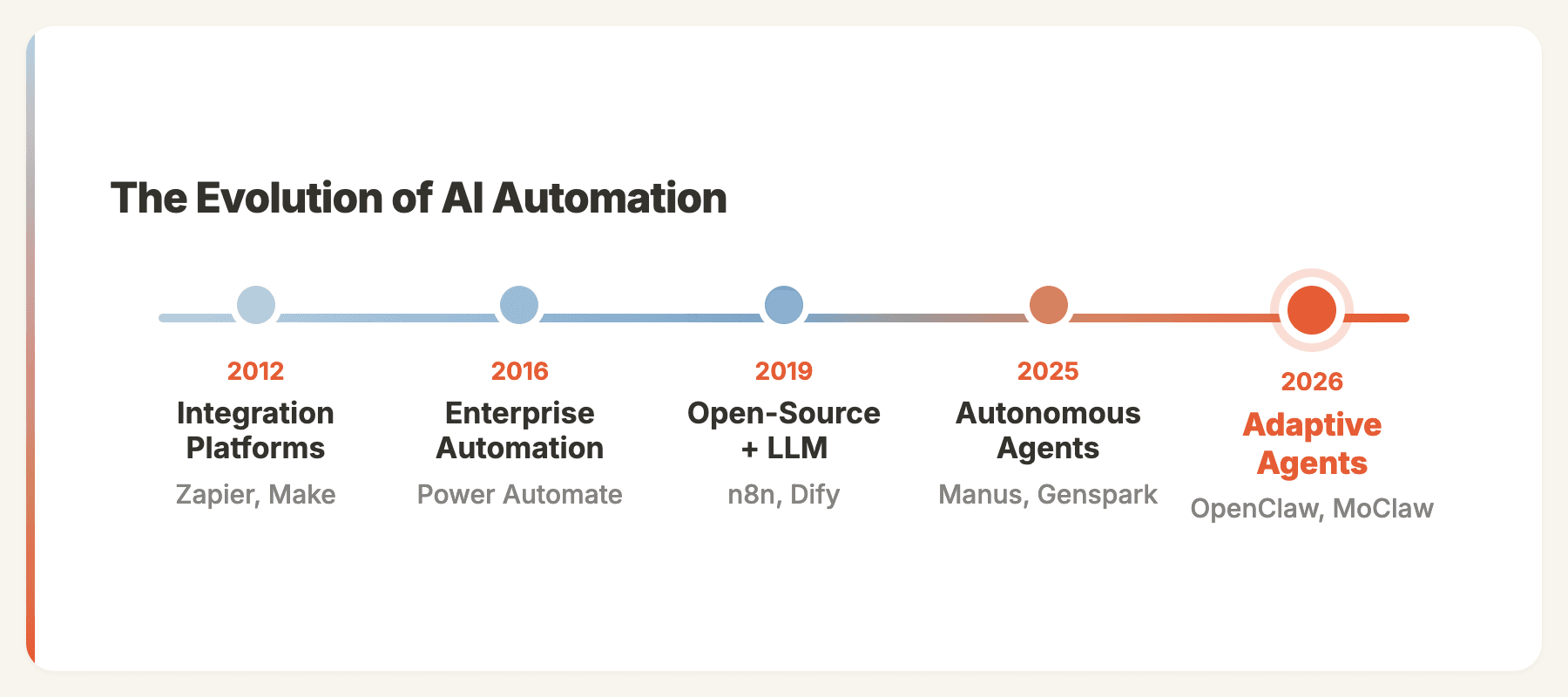
These generations don't have clean chronological boundaries. Zapier (2012) launched years before Power Automate (2016). The distinction is about paradigm, not timeline. Each generation represents a fundamentally different approach to automation.
Integration Platforms: Automation for Everyone
Representative tools: Zapier (2012, 8,000+ app integrations), Make (2012, 3,000+ integrations)
Zapier and Make (originally Integromat) pioneered the idea that automation should be self-service. Connect two apps, define a trigger, set an action. "When I get an email with an attachment, save it to Dropbox." Five minutes, no consultant, no code.
When I first used Zapier after years of building enterprise CRM customizations at Microsoft, I couldn't believe how fast it was. I set up a workflow that pulled new HubSpot leads into a Google Sheet, sent a Slack notification to sales, and scheduled a follow-up email, all in about 20 minutes. The same integration at Microsoft would have gone through weeks of requirements and development. That was my "why did nobody tell me about this sooner" moment.
Make offered a more powerful visual builder with branching logic, iterators, and error handling. I switched to Make when I needed to process webhook payloads with conditional routing, something Zapier couldn't do cleanly at the time. The scenario editor felt like drawing a flowchart, and the cost was roughly half of what I was paying Zapier for the same volume.
Pricing at scale:
| Platform | 10,000 operations/month | Model |
|---|---|---|
| Zapier | ~$299/mo | Per-task billing |
| Make | ~$145/mo | Per-operation, bundled |
Make delivers roughly 60% lower cost at scale because it bundles workflow steps into single operations, while Zapier counts each step separately.
What this generation proved: Self-service automation works. Non-technical users can automate effectively with the right UX.
What it left unsolved: Everything was rules-based. Every condition had to be explicitly programmed. And all data flowed through third-party clouds, creating compliance challenges for sensitive workloads.
Enterprise Automation: The Consultant Model
Representative tools: Microsoft Power Automate (2016), UiPath
While Zapier and Make served prosumers, enterprise platforms like Power Automate and UiPath targeted large organizations with deep system integration needs. Power Automate connected natively to Dynamics 365, SharePoint, and SAP. UiPath specialized in screen-level automation, mimicking human interactions with legacy software.
At Microsoft Redmond, I spent two years building Power Automate solutions for clients like HP and Coca-Cola. One project that sticks with me: we automated HP's partner onboarding flow, connecting Dynamics 365, SharePoint document libraries, and an approval chain through Power Automate. The result was genuinely impressive, what used to take a partner manager 4 hours of manual data entry now happened in minutes. But getting there took 11 weeks of requirements, development, testing, and training. Total cost: roughly $180K in consulting fees. For a single process.
The automation created enormous value, often saving 60%+ of time on repetitive processes. But only organizations with dedicated IT teams and consulting budgets could access it.
What this generation proved: Workflow automation has massive enterprise value. Deep system integration matters.
What it left unsolved: The delivery model was too heavy. The marketing manager who wanted to stop copy-pasting data between spreadsheets couldn't justify a 3-month project.
Open-Source + LLM Nodes: Intelligence Meets Workflows
Representative tools: n8n (2019, cloud launch 2020), Dify
Two forces converged in this generation: the demand for data sovereignty and the arrival of large language models.
n8n launched in 2019 to solve the data sovereignty problem. Open-source (under a Sustainable Use License), self-hosted, and visually similar to Make, but running entirely on your infrastructure. For teams that couldn't send data to Zapier or Make's cloud, n8n filled a critical gap.
Then late 2022 happened. ChatGPT launched, and platforms rushed to integrate LLMs into their workflow builders. Dify emerged to build workflow orchestration natively around LLMs. n8n added LangChain integration and AI Agent nodes.
n8n's Architecture
n8n's AI workflow builder spans nine architectural layers with six specialized LLM agents. The system implements a ReAct-style reasoning loop: think, act, observe, iterate. You build AI agents by connecting an Agent node to a language model, tool nodes, and memory. The agent autonomously decides which tools to call.
What This Made Possible
I built some of my favorite workflows in this era. The one I'm most proud of: a content repurposing pipeline in n8n that took a published blog post, fed it to GPT-4 to generate 5 LinkedIn posts and 3 tweet threads, then queued them in Buffer with optimal posting times. It ran every time we published, and our social engagement tripled in two months. The whole workflow took me an afternoon to build.
These worked well. But a pattern emerged: every workflow still needed someone to design the graph, anticipate edge cases, and maintain the logic. The AI was a smarter node, but humans were still the architects.
The Ceiling
As one analysis argued, n8n's node-based paradigm started showing its age when agentic coding tools made writing real code accessible to everyone. If you can describe what you want in English and get working code, dragging boxes around a canvas feels like unnecessary abstraction.
Additional limitations included memory issues on large datasets, n8n's Sustainable Use License restricting commercial SaaS usage, and the ongoing DevOps burden of self-hosting.
What this generation proved: Adding LLM intelligence to workflow nodes dramatically expands what automation can do. Self-hosting solves data sovereignty.
What it left unsolved: AI was an ingredient, not the chef. Someone still had to design every workflow.
Autonomous AI Agents: Goal-Driven Execution
Representative tools: Manus (joined Meta, December 2025), Genspark
This generation changed the paradigm entirely. Instead of designing a workflow, you describe a goal: "Research the top 10 AI automation companies, analyze their pricing, and create a comparison report."
The agent plans the steps itself. Search the web, read company pages, extract pricing data, organize tables, write analysis, produce a deliverable. No workflow graph. No predetermined steps.
Manus
I used Manus heavily for about three months. The first time I asked it to "research the top 15 AI agent frameworks, compare their architecture, and produce a report with tables," it blew my mind. It opened a browser, visited each project's GitHub and docs, extracted the right information, and delivered a well-structured report in about 8 minutes. No prompt engineering, no workflow design, just a goal.
Manus operates through an iterative agent loop: analyze, plan, execute, observe, repeat. Running in a cloud sandbox with full browser access, shell commands, and code execution. The system uses a "CodeAct" approach where executable Python code is the action mechanism, enabling operations far beyond simple API calls.
Pricing is credit-based, starting at $20/mo and $40/mo for higher tiers. The critical issue: credit consumption is unpredictable. Complex tasks can consume a significant portion of a monthly allocation in a single run, with no upfront cost estimate.
Genspark
I've also spent time with Genspark, which takes a different approach with its Mixture-of-Agents (MoA) architecture. A central orchestrator breaks tasks into parts and routes each step to the most capable specialized model. Logic tasks go to reasoning models, creative work routes to generative specialists, code generation uses development-optimized LLMs. Its "Super Agent" combines nine specialized LLMs with 80+ professional tools.
Genspark pricing starts at $24.99/mo (Plus) and $249.99/mo (Pro), with a free tier offering 100 daily credits.
Where This Generation Falls Short
After three months of daily usage across both platforms, I kept hitting the same four walls:
No persistent memory. Every task starts from zero. The agent doesn't know about previous runs, user preferences, or business context.
Experience doesn't compound. Running the same competitive analysis ten times costs the same and takes the same time. The agent can't learn from previous executions.
No integration into daily operations. These are tools you visit when you have a task. They don't monitor your inbox, watch your CRM, or proactively surface insights.
Data ownership. Everything runs in the provider's cloud. Prompts, outputs, and intermediate data pass through third-party infrastructure.
What this generation proved: AI can plan and execute multi-step tasks autonomously. The agent paradigm is real.
What it left unsolved: Experience reuse, persistent context, and integration into ongoing operations.
The Bridge: Natural Language to Workflows (Late 2025)
Companies like Pokee and Refly recognized the experience reuse problem and attempted to bridge workflow automation and autonomous agents. Their approach: let users describe SOPs (Standard Operating Procedures) in natural language, then generate reusable workflow or agent configurations.
The instinct was correct. Expert knowledge needs to be capturable and replayable. But the implementations were still maturing, and the gap between "describe your process" and "reliable automated execution" was wider than the demos suggested.
These tools laid important groundwork for what came next.
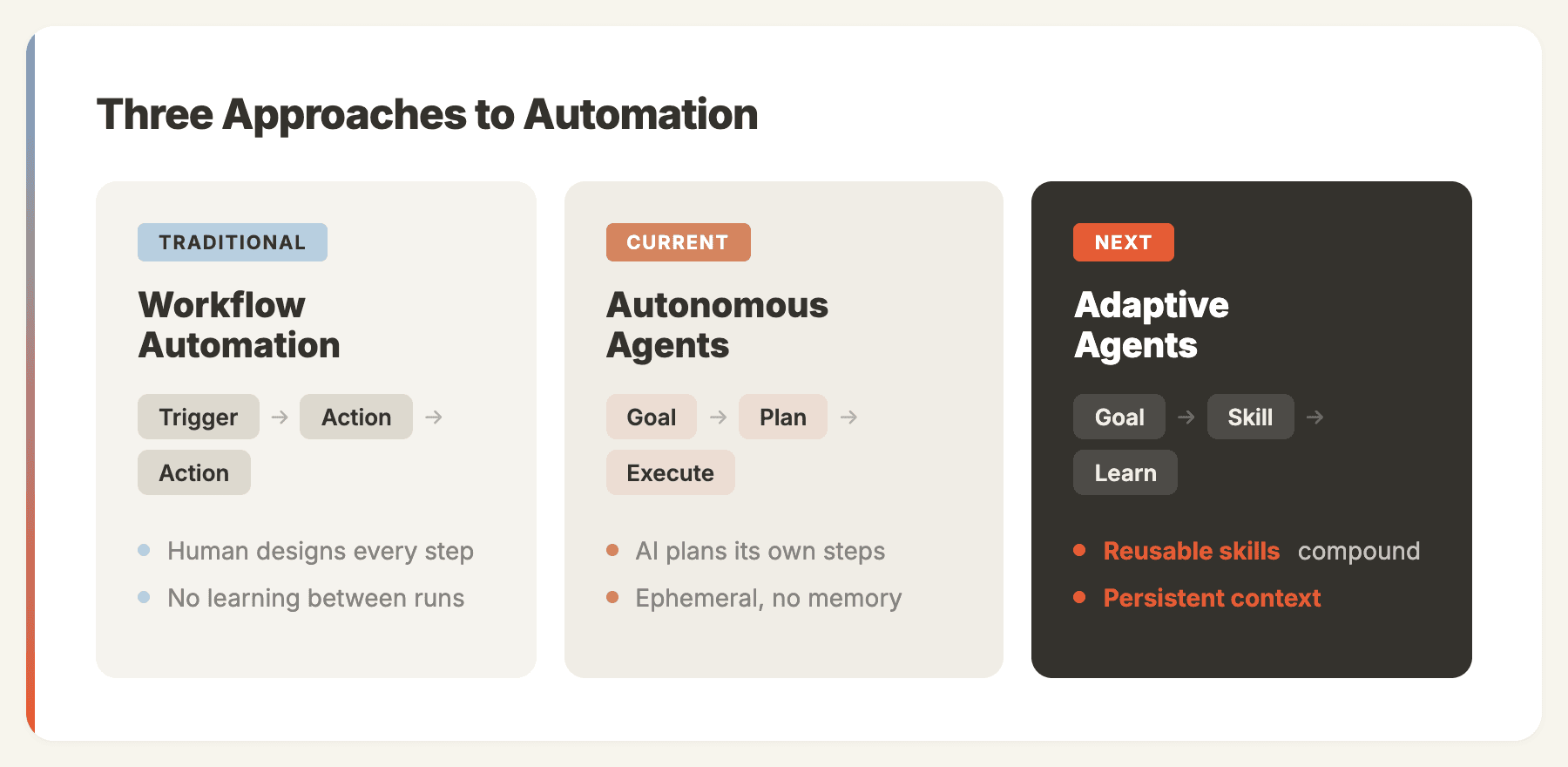
[Adaptive Agents](https://moclaw.ai/blog/always-on-ai-agent-2026): Reusable Skills, Persistent Context
Representative tools: OpenClaw, MoClaw
OpenClaw didn't build a better workflow tool or a smarter agent. It built a better agent framework, one where expert experience is a first-class primitive.
The Skill System
The breakthrough is skills as shareable units of expert knowledge. When someone builds an OpenClaw skill for competitive analysis, they encode not just the steps but the judgment calls: which sources to trust, how to weight pricing vs. features, what format works for different stakeholders.
Skills are shareable (install a community skill and get an expert's approach instantly), composable (skills can call other skills, building complex behaviors from simple units), and improvable (skills get better over time, and improvements propagate to all users).
The premise is that this solves the core limitation of autonomous agents: experience compounds because skills carry knowledge forward.
Compared to Autonomous Agents
| Capability | Manus / Genspark | OpenClaw |
|---|---|---|
| Memory | Ephemeral | Persistent, local storage |
| Deployment | Cloud only | Self-hosted |
| Communication | Web interface | WhatsApp, Telegram, Slack, Discord |
| Proactivity | On-demand only | Cron jobs, webhooks, scheduled tasks |
| Cost model | Per-credit, unpredictable | API costs only, predictable |
| Customization | Limited | Extensible skill/plugin system |
Community Adoption
OpenClaw lists 50+ integrations on its official showcase, spanning chat providers, AI models, productivity tools, and automation platforms. Community-built applications include event management via AI voice calls, document processing pipelines, and lead generation workflows.
MoClaw: Production-Grade Adaptive Agents
OpenClaw proved that the skill-based agent paradigm works. The community adoption validates the core idea. But running OpenClaw in production exposes real challenges: self-hosted Docker setups require DevOps expertise, API keys and credentials need careful management, there's no built-in sandboxing between tasks, and stability under sustained workloads requires significant tuning.
These aren't criticisms of OpenClaw. They're the natural gap between a powerful open-source framework and a production-grade product.
MoClaw takes a top-down approach to close that gap. Rather than wrapping OpenClaw in a hosting layer, we redesigned the architecture from the ground up, incorporating OpenClaw's core design patterns (skills, persistent memory, multi-channel messaging) while building a fully managed, secure infrastructure underneath.
The key architectural difference: every user task in MoClaw runs inside a dedicated secure sandbox. Your agent's code execution, file operations, and API calls are isolated from other users and from the platform itself. This is what makes the difference between a developer tool and a product you can hand to a business team.
What MoClaw adds beyond hosted OpenClaw:
- Managed skill marketplace. Browse and install community skills without touching a terminal. One click to add a competitive analysis skill, a content writer, or a lead qualification pipeline.
- Multi-channel messaging built in. Connect WhatsApp, Telegram, Slack, or Discord in the dashboard. Your agent responds where your team already works.
- Persistent agent memory. Your agent remembers past conversations, learns your preferences, and gets better over time. Ask it to do the same competitive analysis next quarter, and it already knows your format, your competitors, and your evaluation criteria. We use MoClaw internally for our own content operations: keyword research, article drafting, competitive monitoring, and social media scheduling all run through MoClaw agents with custom skills. The article you're reading right now went through our content pipeline.
Disclosure: MoClaw is built by the team publishing this article. We have attempted to present all tools fairly, but readers should be aware of this affiliation.
Choosing the Right Approach
The answer isn't always "use the newest thing." Each generation solves different problems:
| Your Situation | Best Fit | Why |
|---|---|---|
| Connect two apps quickly | Zapier | Simple, fast, 8,000+ integrations |
| Complex workflows on a budget | Make | Visual builder, cost-effective |
| Enterprise system integration | Power Automate | Deep Dynamics/SharePoint/SAP integration |
| Self-hosted with data sovereignty | n8n | Open-source, your infrastructure |
| One-off complex research tasks | Manus / Genspark | Impressive autonomous execution |
| Full control, developer-first | OpenClaw | Maximum customization |
| OpenClaw without infrastructure | MoClaw | Cloud-native, zero setup |
These tools aren't mutually exclusive. Many teams run Zapier for simple integrations, n8n for data-sensitive workflows, and OpenClaw or MoClaw for tasks that need autonomy and persistent context.
When Adaptive Agents Are Not the Right Fit
Adaptive agents are not universally better. They add complexity that simpler tools avoid:
- If you just need to connect two apps, Zapier or Make will do it in minutes. An agent framework is overkill.
- If your automation is deterministic and rule-based, a traditional workflow tool is more reliable and easier to audit.
- If you need enterprise compliance and audit trails, Power Automate's governance features are purpose-built for that.
- If your tasks are truly one-off, an autonomous agent like Manus gives you instant results without setup.
- If your team lacks technical capacity, self-hosted frameworks like OpenClaw require Docker and API key management that may exceed your team's bandwidth.
The right tool depends on the problem, not the hype cycle.
What Comes Next
Three trends will define the next phase of AI automation:
Multi-agent orchestration. Single agents hit limits on complex tasks. The future is teams of specialized agents sharing context, coordinating decisions, and handing off sub-tasks.
Experience marketplaces. As skill systems mature, expect marketplaces where domain experts publish and monetize their automation expertise as installable skills. Not templates, but encoded judgment.
Convergence. n8n is adding more AI agent capabilities. Manus is building persistence. OpenClaw and MoClaw are adding sophisticated planning. The lines between generations will blur, but the underlying architectural choices will determine which platforms evolve fastest.
The organizations that thrive won't be those using the trendiest tool. They'll be those that match the right approach to each use case, and upgrade intentionally as their needs evolve.
Continue Reading
More Guide
AI Business Process Automation, Step by Step

Skill Zoo: Reusable Agent Skills for AI Workflows

Hunyuan 3D as an Agent Tool for 3D Asset Workflows

Automating Fast-Changing Data Needs Review

OpenClaw Explained: What It Is, Who It Fits

AI Browser Automation Tool: 2026 Guide

The MoClaw editorial team writes about workflow automation, AI agents, and the tools we build. Default byline for industry overviews, listicles, and collaborative pieces.
Ready to put this into practice?
MoClaw runs browser tasks, research, and schedules automatically. Try it free.
References: PwC AI Agent Survey · Gartner AI Agents Prediction · n8n Architecture Deep-Dive · Manus AI (DataCamp) · Manus Pricing Analysis (Lindy)