For K-12 and Higher-Ed Teachers
The AI teaching assistant
that does the prep.
MoClaw is the AI agent built for teachers buried in lesson plans, grading, and parent emails. Describe what you need in plain English. We do the work, end to end. Nothing reaches a student or parent until you approve it.
The problem
Sound like your week?
Prep never fits inside the school day
Lesson plans, slides, and materials get built at night and on weekends. The contract says 40 hours. The real job runs closer to 55, and most of the overflow is prep you couldn't touch during class.
Grading eats every weekend
A stack of 120 essays or problem sets means a Sunday gone. You want to give each student real feedback, but by paper 40 you're writing "good work" and moving on.
One class, five reading levels
The same article is too hard for a third of the room and too easy for another third. Rewriting it three ways by hand, for every unit, is not something anyone has time for.
Parent emails pile up after 4 PM
Weekly updates, absence follow-ups, behavior notes, reminders. Each one needs a careful tone, and they always land on top of the grading you still haven't finished.
Your tools don't talk to each other
Roster in the SIS, plans in Google Docs, grades in a spreadsheet, messages in email. Pulling one week together turns into a tab-hopping scavenger hunt.
You don't need another edtech app. You need an agent that finishes the prep.
Start Free Trial Cancel anytimeWhy MoClaw
Why teachers choose MoClaw as their AI teaching assistant
An agent, not a chatbot.
MoClaw carries a teaching task from start to finish: reading your standards, drafting the lesson, building the quiz and answer key, and prepping the parent note. It does the work instead of handing you one more thing to copy, paste, and finish yourself.
Handles real classroom work.
No two units are the same, and neither are your students. MoClaw works from your standards, your materials, and your reading levels, and adapts when a lesson runs long or a class needs the content a different way.
Student data stays yours.
MoClaw follows a local-first approach. Grades, submissions, and roster details stay in an isolated workspace under your control, never pooled with other users or used to train third-party models. You own every file you upload.
Priced for a teacher's budget.
Plans start at $20/month, less than a classroom set of paperbacks. Bring your own API key to keep AI usage unlimited at zero markup. No per-task fees, no surprises.
By the numbers
"I dropped the unit standards in and got a five-day lesson plan, a slide outline, and an exit ticket for each day back in about ten minutes. That's usually my whole Sunday afternoon.
"I feed it one core article and get three versions at different reading levels plus a comprehension check for each. Building a differentiated unit used to take me two full days.
"It drafts feedback on 90 lab reports and I edit instead of writing from scratch. My grading turnaround went from ten days to three, and the comments are actually specific.
"Every Friday it drafts a parent update for all 28 families from my notes. I read them, tweak two or three, and approve. Nothing goes out until I click send.
Not just suggestions
We do the prep,
not just suggest it.
Most AI tools hand you a draft and stop. MoClaw runs the whole task: reading the standard, building the lesson, writing the quiz and answer key, and prepping the parent note. Less time on repetitive prep and grading, more time teaching the students in front of you.
Review first, autopilot when you're ready.
Anything that reaches a student or parent waits for your approval by default. Read the draft, change what you want, then send. Once a routine earns your trust, like the Friday parent update, hand it to autopilot and stop thinking about it.
Real examples
Real prompts. Real results.
Here are practical workflows teachers run with MoClaw every week. Browse more on our use cases page.
Lesson Plan from a Standard
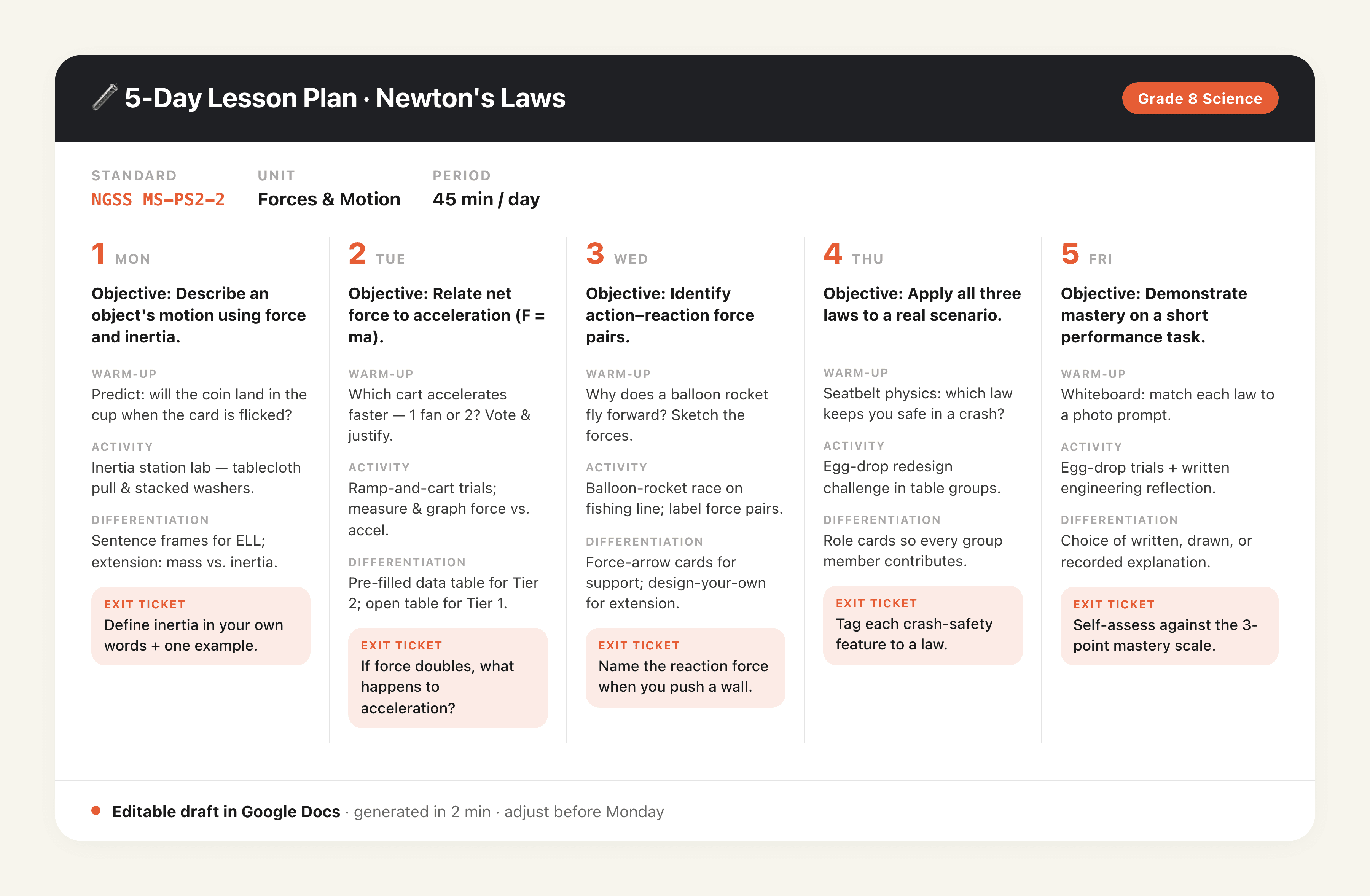
"Tell MoClaw: "Build a five-day lesson plan for 8th grade science on Newton's laws, aligned to NGSS MS-PS2-2. Include daily objectives, a warm-up, one activity per day, and an exit ticket for each lesson.""
MoClaw returns a five-day plan mapped to the standard: daily objectives, a hook, a main activity, differentiation notes, and an exit ticket for each day. You get an editable draft in Google Docs in a couple of minutes, ready to adjust for your class instead of starting from a blank page.
Quiz and Answer Key from Material
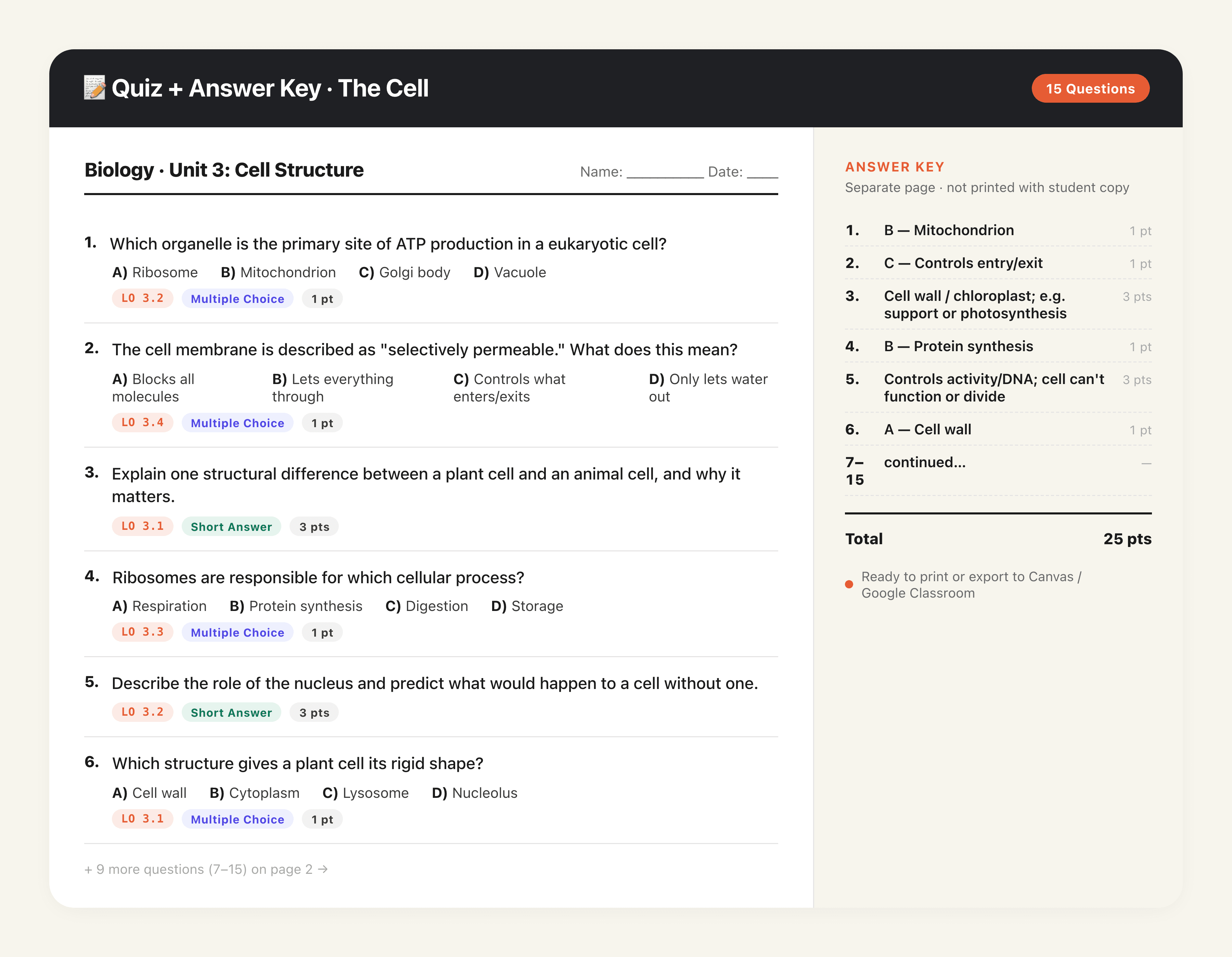
"Tell MoClaw: "Here are the three chapters we covered this week. Make a 15-question quiz mixing multiple choice and short answer, tag each question to its learning objective, and give me a separate answer key.""
MoClaw reads the material and builds a 15-question quiz with a balanced mix of formats, each question tagged to the objective it checks, plus a clean answer key on its own page. Point values are filled in and the whole thing is ready to print or drop into your LMS.
Batch Feedback, Review-First
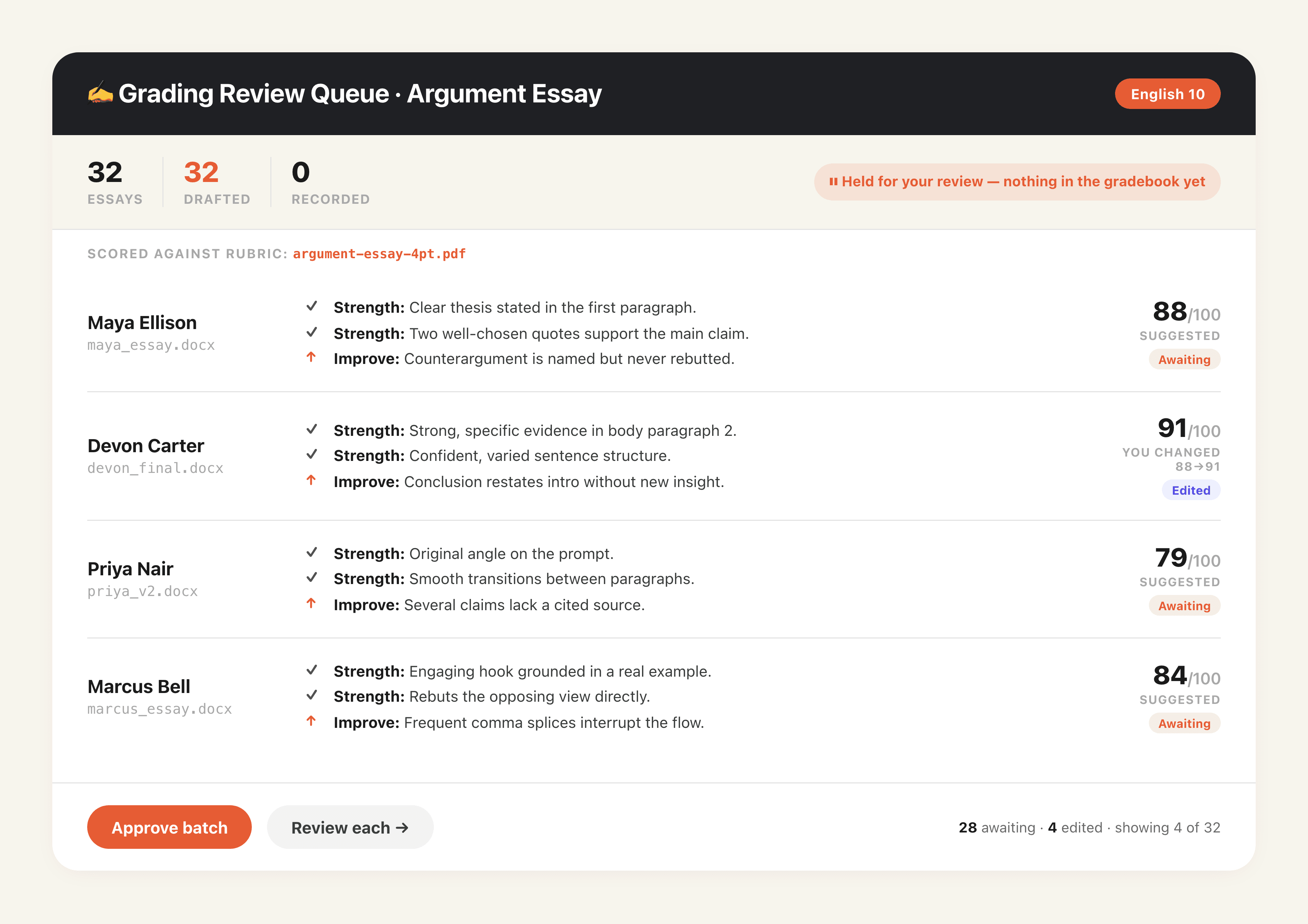
"Tell MoClaw: "Read these 32 uploaded essays against my rubric. For each one, draft two strengths, one thing to improve, and a suggested score. Hold everything for my review before anything is recorded.""
MoClaw grades each essay against your rubric and drafts personalized comments: two strengths, one growth area, and a suggested score. Every draft waits in a review queue. You skim, adjust the scores you disagree with, and approve the batch. Nothing is recorded in your gradebook until you say so.
One Text, Multiple Reading Levels
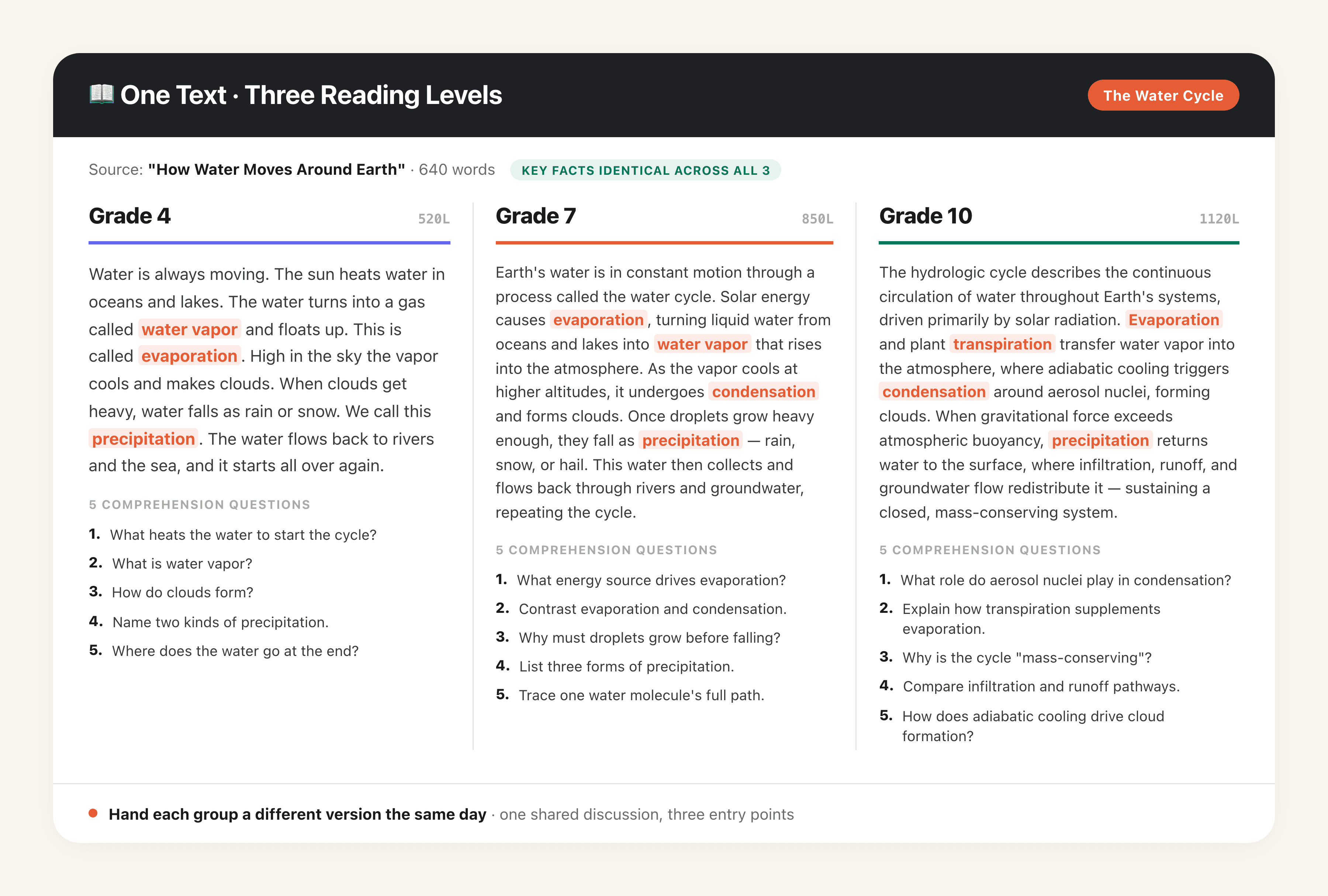
"Tell MoClaw: "Take this article and rewrite it at three reading levels: grade 4, grade 7, and grade 10. Keep the key facts identical across all three, and add five comprehension questions for each version.""
MoClaw produces three versions of the same text tuned to each reading level, with the core facts and vocabulary kept consistent so the class can still discuss the same content together. Each version comes with its own comprehension questions, ready to hand to different groups the same day.
Weekly Parent Update, Drafted for Approval
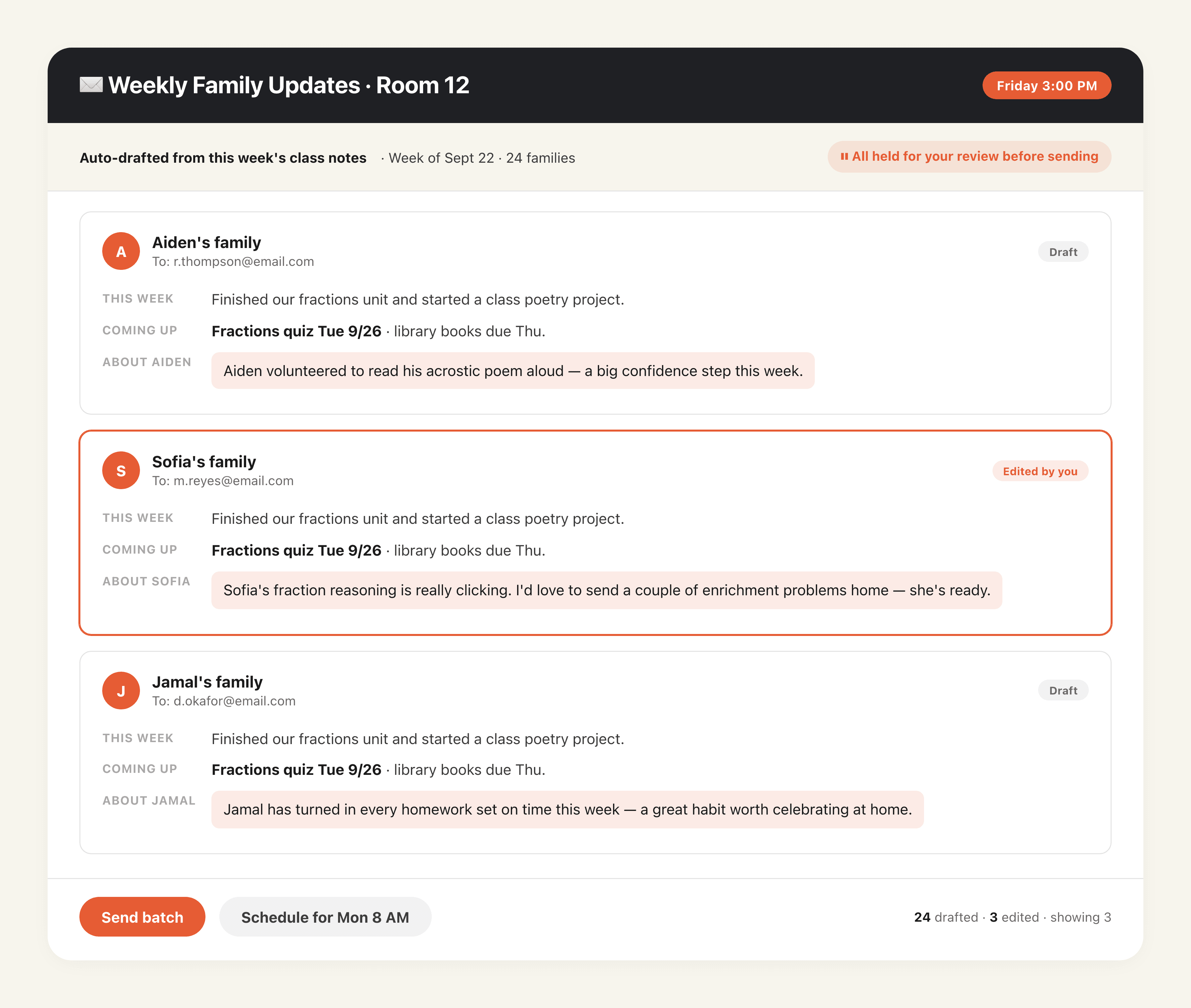
"Tell MoClaw: "Every Friday at 3 PM, turn my week's class notes into a short update for each family: what we covered, upcoming due dates, and one specific note about their student. Hold all of them for my review.""
MoClaw drafts a personalized update for every family from your notes, covering the week's topics, upcoming deadlines, and a specific line about their child. All drafts land in a review queue Friday afternoon. You read through, edit the few that need a personal touch, and send the batch or schedule it for Monday morning.
Integrations
Best AI agent integrations for educators
These integrations connect MoClaw to the tools this audience already uses for daily work.
Google Workspace
Read and write spreadsheets
Pull context from this system
Deep Research
Synthesize multiple sources into one answer
Provides a core capability behind this workflow
Browser Control
Operate web pages in a real browser
Provides a core capability behind this workflow
Claude
Handles reasoning and drafting
Handles reasoning and drafting for this workflow
FAQ
Common questions
How is MoClaw different from ChatGPT?
ChatGPT answers a question and waits for the next one. MoClaw is built around teaching workflows: it reads your standards and materials, builds the lesson, quiz, and answer key, drafts feedback across a full class set, and holds parent messages for your approval. Instead of one reply at a time, it runs the multi-step task to completion.
Is student data kept private?
Yes. MoClaw runs in an isolated workspace under your control. Grades, submissions, and roster information are never pooled with other users or used to train third-party models, and you keep ownership of every file. For anything covered by FERPA or your district policy, keep student records in the tools your school already approves, and check with your administrator before connecting a new system.
Do I need any technical or coding skills?
No. If you can write an email to a parent, you can use MoClaw. There's nothing to configure and no script to write. Describe what you need in plain language, give it access to the right files, and it gets started.
Can I review everything before it reaches a student or parent?
Yes, and that's the default. MoClaw saves drafts and proposed messages for your approval before anything is sent, recorded, or filed. Once you trust a routine, like a weekly parent update, you can switch that one to autopilot while keeping everything else review-first.
Which tools does MoClaw connect with?
Google Workspace (Gmail, Calendar, Docs, Drive), Slack, Telegram, Notion, and PDF and Word imports for syllabi, rubrics, and readings. New integrations ship every few weeks based on what teachers ask for.
How much does MoClaw cost for teachers?
MoClaw starts at $20/month for a managed cloud agent with 1,000 credits included. You can also bring your own API key (BYOK) for unlimited AI use at zero markup. See our pricing page for the full breakdown.
More time to teach,
less time on prep.
Join the teachers who got their evenings back. No setup, no coding, no per-task fees. Just an AI teaching assistant that does the work and waits for your approval.
Start Free TrialCancel anytime