AI Agent Types: Stop Buying the Wrong One
Compare AI agent types by context, tools, judgment, and risk so your team can choose the simplest workflow agent without overbuying autonomy.

Table of Contents
IBM's guide to AI agent types separates agents by how they sense, reason, and act, but the buying question is simpler: which AI agent type can safely carry your workflow without losing context, control, or trust? The fastest way to waste money on AI agents is to buy the label instead of the capability.
A demo seems promising. Then the real workflow hits the system. One tool can route a support ticket. Another can hold context, use software, check sources, prepare an output, and pause before approval. Same label. Different responsibility.
Key Takeaways
- AI agent types are useful only when you connect them to workflow risk, not just model capability.
- Score every workflow on context, tools, judgment, and risk before choosing an agent.
- Classic types explain how an agent decides. Modern types explain how much work it can carry.
- Most startup teams should start with a tool-using workflow agent with human review.
- Fully autonomous agents are usually the wrong first choice for customer, money, legal, or production systems.
Why AI Agent Types Are Really a Control Question
Listing AI agent types as one category creates confusion. Some types explain decision logic: how the agent decides what to do next. Others explain workflow behavior: how much work the agent can carry across tools, steps, and review points.
That distinction matters because businesses adopt agents to reduce manual effort and extend team capacity. A simple reflex agent can trigger a rule when a form arrives. A tool-using workflow agent can open a browser, check a source, compare the result with stored context, draft an output, and ask for review. A multi-agent system can split planning, research, analysis, writing, and review across separate roles.
Those differences change the access the system needs and the size of the mistake it can make. Google Cloud describes AI agents as systems that use reasoning, planning, and tools to complete tasks. AWS makes the same point from an architecture angle: useful agents need goals, orchestration, and controlled actions.
A composite example makes the difference clear. Maya, an operations lead at a 38-person B2B SaaS company, wanted a weekly competitor pricing report. A chatbot could summarize one page if she pasted it in. That still left her opening 24 tabs every Monday. A scheduled workflow agent checked the same pages, captured changes, saved evidence links, and drafted a 7-bullet review. Her Monday research block dropped from about 3.5 hours to 28 minutes, with the final publish step still owned by her.
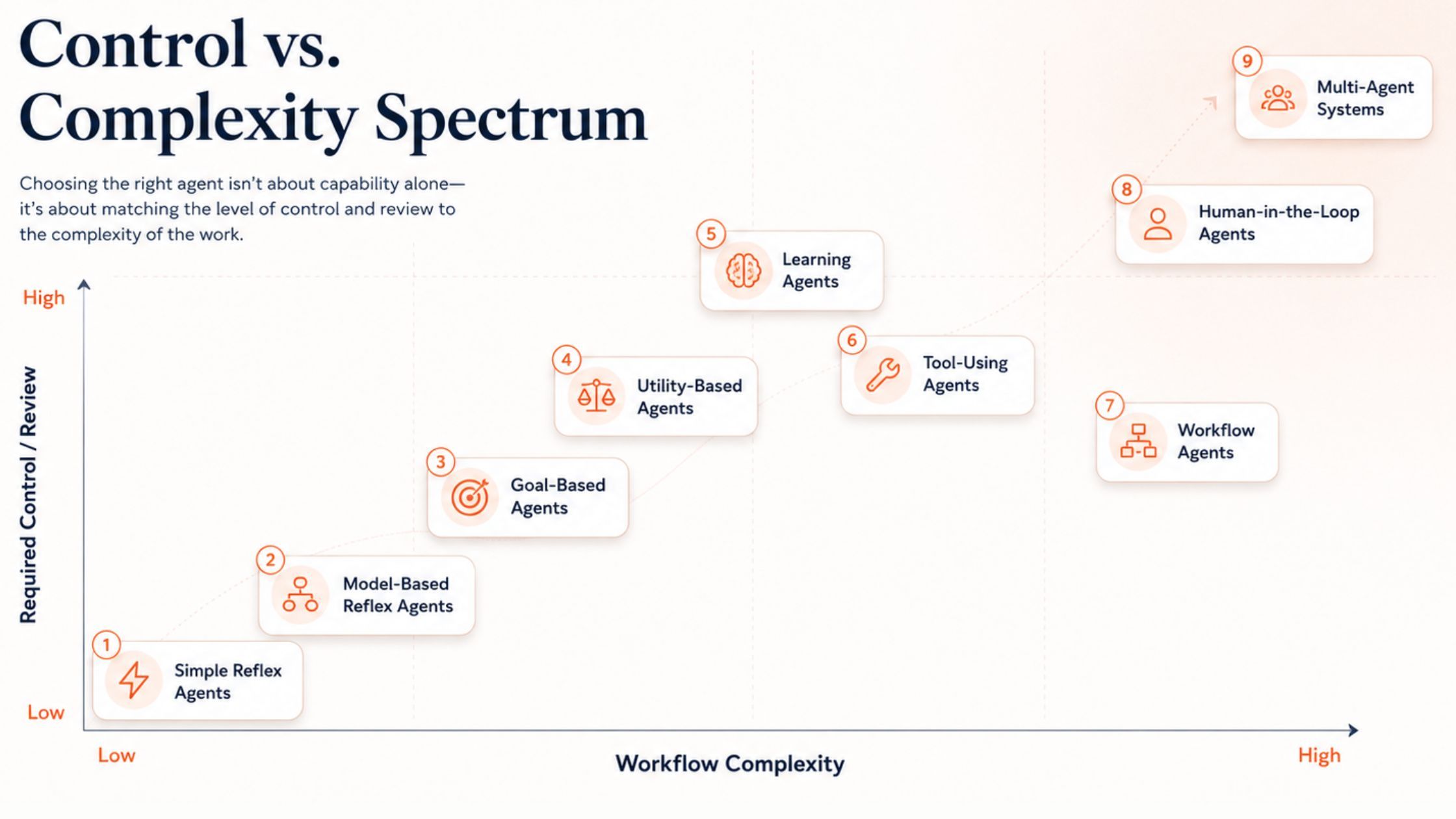
What this proved: The useful question is not "is this an agent?" It is "how much work can this system safely carry?"
What remains unsolved: Vendor pages still use "agent" broadly, so buyers need their own control checklist.
A Four-Part Scorecard for Choosing an Agent
Before choosing an AI agent type, score the workflow across four dimensions.
| Dimension | Ask This | Why It Matters |
|---|---|---|
| Context | Does the agent need memory, history, or state? | Decides whether simple rules are enough |
| Tools | Does it need browsers, files, APIs, code, or apps? | Decides whether tool access matters |
| Judgment | Does it need ranking, comparison, or trade-offs? | Decides whether utility logic matters |
| Risk | Can a bad action harm customers, money, security, or reputation? | Decides whether human review is required |
If a workflow has low context, limited tool use, little judgment, and low risk, traditional automation is usually enough. A form response can trigger a reminder. A keyword can route a ticket. A due date can send a Slack message. You do not need a new agent framework for that.
If the workflow requires tools, reasoning, multi-step execution, and oversight, you are in modern AI agent territory. Anthropic's guidance on building effective agents makes a similar point: start with the simplest pattern that works, then add complexity only when the task demands it.
Luis, a support manager at a subscription app handling about 7,200 tickets a month, learned this the hard way. A rule that routed any ticket containing "pricing" to sales misrouted angry renewal complaints, refund requests, and enterprise upsell questions. The fix was a context-aware triage workflow that checked account tier, recent tickets, sentiment, and customer value before routing. Risk stayed low because the agent routed and drafted, but humans still sent sensitive replies.
What this proved: Context, tools, judgment, and risk are a better buying framework than agent taxonomy alone.
What remains unsolved: Teams still need to define what "bad outcome" means before handing an agent access.
Classic AI Agent Types: How the System Decides
The classic taxonomy explains decision logic. IBM's taxonomy, Wrike's overview, and Simform's guide all describe versions of these categories.
Simple reflex agents are stateless. They look at the current input only, then follow a fixed rule: if this happens, do that. They work for tagging tickets, routing forms, sending reminders, and triggering alerts. The problem starts when context changes the right action. A message with "pricing" may be a sales inquiry, a billing complaint, or a cancellation warning.
Model-based reflex agents add state. They check what is already known before acting. A complaint from a high-value customer with three recent tickets may need escalation. The same complaint from a free user may go to the normal queue. These agents work well for support routing, CRM updates, account alerts, and workflow status checks. Their weakness is bad context. If the stored data is stale, they can route based on the wrong assumption.
Goal-based agents work toward a defined outcome. They decide what to do next by checking whether each step moves the work closer to that outcome. IBM's goal-based agent primer is useful here. "Find good leads" is weak. "Find 20 U.S. B2B SaaS companies with 11 to 50 employees, recent hiring signals, and a likely need for workflow automation" gives the agent a real target.
Utility-based agents choose between options by weighing trade-offs. Several choices may reach the goal, but each carries a different mix of upside, cost, effort, and risk. A utility-based lead agent can score demo requests by company size, funding signal, use-case fit, tech stack match, urgency, and expected deal value. The point is not to find the loudest lead. It is to find the one most worth acting on first.
Learning agents improve through feedback. A lead qualification agent may score 100 accounts. Sales later marks 15 as strong fits, 40 as weak fits, and 45 as irrelevant. Over time, that feedback helps the agent spot which signals predict useful leads. But a learning agent is only as useful as the feedback loop behind it. Bad feedback trains the wrong behavior.
What this proved: Classic agent types are most useful for diagnosing decision behavior.
What remains unsolved: Decision logic alone does not tell you whether the agent can safely run a business workflow.
Modern AI Agent Types: How the Work Gets Carried
Modern agent categories are more useful for teams buying or building software. They describe what the agent can do inside a workflow.
Tool-using agents reach outside the chat. They can search the web, read files, query databases, run code, call APIs, update CRMs, edit spreadsheets, or work across business apps. Oracle's AI agent guide frames agents as a bridge between AI reasoning and enterprise systems. That bridge is where value and risk both appear.
Priya, a finance controller at a services company, used this pattern for invoice review. The workflow pulled invoice PDFs, checked ERP records, read the current exchange rate, compared totals, and flagged any variance above 0.5 percent. The agent did not approve payment. It prepared the evidence packet and routed exceptions to Priya, saving about six hours per month without giving the agent control over cash movement.
Workflow agents matter when the same work needs to run again without rebuilding the process each time. A competitor monitoring workflow should not restart from zero every Monday. The source list, check pattern, evidence, and output format should stay intact. Their strength is continuity. Their weakness is also continuity: a weak process does not fail once. It repeats.
Human-in-the-loop agents automate parts of the work but pause for human judgment at important moments. The agent can research, summarize, compare, and draft. The human approves the final action. This is the safer choice when the cost of a wrong decision is higher than the time saved by full automation.
Multi-agent systems split work into separate roles. One agent collects sources, a second identifies patterns, a third writes the brief, and a final agent reviews the output. The benefit is specialization. The risk is coordination. One weak source can become the next agent's starting point, then the final answer looks polished while the premise is wrong. CrewAI and LangGraph can be powerful for teams with engineering support, but most startups should begin with one well-scoped agent.
What this proved: Modern agent types explain operational load, access, repeatability, and review.
What remains unsolved: More agents can make the workflow look smarter while increasing coordination risk.
Where MoClaw Fits in the Agent Map
As an AI agent platform, MoClaw belongs closest to tool-using workflow agents. Its value is not just giving an agent access to tools. It gives the workflow a place to run.
That matters because a useful agent is rarely just a prompt. Teams also need browser access, files, schedules, memory, visible steps, and reviewable outputs. Without that operating layer, a simple agent idea can turn into an engineering project.
MoClaw reduces that burden. Instead of building the agent framework first, teams define the work: what to check, which sources to trust, what output to prepare, and where a human should review. For a recurring workflow, MoClaw can hold the source list, run schedule, evidence, and output format in one place.
That positioning is why MoClaw is strongest for repeated AI automation workflows like competitor monitoring, lead research, content source gathering, sales account briefings, inbox categorization, and weekly report summaries. Teams can browse templates in the MoClaw use case library, compare plan limits on pricing, and start a workflow from try MoClaw.
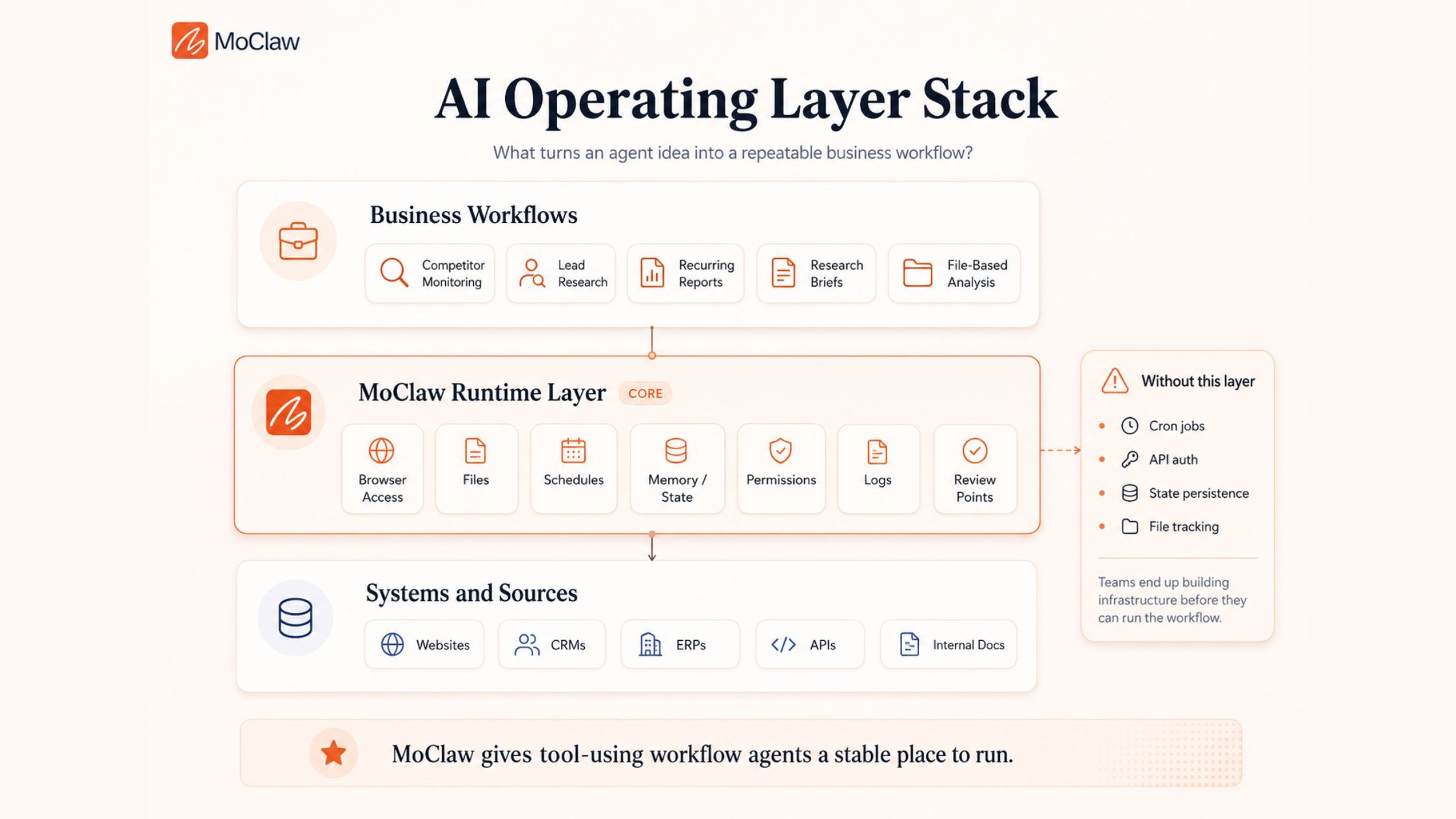
What this proved: MoClaw is best understood as a managed place for tool-using workflows, not as a generic chatbot.
What remains unsolved: Teams still need to define trusted sources, review gates, and the exact output standard.
The Wrong-Agent Problem in Common Workflows
An agent can be powerful and still be wrong for the job. Most failures start there: the workflow needs one agent shape, but the team chooses another.
| Task to Automate | Wrong Choice | What Breaks | Better Choice |
|---|---|---|---|
| Weekly competitor monitoring | Chatbot | User restarts the work every week | Scheduled tool-using workflow agent |
| Lead qualification | Simple rules | Misses context and buying signals | Utility-based tool agent |
| Support replies | Fully autonomous agent | Risky customer-facing mistakes | Human-in-the-loop context agent |
| Market research | Multi-agent system | Too much overhead | Single goal-based tool agent |
| Data tagging | Custom agent framework | Overbuilt for simple logic | Simple reflex automation |
| Invoice review | Autonomous payment agent | Money moves before review | Tool-using agent with approval |
This is why the workflow should be the starting point. Ask what the task needs: context, tools, judgment, repeatability, and review. Then choose the simplest agent that can safely carry the work.
The word "simplest" matters. A custom multi-agent stack may be exciting, but it is the wrong answer for structured routing. A simple rule may be cheap, but it is the wrong answer when account history changes the decision. The best agent matches the work without adding risk you cannot supervise.
For a deeper map of production workflows, see MoClaw's guide to AI agent use cases in 2026. If your need is more traditional automation, the comparison between AI automation and adaptive agents is the better next read.
What this proved: Most agent failures are fit failures, not model failures.
What remains unsolved: A team still has to name its review owner before deployment.
Which AI Agent Type Should You Start With?
For most startup teams, the best starting point is not a fully autonomous decision-maker. It is a tool-using workflow agent with human review.
Start with a task that repeats often, has a clear output, and creates limited risk if the first result is imperfect. Good first workflows include competitor monitoring, lead research, content source gathering, sales account briefings, inbox categorization, and weekly report summaries.
Avoid fully automated outbound sending, refund approvals, legal decisions, production infrastructure changes, and anything where one bad action creates serious damage. If one mistake costs more than five minutes of review, keep a human approval gate.
A practical starter pattern looks like this:
- Pick one recurring workflow with a measurable before-and-after time cost.
- Define the trusted sources the agent may use.
- Define the output format before the first run.
- Run the agent in draft-only mode for two weeks.
- Promote only the low-risk steps to automation after review.
That path is slower than a demo, but faster than repairing trust after a bad customer-facing action.
What this proved: The best first agent is boring, repeatable, and reviewable.
What remains unsolved: High-risk workflows need stronger policy, logging, and approval design before automation.
FAQ
What are the main types of AI agents?
The common classic types are simple reflex agents, model-based reflex agents, goal-based agents, utility-based agents, and learning agents. For business workflows, also consider tool-using agents, workflow agents, human-in-the-loop agents, and multi-agent systems.
What AI agent type should a startup use first?
Start with a tool-using workflow agent with human review. It gives the team practical automation without handing full autonomy to a system that has not earned trust.
Are multi-agent systems better than single agents?
Not automatically. Multi-agent systems help when work truly needs separate roles. They also add coordination risk. For most teams, one well-scoped agent is easier to evaluate, debug, and trust.
When is a simple automation better than an AI agent?
Use simple automation when the trigger is clear, the action is fixed, and context barely matters. Reminders, basic tagging, and form routing often do not need an AI agent.
Where should human review stay in the workflow?
Keep human review before customer-facing messages, money movement, legal decisions, production changes, and any action that can create reputation, security, or compliance risk.
AI Agent Types: Let the Workflow Decide, Not the Label
The strongest AI agent is not the one that looks most impressive in a demo. It is the one that makes a workflow less dependent on memory, tab switching, and someone remembering to do the next step.
If a tool only gives your team another place to think, it has not changed the workflow. It has added another surface. The real value starts when the work has a path: where the information comes from, what the agent should prepare, where the human should review, and where the output should go next.
That is the quiet test most teams miss. After the agent runs, is the workflow lighter? Or did you just add a smarter box to an already messy process?
Across the AI agent types above, choose the simplest agent that can safely carry the work. Then let the workflow, not the label, decide what to buy next.
Continue Reading
More Guide
What Is Agent Handoff? The Waggle Standard

AI Agent Platform Guide: 7 Myths for 2026

Multi-Model AI Agent Guide: 2026 Decisions

No-Code AI Agent Guide: 2026 Platform Picks

Cloud AI Agent in 2026: A Buyer's Field Guide

Why MoClaw Supports BYOK (Bring Your Own Key)
The MoClaw editorial team writes about workflow automation, AI agents, and the tools we build. Default byline for industry overviews, listicles, and collaborative pieces.
Ready to put this into practice?
MoClaw runs browser tasks, research, and schedules automatically. Try it free.
References: IBM: AI Agent Types · IBM: Goal-Based Agent · Google Cloud: What Are AI Agents · AWS: What Are AI Agents? · Anthropic: Building Effective Agents · Oracle: AI Agents · Wrike: Different Types of AI Agents · Simform: Types of AI Agents · CrewAI · LangGraph