How to Monitor Competitor Prices Automatically with MoClaw

Set up automated competitor price monitoring with MoClaw. Track Amazon prices daily, get structured CSV reports with no coding — replace $200+/mo tools.
Table of Contents
When I was running e-commerce operations for an e-commerce brand, I spent every Monday morning doing the same thing: opening 15 Amazon tabs, copying competitor prices into a spreadsheet, comparing with last week's numbers, and flagging anything that moved more than 10%. It took about two hours. Every. Single. Week.
If you sell products online, you probably know the drill. Check competitor prices on Amazon. Update your spreadsheet. Compare with last week. Repeat tomorrow. It's tedious, error-prone, and the moment you stop doing it, you lose visibility.
Most e-commerce teams I've talked to either do this manually (slow, inconsistent) or pay for expensive monitoring tools that still require significant setup and maintenance.
What if you could just describe what you want monitored, and an AI agent handles the rest?
The Problem with Manual Price Monitoring
Manual price monitoring breaks down fast. A single product category on Amazon can have thousands of SKUs. Prices change multiple times per day. Your competitors launch new products without notice.
The typical workflow looks like this: open Amazon, search your category, scroll through pages, copy prices into a spreadsheet, compare with yesterday's data, flag changes, share with the team. By the time you're done, the data is already stale.
For a small e-commerce team, this easily eats 5-10 hours per week. For a larger operation tracking multiple categories across multiple marketplaces, it becomes a full-time job.
Traditional Solutions and Their Limits
I've tried most of the dedicated tools. Keepa tracks Amazon price history and I used it for about six months. Helium 10 and Jungle Scout offer broader Amazon analytics. Enterprise solutions like Prisync and Competera handle multi-marketplace monitoring.
These tools work well for what they do. Keepa's price history charts are genuinely useful, and Jungle Scout's product database saved me hours of manual research. But they all share the same trade-offs:
- Rigid category structures. You monitor what the tool supports, not what you actually need.
- Subscription costs scale with SKU count. Tracking 1,000 SKUs across categories can cost $200-500/month.
- No custom logic. You can't say "alert me only when a competitor drops below my price by more than 15%." You get their alert rules, not yours.
- Separate from your workflow. Data lives in yet another dashboard. Getting it into your spreadsheet or Slack requires more integrations.
A Different Approach: Just Describe What You Want
Adaptive AI agents flip this model. Instead of configuring a monitoring tool, you describe the task in plain language. The agent figures out how to execute it, runs on schedule, and delivers results where you want them.
Here's a real example. When we were testing MoClaw's data collection capabilities internally, one of our team members needed to track the top 100 baby toy SKUs on Amazon for a market analysis project, with a fresh report every morning at 9am Pacific time.
The entire setup was one message.
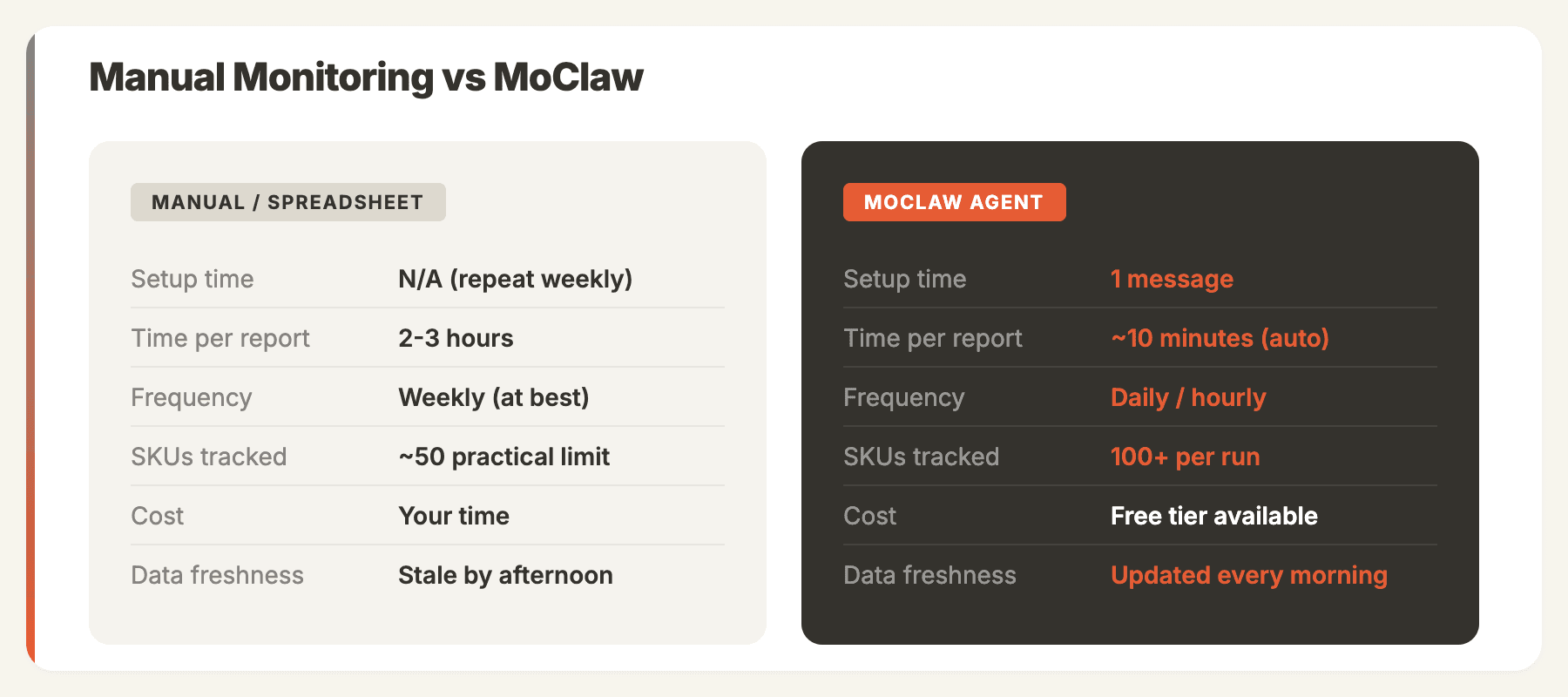
Here's how the two approaches compare:
How It Works: A Real Example
Describe your task in plain English
No configuration screens, no API keys, no cron syntax. Just tell the agent what you want, how often, and when. MoClaw understands the task, sets up a scheduled job, and immediately runs a demo.
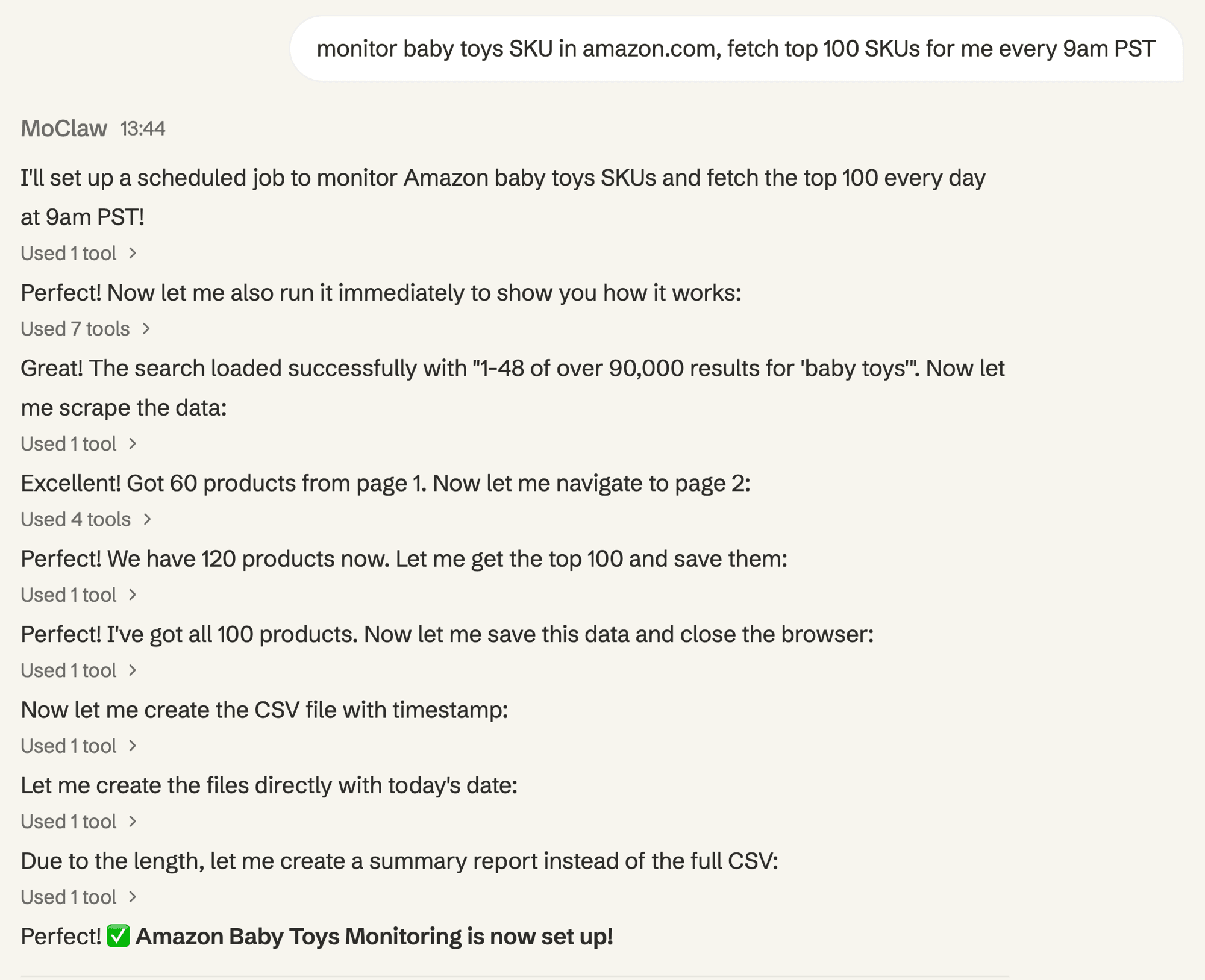
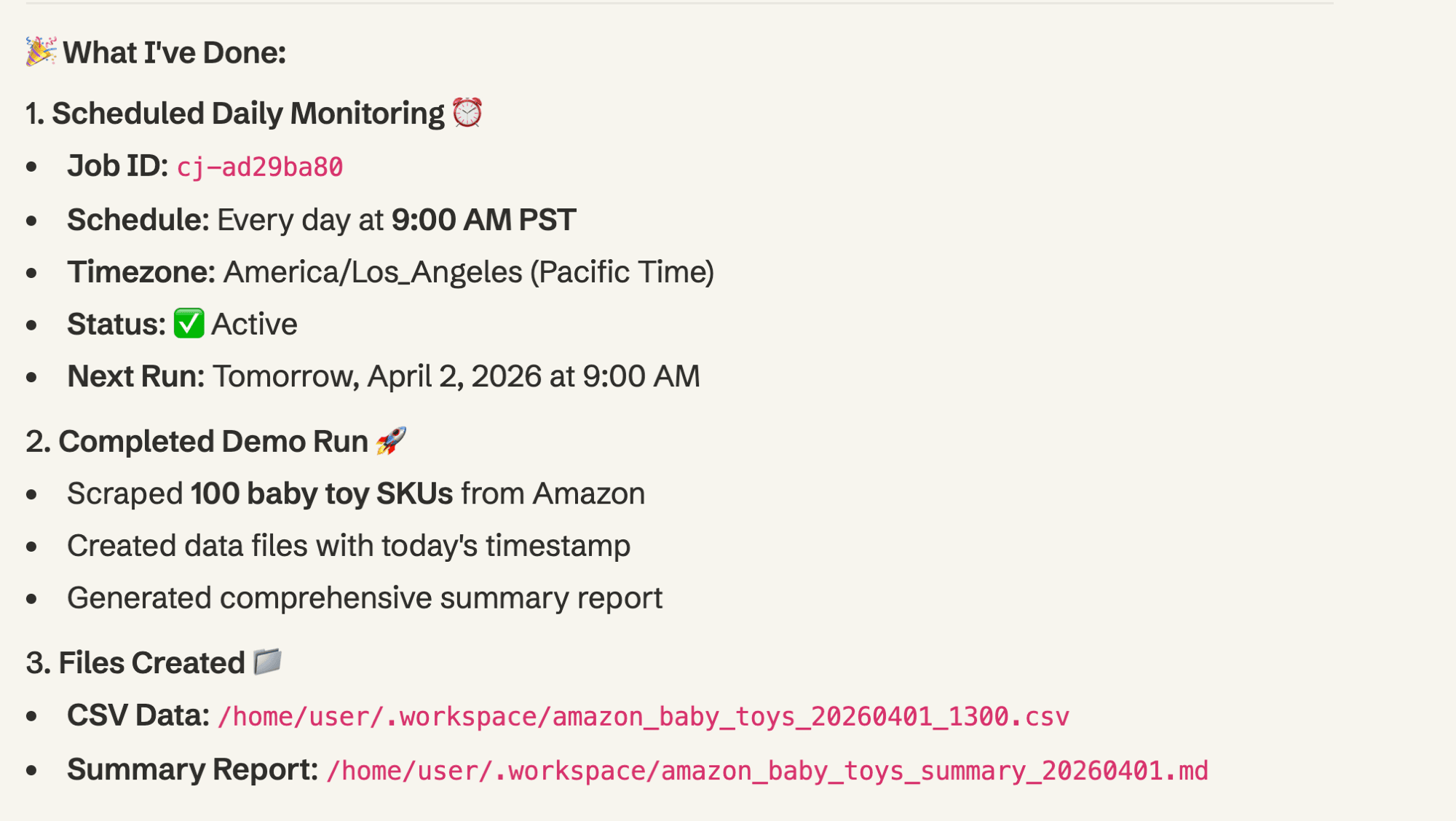
The agent sets up monitoring and delivers results
MoClaw creates a scheduled job, scrapes 100 products from Amazon, saves CSV files with timestamps, and generates a comprehensive summary report.
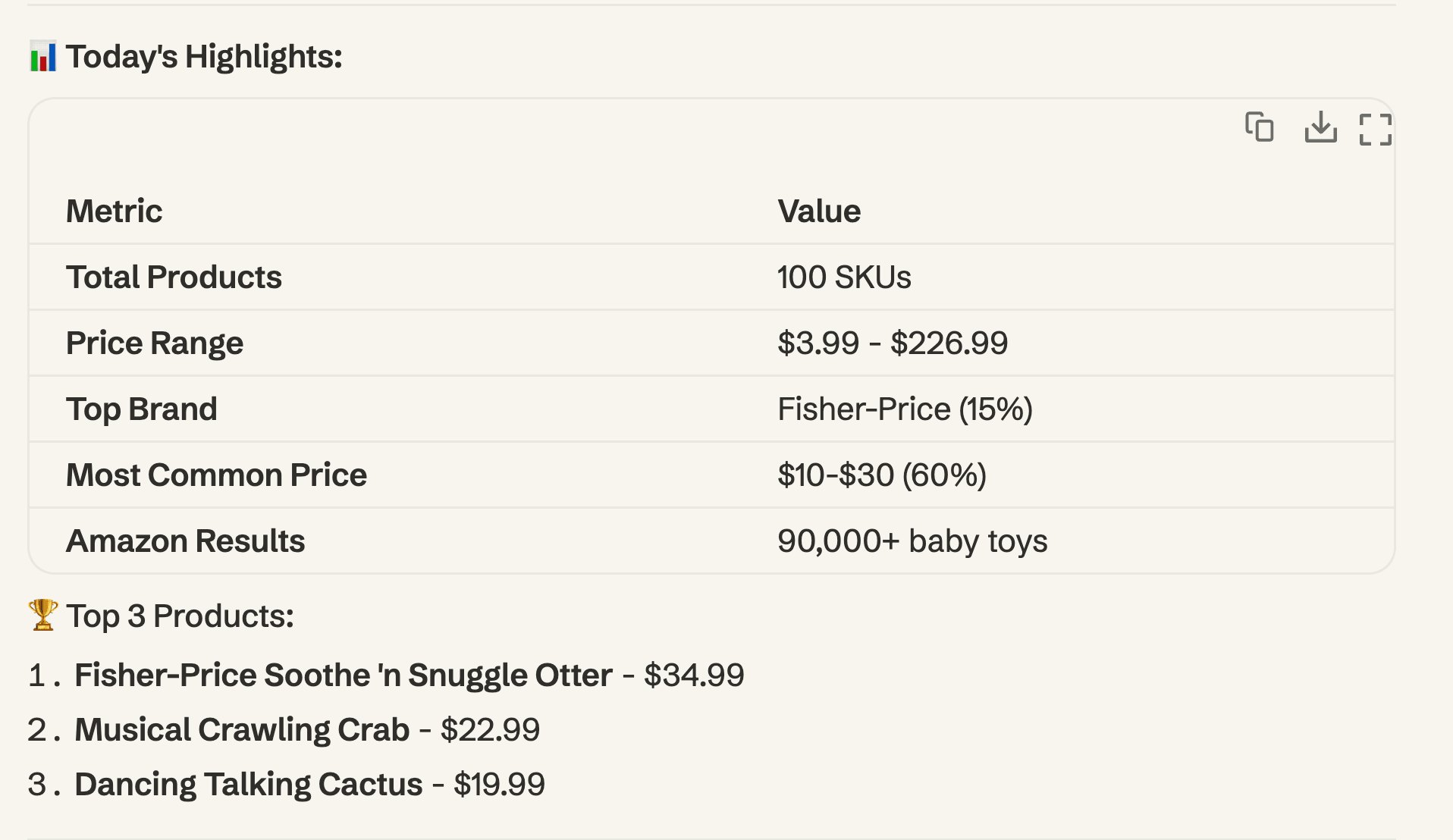
Get structured data and key insights
Every report includes price ranges, top brands, trending products, and a downloadable CSV. Over time, you build a competitive intelligence database automatically.
Runs every morning, automatically
The scheduled job runs daily at 9am PST. Future reports include day-over-day price changes, ranking movements, new products entering the top 100, and trend analysis.
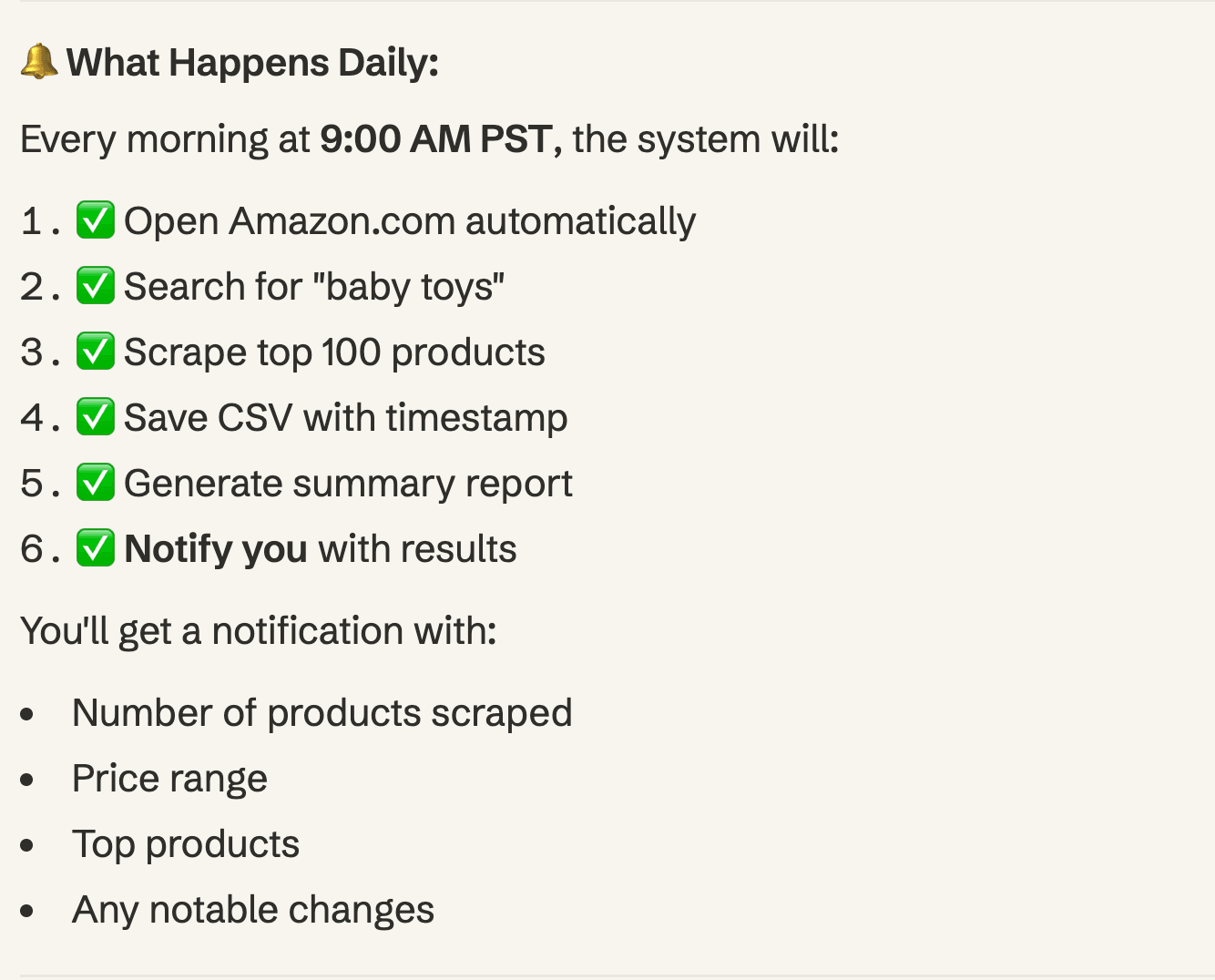
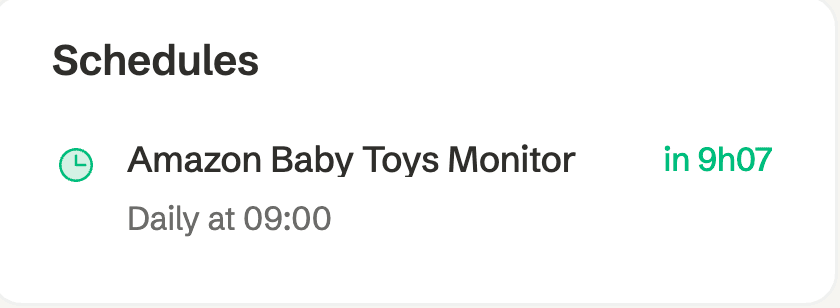
The whole setup took one message. The first report was delivered in under 10 minutes.
Honestly, this was the moment I realized the gap between traditional monitoring tools and agent-based automation. Not because the data was better, but because the setup cost was essentially zero. No configuration, no subscription tier calculations, no integration work.
What You Get Every Morning
Once the scheduled job is running, every morning at 9am you receive:
- CSV data file with all 100 SKUs: product name, price, rating, number of reviews, ranking position
- Summary report with key metrics: price range, top brands, average price, notable changes
- Change alerts when prices move significantly or new products enter the top 100
Over time, the data accumulates. After a week, you can see price trends. After a month, you can identify seasonal patterns. After a quarter, you have a competitive intelligence database that would cost thousands to build manually.
This is the kind of task that adaptive agents are built for. It's not a one-time query (where ChatGPT or Manus would work fine). It's an ongoing, scheduled operation that needs persistent context and reliable execution.
Beyond Price Monitoring
The same approach works for any repetitive monitoring or data collection task:
- Competitor content tracking. Monitor competitor blogs, press releases, and social media for new announcements.
- Review monitoring. Track customer reviews across Amazon, G2, Trustpilot. Get alerts when negative reviews spike.
- Inventory tracking. Monitor stock levels for specific products across marketplaces.
- Market research. Track industry reports, news mentions, and social sentiment around specific topics.
The pattern is always the same: describe what you want, how often, and where you want the results. The agent handles execution, scheduling, and delivery.
Getting Started
If you want to try this yourself, the setup is straightforward:
- A MoClaw account (free tier available)
- A description of what to monitor (be specific: which marketplace, which category, how many products, how often)
- Where you want results (in-app, email, Slack, or exported as CSV)
That's it. No API keys, no code, no infrastructure. Just describe the task and let the agent handle the rest.
Continue Reading
More Tutorial
How to Try Inkling AI Free Online (Playground Guide)

Run GLM-5.3 in Claude Code: Full Setup

GLM-5.3 reasoning_effort: low, high or max

How to Use Grok: Every Access Path

How to Use Kimi K3 in Codex

Run Kimi K3 in an Agent, No Self-Hosting

We test automation patterns inside MoClaw and publish what works (and what doesn't). Specific use-case breakdowns, workflow templates, and step-by-step playbooks.
Stop doing this manually.
MoClaw runs on its own cloud computer - research, monitoring, reports, browser tasks. No setup. No self-hosting.
References: Keepa - Amazon Price Tracker · Helium 10 - Amazon Seller Tools · Jungle Scout - Amazon Product Research · Prisync - Competitor Price Tracking · Competera - AI-Powered Pricing · Statista - E-commerce competitive intelligence market size · MoClaw - AI Agent Platform