7 Devin AI Alternatives and What They Cost

Devin now runs $0 to $200 a month, plus $80 + $40 a seat for teams. Here are 7 Devin AI alternatives with every price checked in August 2026.
Table of Contents
A good Devin AI alternative in 2026 is not just another autonomous coding agent. The safer choice is the tool or stack that matches your workflow, budget model, context needs, and tolerance for hands-off autonomy.
Devin, built by Cognition, made autonomous software engineering feel concrete. But the real buyer question has changed: do you need a code-first agent, a supervised IDE or terminal assistant, a self-hosted benchmark performer, or a browser and workflow automation layer that handles work around engineering?
Key Takeaways
Key Takeaways:
- Do not pick a Devin AI alternative by SWE-bench score alone. Benchmarks help, but workflow fit, context handling, approval model, and pricing predict daily success better.
- The strongest coding-agent shortlist usually includes Cursor, Claude Code, GitHub Copilot or Copilot coding agent, OpenHands, SWE-agent, Aider, and sometimes Augment Code or Tembo for orchestration.
- Open source is not automatically free in practice. OpenHands and SWE-agent avoid license fees, but self-hosting still brings infrastructure, model, monitoring, and support costs.
- Devin-style autonomy is useful for scoped work, but many teams prefer tools that ask for approval before changing files or opening pull requests.
- MoClaw belongs in the evaluation when the need is browser automation, scheduled research, reporting, or persistent cloud workflows around engineering rather than raw code generation.
Devin AI Pricing in 2026, and What It Costs to Leave
Get the money straight before comparing capability. These are Devin's own published plans, read off its pricing page on August 12, 2026.
| Devin plan | Price | What it includes |
|---|---|---|
| Free | $0 | Light quota to code with agents, limited model availability, unlimited inline edits and Tab completions |
| Pro | $20 / mo | Higher quotas with OpenAI, Claude, and Gemini frontier models, full model availability, free use of SWE 1.7, cloud agents (Devin Cloud), extra usage at API pricing |
| Max | $200 / mo | Everything in Pro, with significantly higher quotas |
| Teams | $80 / mo + $40 / mo per full dev seat | Unlimited team members, shared collaboration, centralized billing, admin dashboard with analytics |
| Enterprise | Contact sales | Everything in Teams, plus priority support, dedicated account management, SAML/OIDC SSO |
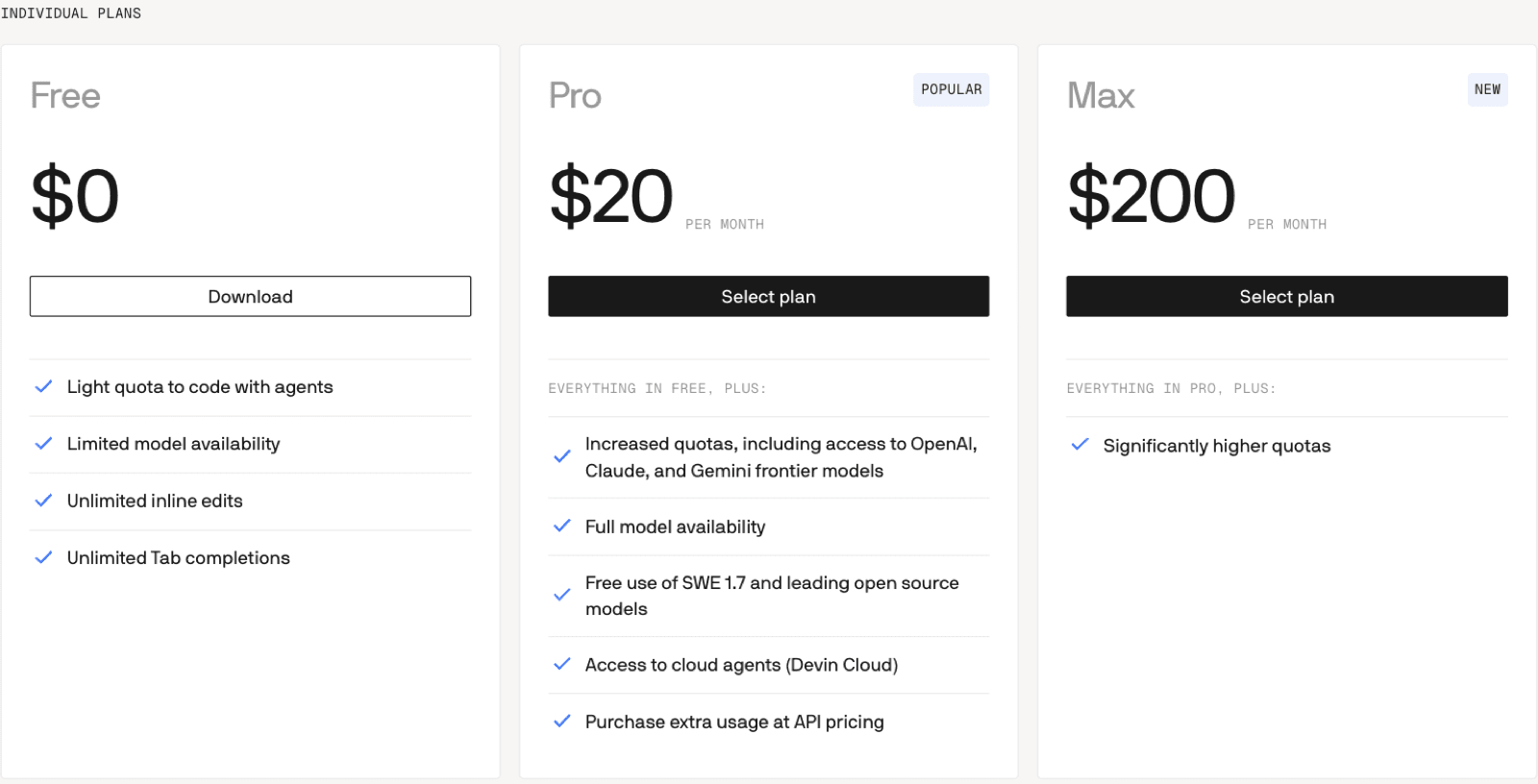
Two things get misreported about this. First, there is a free tier, so evaluating Devin costs nothing but time, and plenty of comparison posts still describe it as subscription-only. Second, Teams is not one number. It is an $80 platform fee plus $40 for every full dev seat, so five full developers is $280 a month, not $80.
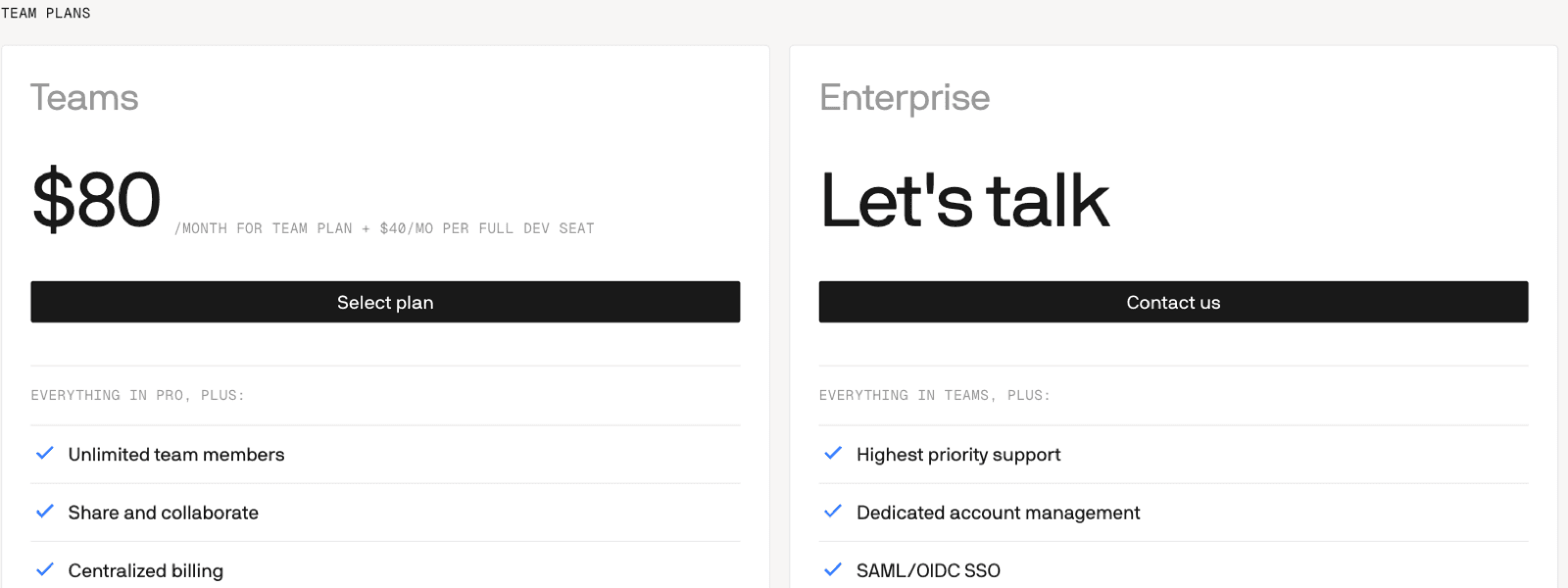
The practical read: at $20 a month for one developer, Devin is priced like every other individual coding agent, so price alone is rarely why teams leave. The reasons that actually show up are workflow fit, how much autonomy you want before a human reviews, and the discovery that half the work you had in mind was never coding.
What this resolved: Devin's real price ladder, from $0 to a $280-a-month five-developer team.
What it left unsolved: Whether a cheaper or differently shaped tool fits your workflow better, which is the rest of this guide.
Why Teams Look Beyond Devin AI in 2026
The search intent behind "Devin AI alternative" is usually practical: teams want the promise of autonomous software work without unclear cost, weak fit, or too much black-box execution. The market is also moving quickly: the current generation of agents takes on whole features, debugging passes, and repository-wide work, not just autocomplete. Devin itself now ships on its own SWE 1.7 model and offers a free tier, which is a different product from the one most 2025-era comparisons describe.
That does not mean every team should replace Devin with the most autonomous tool available. A backend team living in the terminal has different needs from a frontend team in an IDE, a GitHub-native organization, or a founder who mostly wants competitor monitoring, lead research, and browser tasks. The useful comparison is not "which agent is smartest?" It is "which tool should own this workflow, and what human review stays in the loop?"
Five Devin AI Alternative Myths
Myth 1: The highest SWE-bench score is the best tool
SWE-bench Verified is useful context, not a deployment plan. Verdent's 2026 coding assistant ranking emphasizes real testing across completion, context, refactoring, bug detection, and test generation. ToolHalla's Devin, OpenHands, and SWE-agent comparison reports strong open-source benchmark results for OpenHands and SWE-agent, but benchmark scores do not tell you whether a tool fits your IDE, terminal, repository permissions, review workflow, or cost controls.
The better test is local: give the tool real tasks from your codebase for 2-4 weeks. Measure task completion, incorrect edits, review time, developer satisfaction, and whether engineers keep using it after the novelty fades.
Myth 2: Open source means free in practice
OpenHands and SWE-agent are important Devin alternatives because they are self-hostable and model-agnostic. That matters for compliance-first teams, researchers, and organizations that want control over runtime and model choice. But "free software" still requires infrastructure, Docker or runtime setup, API keys, monitoring, updates, and someone who owns breakage.
If your team has platform engineering capacity, open source can be the right answer. If not, the hidden cost can exceed a managed plan quickly. Treat open-source agents as a deployment model, not a coupon.
Myth 3: Autonomous is always better
Devin's headline value is autonomy. The risk is that a fully autonomous tool can spend time on the wrong path before escalating. Augment Code's alternatives guide frames the key tradeoff as autonomy versus structured developer supervision.
Claude Code, Cursor, and GitHub Copilot take more supervised paths: the agent works with developer approval, IDE context, terminal context, or draft pull requests. That model can be slower on paper and faster in practice because the human keeps control of architecture, security, and final merge decisions.
Myth 4: Pricing is straightforward
Pricing is not just a monthly seat. Devin, Cursor, GitHub Copilot, and Claude Code all mix seats, quotas, usage, model costs, and tier limits, and the sticker price hides all of it.
Look at what the published numbers actually mean. Devin, Cursor Pro, and Claude Pro all read as $20 a month, but Devin bills extra usage at API pricing, Cursor meters requests against your tier, and Claude Code runs off your Claude subscription's usage limits. GitHub Copilot's Pro is the cheapest headline at $10 a user, and it also ships a $100 Max tier, which tells you how fast agent workloads escape the entry plan.
The right question is not "what is the entry price?" It is "what happens at our real task volume, with our codebase size, our review process, and our expected model usage?"
Myth 5: One tool fits every developer
Most teams need a stack, not a single winner. A common 2026 pattern is Cursor for daily IDE work, Claude Code for complex terminal or multi-file tasks, GitHub Copilot for GitHub-native teams, OpenHands or SWE-agent for self-hosted experiments, and a separate workflow agent for browser-based tasks that do not belong inside the code editor.
That separation matters. Coding agents work on repositories. Browser and workflow agents work on research, web apps, PDFs, email, competitor pages, reports, and scheduled monitoring. Mixing those categories is how teams overbuy one tool and under-serve another workflow.
Selection Framework: Match Tool to Workflow
Start with the work, then choose the agent. Map one week of actual tasks before testing anything.
| Workflow | Better-fit Devin AI alternative | Why it fits |
|---|---|---|
| Daily IDE editing | Cursor or GitHub Copilot | Low-friction adoption inside existing editor workflows |
| Complex refactoring and terminal work | Claude Code | Strong fit for supervised, multi-file engineering sessions |
| GitHub issue to draft PR | GitHub Copilot coding agent | Native repository and pull-request workflow |
| Self-hosted engineering agent | OpenHands or SWE-agent | More control over runtime, model choice, and compliance |
| Budget terminal coding | Aider | Lightweight, API-key-driven, and useful for solo developers |
| Agent orchestration across repos | Augment Code or Tembo | Better fit when coordination matters more than autocomplete |
| Browser automation and research | MoClaw | Persistent cloud workspace for non-code tasks around the team |
Then set exit criteria before the pilot starts. Define the cost threshold, context failure threshold, and review-quality threshold that would make you stop using a tool. This avoids the usual trap where a team keeps paying for a tool because it looked impressive in a demo but never became part of daily work.
Pricing and Deployment Comparison
Every price below was read off the vendor's own pricing page on August 12, 2026, not copied from another comparison post. AI-agent billing changes fast, so re-check before you buy.
| Tool | Best fit | Deployment model | Published price, checked Aug 12 2026 | Watch-outs |
|---|---|---|---|---|
| Devin | Autonomous software engineering tasks | Managed cloud | Free $0; Pro $20/mo; Max $200/mo; Teams $80/mo + $40 per full dev seat | Autonomy can run ahead of review; extra usage bills at API pricing |
| Cursor | Daily coding and IDE-native edits | Managed IDE | Hobby free; Pro $20/mo; Teams Standard $40/user/mo; Enterprise custom | Pro+ and Ultra tiers are not priced on the public page |
| Claude Code | Terminal-first refactoring and architecture work | Managed CLI, bundled with a Claude subscription | Included in Claude Pro $20/mo ($17/mo billed annually) and Max from $100/mo | Human approval is a feature, but it is less hands-off |
| GitHub Copilot | GitHub-native teams and draft PR flow | Managed inside GitHub | Free $0; Pro $10/user/mo; Pro+ $39/user/mo; Max $100/user/mo | Business and Enterprise are quote-only; weaker fit outside GitHub |
| OpenHands | Self-hosted open-source agent | Self-hosted | No licence fee, plus LLM and infrastructure cost | Needs DevOps, updates, monitoring, and support ownership |
| SWE-agent | Benchmark-focused open-source agent | Self-hosted | No licence fee, plus model/API cost | Strong lab results do not remove deployment work |
| Aider | Solo and terminal-native coding | Local or self-managed | No licence fee, plus model/API cost | More manual setup and supervision |
| MoClaw | Browser, research, reports, scheduling | Managed cloud workspace | $20/mo, one seat, 1,000 monthly credits, 3-day free trial | Not a replacement for an IDE coding agent |
Read the table by shape, not by the smallest number. Four of these are effectively $20 a month for one developer. The differences that cost real money later are the seat model (Devin's Teams fee stacks on top of per-seat), the quota model (Copilot's Max tier exists because heavy agent use blows through Pro), and the operating burden on the self-hosted three.
Alternative Deep Dives by Use Case
Solo developers and indie builders
Start with Aider, Replit Agent, Cursor, or Claude Code depending on where you live. If you build in an IDE all day, Cursor is easier to adopt. If you work in the terminal and want stronger review control, Claude Code is more natural. If you need a small autonomous app-building loop, Replit Agent is worth testing. If the task is market research, web scraping, browser QA, or a recurring report, a coding agent is the wrong surface and MoClaw is a better adjacent tool.
Small engineering teams
The most practical stack is often Cursor for daily edits, Claude Code for harder refactors, and GitHub Copilot if the team already manages work through GitHub. Add OpenHands or SWE-agent only when someone can own self-hosting. Add MoClaw when engineers are losing time to browser-based chores such as price monitoring, lead research, PDF handling, or scheduled competitive updates.
Mid-market teams
Mid-market teams need procurement, compliance, predictable review workflows, and usage governance. Copilot Business or Enterprise can satisfy procurement more easily for GitHub-heavy organizations. Claude Code can serve power users who need deeper terminal sessions. Tembo or Augment Code can help when the issue is orchestration across multiple repositories or teams.
Enterprise and compliance-first teams
Large teams should assume a multi-vendor stack. Copilot may be the default compliance layer, Claude Code may be the expert-user layer, and OpenHands or SWE-agent may be the self-hosted experimentation layer. ToolHalla's comparison points to OpenHands' MIT license and self-hosting as the reason compliance teams keep evaluating it, even when managed tools are easier to start.
Where Browser and Workflow Automation Fits
A Devin AI alternative article should separate coding work from automation work. Devin, Cursor, Claude Code, Copilot, OpenHands, SWE-agent, Aider, and Augment Code are primarily about code. They help inspect repositories, modify files, draft PRs, and reason through software engineering tasks.
MoClaw fits a different part of the operating system of work: a managed cloud computer that can drive a browser, run scheduled tasks, prepare research, handle PDFs, monitor pages, and be reached through web, Telegram, or Slack. It also reads and writes GitHub issues and pull requests, which is where the two categories touch. That makes it useful beside a coding agent, not instead of one. A practical team might let Claude Code refactor a service while MoClaw monitors competitor pricing, summarizes support trends, or prepares a daily research brief.
Decision Matrix
| Primary need | Best first pick | Why |
|---|---|---|
| Best daily coding experience | Cursor | IDE-native and easy for developers to adopt |
| Best supervised complex refactoring | Claude Code | Strong terminal workflow and approval model |
| Best GitHub workflow integration | GitHub Copilot | Native issue, repository, and PR context |
| Best open-source control | OpenHands | Self-hostable and model-agnostic |
| Best open-source benchmark angle | SWE-agent | Strong SWE-bench results, though a lab score is not a deployment |
| Cheapest way to try any of this | Devin Free or Copilot Free | Both ship a $0 tier; you can evaluate before you pick |
| Best browser and research automation | MoClaw | Persistent managed cloud workspace at flat pricing |
| Best orchestration layer | Tembo or Augment Code | Better when coordination beats autocomplete |
Final takeaway: stop asking for the single best Devin AI alternative. Build a shortlist around the work your team actually does, test two or three options against real tasks, and keep the coding-agent and browser-automation categories separate.
Related MoClaw Reading
FAQ
What is the best Devin AI alternative in 2026?
There is no universal best. Cursor is often the fastest fit for IDE-heavy coding, Claude Code is strong for supervised terminal work, GitHub Copilot fits GitHub-native teams, OpenHands and SWE-agent fit self-hosted control, and MoClaw fits browser and workflow automation around engineering.
Should SWE-bench decide which Devin alternative I choose?
No. SWE-bench is useful for judging coding-agent capability, but it does not measure your repository permissions, review process, developer adoption, deployment model, support needs, or actual monthly cost.
Are OpenHands and SWE-agent free Devin alternatives?
They are free as open-source software, but not free to operate. Budget for model/API usage, hosting, updates, monitoring, and the engineering time required to keep the system reliable.
Is MoClaw a Devin replacement?
Not for repository-native coding. MoClaw is better understood as a managed cloud agent workspace for browser automation, research, scheduled reporting, PDF work, and operational tasks that sit around the software team.
How should a team run a Devin alternative pilot?
Choose two or three tools, test them on real tasks for 2-4 weeks, track task completion and review time, and set a cost or quality threshold that triggers a switch. Avoid annual commitments until the tool has survived real workflow testing.
Pick a Devin AI Alternative by Review Burden, Not Autonomy
The tools on this page differ less in what they can write than in how much of your week they consume checking what they wrote. Devin at its most autonomous produces the most output and the most review. Copilot inside a pull request produces less of both. That trade is the actual decision, and no benchmark reports it.
So run the pilot on review time rather than task completion. Give two tools the same three real tickets, and measure the minutes a human spends reading the diff before merge. Both free tiers, Devin's and Copilot's, make that test cost nothing but a fortnight. Whichever tool leaves your reviewers with time left over is your answer, even if it scored lower everywhere else.
Continue Reading
More Comparison
AI Agent Platform Comparison: 7 Picks for 2026

AI Agent vs Automation Tool: 5 Myths for 2026

Cheaper Manus AI Alternative: 2026 Guide

Self-Hosted AI Agent Alternatives 2026

Zapier Alternative: 2026 Selection Guide

12 Best OpenClaw Alternatives in 2026
The MoClaw editorial team writes about workflow automation, AI agents, and the tools we build. Default byline for industry overviews, listicles, and collaborative pieces.
Choosing between tools? Let MoClaw run the work.
Always-on AI assistant on its own cloud computer. No switching required, no setup.
References: Cognition · Augment Code: Best Devin Alternatives · Verdent: Best AI Coding Assistants 2026 · Vellum: Best AI Coding Agents · Fungies: Choose the Right AI Coding Agent · Tembo: Best Devin Alternatives in 2026 · ToolHalla: Devin vs OpenHands vs SWE-agent · MoClaw product page