12 Best OpenClaw Alternatives in 2026

OpenClaw is now foundation-run, with iOS, Android and native Windows builds. Here are 12 alternatives, self-hosted and managed, rechecked August 2026.
Table of Contents
OpenClaw alternatives sort by why OpenClaw is not working for you: setup friction, security boundaries, team use, or always-on execution. Start with Hermes Agent or ZeroClaw for full self-hosting, AutoGPT or Dify for workflow building, Claude Code for coding, and MoClaw when you want a no-install managed option with a free trial.
Worth saying up front: OpenClaw itself is free. It is MIT-licensed open source and there is no subscription, so "cheaper than OpenClaw" is not a thing that exists. What free hides is the other cost, which is setup time, maintenance, API bills, security review, and the ceiling on persistent memory or multi-user collaboration. That is the real comparison this page runs.
Also worth saying: most OpenClaw comparisons on the web were written before mid-2026 and describe a project that has changed a lot since. The next section is what moved, because it changes who should switch. For the verified rename sequence and the distinction between the former project name and current products, see our Clawdbot to OpenClaw guide.
Key Takeaways
Key Takeaways:
- OpenClaw is MIT-licensed and free, so the real comparison is not price. It is setup effort, security boundaries, and whether anyone will operate the thing.
- Keep OpenClaw if you are technical, comfortable with local infrastructure, and want maximum control over your own runtime.
- Consider Hermes Agent, ZeroClaw, Goclaw, NanoClaw, NemoClaw, AutoGPT, Dify, Agno, LangGraph, CrewAI, AutoGen, Vellum, Manus AI, or Claude Code depending on the work you need done.
- The biggest OpenClaw tradeoffs are setup complexity, security review, ongoing maintenance, no simple persistent memory layer, and limited team workflows.
- MoClaw belongs in the comparison as a managed fallback: it is not the free self-hosted answer, but it is useful when the searcher's real pain is "I need this running today."
What Changed in OpenClaw in 2026
Almost every "OpenClaw alternatives" list still in circulation was written against the early-2026 project. Five things moved since, and each one removes a reason people were leaving.
| What changed | When | Why it matters for switching |
|---|---|---|
| OpenClaw Foundation: the project became a non-profit with a full-time team and named partners | July 8, 2026 | "One maintainer, bus factor of one" was a real objection. It is now a governed foundation project; the LICENSE file reads © 2026 OpenClaw Foundation |
| Native iOS and Android apps with chat, Talk mode, and remote action approvals | June 30, 2026 | "Desktop only" was a reason to look at managed platforms. Not any more |
| Native Windows, running inside Microsoft Execution Containers, announced in the Build 2026 keynote | June 2, 2026 | "macOS and Linux only" is the single most repeated stale claim about OpenClaw. It runs on Windows, sandboxed |
| Microsoft shipped Scout, a personal assistant it describes as OpenClaw-inspired | June 2, 2026 | The pattern got validated by a hyperscaler, which usually means more alternatives, not fewer |
| Extended-stable (LTS) release channel plus a public maturity scorecard | July 30, 2026 | "Updates break my setup" was the top complaint in community threads. There is now a slow channel to sit on |
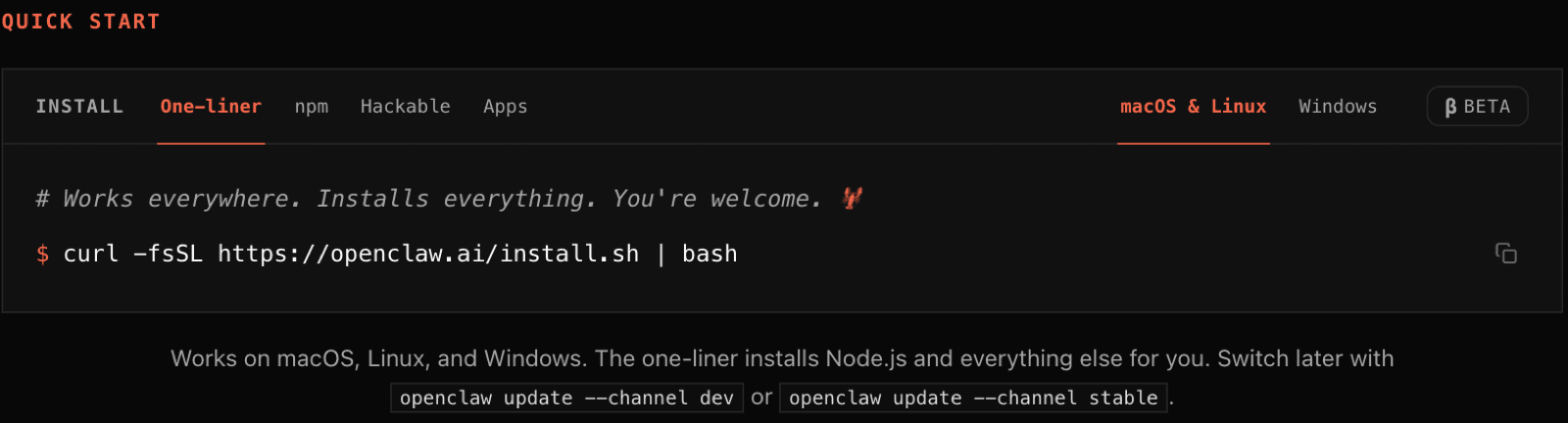
Scale check, pulled from the GitHub API on August 12, 2026: 385,994 stars and 81,122 forks, with commits landing the same day. The 346k figure quoted in most write-ups is months stale. Installation is a single command that works on macOS, Linux, and Windows, and the agent reaches you through 29 chat channels including WhatsApp, Telegram, Discord, Slack, Signal, and iMessage.
None of that makes OpenClaw the right answer for everyone. It does mean three of the five reasons people historically gave for leaving no longer hold, so check your reason against this list before you migrate anything.
What this resolved: Which common objections to OpenClaw are now out of date.
What it left unsolved: The objections that still stand, which are setup effort, security boundaries, and team operation. Those are the rest of this page.
What OpenClaw Actually Is
OpenClaw is commonly described as a free, open-source autonomous AI assistant that can run on your machine and interact through messaging-style workflows. The project lineage matters for searchers comparing alternatives: available summaries describe OpenClaw as formerly Clawdbot and Moltbot, created by Peter Steinberger, initially released as Clawdbot in November 2025, and MIT-licensed. Public summaries such as the OpenClaw overview frame it as a self-hosted agent that executes tasks with large language models. If the older name appears in your research, our Clawbot name history explains how it relates to Clawdbot, Moltbot, and OpenClaw.
That context explains both sides of the appeal. On one hand, OpenClaw is attractive because the platform cost can be zero, the code can be inspected, and technical users can keep more control over runtime and data flow. On the other hand, the user owns the whole stack: local machine health, model API keys, container hygiene, integration permissions, updates, backups, and troubleshooting.
The useful question is not "what is OpenClaw?" It is "which alternative do I want when OpenClaw is too much setup, too broad a permission surface, or too single-user for my team?" That is why there is no single winner here, only a decision map.
Myth 1: "OpenClaw Is the Only Serious Option"
OpenClaw is important, but it is not the only serious option. The awesome-ai-agents-2026 list alone tracks hundreds of agent resources across many categories, and OpenClaw alternatives now cover local runtimes, secure sandboxes, workflow builders, coding agents, and managed cloud workspaces.
The free self-hosted branch includes Hermes Agent for full stack control, ZeroClaw for a lightweight Rust-based runtime, Goclaw for a Go runtime with OpenClaw-compatible ideas, NanoClaw and NemoClaw for security-focused or constrained deployments, and AutoGPT for visual agent workflows. Developer frameworks such as LangGraph, CrewAI, AutoGen, and Agno are better when the goal is to build an agent system rather than run a ready-made personal assistant. For a lightweight container-based assistant, our NanoClaw guide covers isolation, code-based customization, setup, and dashboard limits.
The managed branch is different. Tools like Manus AI, Vellum, and MoClaw reduce setup burden, but they trade away some infrastructure control. That does not make them worse. It means they answer a different version of the query: not "what is free to install?" but "what is low-friction enough to actually use?"
Myth 2: "OpenClaw Setup Is Easy"
OpenClaw setup can be straightforward for the right user, but it is not objectively easy. The pain points are practical: Docker ports, dependency conflicts, Node.js setup, environment variables, local service configuration, GPU or runtime assumptions, Telegram or messaging setup, and basic container safety.
That friction matters because an AI agent is not a normal note-taking app. It can touch files, credentials, browsers, email, APIs, and scheduled workflows. A security-conscious setup often means testing in a throwaway VM or container, separating keys, reviewing skills, and avoiding broad permissions until you understand what the agent can do.
Several 2026 comparisons also flag specific risk claims that should not be glossed over: 469 unresolved security issues as of April 2026, a ClawHavoc supply-chain attack affecting 341 malicious skills, setup complexity, no simple persistent memory layer, and a single-user bias. Those numbers should be read as warning signals, not as a reason to panic. The practical takeaway is simpler: treat OpenClaw like infrastructure, not like a casual browser extension.
This is where a product like MoClaw can be a legitimate fallback. It is not a free self-hosted replacement, but its free trial and managed cloud computer model remove the local setup work. If your main problem is not price but time, that difference matters.
Myth 3: "Local Means Private by Default"
Local control can improve privacy, but it does not automatically make a workflow private or safe. OpenClaw still depends on model APIs, tool permissions, user-managed credentials, and whatever skills or integrations you install. If a local agent can read your browser, email, files, or shell, it needs the same permission discipline you would apply to production automation.
The secure OpenClaw alternative discussion from Composio points in the right direction: isolation, credential boundaries, and least-privilege tool access matter more than whether the UI runs locally. NanoClaw-style container isolation, Vellum-style credential separation, and local-first frameworks can all reduce risk when the user actually configures them correctly.
Use local-first tools when policy requires data to remain on your hardware, you can inspect the code, and you are willing to maintain the runtime. Use managed alternatives when uptime, team access, audit trails, and operational support are more important than owning every layer yourself. For NVIDIA's policy-controlled sandbox stack, our NemoClaw guide explains its hardware needs, alpha limits, and managed alternatives.
Myth 4: "Free Alternatives Are Hobby Projects"
Some free tools are experiments. Others are serious infrastructure. The difference is whether the alternative has a clear use case, an active community, and a maintenance path.
The Vellum 2026 OpenClaw comparison ranks options such as Vellum and Hermes Agent around security, memory, desktop integration, and setup quality. AutoGPT remains a recognizable open-source workflow builder for users who want visual agent construction. Dify is stronger when the goal is app-like agent workflows and LLM application building rather than a personal desktop assistant.
The important distinction is category fit. Hermes Agent or ZeroClaw can be excellent for a developer who wants full self-hosting. Claude Code is a better alternative for someone whose work is mostly code review, file edits, and tests. LangGraph, CrewAI, AutoGen, and Agno are frameworks for teams building agent systems. MoClaw is a managed workspace for users who want tasks, schedules, browser work, and integrations without managing a local runtime.
Myth 5: "Switching Means Starting Over"
Switching away from OpenClaw does not have to mean rebuilding everything. It does mean choosing the right first workflow. The Naoma AI use-case guide recommends comparing alternatives by actual task category, which is the right lens for this keyword.
Start by auditing the three OpenClaw tasks you used most often: coding, browser research, email or messaging, local file automation, scheduled workflows, or multi-agent experiments. Then map each task to one replacement rather than trying to replace the whole platform in one move.
A reasonable switching plan looks like this:
- Keep OpenClaw for generic local tasks that still work.
- Move coding work to Claude Code, Aider, or another code-native tool.
- Move app workflows to AutoGPT, Dify, Vellum, LangGraph, CrewAI, AutoGen, or Agno.
- Move always-on scheduled work to a managed platform if local uptime is unreliable.
- Recheck after 30 days and keep only the tools that clearly outperform the previous setup.
That plan works because it treats OpenClaw as a real tool, not as a strawman. The point is to reduce friction without losing the work style that made OpenClaw appealing.
OpenClaw Alternatives Compared
| Alternative | Type | Free or low-cost path | Best for | Main tradeoff |
|---|---|---|---|---|
| Hermes Agent | Self-hosted agent | Free, open source | Full server-side control and model customization | Requires technical setup and maintenance |
| ZeroClaw | Lightweight local runtime | Free, open source | Rust-based or bare-metal style deployments | Smaller ecosystem than OpenClaw |
| Goclaw | Go runtime | Free, open source | OpenClaw-compatible workflows in Go | Best for developers, not non-technical users |
| NanoClaw | Security-focused local agent | Free or low-cost depending on package | Docker-style isolation and safer agent boundaries | Setup still matters |
| NemoClaw | Local or constrained agent | Free or low-cost depending on package | Users who want a narrower OpenClaw-like footprint | Less broad than a general assistant |
| AutoGPT | Visual workflow builder | Free self-hosted, paid cloud options | No-code or low-code agent workflows | Needs workflow design and testing |
| Dify | LLM app and agent builder | Free self-hosted path | Building agent apps, chatflows, and RAG workflows | More app platform than personal assistant |
| LangGraph / CrewAI / AutoGen / Agno | Developer frameworks | Open-source paths available | Building custom multi-agent systems | Requires engineering work |
| Vellum | Security-first personal AI alternative | Free download plus optional hosting, as noted in comparison coverage | Credential isolation, memory, desktop use | Product fit depends on OS and workflow |
| Manus AI | Managed cloud automation | Paid or limited trials vary | General cloud-based task automation | Less infrastructure control |
| Claude Code | Coding agent | Included in relevant Claude plans | Codebase edits, tests, terminal workflows | Not a general personal assistant |
| MoClaw | Managed cloud agent workspace | Free trial, then paid plan | No-install always-on workflows, browser work, schedules | Not a free self-hosted tool |
The distinction that matters: an OpenClaw alternative can mean free self-hosted software, a free trial on a managed assistant, or an open-source framework that still costs engineering time. Only the first is free the way OpenClaw is free.
Managed Alternatives, If You Do Not Want to Self-Host
Self-hosting is the point of OpenClaw, so the managed list is a different question: who runs the machine when you do not want to. For a hosted deployment example, our SimpleClaw review checks its setup claims, pricing evidence, channels, and security questions.
| Platform | Best For | Strongest Trait | Honest Limitation | Entry Price |
|---|---|---|---|---|
| MoClaw | Managed multi-channel agents on OpenClaw | Skills marketplace, multi-channel | Same engine as OpenClaw | $20 / mo |
| LangGraph Cloud | Graph-based agents | Graph control flow, LangSmith eval | Python-leaning | Custom |
| Vellum | Eval-heavy and prompt management | Evals, A/B testing | Niche audience | Custom |
| Modal | Serverless agent runtimes | Cold-start under 1s | DIY assembly | Usage-based |
| Cloudflare Workers AI | Edge-native agents | Low cold start, global | Newer surface | Usage-based |
| E2B | Code-execution agents | Sandboxed code runtime | Specialist | Usage-based |
| AWS Bedrock Agents | AWS-heavy enterprises | Native AWS integration | Steeper setup | Usage-based |
| Azure AI Foundry | Microsoft 365 shops | M365 integration | Locked to Azure | Usage-based |
The honest framing on MoClaw: it is the same engine as OpenClaw with managed hosting, a skills marketplace, and multi-channel messaging on top. If you like OpenClaw and want it managed, that is the short path. If you want to leave the engine entirely, the open-source table above is the menu.
Section summary: Managed options split between specialist agent platforms and hyperscaler runtimes. Pick by where your data has to live.
Migration Patterns That Work
If you do decide to move off OpenClaw, or off any framework, a few patterns hold up.
Migrate one workflow at a time. A big-bang migration always misses a corner case. Pick the highest-value workflow, port it, run both old and new in parallel for two weeks, then cut over.
Keep your skill format portable. A skill that calls an external tool should not depend on framework internals. If yours does, refactor before you migrate.
Keep state in a real database. Postgres, DynamoDB, or a vector store. Frameworks come and go; your state outlives them.
Document the production behavior, not the code. Which actions does the agent take, which inputs trigger them, which outputs does it produce? You re-implement behavior on the new framework, not line-by-line code.
Run an eval suite on both. Same inputs, compare outputs. Catches regressions before users do.
The teams that try to evaluate five frameworks at once spend their first month indecisive. One workflow, one framework, one team, for two weeks, then let operational reality decide, not GitHub stars.
Decision Framework
The Duet self-hosted vs managed comparison frames the choice around setup, team use, uptime, security, and cost. That is the practical decision tree for this article.
| Need | Better fit | Why |
|---|---|---|
| Full local control | OpenClaw, Hermes Agent, ZeroClaw, Goclaw | You own the runtime and can inspect the stack |
| Lowest platform cost | OpenClaw, Hermes Agent, AutoGPT, Dify | Free self-hosting can work if you can maintain it |
| Security isolation | NanoClaw, Vellum, careful containerized OpenClaw | Boundaries and credential handling matter more than hype |
| Visual workflow building | AutoGPT, Dify, Vellum | Better than forcing every workflow through a personal assistant shell |
| Coding and repo work | Claude Code, Aider, OpenHands-style tools | Code agents understand files, tests, and terminal flows better |
| Multi-agent app building | LangGraph, CrewAI, AutoGen, Agno | These are frameworks, not plug-and-play assistants |
| Team collaboration | Managed platforms | RBAC, audit trails, uptime, and support become more important |
| No-install always-on tasks | MoClaw or another managed cloud agent | Useful when OpenClaw's local runtime is the bottleneck |
Choose OpenClaw if you want control and accept maintenance. Choose a free self-hosted alternative if OpenClaw's architecture is not the right fit. Choose MoClaw or another managed option if the real requirement is a working cloud agent environment with less setup. For the baseline project and the choice between self-hosting and managed cloud operation, see our OpenClaw deployment review.
Related MoClaw Reading
FAQ
What is the best OpenClaw alternative in 2026?
There is no single one. For self-hosting, start with Hermes Agent, ZeroClaw, Goclaw, AutoGPT, or Dify depending on whether you want a personal assistant, a lightweight runtime, a workflow builder, or an app platform. For coding, use Claude Code or a code-native agent. For no-install usage, a managed tool with a free trial is often more realistic than a free local install that nobody maintains. For a portable Go-based assistant, our PicoClaw guide reviews its lightweight design, setup, and pre-v1 security limits.
Does OpenClaw run on Windows?
Yes. Since June 2, 2026 it runs natively on Windows inside Microsoft Execution Containers, announced in the Microsoft Build 2026 keynote, and the sandbox contains what the agent can touch. The install one-liner covers macOS, Linux, and Windows. Comparisons that still call OpenClaw macOS-only predate that change.
Who maintains OpenClaw now?
The OpenClaw Foundation, a non-profit with a full-time team, announced July 8, 2026. The repository's LICENSE file carries a 2026 OpenClaw Foundation copyright line. Before that it was Peter Steinberger's project, and "one maintainer" was a common objection in alternative round-ups.
Is OpenClaw still worth using?
Yes, if you are technical, want open-source control, and can manage setup, API keys, permissions, and maintenance. It is less attractive if you need team workflows, persistent memory without custom work, strong uptime, or a safer default setup.
Is a managed OpenClaw alternative less private?
Not automatically. A managed platform may offer audit logs, permission controls, and hosted reliability, while a self-hosted setup gives more infrastructure control. The safer choice depends on data policy, credential handling, permissions, and whether someone is actually maintaining the system.
Where does MoClaw fit in this comparison?
MoClaw is the managed fallback, not the free self-hosted answer. It fits users who searched for an OpenClaw alternative because setup, local uptime, or maintenance became the blocker. If your priority is zero install and always-on agent work, it deserves a trial alongside the open-source options.
Should I replace OpenClaw completely?
Only if one alternative covers your most valuable workflows better. A safer path is to keep OpenClaw for what still works, move specialized work to better-fit tools, and remove OpenClaw only after the replacement proves itself for real tasks.
Check Why You Are Leaving OpenClaw Before You Migrate Anything
Three of the five reasons people historically gave for leaving OpenClaw stopped being true in mid-2026: it is no longer one maintainer, no longer desktop-only, and no longer unavailable on Windows. If your reason was on that list, the cheapest migration is none at all.
The reasons that survive are setup effort, permission surface, and who operates the thing on a Tuesday when it breaks. Those are not fixed by switching to a different self-hosted agent, because you inherit the same three problems with a smaller community around them. Write down which of the three is actually blocking you, then pick from the column of this page that solves that one. If the answer is "nobody wants to operate it", you are looking for a managed option and the open-source table above is a distraction.
Continue Reading
More Comparison
Self-Hosted AI Agent Alternatives 2026

AI Agent Platform Comparison: 7 Picks for 2026

AI Agent vs Automation Tool: 5 Myths for 2026

Cheaper Manus AI Alternative: 2026 Guide

Zapier Alternative: 2026 Selection Guide

7 Devin AI Alternatives and What They Cost
The MoClaw editorial team writes about workflow automation, AI agents, and the tools we build. Default byline for industry overviews, listicles, and collaborative pieces.
Choosing between tools? Let MoClaw run the work.
Always-on AI assistant on its own cloud computer. No switching required, no setup.
References: OpenClaw overview · Vellum: Best OpenClaw Alternatives in 2026 · Naoma AI: OpenClaw Alternatives by Use Case · Composio: Secure OpenClaw Alternatives · Duet: OpenClaw vs Managed AI Agent Platforms · awesome-ai-agents-2026 · AutoGPT GitHub repository · Dify GitHub repository · LangGraph GitHub repository · CrewAI GitHub repository · AutoGen GitHub repository · Agno GitHub repository · MoClaw product page