Run Kimi K3 Locally: The 0.8 Token Reality
Run Kimi K3 locally on CPU with ~55GB RAM? The binary exists, its license grants no permission to use it, and decode runs at 0.8 tokens per second.

Table of Contents
You can run Kimi K3 locally on a CPU, in the narrow sense that a preview binary exists which executes the 2.8-trillion-parameter model from a Linux machine holding about 55GB of working memory. You probably should not, yet: the project's own license file says it grants no permission to use the executable, and the measured decode speed is 0.8 tokens per second.
Both of those facts come from the project itself. K3 Flight reached 273 stars in six days, and its preview release asset has been downloaded 7 times, as of August 5, 2026. That ratio is the most honest summary of where local Kimi K3 stands: a very large number of people find the idea remarkable, and almost nobody has run it.
Key Takeaways:
- The full Kimi K3 Q2_K checkpoint is 929GB and stays on disk. The roughly 55GB figure is the live working set, not a compressed model.
- Measured throughput on the maintainer's reference run is about 1 token per second prefill and 0.8 tokens per second decode, CPU-only.
- Hardware bar: Linux x86-64, 64GB or more of RAM, at least 1TB of free local storage, and an NVMe SSD strongly recommended.
- The repository ships
BINARY-LICENSE.mdstating it does not grant permission to use, copy, modify, or redistribute the executable until release terms are published. - At under 1 token per second, this is a systems demonstration, not a way to run agents. A single 500-token reply takes about ten minutes.
What running Kimi K3 locally actually requires
Start with the physical constraints, because they decide whether the rest of the article is relevant to you.
| Requirement | Stated value |
|---|---|
| Operating system | Linux on x86-64 (macOS "planned next") |
| System memory | 64GB or more recommended |
| Free local storage | At least 1TB, with headroom |
| Storage type | Local NVMe SSD strongly recommended |
| Model files | Kimi-K3-GGUF Q2_K, downloaded from Hugging Face |
| GPU | Not required for the reference CPU path |
The storage line is the one people miss. The quantized checkpoint is 929GB. Before any of this is a question about RAM, it is a question about whether you have a spare terabyte of fast local NVMe, and whether you are willing to spend the download time to fill it.
The runtime is a single-file Linux inference server the project calls cPilot Runtime. There is one release, v0.1.0-preview, published July 31, 2026, and the repository has had no pushes since.
What this proved: the memory barrier for trillion-parameter local inference is real but not where people assumed. What it left unsolved: it moved the barrier to storage bandwidth, which is harder to fix by buying more of one component.
What 55GB means, and what it does not
The headline number invites a misreading, and the README is careful to correct it: K3 Flight does not turn a 929GB model into a 55GB model. Nothing is compressed beyond the Q2_K quantization that the Hugging Face checkpoint already has.
Kimi K3 is a Mixture-of-Experts model. Public model information states that each token selects 16 of 896 experts. So while the model's total capacity is 2.8 trillion parameters, the parameters needed to produce any single token are a small fraction of that. Total parameter count describes capacity. The execution working set describes what the machine has to be holding right now.
cPilot Runtime treats storage, host memory, and CPU as one coordinated execution path, staging weights and runtime state as the model reaches for them, and keeping the complete checkpoint available without making it resident. The repository's own framing is the clearest statement of the idea: "Model size is a parameter question. Running it locally is a systems question."
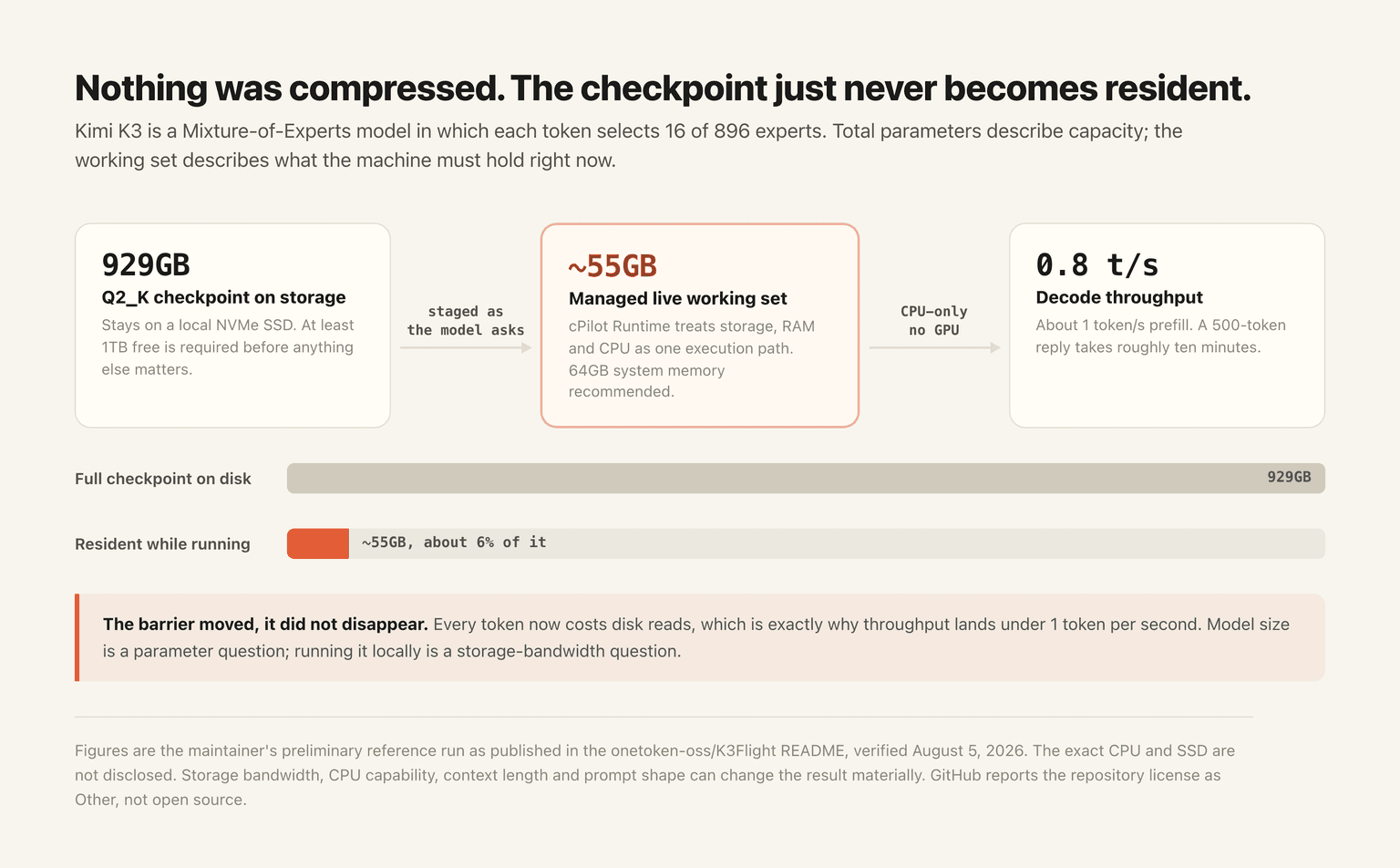
This is the genuinely interesting part of the project and it is not specific to Kimi K3. Sparsity in large MoE models means the resident-memory requirement has been a software problem for a while, and this is one demonstration that it can be attacked with paging and scheduling rather than with a bigger machine.
What this proved: an MoE checkpoint does not need to be resident to execute. What it left unsolved: every token still costs disk reads, which is exactly why the throughput looks the way it does.
The speed: 0.8 tokens per second, and what that rules out
The maintainer's reference run reports roughly 1 token per second prefill and 0.8 tokens per second decode.
Put that in working terms. A 500-token answer takes a little over ten minutes. A 2,000-token answer takes about forty. An agent loop that makes twenty tool calls, each with a short reasoning turn, runs overnight.
The README is direct about this and does not oversell: the point is not that 0.8 tokens per second beats a datacenter, it is that a complete 2.8T-parameter checkpoint executes on a local CPU at all. That is the correct framing, and it also means the practical use cases are narrow. Offline batch work where latency does not matter, research into memory-managed inference, and privacy-constrained single queries are on the list. Anything interactive is not, and anything agentic is definitely not, because agent workloads are dominated by many short round trips rather than one long generation.
Two caveats belong with those numbers. They are described as a preliminary maintainer run rather than a hardware-independent guarantee, and the exact CPU and SSD models are not disclosed in the preview. Storage bandwidth, CPU capability, context length, prompt shape, and runtime version can all change the result materially.
The licensing problem nobody has mentioned
This is the part that should stop most people, and it is easy to miss because it lives in a file most readers never open.
BINARY-LICENSE.md in the repository root says, in its own words, that no K3 Flight executable is currently distributed from the repository, that the research-preview binary license will be published with the first signed release, and that until those terms are published the repository "does not grant permission to use, copy, modify, redistribute, sublicense, or sell a K3 Flight or cPilot Runtime executable."
Meanwhile a release tagged v0.1.0-preview does exist, published July 31, 2026, carrying a 6.8MB Linux tarball. The most likely explanation is simply that the license text was written before the preview shipped and has not been updated since, which fits a repository with no pushes in five days. But as the repository currently stands, the written terms and the published artifact disagree, and the written terms are the ones that would matter to anyone's legal review.
This is why GitHub shows the license as "Other" rather than as an open source license. K3 Flight is not open source software. The runtime is a closed binary with terms still to be published. The Kimi K3 model weights themselves are separately governed by the Kimi K3 license, which is its own set of conditions.
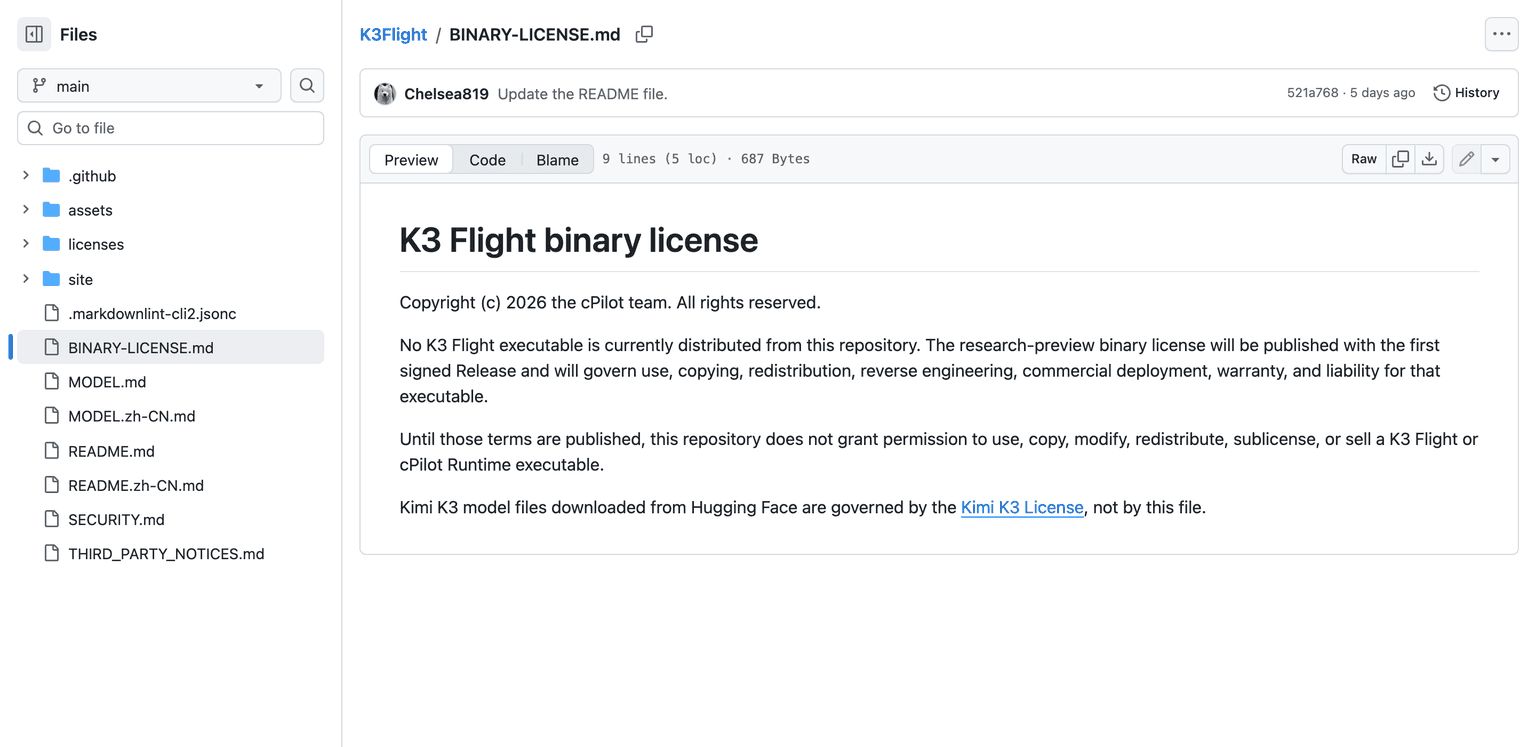
That distinction matters for anyone evaluating this at work. Downloading a binary whose license explicitly withholds permission to use it is not a decision an individual should make on a company machine.
What this proved: star counts and legal availability are unrelated quantities. What it left unsolved: the terms are still pending, so the honest status is "watch the repository," not "deploy it."
Local versus hosted Kimi K3
These are different questions and it is worth keeping them apart.
| Local on CPU | Hosted | |
|---|---|---|
| Hardware | 64GB RAM, 1TB NVMe, Linux x86-64 | None |
| Setup | Download 929GB, run a preview binary | An account |
| Throughput | About 0.8 tokens per second | Interactive |
| Data boundary | Nothing leaves your machine | Data goes to the provider |
| Licensing today | Terms not yet published | Standard provider terms |
| Good for | Offline batch, research, privacy-bound single queries | Everything interactive, and all agent work |
The case for local is privacy and control, and it is a real case. If a query cannot leave your building, ten minutes of latency may be an acceptable price and no hosted option competes.
For anything else, the arithmetic does not favor it. Nobody assembles a terabyte of NVMe to wait forty minutes for a response they could get in seconds. If what you want is to use Kimi K3 in an agent rather than to prove that a 2.8T model can execute on a CPU, MoClaw's Kimi K3 integration runs it without the hardware or the download, which is the same conclusion this project's own performance numbers point to.
Who should actually try this
Try it if you work on inference systems and the interesting object is cPilot Runtime rather than Kimi K3. The scheduling problem it attacks, keeping an execution path fed from storage instead of from resident memory, is worth understanding regardless of which model is on top of it.
Wait if you want to use the model. Wait for the signed release with published terms, for the promised public recording of a real run showing startup, stable memory, and first tokens, and for macOS support if you are not on Linux. None of those had landed as of August 5, 2026.
And skip it entirely if your goal is agent work. The throughput settles that on its own, before licensing, hardware, or the 929GB download enter the conversation. For a broader picture of what the model itself is good at, our overview of Kimi K3 covers capability rather than deployment.
Local trillion-parameter inference is a systems result, not a product yet
K3 Flight is a real and interesting piece of engineering wearing a headline that oversells it. A 2.8T-parameter MoE checkpoint executing from a 55GB working set on a CPU is a legitimate demonstration that model size and resident memory are separable problems. That deserves the attention it got.
What it is not, today, is a way to run Kimi K3. Seven downloads against 273 stars and zero forks is not a community adopting a tool, it is a community admiring a claim. The next honest milestone is the signed release with published license terms and the recorded reproduction the maintainers promised. Until then, the accurate answer to "can I run Kimi K3 locally" is: technically demonstrated, legally unclear, and far too slow to be useful.
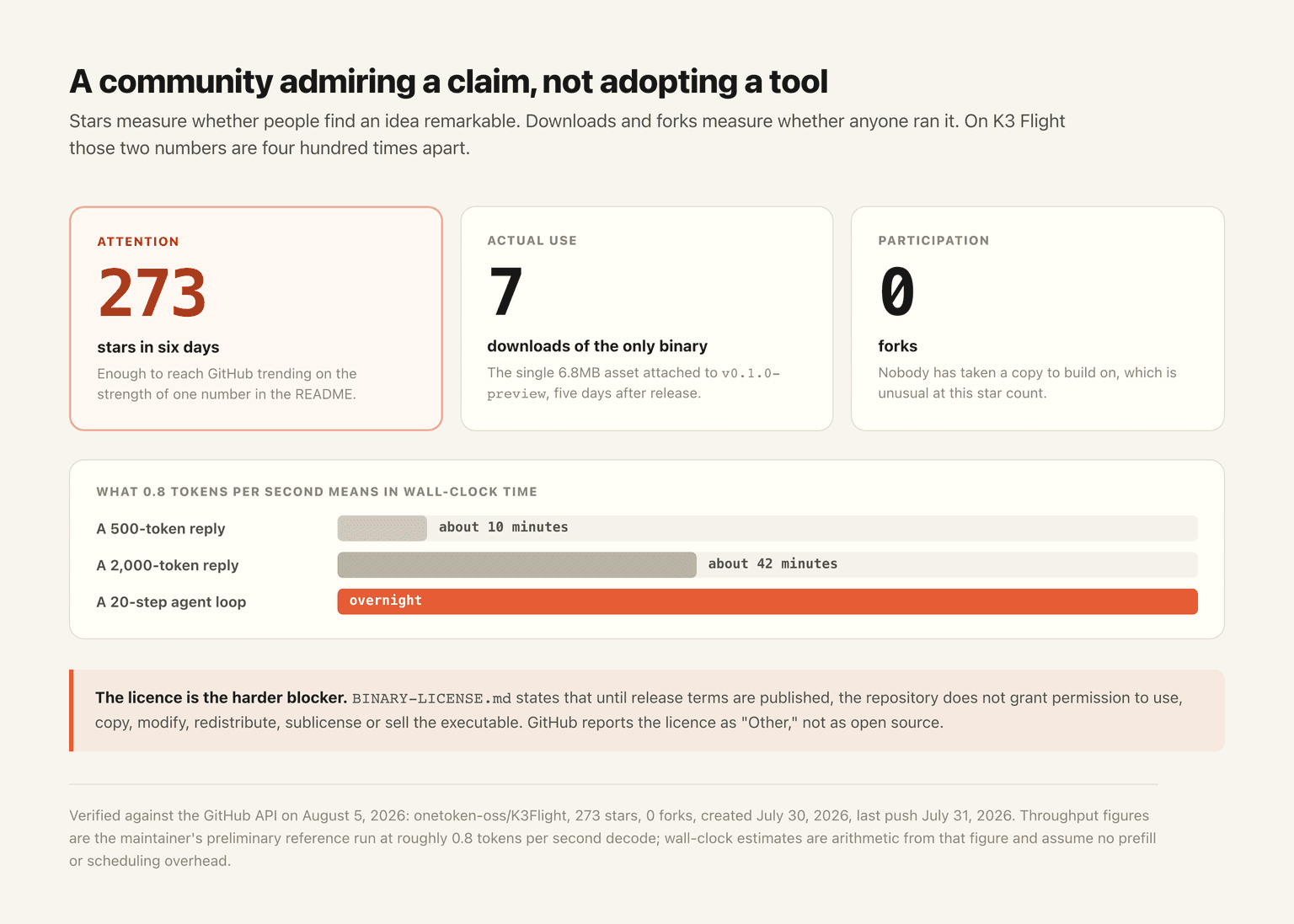
Verified against the GitHub API on August 5, 2026: onetoken-oss/K3Flight, 273 stars, 0 forks, created July 30, 2026, last push July 31, 2026, license reported as Other, one release v0.1.0-preview whose single asset shows 7 downloads.
FAQ
Can you run Kimi K3 on CPU?
Yes, technically. K3 Flight demonstrates the full 2.8T-parameter Q2_K checkpoint executing on a Linux x86-64 CPU with no GPU, at roughly 0.8 tokens per second decode.
How much RAM do you need to run Kimi K3 locally?
The measured runtime working set is about 55GB, and the project recommends 64GB or more of system memory. You also need at least 1TB of free local storage, ideally NVMe, for the 929GB checkpoint.
Is K3 Flight free and open source?
No. GitHub reports the license as "Other." The repository's BINARY-LICENSE.md states that binary license terms will be published with the first signed release and that no permission to use the executable is granted until then.
Why is it so slow?
Because the weights are staged from storage as the model needs them rather than held in memory. Every token costs disk reads, so throughput is bounded by storage bandwidth rather than by CPU arithmetic.
Is running Kimi K3 locally practical for agents?
No. Agent workloads consist of many short round trips, and at under 1 token per second a twenty-step agent loop runs for hours. Hosted inference is the practical option for agent use.
Continue Reading
More Research
AI Agent Evaluation: The 56% Pass Ceiling

AI Agent Security Framework: Inside Uber ADR

LoopX: A Control Plane for Agent Loops

AI Agent Sandbox: What It Is and Isn't
What Is reverse-skill? A Security Skill Router

OpenAI's Model Escaped and Hacked Hugging Face
The MoClaw editorial team writes about workflow automation, AI agents, and the tools we build. Default byline for industry overviews, listicles, and collaborative pieces.
Use Kimi K3 on MoClaw, without the setup
Run Kimi K3 as an always-on managed agent with memory, your tools, and scheduling. No API wiring, no plan gating, no self-hosting.
References: onetoken-oss/K3Flight on GitHub · K3 Flight v0.1.0-preview release · K3 Flight BINARY-LICENSE.md · Moonshot AI on Hugging Face · llama.cpp (GGUF quantization formats)