Run Kimi K3 in an Agent, No Self-Hosting

Want Kimi K3 working in an agent without a GPU? A managed platform runs it with skills and memory, so you skip the 1.56TB self-host bill.
Table of Contents
You run a Kimi K3 agent without self-hosting by pointing a managed platform at the model and letting it handle the servers, so you never touch a GPU. Moonshot AI's flagship is a roughly 2.8-trillion-parameter Mixture-of-Experts model; the published MXFP4 checkpoint runs 1.56 TB across 96 shards on Hugging Face, and Moonshot recommends serving it on a supernode of 64 or more accelerators. That is the bill you skip when a hosted agent runs the model for you.
Most builders who got excited about K3 during launch week did not want a data center. They wanted the model doing something useful by Friday: reading their tickets, drafting replies, running on a schedule. This tutorial is about that job. If you want the spec sheet instead, read what is Kimi K3; if you are hunting for a no-cost way to poke at it, Kimi K3 free covers the app tier and the July 27 open-weights drop. Here the goal is narrower: a working Kimi K3 agent, no infrastructure.
Key Takeaways:
- Kimi K3's published weights run 1.56 TB in MXFP4, and Moonshot's own vLLM recipe starts at eight GB300 accelerators, so self-hosting is a cluster project, not a laptop one.
- A managed agent runs K3 (and smaller open models like Gemma) over an API, so the GPU math never lands on you.
- The hard part of an agent is not the model; it is skills, persistent memory, scheduling, and channel plumbing, which a managed platform owns.
- Renting 8x H100 on-demand runs near $32 an hour before you write a line of orchestration (Lambda pricing).
- Self-hosting still wins when you have strict data-residency rules, steady round-the-clock load, or an ops team that wants the weights in-house.
Run Kimi K3 in an Agent Without a GPU: The Short Version
Here is the whole idea in one breath: the model is a service you call, and the agent is the thing that calls it on a loop with tools and memory. When both live on a managed platform, your involvement stops at picking "Kimi K3" from a dropdown and writing what you want the agent to do.
That split matters because people conflate two very different tasks. Getting K3 to answer a prompt is trivial; you can do it through the Kimi app in a minute. Getting K3 to answer the same class of prompt every hour, remember what it decided last time, reach your Slack, and hand off to a human when it is unsure is the real work. The model is maybe five percent of that. MoClaw is a hosted take on the OpenClaw agent framework, so it carries the other ninety-five: the runtime, the skill library, cross-session memory, and multi-channel messaging.
What you get: K3's capability inside a running agent by the end of an afternoon. What you don't: any control over the model's own hosting, which is the point, not a gap.
What Self-Hosting Kimi K3 Actually Costs
Before the tutorial, it helps to know exactly what you are opting out of, because the numbers are steeper than most people guess.
Start with memory. K3 is a sparse MoE with roughly 2.8T total parameters. Quantized to MXFP4 (4 bits per parameter), the arithmetic gives roughly 1.4 TB, and the checkpoint Moonshot actually published measures 1.56 TB across 96 safetensors shards once block scales and the higher-precision layers are counted. That is just the weights sitting still. Turn the model on and you add a KV cache that, at the full 1M-token context, can reach a couple hundred gigabytes on its own, plus activation buffers and CUDA overhead. A common community sizing lands around sixteen H100 80GB cards across two NVLink-connected nodes to get roughly 1.28 TB of VRAM, and Moonshot's own guidance points at 64 or more accelerators for real serving.
Now price that. Used H100 SXM cards trade around $15,000 to $20,000 each on the secondary market, so a buy-it-outright cluster runs well past $400,000 before power and networking. Renting is gentler but not gentle: an 8x H100 node on Lambda goes for about $3.99 per GPU-hour on-demand, roughly $32 an hour, and K3 wants more than eight cards (Spheron's Lambda breakdown). Even at a modest duty cycle, you are into five figures a month before a single skill is written. Then there is the part nobody bills you for directly: someone has to configure tensor and expert parallelism in a server like vLLM, keep it patched, and stay on call when a node drops.
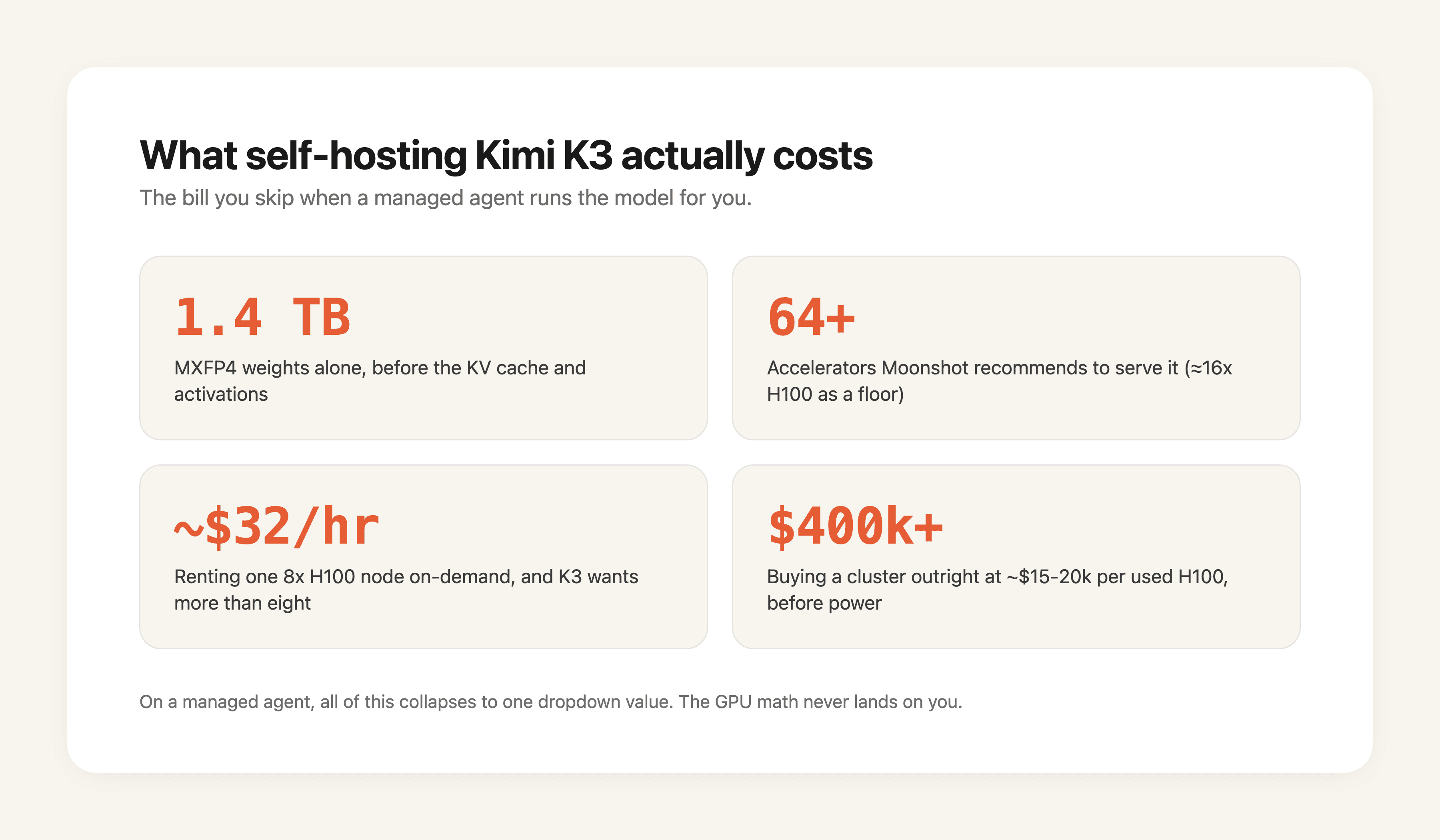
What this section gets you: an honest floor for the self-host path. What it doesn't: a claim that self-hosting is wrong, only that it is a project with a headcount, not a checkbox.
Self-Host vs Managed Agent: The Numbers Side by Side
Laid out flat, the two paths are not close for most teams. The table uses verifiable figures where they exist and marks estimates as estimates.
| Dimension | Self-host Kimi K3 (or large Gemma) | Managed agent (MoClaw) |
|---|---|---|
| Weights on disk | 1.56 TB (K3, MXFP4); Gemma 31B far smaller | None; model runs upstream |
| VRAM to serve K3 | ~1.28 TB, roughly 16x H100 80GB; Moonshot suggests 64+ accelerators | Zero on your side |
| Hardware cost | Used H100 ~$15k-$20k each; buy-out cluster $400k+ | Included in subscription |
| Rental cost | 8x H100 ~$32/hr on-demand (K3 needs more) | Flat plan, see pricing |
| Ops burden | Configure vLLM tensor/expert parallel, patch, on-call | Platform team owns uptime |
| Time to first working agent | Days to weeks | An afternoon |
| Data residency control | Full, weights in your VPC | Vendor-hosted |
| Smaller Gemma models | Can fit 1-2 GPUs (e.g. Gemma 4 12B) | Same dropdown, no GPU |
Gemma is the honest asterisk here. Google's Gemma 4 family ships in sizes from E2B up to 31B, and a 12B checkpoint genuinely does fit on a single high-end GPU, so "self-host" is not absurd for the small end. K3 is a different animal; its footprint is what pushes self-hosting out of reach for solo builders and small teams.
What this gets you: a decision you can defend to a finance team. What it doesn't: absolutes, since a team already running a GPU cluster reads this table differently than a two-person startup.
Step by Step: Put Kimi K3 in a Working Agent
This is the core of the tutorial. The steps assume a managed platform; nothing here touches a GPU, a pip install, or a CUDA driver.
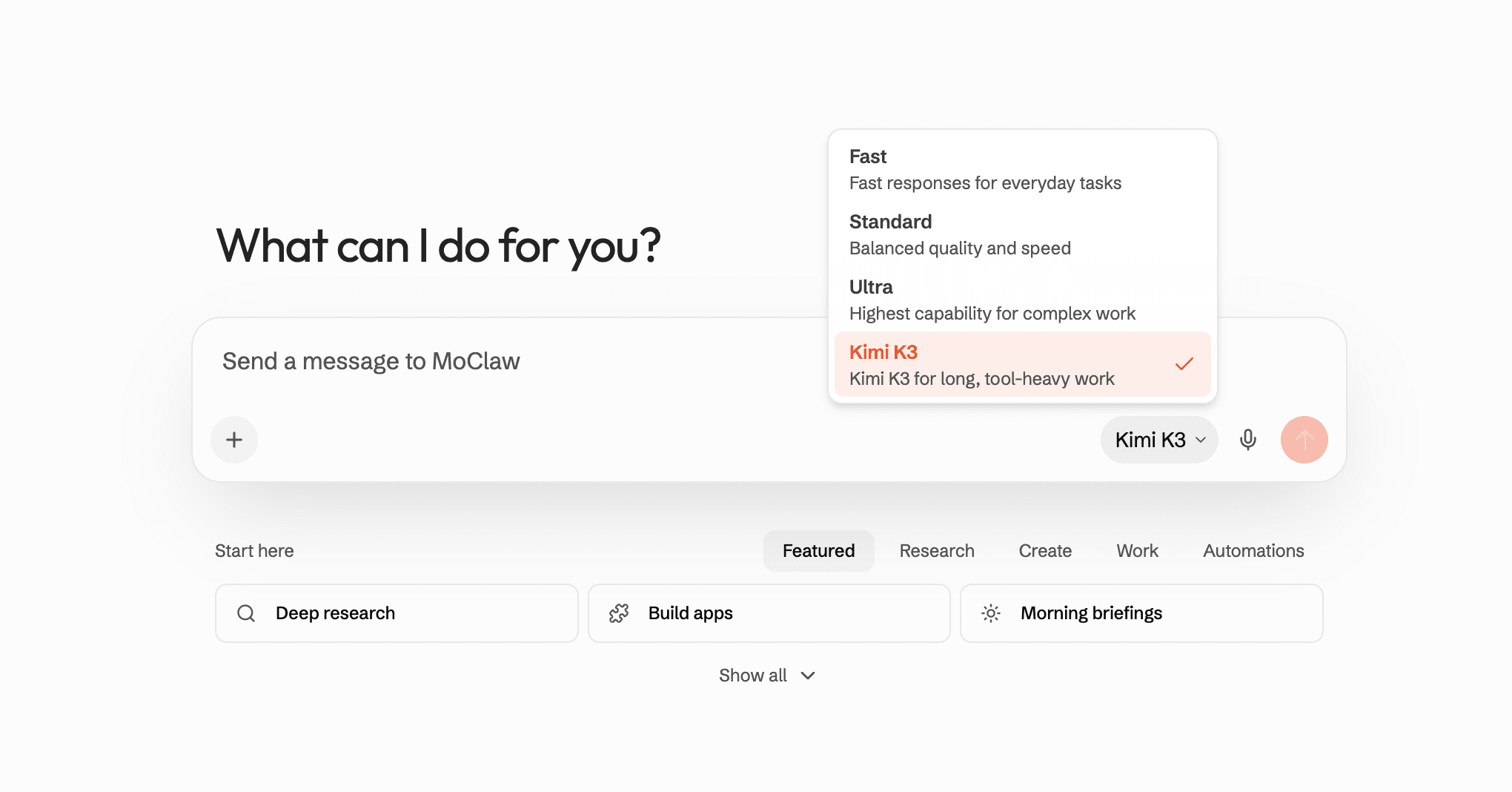
- Create the agent and name the job. Start a new agent and describe the outcome in plain language, not prompt-engineering incantations. "Read new support emails every 15 minutes, draft a reply for anything routine, flag the rest for me." The clearer the job, the less you fight it later.
- Pick Kimi K3 as the model. Open the model picker and select Kimi K3. On a managed platform this is a dropdown, not a deployment; the agent calls K3 over the API upstream. Because the model is a swappable part, you can switch to Gemma or a Claude model later without rebuilding the agent.
- Attach the skills the job needs. Add a skill for the inbox (read and draft), and a skill for wherever the human handoff lands, say Slack. Skills are the agent's hands; without them K3 can reason about your email but cannot touch it.
- Turn on memory. Enable persistent memory so the agent remembers which senders you always want escalated, the tone you edit drafts toward, and decisions from last week. This is what stops the agent from relearning your context every single run.
- Set the schedule and the guardrail. Give it the 15-minute cadence, and set the confidence gate so anything the agent is unsure about waits for your approval instead of sending. For a fuller treatment of that safety pattern, see the self-host vs managed agent piece.
- Run once, watch, then let it loose. Trigger a manual run, read what K3 drafted, correct anything off, and let the memory bank the correction. After a handful of clean runs you flip it to autonomous. That is the whole loop.
Notice what is absent: no weights downloaded, no parallelism configured, no node on fire at 2 a.m. The most infrastructure-heavy step was choosing a dropdown value.
What this gets you: a Kimi K3 agent that survives past the demo. What it doesn't: the ability to run K3 offline or air-gapped, which needs the self-host path.
Why Skills and Memory Matter More Than the Model
Builders fixate on the model because launch week is loud about benchmarks. In production the model is rarely the bottleneck. Two things decide whether an agent is useful: whether it can act, and whether it remembers.
Skills are how an agent acts. A raw K3 call returns text; a skill turns that text into a sent email, a created ticket, a posted message, a scraped page. Take Priya, a founding engineer who wired K3 into a test harness during launch week. The model impressed her in ten minutes, but the thing that actually saved her a sprint was not K3's reasoning; it was that the platform already had a Linear skill and a Gmail skill, so she did not write two integrations from scratch. The model was interchangeable. The skills did the real work.
Memory is the other half, and it is the quieter one. An agent without memory is a very smart goldfish; it solves your problem and forgets it did. With cross-session memory, the inbox agent learns that emails from your biggest customer always escalate, that you rewrite "Hi there" to "Hey," that Friday deploys get a softer tone. The model does not change between runs; the accumulated context does, and that is where the agent stops feeling generic. This is also why swapping K3 for a cheaper model later rarely breaks anything: the value lived in the skills and memory, not the weights.
What this gets you: a reason to stop model-shopping and start job-defining. What it doesn't: a free pass on model choice, since a weak model still drafts weak replies.
Where Gemma Fits: A Smaller Open Model in the Same Agent
Not every job wants a 2.8T model, and paying frontier token rates for inbox triage is a waste. This is where an open model like Gemma earns its slot.
Google's Gemma 4 is a family of open-weight models with a 256K-token context and support for over 140 languages, spanning both dense and MoE designs. The sizes run small enough that a 12B checkpoint fits comfortably on one strong GPU, which is exactly why Gemma is the model people actually do self-host. But you do not have to. On a managed agent, Gemma is the same dropdown as K3, so you can route the cheap, high-volume classification step to Gemma and reserve K3 for the calls that need real reasoning.
Consider a composite but realistic setup: a research agent uses Gemma to skim and tag two hundred incoming links a day (a benign, high-volume job), then hands the dozen that survive to K3 for a careful summary with your taste baked in. Same agent, same memory, two models, zero GPUs. Splitting work by model is trivial when neither one lives on your hardware. If cost per run is what you are optimizing, the cut AI agent costs guide goes deeper on this routing pattern.
What this gets you: a cheaper agent that still reaches for K3 when it counts. What it doesn't: a reason to run Gemma locally unless you specifically want offline control.
When Self-Hosting Is Still the Right Call
A fair tutorial admits where its own advice stops. Managed is the right default for most builders, but not for everyone, and pretending otherwise would be selling.
Self-host if any of these is true for you. Your data cannot leave your own network for regulatory or contractual reasons, and a vendor-hosted model is simply off the table. Or your load is steady and heavy enough, round the clock, that owning hardware beats per-token billing on pure math; a cluster amortizes well at high, constant utilization. Or you already run a GPU fleet and an ML platform team, so the marginal cost of adding one more model is an afternoon of their time, not a new hire. In those cases the Northflank and vLLM guides are your next stop, and the weights have been downloadable since July 27.
For the smaller Gemma sizes, the calculus shifts earlier; a single-GPU Gemma 4 12B is a reasonable weekend project even for a small team. K3 is where the line moves hard toward managed for anyone without a cluster.
What this gets you: permission to ignore the rest of this article if you are in one of those buckets. What it doesn't: a middle path, since "kind of self-host a 2.8T model" is not really a thing.
 @ardchainx.com/ardchain
THIS GUY IS BUILDING INSANE CUSTOM SITES FOR $0.23 IN API COSTS WITH THE NEW KIMI K3 currently #1 on the coding arena. the video attached shows a complex, highly detailed website. it was coded entirely by a new model called Kimi K
 @mikenevermissx.com/mikenevermiss
this guy just wired kimi k3 directly into codex. the model is insanely good, but the app isn’t. so instead of using the kimi app, he connected his kimi subscription to codex through oauth. now kimi k3 shows up right inside the mod
 @mikenevermissx.com/mikenevermiss
Kimi K3 vs GPT-5.6 Sol vs Fable 5 I gave all three models the exact same game design prompt. I looked at three things: how fast they built it, how good the design looked, and how the gameplay felt. Results: Kimi K3 had the best de
FAQ
Can I run Kimi K3 in an agent without a GPU?
Yes. A managed agent platform calls K3 over an API and runs the model upstream, so no GPU touches your side. You select K3, attach skills, and the platform owns the hardware. The GPU requirement only appears if you self-host the weights.
How much VRAM does Kimi K3 need to self-host?
The published MXFP4 weights alone are 1.56 TB, before any KV cache. Moonshot's official vLLM recipe puts the floor at eight GB300 accelerators on a single node (or eight MI355X/MI350X on ROCm, vLLM 0.27.0+), and recommends multi-node for production traffic. Posts claiming eight H100s will do are out by more than half: that is 640 GB against a 1.56 TB checkpoint. This is why most builders reach for a hosted version.
Is running Kimi K3 through a managed agent the same as self-hosting?
No, and that is the point. Self-hosting means the weights and the serving stack live on your hardware. A managed agent means you get K3's output without owning any of that; the trade-off is you rely on the vendor's hosting rather than controlling it yourself.
Can I use Gemma instead of Kimi K3 in the same agent?
Yes. On a managed platform both are model options behind the same dropdown, so you can run Gemma for cheap, high-volume steps and K3 for the reasoning-heavy ones inside one agent, sharing the same skills and memory.
Do I need the open weights to use K3 in an agent?
No. K3 has been reachable through the API and hosted platforms since its July 16 launch, and the July 27 weights release changed nothing about that path. Downloading the checkpoint matters if you want to self-host or run offline; for a managed agent it is irrelevant, and it did not make hosted access any cheaper either.
Will switching models later break my agent?
Usually not. Because the skills and memory carry the real logic, swapping K3 for Gemma or a Claude model is mostly a dropdown change. You may need to re-check tone or prompts, but the integrations and accumulated context stay put.
Pick the Model, Skip the Infrastructure
The durable lesson from K3's launch is not that one model won a week; it is that models now churn at the frontier every few weeks, and wiring each new one into a working agent by hand is a losing game. The 1.56 TB of weights, the eight GB300 accelerators, the vLLM parallelism config: that is real work you can simply decline. Treat the model as a swappable part, invest in the skills and memory around it, and let a managed platform absorb the hosting.
That is the whole argument for the managed path. Point a hosted agent at Kimi K3, give it a job it can do every hour, and let the GPU math be someone else's problem. When the next open model drops, you change a dropdown instead of a data center. Run Kimi K3 as a managed, always-on agent at /integrations/kimi-k3, no self-hosting required.
Continue Reading
More Tutorial
Run GLM-5.3 in Claude Code: Full Setup

How to Use ChatGPT Work for Research and Recurring Tasks

How to Try Inkling AI Free Online (Playground Guide)

GLM-5.3 reasoning_effort: low, high or max

How to Use Grok: Every Access Path

How to Use Kimi K3 in Codex
The Zentor editorial team writes about workflow automation, AI agents, and the tools we build. Default byline for industry overviews, listicles, and collaborative pieces.
Use Kimi K3 on MoClaw, without the setup
Run Kimi K3 as an always-on managed agent with memory, your tools, and scheduling. No API wiring, no plan gating, no self-hosting.
References: Kimi K3: benchmarks, pricing, hardware requirements, and self-hosting (Northflank) · Lambda Cloud H100 Pricing 2026: Per-Hour Cost Breakdown (Spheron) · vLLM Expert Parallel Deployment (docs) · Gemma 4 model card (Google AI for Developers) · google/gemma-4-12B model card (Hugging Face) · Kimi K3 on Artificial Analysis (Intelligence Index v4.1)