How to Use Kimi K3 in Codex
Run Kimi K3 inside Codex with codex-router: the guided install, the two Kimi auth routes, and what actually changes once K3 is driving the loop.
Table of Contents
The short answer to how to use Kimi K3 in Codex: install codex-router, a local proxy that publishes external models into Codex's own model picker. One guided install script, one restart, and Kimi K3 (OAuth) shows up next to the GPT models. Codex keeps running its own agent loop; only the inference goes somewhere else.
The project is MIT licensed, created July 19, 2026, and sits at 219 stars as of July 30, 2026. It's a community project with no affiliation to OpenAI or Moonshot, which matters mainly because it means the integration is unofficial and can break when either side ships a change.
Key Takeaways:
- codex-router runs as a local service on
127.0.0.1and merges external models into Codex's native catalog. - Kimi K3 is available two ways:
kimi-oauth/k3reuses your Kimi Code CLI session,kimi-api/kimi-k3uses a separately billed Platform API key. - Codex reads its model catalog only at app startup, so a full quit and reopen is mandatory, not optional.
- The router swaps inference only. Tools, permissions, skills, MCP servers and conversation state stay with Codex.
- On the subscription side, full
k3and its 1M context need the Moderato tier or above. Entry tiers getkimi-for-codingat 256K instead, which is a different product than the one the context number implies. - The setup path below was run on a clean Linux container in July 2026, so the install and doctor behaviour is first-hand. The model-picker step was not: that needs a Kimi credential we did not have.
Why route Codex to a different model
Three reasons show up repeatedly, and none of them is "K3 is better than GPT."
Cost is the obvious one. If you already pay for a Kimi Code subscription, the OAuth route puts that spend to work inside Codex instead of leaving it idle in a second CLI. The router's kimi-oauth/* entries exist for exactly this: no new billing relationship, just a credential you already have.
Context length is the second. Long-repo work is where session budget disappears fastest, and moving those runs to a different provider means the expensive Codex quota stays available for the work that actually needs it.
The third is jurisdictional. Some teams need a specific provider for a specific class of data and can't route it through OpenAI. The router's design takes this seriously: each target keeps separate ports, state files, caller keys and provider selection, and installing the Cursor target doesn't touch the Codex config.
What codex-router is
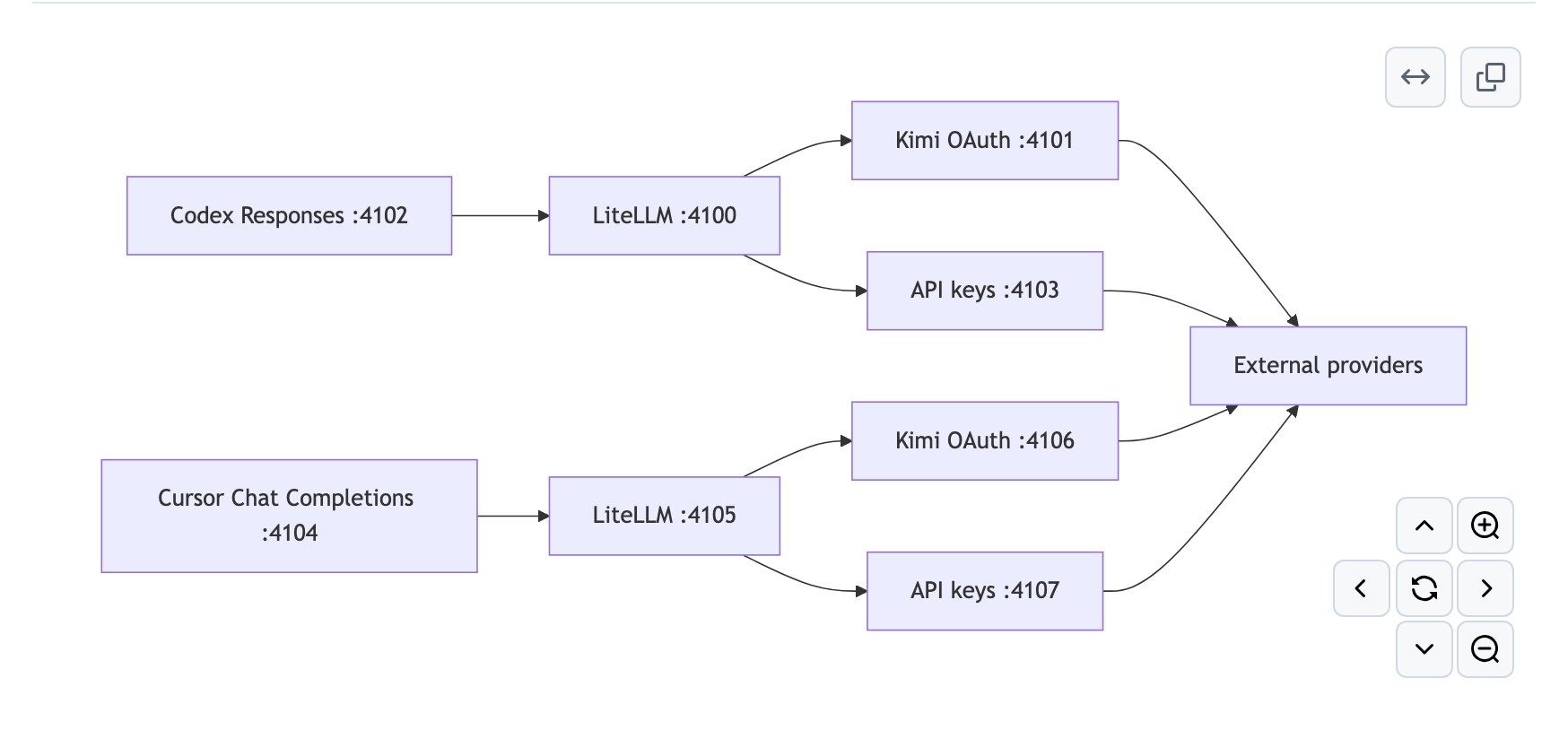
A local proxy plus a catalog rewriter. Codex speaks the Responses API to a listener on port 4102; that forwards to LiteLLM on 4100, which translates to whatever protocol the target provider actually wants, preserving streaming and tool-call shapes. Kimi OAuth traffic goes out through 4101, API-key traffic through 4103. Every listener binds to loopback, browser-originated requests are rejected, and the final forwarder discards the internal key and injects only the selected provider credential.
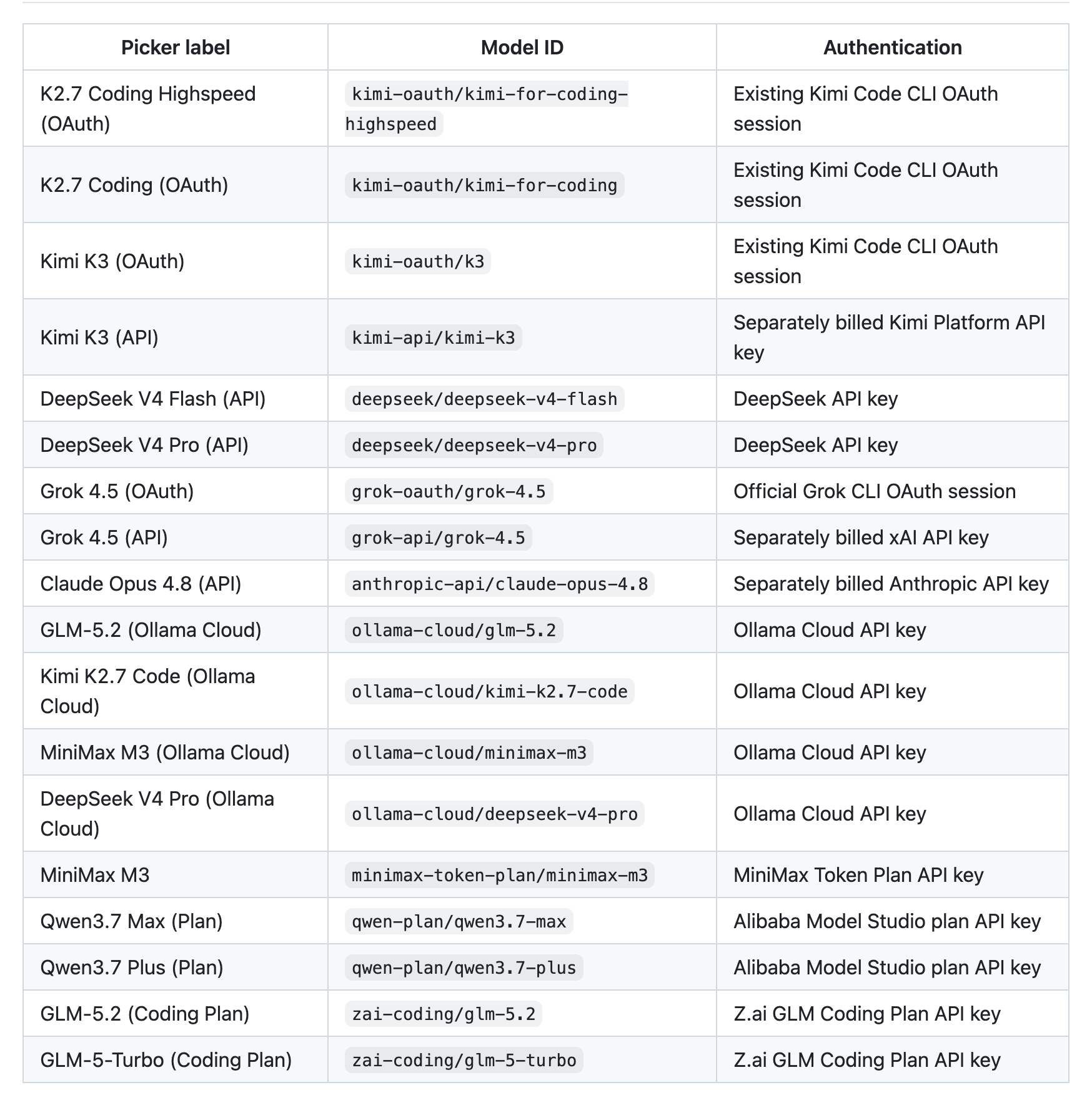
Kimi isn't the only option in there. As of July 2026 the registry ships DeepSeek V4 Flash and Pro, Grok 4.5 by OAuth or API, Claude Opus 4.8, GLM-5.2 and MiniMax M3 through Ollama Cloud, Qwen3.7 Max and Plus on Alibaba Model Studio plan keys, and the Z.ai GLM Coding Plan endpoints. Ten more providers including Groq, OpenRouter, Together, Fireworks and Cerebras are registered for routing but ship no preselected models, because their catalogs churn faster than the repo can verify entries.
The two Kimi rows are deliberately separate and worth understanding before you pick one:
| Picker label | Model ID | Authentication | Billing |
|---|---|---|---|
| Kimi K3 (OAuth) | kimi-oauth/k3 |
Existing Kimi Code CLI OAuth session | Your Kimi Code subscription |
| Kimi K3 (API) | kimi-api/kimi-k3 |
Kimi Platform API key | Separately billed, per token |
Kimi Code OAuth and the Kimi Platform API are different systems with different quotas. The router lists both because picking the wrong one is the kind of mistake you discover on an invoice.
The other path: Moonshot's own CC Switch setup
codex-router is not the only route, and it's worth knowing that Moonshot documents one itself. Their guide uses CC Switch as the local routing layer instead, and it makes the protocol reason explicit: "Codex CLI uses the Responses API, while Kimi Open Platform provides an OpenAI-compatible Chat Completions API. CC Switch Local Routing converts requests and streaming responses between the two protocols" (Kimi Open Platform docs).
The endpoints matter more than the tool choice, because this is where the two Kimi products stop being interchangeable:
| Kimi Code (subscription) | Kimi Open Platform (per token) | |
|---|---|---|
| Base URL | https://api.kimi.com/coding/v1 |
https://api.moonshot.ai/v1 |
| Auth | API key from the Kimi Code Console | Platform API key |
| Model IDs | k3, k3-256k, kimi-for-coding, kimi-for-coding-highspeed |
kimi-k3 |
| Context | up to 1M on k3, 256K on the rest |
1,048,576 tokens |
| Gate | full k3 needs Moderato tier or above; kimi-for-coding-highspeed needs Allegretto |
none, you meter every token |
Sources: Kimi Code docs and Kimi Open Platform docs.
Read the last row against the fourth. The 1M window that makes K3 attractive for repo-scale work is tier-gated on the subscription, so a base-tier subscription plus an OAuth route gets you 256K, not 1M. The Platform API has no such gate and charges $3.00 per million input tokens and $15.00 per million output instead. That is the real decision, and it is a billing one rather than a tooling one.
In CC Switch the configuration is short: turn on the routing master switch and enable Codex under it, add Kimi as a provider with one of the base URLs above, set the upstream format to Chat Completions (routing required), enable Supports thinking mode and Supports reasoning effort so Codex can pass those through, fetch the model list, then restart Codex CLI. Start it in a project and the status bar should name the Kimi model.
Worth noting who says what about support here. Kimi's own documentation, on the page that documents this integration, calls it a "community-provided third-party integration" that is "not officially maintained or supported" (Kimi Code docs). That corroborates the point above about unofficial integrations from the vendor's own side, and it applies to the CC Switch path as much as to codex-router.
Setup, step by step
Requirements first: Codex App or CLI, Node.js 22.19 or newer with 24 LTS recommended, uv or Python 3.10+ with venv, and Git for the managed checkout and rollback.
On macOS or Linux:
curl -fsSL https://raw.githubusercontent.com/duolahypercho/codex-router/main/install.sh \
  | sh -s -- --target codex --guided
Windows PowerShell:
$installer = Join-Path $env:TEMP "codex-router-install.ps1"
Invoke-WebRequest https://raw.githubusercontent.com/duolahypercho/codex-router/main/install.ps1 -OutFile $installer
powershell.exe -NoProfile -ExecutionPolicy Bypass -File $installer -Target codex -Guided
The guided flow selects providers, detects existing authentication, can run kimi login for you, prompts for API keys with terminal echo disabled, installs a per-user background service, and verifies each local layer. It makes no paid request unless you explicitly pass --smoke-test.
Have a credential ready before you start, because the installer will not let you finish without one. Picking no provider returns Select at least one provider. Picking Kimi OAuth and then declining to install the official CLI aborts the run, and so does installing the CLI but cancelling the login, which exits with Kimi Code OAuth sign-in was cancelled. There is no look-around-first mode.
Then verify before you touch Codex:
./bin/model-router codex doctor
./bin/model-router codex providers      # want: SHOW and ready for kimi-oauth
The doctor reports three levels, and the difference matters. OK is a passing check. FAIL is a broken local layer that blocks routing, and each one prints its own fix command, usually ./bin/doctor --fix. WARN is just an unconfigured provider, one line per provider in the registry, and you are supposed to have a screenful of them: you only configured one or two.
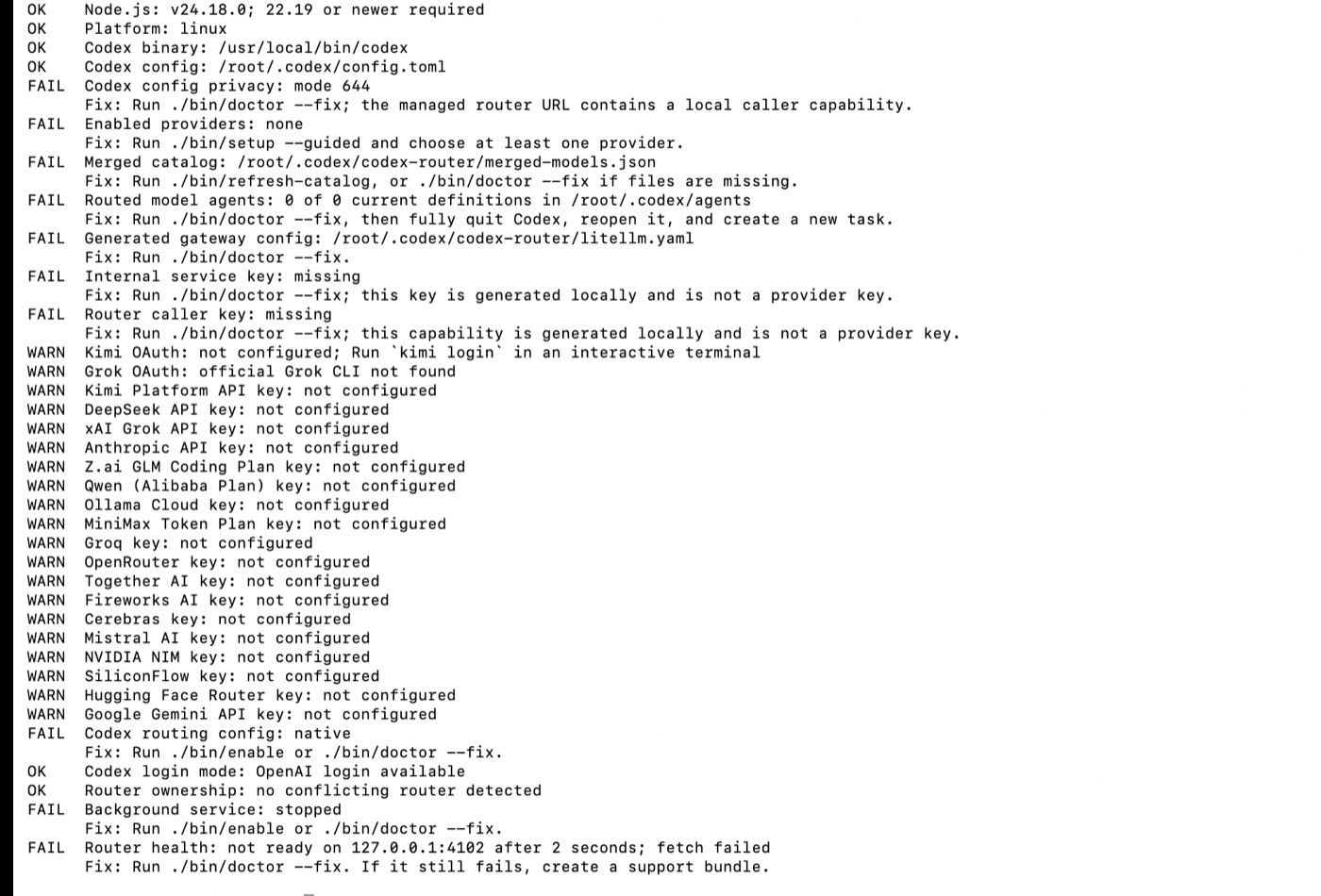
Resolve every FAIL line before you touch Codex. Two of them are worth reading rather than just fixing: Codex config privacy: mode 644 matters because the managed router URL in that file contains your local caller capability, and Router health: not ready on 127.0.0.1:4102 is the check that tells you the background service never came up. Once the failures are clear:
- Quit Codex completely. Closing the window isn't enough.
- Reopen it and start a new task.
- Open the normal model picker.
If the models still aren't there, run ./bin/refresh-catalog, then quit and reopen again. Codex loads model_catalog_json once at startup and never re-reads it, which is the single most common reason a correct install looks broken.
What the installer writes into your Codex config is two marked blocks, nothing else:
# BEGIN codex-router-managed
openai_base_url = "http://127.0.0.1:4102/_codex-router/<generated-capability>/v1"
model_catalog_json = "/absolute/path/to/.codex/codex-router/merged-models.json"
# END codex-router-managed
That generated path segment is your local caller authentication. Don't paste the full URL into a bug report.
One Windows trap: if Codex Desktop runs on Windows while you run router commands through WSL, there are two .codex directories and the commands will happily configure the wrong one. Export CODEX_HOME=/mnt/c/Users/<WindowsUser>/.codex before running anything.
What actually changes when K3 is driving
Less than people expect, and the README is unusually direct about it: the host app still owns the agent loop, tools, permissions, files, plugins, skills, MCP servers and conversation state. The router handles inference and protocol translation, and it cannot add a capability the selected model or provider doesn't implement.
So Codex's approval prompts, sandboxing and file handling behave identically. What changes is response style, tool-call reliability, and how the model handles a long context, all of which are model properties. If K3 calls tools differently than GPT does on your codebase, that's K3, and no router setting fixes it. One capability genuinely does get lost in translation rather than in the model: the K3 API supports video natively, Codex CLI never submits it, and Moonshot's own workaround is to extract key frames with ffmpeg and optionally add an audio transcript (Kimi Open Platform docs). Anything without a Chat Completions equivalent has the same problem.
Two things do change operationally. Native GPT models still require an OpenAI login; there's no GPT OAuth provider inside the router, so signing out costs you those models along with cloud tasks. And the tray's "Use without OpenAI login" switch republishes external models under native GPT slugs, because some Codex surfaces only display models whose slugs pass a server-delivered allowlist. The mapping lands in native-aliases.json. It works, but it means the name in your picker and the model actually answering can be two different strings, which is worth knowing before you file a confused bug.
I'm writing this from the repository's documentation, config registry and install scripts rather than from a running install, so treat the command sequence as verified-on-paper. The failure modes above are the ones the project documents, not ones I hit.
Other routing options
If you don't want codex-router specifically, CC Switch is covered above and is the layer Moonshot's own guide uses. Beyond those two the alternatives are narrower than they look. opencodex takes a different approach to the same problem and codex-router credits it directly. Some teams point an OpenAI-compatible base URL at a provider by hand, which works until you want two providers or a model picker. And PenguinHarness sidesteps the question by being its own harness with its own model configuration, K3 included, rather than borrowing Codex's.
Skipping the setup entirely
None of the above is hard. It's just yours to maintain: a background service per user, a config Codex overwrites if you reinstall it, a catalog that goes stale, and an unofficial integration between two products that ship on their own schedules.
If what you actually wanted was K3 doing agent work rather than K3 living inside Codex specifically, the hosted route removes the whole layer. Zentor's Kimi K3 integration runs the model in a managed agent with memory and a sandbox already attached, so there's no router, no port, and no catalog refresh. The tradeoff is real and worth stating: you lose Codex's editor integration and your local file tree.
FAQ
Does codex-router need an API key?
Not for Kimi. The kimi-oauth/k3 route reuses an existing Kimi Code CLI OAuth session, so if you're already logged in there, no key is involved. The kimi-api/kimi-k3 route does need a Kimi Platform key, billed separately. Grok works the same way, with OAuth reusing ~/.grok/auth.json from the official xAI CLI. DeepSeek, Anthropic and the Ollama Cloud entries are key-only.
Can I switch models mid-session?
You switch in Codex's own model picker, since the router republishes external models with their real names into the native catalog. What you can't do mid-session is add a model: the catalog is read at app startup, so a newly enabled provider needs ./bin/refresh-catalog and a full restart before it appears. From the command line, ./bin/control model-set <model-slug> changes the active model.
Does this break Codex's built-in features?
The integration is designed not to. It preserves the built-in OpenAI provider, native GPT models, ChatGPT sign-in, profiles, MCP settings, project trust and reasoning defaults, and adds two marked blocks to the config rather than rewriting it. Turning off the login-free mode restores the exact model and model_provider values that were there before. The real risk isn't the config, it's version drift: this is an unofficial integration, and a Codex update can change the surface it depends on.
Is codex-router safe to run?
It binds every listener to 127.0.0.1, rejects browser-originated requests, stores credentials at mode 600 on POSIX and under a current-user ACL on Windows, and reports credential presence without ever printing values. That's a better posture than most local proxies. It's still an unaudited community project sitting between your editor and your API keys, so the usual judgement applies.
For the model itself rather than the plumbing: what Kimi K3 is covers the architecture and benchmark results, and Kimi K3 vs Claude covers where the two actually diverge on agent work.
Continue Reading
More Tutorial
How to Build an App With AI From One Prompt

How to Use ChatGPT Work for Research and Recurring Tasks

How to Try Inkling AI Free Online (Playground Guide)

GLM-5.3 reasoning_effort: low, high or max

Run GLM-5.3 in Claude Code: Full Setup

How to Use Grok: Every Access Path
The Zentor editorial team writes about workflow automation, AI agents, and the tools we build. Default byline for industry overviews, listicles, and collaborative pieces.
Use Kimi K3 on MoClaw, without the setup
Run Kimi K3 as an always-on managed agent with memory, your tools, and scheduling. No API wiring, no plan gating, no self-hosting.
References: Kimi Open Platform: using Kimi K3 with Codex CLI · Kimi Code docs: Codex third-party integration