Run GLM-5.3 in Claude Code: Full Setup

Set up GLM-5.3 in Claude Code with a GLM Coding Plan. The base URL, the model default that gives you GLM-4.7 instead, and how to fix error 1113.
Table of Contents
A working GLM-5.3 Claude Code setup needs three things: a GLM Coding Plan subscription, Claude Code installed through npm, and Z.ai's endpoint at https://api.z.ai/api/anthropic set as your base URL. The fastest route is npx @z_ai/coding-helper, which writes the configuration for you.
Key Takeaways:
- Z.ai's documented default model mapping still points at GLM-4.7, so a by-the-book setup does not give you GLM-5.3
- Claude Code and Goose use a different base URL from every other supported tool
- Getting that URL wrong shows up as a billing error,
1113 Insufficient Balance, not a connection error - macOS needs Node installed through nvm or the install hits permission problems
- Z.ai's docs cite compatibility with Claude Code 2.0.14 while its own GLM-5.3 benchmarks ran on 2.1.207
There's a reason this pairing is worth the setup time. Z.ai ran its own GLM-5.3 evaluations inside Claude Code, naming version 2.1.207 in the footnotes for Terminal-Bench, Agents' Last Exam, CyberGym and the rest. The benchmark numbers people are quoting today were produced through this exact harness, not a bespoke internal one.
What you need before you start
Four things, and the second one catches macOS users constantly:
- A GLM Coding Plan subscription, any tier. Lite lists at $18 a month and serves the same models as Max
- Node.js 18 or newer, installed through nvm on macOS. Z.ai's setup guide warns that installing the package directly tends to produce permission errors
- Git for Windows, if you're on Windows
- An API key from the Z.ai platform, created on the API Keys page
The plan serves three models and only three: GLM-5.3, GLM-5-Turbo and GLM-4.7. GLM-5.2 is not among them, which surprises people migrating from a working GLM-5.2 config.
Installing Claude Code
Standard npm global install, then run it from inside your project:
npm install -g @anthropic-ai/claude-code
cd your-project
claude
On first launch Claude Code asks whether to use the API key it found, and then asks permission to read the folder you're in. Both prompts are expected.
If you already run Claude Code against Anthropic, note that pointing it at Z.ai is a global configuration change rather than a per-project one. That matters more than it sounds: there's no per-repo override, so a machine configured for Z.ai sends everything through Z.ai until you change it back, and the switch lives in environment variables plus ~/.claude/settings.json. People who work on client code under one provider and personal projects under another usually end up scripting the toggle, or keeping the two setups on separate machines entirely.
Worth deciding before you start, because discovering it halfway through a billing period is how people end up with usage on the account they meant to leave idle.
The default that quietly gives you GLM-4.7
Here's the gap between the documentation and what most people think they're buying. Z.ai's Claude Code page lists the default environment variable mapping as:
| Claude Code variable | Z.ai default |
|---|---|
ANTHROPIC_DEFAULT_OPUS_MODEL |
GLM-4.7 |
ANTHROPIC_DEFAULT_SONNET_MODEL |
GLM-4.7 |
ANTHROPIC_DEFAULT_HAIKU_MODEL |
GLM-4.7 |
All three point at GLM-4.7, a model from January 2026. Follow the setup guide end to end on launch day and you get a working Claude Code that never touches GLM-5.3, while the page itself carries a separate note telling you to see the model-switching instructions to use the latest model.
So if you subscribed this week, configured everything correctly, and came away unimpressed, check which model you actually ran before drawing conclusions. The 50% coding improvement Z.ai advertises is measured against GLM-5.2, and GLM-4.7 sits a generation below that.
Both routes fix it. npx @z_ai/coding-helper walks through tool installation, plan configuration and MCP servers interactively and will set the model for you. Manual configuration means overriding those three variables yourself with glm-5.3.
The base URL that decides whether you get billed
Z.ai runs two different endpoints, split by tool:
- Claude Code and Goose:
https://api.z.ai/api/anthropic - Everything else:
https://api.z.ai/api/coding/paas/v4
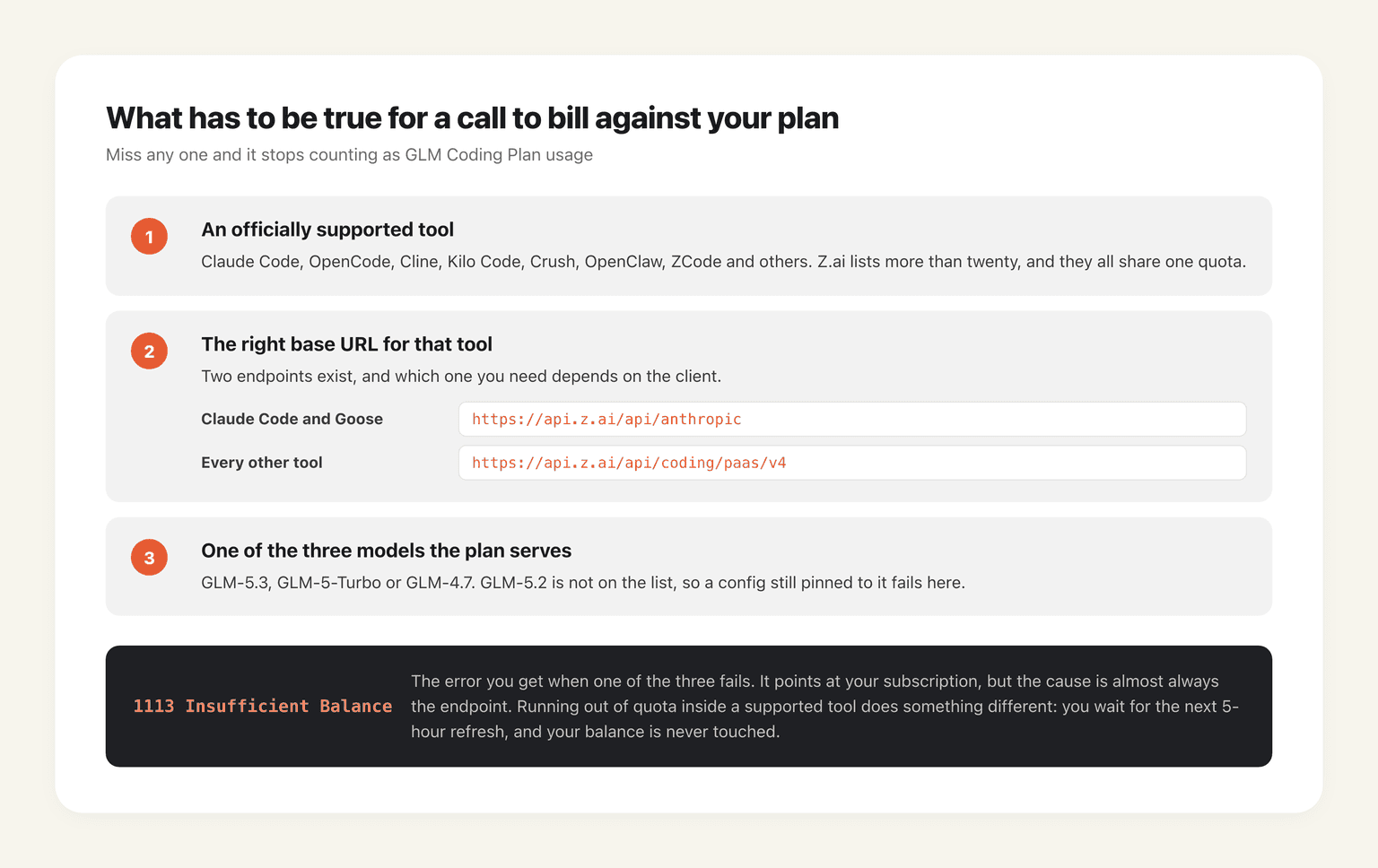
Use the wrong one and your calls stop qualifying as plan usage. The symptom, per Z.ai's plan FAQ, is error 1113 Insufficient Balance, which is close to the least helpful error string it could have picked, because it sends everyone to check their subscription instead of their endpoint.
Three conditions have to hold together for a call to count against your plan: a supported tool, the correct base URL for that tool, and one of the three permitted models. Miss any one and you're outside the plan.
Worth stating clearly since it's widely misunderstood: exhausting your plan quota inside a supported tool does not drain your account balance. Z.ai's FAQ says calls in supported tools draw only on plan quota, and when it runs out you wait for the next 5-hour refresh. If your balance is moving, your configuration is wrong, not your usage.
When settings.json changes don't take effect
Editing ~/.claude/settings.json by hand and seeing nothing change is common enough that Z.ai documents the fix. Close every Claude Code window, open a fresh terminal, and run claude again, because the process reads configuration at startup and a stale session will happily ignore your edit.
If that doesn't do it, delete ~/.claude/settings.json entirely and reconfigure through environment variables; Claude Code regenerates the file. Failing that, run the JSON through a validator, since a trailing comma produces exactly the same silent no-op as a wrong value.
Which Claude Code version to run
Z.ai's page says it verified compatibility with Claude Code 2.0.14. Its GLM-5.3 benchmark footnotes name 2.1.207. Meanwhile npm was serving 2.1.232 as latest on 14 August 2026, so there are three different versions in play depending on which page you read, and the setup guide is plainly the stalest of them.
claude --version
claude update
Stay current. Running roughly what Z.ai used for its own numbers is the closest you'll get to reproducing them, and a harness two minor versions behind changes how tools get exposed to the model, which is exactly the surface these benchmarks measure.
Running GLM-5.3 when the laptop isn't in the loop
Everything above assumes you're sitting at the terminal, which is fine for interactive work and awkward for the workload GLM-5.3 was actually trained on. Z.ai built its training environments around tasks it describes as several days of work for an experienced engineer, and ZCode ships a goal mode that plans, codes, tests and verifies until a target is met, plus phone-based remote control for runs nobody is watching.
A claude process in a terminal window doesn't survive that shape of job. It ends when the session ends.
The other detail worth noticing is that OpenClaw appears on Z.ai's supported-tools list alongside Claude Code, sharing the same subscription quota. We covered the general problem in what an always-on AI agent actually requires, and the plan-side mechanics, including why off-peak hours give you both cheaper points and higher concurrency, are in why the GLM Coding Plan throttles you.
Getting a working GLM-5.3 Claude Code setup, start to finish
Subscribe, install Node through nvm, install Claude Code globally, then run npx @z_ai/coding-helper and let it write the configuration rather than doing it by hand. Afterwards, verify two things before you judge the model: that your base URL is the Anthropic-compatible one, and that your model variables say glm-5.3 rather than the documented GLM-4.7 default. Almost every complaint about this setup traces back to one of those two.
Then schedule the heavy work outside 14:00 to 18:00 UTC+8, where points cost half and concurrency limits rise. If you're in the US, that's your entire working day already.
MoClaw is the hosted version of this idea: OpenClaw running as a cloud AI computer that stays powered on, so a long job keeps going after you close the terminal, working alongside the local setup you just built rather than replacing it. The free trial runs three days on 1,000 credits, and a $20 subscription carries 1,000 credits a month.
FAQ
How do I use GLM-5.3 in Claude Code?
Subscribe to a GLM Coding Plan, install Claude Code with npm install -g @anthropic-ai/claude-code, then run npx @z_ai/coding-helper to configure the plan. Set the base URL to https://api.z.ai/api/anthropic and override the model variables to glm-5.3, since Z.ai's documented defaults point at GLM-4.7.
Why is Claude Code using GLM-4.7 instead of GLM-5.3?
Because that's the documented default. Z.ai maps ANTHROPIC_DEFAULT_OPUS_MODEL, ANTHROPIC_DEFAULT_SONNET_MODEL and ANTHROPIC_DEFAULT_HAIKU_MODEL to GLM-4.7 out of the box, and switching to the latest model is a separate step in its documentation.
What base URL does Claude Code need for Z.ai?
https://api.z.ai/api/anthropic. Every other supported tool uses https://api.z.ai/api/coding/paas/v4 instead. Using the wrong endpoint produces error 1113 Insufficient Balance rather than a connection failure.
Which Claude Code version works with GLM-5.3?
Z.ai's setup page states verified compatibility with 2.0.14, but its own GLM-5.3 benchmarks were run on Claude Code 2.1.207. Run claude update and stay current if you want results comparable to the published numbers.
Does using GLM-5.3 in Claude Code cost extra beyond the subscription?
No, provided the call qualifies as plan usage: supported tool, correct base URL, and one of GLM-5.3, GLM-5-Turbo or GLM-4.7. Running out of quota means waiting for the next 5-hour refresh, not a charge against your balance.
Can I use the GLM Coding Plan in OpenClaw as well?
Yes. OpenClaw is on Z.ai's supported-tools list, and all supported tools share the same subscription quota, so you can move between them without a second plan.
Setup steps, environment variable defaults, endpoint addresses and version guidance in this article were taken from Z.ai's Claude Code integration page, its GLM Coding Plan FAQ and the GLM-5.3 launch post on 14 August 2026. Z.ai's documentation was updating around the launch, so check the current page before troubleshooting against these values.
Continue Reading
More Tutorial
GLM-5.3 reasoning_effort: low, high or max

How to Use Grok: Every Access Path

How to Use Kimi K3 in Codex

Run Kimi K3 in an Agent, No Self-Hosting

I Made a Product Video With video-shotcraft

How to Run Inkling AI Locally: Hardware & Setup
The MoClaw editorial team writes about workflow automation, AI agents, and the tools we build. Default byline for industry overviews, listicles, and collaborative pieces.
Stop doing this manually.
MoClaw runs on its own cloud computer - research, monitoring, reports, browser tasks. No setup. No self-hosting.
References: Claude Code integration guide, Z.ai developer documentation · GLM Coding Plan FAQ, Z.ai developer documentation · GLM-5.3 launch post and benchmark footnotes, Z.ai · Z.ai DevPack overview (supported tools) · Claude Code on npm · GLM Coding Plan usage policy, Z.ai