How to Run Inkling AI Locally: Hardware & Setup

Inkling's weights are free on Hugging Face, but can your hardware handle 975B parameters? Realistic needs, NVFP4 vs BF16, and every supported runtime.
Table of Contents
You can download Inkling AI's weights for free, but downloading and running are two very different problems, and the gap between them is where most people underestimate this model. Inkling is a 975-billion-parameter mixture-of-experts model that activates 41 billion parameters per token. That split is the thing to grasp before you spend a cent on hardware: the 41 billion active parameters make Inkling cheap to compute once it's loaded, but the full 975 billion still have to sit somewhere the GPU can reach, because any token might route to any expert. So your memory bill is sized by the big number, and your speed is sized by the small one. And because generation speed is mostly bound by how fast the GPU reads weights out of memory, a mixture-of-experts model that only reads its 41 billion active parameters per token runs far faster than a dense 975-billion model would; that speed is the payoff for all the memory pain. Most "can I run this locally" disappointment traces back to missing exactly that. For the full rundown of what Inkling is, see our complete Inkling AI guide.
Key Takeaways:
- You can download Inkling's weights for free, but running them is a datacenter problem, not a laptop one.
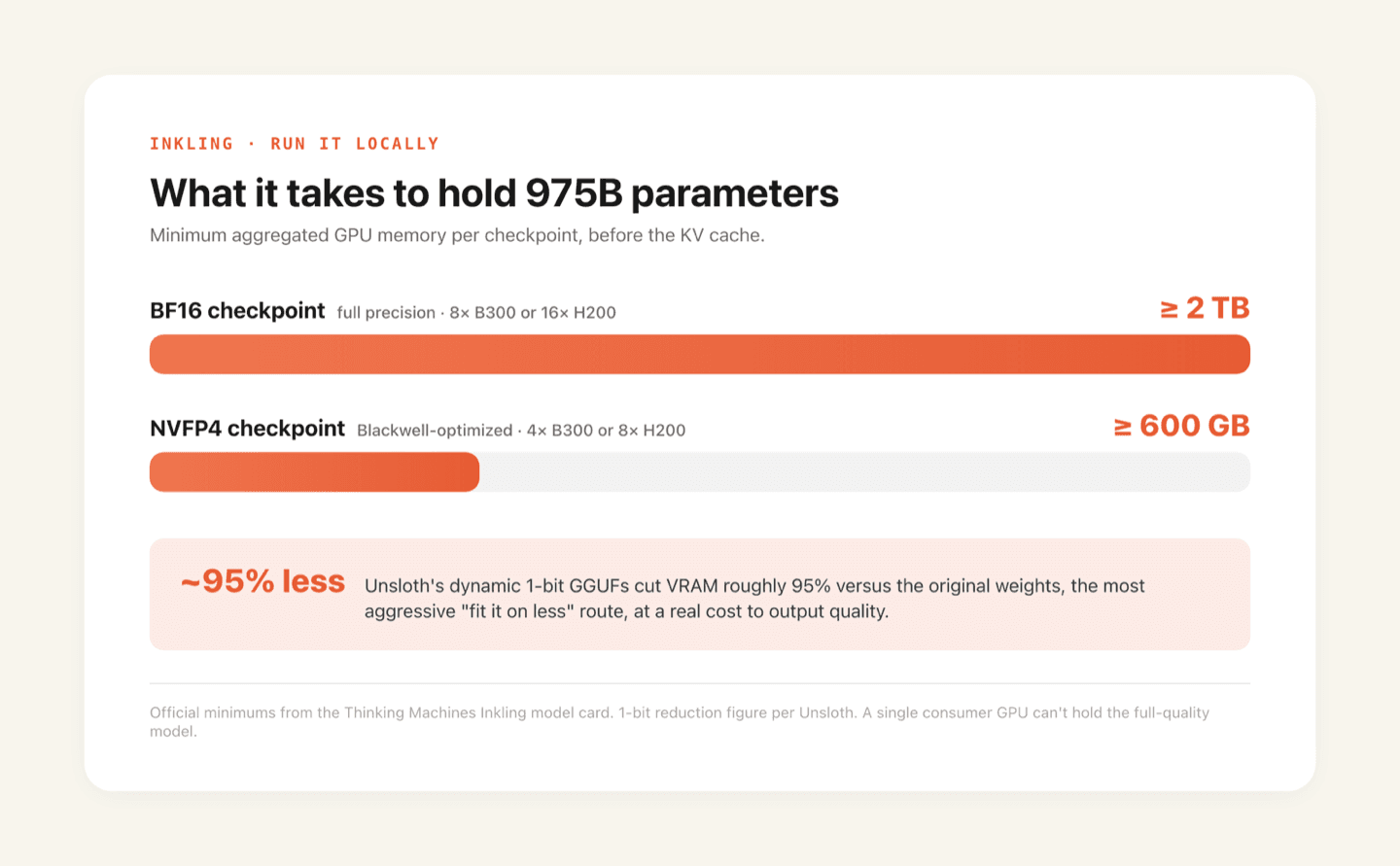
- Official minimums: BF16 needs at least 2 TB of aggregated VRAM (8x B300 or 16x H200); NVFP4 needs at least 600 GB (4x B300 or 8x H200).
- Six runtimes shipped on day one; Unsloth's 1-bit GGUFs cut VRAM roughly 95% at a real quality cost.
- For modest hardware, wait for Inkling-Small or use a hosted API instead.
Model Sizes: BF16 vs NVFP4
Inkling AI ships in two formats on Hugging Face, and choosing between them is really a question of how much memory you can spare. The BF16 checkpoint is the full-precision original. The NVFP4 checkpoint is a lower-precision version optimized for Nvidia's Blackwell hardware, and it's roughly a quarter the size. Lower precision means each parameter is stored in fewer bits, which shrinks the footprint at a usually-small hit to output quality. For most work NVFP4 is the sensible default, and it's the format that stands any chance of fitting real hardware.
Here's the honest math, and read it as exactly what it is, a back-of-the-envelope estimate that ignores the KV cache, activations, and runtime overhead: at BF16 (two bytes per parameter), 975 billion parameters works out to around 1.95 terabytes of weights. At NVFP4 (roughly half a byte per parameter), it's around 490 gigabytes. Those figures are the weights alone. Real memory use in practice runs higher once you add the context window's KV cache, and for a model that can hold up to a million tokens, that cache is not a small footnote.
Thinking Machines' model card is more specific than a rough estimate, and since it's official rather than a community guess, it's worth quoting straight. The BF16 checkpoint needs at least 2 TB of aggregated VRAM, which the card spells out as 8 NVIDIA B300 GPUs or 16 H200s. The NVFP4 checkpoint drops that floor to at least 600 GB, deployable as 4 B300s or 8 H200s. Treat those as the minimum to load the model, not a comfortable target, because they sit before the KV cache your context window will need. Either way the point holds: this is datacenter hardware, and NVFP4 is what makes it merely expensive rather than impossible.
Supported Runtimes: vLLM, SGLang, and llama.cpp
Inkling AI had broad runtime support on launch day, which is both unusual and genuinely useful, because it means you aren't locked into one stack. Six options shipped with day-zero support.
Transformers, Hugging Face's library, is the reference path and the most documented place to start. SGLang and vLLM are the two high-throughput serving engines most teams reach for when they want to serve the model at real speed; both ran Inkling on day one, with RadixArk behind the SGLang integration and Inferact behind vLLM. llama.cpp is the one that matters if you're trying to squeeze the model onto more modest hardware: it's the GGUF route, and it supports offloading the inactive experts of a mixture-of-experts model to CPU RAM, so you can trade speed to fit a model that wouldn't otherwise load. Unsloth backs that path and has pushed it further than anyone, quantizing Inkling down to 1-bit dynamic GGUFs that, by their own numbers, cut VRAM roughly 95% against the original weights. That's the most aggressive "fit it on less" option available, with the obvious catch that 1-bit quantization trades real output quality for the memory it saves. TokenSpeed and Miles fill out the list as the two more specialized inference options.
One detail worth filing away: Inkling's weights include speculative MTP (multi-token prediction) layers, which several of these runtimes can use to speed up generation by drafting several tokens at once. It won't matter for a quick kick-the-tires test, but it adds up when you're serving real traffic.
The practical takeaway is that whatever your team already runs, one of these probably covers it, so the runtime is rarely the thing that stops you. Memory is. Which loops straight back to the previous section.
The Realistic Path for Most Teams
Here's the blunt version of what "running Inkling AI locally" looks like for most people in mid-2026: it isn't a single machine under your desk. For any team without a rack of datacenter GPUs, "local" in practice means one of two things, a multi-GPU cloud cluster you rent and control, or skipping self-hosting and calling a hosted API. Both keep your data and your deployment far more in your hands than people assume, and both hurt a lot less than fighting to load 975 billion parameters onto hardware that can't hold them. The cluster path buys you control and the freedom to fine-tune; the API path buys you zero infrastructure and the fastest start. That's a control-versus-convenience decision, not a capability one, since it's the same Inkling either way.
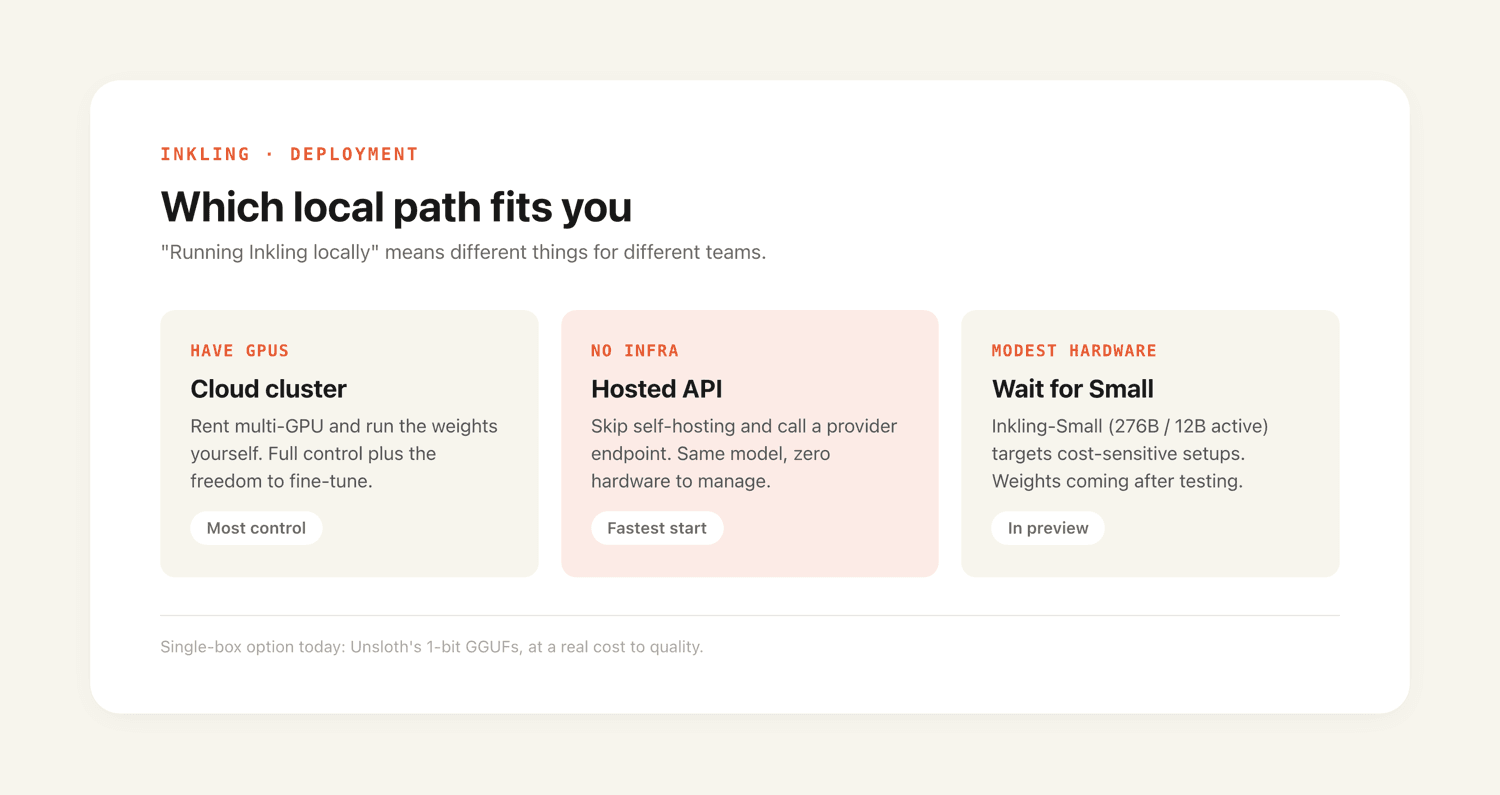
The genuine single-machine crowd, the folks running models on a strong workstation or a loaded Mac, are better off waiting, with one asterisk: Unsloth's 1-bit GGUFs from the last section are the only route with a real shot at fitting the full model onto a single very high-end box today, if you can live with what 1-bit does to quality. For everyone not chasing that edge case, Inkling-Small is the cleaner answer. It's a 276B model with 12 billion active parameters, aimed squarely at cost- and hardware-sensitive setups, and Thinking Machines has said as much directly. Its weights aren't out yet; they're coming after testing. So if you want truly local on modest hardware without the 1-bit compromise, that's the release to watch, not this one.
It helps to think in dollars, not just gigabytes. Renting the 4x B300 or 8x H200 setup that Inkling's NVFP4 checkpoint needs costs real money per hour on any cloud, and those GPUs bill whether the model is busy or idle. Self-hosting only pays off once your usage is steady enough to beat per-token API pricing. For bursty or low-volume work, a hosted API almost always comes out cheaper than keeping a multi-GPU cluster warm. Self-hosting wins when you run the model hard, around the clock, and want the data control that comes with owning the deployment.
If the hosted route is where you land, the API providers double as how Inkling plugs into the rest of your stack; see MoClaw integrations for the connectors.
Downloading the Weights from Hugging Face
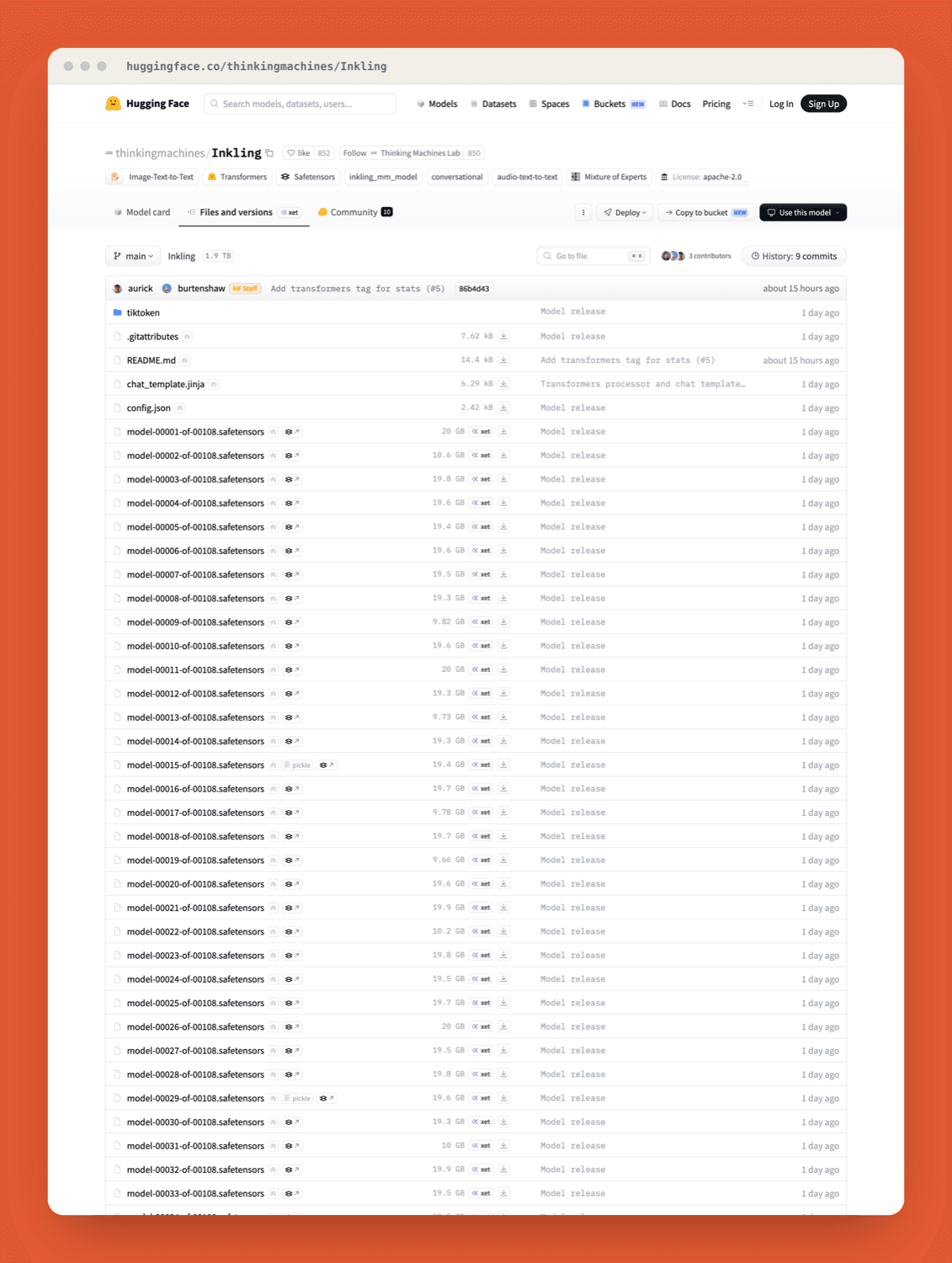
Inkling AI's weights live on Hugging Face, free to download, in the two formats already covered, BF16 and NVFP4. That part genuinely is as easy as it sounds: it's a public model repository, you pull the checkpoint you want, and it's yours to run offline from then on, no API key and no per-token cost. Do budget for the download itself, though: at hundreds of gigabytes even in NVFP4, pulling the weights is a real transfer over a real connection, not a quick file grab.
The repos are public: thinkingmachines/Inkling for the BF16 original and thinkingmachines/Inkling-NVFP4 for the quantized checkpoint. I won't reproduce the exact shard layout here, since that can shift between releases, so pull the repo, read its model card for the current file list, and match the checkpoint to the runtime you settled on. Worth knowing before you build anything on it: the weights are released under Apache 2.0, so you can run, modify, and ship them commercially without a special license grant, which is unusually permissive for a model this size. The download is the five-minute part. The hardware to actually load what you pulled is the rest of this article.
FAQ
How much VRAM does Inkling need?
More than almost any single machine has. Thinking Machines' model card puts the official minimum at 2 TB of aggregated VRAM for the BF16 checkpoint and 600 GB for NVFP4, before the KV cache, and illustrates those as roughly 8 B300 or 16 H200 GPUs for BF16 and 4 B300 or 8 H200 for NVFP4. Because it's a mixture-of-experts model, you need memory for all 975 billion parameters even though only 41 billion are active per token. Unsloth's 1-bit GGUFs cut that requirement dramatically at a real quality cost, but a single consumer card still can't hold the full-quality model.
Can I run Inkling on a single GPU?
Realistically, no. Even the quantized NVFP4 weights are far larger than any single GPU's memory, so a one-card setup can't hold the full model. You can experiment with CPU offloading through llama.cpp to fit more than your VRAM alone allows, at a real cost to speed, but a single GPU running Inkling comfortably isn't on the table. If you want single-machine local, wait for Inkling-Small.
When will Inkling-Small be available?
Thinking Machines hasn't given a date. The official line is that Inkling-Small is in final testing, with weights to follow once that's done. Until then, the full 975B Inkling is the only version with downloadable weights.
Continue Reading
More Tutorial
How to Use ChatGPT Work for Research and Recurring Tasks
Run GLM-5.3 in Claude Code: Full Setup

How to Try Inkling AI Free Online (Playground Guide)

GLM-5.3 reasoning_effort: low, high or max

How to Use Grok: Every Access Path

How to Use Kimi K3 in Codex
The MoClaw editorial team writes about workflow automation, AI agents, and the tools we build. Default byline for industry overviews, listicles, and collaborative pieces.
Stop doing this manually.
MoClaw runs on its own cloud computer - research, monitoring, reports, browser tasks. No setup. No self-hosting.
References: Thinking Machines — Introducing Inkling · Inkling model card · Inkling on Hugging Face · Welcome Inkling — Hugging Face blog · Artificial Analysis · Tinker — Thinking Machines