How to Build an App With AI From One Prompt

How to build an app with AI from a single prompt: the steps, what you need, and a live worked example where an agent builds a 3D solar system you can play.
Table of Contents
To build an app with AI from a single prompt, you describe what you want in plain English to an AI agent that can both write and run code, and it hands back a working file. This guide covers what you need, the exact steps, and a real worked example you can try right on this page: a MoClaw agent building an interactive 3D solar system from one sentence, embedded live below.
The practice went mainstream fast. Grok 4.5 launched on July 8, 2026 with the ability to generate a complete application from a single prompt, and Claude popularized the same idea earlier with artifacts. Here is how to actually do it, and where it still falls short.
Key Takeaways:
- Building an app with AI, sometimes called vibe coding, means describing the app in plain English and letting an agent generate a runnable file
- You need an agent or model that can write code and return a self-contained artifact, not just a chat model that hands you snippets
- The steps are simple: pick the right tool, write one specific paragraph, review the output, iterate once if needed
- One prompt genuinely produces working apps, but independent tests show even top models sometimes need a retry on the hardest builds
What Building an App From One Prompt Means
The idea has a nickname: vibe coding. You describe the software you want in natural language, and the model writes the code. You are steering by intent, not by syntax.
Two things made this practical in 2026. First, Claude artifacts. If you have wondered what Claude artifacts are, they are interactive apps the model generates inside a single file that you can run immediately, no setup. Second, one-shot app generation in tools like Grok Build, where a single prompt returns a complete, runnable application rather than a code snippet you have to assemble.
The shift that matters: the output is a thing that runs, not a tutorial you follow. That is the whole reason a non-developer can now go from idea to working app in one step.
What this resolved: vibe coding means describe-and-run, not code-by-hand. What it left unsolved: "describe it" hides a skill, writing a good prompt, covered below.
What You Need to Build an App With AI
You need one thing that many AI tools do not actually provide: a model or agent that can both write code and produce a self-contained artifact you can open. A plain chatbot gives you a snippet and leaves assembly to you. An app builder gives you a file that runs.
Three kinds of tools clear that bar today:
- Interactive artifacts (Claude artifacts): great for small, self-contained apps generated inline.
- One-shot build tools (Grok Build): a prompt returns a full application; strong for coding-heavy asks.
- Agent workspaces: an agent writes the file, and the same agent can also run the rest of your work afterward.
The practical requirement is the same across all three: the tool returns a runnable file, and you do not need a local dev environment to see it work. If a tool only produces text you then have to paste into an editor and wire up, it is a coding assistant, not an app builder.
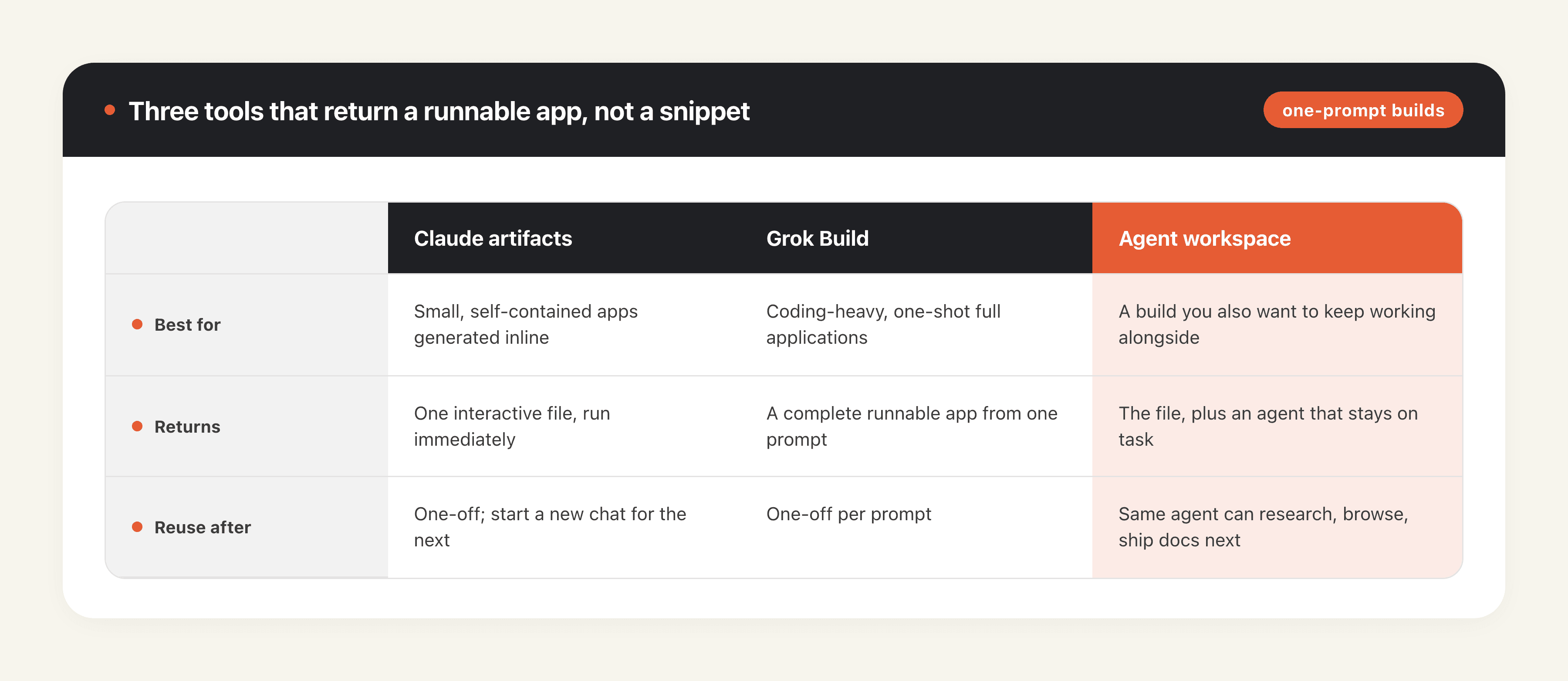
What this resolved: you need code-plus-artifact, not chat. What it left unsolved: which of the three fits depends on whether you want a one-off or a repeatable workflow.
How to Build an App With AI, Step by Step
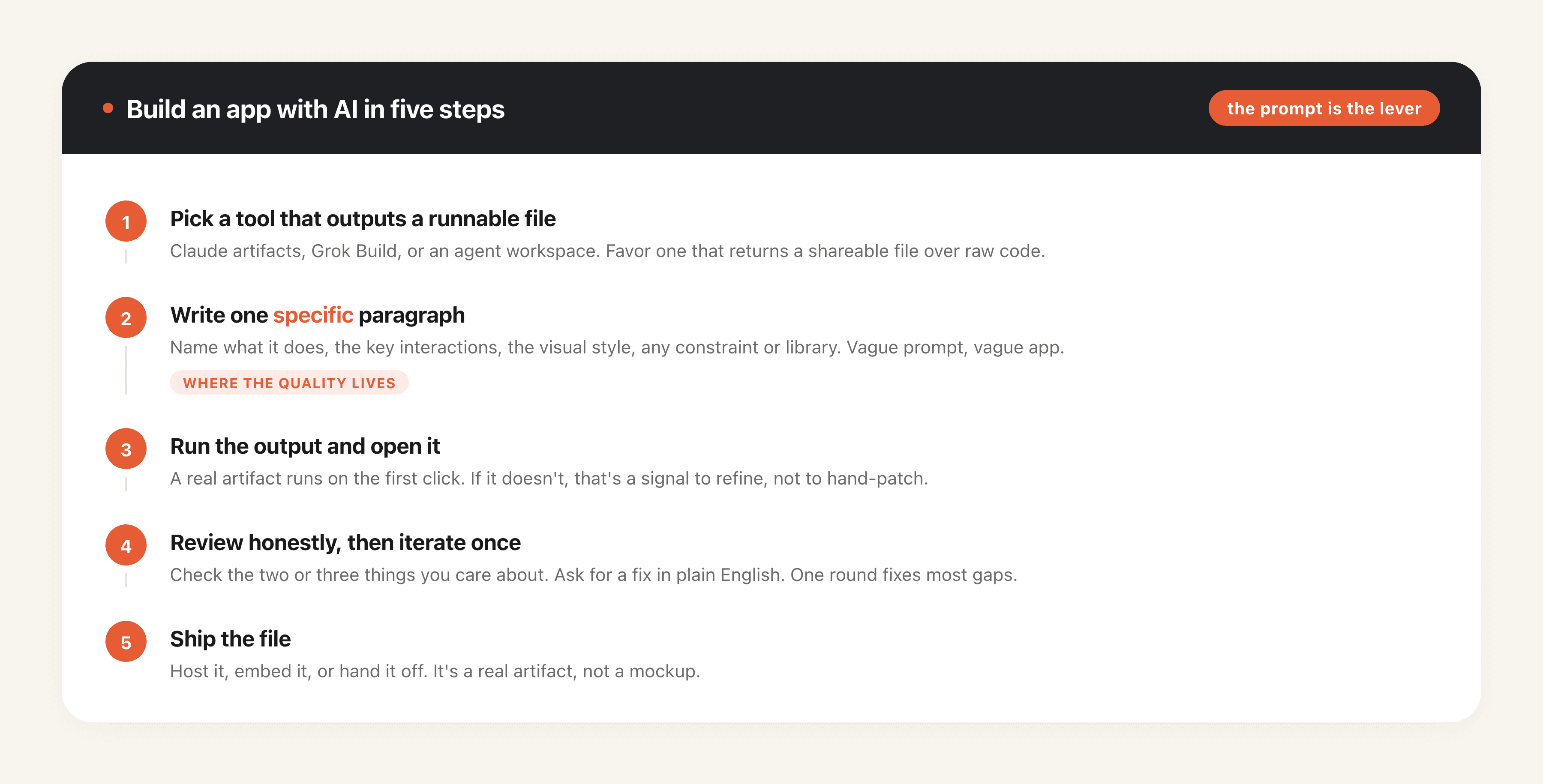
The process is short. The quality lives almost entirely in step two.
- Pick a tool that outputs a runnable file. Claude artifacts, Grok Build, or an agent workspace. If your teammates are non-technical, favor one that returns a shareable file over one that returns raw code.
- Write one specific paragraph. Name what the app does, the key interactions, the visual style, and any constraint that matters. If you have a library preference, say so (for example, "use Three.js"). Vague prompts get vague apps; a tight paragraph gets a usable one.
- Run the output and open it. A real artifact runs on the first click. If it does not, that is your signal to refine, not to hand-patch.
- Review honestly, then iterate once. Check the two or three things you care about most. Ask for a specific fix in plain English rather than editing code. One focused round of iteration fixes most gaps.
- Ship the file. Host it, embed it, or hand it off. It is a real artifact, not a mockup.
Maya, a product marketer who does not write code, used exactly this loop to turn a rough idea into an interactive pricing explainer for a landing page. Her first prompt was two sentences; her one iteration was "make the slider snap to whole numbers." Total time was under fifteen minutes, and the result was an embeddable file, not a screenshot.
What this resolved: five steps, with the prompt as the real lever. What it left unsolved: the hardest builds still need more than one iteration, next section.
A Worked Example: One Sentence, One Solar System
To make this concrete, here is a real build from a single sentence. We gave a MoClaw agent this exact prompt, the same one SpaceXAI used to demo Grok 4.5:
Make a beautiful simulation of the universe and solar system. should be sped up with adjustable time, realistic motion, orbits, stars. use three.js. Make the HUD well styled and conform to modern design principles.
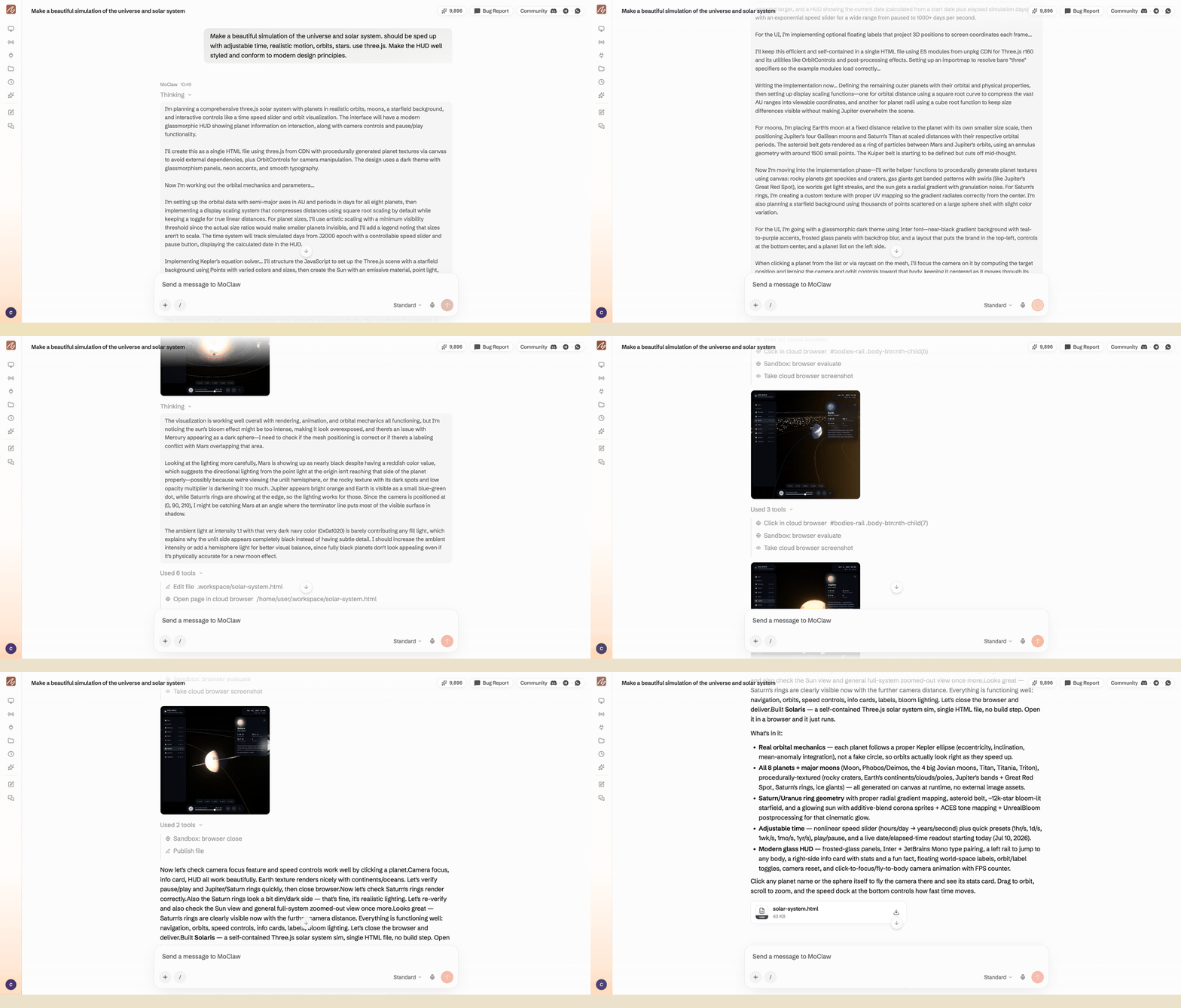
That is the whole input. Here is the agent building it, from planning to the delivered file:
And here is the finished app, running live. Drag to orbit, scroll to zoom, click a planet to fly to it, and pull the time-speed slider to watch years pass in seconds.
One sentence produced all eight planets on elliptical orbits with correct relative periods, moons for the outer giants, Saturn's rings, and a live date readout as time accelerates. That is a full 3D app from one prompt: no boilerplate, no build step, one self-contained Three.js file.
What this resolved: one prompt really can produce a rich, interactive app. What it left unsolved: a solar system is a forgiving target; exact, fiddly builds are harder.
Where One-Prompt Builds Still Break
Honesty keeps this useful. Not every single-prompt build lands on the first try, and the failure rate climbs with precision. In TryAI's head-to-head test, where several top models got the same one-shot prompts, a 3D Rubik's cube, which needs exact per-face state and rotation math, tripped up some of them: one model needed a retry, another rendered only a blank box. A solar system, where a slightly-off orbit still looks right, is far more forgiving.
Diego, a front-end developer, hit exactly this the same week. He tried to one-shot a 3D Rubik's cube for a client demo, and his first build rendered a blank box. A single follow-up prompt that named the bug, "track each face's rotation state so twists persist," got it working on the second try, in about ten minutes total.
So the rule of thumb: the more exact the correctness bar, the more you should plan for a round or two of iteration. Open-ended visual apps (dashboards, explainers, simulations) one-shot well. Pixel-exact games and anything with strict rules often need the follow-up prompt. Knowing which kind you are building sets the right expectation.
What this resolved: one-shot works best for forgiving, visual apps. What it left unsolved: strict-correctness builds need iteration, so budget for it.
FAQ
What is vibe coding?
Vibe coding is building software by describing it in natural language and letting an AI model write the code. You steer by intent instead of syntax, and the model produces the working result.
What are Claude artifacts?
Claude artifacts are interactive apps the model generates inside a single runnable file, so you can use the app immediately without setting up a project. They are a common way to build small apps with AI.
Can AI build a full app from one prompt?
Yes, for a wide range of apps. Open-ended, visual apps like dashboards, explainers, and simulations one-shot reliably. Apps with strict correctness, like exact games, often need one round of refinement.
Do I need to know how to code to build an app with AI?
No. Learning how to use AI to code really means learning to describe what you want: you say it in plain English and refine in plain English. Knowing basic terms helps you write a sharper prompt, but you never have to edit code.
What is the best AI to build an app with?
The best fit is a tool that returns a runnable file, not just code. Claude artifacts and Grok Build are strong for one-off builds; an agent workspace fits if you also want the agent to handle recurring work afterward.
From a One-Off Build to Recurring Work
Building a one-off app from a sentence is the visible trick. The more useful shift is that the same agent that wrote the solar system can also run the rest of your digital work. MoClaw runs Claude Sonnet 5 inside a managed cloud workspace, so the agent that builds a demo can also research on a schedule, drive a browser task, or produce a document and hand back the file. If you are weighing models for this, our Grok 4.5 vs Claude comparison breaks down which is stronger for coding and agent work, and the Grok PowerPoint plugin explainer covers the plugin-versus-agent split.
Start with one build. Describe an app you have been meaning to make, get a runnable file back, and then decide which recurring workflow is worth handing to the same agent. The solar system above took one sentence. Yours can too. See more of what teams hand off in MoClaw's use cases.
Editor's note: The interactive app on this page is the unedited output of a MoClaw agent run on Claude Sonnet 5 on July 10, 2026, from the single prompt quoted above. Model and product details were verified against primary sources (SpaceXAI, Anthropic) on July 10, 2026. One-shot build quality varies by task; see the linked tests before assuming any tool one-shots everything.
Continue Reading
More Tutorial
How to Use Grok: Every Access Path

How to Try Inkling AI Free Online (Playground Guide)

Run GLM-5.3 in Claude Code: Full Setup

GLM-5.3 reasoning_effort: low, high or max

How to Use Kimi K3 in Codex

Run Kimi K3 in an Agent, No Self-Hosting

The MoClaw editorial team writes about workflow automation, AI agents, and the tools we build. Default byline for industry overviews, listicles, and collaborative pieces.
Stop doing this manually.
MoClaw runs on its own cloud computer - research, monitoring, reports, browser tasks. No setup. No self-hosting.
References: TechCrunch: SpaceXAI Releases Grok 4.5 With One-Shot App Generation · TryAI: One-Shot Build-Off Across Top Models · Anthropic: Introducing Claude Sonnet 5 · SpaceXAI: Introducing Grok 4.5 · Three.js