Grok 4.5 PowerPoint Plugin, Explained

What the Grok 4.5 PowerPoint and Office plugin actually does in your deck, its real limits, and when an AI agent that builds the whole file wins instead.
Table of Contents
The Grok 4.5 PowerPoint plugin is a sidebar assistant that lives inside Microsoft PowerPoint and helps you build a deck you are already driving. It can assemble slides using native shapes and diagrams, pull live information, and edit the open file, but it works inside your PowerPoint session rather than producing a finished deck from a one-line prompt.
That distinction is the whole point of this piece. Grok 4.5's Office integration is genuinely useful, and it is also a different tool than an AI agent that builds the entire file for you. Knowing which one your task needs saves an afternoon.
Key Takeaways:
- Grok 4.5 ships as a plugin for Microsoft Word, PowerPoint, and Excel, appearing as a chat sidebar in each app
- In PowerPoint it builds slides with native shapes and diagrams; in Excel it builds multi-sheet models with live web research; in Word it drafts structured prose
- It requires a paid Grok subscription tier and a Microsoft 365 workflow, and Grok 4.5 is EU-blocked at launch
- A deck-building AI agent takes a different job: you describe the deck, it researches and produces the file end to end, no Office session required
What the Grok 4.5 Office Plugin Actually Is
On July 8, 2026, SpaceXAI shipped Grok 4.5 with plugins that put the model directly inside Microsoft Word, Excel, and PowerPoint. Coverage of the Office integration describes it as a sidebar panel in each app: you chat with it, hand it tasks, or ask it to analyze whatever document you have open.
The real differentiator versus Microsoft's own Copilot is the data feed. Grok can pull current news and trending topics in real time through its X connection, something Copilot does not offer natively. So the plugin is not just a writing helper. It is a research-aware assistant embedded in the app you already use.
Two caveats up front, both honest. It requires a paid Grok subscription tier (the plugin is available on SuperGrok at $30 a month, SuperGrok Heavy at $300, or Business and Enterprise plans), and because it runs on Grok 4.5, it inherits the EU availability block at launch. European users cannot use the plugin until Grok 4.5 opens in the region, expected mid-July 2026.
What this resolved: the plugin is a real, in-app assistant with a live-data edge. What it left unsolved: access needs a paid tier and a region that is not EU-blocked yet.
What Grok 4.5 Does Inside PowerPoint
Specifically in PowerPoint, Grok 4.5 assembles decks using native PowerPoint shapes and diagrams rather than pasting flat images. That matters, because native shapes stay editable: you can nudge a box, recolor a diagram, or restructure a slide after the model builds it.
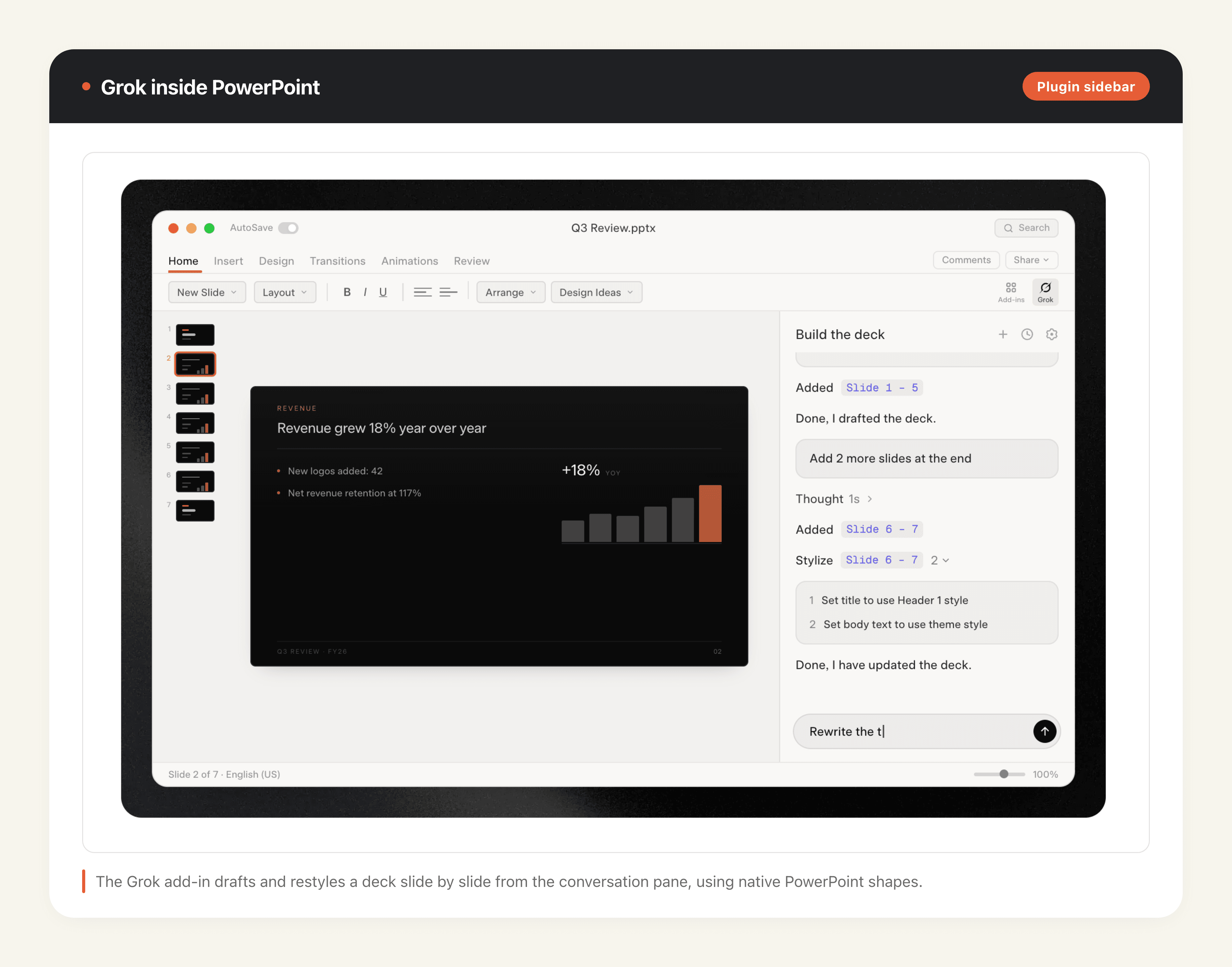
The Office story is broader than slides. In Excel, Grok 4.5 builds multi-sheet models with working formulas and live web research, and it leaves notes and stickies as it goes so you can follow its reasoning. In Word, it drafts structured prose. The through-line is that Grok works as a collaborator inside a file you own, editing alongside you.
In a demo shared by xAI, senior engineer Matthew Dabit turned a dense neuroscience research paper into a nine-slide, presentation-ready deck in under five minutes, using native shapes rather than pasted images. That is the ceiling of what the plugin does well: fast structure from a source you hand it.
Priya, a product marketer at a mid-size SaaS company, used it to turn a rough outline into a first-draft launch deck. She had the structure in her head, typed section-by-section asks into the sidebar, and watched Grok lay out shapes and a comparison diagram she then refined. For someone who lives in PowerPoint and wants a faster co-pilot, that is a real time save.
What this resolved: Grok builds editable, native PowerPoint content, not throwaway images. What it left unsolved: you still drive the deck slide by slide.
Where the Plugin Genuinely Helps, and Where It Stalls
The plugin shines when you already have a Microsoft 365 license, you know roughly what the deck should say, and you want an assistant that speeds up the building. It is strongest as a co-pilot for someone comfortable in PowerPoint.
It stalls in predictable places. In-app AI deck helpers still lean heavily on what you give them. One designer who tested a competing PowerPoint plugin went in with complete end-to-end content, a detailed brief on the vibe and theme, brand guidelines, and screenshots, and still rated the output as average. The pattern generalizes: the more polished you need the deck, the more you have to feed and correct the assistant. It compresses the middle of the work, not the whole job. Other early testers were more positive, describing the plugin's output as formatted work you could actually hand to someone, not placeholder content needing a rebuild. Both readings hold: the plugin is genuinely good at structure and speed, and it still rewards a clear brief.
It also assumes the whole Microsoft stack. No Microsoft 365 license, or a team on Google Slides or Keynote, and the plugin is a non-starter. And it assumes you want to be in the file at all. Sometimes you just want the deck to exist.
What this resolved: the plugin is a strong co-pilot for Microsoft 365 users who know their content. What it left unsolved: it needs a driver, a license, and your steady input to reach polished output.
Plugin vs Agent: The Structural Difference
This is the fork that actually decides the tool, and neither side is universally better.
A plugin is AI inside your PowerPoint session. You open the app, you steer, and the model helps with the slide in front of you. The unit of work is the edit.
An agent is a different shape. You describe the deck you want, and the agent researches the topic, structures the narrative, and produces the finished file, then hands it back. The unit of work is the outcome. You never have to open PowerPoint to get there, and you do not need a Microsoft 365 license, because the agent generates the file itself.
Think of it as the difference between a power tool and a contractor. The plugin is a very good power tool you operate. The agent is a contractor you brief. If you enjoy building and want leverage, the tool wins. If you want the thing built while you do something else, the contractor wins.
What this resolved: plugin equals AI-in-your-session; agent equals describe-and-receive. What it left unsolved: which fits depends on your starting point, next section.
When the Agent Route Wins
Four situations tilt clearly toward the agent.
- No Office license. If you do not own Microsoft 365, or your team is on Google Workspace, an agent that produces the file sidesteps the whole dependency.
- Starting from a topic, not a draft. When all you have is "a 12-slide investor update on our Q3 numbers," describing it beats building it shape by shape.
- Batch production. Ten localized versions of the same deck, or a weekly recurring report, is drudgery in a sidebar and trivial for an agent.
- Non-designers who just need it done. People who dread PowerPoint do not want a better way to operate PowerPoint. They want to not operate it.
Daniel, a founder pitching to twelve regional partners, needed the same deck in a consistent format for each. Building that in a plugin meant twelve manual passes. He described the deck once to MoClaw's AI PPT maker, which researched, structured, and generated each version as a finished file. He spent his afternoon rehearsing the pitch instead of aligning text boxes.
The same logic covers adjacent jobs: turning a PDF or a Word document into a deck is an outcome-shaped task, better suited to an agent that ingests the source and produces slides than to a sidebar you drive manually.
What this resolved: no-license, topic-first, batch, and non-designer jobs favor the agent. What it left unsolved: if you love driving the deck and own the stack, the plugin is still the better fit.
How to Choose Between Them for Your Next Deck
Run three quick questions before your next deck.
Do you already have Microsoft 365 and live in PowerPoint? If yes, the Grok 4.5 plugin is a natural upgrade to how you already work, assuming you are outside the EU or waiting past mid-July. Do you have a finished narrative in your head, or only a topic? A narrative suits the plugin; a bare topic suits the agent. Do you need one deck or many, once or every week? One-and-done leans plugin; batch or recurring leans agent.
Most teams end up using both. The plugin for the deck you are hands-on with, the agent for the decks you want off your plate. That is not a compromise, it is just matching the tool to the task.
If you already chose the plugin route and need setup checks, Excel and Word review rules, or a tenant rollout checklist, use our Grok office add-ins guide. This piece stays on the plugin-versus-agent decision for decks.
What this resolved: a three-question test to pick per deck. What it left unsolved: your mix will shift as more of your reporting becomes recurring and batchable.
FAQ
Is the Grok PowerPoint plugin free?
No. It requires a paid Grok subscription tier, reported as SuperGrok, Heavy, Business, or Enterprise. You also need a Microsoft 365 environment to run it inside PowerPoint.
Does Grok 4.5 work in the EU?
Not at launch. Grok 4.5 is EU-blocked as of July 8, 2026, with access expected around mid-July 2026, and the Office plugin inherits that restriction. See our EU availability guide for what to use meanwhile.
Can Grok make a full deck from a prompt?
Inside PowerPoint, it builds slides from your instructions, but it works as a co-pilot in a session you are driving, and output quality tracks how much detail you feed it. If you want a finished deck generated end to end from a single description, that is an agent's job, not a plugin's.
What is the difference between the Grok plugin and an AI PPT agent?
The plugin edits inside your PowerPoint session; the agent produces the whole file from a description without you opening PowerPoint. Plugin optimizes the edit, agent optimizes the outcome.
Matching the Tool to the Deck You Actually Need
The Grok 4.5 PowerPoint plugin is a legitimately good addition to Microsoft 365, especially with its live X data feed, and it is the right call when you own the stack and want a faster co-pilot. It is not the right call when you have no license, only a topic, a batch to produce, or no desire to be in PowerPoint at all.
For those jobs, an agent that builds the file end to end is the cleaner path. If that is your situation, describe your deck to MoClaw's AI PPT maker and get a finished file back, no Office license and no slide-by-slide labor required. The same describe-it-and-get-a-file approach works well beyond decks, as our guide on how to build an app with AI shows. Pick the tool that matches how you want to spend the next hour, and let the deck follow from that.
Editor's note: Availability, pricing, and benchmark details here were verified against primary sources (xAI and Microsoft) on July 9, 2026. This space moves fast, especially preview status and regional rollouts, so check the linked sources before making production decisions.
Continue Reading
More Guide
Ox Alpha: What We Know So Far

Claude Code Session Manager: Wake for Mac

Grok Speaking Gibberish: What Actually Helps

How to Build Claude Skills for Agent Workflows

Claude Code AGENTS.md: What Actually Loads

Herdrm: One Mac Console for Every Coding Agent
The MoClaw editorial team writes about workflow automation, AI agents, and the tools we build. Default byline for industry overviews, listicles, and collaborative pieces.
Ready to put this into practice?
MoClaw runs browser tasks, research, and schedules automatically. Try it free.