What Autonomous AI Agents Should Handle

Autonomous AI agents save time only when the task is clear, bounded, and reviewable. Learn what AI should handle alone and where people stay accountable.
Table of Contents
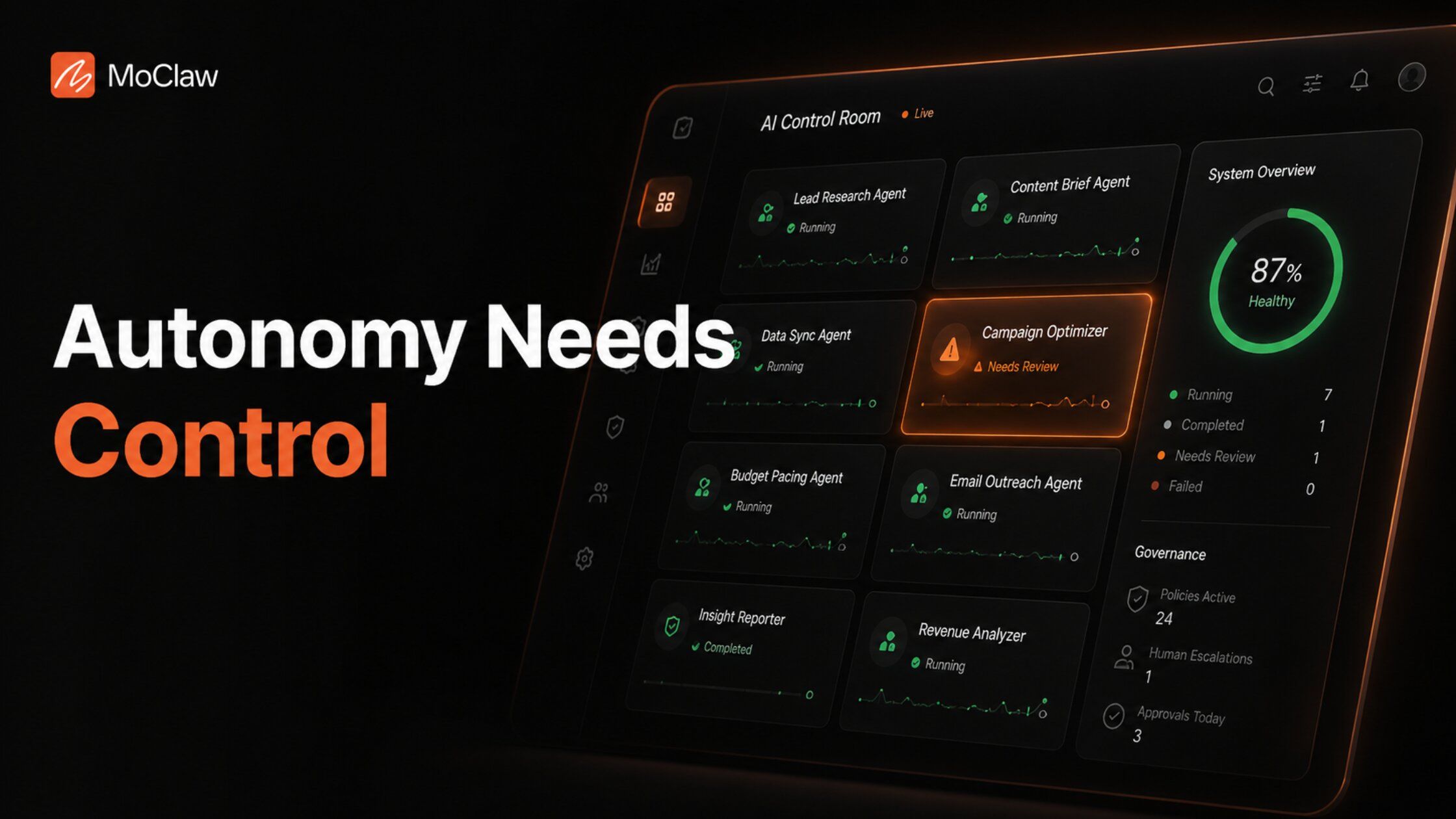
Autonomous AI agents should handle work only when the goal is clear, the rules are known, and the result is easy to check. The moment a task can affect trust, money, access, private data, or a customer-facing decision, the agent needs a hard limit and a person in the loop.
Gartner predicts more than 40% of agentic AI projects will be canceled by the end of 2027, largely because teams grant autonomy before the workflow is ready for it. The appeal is obvious: autonomous AI agents make the day feel lighter. The small tasks stop piling up, the follow-up gets handled, the check runs without another reminder. That relief is real, and it is also where the harder call begins, because work that keeps moving after your attention has left needs a clear sense of what should stay in motion and what should come back to a person.
Key Takeaways:
- Hand a task to an autonomous agent when it repeats, uses trusted inputs, follows a defined process, and returns work a person can review without redoing it.
- Keep people accountable for vague strategy, sensitive judgment, irreversible actions, and any decision someone must defend later.
- Autonomy and access are different risks. A scheduled read-only agent can be safer than a manually-approved one that can edit customer accounts.
- Treat autonomy as a ladder, not a switch. The same task can be safe to summarize and unsafe to act on.
- Every autonomous workflow needs a defined stop point near money, customer data, legal risk, publishing, or system changes.
Quick Answer: What Should AI Handle on Its Own?
AI can work on its own when the goal is clear, the rules are known, and the result is easy to check. The most suitable tasks repeat often, use trusted inputs, follow a defined process, and return work a person can review without starting over.
The moment the result can affect trust, money, access, private data, or a customer-facing decision, the agent needs clear limits. It should not own a vague strategy, sensitive judgment, irreversible actions, or final decisions that someone must explain, defend, and own. Let AI move the work where the path is clear, and keep people close where the stakes rise.
Section summary: Clear, bounded, reviewable work is safe to automate. Anything that needs authority or judgment stays with a person.
What Are Autonomous AI Agents?
Autonomous AI agents begin where a single AI agent response usually ends. They take a defined goal, break it into steps, use available tools, track progress, and keep working until they produce a usable result. A standard AI tool may explain how to organize a weekly report; an autonomous agent can collect the inputs, compare what changed, and return an update the team can review.
Consider Maya, an ops lead at a 30-person SaaS company. Her old Monday routine was matching a CRM export against an invoice list by hand, around 400 rows, looking for accounts that no longer agreed. An autonomous agent now does the first pass: it flags the mismatches and shows the source behind each one, and Maya spends 20 minutes reviewing instead of two hours reconciling. The follow-through removed the repeated prompts and manual handoffs, but the final correction still belongs to her.
Section summary: An autonomous agent carries a goal across multiple steps and tools. The value is follow-through, not a single answer.
How Autonomous AI Agents Work
An autonomous agent works through a loop that depends on three things: a clear target, reliable working material, and a stop point.
A well-defined target. A clear target defines what counts as done, what falls outside scope, and what the output should include. "Compare the invoice list with the project tracker and flag missing invoice numbers, mismatched amounts, and unpaid items" gives the agent a real task. "Check if anything looks wrong with billing" gives it too much room to guess.
Reliable working material. The agent may need approved URLs, internal files, app data, examples, templates, rules, or past decisions. Tool access lets it move through pages, files, fields, drafts, and systems instead of staying inside a reply.
A stop point. Strong autonomous workflows include a pause condition. The run should stop when data is missing, sources conflict, rules are unclear, or the task starts changing shape. A stop point protects the workflow from quiet drift. It tells the agent: this is no longer execution, bring it back to a person.
Section summary: Target, material, stop point. Remove any one and autonomy turns into guessing.
Autonomous Agents vs Assistants, Automation, and Agentic AI
Most AI labels blur because the interface looks similar. The handoff is where they separate. These categories overlap in practice and companies use the labels differently, so treat the distinctions below as practical rather than universal.
| Term | What it does | What sets it apart |
|---|---|---|
| AI assistant | Helps a user complete a task | The user stays close to the work |
| Workflow automation | Executes a process designed in advance | Most steps are decided before the run |
| Autonomous AI agent | Works toward a goal across multiple steps | It can choose the next action within approved limits |
| Agentic AI | AI that can reason and act toward goals | A broader capability, not one product type |
An assistant may use tools, an automated workflow may include AI, and an autonomous agent may operate inside a larger agentic system. The point is how much work it can carry before a person must take over.
Section summary: The dividing line is the handoff, not the interface. Judge how far the work travels before it needs you.
The AI Autonomy Ladder: How Much Should AI Do?
Autonomy is not a yes-or-no decision. The same task can be safe at one level and risky at another: a customer complaint may be safe to summarize, need approval before a reply, or require a person to resolve.
| Level | What AI can do | Human role |
|---|---|---|
| 1. Observe | Summarize information | Review |
| 2. Advise | Compare options or suggest next steps | Decide |
| 3. Prepare | Draft the action | Approve |
| 4. Monitor | Watch known sources and flag changes | Interpret |
| 5. Act inside the rules | Complete narrow internal actions | Audit |
| 6. Operate | Carry a linked workflow across tools | Govern |
A task should move higher only after its rules, evidence, and recovery path have proved reliable. Higher autonomy is not a prize for a smarter model. It is a responsibility the process must earn.
Section summary: Promote a task up the ladder on evidence, not optimism. Each rung adds reach and adds risk.
Autonomy vs Access: The Risk Most Teams Miss
More autonomy does not always mean more risk. Reach can matter more. Autonomy controls how far the agent can continue; access determines what it can touch along the way. A scheduled agent that only reads approved public pages may be safer than a manually-approved agent that can edit customer accounts. The first has more independence, the second has more reach.
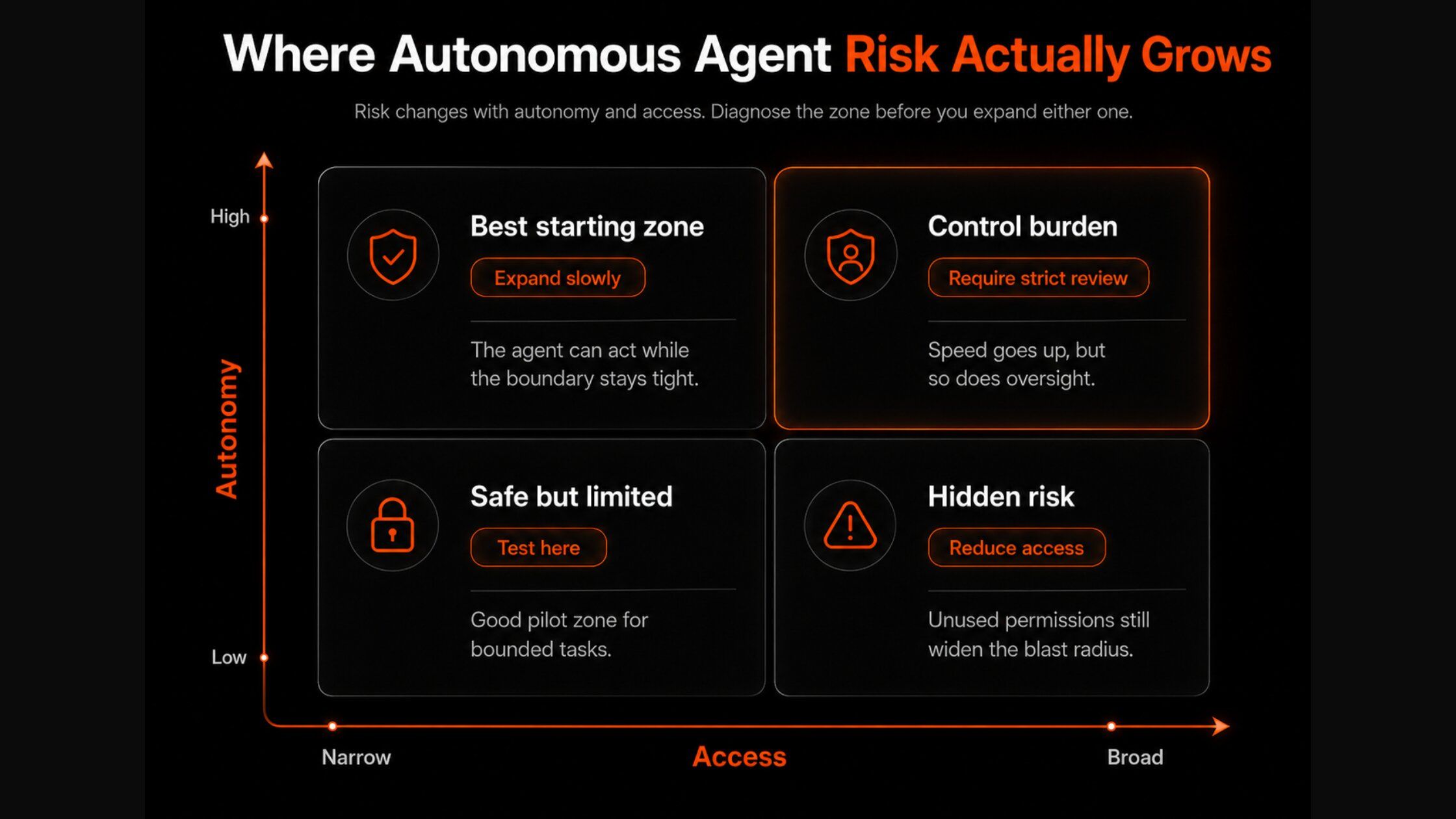
| Narrow access | Broad access | |
|---|---|---|
| Low autonomy | Mistakes are easy to handle | A single action can still cause harm |
| High autonomy | Useful work continues with limited exposure | Mistakes can spread before review |
A reliable workflow may earn more autonomy. Broader access should come later and grow more slowly than confidence.
Section summary: Separate "how far" from "how much it can touch." Expand reach last, and slowest.
How to Decide What AI Can Handle Alone
Autonomy is safer when the agent is executing a defined task, not filling in the team's missing decisions. Five questions decide it.
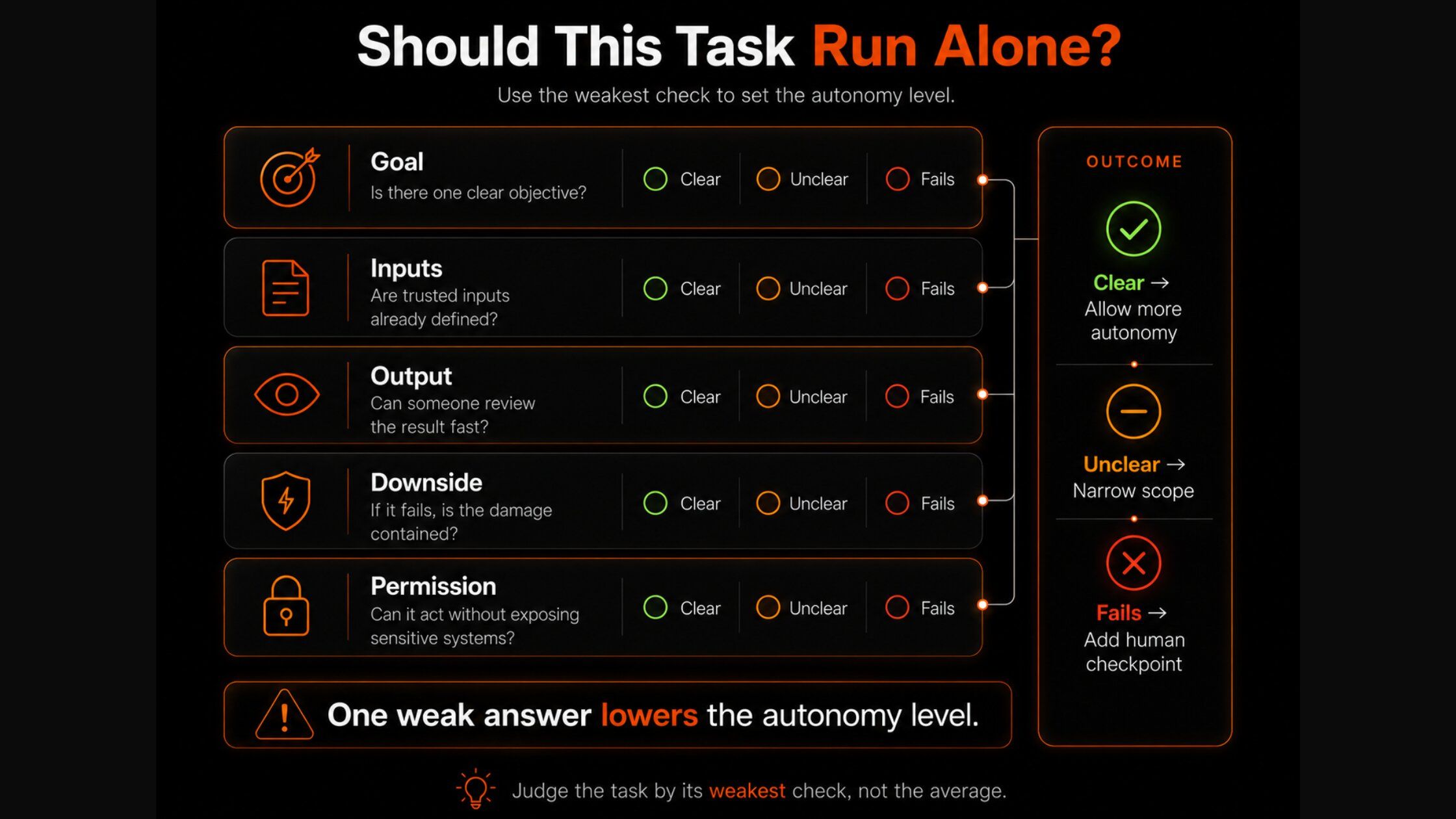
Is the goal clear? The clearer the instruction, the less the agent has to decide on its own. Words like "best," "important," or "high quality" hide standards the agent would otherwise invent.
Are the inputs trusted? Autonomous work is only as strong as the material feeding it. Open-ended source selection or stale files put the trust decision inside the process. Use approved sources, current files, and examples that match the expected output.
Can the output show its work? A useful result leaves its path visible: what the agent used, what it assumed, and what it could not confirm. A result that cannot show its path forces the team to recheck most of the work before trusting it.
Is the downside contained? A renamed file, saved draft, internal note, or tracker update has a short recovery path. A sent contract, changed account, deleted record, or public claim carries a higher cost.
Does permission match the job? If the agent only needs to read, do not let it write. Draft permission should not become send permission. If any answer is unclear, lower the autonomy level, narrow the permission, or add a checkpoint.
Section summary: Five checks: goal, inputs, traceability, blast radius, permission. One weak answer means dial autonomy down, not up.
Autonomous AI Agent Examples: Work AI Can Handle Alone
The best starting points have a defined output and a clear handoff.
Reconciliation that finds mismatches. Agents can compare records across files, tools, or systems and return the differences in one place. An agent could match a CRM export, an invoice list, and a project tracker to find missing accounts or conflicting values, then leave the final correction to the person who owns the data. (This is close to what powered Maya's Monday reconciliation above, and to a data review pass that verifies a list before anyone emails it.)
Operations with known rules. Trackers, reports, reminders, and status checks often follow the same pattern run to run. A weekly tracker is a good example: the agent updates fixed fields from a known source and flags missing data rather than guessing it.
Drafting that moves work forward. Take Devin, who runs support for a DTC brand handling roughly 120 tickets a week. An agent summarizes each complaint, pulls the customer history, drafts a reply, and flags missing context. The safe handoff is a prepared first pass; the final promise or decision stays with Devin. It should not promise a refund, change the account, or send the response without approval.
Section summary: Reconciliation, rule-based operations, and first-pass drafting are the safe on-ramps. Each ends in reviewable work, not an irreversible action.
Where Autonomous AI Agents Should Stop
A task may qualify for autonomy at the start and still reach a point where the agent should stop. Autonomy earns its value by keeping a workflow moving; that value disappears when the next step needs authority, strategy, or certainty the agent does not have. To distinguish agent communities from task-running assistants, see our Moltbook social-agent guide.
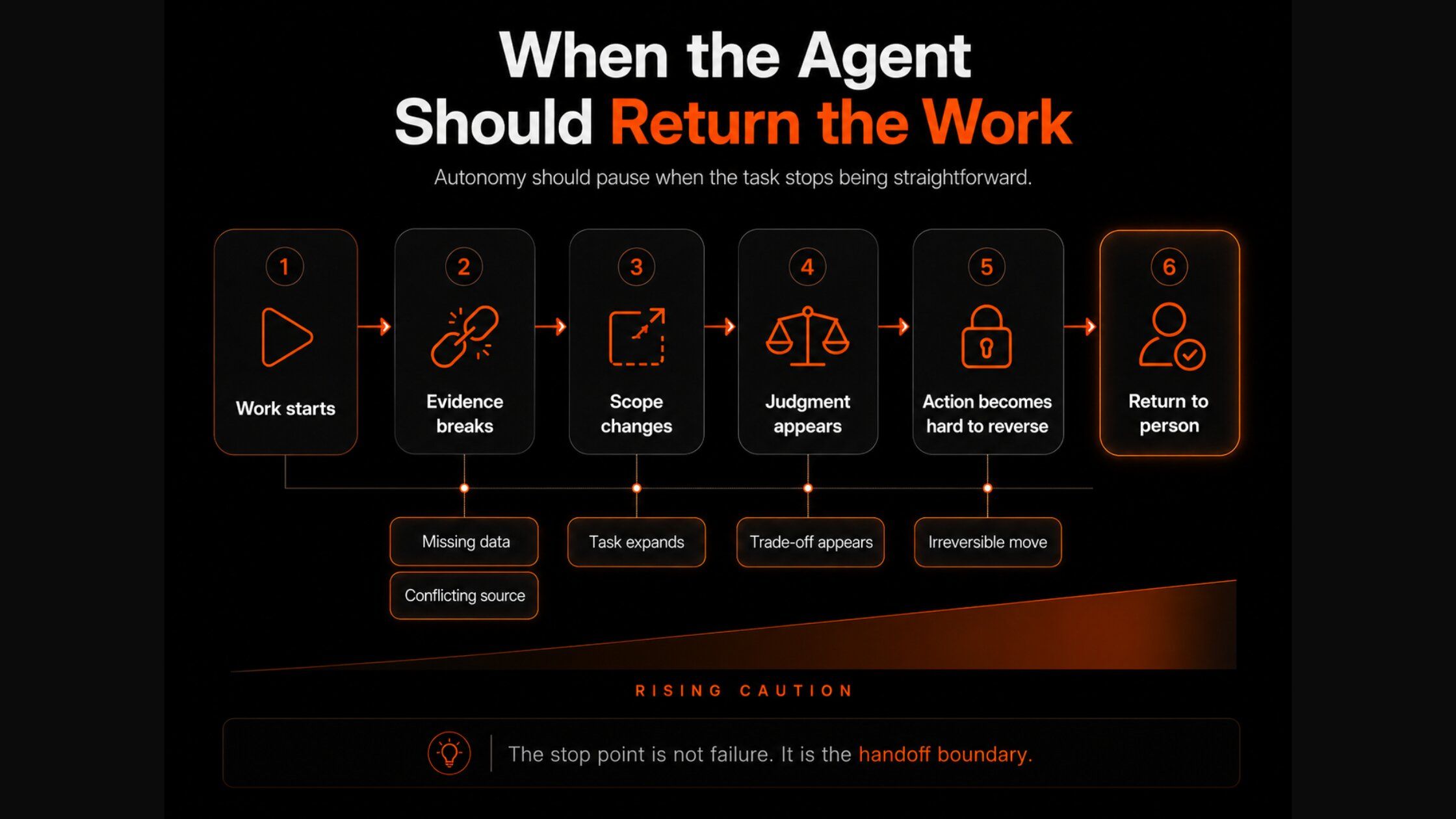
The evidence no longer supports the next step. If required data is missing, sources conflict, or information is stale, the agent should return the gap instead of filling it with a guess.
The task has changed scope. Research should not quietly become outreach. A draft should not become a sent message. Monitoring should not turn into a decision.
The agent has to choose what matters. When the agent must weigh speed over accuracy, cost over quality, or one stakeholder over another, those preferences belong to the team, not the run.
The next action is hard to reverse. Payments, account changes, access grants, contract commitments, deletions, and public claims need a human decision point.
Section summary: Stop on missing evidence, scope creep, value trade-offs, and irreversibility. A stop point is a feature, not a failure.
AI Agent Guardrails That Actually Hold
A boundary only matters if the workflow can enforce it. A cautionary case makes the point: a 12-person fintech once let an agent update customer records directly, and one wrong field rule touched 80 accounts before anyone caught it. The fix was not a smarter model, it was a guardrail.
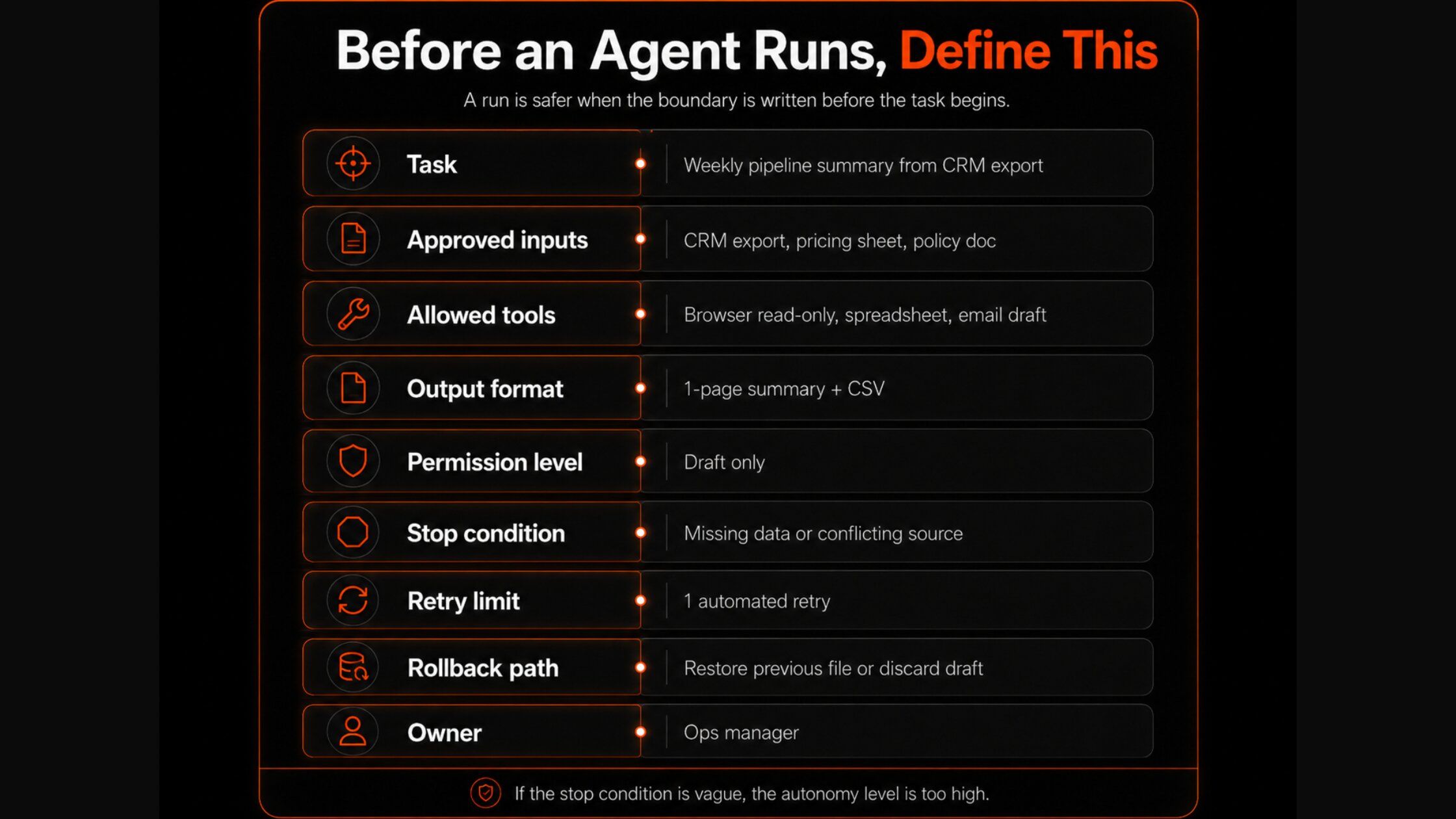
Before an agent starts, define the job: the finish line, approved inputs, required output, and accountable owner. Any step outside that brief returns to a person. Keep access as narrow as the task requires, since research rarely needs write access and drafting should stop before sending. Ask the agent to leave a review trail of sources used, actions taken, assumptions made, and the reason for stopping. Clarify where it should pause, how many retries are allowed, and what must roll back if something fails. Frameworks like Anthropic's guidance on building effective agents and the NIST AI Risk Management Framework treat this control layer as a first principle, not an afterthought.
Section summary: Brief, narrow access, review trail, and rollback rules. Guardrails are what let you raise autonomy safely.
The Workspace Layer Autonomous Agents Need
Once the goal, inputs, permissions, and stop points are clear, the agent still needs a place to do the work. MoClaw gives autonomous workflows their own AI cloud computer, so recurring work does not restart inside a fresh chat every time.
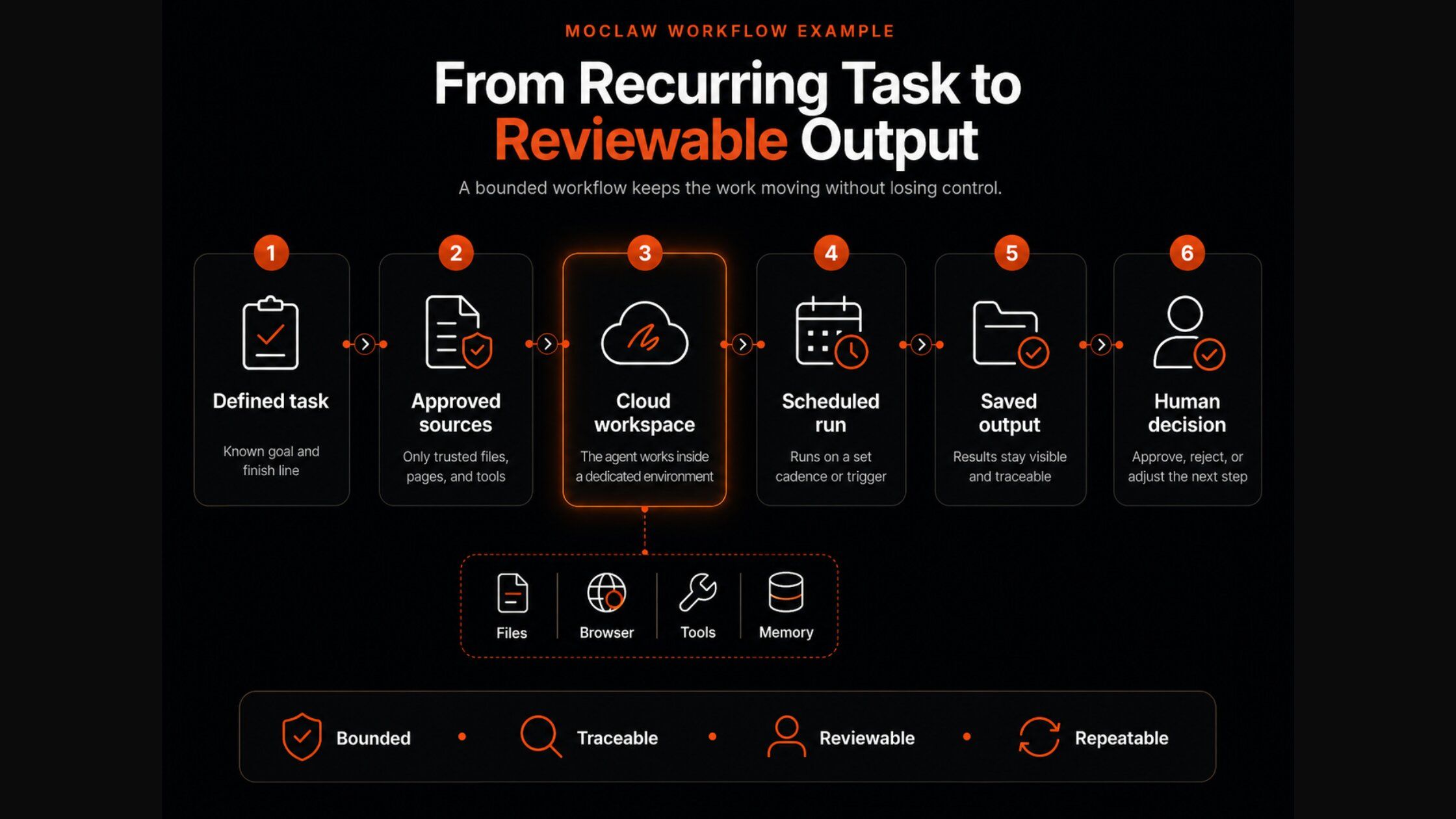
That helps in a few practical ways: less repeat setup, since the same brief, files, and sources do not need rebuilding each run; work that can continue, since scheduled tasks move forward without the user watching the chat; a path through regular websites that lack clean APIs; usable outputs as a spreadsheet, PDF, slide deck, or clean document; and one workflow across web, Telegram, or Slack without splitting context. A weekly investor-update draft is a simple example: MoClaw can collect the notes, organize the numbers, prepare the update, and return a clean document, while the person keeps control of the judgment. For more patterns, see the use-case library the difference between an AI chatbot and an AI agent, and how repeatable steps get packaged as reusable agent skills.
Section summary: A narrow autonomous workflow needs a stable place to run. The agent carries the repeatable steps; the person keeps the judgment.
FAQ
What tasks should autonomous AI agents never do on their own?
Anything hard to reverse or accountable to a person: sending contracts, changing or deleting records, granting access, moving money, or making public claims. Agents can prepare these, but a person should approve the final step.
How is an autonomous AI agent different from workflow automation?
Workflow automation runs a process decided in advance, step by step. An autonomous agent works toward a goal and can choose the next action within approved limits, which is why it needs clearer boundaries.
How do I know when to give an agent more autonomy?
When its rules, evidence, and recovery path have proven reliable on lower-stakes runs. Promote a task up the autonomy ladder on track record, and expand its access more slowly than its autonomy.
What is the difference between autonomy and access?
Autonomy is how far the agent can continue without you. Access is what systems and data it can touch. A high-autonomy, read-only agent can be safer than a low-autonomy agent with write access to customer accounts.
The Quietest Risk Is Convenience
Autonomous work often wins trust through relief. A task stops interrupting the day, a report appears on time, a check runs without being chased, and the handoff feels harmless because it feels helpful. That is exactly why it deserves a second look. A workflow succeeding once does not mean it should run unwatched. Some workflows fail loudly; the riskier ones succeed quietly, long enough that nobody thinks to look again. Autonomy earns its value through consistency, and it should earn its trust the same way.
Try MoClaw free and give one bounded, reviewable workflow to an agent before you trust it with the next.
Continue Reading
More Research
Claude Code SEO Skill: Fire Your SEO Agency

AI Agent Sandbox: What It Is and Isn't

Lindy AI Review: Does Editable Memory Help?

Caveman Skill: What the 65% Really Buys

Hermes Agent Desktop Review 2026: Worth It?

Agent Substrate: 250 Agents on 8 Pods
Field notes from the MoClaw team. We compare the agent stack we run in production against the alternatives we evaluated and dropped. Production stories with real numbers, not vendor decks.
Turn insights into action.
MoClaw automates the recurring work your analysis points to. No engineering required.
References: IBM: What are AI agents? · IBM: What is agentic AI? · Gartner: 40%+ of agentic AI projects canceled by 2027 · Anthropic: Building effective agents · NIST: AI Risk Management Framework