GLM-5.3 reasoning_effort: low, high or max

GLM-5.3 reasoning effort has three levels and no off switch. What low, high and max cost in output tokens, and how to migrate without failed requests.
Table of Contents
GLM-5.3 reasoning effort comes in three settings, low, high and max, it defaults to max, and there's no longer any way to turn thinking off. If your current code sends thinking.type: "disabled", the request fails rather than degrading, so that field has to change before the model ID does.
Key Takeaways:
- Three levels only:
low,high,max. The default ismaxand Z.ai recommends it for coding thinking.type: "disabled"is gone. Sending it produces a failed request- Max scores 34.5% on Z.ai Code Bench at roughly 75K output tokens; high gets 31.4% at roughly 50K
- That's 3.1 points for 50% more output, which is a cost decision rather than a quality one
- Z.ai published no figure for
low, so nobody outside the company knows what it gives up
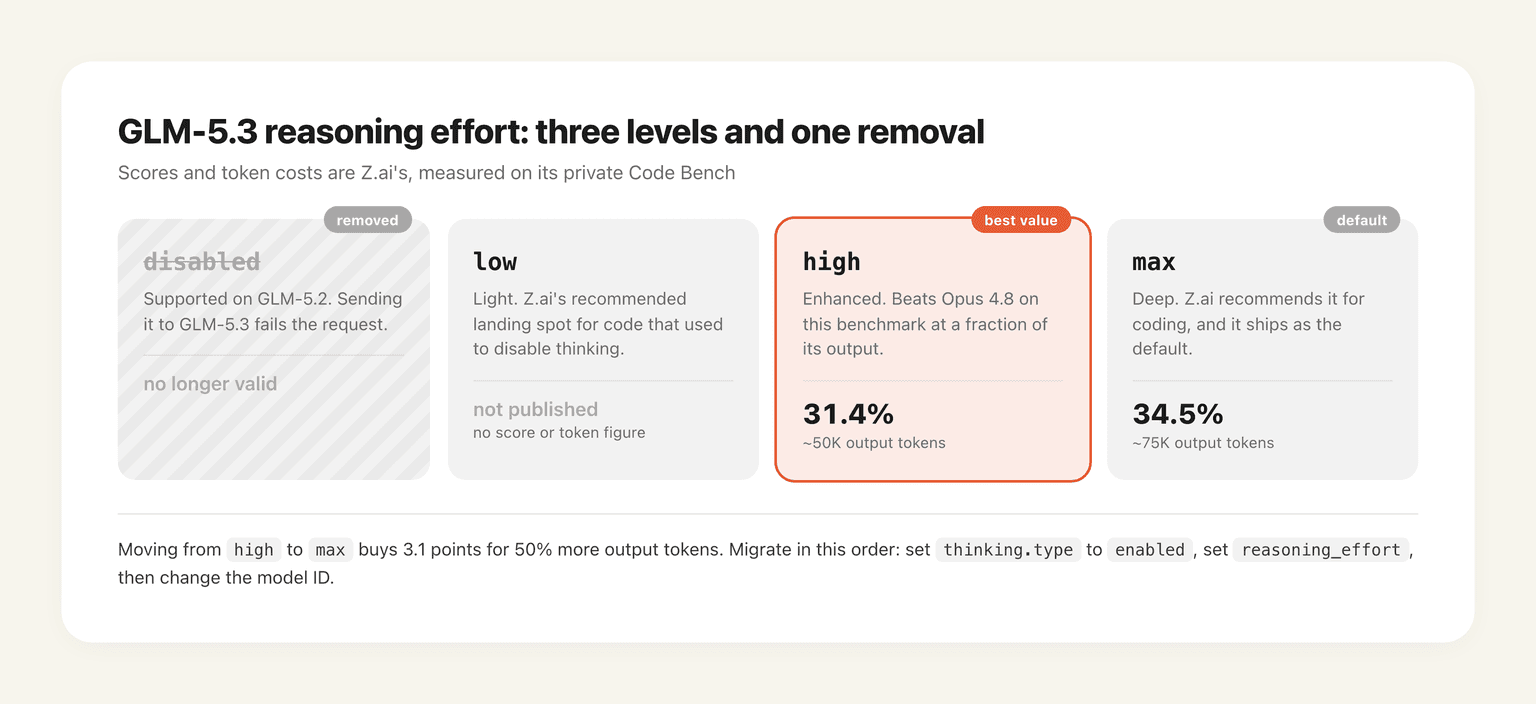
Z.ai's own comparison makes the tradeoff concrete. At high effort GLM-5.3 reaches 31.4% for about 50,000 output tokens per task, against Claude Opus 4.8's 29.5% for about 120,000. Push GLM-5.3 to max and you get 34.5%, but you pay 75,000 tokens for it. The default setting is the expensive one, which is worth knowing before you migrate anything with volume behind it.
What changed in GLM-5.3's thinking parameters
GLM-5.2 let you turn thinking off. GLM-5.3 does not, and Z.ai documents the removal rather than quietly dropping support:
| Parameter | Accepted values | Default | Note |
|---|---|---|---|
thinking.type |
enabled |
enabled |
disabled is no longer supported |
reasoning_effort |
low, high, max |
max |
max recommended for coding |
There's no medium. The gap between low and high is the whole middle of the range, which makes the choice coarser than the equivalent controls on most competing models.
A minimal request body looks like this:
{
  "model": "glm-5.3",
  "thinking": { "type": "enabled" },
  "reasoning_effort": "max"
}
One caveat on timing: the public GLM-5.3 API hadn't opened as of 14 August 2026, so for now this is what you prepare for rather than what you call. Access runs through the GLM Coding Plan, and the availability picture is its own tangle.
The migration fails loudly, which is the good outcome
Z.ai's instruction is explicit and ordered: if your application currently sends thinking.type: "disabled", change it to enabled and set reasoning_effort to low, then update the model ID. Do it the other way round and the request fails.
A hard failure is the merciful version of this change. The alternative, where an unsupported field gets ignored and your latency-sensitive path silently starts spending 75,000 output tokens per call at the default effort, would cost far more and take a billing cycle to notice. Loud beats silent when the quiet failure mode is a bill.
What it does mean is that this migration can't be a model-ID find-and-replace, which is how most of them get done. Anywhere in your codebase that disabled thinking to keep a call cheap and fast now has to make a real decision about how much reasoning that path deserves.
What each level costs, in Z.ai's own numbers
Only two of the three levels have published figures, both from Z.ai Code Bench, the private benchmark Z.ai uses on contamination grounds:
| Setting | Score | Output tokens per task |
|---|---|---|
| GLM-5.3, max | 34.5% | ~75,000 |
| GLM-5.3, high | 31.4% | ~50,000 |
| GLM-5.3, low | not published | not published |
| GLM-5.2, max | 23.4% | ~96,000 |
The GLM-5.2 row is the one that shows what post-training bought: the new model at max beats the old model at max by eleven points while spending roughly 22% fewer output tokens. Efficiency and quality moved together, which doesn't usually happen.
The blank row matters too. Z.ai recommends low as the migration target for anything that previously ran with thinking off, yet publishes nothing about what low scores or costs. If you're moving a production path onto it, you're doing so on the vendor's word.
Max buys three points for fifty percent more output
Strip it down and the decision is arithmetic. Going from high to max adds 3.1 percentage points and 25,000 output tokens per task, so you're paying about 50% more output for roughly a 10% relative improvement in completion rate.
For most work that's a bad trade, and I'd default to high rather than accepting the shipped default. Three cases where max earns it:
- The task is long-horizon and unattended, where a failure costs a rerun of everything rather than a retry
- The output is small relative to the reasoning, so the token multiplier applies to a small base
- You're on the GLM Coding Plan running off-peak, where points cost half and the difference partly disappears
That last one is genuinely underused. Peak hours on the plan are 14:00 to 18:00 UTC+8 on weekdays and everything else bills at half, so max effort scheduled outside that window can land cheaper than high effort inside it. The mechanics, including the concurrency bump that comes with off-peak, are in why the GLM Coding Plan throttles you.
One measurement caveat before you trust any of this on your own workload. Z.ai Code Bench is a private benchmark with its own task mix, and effort levels don't scale uniformly across task types: a job that's mostly retrieval and small edits gains far less from deeper reasoning than a multi-file refactor does. The 3.1-point gap is an average over Z.ai's mix, not a constant you can apply to yours. Run both settings against twenty of your own tasks before standardising on either.
max because you didn't set the field is how a migration turns into a 50% output-token increase nobody chose.Why Z.ai took the off switch away
No official reason accompanies the removal, so this is inference rather than reporting: every capability Z.ai advertises for GLM-5.3 depends on the model reasoning before it acts. The training environments were built around diagnosing problems across a stack, planning multi-step work, and verifying results. A no-thinking mode would produce a model that fails at everything the release exists to demonstrate, and it would get benchmarked in that state by someone.
There's a plainer commercial reading as well. Thinking tokens are output tokens, and output tokens are billed. Removing the option that suppresses them isn't neutral. Both explanations can be true at once, and the honest position is that Z.ai hasn't said.
What to change in your code, exactly
Four things, in this order. Find every call site that sets thinking.type and change disabled to enabled. Add an explicit reasoning_effort to each one instead of relying on the default, using low where the old code had thinking off. Only then switch the model ID to glm-5.3. Finally, put a token-usage assertion on your hottest path, because effort level is now the single largest lever on output volume and a stray default will show up in billing before it shows up in latency.
If you maintain a shared client wrapper, set the effort explicitly there and make it a required argument. A default that costs 50% more output is not a default anyone should inherit by accident.
Choosing a GLM-5.3 effort level by the job in front of you
Interactive completions and classification, where a human waits on the answer: low. Ordinary agent work through Claude Code or OpenCode, where you want quality without watching the meter: high, which is where most people should sit. Long unattended runs across a large repo, refactors spanning many files, anything where a wrong answer costs an hour of rework: max, ideally scheduled off-peak.
The pattern underneath is that effort level is really a statement about how long you're willing to let something run. Max effort on a long-horizon task stops being an API parameter and becomes a job with a wall-clock duration, which is a different operational problem from a slow request. That's the gap MoClaw fills: a hosted cloud AI computer that stays running for the length of the job, alongside the agents you already use rather than instead of them. The free trial runs three days on 1,000 credits, and a $20 subscription carries 1,000 credits a month.
FAQ
What are GLM-5.3's reasoning effort levels?
Three: low, high and max. Z.ai describes them as light, enhanced and deep respectively. The default is max, and Z.ai recommends max for coding tasks.
Can I disable thinking on GLM-5.3?
No. thinking.type: "disabled" is not supported and a request containing it fails. The nearest equivalent is thinking.type: "enabled" with reasoning_effort set to low, which is what Z.ai tells migrating applications to use.
How do I migrate from GLM-5.2 to GLM-5.3?
Change thinking.type from disabled to enabled, set reasoning_effort to low, and only then update the model ID to glm-5.3. Doing it in the other order produces failed requests.
Which reasoning_effort should I use?
high for most work. Z.ai's figures put max at 34.5% versus high at 31.4% on its Code Bench, but max spends about 75,000 output tokens per task against high's 50,000, so you pay 50% more output for 3.1 points. Reserve max for long unattended runs, ideally scheduled during off-peak hours on the Coding Plan.
What does GLM-5.3 low effort score?
Z.ai hasn't published a score or a token figure for low, despite recommending it as the migration target for code that previously disabled thinking. That gap is worth testing yourself before putting a production path on it.
Does reasoning effort affect GLM Coding Plan quota?
Yes, indirectly. The plan counts points separately for input, cached input and output tokens, and reasoning tokens are output. Higher effort consumes more of your weekly quota, though calls made outside the 14:00 to 18:00 UTC+8 weekday peak consume half the points.
Parameter behaviour, migration instructions and benchmark figures in this article come from Z.ai's GLM-5.3 launch post and its developer documentation, read on 14 August 2026. The public API had not opened on that date, so verify the parameter contract against current docs before shipping a migration.
Continue Reading
More Tutorial
Run GLM-5.3 in Claude Code: Full Setup

How to Use Grok: Every Access Path

How to Use Kimi K3 in Codex

Run Kimi K3 in an Agent, No Self-Hosting

I Made a Product Video With video-shotcraft

How to Run Inkling AI Locally: Hardware & Setup
The MoClaw editorial team writes about workflow automation, AI agents, and the tools we build. Default byline for industry overviews, listicles, and collaborative pieces.
Stop doing this manually.
MoClaw runs on its own cloud computer - research, monitoring, reports, browser tasks. No setup. No self-hosting.
References: GLM-5.3 launch post and API changes, Z.ai · GLM-5.3 model overview, Z.ai developer documentation · GLM Coding Plan usage policy, Z.ai · GLM Coding Plan FAQ, Z.ai · Z.ai DevPack overview