AI Website Builder
Use the MoClaw AI website builder to turn one sentence into a complete, <a href="/blog/always-on-ai-agent-2026">responsive website</a> with real code and original copy, ready to publish in minutes.
Runs on managed cloud. No scripts, no Zapier.
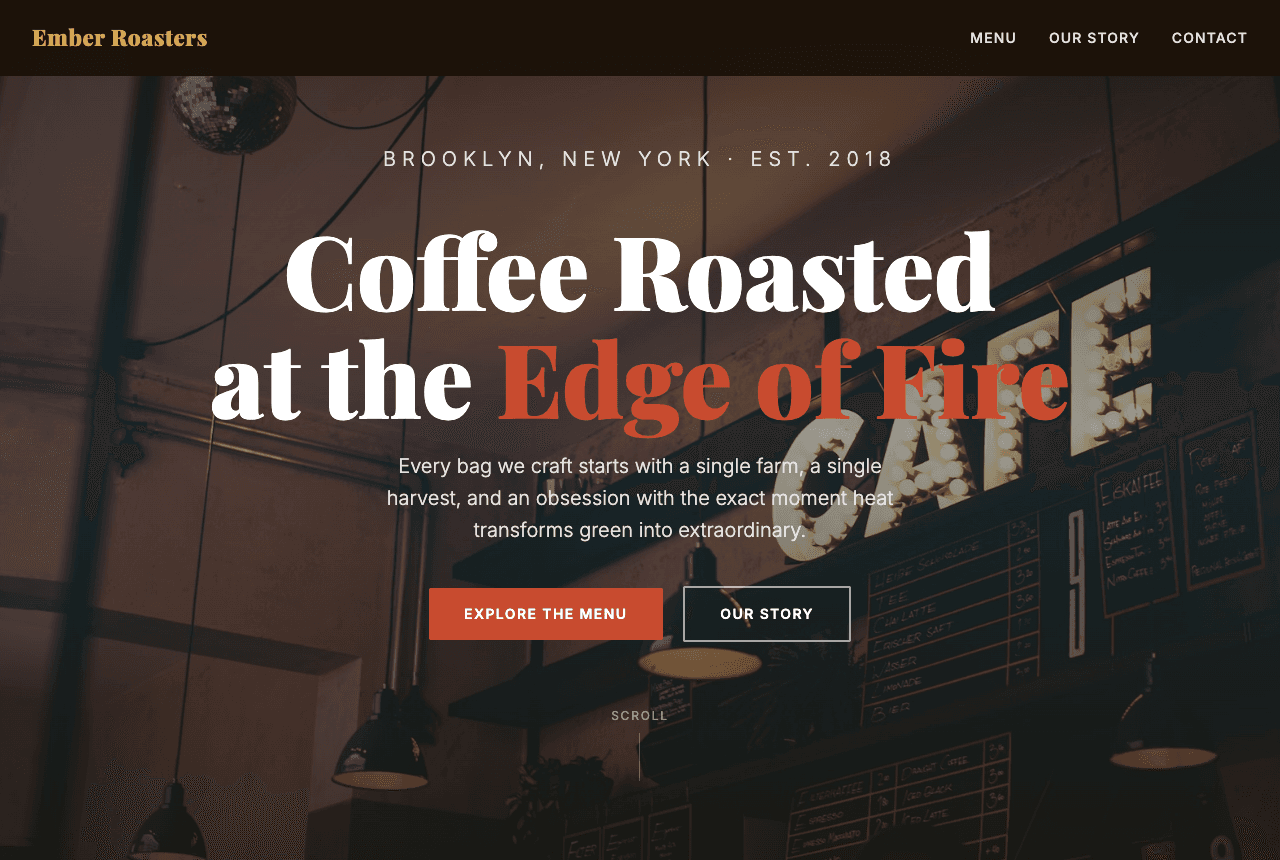
The user wants a complete one-page site for Ember Roasters, a Brooklyn coffee roaster. I will hand-write the HTML, CSS, and a touch of JavaScript rather than drop a template, so every section is custom. Plan: a warm hero with original copy, a 5-item menu with real prices, a founder story, and a contact form, all responsive down to mobile. I will build the file, then validate it renders before handing it back.
Used 2 tools
Bash mkdir -p projects/ember-roasters
Created project folder projects/ember-roasters
Write projects/ember-roasters/index.html
Wrote index.html with hero, menu, story, and contact sections plus base styles
Hero and copy are in. Now I will tighten the responsive layout, add a mobile menu breakpoint, and wire up the contact form so the fields validate on submit.
Used 2 tools
Write projects/ember-roasters/index.html
Updated index.html, added two media queries and contact form validation. File size 22 KB.
Bash cd projects/ember-roasters && python3 -m http.server 8080 and open index.html to validate sections render
Page renders cleanly. All sections present: hero, menu (5 items), story, contact. Layout reflows correctly at mobile width.
Your Ember Roasters site is built. Highlights:
- Hero: "Coffee Roasted at the Edge of Fire" with a Brooklyn, Est. 2018 tagline and two call-to-action buttons.
- Menu: 5 real coffees with origins and prices, from a bright Ethiopia Yirgacheffe to the house Edge of Fire dark roast.
- Our Story: a short founder narrative about single-farm sourcing and roasting to the exact moment heat transforms the bean.
- Contact: a working form with name, email, and message fields plus client-side validation.
It is one self-contained, responsive index.html (22 KB), no build step and no dependencies. Download it and drop it on Netlify, Cloudflare Pages, or GitHub Pages to go live. Want me to add an online-ordering section or a newsletter signup next?
Try follow-up prompts
How the ai website builder works
Describe the Website You Want the AI Website Builder to Create
Tell MoClaw the business, the sections you need, and the tone in plain language. You can name specific pages, products, or prices. The more detail you give, the closer the first draft lands to your brand.
Watch the AI Website Builder Write Real Code
MoClaw plans the layout, writes the HTML and CSS by hand, and adds light JavaScript for things like form validation. It works in a real cloud workspace, so you see each file and command as it goes. Nothing is locked behind a proprietary editor.
Download Your Responsive Site and Publish Anywhere
You get a self-contained, mobile-responsive page with no build step. Download it and host it on Netlify, Cloudflare Pages, or GitHub Pages. Because it is plain code, you own it and can edit it forever.
What MoClaw watches for you
ai website builder: MoClaw vs the alternatives
See how MoClaw's AI-powered approach differs from traditional tools.
| Feature | Manual / Freelancer | Wix AI | MoClaw |
|---|---|---|---|
| Time to first full draft | Days to weeks | Minutes, inside their editor | Minutes, as a downloadable file |
| Real, editable code you own | Yes | No, locked to the platform | Yes, plain HTML and CSS |
| Original copywriting included | Extra cost | Generic suggestions | Tailored copy written for you |
| Hosting flexibility | Any host | Tied to their hosting | Host anywhere you like |
| Iterate by chatting | Back-and-forth with a developer | Manual edits in the builder | Describe the change and it updates |
| Starting cost | High freelance rates | Monthly subscription | Free tier to start |
Why Use an AI Website Builder That Writes Real Code?
Template builders give you a pretty page you can never fully own or move, so the moment you outgrow them you start over.
Real HTML You Own, Not a Locked Template
MoClaw writes plain, portable code, so you can host it anywhere and edit it forever instead of renting a page inside someone else's editor.
Iterate by Just Describing the Change
Need a new section, a different color, or sharper copy? Say so in chat and MoClaw rewrites the code, no manual dragging or developer hand-off.
Production-Ready, Responsive Output
Every page ships mobile-responsive with real marketing copy and working forms, so it is ready to publish rather than a rough starting point.
Ways to extend your ai website builder
More ways this workflow can grow once it's running.
ai website builder FAQ
How does the MoClaw AI website builder create a site from a description? ⌄
You describe the business and the sections you want, and MoClaw plans the layout, writes the HTML and CSS by hand, and adds light JavaScript where needed. It runs in a real cloud workspace, so the output is actual code rather than a fill-in-the-blank template.
Can I customize the design, colors, and copy the AI website builder generates? ⌄
Yes. Because the result is real code, you can ask MoClaw to change colors, fonts, layout, or wording just by describing the change in chat. You can also open the file and edit it directly in any editor.
What format does the AI website builder deliver, and how do I publish it? ⌄
You get a self-contained index.html file with no build step or dependencies. Download it and drag it onto Netlify, Cloudflare Pages, or GitHub Pages to put it online, or hand it to your own host.
How long does the AI website builder take to build a full page? ⌄
A focused one-page site is usually ready in a few minutes. Larger sites with more sections take a little longer because MoClaw writes and validates each part before handing it back.
Can the AI website builder use my own content, images, or brand assets? ⌄
Yes. You can paste in real copy, product names, and prices, and attach images or brand guidelines. MoClaw will work them into the page instead of inventing placeholder content.
Is the MoClaw AI website builder better than template tools like Wix or Squarespace? ⌄
It is a different approach. Template builders lock you into their editor and hosting, while MoClaw gives you plain, portable code you own and can host anywhere. For custom layouts and full control, that flexibility is the main advantage.
How much does the MoClaw AI website builder cost? ⌄
You can start on the free tier and build your first sites at no cost. Paid plans add more usage and larger projects when you need them.
Can I combine the AI website builder with other MoClaw tasks like content writing or SEO? ⌄
Yes. MoClaw can research keywords, write the marketing copy, and build the page in one workflow, so the site and its content are produced together rather than in separate tools.
Integrations
Best integrations for ai website builder
Who it's for
Who uses ai website builder
Related app building use cases
From our blog
Try AI Website Builder for free
No credit card required