Lindy AI Review: Does Editable Memory Help?

A hands-on Lindy AI review: we tested whether editable memory carries a weekly brief format across Slack prompts, and how a correction actually sticks.
Table of Contents
Lindy AI is an AI teammate platform for repeat assistants that keep persistent context, including editable memory for preferences and rules. This Lindy AI review tests one question: can Lindy carry editable memory into a repeat workflow without repeated setup? Tested on August 26, 2026, in Slack, Lindy remembered a competitor-brief structure, reused it, accepted a correction, and later applied the corrected version.
Key Takeaways:
- Lindy recalled the original three-part brief format on the next run.
- A correction worked best when phrased as a future rule.
- Editable AI memory helps recurring drafts, but it does not replace approval.
- Persistent context needs periodic cleanup.
- Teams should check pricing, sharing, deletion, and controls before rollout.
I'm Vera. My test was small. I told Lindy to use product change, pricing signal, and risk note for a weekly competitor brief. Then I asked for Acme's format, and Lindy reused those sections. I changed the third section to a follow-up question. The first correction worked in-thread, but a later prompt briefly returned to the risk note. After I wrote, "From now on, replace risk note with follow-up question," Lindy produced the updated format again. Memory can help, but durable corrections need explicit wording.
Quick Verdict
Lindy memory helps when repeated work has a stable shape. In this AI teammate test, Lindy carried a brief format forward and later used the corrected version after a clear rule update.
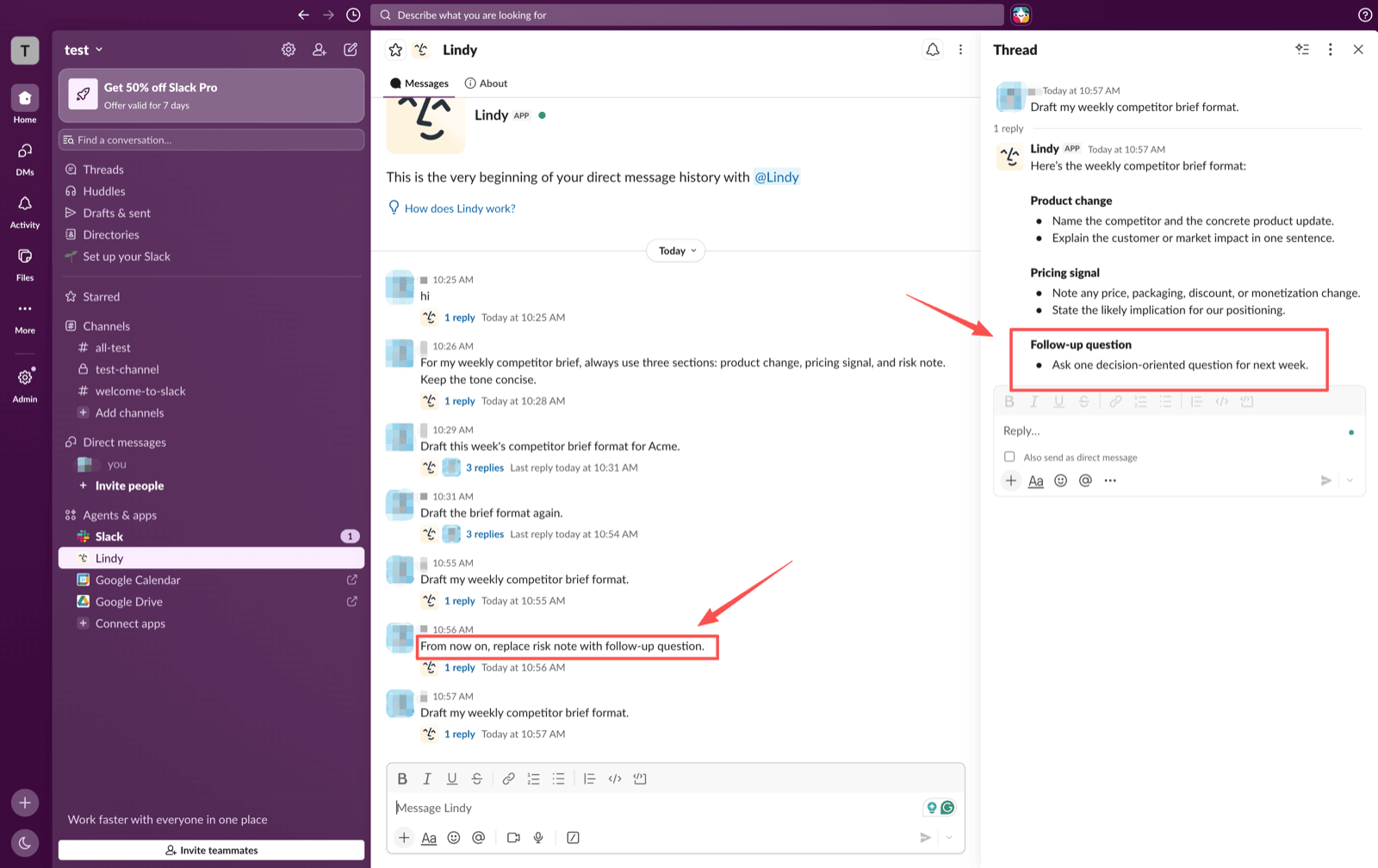
I would use Lindy for reviewable recurring drafts, not delegated decisions. Save the preference, run the task, correct the rule plainly, then test from a fresh prompt.
How We Tested Editable Memory
The Repeat Task and Test Environment
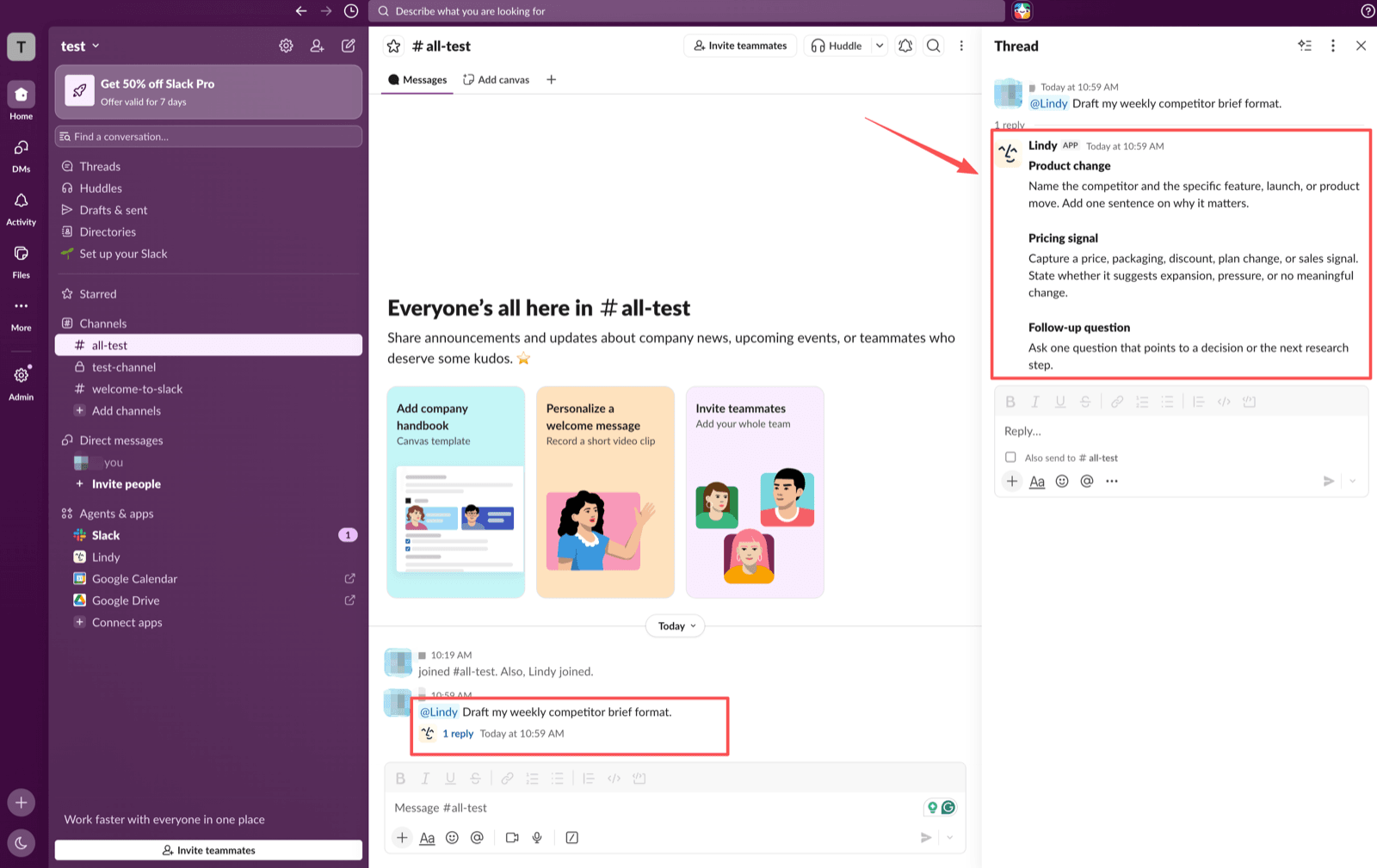
The test ran in Slack, first in DM and later through an @Lindy message in the all-test channel. No email, calendar, CRM, or client files were connected. The task was one weekly competitor-brief format.
The original rule asked for Product change, Pricing signal, and Risk note. The correction changed the third section to Follow-up question.
What Counted as Useful Recall
Useful recall meant Lindy reused the structure without being re-told. Stronger recall meant preserving the corrected third section later.
The test passed basic recall, then passed the correction check after the update became a future instruction. Recurring workflow review needs behavior across prompts.
The regression in the middle is the part I would want any buyer to see. My first correction was phrased the way a person talks to a colleague, and it worked immediately in the thread I was standing in, which is exactly the result that makes you stop testing and assume the rule is saved. It wasn't. A later prompt in the same DM came back with Risk note as the third section, and nothing about that reply looked like a failure, since the format was still the format I had originally asked for. That is the failure mode worth planning around: not an error message, just a quietly outdated preference that reads as correct to anyone who wasn't in the room when the rule changed.
What This Test Did Not Cover
Plenty. I never connected a mailbox, a calendar, a CRM, or a file store, so nothing here says anything about how Lindy handles real customer records or how its meeting features hold up. I ran one format on one afternoon, not a month of Monday reports, which means I can report that a rule survived a channel switch but not that it survives thirty days of unrelated tasks piling up in the same workspace. Every screenshot in this review comes from that single session.
What Lindy Remembered on the Next Run
Lindy remembered the first format. When asked for Acme's weekly competitor brief, it returned Product change, Pricing signal, and Risk note.
That aligns with Lindy's memory model: memories can persist across task runs and enter later context. Lindy's documentation splits the two apart deliberately, since context that accrues inside one task disappears when the task ends, while a memory is written to a store that gets injected into every later AI call. Both the settings context and the current memory set ride along on each call, which explains why a saved format shows up unprompted and why a stale one keeps showing up too.
The docs list three ways a memory gets created: someone configures it while building the agent, a user adds one in conversation ("I prefer morning meetings"), or the agent writes one itself mid-run. The third route is the one worth watching, because an agent-written memory can land in the store without anybody reviewing the wording. MoClaw's agent memory vs chat history guide explains the boundary between persistent context and ordinary chat.
Correcting Stored Context Before Reuse
The correction test mattered more than recall. Lindy handled "replace risk note with follow-up question" inside the active thread. After the clearer "From now on" instruction, it used Follow-up question again in a fresh Slack channel prompt.
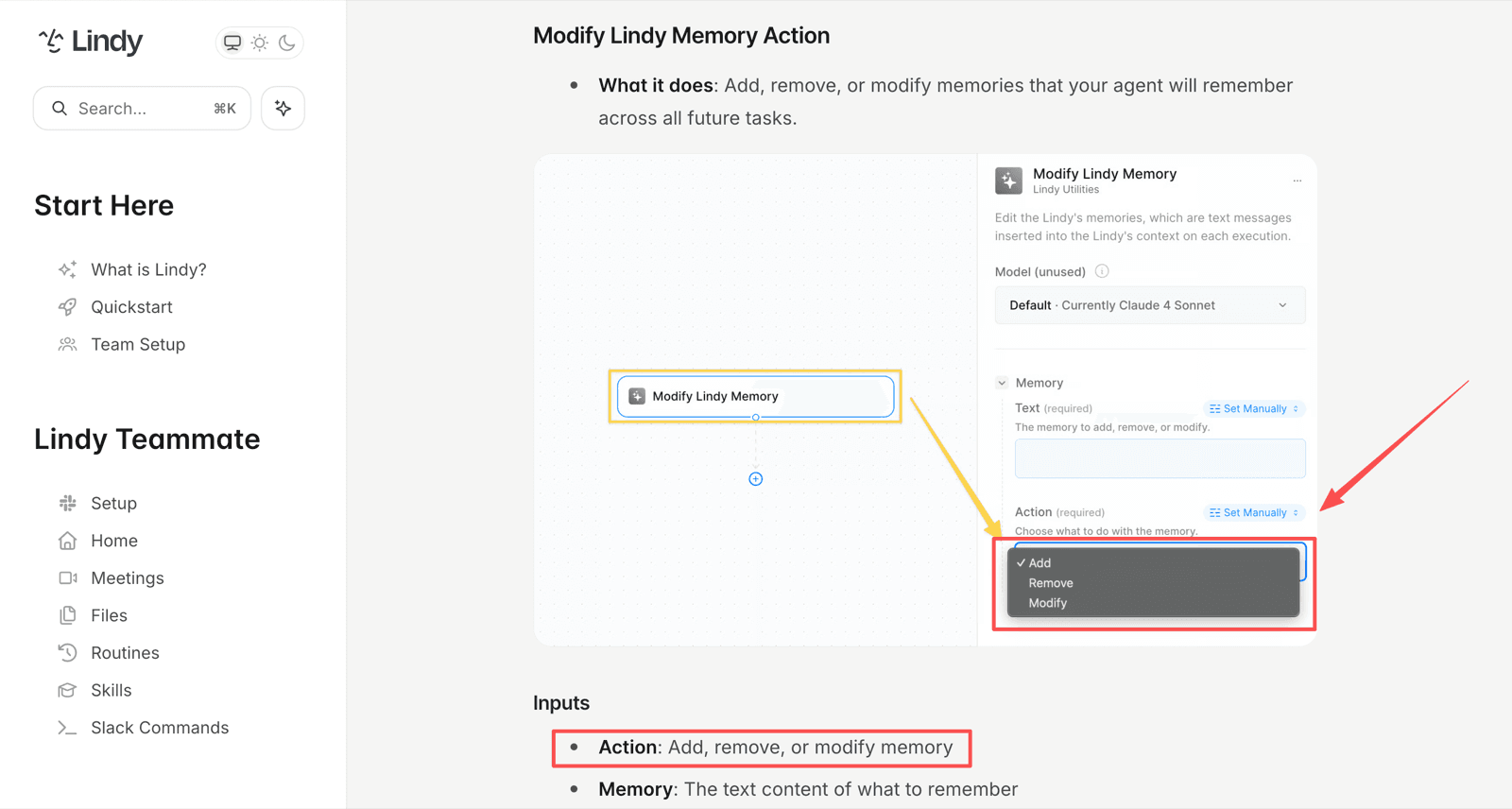
That is the workflow I would keep. Do not treat a local edit as durable by default. Phrase lasting changes as standing rules, then rerun the task. Lindy's memory action can add, remove, or modify memories, so important rules deserve deliberate edits.
There is also a Delete All Memories action, which wipes the store rather than editing one entry. Lindy's own guidance points at it for the case where accumulated memories start conflicting and the agent's behavior degrades. Useful, and blunt: you lose the good rules along with the bad ones, so it is the tool you reach for when a workspace has drifted, not when one preference is wrong.
The wording pattern that worked for me is boring on purpose. Name the workflow, name the field, name the replacement, and put it in the future tense. "From now on, for the weekly competitor brief, the third section is Follow-up question" leaves less room for the model to treat the sentence as a one-off edit to the draft in front of it.
What Memory Did Not Solve
Memory did not solve research quality. This test checked format recall, not whether Acme data was accurate.
Memory also did not remove context management. When repeat tasks carry too much old material, users still need cleanup. Lindy's documentation makes the same point from the billing side: long context accrual inside a task raises what that task costs, and the suggested fix is to store the key detail as a memory, clear the rest, or split the workflow into smaller pieces. So the housekeeping is not optional hygiene that a tidy person does. Skipping it shows up on the invoice.
Who Benefits From This Workflow
Lindy fits users who repeat lightweight formats: weekly briefs, meeting prep, sales follow-ups, inbox summaries, client updates, and status reports. If the pain is re-explaining format and tone, memory can reduce friction.
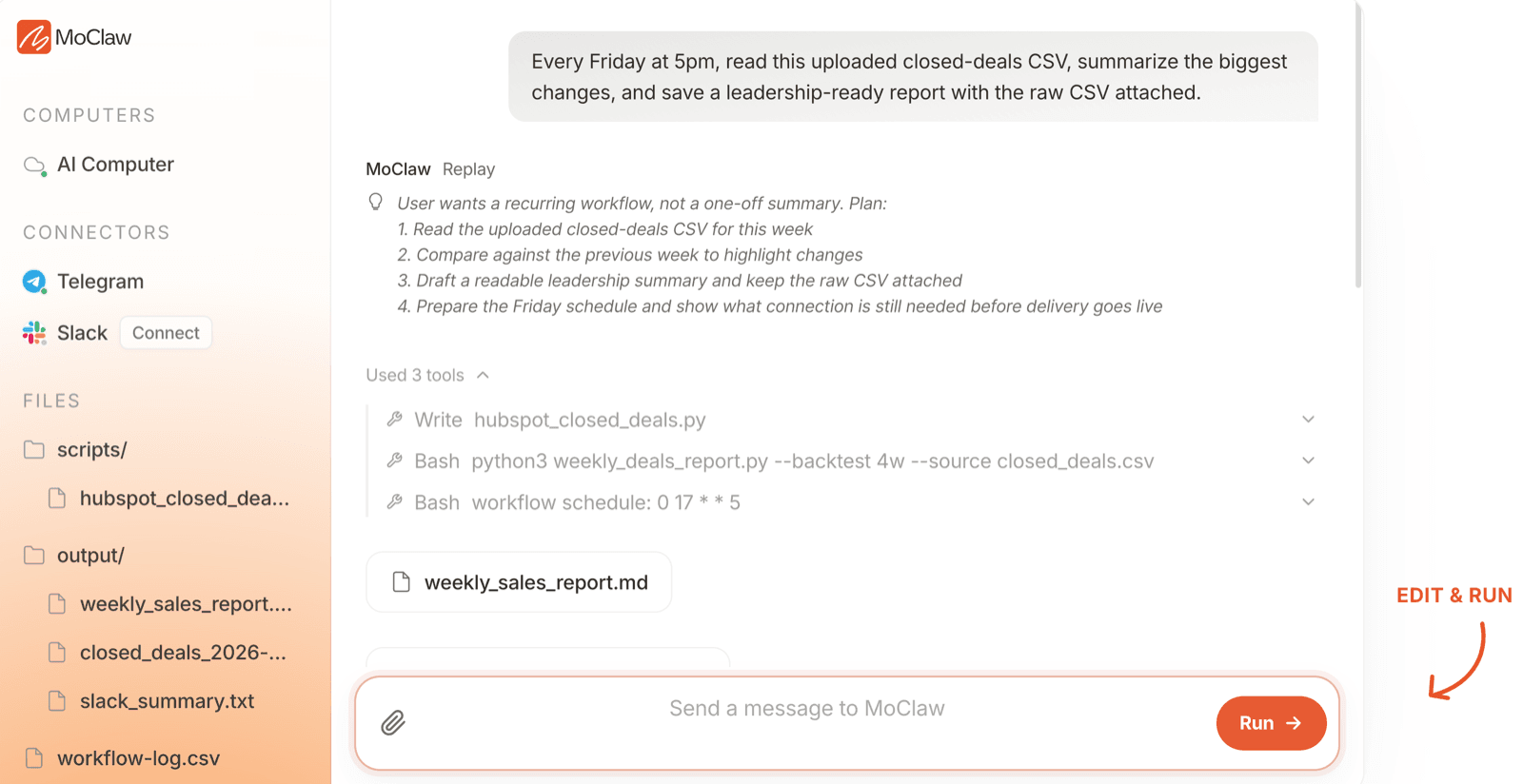
MoClaw is adjacent rather than identical. For managed browser, file, schedule, and review workflows, MoClaw's AI workflow automation is the better internal reference.
Trade-Offs Before You Rely on Memory
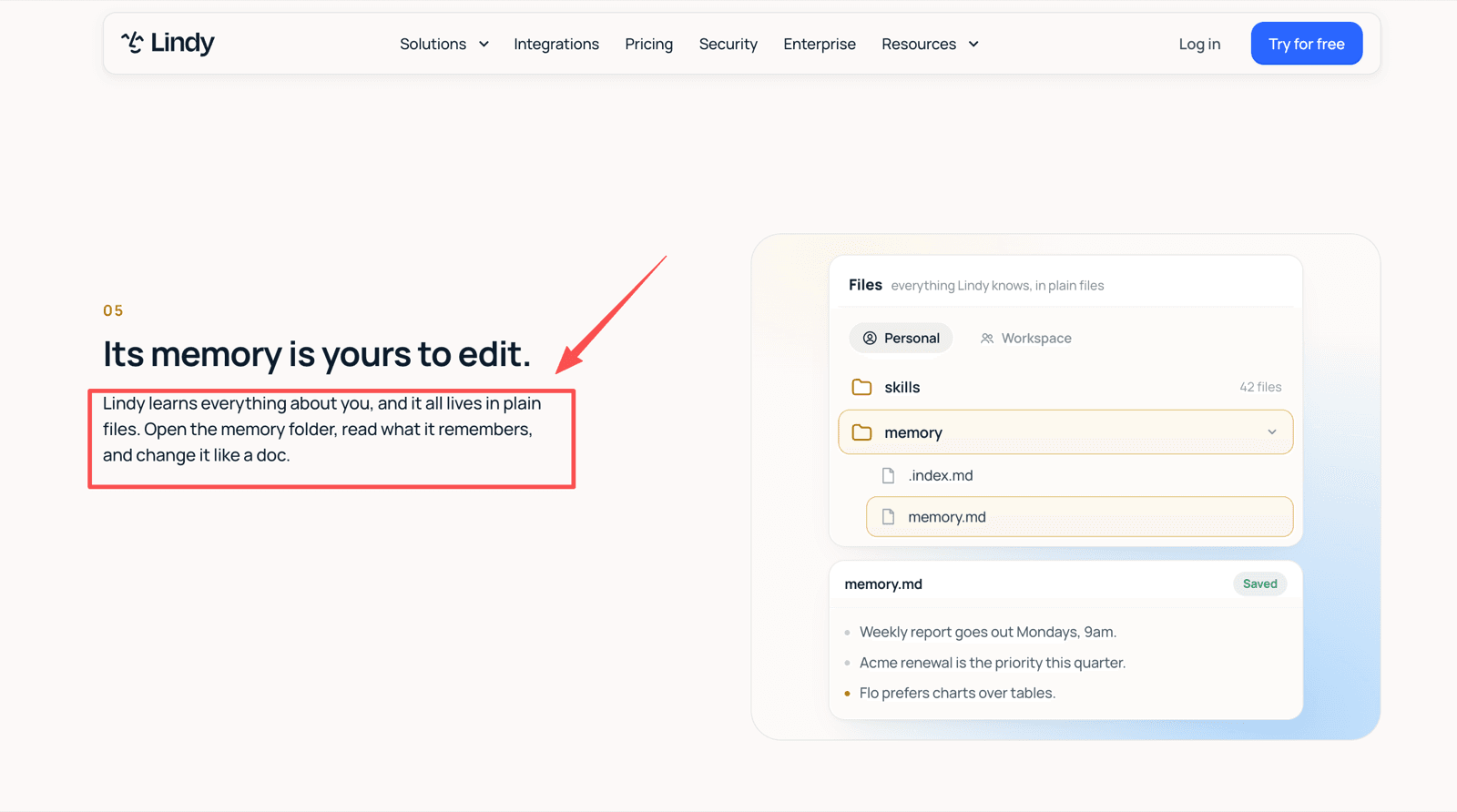
Before relying on Lindy memory, check visibility, deletion, and sharing controls. Lindy presents memory as plain files users can open and edit, with user-defined and agent-updated memories; verify the current storage interface and access controls before team rollout. That is useful, but teams still need an owner for durable preferences.
What It Costs to Run This Every Week
Cost deserves the same discipline. Lindy's pricing page (lindy.ai/pricing) currently lists credits, scheduled routines, persistent workspace context, skills, approvals, and model selection, and it prices per user: Plus at $29.99 a month for 3,000 credits, Pro at $99.99 for 15,000, and Max at $199.99 for 35,000, with an Enterprise tier for SSO, SCIM, and HIPAA. Lindy's docs put a credit at roughly a cent and sort work into three bands, where everyday asks run 2 to 250 credits, deep work runs 250 to 1,000, and a big build can reach 2,500.
A weekly competitor brief of the kind I tested is not an everyday ask once Lindy is actually researching a competitor rather than printing a format; the docs put "research a competitor and write the report" squarely in the 250 to 1,000 band. Four of those a month is a small slice of a Plus allocation, which is the reassuring version of the math. The version that catches teams out is that credits pool at the workspace level and do not roll over, so an unused month buys you nothing, and when the pool runs low Lindy pauses credit-using actions instead of billing you extra. Admins can top up at $10 per 1,000 credits, and those purchased credits do carry over.
The Slack Seat Rule Worth Reading Twice
One detail matters more than it looks for a Slack-first workflow like mine. Lindy bills a seat for anyone who uses it, including someone who only @mentions Lindy in a channel. Someone new who arrives that way gets a 7-day trial before the seat is billed; anyone who already has a Lindy account is billed straight away. Drop Lindy into a busy channel and the seat count is decided by whoever types @Lindy, not by whoever planned the rollout.
The recurring task owner should know what stops when limits or approvals intervene.
FAQ
Does Lindy record which task first created each memory file?
Pair important memory rules with the source thread URL, date, and owner. Cleanup is easier when a preference becomes stale.
Can Lindy show which memory file influenced a later draft?
Build that trace into your process. Compare the draft with the active memory rule and keep a before-and-after note when rules change.
Can Lindy memory files include source links from connected apps?
A memory file can store plain text, so source URLs or record IDs can be part of the rule. Prefer links over private source content.
Can one Lindy keep separate memory files for different roles?
Use separate Lindies or named memory rules for sales, research, and operations. Role separation prevents cross-team drift.
Are Lindy memory files visible outside the agent that created them?
Treat memory as workspace-governed information. Test visibility with real team roles before saving client names or role-specific rules.
Lindy AI Review Verdict
For this narrow Lindy AI review, editable memory helped with repeat formatting and improved after a clear, durable correction. Write memory rules plainly, test them from a fresh prompt, keep source links for important rules, and let a human approve the output.
If you want a single sentence to take away: the feature works, and the thing that decides whether it works for you is how carefully somebody words the rules and how often somebody deletes the ones that went stale.
Disclosure: This MoClaw review uses one Slack-based task, not meetings, inbox automation, or every integration.
Continue Reading
More Research
Caveman Skill: What the 65% Really Buys

Hermes Agent Desktop Review 2026: Worth It?

Agent Substrate: 250 Agents on 8 Pods

Cursor Origin Landed During a GitHub Outage

AI Agent Sandbox: What It Is and Isn't

Inside OAK, an On-Device AI Agent Kernel

The MoClaw editorial team writes about workflow automation, AI agents, and the tools we build. Default byline for industry overviews, listicles, and collaborative pieces.
Turn insights into action.
MoClaw automates the recurring work your analysis points to. No engineering required.
References: Lindy docs: memory vs context · Lindy docs: Modify Lindy Memory action · Lindy docs: knowledge base sources · Lindy docs: skills · Lindy: editable memory in plain files