Apache Maka: The Agent That Logs Everything

Apache Maka is an incubating local-first agent workspace. Every tool call and permission decision lands in an append-only log, on your machine.
Table of Contents
Most agent tools show you a chat transcript and call that the record. Apache Maka takes a different position: the transcript is a view, and the actual record is an append-only log of model messages, tool calls, tool results, permission decisions, and how each turn ended. That inversion sounds like a database detail. It changes what you can answer afterwards.
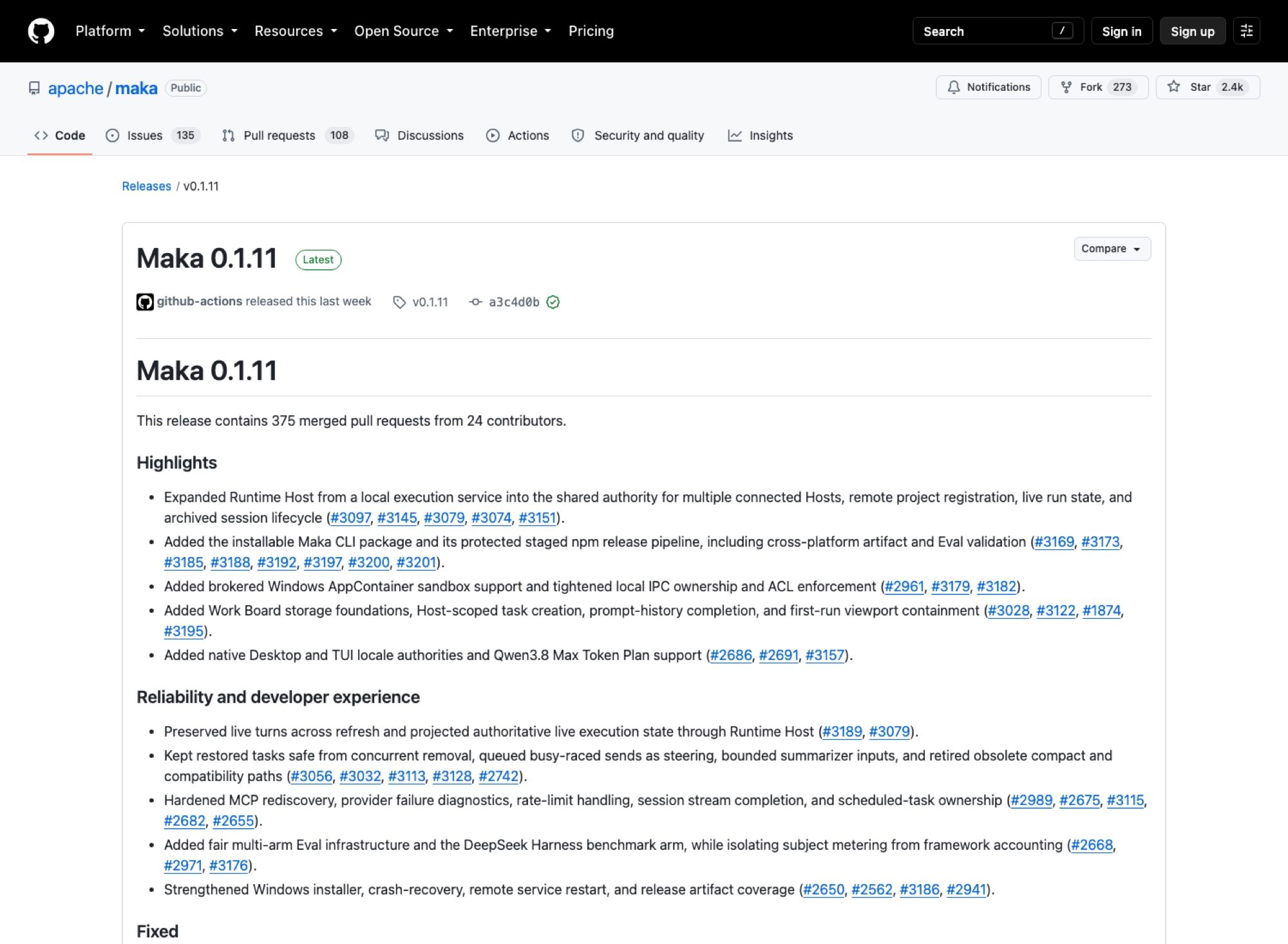
The project entered incubation at the Apache Software Foundation and picked up around 2,400 stars in its first three months, which is fast for something that shipped its first public desktop build only recently. Version 0.1.11, out on 18 August 2026, carried 375 merged pull requests from 24 contributors. That is not a weekend project.
Key Takeaways:
- The append-only record covers model messages, tool calls, results, permission decisions, and termination events; the UI is a view over it.
- Compaction shortens the prompt without discarding stored evidence.
- Apache Incubating, Apache-2.0, and explicitly still changing its on-disk formats.
- Published binaries as of 0.1.11: macOS Apple Silicon and Windows x64 preview. No Linux build.
What Apache Maka is
It's a local-first agent workspace. Sessions, settings, and run records stay on your machine by default, and you supply the model yourself: a cloud API, something running locally, or a compatible gateway. The built-in tool set is the familiar one (Read, Write, Edit, Bash, Glob, Grep), with Computer Use and catalog skills available but switched off unless you turn them on.
Three ways in. The desktop app is Electron and React, and it's where the session UI, artifact previews, model settings, and permission configuration live. A TUI and CLI (maka, maka run) work in whatever directory you're already sitting in and share the same workspace and model connections as the desktop. And there's an evaluation harness, maka eval run <spec> --out <directory>, for reproducible benchmark experiments across Maka and outside subjects.
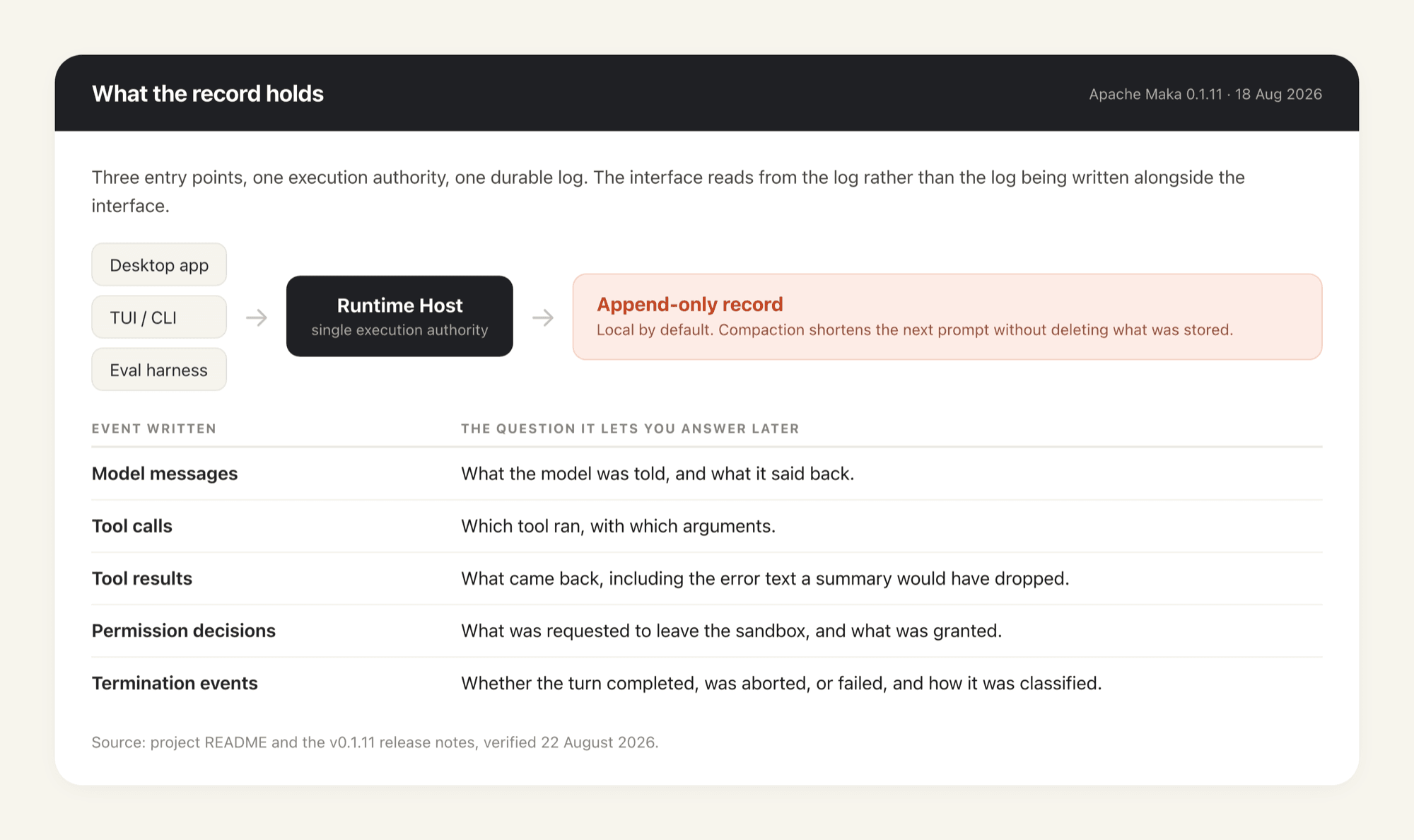
All three go through one component the project calls Runtime Host. That single-authority design is why the CLI and the desktop app don't drift out of sync, and version 0.1.11 pushed it further, turning Runtime Host from a local execution service into the shared authority across multiple connected hosts with remote project registration and live run state.
The append-only log, and why it isn't just logging
Plenty of tools write a log file. What's different here is that the log is the source of truth and the interface reads from it, rather than the log being a debug artifact written alongside whatever the UI happens to hold in memory.
Five kinds of event get recorded: the model messages, the tool calls, the tool results, the permission decisions, and the termination event that says how a turn actually ended. That last category is the one most tools drop. Knowing a run stopped is easy; knowing whether it completed, was aborted, hit a classified failure, or died mid-tool-call is the difference between a record you can act on and a transcript you can only read.
The consequence the project leans on hardest is stated in its own README as "shorter context is not deleted history." When Apache Maka compacts a session, it omits old tool output from the next prompt without throwing away the saved evidence. Anyone who has watched a coding agent summarise away the exact error message it needed twenty minutes later will recognise what that fixes. The model's window gets smaller; your ability to go back and check does not.
Where a permission trail earns its keep
Three situations, and they're not the ones the word "audit" usually conjures.
Debugging is the mundane one. When an agent does something wrong six steps deep, the useful question is which tool call produced the bad state and what it was handed. A transcript gives you the story the model told about its work. The record gives you the arguments.
Review is the second. If you're the person who has to approve an agent touching a production repo, "it asked and I clicked yes" is not reviewable. A stored permission decision, with what was requested and what was granted, is. That connects directly to the problem of vetting agent extensions you didn't write, which we've covered in reviewing third-party agent skills and permissions.
Compliance is the third and it's the one the design clearly anticipates, though it's worth being careful here: an append-only local log is a building block, not a compliance programme. It gives you evidence. Someone still has to retain it, and retention on a laptop that gets reimaged is not retention.
Which is the practical limit of local-first, and it's a real one. A record that only exists on one machine is only as durable and only as reachable as that machine. If the evidence matters, it needs to live somewhere that isn't a device you carry through airports. MoClaw is a hosted cloud AI computer, so the workspace and everything it wrote down sit on a machine that stays put and stays reachable from whichever device you happen to open. Local-first and hosted aren't opposites; the second is where you put the first when it needs to outlive one laptop.
Sandboxing, and what needs your approval
Tools that stay inside the sandbox boundary run. Tools that leave it need approval, that approval gets recorded, runs can be aborted mid-flight, and failures come back classified rather than as a generic error string.
Version 0.1.11 added a brokered Windows AppContainer sandbox and tightened local IPC ownership along with ACL enforcement, which is a level of platform-specific security work you don't often see in a project this young. It also added crash recovery and optional resume of an interrupted turn, both of which are downstream of the same architectural bet: if the record is durable, the process doesn't have to be.
For a wider view of how these controls fit together across agent tooling, the agent security framework piece sets out the categories.
Running evaluations without watching them
The eval harness is the least discussed surface and the one that most rewards a machine you don't have to babysit. It expands a declarative spec into task by repetition by subject cells, keeps per-cell attempts immutable, replaces failed infrastructure in a targeted way rather than restarting the sweep, and picks the earliest valid result. Version 0.1.11 added fair multi-arm eval infrastructure and a DeepSeek Harness benchmark arm, while separating subject metering from framework accounting so the numbers aren't quietly contaminated by the harness itself.
Multiply cells by repetitions and a serious sweep runs for hours. Doing that on a laptop means the sweep and your day compete for the same CPU, and a lid closed at the wrong moment takes the run with it. Running it on a MoClaw instance instead means the machine is awake for the whole sweep whether or not you are, which is less an optimisation than a precondition for trusting the output. The same holds for a long overnight agent turn; durable records help you recover from a crash, but they can't resume a process that was suspended along with the hardware.
Which platforms actually have a build
Check the releases page, not the marketing. As of the 0.1.11 release the published artifacts are a macOS Apple Silicon .dmg and .zip, a Windows x64 .exe and .zip, and a bundled source tarball. There is no Linux artifact. The README's own badges say the same thing in three words: macOS arm64, Windows preview, Linux soon.
The Windows build is labelled an unsigned preview, so expect SmartScreen to argue with you. Intel Macs aren't covered by the published binaries either. And the desktop download is large, roughly 258 MB for the macOS disk image, because it ships an Electron runtime.
That combination puts a real question in front of anyone who wants to try it: which machine? Trying a young agent workspace on the laptop you also ship from means installing an Electron app plus a sandboxed execution layer next to your actual work. Running it on a hosted machine instead keeps the experiment off your primary box, and MoClaw exists for exactly that shape of problem — a cloud computer you can hand to an agent, alongside your existing setup rather than instead of it.
What "Incubating" means here
Precision matters on this one. Apache Maka is undergoing incubation at the ASF, sponsored by the Apache Incubator PMC. It is not a graduated top-level Apache project, and the project ships a DISCLAIMER-WIP file recording the issues it currently knows about. Incubation status isn't a verdict on code quality; it means the infrastructure, communications, and decision-making haven't yet been reviewed as stable in the way the ASF requires.
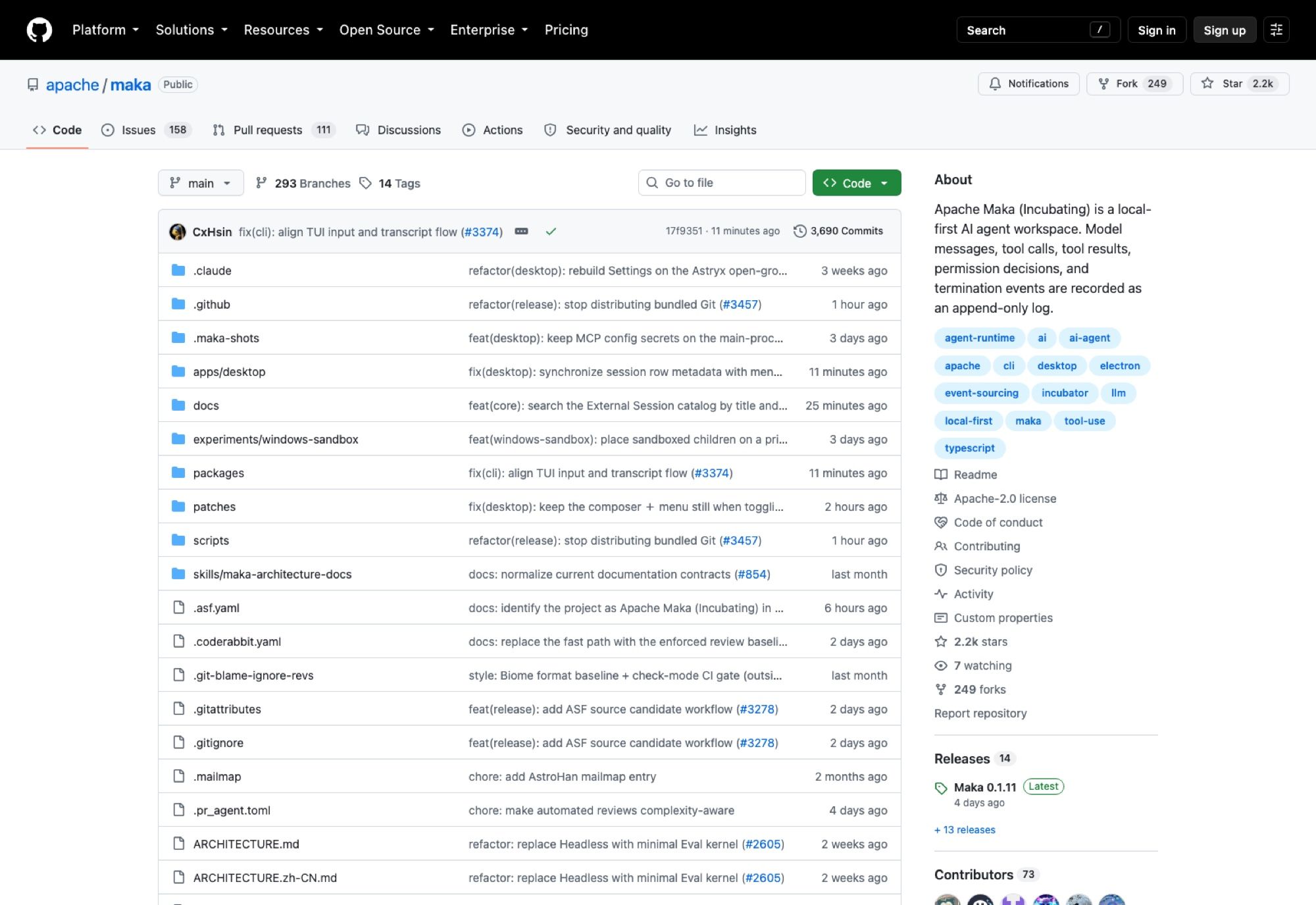
The licence is Apache-2.0, verified against the repository in August 2026. The project also says plainly that it's under active development and that data formats, CLI commands, and experimental capabilities may still change. Read that as: fine to run, don't build a pipeline that assumes the on-disk format is frozen. The backend architecture document is where the design reasoning actually lives.
Compared with a normal desktop agent console
The usual desktop agent client keeps a conversation and maybe a tool-call list, both of which live in whatever the app happens to hold. Restart it, and what you get back is what it chose to persist.
The difference here is direction. Because Apache Maka writes the execution record first and renders from it, crash recovery and session branching aren't features bolted on afterwards; they fall out of the design. Branching from a specific turn, retrying, regenerating, archiving, and searching sessions all work on the same underlying record. That's also why the eval harness can treat Maka and external subjects the same way: the experiment layer only owns the spec and the scores, while execution goes through Runtime Host like everything else.
The trade is complexity. One authority, one durable log, and a sandbox broker is more moving parts than a chat window with an API key, and you feel that in a 258 MB installer and a 0.1.x version number.
Should you install it
If you want a local agent client and nothing more, there are lighter options and this isn't one of them. If you need to answer "what did the agent do, what did it touch, and who said yes" after the fact, that's the specific question Apache Maka was built around, and it's the reason to put up with an early build.
Start with the desktop app on an Apple Silicon Mac, since that's the best-supported target today. Point it at a model you already pay for. Then, and this is the part worth doing deliberately, go and look at the record after a session that went wrong. That's the whole pitch, and you can evaluate it in one afternoon.
FAQ
Is Apache Maka free and open source?
Yes, Apache-2.0, confirmed against the repository in August 2026.
Is it an official Apache project?
It's an Apache Incubating project, sponsored by the Apache Incubator PMC, not a graduated top-level project. The repo carries the standard incubation disclaimer plus a DISCLAIMER-WIP file listing known gaps.
What exactly does the audit log record?
Model messages, tool calls, tool results, permission decisions, and termination events. The termination event is the one that tells you whether a turn completed, was aborted, or failed, and how.
Does it run on Linux?
Not yet. The 0.1.11 release publishes macOS Apple Silicon and Windows x64 binaries plus a source tarball; the README lists Linux as not yet supported.
Does Maka include a model?
No. You connect your own: a cloud API, a local model, or a compatible gateway. Multiple model connections are supported, with streaming output and provider error reporting.
Can I use it from the terminal instead of the desktop app?
Yes. maka and maka run share the workspace and model connections with the desktop app, because both go through Runtime Host. Version 0.1.11 also shipped an installable Maka CLI package. If you're weighing how session state should work across tools generally, managing Claude Code sessions covers the same ground from the other side.
Continue Reading
More Guide
What Is DeepSeek Harness (DSH)?

Qwen 3.8 27B Overthinking: Turn Down xhigh

DeepSeek Vision API: What It Sees and Misses
Claude Code Voice Mode: What /voice Can't Do

Ruflo Is Claude Flow: What Actually Changed
Ox Alpha: What We Know So Far
The MoClaw editorial team writes about workflow automation, AI agents, and the tools we build. Default byline for industry overviews, listicles, and collaborative pieces.
Ready to put this into practice?
MoClaw runs browser tasks, research, and schedules automatically. Try it free.
References: https://github.com/apache/maka · https://github.com/apache/maka/releases/tag/v0.1.11 · https://github.com/apache/maka/blob/main/ARCHITECTURE.md · https://github.com/apache/maka/blob/main/LICENSE · https://incubator.apache.org/