Claude Code Voice Mode: What /voice Can't Do
Claude Code voice mode is dictation only: you speak, Claude types. What /voice does, the requirements that block it, and how to get a spoken reply.
Table of Contents
Anthropic started rolling /voice out to Claude Code in March 2026, and the shortest honest description of Claude Code voice mode is the one Anthropic's own documentation uses in the page title: dictation. Hold a key, say the thing, and your words appear in the prompt box as text. Claude reads them and answers in the terminal, silently, the same way it answers anything you typed. Nothing is spoken back to you.
That surprises people expecting the terminal equivalent of asking Siri a question. It shouldn't; the feature is filed under Interface, named "Voice dictation", and described in one direction only. Below: what /voice gives you, the requirements that quietly disqualify a lot of setups, and what you'd install for the other half of a conversation.
Key Takeaways:
/voiceis speech-to-text into the prompt box. Claude never speaks its answer.- It needs a Claude.ai account and a microphone on the same machine, so SSH and Claude Code on the web are out.
- Transcription is free: no tokens, no
/usagelimits. - A spoken reply, a persistent memory and an on-screen face are three separate open-source installs, assembled by one Claude Code wizard.
What Claude Code voice mode actually does
/voice takes an optional argument: /voice hold, /voice tap, or /voice off. Hold is the default and works as push-to-talk, recording while you keep the key down (Space, unless you rebind it) and stopping on release. Tap mode starts on one press and sends on the next. Your speech gets transcribed live into the prompt input, so you can dictate half a message and type the rest, which turns out to be the mode most people settle into once the novelty wears off.
Two details beat the feature announcement. Transcription is tuned for coding vocabulary, so regex, OAuth, JSON and localhost come back spelled correctly rather than phonetically, and your project name and git branch are fed in as recognition hints automatically. The setting also persists across sessions; skip /voice and put {"voice": {"enabled": true, "mode": "tap"}} in your user settings file.
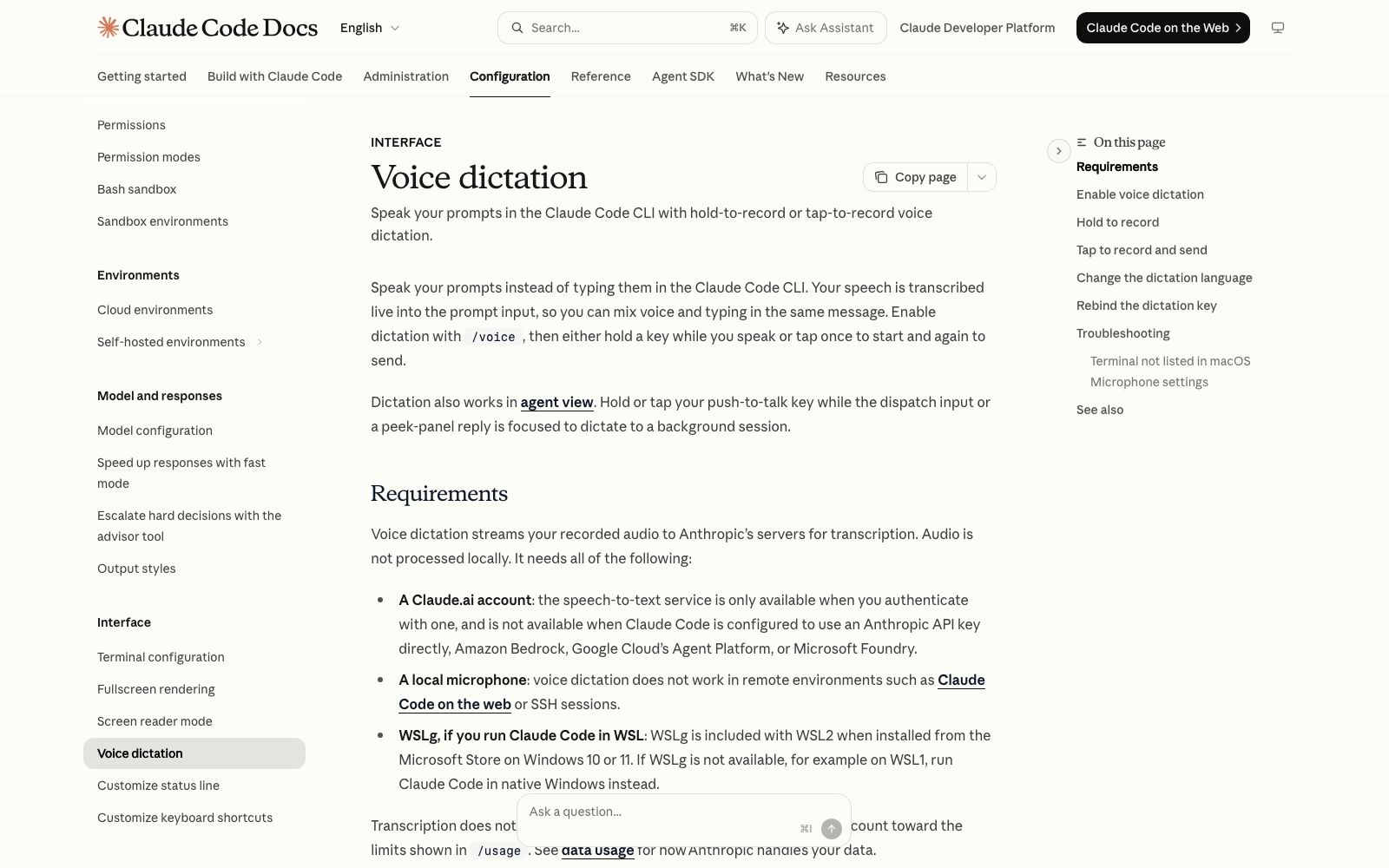
The requirements are where setups get disqualified. Audio streams to Anthropic's servers for transcription rather than running locally, and the speech-to-text service only works when you're authenticated with a Claude.ai account. Point Claude Code at an Anthropic API key directly, or at Amazon Bedrock, Google Cloud's Agent Platform, or Microsoft Foundry, and /voice is simply not available to you. You also need a microphone attached to the machine you're typing on. On Linux, if the native audio module won't load, Claude Code falls back to arecord from ALSA utils or rec from SoX, and prints an install command if neither exists.
Good news from the same page: transcription costs no Claude messages or tokens and doesn't count against /usage. Talking is free.
The requirement that matters most is the microphone
Read that local-microphone line again, because it rules out more than it looks like. Voice dictation doesn't work in remote environments, and the docs name two: Claude Code on the web, and SSH sessions. The VS Code extension inherits the same limit, knocking out Remote-SSH, Dev Containers and Codespaces. The microphone is on your desk and the process is not.
Which sets up a split worth being deliberate about. Voice is a property of where you're sitting; the agent is a property of where the work lives, and those two things stop being the same machine the moment your agent needs to still be running tomorrow morning. That is the gap MoClaw fills: a hosted cloud AI computer that stays powered on and reachable, running alongside the Claude Code you already have on your laptop rather than instead of it. Dictate locally, let the long jobs live somewhere that doesn't sleep when you shut the lid.
What answers out loud instead
If you want the reply spoken, that's a separate install, and the one people keep landing on is backtalk, AGPL-3.0, created on 16 August 2026 and sitting at 28 stars when I checked on 24 August 2026. It runs on Claude Code only and is built on Claude's agent SDK. You hold a key, talk, release, and the answer comes back through your speakers sentence by sentence as it's generated, with first audio in roughly one to two seconds on a warm turn.
The design decisions beat the feature list. Hearing and voice both run on local models, so there are no voice API keys and no per-word charges; the brain is the Claude Code session you already pay for. The microphone opens only while you hold the key, which is why you don't need headphones and why it never hears its own speakers. Press the key while it's talking and it stops to listen. There's a spoken permission flow too: when the agent wants to do something real it asks out loud and waits, and anything other than a clear yes counts as a no, with your words passed back as the reason. Saying "no, put that in drafts instead" steers it rather than just blocking it.
Session control is spoken too: "clear the session", "compact the session", "switch to the deep model". None of which makes it an assistant in its own right, and the voice assistant versus voice agent distinction lands here, because backtalk has no personality and no separate brain. It's a mouth and ears bolted onto whichever agent your CLAUDE.md already defines.
That local dependency is real, though. backtalk keeps a live Claude Code session running in a folder on your machine, which means the mouth goes quiet the second that machine does. Pairing it with a MoClaw cloud AI computer for anything long-running is the pragmatic split: talk to the local session, park the overnight work on a host that stays up.
Memory is a different problem, and Claude Code already solved part of it
People conflate voice and memory constantly, so it's worth separating them. Claude Code ships two official memory mechanisms already: CLAUDE.md files, which are instructions you write, and auto memory, which is notes Claude writes itself based on your corrections. Both load at the start of every conversation, and both are treated as context rather than enforced configuration.
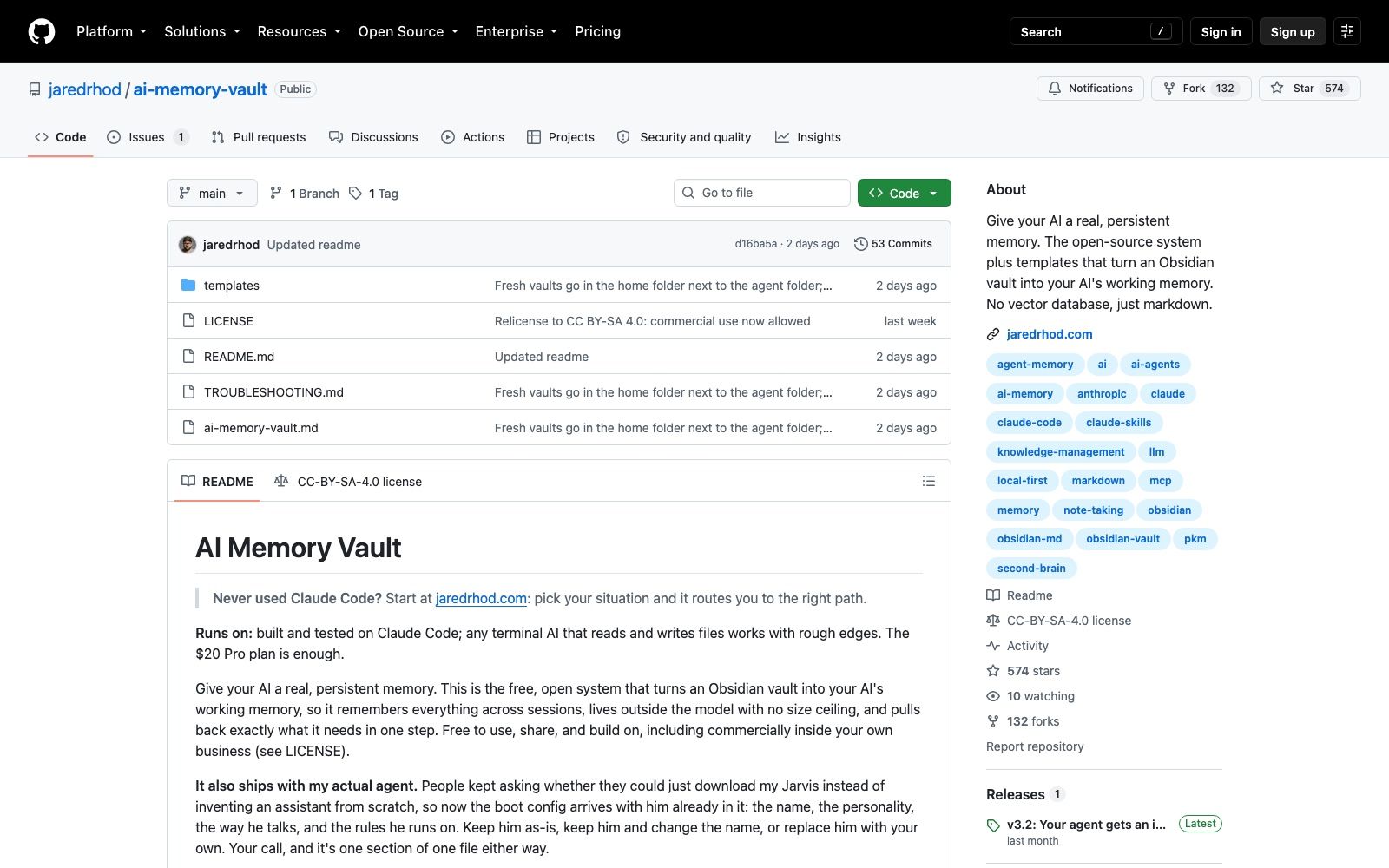
What ai-memory-vault does is something else: it turns an Obsidian vault into your agent's working memory, with no vector database, just markdown files the AI reads and writes. It's the oldest and by far the most popular piece of this stack, created 18 June 2026 and carrying 574 stars and 132 forks as of 24 August 2026. Its LICENSE was changed last week to CC BY-SA 4.0 with a commit message that says the quiet part directly: commercial use now allowed. That's a different licence from the rest of the stack, and if you're planning to use any of this inside a business, it's the file to read rather than the README.
The tradeoff is the one covered in agent memory versus chat history: a vault is files on a disk, so the machine holding those files is the only machine your agent remembers anything on. A hosted MoClaw computer moves that problem, because the memory sits with the always-on machine rather than with whichever laptop you happened to open. Less annoying than discovering your agent has amnesia on your other computer.
The face, the hands, and one paste that installs everything
Two more pieces round out the set. ai-visualizer (34 stars, AGPL-3.0) is a folder of web pages plus a standard-library Python server, rendering four full-screen "faces" that idle, listen, think and speak in sync with the conversation. barehands (650 stars, AGPL-3.0) does webcam hand tracking so you can shove notes around a board without a headset; it needs Chrome.
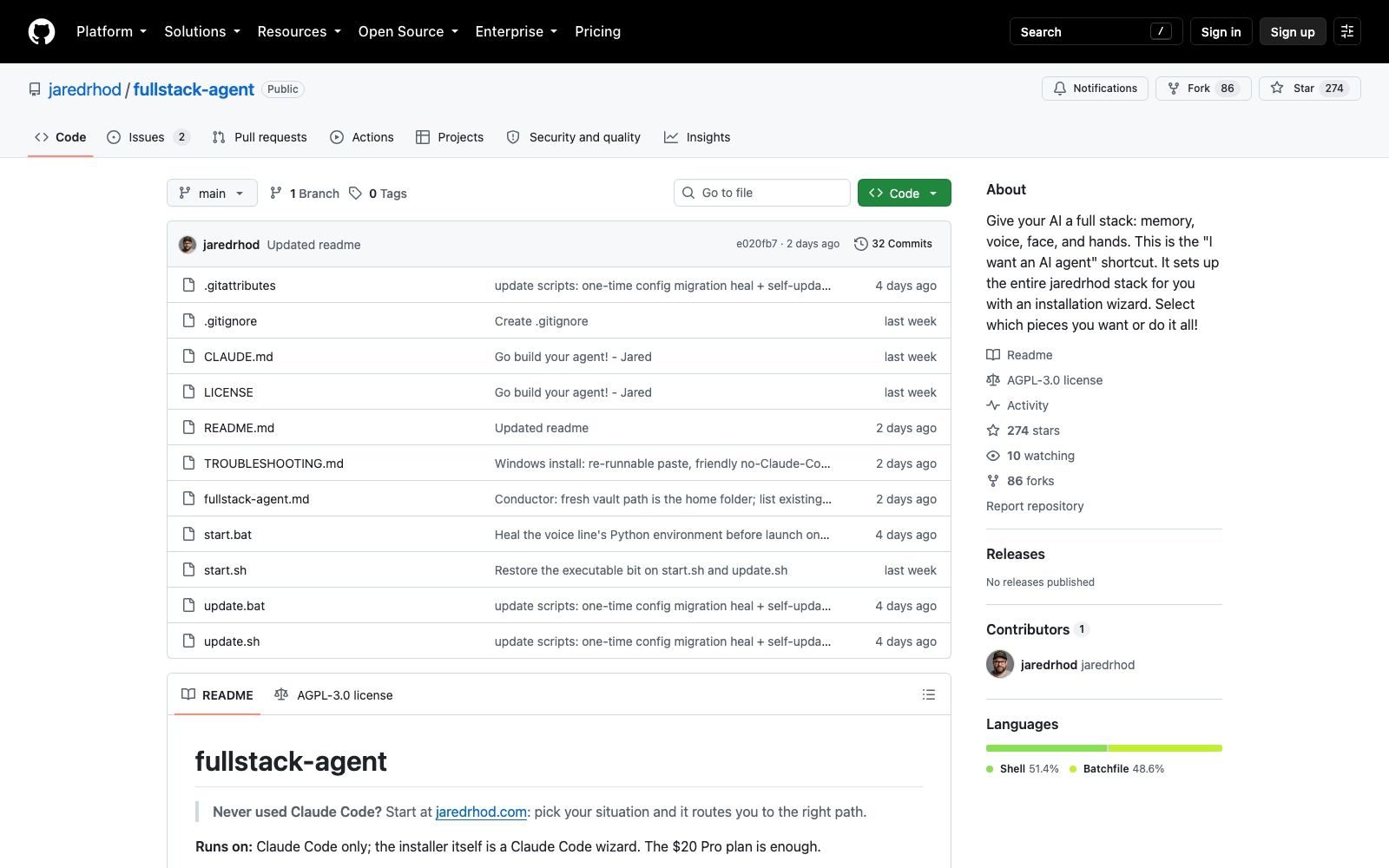
fullstack-agent is the wizard that assembles all four. Created on 17 August 2026, it had 316 stars, 95 forks, 32 commits and no published releases when I checked on 24 August 2026, and the repo itself is almost entirely shell and batch scripts. Installing it isn't a repo clone in the usual sense; you clone it and then run claude "set me up", and the rest happens as a conversation inside Claude Code, which asks which pieces you want and where your notes live before it configures anything.
A naming warning, since search will trip you up. An unrelated academic project called FullStack-Agent, published as arXiv:2602.03798, is a multi-agent framework and benchmark for full-stack web coding. Same name, different thing. The repo here is an agent that has a full stack, not one that writes it.
Cost, licences, and what you're actually installing
The README states that the $20 Pro plan is enough, and every sub-project repeats it; that's the author's claim as of August 2026, and voice turns burn plan usage like any other session. Hardware matters more anyway: the voice needs a microphone and roughly 1 GB of local models on first run, the hands need a webcam and Chrome, and the mind and face need nothing beyond Python 3.
Licensing is not uniform, which catches people out. The main repo, backtalk, ai-visualizer and barehands are AGPL-3.0; ai-memory-vault is CC BY-SA 4.0. AGPL is fine for using this in your own business, and the author says so plainly, but running a modified version as a service other people use obliges you to ship your source under the same terms. Read the LICENSE files, not the GitHub sidebar summary.
There's a more practical question underneath it. This is a stack from a single contributor, six days old as I write, that runs an install wizard with write access to your home directory and wires a microphone and optionally a webcam into a live agent session. None of that is a reason not to try it; it is a good reason not to try it on the laptop holding your production credentials, which is the other thing a MoClaw cloud machine is useful for: somewhere disposable to be careless, separate from where your real work lives. The free versus paid breakdown of Claude Code covers what each tier gets you.
When plain dictation is enough
Most people asking about Claude Code voice mode want one of two things, and only one needs a stack. If you want to stop typing long prompts, /voice tap covers it today, costs nothing extra, and puts no third-party code near your machine. Turn it on, rebind the key if Space annoys you, done.
The stack is for the other want: an assistant that talks back, remembers you without you curating a CLAUDE.md, and greets you when you sit down. That's a maintenance commitment as much as a tool, and it's fair to say so. Try Claude Code voice mode for a week first. If the silence after each answer still bothers you, go looking for a mouth.
FAQ
Does Claude Code voice mode read answers out loud?
No. Voice dictation is input only: your speech is transcribed into the prompt input, and Claude's replies stay as text in the terminal. Spoken replies require a third-party add-on such as backtalk.
Why is /voice not working for me?
The three most common causes are all in the requirements. You need to be authenticated with a Claude.ai account, since the transcription service isn't available on a direct Anthropic API key, Amazon Bedrock, Google Cloud's Agent Platform or Microsoft Foundry. You need a local microphone, which rules out Claude Code on the web and SSH sessions. And on WSL you need WSLg, which ships with WSL2 from the Microsoft Store but not with WSL1.
Does voice dictation use up my Claude usage limits?
Transcription itself doesn't consume Claude messages or tokens and doesn't count toward the limits shown in /usage. Whatever Claude does with the transcribed prompt costs the same as if you'd typed it.
Is fullstack-agent free?
The repos are free and open source, under AGPL-3.0 except ai-memory-vault, which is CC BY-SA 4.0. You still need a Claude subscription for the agent itself, and the author states the $20 Pro plan is sufficient as of August 2026.
Does fullstack-agent work with anything other than Claude Code?
The main installer is a Claude Code wizard and the README says Claude Code only. ai-memory-vault is the exception: it was built and tested on Claude Code, but the author says any terminal AI that reads and writes files will work with rough edges.
Continue Reading
More Guide
What Is DeepSeek Harness (DSH)?

Qwen 3.8 27B Overthinking: Turn Down xhigh

DeepSeek Vision API: What It Sees and Misses

Apache Maka: The Agent That Logs Everything

Ruflo Is Claude Flow: What Actually Changed
Ox Alpha: What We Know So Far
The MoClaw editorial team writes about workflow automation, AI agents, and the tools we build. Default byline for industry overviews, listicles, and collaborative pieces.
Ready to put this into practice?
MoClaw runs browser tasks, research, and schedules automatically. Try it free.
References: https://code.claude.com/docs/en/voice-dictation · https://code.claude.com/docs/en/commands · https://github.com/jaredrhod/fullstack-agent · https://github.com/jaredrhod/backtalk · https://github.com/jaredrhod/ai-memory-vault · https://arxiv.org/abs/2602.03798 · https://techcrunch.com/2026/03/03/claude-code-rolls-out-a-voice-mode-capability/