DeepSeek Vision API: What It Sees and Misses
DeepSeek V4 Flash reads images now. What the deepseek vision api costs, the three ways to send a picture, and the 800x800 resize limit nobody mentions.
Table of Contents
DeepSeek's V4 Flash line started accepting images on August 21, 2026. The deepseek vision api runs through the same OpenAI-compatible /chat/completions endpoint you already call: change the model string to deepseek-v4-flash-vision-exp, pass an image block next to your text, and the request works. Two things the launch coverage mostly skipped are that image tokens bill at ordinary V4 Flash rates, and that every image you send gets resized down to roughly 800×800 pixels before the model ever looks at it.
That second detail decided the tone of the Hacker News thread, which ran past 140 comments the same day. The loudest reaction wasn't about accuracy. It was one commenter's flat "800 by 800 kills a lot of use cases," and a longer complaint that a full A4 page of scanned text needs more resolution than that to survive OCR.
Key Takeaways:
- The model id is
deepseek-v4-flash-vision-exp, it is marked experimental, and it accepts JPEG, PNG, GIF and WebP detected by file content rather than filename - Images can arrive three ways: a base64
data:URL, a public http(s) link, or afile_idfrom the Files API - Every image is resized to roughly the pixel count of an 800×800 image, capping cost at 384 tokens per image and capping detail at the same time
- Pricing matches text-only V4 Flash: $0.22 per million cache-miss input tokens off-peak, $0.66 per million output, doubling during peak hours
- Sending an image to any other DeepSeek model returns a 400 with the message
This model does not support image
What DeepSeek actually shipped on August 21
The release note is short. DeepSeek-V4-Flash-Vision-Exp went live on the API platform, it matches text-only V4 Flash on text work, and DeepSeek Harness 0.1.1 shipped the same day with support for the new model already wired in.
Calling this DeepSeek's first vision model would be wrong, and a few people in that HN thread said so. DeepSeek-OCR has existed as a separate open document model for a while, and the chat product has had its own vision mode. What changed is narrower and more useful: the V4 Flash API line, the one people already point their agents at, now takes pictures directly instead of needing a second model bolted on to describe them first.
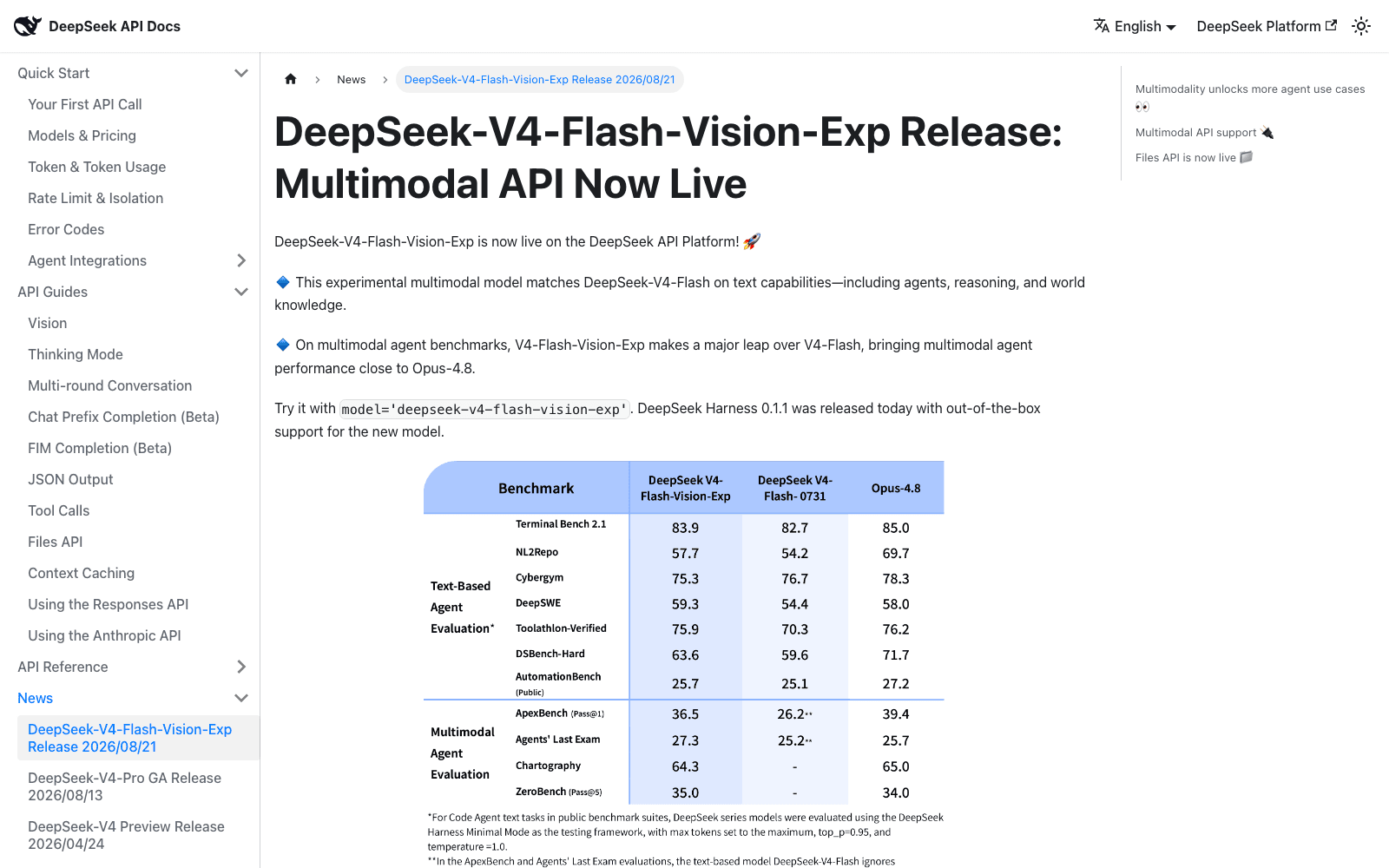
DeepSeek's own numbers in that table are worth reading with a little suspicion, since they are the vendor's. ApexBench pass@1 goes from 26.2 on text-only Flash to 36.5 on the vision model, against 39.4 for Opus-4.8. Chartography and ZeroBench have no score at all for the text-only model, which makes sense because a blind model can't attempt them. The interesting entry is Cybergym, where the vision model scores 75.3 against 76.7 for the text-only one. Adding eyes cost it something.
Vision is the perception layer an unattended agent was missing
Before this, if you wanted a DeepSeek agent to look at anything, you built a workaround. Someone published pi-deepseek-vision on August 4, an extension that intercepts pasted images and read-tool calls, ships them to a separate vision-capable endpoint, and hands the text description back so DeepSeek has something to reason over. The reason that extension exists is printed in its own README: the harness was replacing every image with the string (image omitted: model does not support images) before the request ever left the machine.
Several HN commenters described the failure mode that produced. V4 Flash 0731 apparently assumed it could see, pulled a screenshot off a connected device, then reasoned its way into inventing pixel-analysis tooling when it discovered it couldn't. One person described it recreating vision by analyzing pixels across three separate projects.
Watching your own screen is the obvious use, and it's also the one that exposes where the agent lives. A screenshot loop, a chart that refreshes overnight, a dashboard you want checked at 3am: none of that survives a closed laptop lid. That gap is what MoClaw covers, a hosted cloud AI computer that stays running so a scheduled look-at-this task has somewhere to land, sitting alongside whatever you already run locally rather than replacing it.
Three ways to send an image to the deepseek vision api
All three use the standard OpenAI content-array shape documented in DeepSeek's Vision guide, where content becomes a list of blocks instead of a plain string. The base URL stays https://api.deepseek.com.
The first is a base64 data: URL in an image_url block, the least ceremony for a local file and the right default until the file gets big. The second is a plain public link, also in image_url, and DeepSeek fetches it for you. That link has to be under 8192 characters, the file at most 32 MiB, and the download has to finish inside 60 seconds, so a slow origin server becomes your problem rather than DeepSeek's.
The third is the Files API. Upload once, get back a file_id shaped like file-api-..., then reference it from a file block. This is the one to reach for when the same image appears in several requests, or when the file is large enough that inlining it would blow past the 48 MiB request body ceiling. Images referenced by file_id can go up to 64 MiB. DeepSeek says the Files API itself is free to use.
There's also an Anthropic-compatible path at https://api.deepseek.com/anthropic, where the block is called image and carries a source object whose type is base64, url, or file. Same three methods, different envelope.
The 800×800 resize rule is the part that will bite you
Read this section before you plan any document workflow around the deepseek vision api, because it constrains what the model can physically resolve.
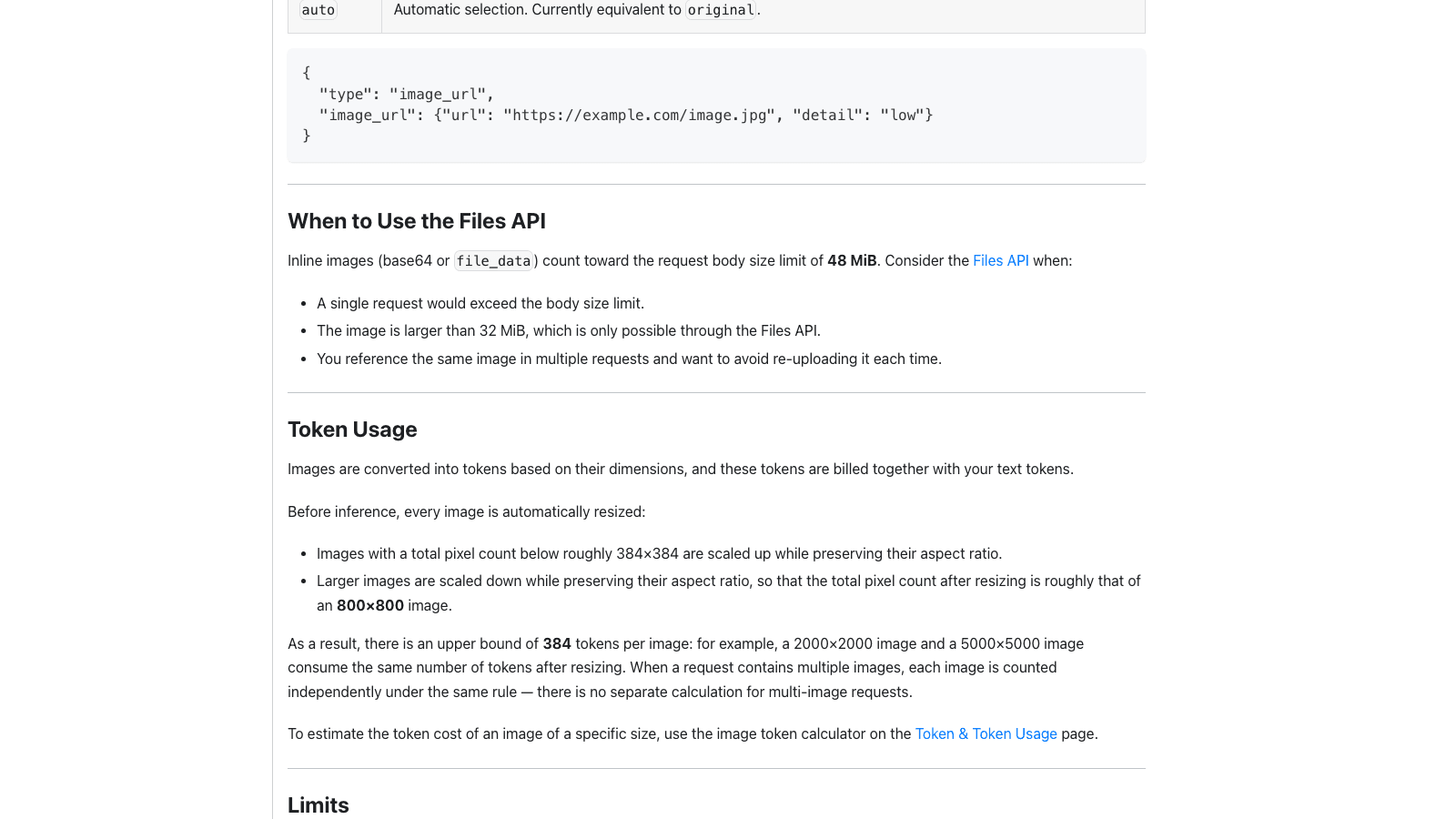
Every image is resized before inference. Anything under roughly 384×384 total pixels gets scaled up; anything larger gets scaled down until the total pixel count is about that of an 800×800 image. Aspect ratio survives, pixels don't. The consequence DeepSeek states plainly is that a 2000×2000 image and a 5000×5000 image cost exactly the same 384 tokens, because after the resize they are the same picture.
For cost that's excellent, and for a small UI screenshot it barely matters. One commenter pointed out that 800×800 is 0.64 megapixels, less than a Super VGA display from 1995, and argued the useful threshold sits nearer 1080p. Feed it a full letter-size scan of dense body text and you are asking it to read something it was handed at postcard resolution.
There is a detail field on image_url inputs, but it only goes the other direction: low downsamples to 512×512 for speed and cost, while high, original and auto all currently mean the same thing, which is the original image subject to that same automatic resize. No setting buys you more pixels.
What images actually cost on the deepseek vision api
Vision is priced as V4 Flash, not as a premium tier. As of 2026-08-22 the published rates are $0.007 per million cache-hit input tokens off-peak and $0.014 at peak, $0.22 per million cache-miss input tokens off-peak and $0.44 at peak, and $0.66 per million output tokens against $1.32 at peak. Peak hours run 01:00 to 04:00 and 06:00 to 10:00 UTC, Monday through Friday, and off-peak is exactly half.
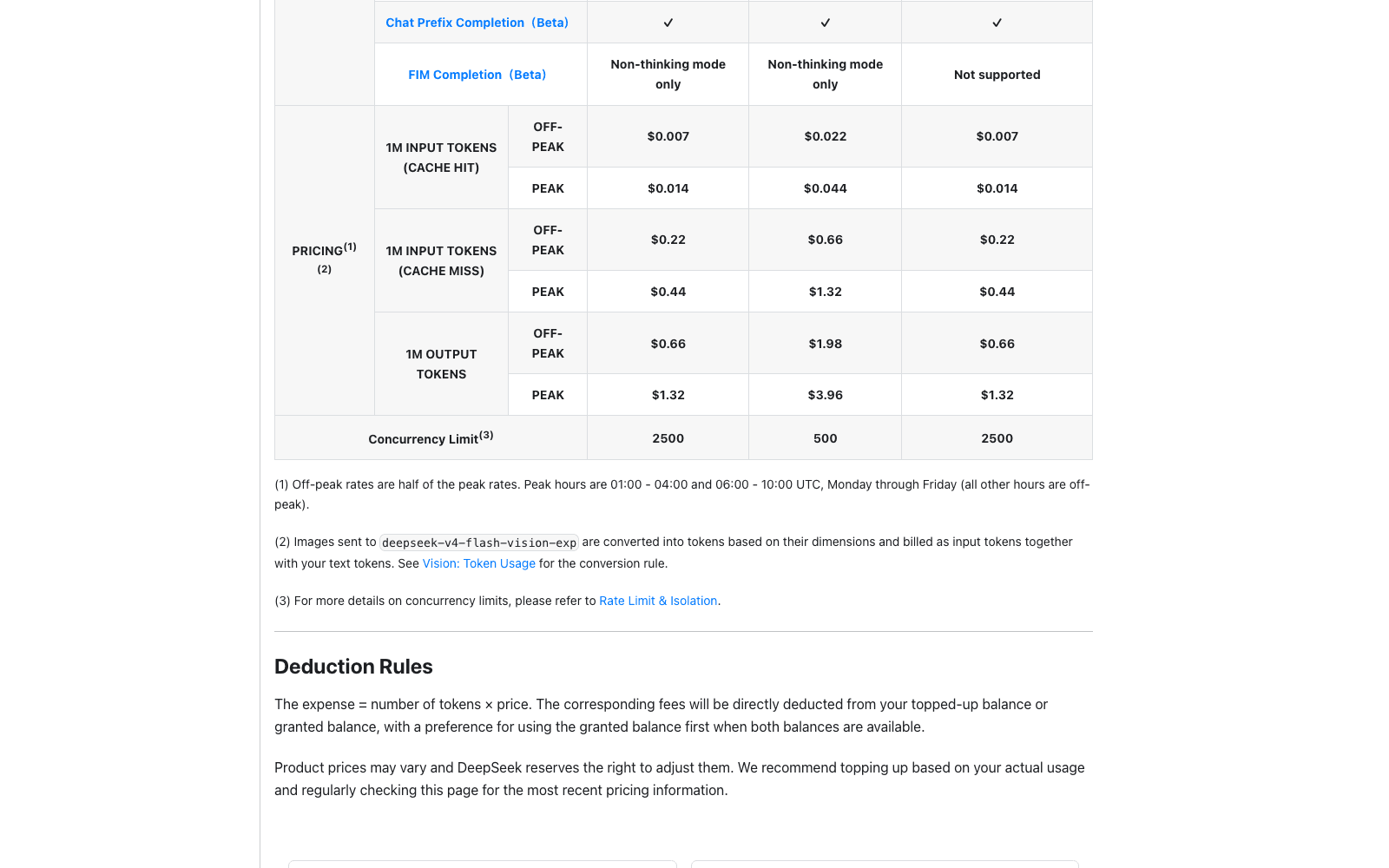
Because each image caps at 384 tokens, a thousand screenshots costs about 384,000 input tokens, which is roughly eight and a half cents off-peak before you count a single word of your prompt. That is the number that makes a scheduled visual check worth running at all.
The same column has one regression worth noting: FIM completion, which both V4 Flash and V4 Pro support in non-thinking mode, is listed as not supported on the vision model. Context length stays at 1M and max output at 384K, and the concurrency limit is 2500, matching Flash.
If you'd rather not manage a second key, OpenRouter lists the model at $0.22 per million prompt tokens and $0.66 per million completion tokens with the full 1,048,576-token context. Those figures match DeepSeek's off-peak direct rates rather than the peak ones, so a request routed during peak hours is not automatically the same price as calling DeepSeek yourself.
The errors you will hit first
Three restrictions are documented, and all three return a 400.
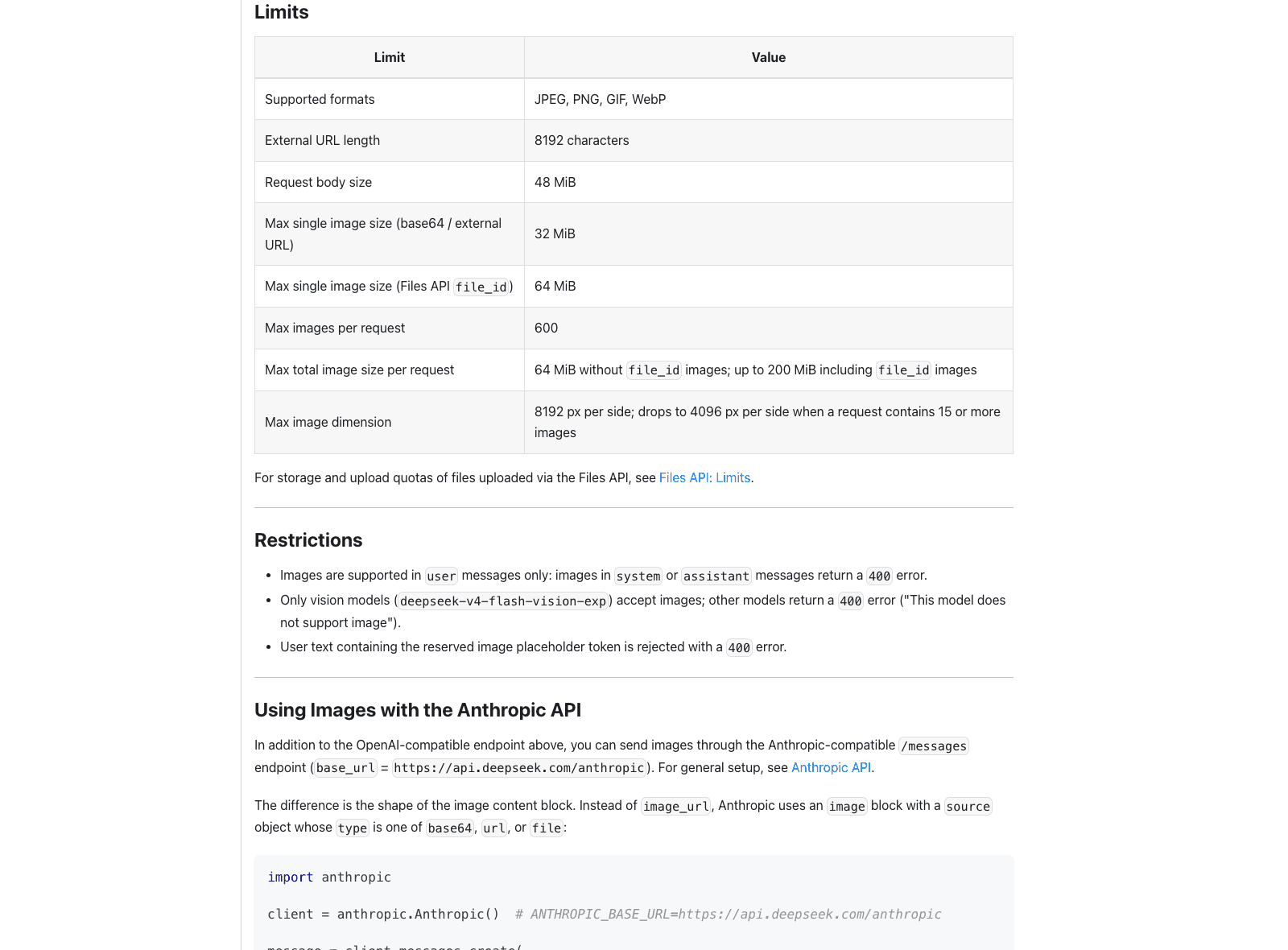
Images are accepted in user messages only, so an image tucked into a system prompt fails rather than being ignored. Sending an image to any model other than deepseek-v4-flash-vision-exp returns a 400 whose message reads This model does not support image, which is the one you'll see if a router or a config file quietly falls back to plain V4 Flash. User text containing the reserved image placeholder token is rejected too.
The ceilings are generous enough that most people won't meet them: 600 images per request, 64 MiB of total image payload without file_id and up to 200 MiB with, and 8192 px per side. That last one drops to 4096 px per side as soon as a request carries 15 or more images, which is an easy thing to trip over in a batch job and a hard thing to debug after the fact.
Where this fits if you already run DeepSeek agents
The honest summary is that this closes a gap rather than opening a frontier. If you already route work through the model, you now get to delete a vision shim, and everything the V4 line is good at applies to a screenshot as well as to a file. If you run the DeepSeek Harness, version 0.1.1 already knows about the model.
What it changes about scheduling is larger than what it changes about capability. A text-only agent can only act on what someone typed to it, while one that reads pictures can act on what a system is displaying, and the interesting version of that is unattended. MoClaw runs those checks on hosted infrastructure with the schedule attached to the account rather than to a machine, which is the difference between a monitor that runs and one that runs when you happen to be at your desk.
Treat the exp suffix as a real warning. Model ids on experimental releases move, and DeepSeek renamed things quietly in August already, so pin the id and keep a fallback path in your config. Picking which model handles which task is a setting on MoClaw rather than a rewrite, which is the cheap insurance when a preview model graduates or disappears. For the always-on side of that setup, the model choice matters less than whether anything is awake to make the call.
Frequently asked questions
Is DeepSeek V4 Flash Vision free?
No. It bills at standard V4 Flash rates, with images converted to input tokens at up to 384 tokens each. As of 2026-08-22 that is $0.22 per million cache-miss input tokens off-peak and $0.44 at peak. The Files API used to upload and reference images is free; the inference is not.
What image formats does the deepseek vision api support?
JPEG, PNG, GIF and WebP. DeepSeek detects the format from the actual file content rather than the filename or declared MIME type, so a mislabeled .png that is really a JPEG still works.
Does it work with the OpenAI SDK?
Yes. The endpoint is OpenAI-compatible Chat Completions, and the Responses API is supported as well. There is also an Anthropic-compatible endpoint at https://api.deepseek.com/anthropic that takes an image block with a source object instead of image_url.
Why does my request return "This model does not support image"?
You sent an image to a non-vision model. Only deepseek-v4-flash-vision-exp accepts images; every other DeepSeek model returns that 400. Check whether a fallback in your router or SDK config swapped the model id out from under you.
Can it read a full page of scanned text?
Not reliably at full-page resolution. The resize to roughly 800×800 total pixels applies to every image and cannot be raised, so dense A4 or letter-size scans lose detail. Cropping the page into regions and sending them as separate images works around it, and the 600-image ceiling leaves plenty of headroom.
Pin the model id before you build on DeepSeek vision
Try it on the workload you actually have rather than on a benchmark. Send three real screenshots from whatever you were going to automate, check whether 0.64 megapixels is enough for those specific images, and only then decide whether the resize is a footnote or a blocker. UI captures and charts are a straight upgrade at a price that barely registers; documents deserve a measurement first.
Then write down the model id, the fallback, and the date you checked the pricing page, because exp models are the ones most likely to move under you.
Continue Reading
More Guide
What Is DeepSeek Harness (DSH)?

Qwen 3.8 27B Overthinking: Turn Down xhigh
Claude Code Voice Mode: What /voice Can't Do
Apache Maka: The Agent That Logs Everything

Ruflo Is Claude Flow: What Actually Changed
Ox Alpha: What We Know So Far
The MoClaw editorial team writes about workflow automation, AI agents, and the tools we build. Default byline for industry overviews, listicles, and collaborative pieces.
Ready to put this into practice?
MoClaw runs browser tasks, research, and schedules automatically. Try it free.
References: https://api-docs.deepseek.com/guides/vision/ · https://api-docs.deepseek.com/news/news260821/ · https://api-docs.deepseek.com/quick_start/pricing/ · https://news.ycombinator.com/item?id=49386163 · https://openrouter.ai/deepseek/deepseek-v4-flash-vision-exp