macOS Harness: browser-use Hands Over a Mac

macOS Harness is browser-use's minimal harness letting an LLM control your Mac through six primitives. Setup, permissions, and the real risks.
Table of Contents
Two days ago the browser-use team pushed a repository that does something most agent tooling carefully avoids: macOS Harness hands a language model the whole Mac and then gets out of the way. No per-app integrations, no recipe library, no approval wrapper around each action. One Python process, six primitives, and whatever the model decides to write next.
That description sounds either reckless or trivial depending on how you read it, and the interesting part is that it's neither. What follows is what the project actually does, what it asks of your machine, and where the honest limits are, as of August 2026.
What macOS Harness Actually Ships
The repository went public on 17 August 2026 under browser-use/macos-harness, MIT licensed, 99.8% Python. As of 19 August it has 421 stars, 25 forks, six commits, and exactly one contributor: Gregor Žunič, who co-founded browser-use. Three releases landed within forty minutes of each other on launch day, v0.1.0 through v0.1.2. The README labels it experimental and macOS only, which is unusually blunt for a launch post.
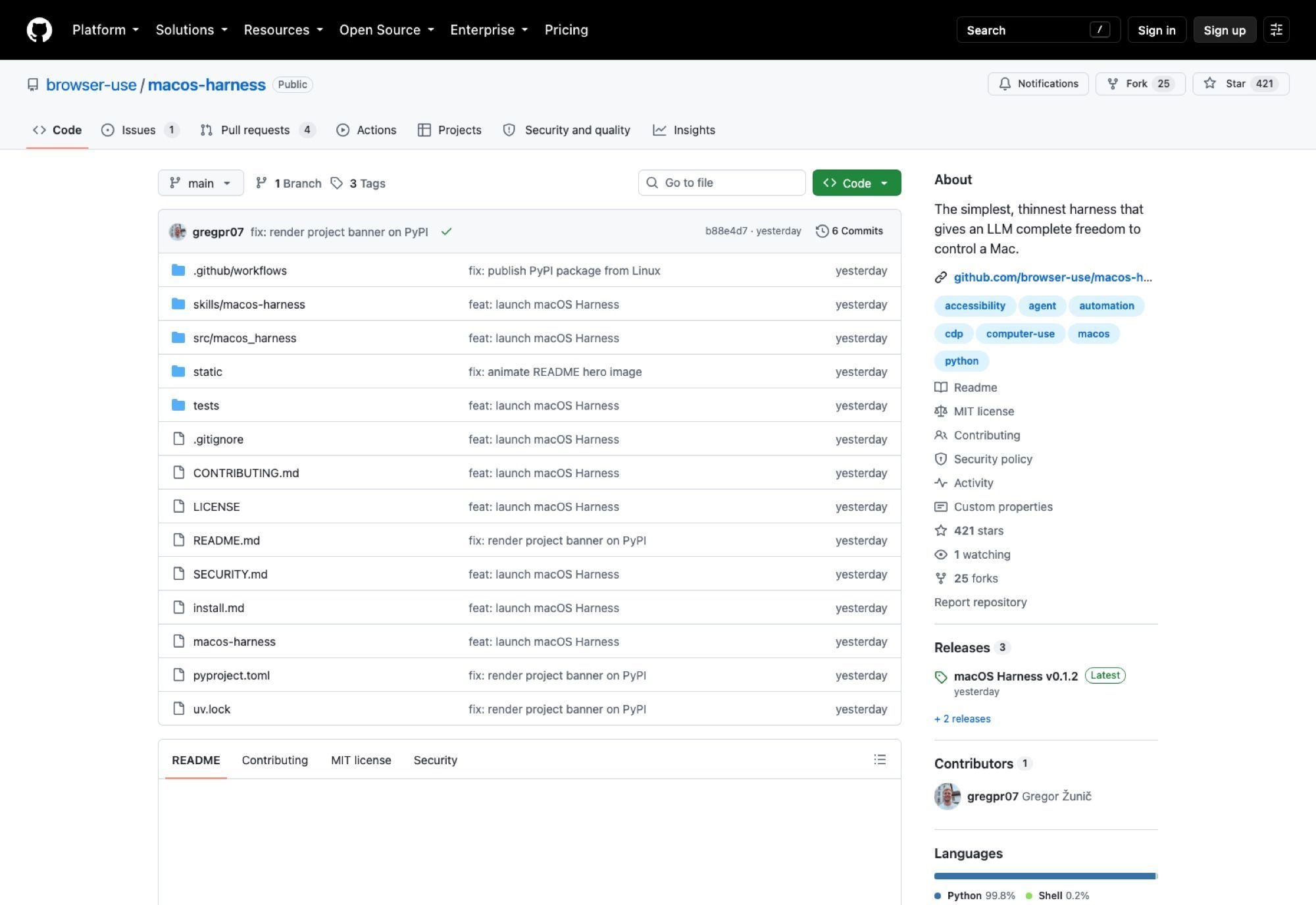
Installation goes through uv, pinned to Python 3.12:
uv tool install --python 3.12 --upgrade --force macos-harness
mkdir -p "${CODEX_HOME:-$HOME/.codex}/skills/macos-harness"
macos-harness skill > "${CODEX_HOME:-$HOME/.codex}/skills/macos-harness/SKILL.md"
macos-harness doctor
That third line is the part worth pausing on. macos-harness skill prints a skill definition which you redirect into your agent's skills directory, so the model teaches itself the workflow rather than you writing a tool schema. The repo also offers a shortcut: paste a single paragraph into Codex or Claude Code and let the agent run the whole install, register the skill, check permissions, and verify itself by capturing an already-running window. Setup as a prompt, not a runbook.
Six Primitives, and Why That Number Is the Whole Argument
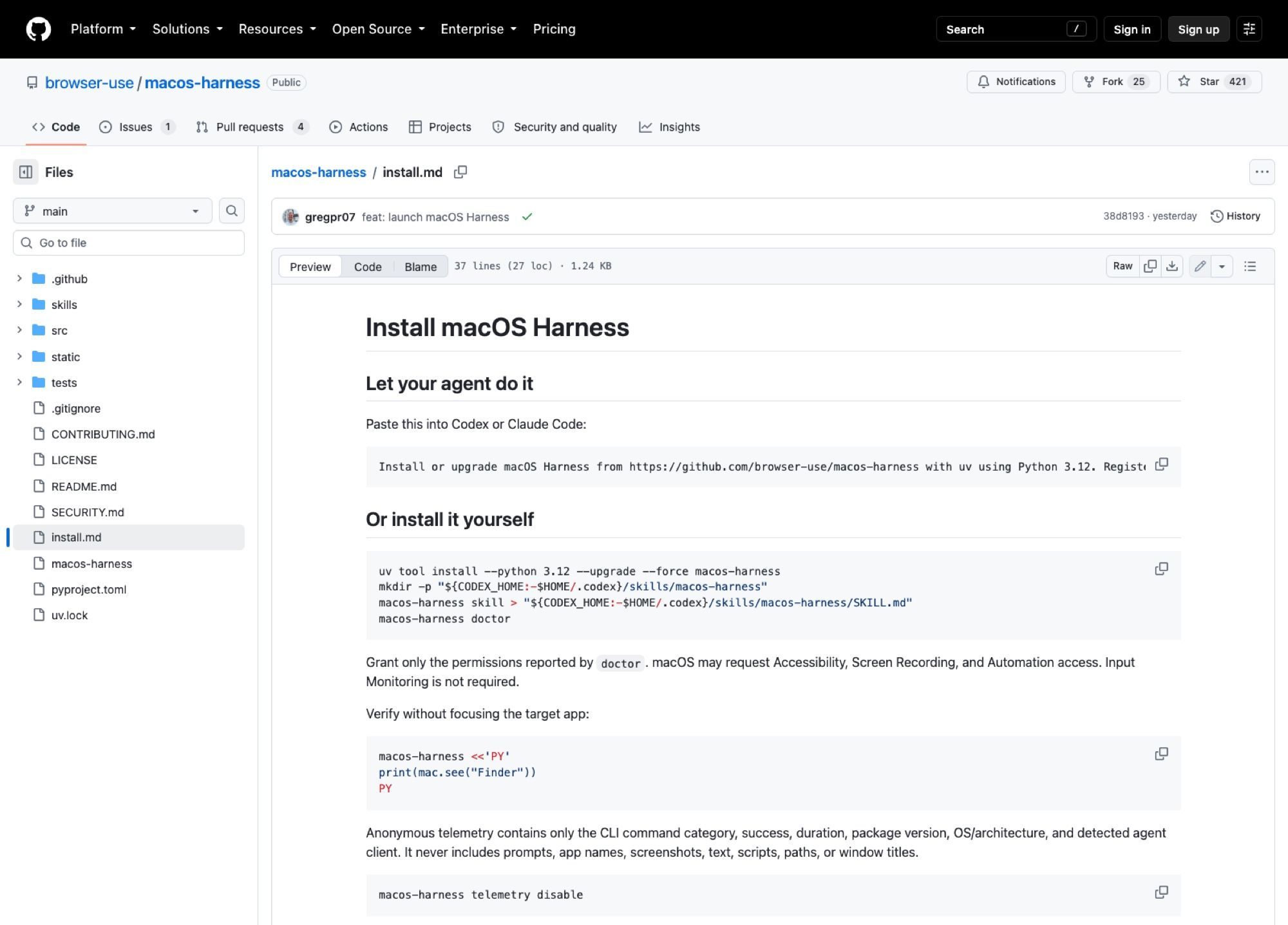
Everything the model can do to your Mac routes through six calls: mac.see, mac.key, mac.type, mac.click, mac.ax, and mac.script. Screenshot a window, send a keystroke, type text, click a coordinate, read the accessibility tree at a point, run AppleScript. Alongside them, in the same interpreter, sit browser, Path, and subprocess.
Here's the launch example verbatim from the README:
macos-harness <<'PY'
frame = mac.see("Spotify")
mac.key("cmd+k", app="Spotify")
mac.type("Alessia Cara", app="Spotify")
mac.click(640, 420, app="Spotify")

item = mac.ax.at(640, 420, app="Spotify")
mac.script('tell application "Spotify" to play')

print(browser.page_info())
print(list(Path.home().iterdir()))
PY
There is no Spotify tool here, no Slack tool, no Final Cut tool, no registry of app adapters waiting to be contributed. The bet is that a model good enough to point at your desktop is also good enough to write the missing forty lines of Python mid-task, and that an adapter per application is a losing race against the number of applications. Whether that pays off depends entirely on which model you point at it, which the project doesn't pretend otherwise about.
The README draws the loop in four steps: the agent wants something no helper exists for, reaches for raw macOS primitives, writes the missing logic in ordinary Python, and finishes without an app-specific tool being added. That last clause is the claim. Every conventional integration layer accumulates — one adapter for Slack, another for Notion, a third for the internal tool built in 2019 that nobody will ever adapt. macOS Harness argues the accumulation is the bug.
The counter-argument writes itself. Code generated mid-task has no test coverage, no review and no memory of the last run, so the same task can produce different Python on Tuesday than on Monday. For scripted, repeatable work that's a downgrade from a boring adapter. For the long tail of one-off desktop tasks nobody would ever adapt, it's the only thing that works at all.
Underneath, the plumbing is ordinary macOS: CGWindow for screenshots, CGEvent delivered to a process ID for input, the Accessibility API and Apple Events when pixels aren't enough, and Chrome DevTools Protocol through browser-use's existing Browser Harness for the real logged-in browser. Nothing exotic, which is part of why the surface stays small.
The Part Nobody Advertises: What It Refuses to Do
Read the behaviour list carefully and a pattern shows up. macOS Harness captures background windows without bringing them forward. It sends input to a PID rather than to whatever holds focus. It draws an animated, click-through pointer so you can watch the agent work, and it never moves your actual cursor. macos-harness doctor reports which permissions are genuinely needed, and the README says plainly that Input Monitoring is not among them.
That's a coherent stance: the agent operates on your Mac without taking it away from you. You can keep typing in another window while it drives Spotify in the background. Compare that with screen-recording-plus-global-input automation, where the machine effectively becomes unusable for the duration, and the restraint starts to look like the actual product decision.
Telemetry is enabled by default. It records the CLI command category, whether the command succeeded, duration, package version, OS and architecture, and which agent client it detected. The README enumerates what it never captures: prompts, app names, screenshots, UI text, scripts, paths, window titles. One command turns it off:
macos-harness telemetry disable
I'd rather this defaulted the other way, but at least the disclosure is specific enough to check.
Security: Read the SECURITY.md Before the README
The project's own security note is two paragraphs and both of them matter. macOS Harness can control applications and read visible UI content with whatever permissions you grant. Its advice: treat agent instructions and third-party UI as untrusted input, review irreversible actions, grant the minimum the doctor asks for.
Unpack "third-party UI as untrusted input" and you get the failure mode. The model reads your screen to decide what to do. Anything that can put text on your screen — a web page, an email preview, a Slack message, a filename — is now writing into the model's context. Prompt injection stops being an abstraction the moment a harness has a click primitive and a shell.
macOS will ask for Accessibility, Screen Recording, and Automation. Those grants aren't scoped to the app you're automating; Screen Recording on your daily machine means the agent can see the Signal thread, the staging credentials in a terminal tab, and the tax document you left open. The harness is well behaved about focus; permissions are still permissions.
This is the point where a hosted machine stops being a convenience and starts being a containment boundary. MoClaw is a cloud AI computer with its own desktop, so the screen the agent is allowed to read is a screen that only ever had the task on it. Your laptop keeps its own permissions to itself, and the two setups coexist rather than compete.
macOS Harness vs Browser Automation vs phone-harness
browser-use's earlier work stops at the browser boundary, which covers a surprising share of real work and then abruptly doesn't: the file dragged into Final Cut, the native preferences pane, the desktop app with no web version. macOS Harness extends past that wall while still calling into Browser Harness for anything inside Chrome. If your workload is genuinely web-shaped, the browser automation guide covers the narrower, better-trodden path.
Against phone-harness, the difference is what a "screen" costs. A phone screen is small, the accessibility tree is shallow, and the app inventory is bounded. A Mac has arbitrary windows, arbitrary shells, and a filesystem the model can walk with Path.home().iterdir(). More reach, more ways to be wrong.
And against the general category discussed in what an agent harness is, macOS Harness is deliberately at the thin end. Most harnesses grow toward orchestration: retries, state machines, tool registries, approval gates. This one has none of that and says so.
Running It Overnight Is Where the Model Breaks Down
One persistent Python process is elegant until you ask when it runs. The process lives on the Mac in front of you, so it exists exactly as long as that Mac is awake and unlocked, and a MacBook that closes at 18:00 is a MacBook whose agent stopped at 18:00. There's no daemon story here, and for a two-day-old experimental release that's a reasonable thing to have left out.
The gap is real regardless of whether the project intends to fill it. That's where MoClaw fits: a hosted cloud AI computer that stays up, so the long-running half of the work has somewhere to live while the harness on your own Mac handles the things that genuinely need your Mac — your logged-in apps, your local files, your licensed software.
Cost matters here too, because "always on" usually means "always billed." MoClaw's free trial runs three days or 1,000 credits, and the $20 subscription is 1,000 credits a month, which makes an overnight run something you can price before you start it rather than after.
Should You Install It Today?
If you write Python and you already run Codex or Claude Code, yes, on a machine you'd be comfortable handing over. Six commits and one contributor is not a maintenance guarantee, the experimental label is doing real work, and v0.1.2 was tagged three minutes after v0.1.1, which is a launch-day cadence rather than a stability signal.
The repository state backs that up. Six commits, one branch, three tags, one open issue, four open pull requests, and 25 forks against 421 stars. A fork ratio near 6% on a two-day-old project usually means people are reading the source rather than just bookmarking it, which is a healthier signal than the star count. Still, one contributor is one contributor.
There's a workflow question underneath the technical one. If the harness runs on the laptop you carry, the work is pinned to wherever that laptop is, and resuming a half-finished task from another machine means starting over. MoClaw decouples those: the hosted computer keeps its state and session, reachable from a desk, a phone or somebody else's browser, while macOS Harness stays where it has to be — on the Mac holding your logged-in apps.
If you want something that reliably drives your Mac unattended, this isn't that yet and doesn't claim to be. What it is: the smallest credible answer to "can a model just use a computer," from the people who already built the browser version. Point it at a machine where the worst case is annoying rather than expensive, and start with mac.see on an app you don't care about.
FAQ
Is macOS Harness free?
Yes. MIT licensed, installed from PyPI with uv. You pay for whatever model you point at it, not for the harness.
What permissions does macOS Harness need?
Run macos-harness doctor and grant only what it reports. macOS typically asks for Accessibility, Screen Recording, and Automation. Input Monitoring is not required.
Does it work with Claude Code and Codex?
Yes. macos-harness skill prints a skill definition you write into the agent's skills directory, and the install docs default that path to ${CODEX_HOME:-$HOME/.codex}/skills/macos-harness. The README's one-paragraph install prompt is written for both.
Can it run without taking over my screen?
Mostly. It captures background windows without raising them, sends input to a specific process, and draws a click-through pointer instead of moving your real one, so you can keep working in another window. It still needs Screen Recording permission to see anything at all.
Is it safe to run?
It's as safe as the permissions you grant and the content the model reads. The project's own SECURITY.md tells you to treat third-party UI as untrusted input and to review irreversible actions. Take that literally.
Continue Reading
More Guide
Ox Alpha: What We Know So Far

Claude Code Session Manager: Wake for Mac

Grok Speaking Gibberish: What Actually Helps

How to Build Claude Skills for Agent Workflows

Claude Code AGENTS.md: What Actually Loads

Herdrm: One Mac Console for Every Coding Agent
The MoClaw editorial team writes about workflow automation, AI agents, and the tools we build. Default byline for industry overviews, listicles, and collaborative pieces.
Ready to put this into practice?
MoClaw runs browser tasks, research, and schedules automatically. Try it free.
References: https://github.com/browser-use/macos-harness · https://github.com/browser-use/macos-harness/blob/main/install.md · https://github.com/browser-use/macos-harness/blob/main/SECURITY.md · https://github.com/browser-use/macos-harness/releases