Herdrm: One Mac Console for Every Coding Agent

Herdrm is a native macOS console for herdr: every coding agent on every machine in one sidebar with live terminals. What it does, plus the licence gap.
Table of Contents
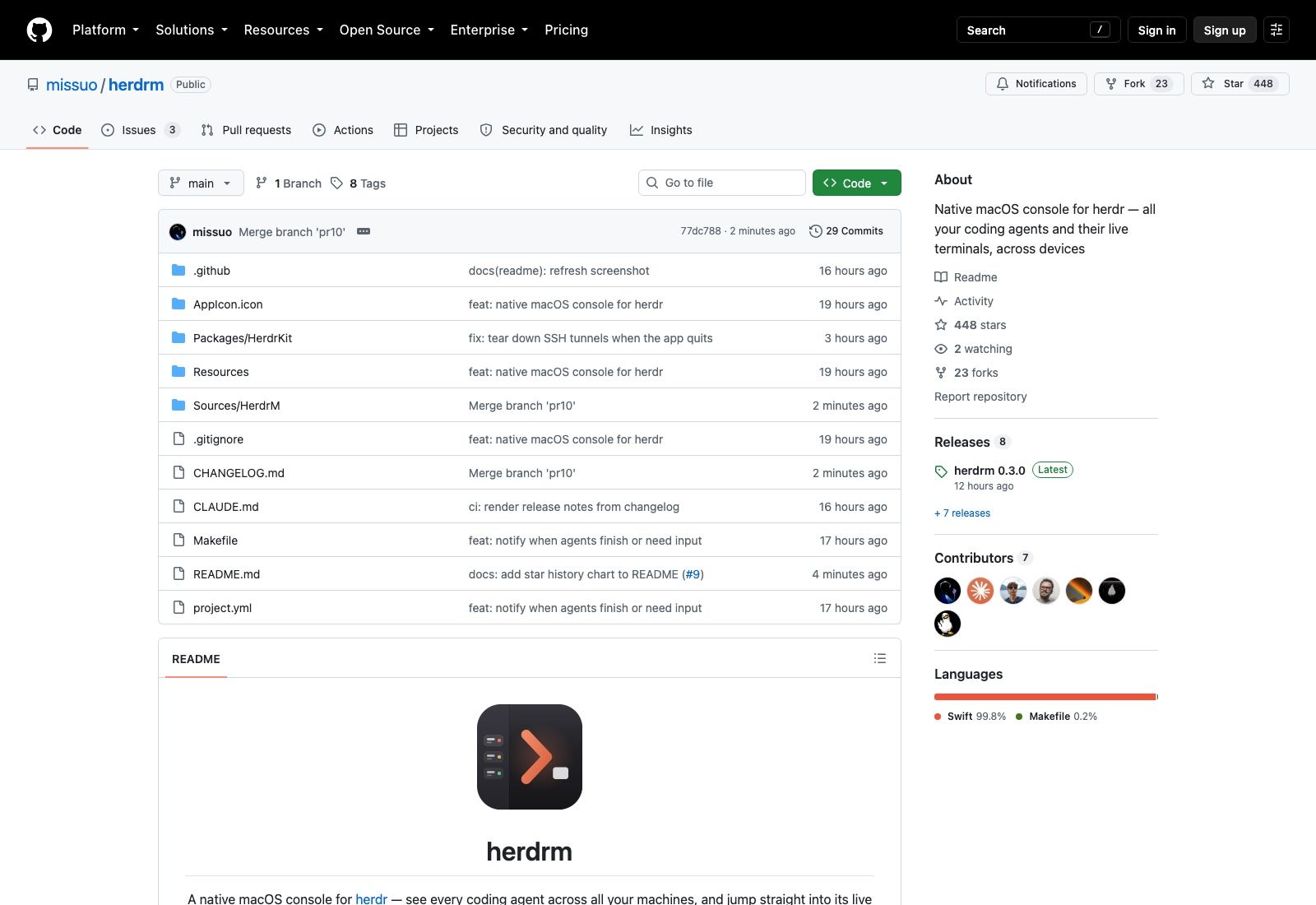
Herdrm went public on 19 August 2026 and had 448 stars by the following morning, which for a Swift app with 29 commits is a strange curve. The reason isn't the app; it's what the app sits on top of. Herdr, the runtime underneath, reports 30,695 stars and 493,063 installs, and it had no native Mac client until this one showed up.
So the thing to understand first is what herdrm is not. It isn't a coding agent, and it doesn't compete with Claude Code or Codex. It's a window onto agents that are already running somewhere else.
Herdrm is a console, not an engine
Herdr holds terminals open for coding agents and tracks which ones are working, blocked or done. It's a background server, and you talk to it through a CLI. The app puts a SwiftUI window in front of that server: a sidebar listing every space and every agent, with a live terminal attached to whichever one you select.
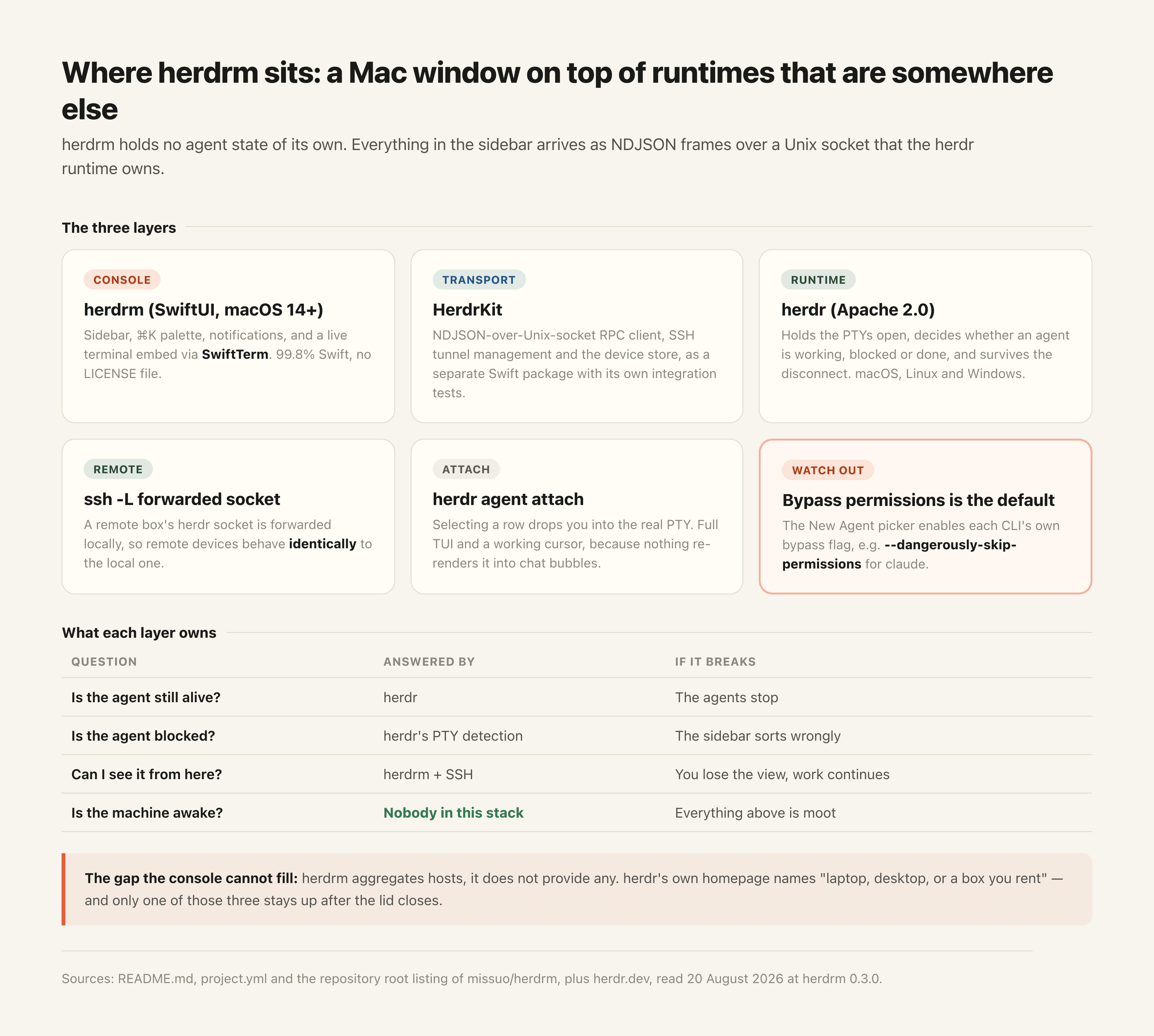
The distinction matters because the two layers fail differently. If herdr breaks, your agents stop. If the console breaks, you lose the view and the agents keep going, because the console holds no state that the runtime doesn't already own. Anything it shows you came off a Unix socket in NDJSON frames; the app is a client, and a fairly thin one.
That's also why the feature list reads like a window manager rather than an agent product. Blocked agents bubble to the top of the sidebar, working ones spin, finished ones get a check. There's a ⌘K palette across every agent and space. Sparkle handles auto-updates, and the builds are signed and notarised, which is more polish than a one-day-old project usually carries.
Live terminals across devices, and what that actually requires
The headline capability is that one herdrm window covers more than one machine. Your local herdr instance shows up, and so does any remote box you add, with the remote socket forwarded through ssh -L so both behave identically. Each device stays connected with automatic reconnect, a tinted name chip marks which machine a row lives on, and the switcher in the bottom-left filters by device.
Authentication for remote devices goes through your existing OpenSSH config or agent, Tailscale SSH, or a password stored in the macOS login Keychain. Nothing new to configure if you already reach those machines.
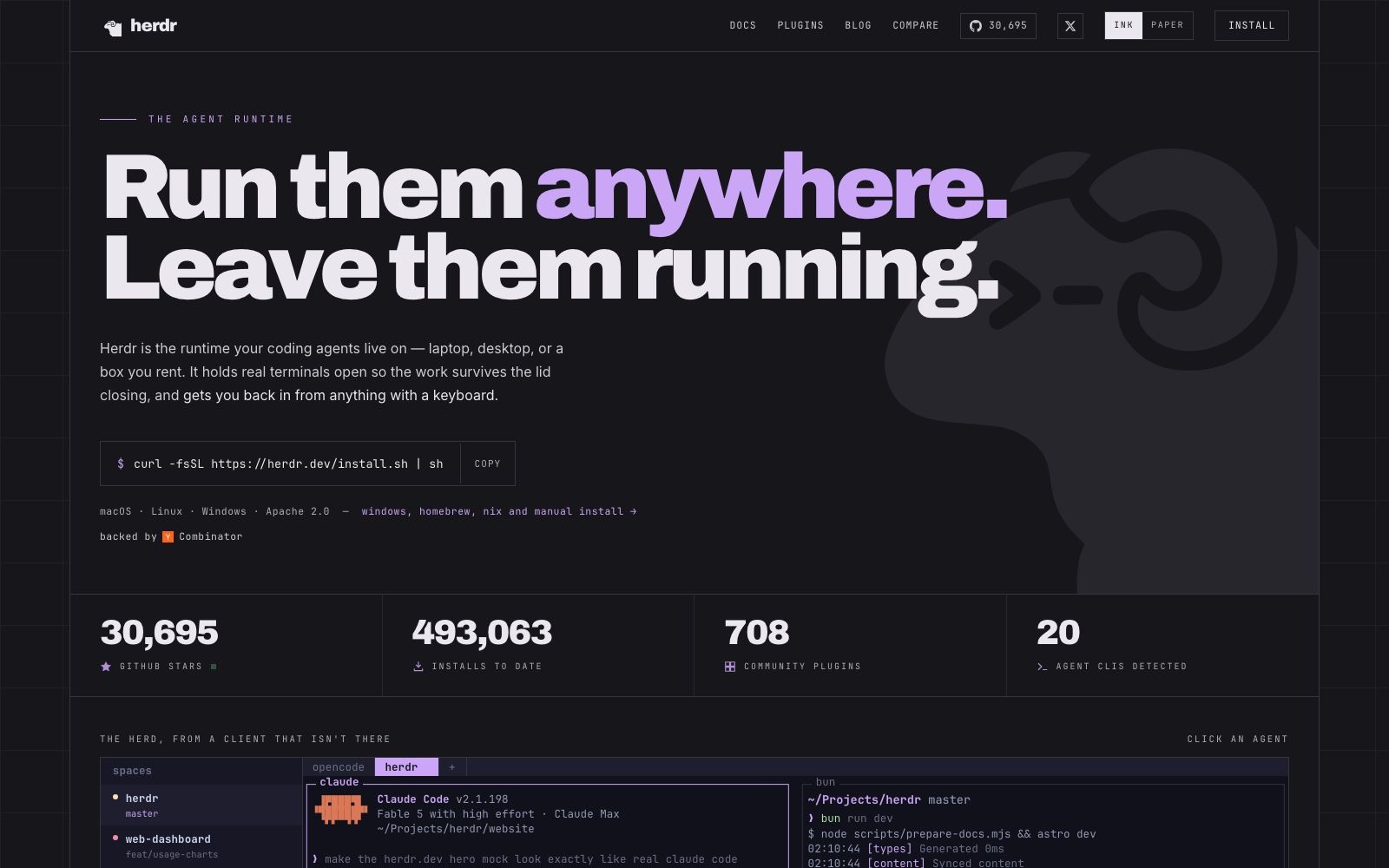
Read that list again and the assumption behind it becomes obvious: you have machines that are already up. It aggregates hosts; it doesn't provide any. Herdr's own homepage is candid about where its runtime is meant to live, naming "laptop, desktop, or a box you rent" in that order, and the pitch right beside it is that terminals survive the lid closing. A laptop is not the machine that satisfies that. This is exactly the gap MoClaw fills: a hosted cloud AI computer that's already awake, so the long-running agent has somewhere to live and your Mac becomes the thing you watch it from rather than the thing it depends on.
Selecting an agent attaches you to its PTY
Selecting a row runs herdr agent attach and drops you into the real terminal, not a rendered transcript of it. Full TUI, working cursor, no chat wrapper in between, with terminal emulation handled by SwiftTerm.
This is a bigger deal than it sounds if you have used the alternative. Chat-shaped agent GUIs re-render output into message bubbles, which quietly breaks anything that draws to the screen: progress bars, diff viewers, interactive prompts, the permission dialogs that agents pop up mid-task. This app sidesteps the whole category of problem by not being a chat client.
Notifications follow the same instinct. You get a system notification when any agent on any device finishes or needs input, clicking it jumps you to that agent, and agents you're actively watching never notify you. That last clause is the one that decides whether a notification feature gets left on after week one; notify on everything and people mute you by Thursday.
Status here is inherited rather than inferred, which is worth understanding before you trust the sidebar. Herdr is the thing watching the PTY and deciding an agent is blocked; herdrm renders that decision. So the sorting is only as good as the runtime's detection, and an agent stuck in a way herdr doesn't recognise will sit there looking busy.
The New Agent picker, and a default worth knowing about
You can start an agent in any space on any connected device. The picker only offers CLIs actually installed on that device, which removes a whole class of confusion when your laptop has Codex and the rented box doesn't.
Then there's the default nobody should discover by accident: the picker enables each agent's own bypass-permissions flag by default. For Claude Code that means --dangerously-skip-permissions. The reasoning is easy to follow, since an agent that halts on a permission prompt inside a detached session is an agent nobody is there to unblock, and the whole point of herdr is that work continues while you're away. The consequence is equally easy to follow: an agent started from that picker will not stop to ask before touching something.
Where that agent runs starts to matter a lot once permission checks are off. Running it on the Mac holding your SSH keys, your credentials and your working tree is a different risk from running it on a machine that exists only for this. A hosted cloud AI computer like MoClaw puts a boundary in that has nothing to do with trusting the agent's judgement: the filesystem it can reach isn't the one your day depends on.
Installing it
Two routes. Homebrew is one line:
brew install owo-network/brew/herdrm
Or grab herdrm-x.y.z.zip from the releases page, unzip, drag herdrm.app into /Applications. Either way Sparkle takes over updates from then on, so you do this once.
Building from source needs XcodeGen, after which make build runs xcodegen and xcodebuild into build/Build/Products/Debug/herdrm.app, make run launches it, and make kit-test runs the HerdrKit integration tests against a live local herdr. That last target is the tell that the socket client is tested against the real runtime rather than a mock, which for an RPC client is the only test that means anything.
Eight releases landed between 19 and 20 August 2026, with 0.3.0 tagged twelve hours before this was written. Version numbers moving that fast on a signed, auto-updating app is a reasonable trade while a project is this young, though it does mean the version you install today isn't the one you'll be running by Friday.
How herdrm relates to herdr, Heeler and the rest
Herdr is Apache 2.0, ships for macOS, Linux and Windows, and installs with a single curl line. Its site claims 708 community plugins and 20 agent CLIs detected, and it's Y Combinator-backed. That's the established piece.
Herdrm is one of several clients around it. The README credits Heeler, an iOS herdr client, for the domain model and transport patterns it borrowed, and names waku as the sidebar design reference. The interesting signal is that a runtime one year into its life is now growing a client layer per platform, which is roughly the shape the DeepSeek Harness ecosystem took a fortnight ago. Clients arrive when a runtime gets popular enough that the terminal stops being the bottleneck; they also inherit every breaking change the runtime makes, and herdrm is a fortnight younger than the release cadence it's chasing.
Worth noticing what nobody in this layer is building: a place for the agents to run. Every client here assumes a host, and the hosts are the reader's problem. MoClaw is that missing half, a cloud AI computer you don't administer, which is the part a console cannot supply no matter how good the sidebar is.
Architecturally it splits into two pieces: Packages/HerdrKit, a Swift package holding the NDJSON-over-Unix-socket RPC client, SSH tunnel management and the device store; and Sources/HerdrM, the SwiftUI app. HerdrKit having its own integration test target suggests the split is real rather than cosmetic.
Licensing: there isn't one
The repository ships no LICENSE file. The GitHub API returns null for the licence field, and listing the repository root on 20 August 2026 confirms it: a README, a CHANGELOG, a CLAUDE.md, a Makefile, project.yml, and the source directories, with nothing granting anyone rights to any of it.
Under default copyright that means the source is readable but not yours to modify, redistribute or ship inside anything. The Homebrew tap and the notarised release builds are fine to install and use; what's undefined is everything past that. Given how young the project is, the likeliest explanation is that nobody has got round to it, and it may well be MIT by the time you read this. Check before you build on it.
The README also carries its own warning, in a callout near the top: early-stage software without full test coverage, expect bugs.
FAQ
Is herdrm free and open source?
Free to download, yes. Open source, not as of 20 August 2026: the repository has no LICENSE file and the GitHub API reports no licence, which leaves reuse rights undefined even though the source is public.
What is herdr?
The runtime herdrm is a console for. Herdr keeps real terminals open for coding agents so sessions survive disconnects, tracks whether each agent is working, blocked or done, and exposes all of it over a local socket. It's Apache 2.0 and runs on macOS, Linux and Windows.
Does herdrm run on Windows or Linux?
No. It's 99.8% Swift, built with SwiftUI and XcodeGen, and requires macOS 14 or newer. Herdr itself is cross-platform, so a Linux box can host the agents that a Mac running herdrm watches.
Do I need herdr installed before herdrm works?
Yes for local use, though herdrm will start the local herdr server itself if it isn't already running. Remote machines need herdr running on them independently, reachable over SSH.
Which coding agents does it show?
Whatever herdr is running, which currently spans claude, codex, gemini, grok and opencode among others. The New Agent picker filters to CLIs actually installed on the device you're targeting.
Worth installing, worth watching the licence
One console over every coding agent on every machine you own is a genuinely useful thing to have, and herdrm is a well-made version of it: native, notarised, no chat wrapper, notifications that respect what you're already looking at. Eight releases in the first day says the maintainer is moving fast.
What it can't do is give you a machine. Everything herdrm is good at assumes there's already a host somewhere with terminals open on it, which is why the honest way to read this app is as the last mile of a setup rather than the setup itself. MoClaw covers the other end of that arrangement as a hosted cloud AI computer running alongside your existing install, not in place of it, and it's reachable from whatever device you happen to have with you rather than only the Mac with herdrm on it.
For the broader category this sits in, see our explainer on what an agent harness is, the macOS harness from browser-use for a very different take on giving an agent a Mac, and our guide to running Claude Code agents in parallel.
Star counts, release history and licence status verified against the GitHub API and the repository itself as of August 2026.
Continue Reading
More Guide
Ox Alpha: What We Know So Far

Claude Code Session Manager: Wake for Mac

Grok Speaking Gibberish: What Actually Helps

How to Build Claude Skills for Agent Workflows

Claude Code AGENTS.md: What Actually Loads

CopilotKit OpenBot Gives Each Agent a Computer
The MoClaw editorial team writes about workflow automation, AI agents, and the tools we build. Default byline for industry overviews, listicles, and collaborative pieces.
Ready to put this into practice?
MoClaw runs browser tasks, research, and schedules automatically. Try it free.
References: https://github.com/missuo/herdrm · https://github.com/missuo/herdrm/releases · https://herdr.dev/ · https://herdr.dev/docs/install/ · https://github.com/migueldeicaza/SwiftTerm