How to Build Claude Skills for Agent Workflows

Learn how to build Claude Skills: a SKILL.md file, a trigger-ready description, and a testing checklist that turn repeated tasks into reusable agent workflows.
Table of Contents
Claude Skills are folders of instructions, scripts, and optional resources that Claude loads on demand to do a specific task the same way every time. Each one is a SKILL.md file plus whatever files it needs, and Claude pulls it in only when the task in front of it matches.
Key takeaways:
If you have thirty seconds, here is the whole thing:
- A Claude Skill is a SKILL.md file with metadata plus instructions. Resources and scripts are optional.
- The metadata (a name and a description) tells Claude when to reach for the skill. The body loads only when used, so a long skill costs almost nothing until you need it.
- You don't need to code. Write the file by hand, or have the skill creator build it from a plain conversation about your process.
- A task is worth turning into a skill once you've pasted the same instructions enough times to feel the friction.
Vera here. I didn't learn that from a launch post. I learned it the third time I pasted the same eight-line research checklist into a chat and counted: I'd done that exact paste at least a dozen times. That was when I stopped and asked whether it still needed to be me retyping the instructions. This piece is about what I did after that, and how the structure works.
What a Claude Skill Is
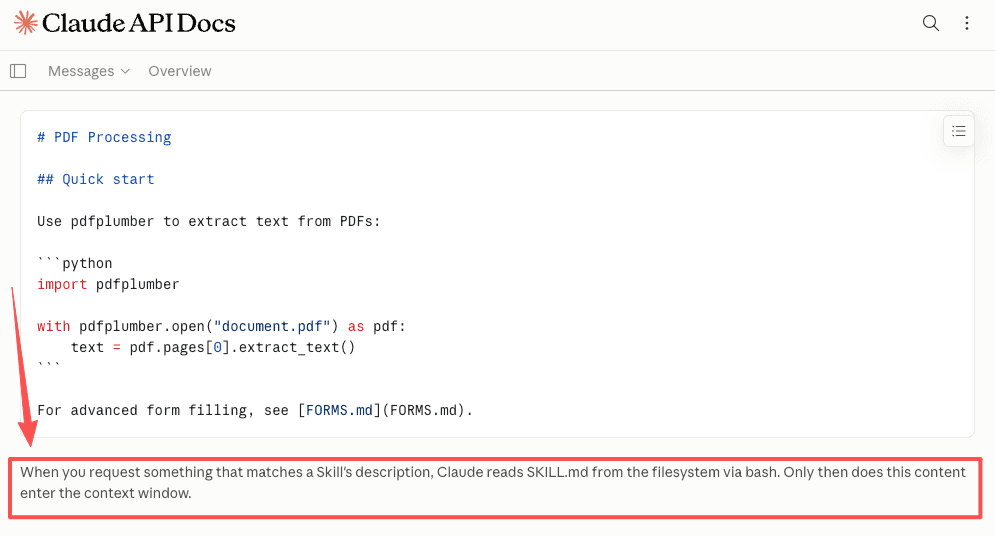
The cleanest way I can put it: a skill is the difference between explaining a task and having a task already explained. The mechanism behind that is worth understanding once, then forgetting. At startup, only each skill's name and description sit in context. Claude reads the full SKILL.md only when something you ask lines up with that description, and it opens extra files only when a step needs them. The Agent Skills overview walks through that load-on-demand behavior with a worked example.
This format isn't a closed Anthropic thing either. The same folder shape is published as the Agent Skills open standard, so a skill you write isn't necessarily locked to one product. Support varies by tool, so check before you assume portability.
For context: I run a one-person practice, research, ops, reporting, whatever the contract is. I came at this as a user with a stack of recurring busywork, not as someone evaluating an architecture.
Basic Skill Structure
A skill is a folder. One file is required, the rest is optional. Here's the whole shape.
| Part | What it is | Required |
|---|---|---|
| SKILL.md | Metadata at the top, instructions below | Yes |
| references/ | Docs Claude reads only when a step needs them | No |
| scripts/ | Code Claude runs without loading the full file | No |
| assets/ | Templates and supporting files | No |
SKILL.md
SKILL.md is the one piece you can't skip. It opens with YAML metadata between two --- lines, then the instructions in plain Markdown below. Anthropic's public skills repository has a template you can copy, and it's where the skill creator skill itself lives if you'd rather not start from a blank file.
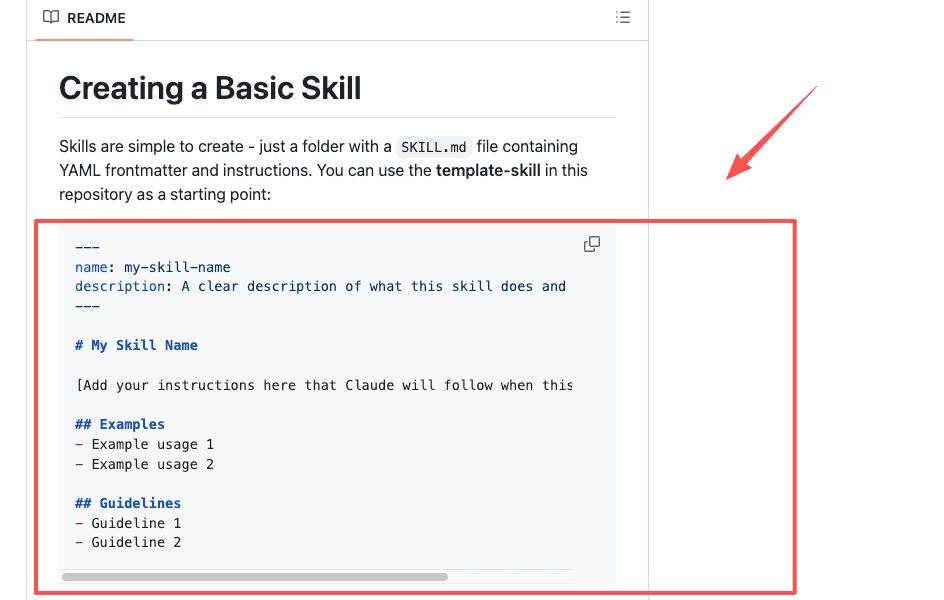
Keep this file focused. The guidance is to stay under 500 lines and push anything long into a references/ file, with an explicit pointer so Claude knows it exists. Once Claude loads SKILL.md, every line competes with the rest of what it's holding in its head.
Description and trigger
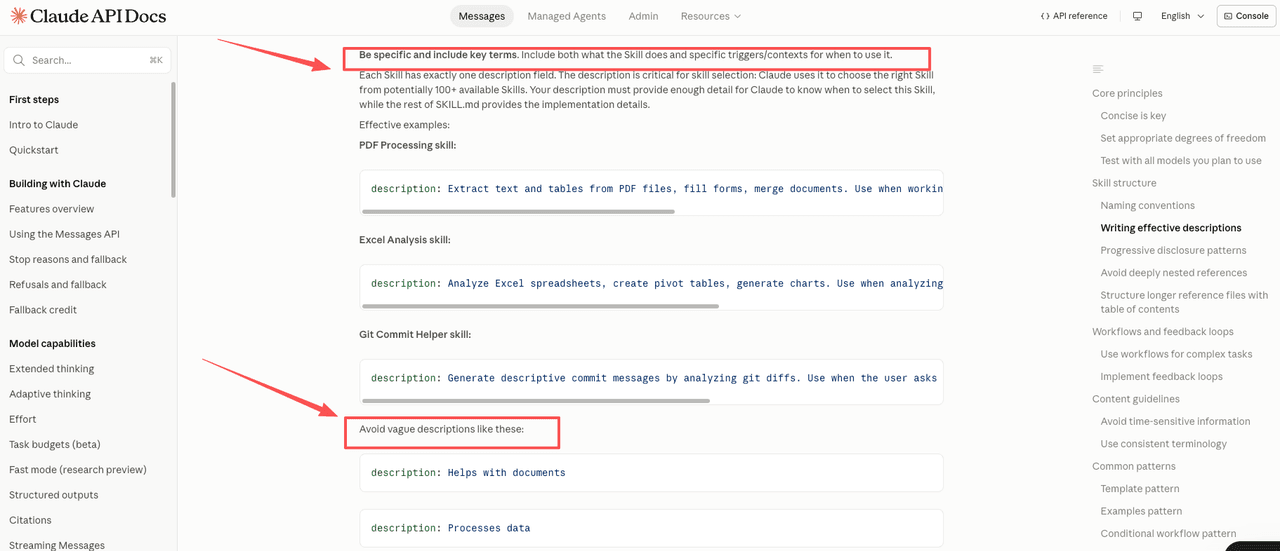
This is the part I got wrong first. The description in your metadata isn't a label. It's the trigger. Claude decides whether to use a skill almost entirely from that one sentence, and per the skill authoring best practices, it tends to under-trigger rather than over. A vague description means a skill that never fires.
What worked for me was writing the description to answer two things at once: what it does, and when it should kick in. Naming the situations out loud, including the ones I wouldn't spell out, was the difference between a skill that sat unused and one that showed up when I needed it.
Resources and scripts
If a step always runs the same way, it goes in scripts/. Claude runs the script and takes back only the output, not the whole file, which keeps context clean. Reference material that isn't needed every time goes in references/. My rule: if I keep explaining the same fixed detail in the instructions, that detail belongs in a separate file the skill points to.
A Simple Repeatable Agent Workflow Example
Here's the one I actually built, start to current state.
The recurring task was project research prep. Every new project opened the same way: search, open pages, pull the bits that matter, drop them into a fixed structure I always use. Collection took an hour or two and usually left me too flat to do the actual thinking. I'd run that cycle long enough to develop a specific boredom with it.
So I wrote a skill. The SKILL.md held my structure: the categories I sort findings into, the summary format I want, the two things I always check and always forget. The description said, in plain words, to use it whenever I started research on a new project. I added one reference file with my source-quality rules, because I kept repeating them.
It did not go cleanly the first time. My description was too narrow, so Claude didn't reach for the skill until I named the project type explicitly. I widened it. The second version triggered on its own. The agent workflow I ended up with isn't dramatic: I say the project name, the collection and first-pass structuring happen, and my work now starts where it used to start two hours in.
What changed wasn't how I do research. It's that the front half stopped being mine to do.
When the Thing Worth Copying Is the Protocol, Not the Skill
Skills are one answer to repeatability. The other one showing up in the wild is a written protocol that lives in your project instructions and never becomes a skill at all.
vibe-coding-toolkit (202 stars, 46 forks, MIT, created 14 August 2026) is a clean specimen. It bundles Claude Code plugin picks, prompt templates, a CLAUDE.md template, a settings.json example, hook examples, and ESLint and Biome quality gates, all extracted from a production fintech codebase the author can't show under NDA. The repository history is short by design, because it's where the method got documented rather than where it was built.
The piece worth reading even if you install none of it is the parallel-wave dispatch rule. Two conditions decide whether tasks can run at the same time: no dependency between them, and no file overlap. Break either and you get the silent failure mode, two agents writing over each other in one file, or a "wave" that was never independent to begin with. What the toolkit encodes is the safe degradation: when it isn't clear whether a task satisfies both conditions, treat that task as dependent on everything already listed and run it in series.
That's a genuinely portable idea, and it's why this belongs in a discussion about skills rather than beside one. Building it as a skill would be the wrong shape, because it isn't a capability the agent invokes; it's a constraint on how you decompose the work before the agent starts. The toolkit puts it in templates/rules/ and in the project instruction file, which is where a constraint belongs.
One thing to check before you clone it: the documentation is written in Portuguese. The templates, hook examples and lint configuration are code and transfer as-is, but the playbooks and the seven ready-to-copy prompts are Portuguese prose, so an English-speaking team gets the pattern out of this repository rather than a set of files to paste.
Testing and Maintaining Skills (Checklist)
A skill isn't done when the file saves. It's done when it fires correctly without you babysitting it. This is the rough checklist I run now:
- Does it trigger on its own? Describe a real task in your own words and watch whether Claude reaches for the skill unprompted. If you have to name the skill, the description is too narrow.
- Does it do the thing the same way twice? Run it on two different inputs. Compare the outputs against what you actually wanted.
- Where does it read? If Claude keeps opening a reference file every single time, that content probably belongs in the main SKILL.md. If it never opens a file, that file might be dead weight.
- What broke? Note the first failure honestly. Mine was the trigger. Fix the one thing, rerun, repeat.
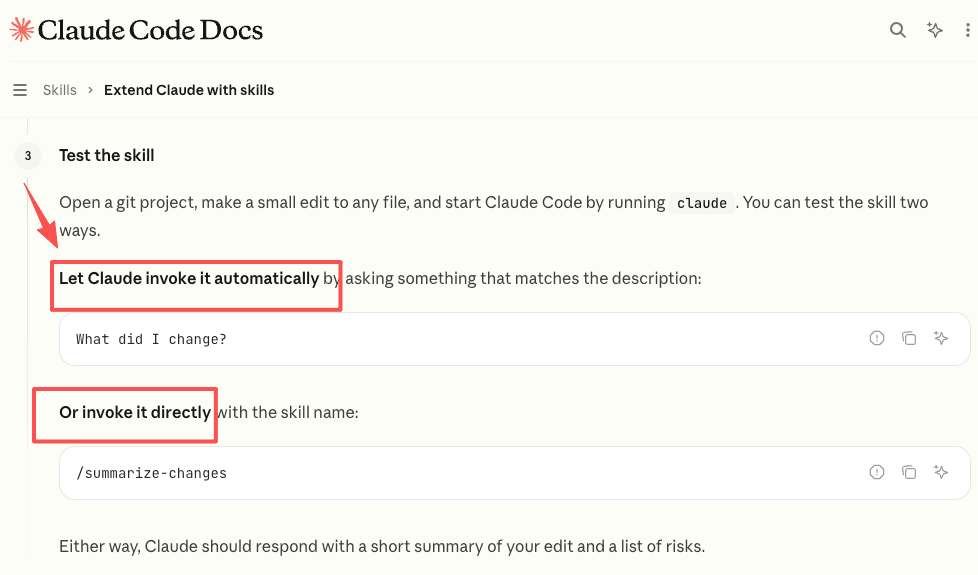
If you want this to feel less like guessing, the Claude Code skills documentation covers invoking, testing, and iterating on skills directly. The skill creator now also helps you write small tests that check whether a skill still works after changes. I don't test every skill. I test the ones I'd be annoyed to find quietly breaking.
Still watching mine. No problems in a few weeks, but a few weeks of no problems isn't the same as no problems.
When a Managed Skill Library Helps
Once you have more than two or three reusable skills, a question shows up: where do they live, and what runs them when you're away from your computer.
For a single skill in a single chat, nothing. You don't need infrastructure for that. The case for a managed setup starts when your reusable skills are tied to tasks that should run on a schedule, or from your phone, or while you sleep. That's a different problem from authoring the skill. It's about something staying online to hold and execute it.
This is the part of my own setup where Zentor fits. It runs on its own always-on cloud computer, and you can drop a SKILL.md and a script straight into it, as documented on the Zentor integrations page. I send one instruction from Telegram, close my phone, and the task runs without me watching. The plans and credit details are on its pricing page. To be clear: Zentor is not officially affiliated with Anthropic. It's one place to keep agent skills running, not the source of the format.
Whether that's worth it depends on your frequency and how much of your work needs to happen away from the keyboard. At my volume, having the skills run themselves was the part that took them off my list for real.
FAQ
What happens if a skill's description is too broad?
Claude may load it for tasks it was not meant to handle, which wastes context and can produce the wrong output. A description that says "use this for any research task" will fire too often. The fix is naming the specific situation: what kind of research, what trigger makes it relevant. Narrow descriptions that name the actual scenario trigger more reliably than broad ones that try to cover everything.
Do Claude Skills require coding?
No. You can write SKILL.md by hand as plain Markdown, or use the skill creator to build it from a conversation where you describe your process. Scripts are optional and only matter if a step needs to run identical code every time. Most of my skills are instructions and structure, no code.
How is a skill different from a prompt?
A prompt is something you type into one chat and lose. A skill is saved, named, and reusable, so Claude can find and apply it across future tasks on its own. Reusable skills also keep their long reference material outside the active context until a step actually needs it, which a pasted prompt can't do.
When should a repeated task become a skill?
When you've explained the same task enough times to feel the friction, and the steps are stable. If you're still changing how you do it each run, it's too early. A good test: would you be annoyed doing this by hand fifty more times? If yes, fold it into an agent workflow and stop retyping it.
When Claude Skills Are Worth Building (and When a Prompt Is Enough)
Here's where I've landed. Build a Claude Skill when the task is stable, you've done it enough times to be tired of it, and you'd rather not explain it again. Stick with a plain prompt when the task is a one-off, or still shifting shape each time you run it. The structure is small: a file, a description that actually triggers, optional scripts. The judgment is the harder part, and it's the part only you can make for your own work.
That's where mine is right now. The skill layer was the piece I was missing: instructions that stay put instead of getting retyped. If what you actually need is the workflow underneath, how to set up a recurring AI agent workflow is the piece that comes before this one. I'll update if something changes.
Continue Reading
More Guide
Skill Zoo: Reusable Agent Skills for AI Workflows
Meta Skills AI, Explained

Claude Skills for Marketing

ChatGPT Codex: From Chat to Tasks
Programmatic Tool Calling for Agents

pxpipe Workflow: Compress Context Safely
The Zentor editorial team writes about workflow automation, AI agents, and the tools we build. Default byline for industry overviews, listicles, and collaborative pieces.
Ready to put this into practice?
MoClaw runs browser tasks, research, and schedules automatically. Try it free.