Goldie: App Store Screenshots, Automated
Goldie drives your real iOS app in a simulator, frames the captures, joins a preview video, and checks it against Apple's upload rules. What it needs.
Table of Contents
Shipping an iOS release means producing a set of store assets nobody enjoys making: framed screenshots at a size Apple will accept, in every locale you support, plus a preview video that runs between 15 and 30 seconds or gets rejected. Most teams do this in Figma at midnight before submission, one locale at a time. Goldie app store screenshots come out of a different process — your real app, driven through a simulator, captured, framed, joined into a video, and then checked against Apple's upload rules before you ever open App Store Connect.
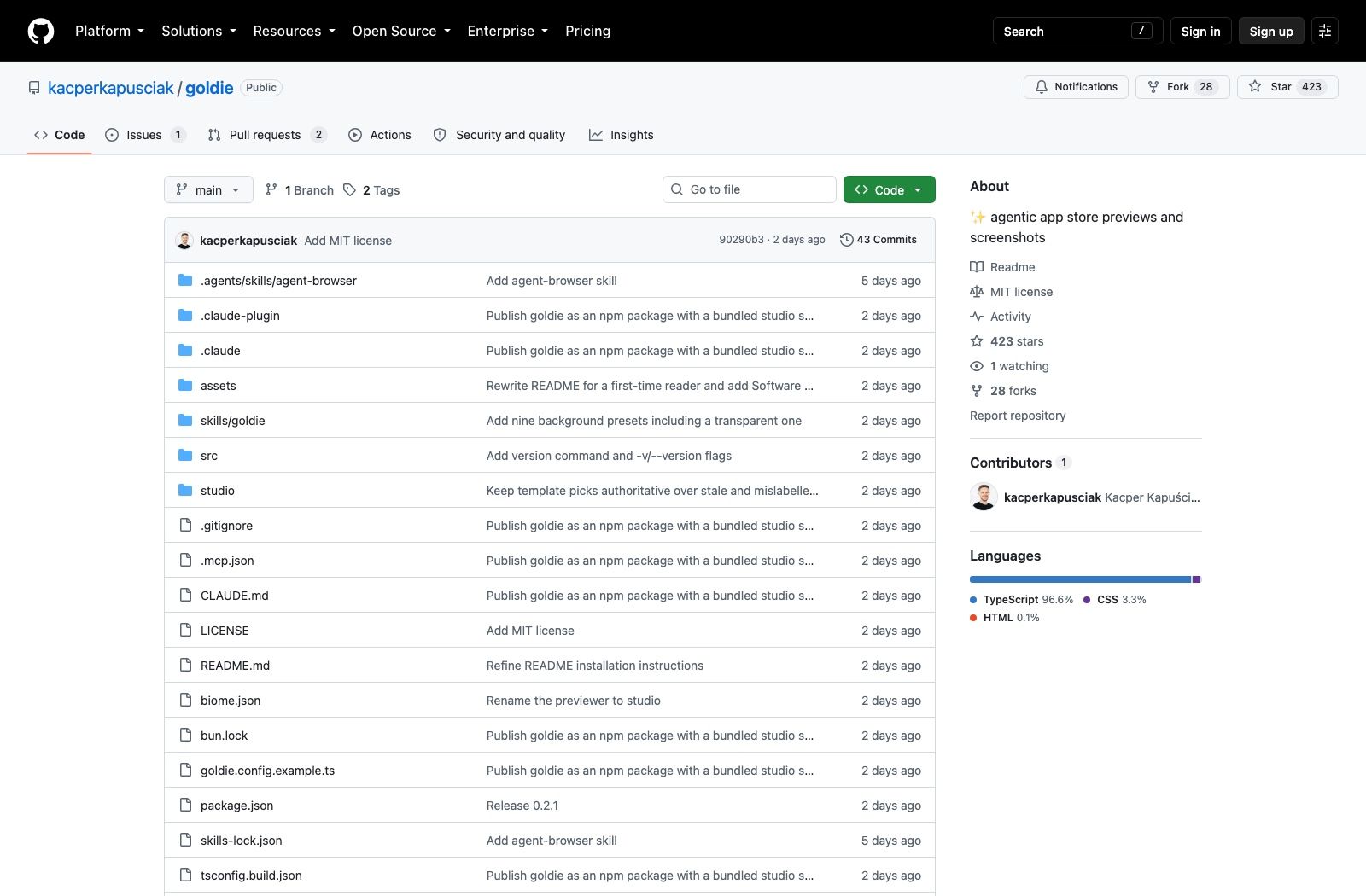
Kacper Kapuściak published the repository on 24 August 2026. It's at 423 stars and 28 forks as of 30 August 2026, MIT licensed, 96.6% TypeScript, with two tags cut so far and the current one at v0.2.1. Software Mansion sponsors it, which matters because they also built the piece goldie depends on.
What it actually does
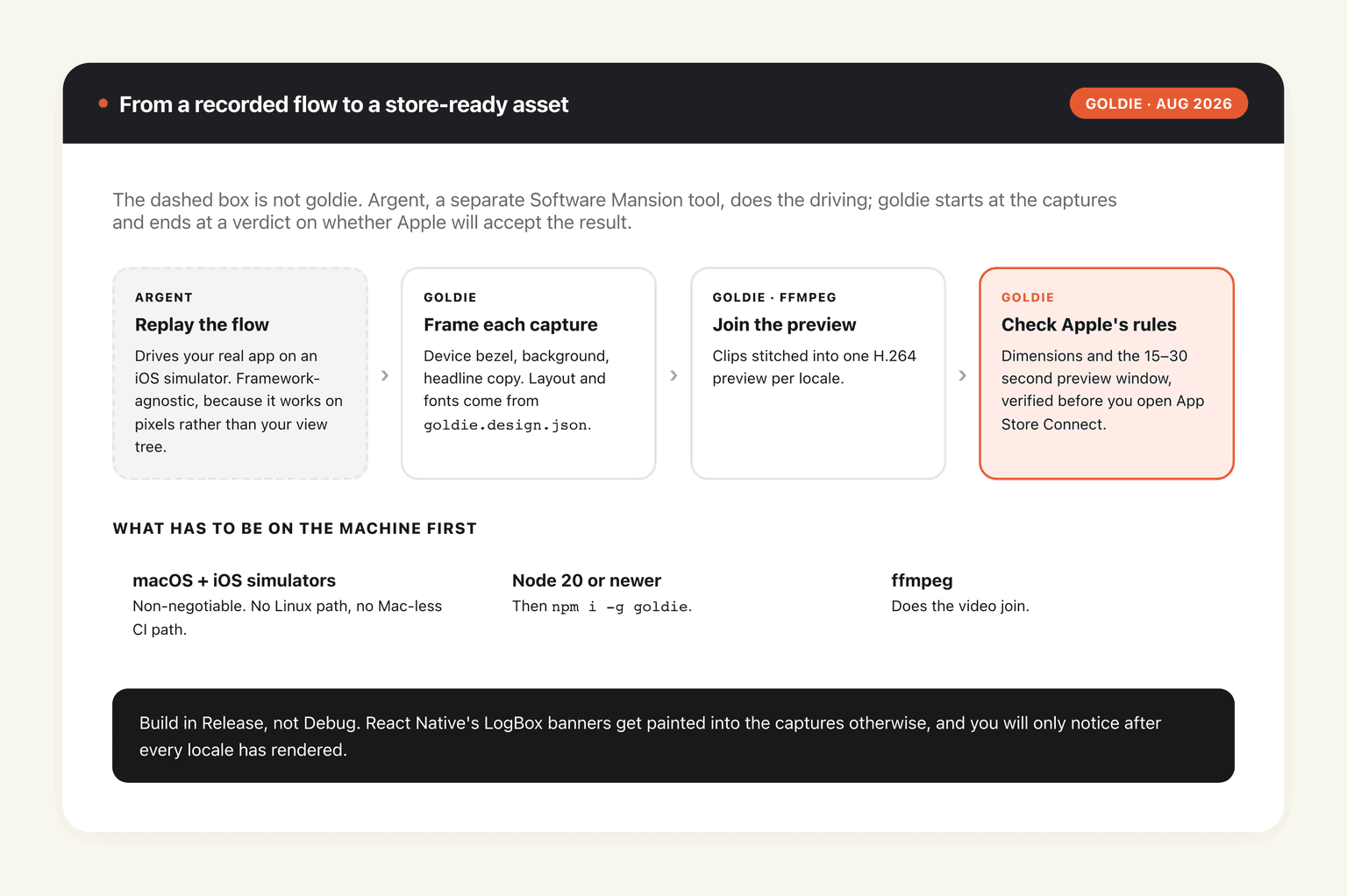
Goldie doesn't drive your app itself. Argent, Software Mansion's flow-replay tool, does that part: it replays a recorded flow on an iOS simulator and hands back the captures. Goldie takes over from there, wrapping each capture in a device bezel, dropping it on a background, laying a headline over it, stitching the clips into a preview video with ffmpeg, and running the result past Apple's rules.
Because the app runs in a simulator rather than in a rendering engine, framework doesn't matter. SwiftUI, UIKit, Flutter, React Native and Kotlin Multiplatform all produce the same kind of capture, since the tool is looking at pixels on a simulated device and not at your view hierarchy.
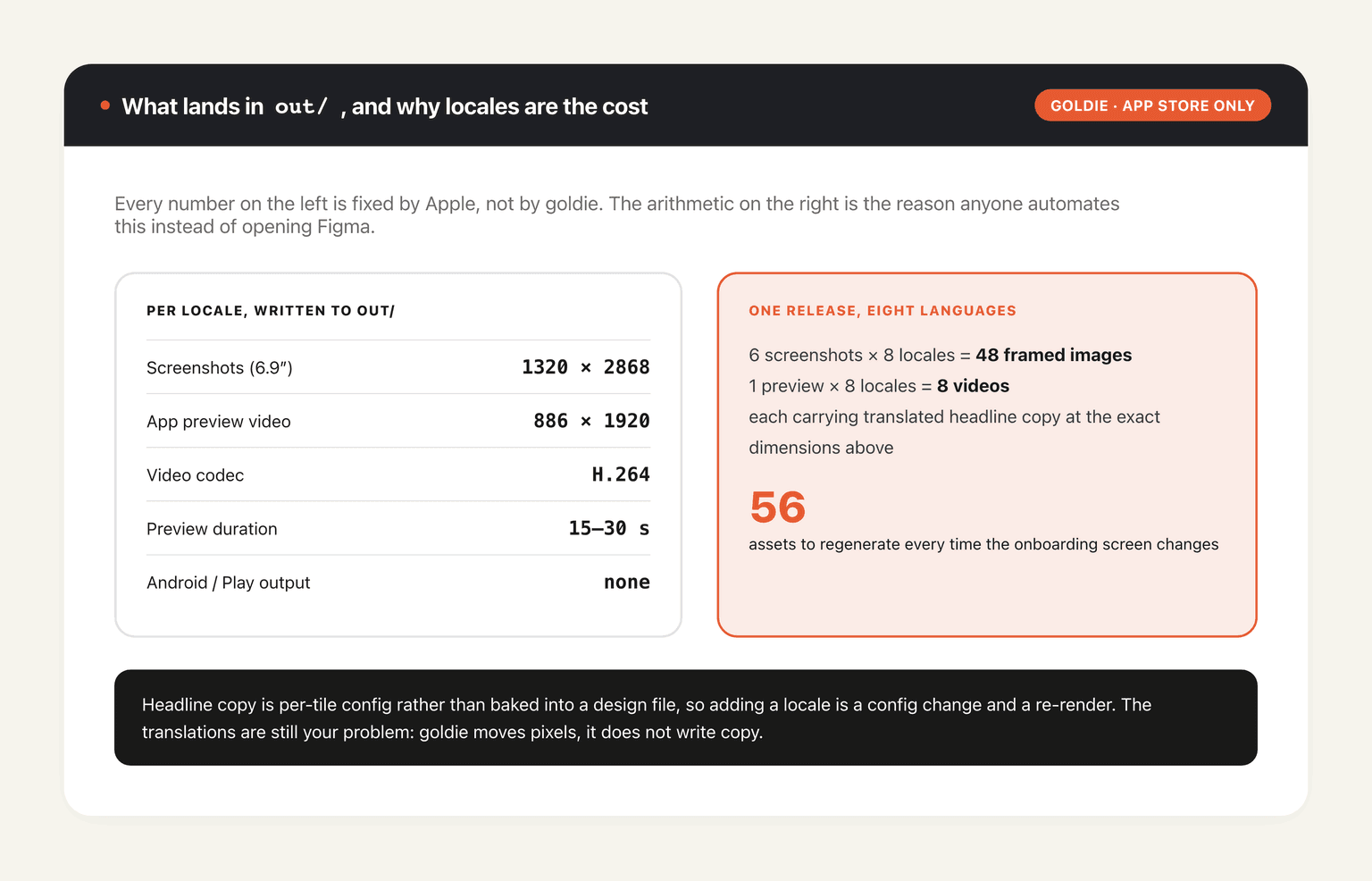
The output lands in out/: 6.9-inch screenshots at 1320 × 2868, and an 886 × 1920 H.264 preview, generated per locale. Those are the dimensions App Store Connect wants, which is the whole point of not doing this by hand.
Not an image generator, and the distinction matters
There's a category of tool that takes your app's name and a description and produces a nice-looking store page mockup. That's not this. Every pixel of the phone screen in a goldie output came out of your actual app running your actual flow, which means the screenshots stay honest and they go stale the moment your UI changes.
Both halves of that are load-bearing. Apple's guidelines require screenshots to show the app in use, and a rendered approximation is a rejection risk as well as a small lie to the person deciding whether to download. The staleness is the price: the README says flatly that flows fail when the app changes, and your options are to ask your coding agent to repair them or re-record with argent.
What you need before any of this runs
The requirements list is short and completely non-negotiable: macOS with iOS simulators installed, Node 20 or newer, and ffmpeg. That's a Mac with Xcode on it. No Linux path, no CI-without-a-Mac path, no Windows.
Install the CLI globally:
npm i -g goldie
Then add the skill to whatever agent you use. For Cursor, Codex, or anything else that reads the skills format:
npx skills add kacperkapusciak/goldie
For Claude Code it goes through the plugin marketplace instead:
/plugin marketplace add kacperkapusciak/goldie
/plugin install goldie@goldie
With the skill installed you ask from your app's repository, in plain English, for App Store screenshots using goldie. The agent explores the app, writes the flows and the config, and opens the studio. Follow-up instructions like "use a dark background" edit the same files rather than starting over, which is the difference between an agent integration and a wrapper around a CLI.
Three commands, or a config file
Skip the agent entirely if you'd rather. Copy goldie.config.example.ts to goldie.config.ts, point its scenes at your argent flows in .argent/flows, and run:
goldie doctorchecks your tools, simulators and flows before you waste a render on a broken setupgoldie allcaptures, frames, renders the preview and verifies itgoldie studioopens a browser view where you can preview and tweak
The studio is where most of the design decisions live. It switches backgrounds, templates, bezels, fonts and per-tile copy, then saves everything to goldie.design.json so the CLI renders exactly what you saw. Bezels ship as 17-pro-blue, 17-pro-silver and 17-pro-orange, or you can supply your own image; theme.screenOnly: true drops the phone frame entirely. Templates come as editorial, showcase, magazine, storyboard and dynamic, or you can compose your own sequence from twelve layouts including panorama-duo and tilt-right. Five fonts are bundled: Merriweather, DM Mono, Lato, DM Sans, Montserrat.
One gotcha the README flags and everyone hits once: build in Release, not Debug. React Native's LogBox banners get painted straight into your captures otherwise, and you'll only notice after you've rendered every locale.
Where the time actually goes: locales
The per-locale part of that output line is easy to skim past and it's the reason the tool exists. One app with six screenshots and a preview video, shipped in eight languages, is 48 framed images and 8 videos, every one of which has to carry translated headline copy at the right dimensions. Do that by hand and it's a day. Do it again next release, because you changed the onboarding screen, and it's another day.
Goldie handles the multiplication because the headline copy is per-tile config rather than baked into a design file, so a new locale is a config change and a re-render instead of a new set of artboards. Whether the translations themselves are any good is your problem; the tool moves pixels, it doesn't write copy.
That's the honest shape of the saving. The capture and framing were never the expensive part of shipping a release, but they were the part that couldn't be delegated, because a designer needed a build and a build needed a machine. A goldie app store screenshots run turns them into something a script does on a schedule, which is the same move that makes the rest of a release worth automating: self-hosted agent setups exist for exactly this class of repeated, machine-shaped chore. MoClaw covers the hosted end of it, taking the steps that don't need Xcode off your own hardware entirely so the Mac stays free for the build.
The verification step is the part worth paying for
Framing screenshots is a solved problem; a dozen tools do it, and half of them are Figma templates. What's unusual here is that goldie all ends with a check against Apple's upload rules rather than with a folder of PNGs and good luck.
Anyone who has submitted an iOS app knows the loop this replaces. You upload, App Store Connect rejects an asset on a dimension or duration technicality, you fix one thing, you upload again, and the review clock has already restarted. Preview videos are the worst offender because of the 15-to-30-second window: shoot 32 seconds of a genuinely good demo and it's simply invalid. Catching that locally, before submission, is worth more than any amount of template variety.
That framing also tells you where the tool's boundary sits. Goldie app store screenshots are an artefact of a build; the rest of a release — changelog, localised descriptions, the marketing post, the support-page updates — stays manual. Those tasks are long, they're dull, and they don't need a Mac. That's the split MoClaw works along: a hosted cloud AI computer that carries the parts of a release that aren't pinned to your simulator, running alongside your local setup rather than replacing it.
What it doesn't do
No Android. No Google Play. The tool targets Apple's store, the output dimensions are Apple's dimensions, and the verification step reads Apple's rules. If you ship on both platforms, half your problem stays exactly where it was, and you will still be in Figma at midnight for the Play listing.
No hosted version either. Everything runs on your machine, which is the right design for something that has to boot a simulator, and also means the project is a week old with two version tags and a single contributor to judge it by. Star velocity in the first week measures how well a launch post travelled and not much else; 423 stars in six days says people liked the idea, not that the tool survives contact with a messy app.
There's also a dependency worth thinking about before you commit: goldie is downstream of argent for the capture step. If your flows are the fragile part of your test suite already, they'll be the fragile part of your screenshot pipeline too, and a UI change now breaks two things instead of one. The upside is that they break loudly, at goldie doctor, rather than silently producing a screenshot of the wrong screen.
Handing repetitive visual production to an agent is a pattern showing up across several categories now, and the same trade appears each time: real output that stays accurate, at the cost of a pipeline that has to be maintained. We looked at the video side of that in agent-driven video editing, and the mechanics of skills like this one in our explainer on agent skills. MoClaw sits on the other side of that trade for work that doesn't need local hardware, since a cloud machine you can reach from a phone means a stalled release step doesn't wait for you to get back to the desk.
FAQ
Is goldie free and open source?
Yes. MIT licensed, with the plain MIT text in the repository's LICENSE file, copyright Kacper Kapuściak 2026. There's no paid tier and no account.
Does goldie work for both the App Store and Google Play?
App Store only. The output sizes, the preview-video constraints and the verification step are all Apple-specific, and nothing in the repository targets Play Store assets.
What do I need to run goldie?
macOS with iOS simulators, Node 20 or newer, and ffmpeg. There's no way around the Mac requirement, because the whole approach depends on booting a real simulator and replaying a flow on it.
Does it work with my framework?
It should. Goldie drives the app through the simulator rather than through your code, so SwiftUI, UIKit, Flutter, React Native and Kotlin Multiplatform all behave the same as far as it's concerned.
Do I have to use a coding agent?
No. The CLI stands alone: write goldie.config.ts by hand, point it at your argent flows, and run goldie all. The agent path just means the flows and config get written for you from a request in plain English.
Why do my screenshots have debug banners in them?
You built in Debug. Use a Release build; the README calls this out specifically because React Native's LogBox paints straight into the capture.
How long does a goldie app store screenshots run take?
The repository doesn't publish timings, and it would depend on how many scenes and locales you configured plus how fast your simulator boots. goldie doctor is the cheap pre-flight, so run that before committing to a full goldie all.
What sizes does it produce?
6.9-inch screenshots at 1320 × 2868 and an 886 × 1920 H.264 preview, per locale, written to out/. Previews have to run between 15 and 30 seconds to be accepted.
Continue Reading
More Guide
OpenAI Assistants API Deprecated: What Broke
MCP Tools: What They Are and Which to Use
OpenAI Models Not Available in Cursor Nov 12

Coding Agent Security: When Your Tools Lie

OpenAI Python HTTPX2: What Actually Breaks
Headcount: Claude Code as an Org Chart

The MoClaw editorial team writes about workflow automation, AI agents, and the tools we build. Default byline for industry overviews, listicles, and collaborative pieces.
Ready to put this into practice?
MoClaw runs browser tasks, research, and schedules automatically. Try it free.
References: kacperkapusciak/goldie (GitHub) · software-mansion/argent · Software Mansion