MCP Tools: What They Are and Which to Use
MCP tools let AI assistants connect to your files, apps, and data through one open standard. Here is what they are, how they work, and which to start with.

Table of Contents
MCP tools are small connectors that let an AI assistant reach outside its own chat window: into your files, your calendar, a database, or a web app. They all speak one shared standard, the Model Context Protocol (MCP), so any assistant that supports MCP can use any MCP tool without custom wiring.
Key takeaways
- MCP tools are connectors that give an AI assistant access to outside data and apps through one open standard.
- They matter because the standard is being adopted faster than the big AI vendors' own toolkits (153 million monthly downloads, up 14x in a year).
- Tools fall into a few groups: file and document access, app and SaaS connectors, web and search, and database or data access.
- You can run MCP tools yourself if you are technical, or use a managed assistant that connects them for you.
- Start with one tool that removes a real chore, then add more only once it proves useful.
Hi, I'm Marcus, and I learned what MCP tools were worth the slow way. For about a month my assistant drafted my weekly invoice summaries, and every Monday I exported the folder, pasted twelve files into the chat, waited, then copied the result into a spreadsheet by hand. It was maybe forty minutes a week. That does not sound like much, but it was every single Monday, and it was the dull copy and paste you keep putting off. Then I connected one file tool and one spreadsheet tool. The next Monday I typed one sentence and the summary landed in the sheet on its own. Same assistant, same model. The only thing that changed was that it could finally reach the files.
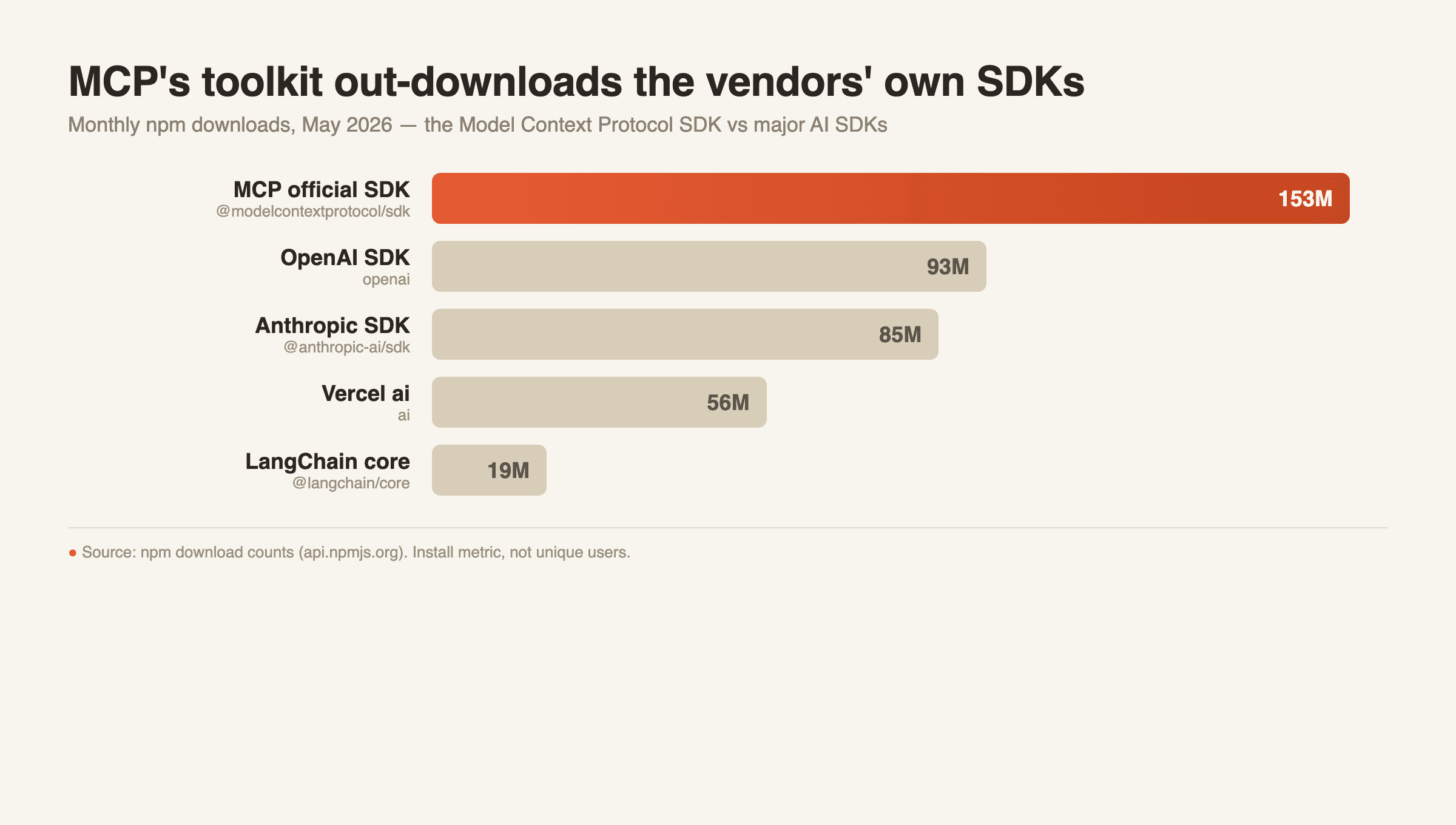
That small shift is happening at scale. The official MCP toolkit was downloaded 153 million times on npm in May 2026, up 14 times in twelve months. In the same month, OpenAI's own developer toolkit drew 93 million and Anthropic's drew 85 million. A standard that did not exist eighteen months ago is now installed more often than the toolkits of the companies that build the AI models. (Figures are npm download counts, a public install metric, not unique users.)
What MCP tools actually are
Think of npm as a giant parts warehouse for software, and an MCP tool as one part you plug in. Before MCP, connecting an AI assistant to each new app meant custom work every time. MCP turns that into a standard socket, closer to USB-C, where one connector fits many assistants.
Each MCP tool exposes a specific capability. One tool might let the assistant read and write files on your computer. Another might let it search the web, pull rows from a database, or send a message in a workspace app. The assistant decides when to call a tool, the tool does the narrow job, and the result comes back into the conversation. You do not retrain the model. You give it a new socket and it can reach one more place.
The 153 million monthly downloads are a rough proxy for how many projects are adding these sockets. The number counts installs, not people, but the direction is clear. Connecting AI to real tools is becoming a default expectation rather than a niche project.
How MCP tools work, in plain terms
Every MCP setup has two sides. On one side is a host, which is the assistant or app you talk to. On the other side is a server, which is the tool itself. The host asks the server what it can do, the server lists its actions, and from then on the assistant can call those actions when a task needs them.
Go back to my invoice example. The assistant did not get smarter when I added the file tool. It just gained a way to open the folder, read the files, and hand the numbers to the spreadsheet tool. The thinking was always there. What it lacked was reach. That is the whole idea behind MCP tools: the model brings the reasoning, the tool brings the hands.
This is also why one good tool often beats five mediocre ones. Each tool you add is a new thing the assistant can reach, and a new thing that can fail. The people getting value early tend to start narrow and expand only when a tool earns its place.
The main types of MCP tools
The most common MCP use cases cluster into four groups of tools. You do not need all of them. You need the one that removes your most repetitive chore.
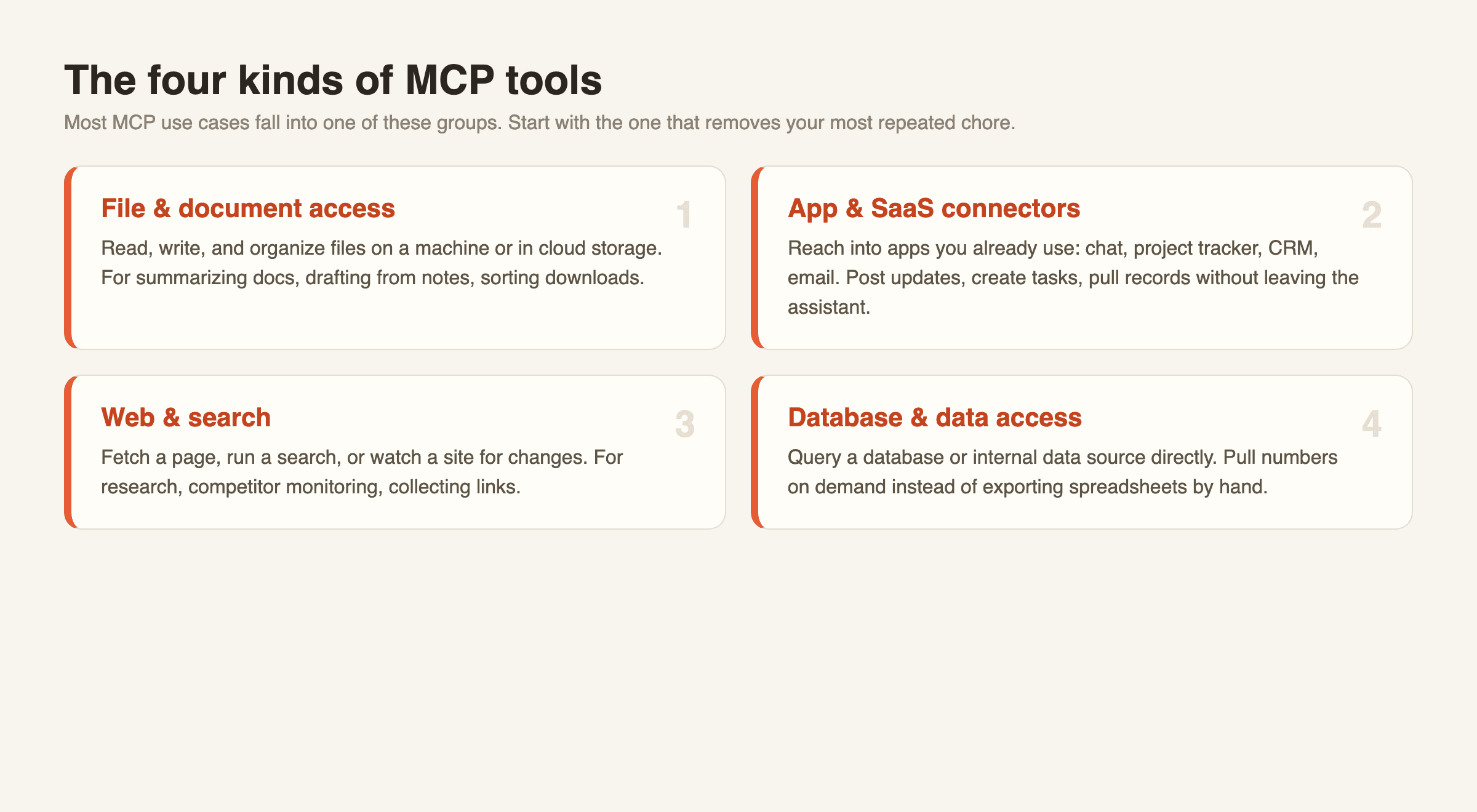
File and document access. Read, write, and organize files on a machine or in cloud storage. Useful for summarizing documents, drafting from notes, or sorting downloads. This was my first tool, and the invoice chore was the reason.
App and SaaS connectors. Reach into the apps you already use, such as a chat workspace, a project tracker, a CRM, or email. Useful for posting updates, creating tasks, or pulling records without leaving the assistant.
Web and search. Fetch a page, run a search, or watch a site for changes. Priya, who runs operations at a small agency I spoke with, used to open nine competitor pricing pages every morning and note the changes by hand, about thirty minutes before she had even started real work. She connected one web tool that checks those pages and flags only what moved. The thirty minutes became a two-line message waiting in her inbox.
Database and data access. Query a database or an internal data source directly. One support team I talked to used to answer "where is my order" by exporting a CSV, opening it, and searching by hand, a few minutes per ticket across roughly two hundred tickets a week. A database tool let the assistant look up the status directly, and those few minutes per ticket collapsed to one question and one answer.
A quick way to choose: write down the task you repeat most each week, then pick the single group that touches it. That is your first tool.
MCP tools versus general LLM tools
You will also see the broader phrase llm tools, which covers anything that extends a language model, including plugins, function calls, and frameworks. MCP tools are a specific, standardized slice of that world. The difference matters for one practical reason. A general LLM tool is often tied to one product, so it works only inside that product. An MCP tool follows the open standard, so it can move with you across any assistant that supports MCP. Of all the AI agent tools on the market, the ones built on an open standard are the ones that keep working as you switch assistants.
That portability is the reason the download numbers are climbing. When a connector works in more than one place, more teams are willing to build on it, and more teams installing it is exactly what 153 million monthly downloads describes. If you want the broader picture of how reusable abilities fit into agent work, our guide on what AI agent skills are covers the next layer up.
How to start using MCP tools
If you are technical, you can run MCP servers yourself. You install a server, point your assistant's host at it, confirm the permissions it asks for, and test one action before trusting it with more. Keep the permission scope tight. A file tool that can read one folder is safer than one that can read your whole drive.
If you do not write code, the setup, permissions, and upkeep are real work, and that is where a managed assistant helps. A managed cloud assistant connects the common tools for you and handles the plumbing, so the practical question shifts from "which integrations are bundled" to "does it support the open standard." That second question matters more over time, because a tool that follows MCP can reach a growing pool of connectors rather than a fixed list. If you want to see that approach without the setup, MoClaw is built to connect AI to your everyday tools through standards like this. You can see how it works or try it.
What to watch out for with MCP tools
MCP tools are useful precisely because they can reach real systems, which is also where the risks live. Three honest cautions. First, permissions. An MCP tool can act on your data, so grant the narrowest access that still does the job. Second, reliability. More tools mean more moving parts, and a connector that breaks quietly when an app changes can cost more time to babysit than it ever saved. Add them one at a time and confirm each works before stacking the next. I added my spreadsheet tool a week after the file tool, not the same day, and that gap is the only reason I caught a formatting bug before it touched real numbers. Third, hype. The tools worth having are usually the boring, predictable ones you reach for every day, not the longest list of logos. One connector you actually use beats twenty you never touch.
MCP tools FAQ
What are MCP tools in simple terms?
They are connectors that let an AI assistant reach outside its chat, into your files, apps, or data, using one shared open standard called the Model Context Protocol.
Are MCP tools and LLM tools the same thing?
No. LLM tools is a broad term for anything that extends a language model. MCP tools are the standardized, portable subset that works across any assistant supporting the protocol.
Do I need to be a developer to use MCP tools?
To run the tools yourself, yes, some technical setup is involved. A managed assistant can connect them for you if you do not want to handle servers and permissions.
Which MCP tool should I start with?
Pick the one that removes your most repeated weekly chore, usually file access, an app connector, or web search. Add more only once the first one proves useful.
Why are MCP tools growing so fast?
Because the standard is portable. The official toolkit passed 153 million monthly npm downloads in 2026, more than OpenAI's or Anthropic's own toolkits, as connecting AI to real tools became a default expectation.
Getting started with MCP tools
MCP tools turn an AI assistant from a closed chat box into something that can reach your files, apps, and data through one open standard. My invoice Monday went from forty minutes of copy and paste to one sentence, and the only thing that changed was reach. The adoption curve, 153 million monthly downloads and climbing, says this is becoming standard rather than optional. Start with a single tool that removes a real chore, keep its permissions tight, and expand only when it earns the next slot. If you would rather skip the setup, a managed assistant like MoClaw connects these tools for you so you can focus on the work instead of the wiring.
Continue Reading
More Guide
AI Travel Planning Workflow for Busy Teams

AI Travel Email Integration for Bookings

ChatGPT Codex: From Chat to Tasks

What Compound Engineering Actually Compounds

Running Claude Code Agents in Parallel

Grok 4.5 Agent Workflows: Tools and Fallbacks
The MoClaw editorial team writes about workflow automation, AI agents, and the tools we build. Default byline for industry overviews, listicles, and collaborative pieces.
Ready to put this into practice?
MoClaw runs browser tasks, research, and schedules automatically. Try it free.
References: Model Context Protocol (official site) · Model Context Protocol (Anthropic announcement) · @modelcontextprotocol/sdk on npm · openai on npm · @anthropic-ai/sdk on npm · npm download-counts methodology