GPT Image 2 Prompts: 541 Copyable Templates
A public library reverse-engineers 541 GPT Image 2 prompts into fill-in-the-blank templates. What's inside, how to adapt one, and where it stops working.
Table of Contents
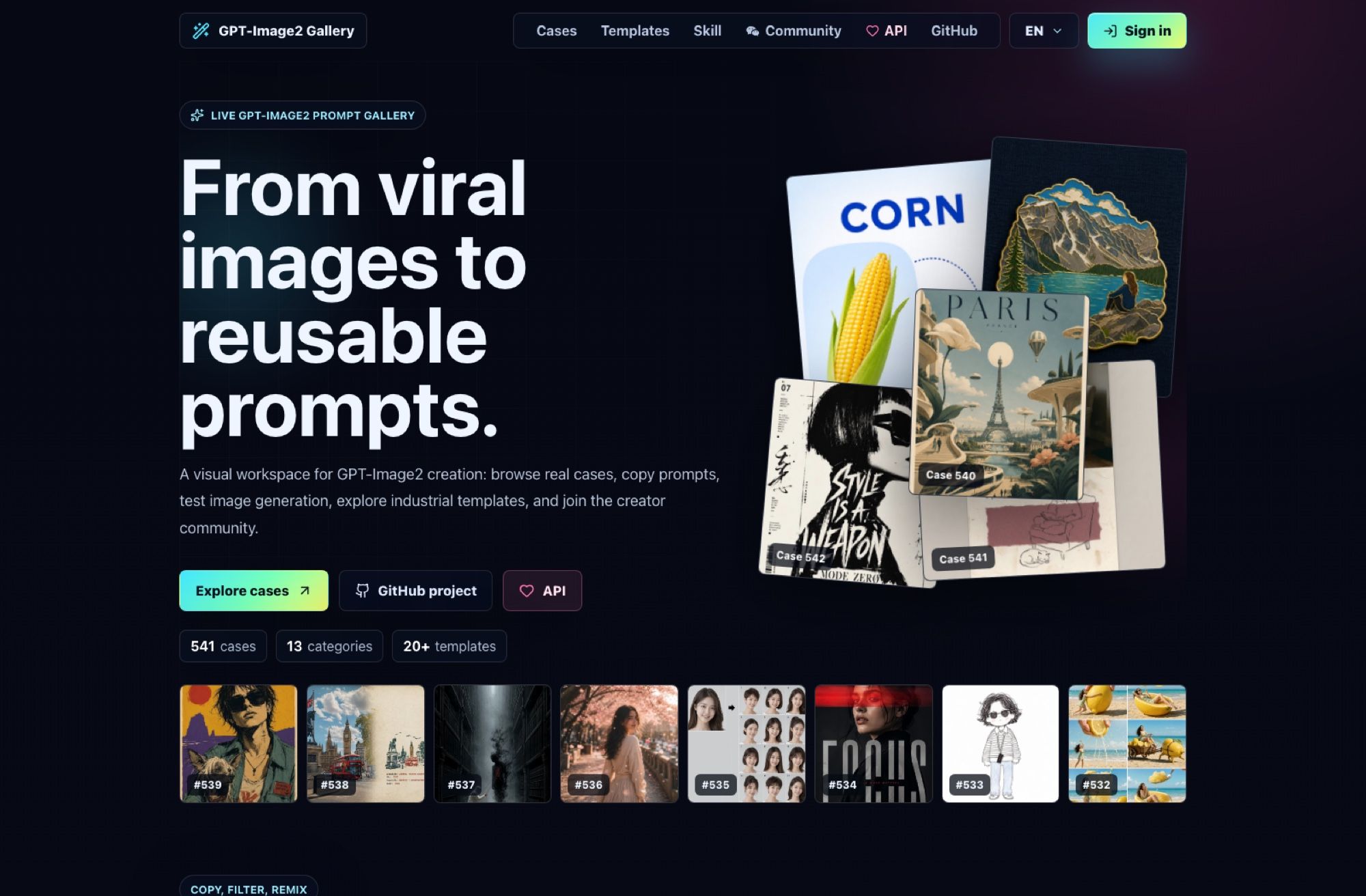
Somebody spent months taking apart images that went viral on X and writing down how they were made. The result is a public library of GPT Image 2 prompts you can copy: 541 cases as of 29 August 2026, each one a full prompt with the variable parts marked in brackets so you swap in your own subject and run it. No prompt-writing skill required, which is the entire point.
The repo is freestylefly/awesome-gpt-image-2, MIT licensed, created 25 April 2026, and at 24,328 stars when I checked. There's also a browsable gallery at gpt-image2.canghe.ai if you'd rather look at pictures than read JSON.
Key Takeaways:
- 541 finished prompts, each with the swappable parts marked in brackets, sorted into 13 categories.
- Every case links back to the post its prompt was reconstructed from, so you can check the source.
- The prompts are English even though the project is maintained in Chinese and many case titles are not.
- Change the bracketed slots and the nouns; leave the camera, lighting and typography clauses alone.
- Written for GPT-Image-2. Other models get you the composition, not the identical image.
What's actually in the library
Not tips. Not a guide to writing better prompts. Finished GPT Image 2 prompts, sorted 13 ways.
The categories are the ones a marketing team recognises: Posters & Typography, Products & E-commerce, Charts & Infographics, Brand & Logos, Characters & People, Documents & Publishing, Illustration & Art, Photography & Realism, Architecture & Spaces, Scenes & Storytelling, UI & Interfaces, History & Classical Themes, and a catch-all. A second axis tags each case by scene: Commerce, Creative, Education, Fashion, Food, History, Social, Story, Tech, Travel.
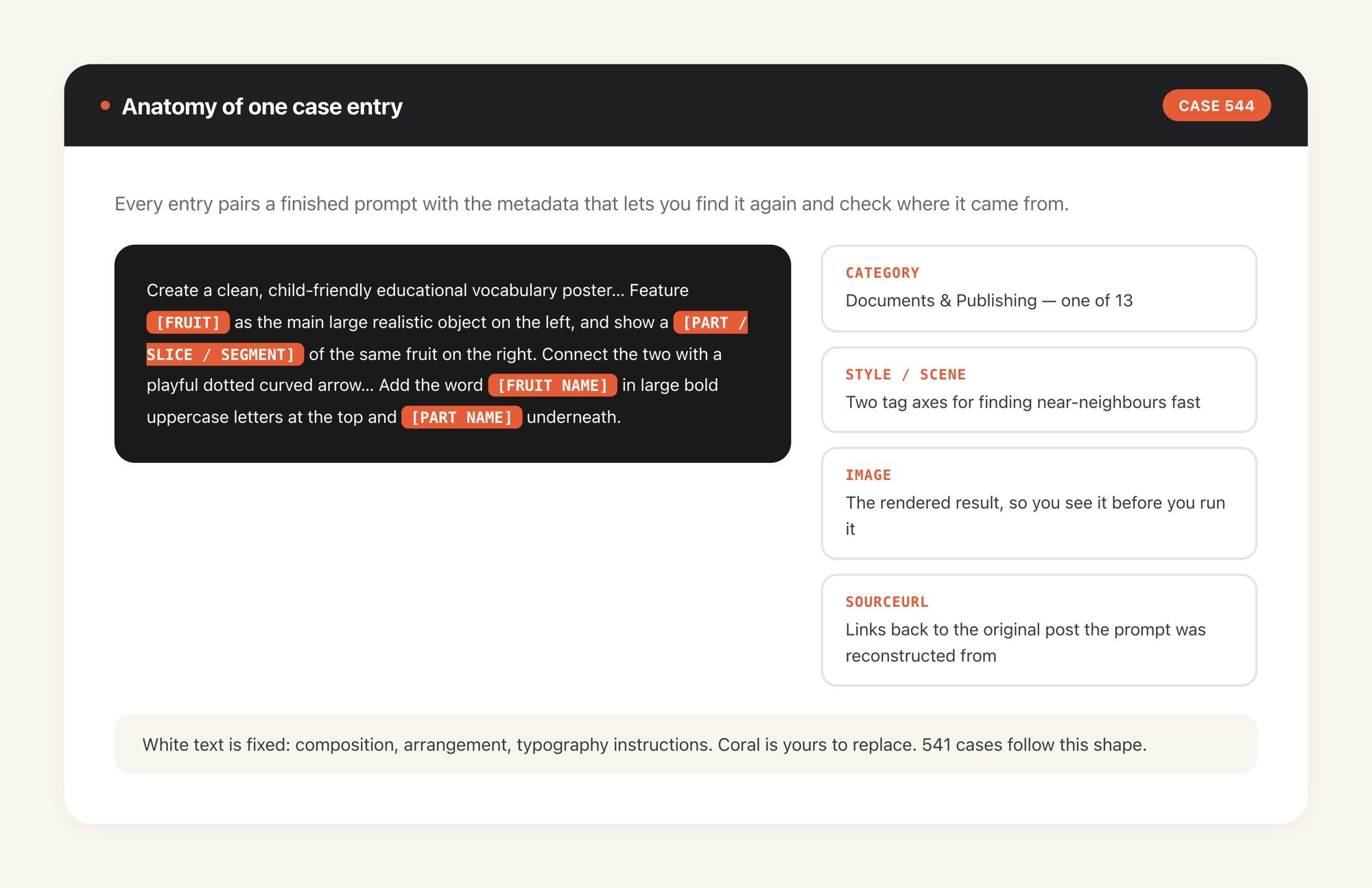
Every case carries its source. The data file records the account the original image came from and links back to the post, so the library is openly a reverse-engineering project rather than an anonymous prompt dump. That matters if you're going to use these commercially: you can go look at what the prompt was reconstructed from and judge for yourself.
How a template actually reads
Here's the shape, taken from case 544, a preschool vocabulary poster:
Create a clean, child-friendly educational vocabulary poster for preschool/kindergarten
children, inspired by a simple visual learning card. Feature [FRUIT] as the main large
realistic object on the left, and show a [PART / SLICE / SEGMENT] of the same fruit on the
right. Connect the two with a playful dotted curved arrow and a tiny simple stick-figure
child pointing toward the smaller part. Add the word "[FRUIT NAME]" in large bold uppercase
letters at the top and "[PART NAME]" in large bold uppercase letters underneath.
Four bracketed slots, and everything else is fixed. Swap fruit for tools, or animals, or SKUs from your catalogue, and you get the same layout with your content in it. That's the mechanic across all 541: the composition, lighting, typography and camera language are already written, and you're filling in nouns.
Which is a useful thing to be honest about, because it also tells you the limit. You aren't learning to write GPT Image 2 prompts by using these; you're borrowing someone else's finished ones. For a marketer who needs eight consistent product cards by Thursday, borrowing is the correct move. If you want the underlying craft, this library is the wrong teacher, and that's not a criticism of it.
The prompts themselves are in English, which is worth stating because the project is maintained in Chinese and many case titles are too. The payload you copy is English; the browsing chrome sometimes isn't.
The count that doesn't match itself
Three different numbers describe this library depending on where you look, and none of them is wrong.
The README badge says 544. The gallery says 541. The data file says totalCases: 541, and the highest case ID in it is 544. So cases have been pulled or renumbered, the badge tracks the top ID, and the real answer to "how many prompts are in here" is 541 on the day I counted.
I'd mention it partly because the project ships new cases weekly, and partly because a library that grows this fast is one where any figure in an article like this one has a short shelf life. Treat "541" as a snapshot from 29 August 2026, not a spec.
Using it without opening a code editor
Three routes, in ascending order of effort.
Browse the gallery, find something with the composition you want, copy the prompt, paste it wherever you generate images. That's it, and for most people it's the whole workflow. Testing generation on the site itself needs a Google sign-in.
If you already run an AI agent, the repo also ships as an installable skill called gpt-image-2-style-library, which lets the agent pick a template for you from a description instead of making you scroll a gallery. It installs through npx skills add freestylefly/awesome-gpt-image-2 --skill gpt-image-2-style-library --agent claude-code codex --global --yes --copy, or through Claude Code's plugin system with /plugin marketplace add freestylefly/awesome-gpt-image-2. Our roundup of Claude skills for marketing work covers what that install pattern gets you more generally.
The gap in all three routes is the same one. Copying is instant; producing forty variants for a campaign is not, and doing it from a laptop means sitting there while each one renders. That's the part MoClaw takes over: a hosted cloud AI computer where the image work runs on its own machine, so a batch keeps going after you shut the lid and the outputs are waiting rather than half-finished.
Will these prompts work on a different image model?
Partly, and you should know which part.
A prompt written for GPT-Image-2 is tuned to that model's handling of text rendering, instruction following and layout. Paste it into FLUX or Seedream and you'll get something in the same neighbourhood rather than the same picture. What transfers well is the structure: the framing, the described lighting, the compositional relationships, the explicit typography instructions. What transfers badly is anything relying on a specific model's quirks, and in-image text is usually where the difference shows first.
MoClaw's own image integration runs FLUX, Recraft, Reve and Seedream through fal.ai, so it will not reproduce a GPT-Image-2 output identically, and I'd rather say that than imply otherwise. Where a MoClaw instance earns its place is one step out from the render: keeping the library, the prompt variants you've adapted, the generated files and the rest of a campaign's work on one machine you can reach from anywhere, instead of scattered across a downloads folder and three chat histories. If you want a read on where the underlying models currently stand, our explainer on FLUX 3 is the closest comparison point.
One thing to keep your eye on: the repo carries paid sponsor placements, including an affiliate-linked API vendor in the README. That's a normal way to fund open work and it doesn't touch the quality of the prompts, but a sponsored recommendation for where to buy generation credits is an advertisement, and it's presented as a thank-you table rather than labelled as one.
Adapting one without wrecking it
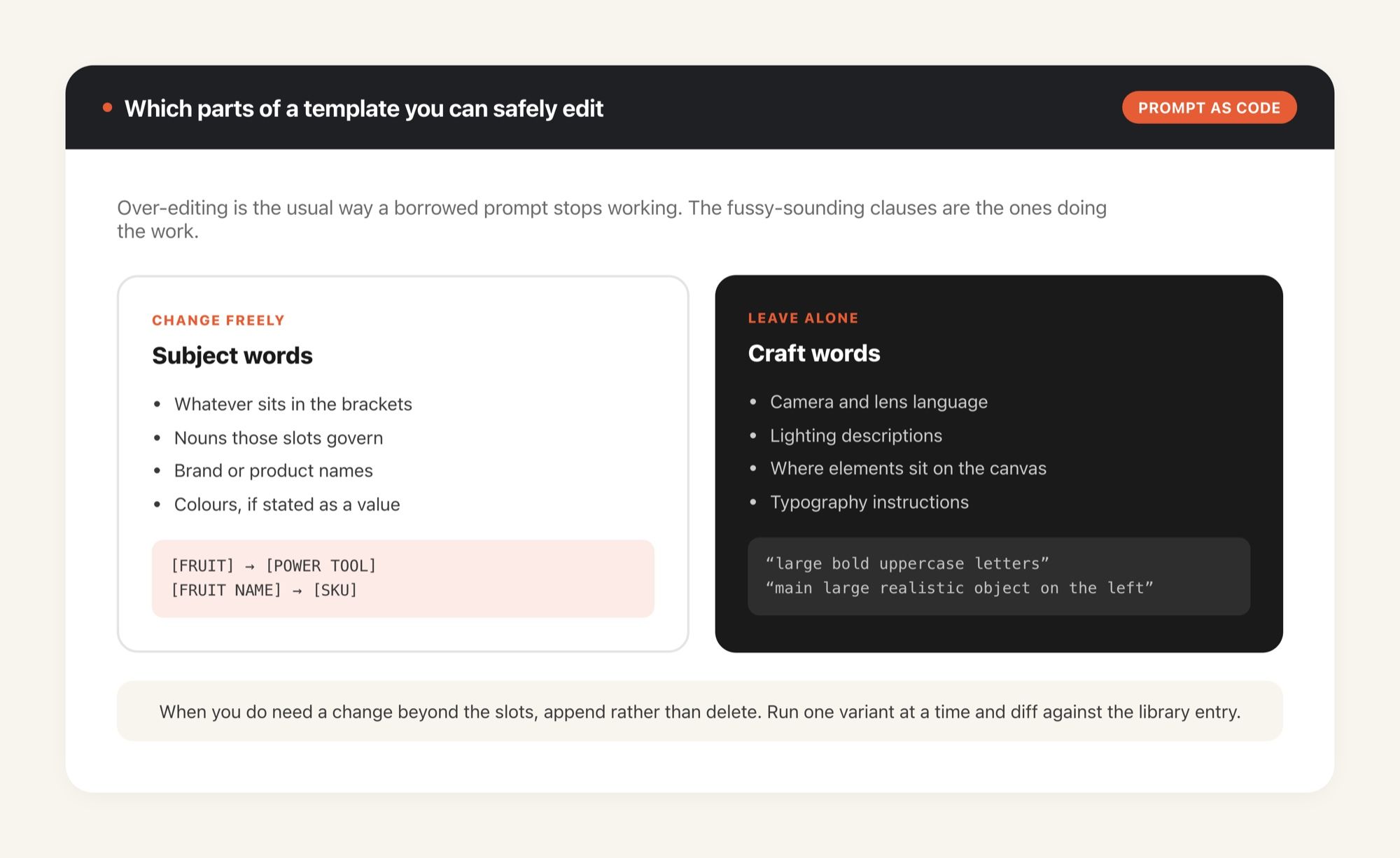
The failure mode with borrowed GPT Image 2 prompts is over-editing. People paste a template, decide the wording sounds fussy, rewrite half of it in their own voice, and get back something generic. The fussy wording is load-bearing.
A rule that has held up for me: change the bracketed slots and the nouns they govern, leave everything describing how the image is made alone. Camera language, lighting, "large bold uppercase letters", "clean flat vector", the arrangement of elements on the canvas: those clauses are the reason the original looked good. Subject words are yours to change. Craft words aren't.
Where you do want to edit, edit additively. Appending "on a warm cream background, no drop shadows" to the end of a working prompt is low risk; deleting the sentence about composition because it seemed redundant is how you lose the layout. Run one variant at a time, keep the version that worked, and treat the library entry as your baseline to diff against rather than a first draft.
Two per-case fields save time here. The style and scene tags let you find near-neighbours quickly, so when a template is nearly right you can pull three sibling cases from the same style bucket and compare which one already handles the thing you were about to bolt on.
Who this is genuinely for
Anyone who needs images regularly and has no interest in becoming good at prompting. Working from a library of GPT Image 2 prompts is a shortcut around a skill, and treating it as one keeps the expectations right. Social posts, product cards, slide diagrams, event posters, thumbnails. You pick a look that already worked for someone, change the nouns, run it.
There's a second group I'd point at: people who need an image type they've never made before. Nobody who has spent a career on email copy knows how to describe an isometric infographic to a model, and the Charts & Infographics bucket is effectively a worked answer to that. You're not buying quality you couldn't reach; you're skipping the two hours of trial and error it would take to find the vocabulary.
It's less useful if your brand needs a specific visual identity, since 541 borrowed compositions will drift toward whatever was popular on X, and the tell is real. Teams shipping high volume on a small crew get the most out of it, which is the same shape as the small-team economics described in our piece on running marketing without a marketing team.
Counts, categories and install commands here reflect the repository as of August 2026.
FAQ
Are these GPT Image 2 prompts free to use?
Yes. The repository is MIT licensed and the prompts are public. The gallery site is free to browse, though testing image generation there requires a Google sign-in, and generation itself costs whatever your image provider charges.
Do I need GPT-Image-2 access to use these prompts?
To reproduce results exactly, yes. The prompts are written for that model. They can be pasted into other image models and usually produce something structurally similar, because the compositional instructions carry over even when the model's handling of text and fine detail doesn't.
What does "prompt as code" mean for images?
It means treating a prompt as a template with named variables rather than a one-off sentence. A case in this library keeps the composition, lighting and typography fixed and marks the swappable parts in brackets, so the same prompt produces a consistent series across different subjects instead of a single image.
Can an AI agent pick the template for me?
Yes. The repo publishes an agent skill, gpt-image-2-style-library, that reads the same category, style and scene tags the website uses, so you can describe what you want and let the agent match it to a case rather than browsing 541 of them yourself.
Continue Reading
More Guide
OpenAI Assistants API Deprecated: What Broke
MCP Tools: What They Are and Which to Use
OpenAI Models Not Available in Cursor Nov 12
Coding Agent Security: When Your Tools Lie
OpenAI Python HTTPX2: What Actually Breaks
Goldie: App Store Screenshots, Automated

The MoClaw editorial team writes about workflow automation, AI agents, and the tools we build. Default byline for industry overviews, listicles, and collaborative pieces.
Ready to put this into practice?
MoClaw runs browser tasks, research, and schedules automatically. Try it free.
References: freestylefly/awesome-gpt-image-2 (GitHub) · GPT-Image2 Gallery · cases.json (541 cases, 13 categories) · npm gpt-image-2-style-library v1.0.4 · black-forest-labs/flux