Lightpanda Is Fast Because of What It Skips

Lightpanda runs 100 pages in 5s on 123MB of RAM where headless Chrome needs 46s and 2GB. What it drops to get there, and when that trade is wrong.
Table of Contents
Lightpanda's pitch fits on one line: 123MB of memory where headless Chrome takes 2GB, and 5 seconds to fetch 100 pages where Chrome takes 46. Those figures come from the project's own benchmark, 933 real pages over the network on an AWS m5.large. They are also, in a sense, beside the point. Lightpanda is roughly nine times faster at that job because it declined to build the parts of a browser that make Chrome slow, and whether the trade lands well depends entirely on which of those parts you were relying on.
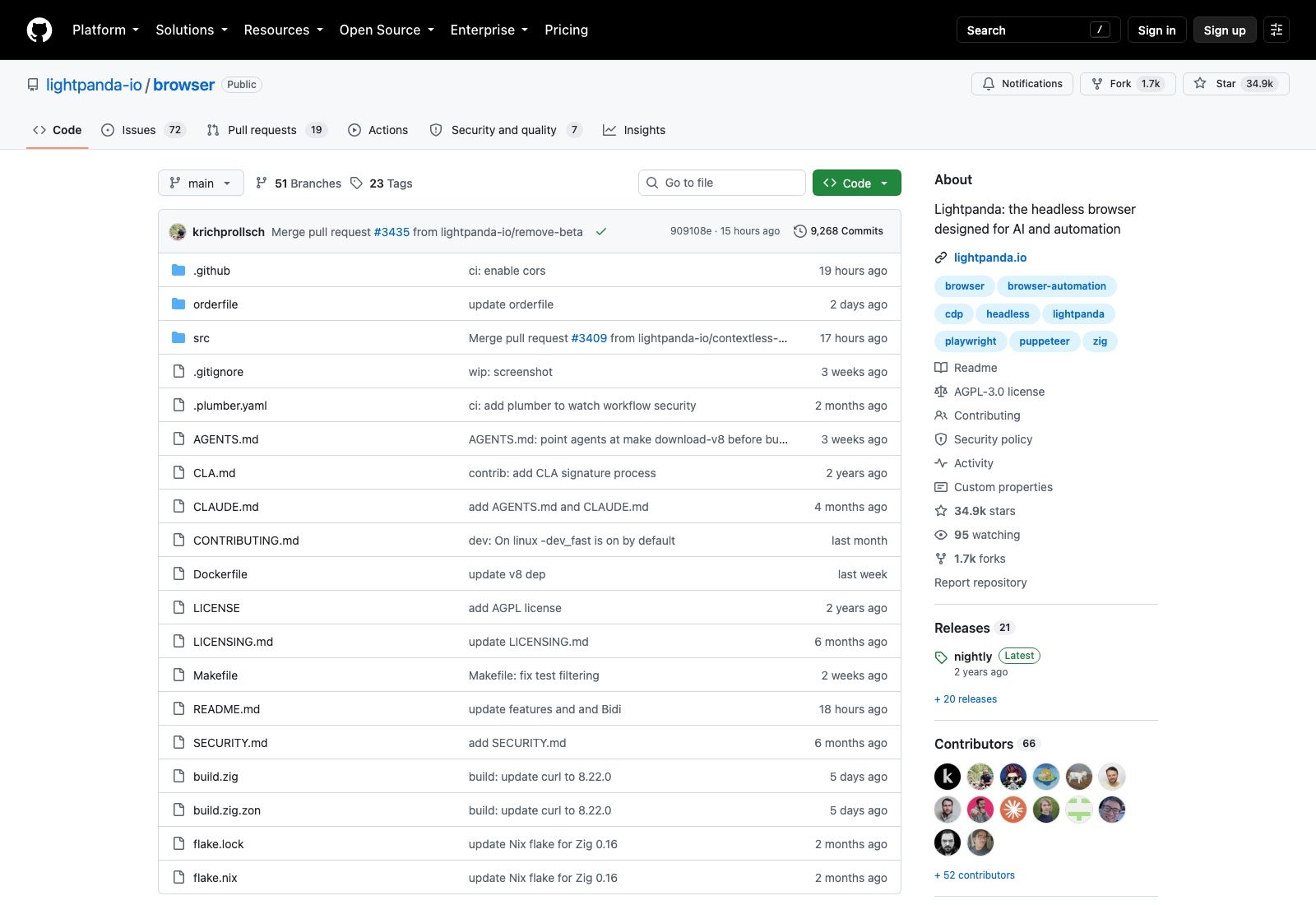
This is not a new project riding a trend. lightpanda-io/browser was created on February 7, 2023, and as of September 8, 2026 it carries 34,908 stars, 1,700 forks, 66 contributors and 9,268 commits. Release 0.4.0 shipped on August 31, 2026. It's written in Zig, licensed AGPL-3.0, and it is not a Chromium fork or a WebKit patch; the team wrote a browser from scratch, which is the reason the limitations are interesting rather than embarrassing.
There is no rendering engine, and that is the whole story
Buried in the README's closing section is the line that explains everything else: no graphical rendering engine. Lightpanda parses HTML, builds a DOM, runs JavaScript on V8, handles Ajax and fetch, and speaks CDP. What it never does is lay out boxes or paint pixels.
Follow that through and the consequences arrive in order. Anything that depends on geometry is gone: element bounding boxes, viewport-relative positions, "is this button visible", scroll-into-view behaviour that real layout would trigger. Screenshots aren't screenshots; the README describes --dump png and --dump pdf as a text-only rendering of the page. CSS still parses, but nothing computes a final visual state from it, so a selector that depends on an element being hidden by layout won't behave the way it does in Chrome.
For a crawler pulling text and links out of JavaScript-heavy pages, none of that matters and you keep the 16x memory saving; our guide to browser automation for agents walks through which jobs fall on which side of that line. For a test suite that asserts on what a user can see, or a scraper that keys off visual position, Lightpanda isn't a drop-in replacement no matter how CDP-compatible it is.
The Web Platform Tests dashboard says the quiet part
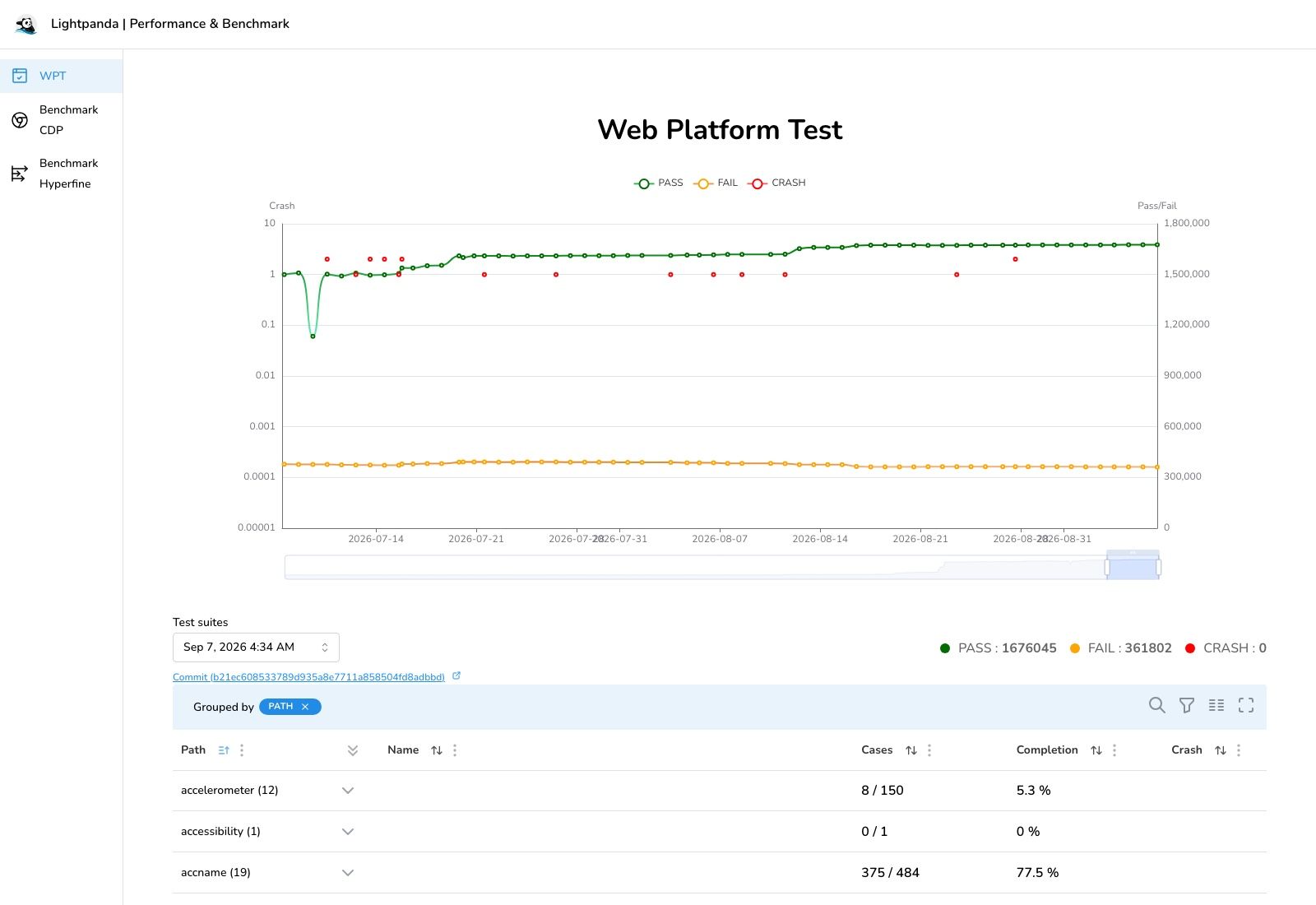
Give the team credit here, because most projects would not publish this. Lightpanda runs the Web Platform Tests continuously and puts the results on a public dashboard at perf.lightpanda.io/wpt.
The suite dated September 7, 2026 records 1,676,045 passing, 361,802 failing and zero crashes. That's around 82% of subtests passing, which is a genuinely impressive number for a browser engine written from scratch by 66 people, and it is also nearly a fifth of the web platform not behaving as specified.
The per-area breakdown is where you should actually look before committing. On that run, the accelerometer suite completed 8 of 150 cases, accessibility 0 of 1, and accname 375 of 484 at 77.5%. Those are three arbitrary rows near the top of an alphabetical list, and the spread between them is the point: coverage is uneven by API, so the honest question isn't "how complete is Lightpanda" but "are the specific APIs my target sites use in the covered set". The dashboard lets you check that in about five minutes, and doing so is cheaper than discovering it in production.
AGPL-3.0 is not a footnote
The repository is licensed AGPL-3.0, and the README's own framing of Lightpanda as server-side infrastructure is exactly the situation the licence was written for.
The short version: AGPL extends copyleft across the network boundary. If you modify the code and let users interact with it remotely, the licence requires you to offer those users the modified source. Running an unmodified binary inside your own company to crawl pages doesn't trigger this. Patching the engine to handle a site your business depends on, then exposing that behind a customer-facing API, does.
Plenty of engineering organisations have a blanket policy against AGPL in the dependency tree regardless of the details, so check yours before the proof of concept becomes a roadmap item. The repository also carries a separate LICENSING.md alongside the licence file, updated about six months ago, which suggests commercial terms exist for people who need them. If that describes you, ask them rather than guessing.
The install has sharp edges
Three of these will cost you an afternoon each, and all three are documented if you read past the Homebrew line.
There is no native Windows binary. Windows users run Lightpanda inside WSL2, with the automation client free to sit on either side since WSL forwards localhost:9222. That's workable, but it's a different answer from "cross-platform".
On musl-based distributions the Linux binary simply fails, and it fails with a message that doesn't explain itself: cannot execute: required file not found. The release binaries link against glibc, so Alpine images can't run them. Given how many people default to Alpine for anything containerised, this is the single most likely first-run failure. The fix is a glibc base image such as debian:bookworm-slim or ubuntu:24.04, or building from source.
The distribution model is also worth understanding. Homebrew and the AUR both install the latest nightly, and the nightly tag on GitHub is a rolling one that gets force-updated rather than a dated release. Version 0.4.0 exists as a tagged release from August 31, and there are 21 releases in total, but the default path most people take installs a moving target. Pin something if reproducibility matters to you.
Telemetry ships enabled
Lightpanda collects and sends usage telemetry by default. Setting LIGHTPANDA_DISABLE_TELEMETRY=true turns it off, and the privacy policy lives at lightpanda.io/privacy-policy.
It's disclosed plainly in the README, so nobody is being sneaky. It's still an opt-out rather than opt-in, and if you're deploying to a regulated environment that distinction is going to come up in review. There's a matching LIGHTPANDA_DISABLE_CORE_DUMP variable for suppressing crash dumps, which is the sort of flag you want to know about before a crash writes a few gigabytes of process memory to a container volume.
The agent mode is the part nobody writes about
Everyone quotes the memory benchmark. Almost nobody mentions that lightpanda agent exists, and it is the most interesting thing in the repository.
You describe a task in plain English, the agent drives the browser through it, and because the agent runs inside the same process as the engine, every tool call is a direct operation rather than a round trip over CDP. The speed and memory characteristics survive.
The output is where it gets useful. A session exports as PandaScript, which is vanilla JavaScript plus a handful of native browser primitives, saved with /save and replayed later with lightpanda run script.js. The README's phrasing is precise: the scripts are deterministic and token-free, so you prototype with a model and ship the result without a model at runtime. That inverts the usual economics of browser agents, where every production run pays for inference on a flow that hasn't changed in weeks. It also means your automation stops drifting, since a recorded script does the same thing on Tuesday that it did on Monday.
The MCP server is similarly practical. It speaks JSON-RPC over stdio for a single client, or over HTTP with lightpanda mcp --port 9223 when several agents need to share one process. Each connection gets its own browsing session with separate pages, cookies and memory, keyed by an Mcp-Session-Id header; send the same id from two agents and they deliberately share a browsing context, which is how you'd build a workflow where one agent logs in and another continues on the same page. session_new, session_list and session_close manage them by hand.
Model support is broad rather than locked down: Anthropic, OpenAI, Gemini, Vertex, Mistral, Hugging Face, the Vercel AI Gateway, anything OpenAI-compatible through OPENAI_BASE_URL, and local models via Ollama or llama.cpp. There's a --no-llm flag that drops you into a plain REPL, which is the fastest way to find out whether the engine can even parse your target site before you spend a token on it.
Where Lightpanda earns its keep
The case for it is narrow and strong.
If you're running one browser at a time on a workstation, Chrome is fine and the operational simplicity is worth more than the memory. The economics invert somewhere around the point where you're running hundreds of concurrent instances, which is where Chrome's 2GB per hundred pages stops being an annoyance and starts being the line item. That's the workload Lightpanda was built for, and the reason the README argues that a server-side browser doesn't need most of what a desktop browser carries.
The other half of that workload is time. A crawl over a few hundred thousand pages runs for hours, and hours are exactly what a laptop is bad at: the lid closes, the VPN drops, the machine sleeps, and you restart from a checkpoint you hopefully wrote. Running that on a hosted machine that stays awake is not a nicety, it's the requirement. MoClaw covers that shape of work as a hosted cloud AI computer where long jobs have somewhere to live, alongside whatever you run locally rather than instead of it. The free trial is 3 days or 1,000 credits, and the $20 subscription includes 1,000 credits a month.
Worth saying plainly: for most people building an agent that needs to open a page and click something, standing up any browser infrastructure is the wrong project, and the tooling comparison we keep updated will get you further than benchmarking engines. You want the capability, not the engine. Lightpanda matters when the browser itself is your bottleneck, and if you're not there yet, using something with browser control already built in like MoClaw gets you to the actual task sooner.
Check the WPT dashboard against your target sites, try it on twenty representative pages, and keep Chrome around for the ones that need real layout. Both can coexist in one pipeline, routed by what each page demands.
FAQ
Is Lightpanda free to use commercially?
The code is AGPL-3.0, which permits commercial use but extends copyleft over the network: modify it and let remote users interact with it, and you must offer them the modified source. Unmodified internal use is unaffected. The repository carries a LICENSING.md, so ask the team if you need different terms.
Does Lightpanda support Playwright and Puppeteer?
It exposes a CDP server on port 9222 and supports CDP plus WebDriver BiDi, so clients that speak those protocols connect. Compatibility is bounded by what the engine implements, not by the protocol, so anything depending on layout or screenshots won't work as expected.
How is Lightpanda faster than Chrome?
By doing less. No graphical rendering engine, no Chromium codebase, and Zig with explicit memory control instead. The project measures 123MB versus 2GB peak memory and 5s versus 46s for 100 pages on an m5.large.
Can I run it on Alpine Linux?
Not with the release binaries, which link against glibc and fail with cannot execute: required file not found. Use a glibc base image or build from source.
Does Lightpanda work on Windows?
There's no native Windows binary. Install it under WSL2 and connect from either the WSL side or the Windows host, since localhost:9222 is forwarded automatically.
Star counts, dates and release information were verified against the GitHub API and the project's own dashboards on September 8, 2026.
Continue Reading
More Guide
MiniMax M3 Free Ended: What to Use Instead

MarkItDown: When Your Markdown Comes Back Thin

OpenAI Deprecated Its Codex Skills Repo

Open Science: The AI Workbench for Researchers

How to Use GPT-6 Astra: What It Really Costs

GLM 5.2 Free Is Gone From OpenRouter
The MoClaw editorial team writes about workflow automation, AI agents, and the tools we build. Default byline for industry overviews, listicles, and collaborative pieces.
Ready to put this into practice?
MoClaw runs browser tasks, research, and schedules automatically. Try it free.
References: https://github.com/lightpanda-io/browser · https://lightpanda.io · https://perf.lightpanda.io/wpt · https://github.com/lightpanda-io/demo/blob/main/BENCHMARKS.md · https://lightpanda.io/docs/usage/pandascript · https://github.com/lightpanda-io/agent-skill