Workweave Router: One Endpoint, Every Model

Workweave Router picks a model per action with an on-box classifier. What it does, why the Elastic licence matters, and how to check the savings claim.
Table of Contents
Every coding agent you run makes the same silent bet: that the one model you configured is the right model for whatever you just asked. Rename a variable, and you pay frontier prices. Ask for an architecture review, and a cheap model gives you a shrug. Workweave Router is a proxy that sits between your agent and your providers and picks a model per request, using a small classifier that runs on your own machine rather than a prompt that asks a big model to judge itself.
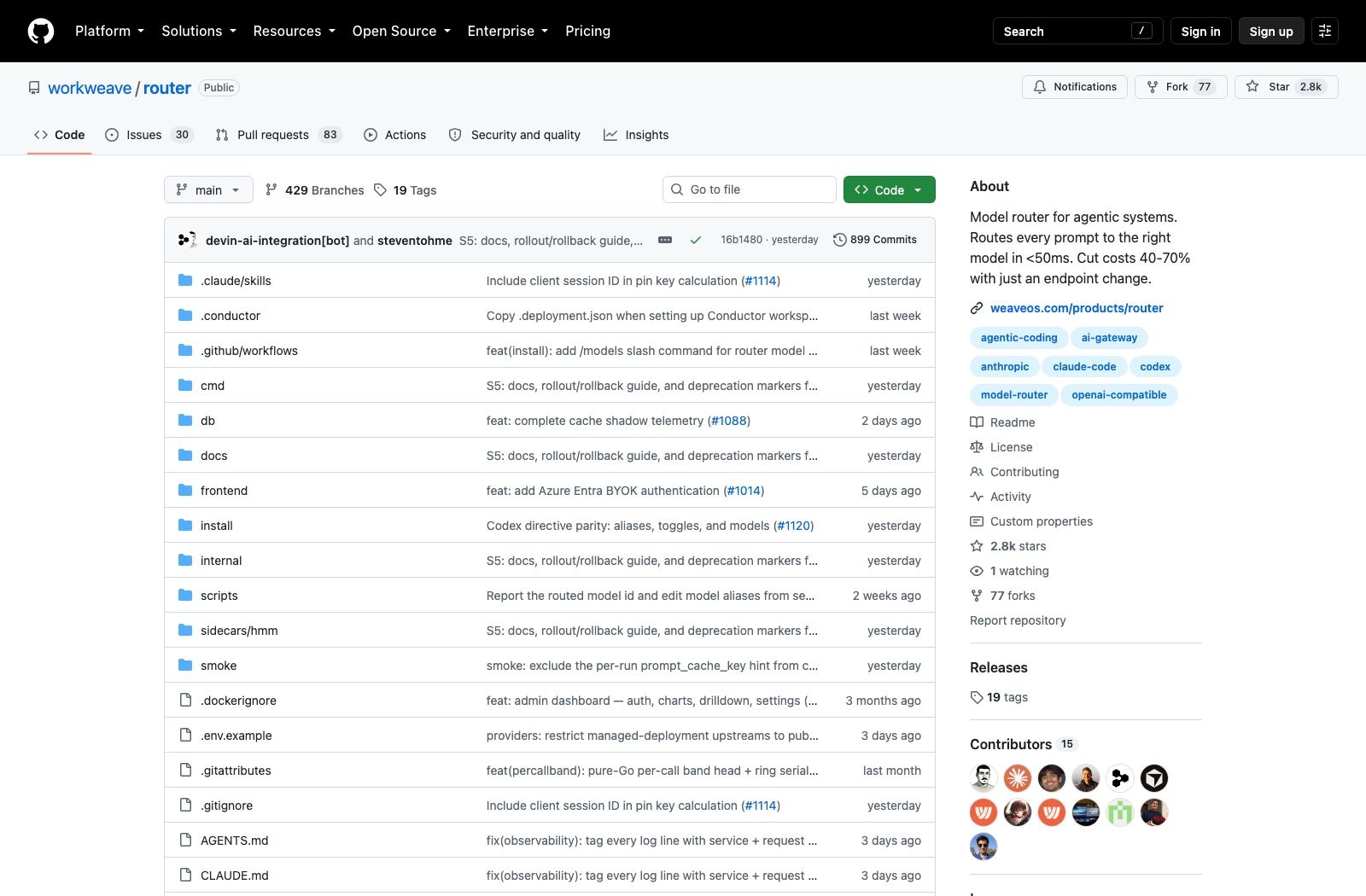
The repository went up on 27 April 2026 and sits at 2,781 stars and 77 forks as of 30 August 2026. It's written in Go, it speaks three provider APIs natively, the newest tag is router-v0.2.11, and it has one detail in the fine print that decides whether you can use it at work.
What Workweave Router actually does
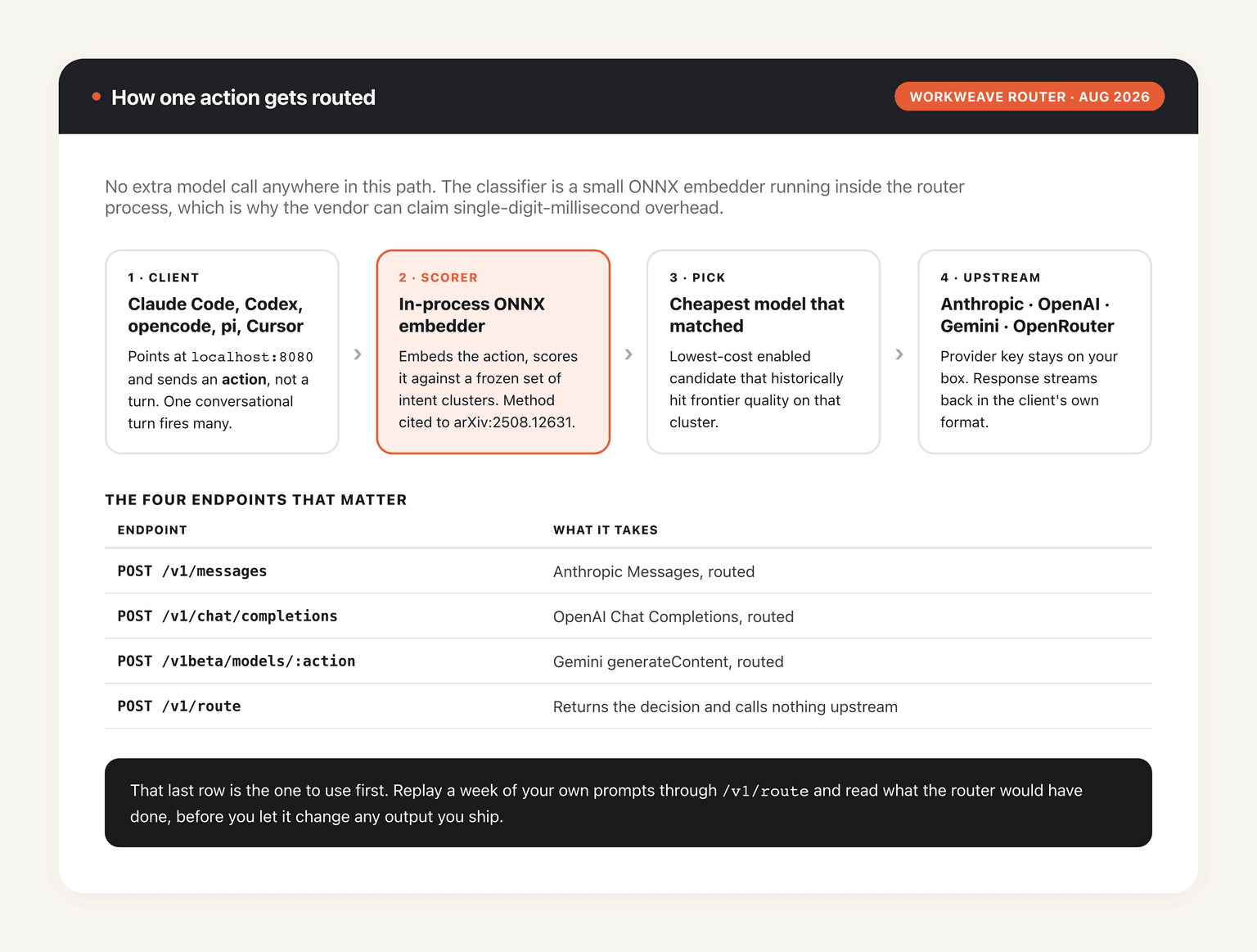
Point Claude Code, Codex, opencode, pi, or Cursor at localhost:8080 instead of the provider's endpoint. The router reads the request, scores it, and forwards it upstream to whichever enabled model fits. The response streams back the way your client expects, tools and images included, so nothing downstream knows a substitution happened.
Three wire formats are supported at once. POST /v1/messages takes Anthropic Messages, POST /v1/chat/completions takes OpenAI Chat Completions, and POST /v1beta/models/:action handles Gemini's generateContent. A fourth endpoint matters before you trust any of this: POST /v1/route returns the routing decision without calling upstream. You can replay a week of your own prompts through it and read what the router would have done, which is a much better way to evaluate a routing claim than watching your invoice.
The docs are careful about a distinction most people gloss over. Workweave Router routes per action, not per turn. One turn of conversation with a coding agent can fire off a dozen separate API calls — a file read, a plan, an edit, a test run, a summary — and those have wildly different difficulty. Routing at turn granularity would hand all of them to whatever the hardest one needed. Routing per action is where the savings claim comes from.
The licence is the first thing to check
GitHub's API reports the licence as NOASSERTION, which is what it says whenever it can't match a file to a known SPDX identifier. Open LICENSE and the answer is plain: Elastic License 2.0, copyright Workweave, Inc. The README carries an ELv2 badge too.
That's source-available, not open source, and the difference matters if you were planning to build on it. ELv2 lets you use, copy, modify and redistribute the software freely, with a short list of things you can't do. The one that bites: you may not provide the software to third parties as a hosted or managed service. Running it inside your own company is fine. Wrapping it and selling routing to your customers is not. If your procurement process has a checkbox for OSI-approved licences, Workweave Router fails that checkbox, and it's better to find that out now than three sprints in.
Nothing about that makes it a bad tool. It does mean "open source model router" is the wrong phrase, and any roundup that files it next to genuinely permissive projects is being sloppy. The self-hosting instructions are real and complete; the licence just constrains what you may do with the result.
How the routing decision gets made
Most "smart routing" products ask a language model to classify the prompt, which costs a call and adds latency to every request you make. Workweave Router doesn't. It embeds each incoming action with a small ONNX model running in the router's own process, scores that embedding against a frozen set of intent clusters, and picks the cheapest enabled model that has historically matched frontier quality on that cluster.
The method has a paper behind it. The README cites arXiv:2508.12631, Beyond GPT-5: Making LLMs Cheaper and Better via Performance-Efficiency Optimized Routing, the Avengers-Pro work by Zhang et al. Whether the router's implementation reproduces the paper's numbers on your workload is a separate question, and one only /v1/route plus your own traffic can answer.
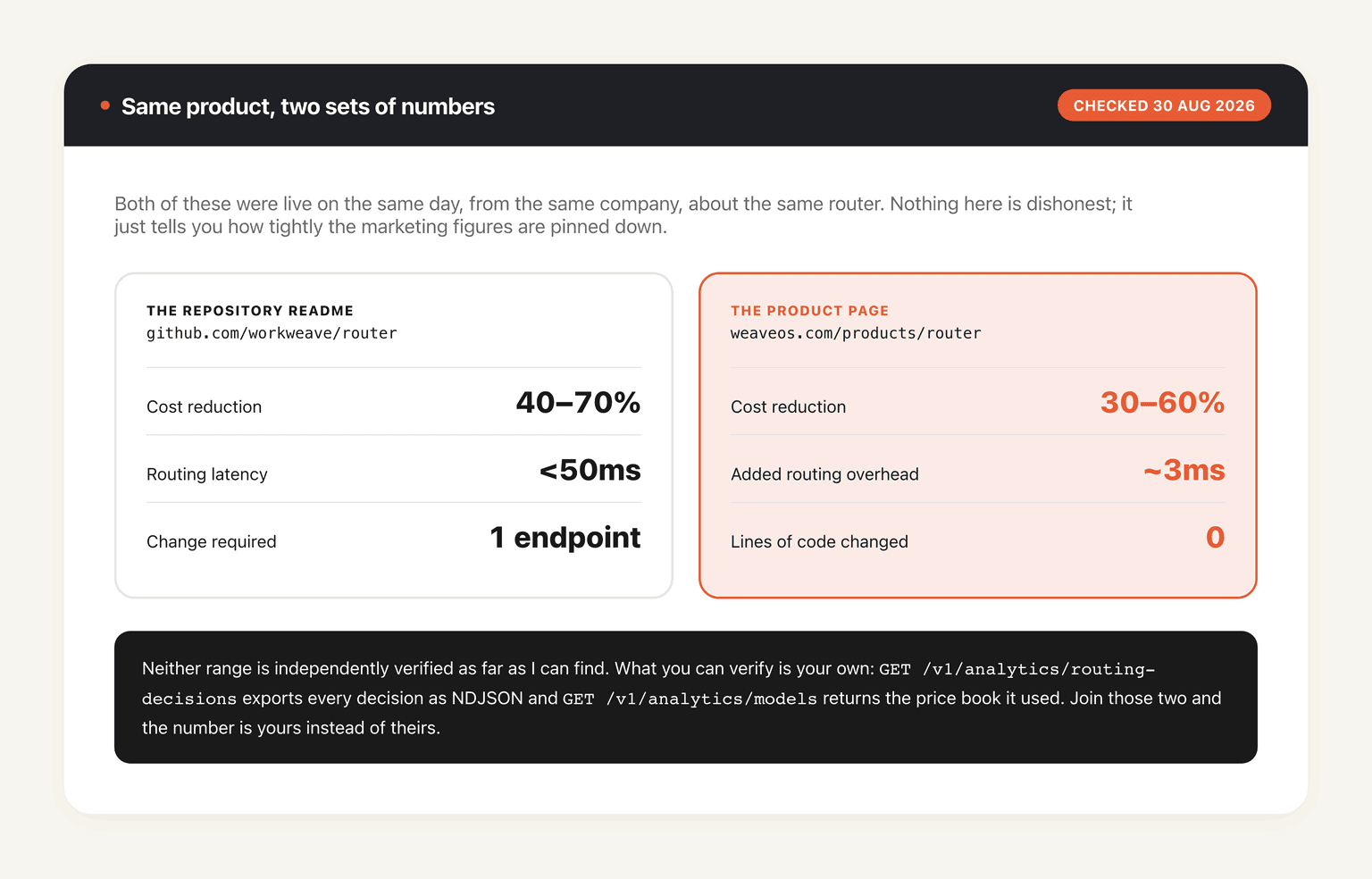
Because the scorer is in-process and tiny, the routing overhead is a local matrix multiply rather than a network round trip. That's the mechanism behind the vendor's "under 50ms" figure. It's a plausible mechanism; it is not an independent measurement, and I couldn't find third-party benchmarks of either the latency or the savings claim. The product page's ~3ms and the README's under-50ms are presumably the scorer's own cost versus the whole proxy hop, but nothing on either page says so.
There's an optional second strategy shipped as a sidecar: a frozen HMM policy that runs in its own container on port 8093, enabled with make up-hmm and a Google API key. It isn't the default. The installer does select it for the public hosted endpoint when wiring up Codex, which is the kind of asymmetry worth knowing about if you benchmark the local stack and then deploy against the hosted one.
What "40 to 70 percent" is actually claiming
The headline number on the repository is a 40 to 70 percent cost cut from a single endpoint change. Weave's own product page, checked on 30 August 2026, carries the page title "Weave Router | Cut LLM Inference Costs 30-60%" and advertises "~3ms added routing overhead" where the README says under 50ms. Same vendor, same product, two sets of numbers live at the same time. Neither is a lie; they measure different things, or they were written months apart and nobody reconciled them. Either way it sets your expectations for the marketing.
A routing saving is the gap between what you spent and what you would have spent sending every action to your default model. If your default is already Haiku, there's almost nothing to reclaim. If your default is the most expensive frontier model available and half your traffic is file reads and lint fixes, the ceiling is enormous and 70 percent is not a hard target. The number describes a workload as much as it describes the router, and Workweave don't publish which workload produced theirs.
What you can check yourself is cheap. GET /v1/analytics/routing-decisions streams raw decisions as cursor-paginated NDJSON, GET /v1/analytics/models returns the price book it used, and GET /v1/analytics/schema documents the fields. Pull a week into a warehouse, join decisions against prices, and you have your own number rather than theirs. Very few tools in this category hand you the export that lets you audit their marketing, and Workweave doing so is a point in their favour.
One caution on how you read the resulting number. Token spend is only half of what an agent costs you; the other half is the hours it runs while somebody watches it. A router shrinks the first half and leaves the second untouched, which is the accounting MoClaw is priced against instead: a hosted cloud AI computer bills the work, not your attention, so a long build keeps going after you've closed the laptop and gone to dinner.
The provider spread is wide enough for the routing to have somewhere to go: Anthropic, OpenAI and Gemini directly, then DeepSeek, Kimi, GLM, Qwen, Llama and Mistral through OpenRouter or any OpenAI-compatible endpoint. If you've ever hit a wall wiring a specific model through a gateway, our notes on what a missing-endpoint error from OpenRouter actually means cover the failure mode.
Getting it running: hosted or your own box
The path Workweave recommends is one command, npx @workweave/router, which asks which client you're wiring, asks whether you want user or project scope, fetches a router key and edits the right config file. Node 18 or newer; the Claude Code, opencode and pi paths also want jq. Flags skip the picker: --claude, --codex, --opencode, --pi. That version talks to Workweave's hosted router, not to anything on your machine.
Self-hosting is a heavier lift than the marketing suggests. make full-setup brings up Postgres alongside the router on port 8080, seeds an rk_ key and prints it in the logs, and stands up a dashboard at /ui behind the password admin — change that before anything else. Multi-replica deployments need Pub/Sub as well, for cache invalidation; Docker Compose runs an emulator for local work. Traces go out over OTLP to Honeycomb, Datadog, Grafana or whatever you already run.
Two keys, and mixing them up is the first mistake everybody makes. sk-ant-…, sk-or-… and friends are upstream provider keys and live in .env.local. rk_… is the router key your clients send as a bearer token. Provider keys stay on the box, encrypted at rest, and prompts go from your router straight to the provider you configured.
So the honest version of the setup story is: a Go binary, a Postgres instance, an optional sidecar, a Pub/Sub dependency once you scale past one replica, and a dashboard that ships with a default password. That's a service, and services need an owner. This is the seam where a hosted machine earns its keep: MoClaw is a cloud AI computer that's already running, so the thing you were about to babysit at 2am isn't sharing a lifecycle with your laptop's battery. Cursor is supported too, though the README marks it early beta and warns that performance may not be the best.
Where a router stops helping
Routing solves model selection. It doesn't solve any of the other reasons agent work goes wrong, and it's worth being clear about the boundary before you expect too much.
A misrouted action is a quality regression you may not notice for hours. The router picks the cheapest model that has historically matched frontier performance on a cluster, and your prompt may sit at the edge of that cluster. That's what /v1/route and the analytics export are for; if you deploy this without ever reading a decision log, you've bought a black box that changes your outputs.
Then there's the part routing can't touch at all. A model router makes each call cheaper. It does nothing about the agent sitting idle because the machine it lives on went to sleep, or the run you started in the office and can't pick up from a phone. That gap is where MoClaw fits differently from a router: it's a hosted cloud AI computer, so the session survives your commute rather than dying with the SSH connection. The two aren't alternatives. A router optimises the calls; a hosted machine optimises where the work happens.
Finally, routing sits inside the larger question of how you structure multi-agent work at all, which we've written about in our guide to AI agent orchestration. Model selection is one decision in that stack, and it's rarely the one that's limiting you first.
FAQ
Is Workweave Router open source?
No. It's source-available under the Elastic License 2.0, which permits use, modification and redistribution but forbids offering the software to third parties as a hosted or managed service. GitHub's API reports NOASSERTION for it, so a licence badge in a listicle isn't enough; read LICENSE in the repo.
Does Workweave Router work with Claude Code and Codex?
Yes, and both get a first-class installer path. npx @workweave/router --claude wires Claude Code and adds /router-on, /router-off, /router-status and /router-models slash commands. --codex patches ~/.codex/config.toml with a managed [model_providers.weave] block, keeps your existing ChatGPT OAuth login intact, and ships the router directives as native Codex skills ($force-model, $unforce-model, $router-feedback) because Codex doesn't load third-party slash-command files. opencode, pi and Cursor are supported as well.
What models can Workweave Router route between?
Anthropic, OpenAI and Gemini natively, plus DeepSeek, Kimi, GLM, Qwen, Llama and Mistral through OpenRouter or any OpenAI-compatible endpoint. npx @workweave/router models lists every deployed model with its on/off state and lets you enable or disable candidates from the terminal.
Can I see why it picked a given model?
Yes. POST /v1/route returns the decision without proxying the call, and GET /v1/analytics/routing-decisions exports raw decisions as NDJSON with a read-only key. Run both before you trust the savings figure.
Do I have to self-host it?
No. The hosted router at router.workweave.ai is the default path from the npm installer, and --local switches to a self-hosted localhost:8080. Self-hosting means running Postgres, and Pub/Sub once you go multi-replica.
Is the 40 to 70 percent saving verified?
Not independently, as far as I can find, and Weave's own site quotes a different range (30 to 60 percent) than the repository does. Treat both as vendor-stated. The size of any real saving depends entirely on what your default model was and how much of your traffic is easy work, which is why the analytics export matters more than the headline.
Continue Reading
More Guide
OpenAI Assistants API Deprecated: What Broke

MCP Tools: What They Are and Which to Use

OpenAI Models Not Available in Cursor Nov 12

Coding Agent Security: When Your Tools Lie

OpenAI Python HTTPX2: What Actually Breaks

Goldie: App Store Screenshots, Automated

The MoClaw editorial team writes about workflow automation, AI agents, and the tools we build. Default byline for industry overviews, listicles, and collaborative pieces.
Ready to put this into practice?
MoClaw runs browser tasks, research, and schedules automatically. Try it free.
References: workweave/router (GitHub) · Weave Router product page · Elastic License 2.0 · arXiv:2508.12631 Beyond GPT-5 (Avengers-Pro)