AI Agent Orchestration: Design Guide

AI agent orchestration coordinates agents, tools, evidence, and people toward one outcome. Learn when it helps, how to set boundaries, and when you overbuild.
Table of Contents
AI agent orchestration is the design of how one or more AI agents, tools, rules, saved work, and people move toward one outcome. It sets each stage's job, access, output, and stop point, and it makes clear what information carries forward, what needs human review, and what happens when something goes wrong.
No team sets out to build a complicated AI workflow. It usually begins with one useful task. As the work expands, the team improves the prompt, connects a new tool, adds a review step, or creates a rule for edge cases. The stakes behind that drift are getting higher: Gartner predicts that 40% of enterprise applications will feature task-specific AI agents by 2026, up from less than 5% in 2025 (Gartner, August 2025). More agents, in more places, means more workflows quietly turning into something no one designed.
Each change makes sense at the time. But eventually, the workflow becomes hard to explain because it was never designed as one whole system. Evidence is missing, steps overlap, and no one is sure what should happen when a source can't be checked, a tool fails, or the information conflicts.
Complexity rarely announces itself. It accumulates through sensible decisions made one at a time.
At that point, the challenge is no longer just completing the task. It's designing how information, tools, decisions, and people move from one stage of work to the next.
The difficult part is rarely getting one agent to work. It's making the entire workflow behave predictably after the first success.
Key Takeaways:
- AI agent orchestration is a control layer, not a fourth workflow type. It becomes useful when work crosses tools, sources, stages, owners, or review points.
- Split work only when stages need different information, authority, tools, standards, or review paths. Do not split just because a task has several steps.
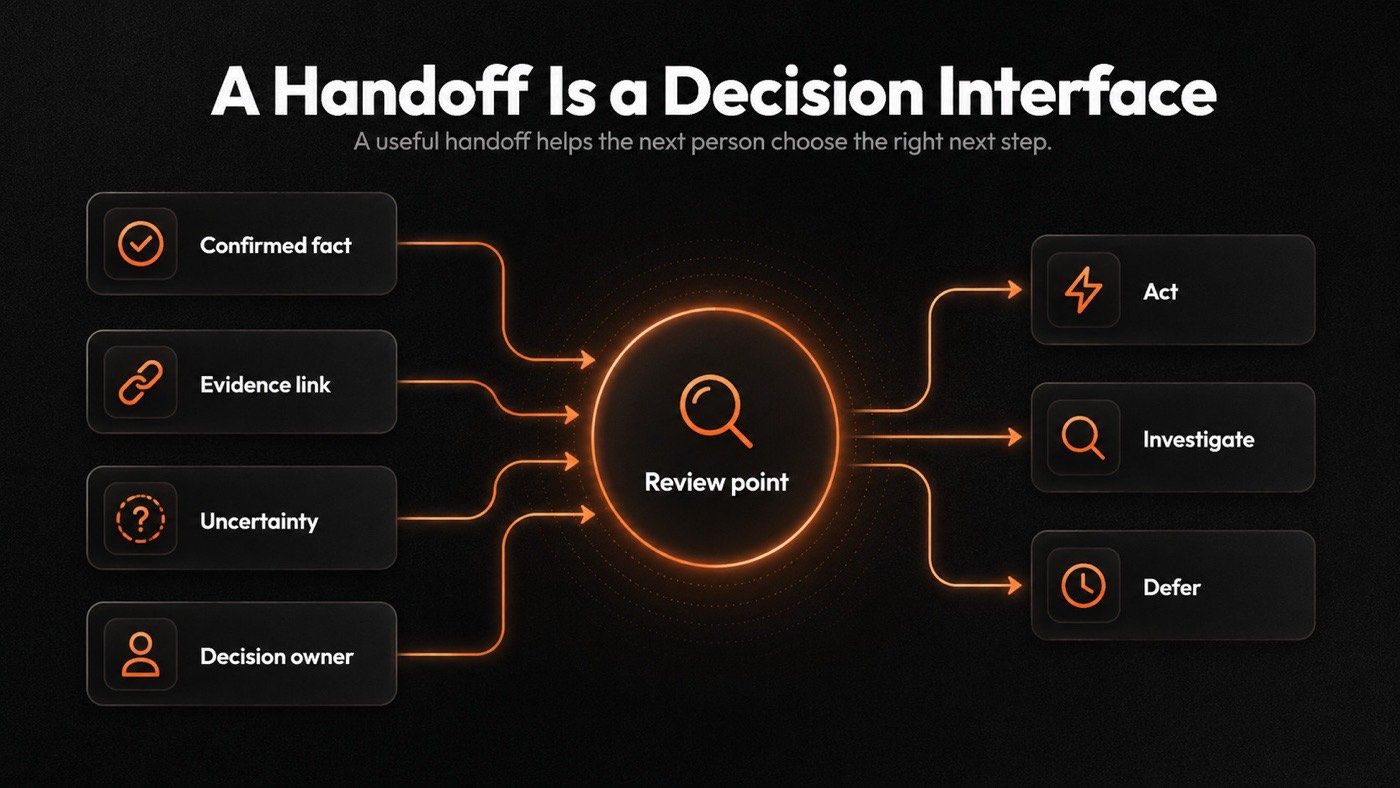
- A useful handoff separates evidence from interpretation: what was found, the source, whether it is confirmed, an open question, and the next owner.
- Choose the lightest pattern that removes the bottleneck. Patterns are trade-offs, not upgrades.
- A workflow is trustworthy not because it has more stages, but because each stage leaves a clear record of what happened and what must happen next.
What Is AI Agent Orchestration?
AI agent orchestration is the design of how one or more AI agents, tools, rules, saved work, and people move toward one outcome. IBM frames it the same way, as "the process of coordinating multiple specialized AI agents within a unified system to efficiently achieve shared objectives".
It sets each stage's job, access, output, and stop point. It also makes clear what information should carry forward, what needs human review, and what should happen when something goes wrong.
You can use orchestration with one agent or several. A recurring agent may still need approved tools, a set output format, saved rules, and a review point. More agents raise the risk of duplicate work, weak handoffs, and unclear responsibility.
Good orchestration is less about creating more intelligent agents than about creating more predictable work.
When Does Orchestration Help?
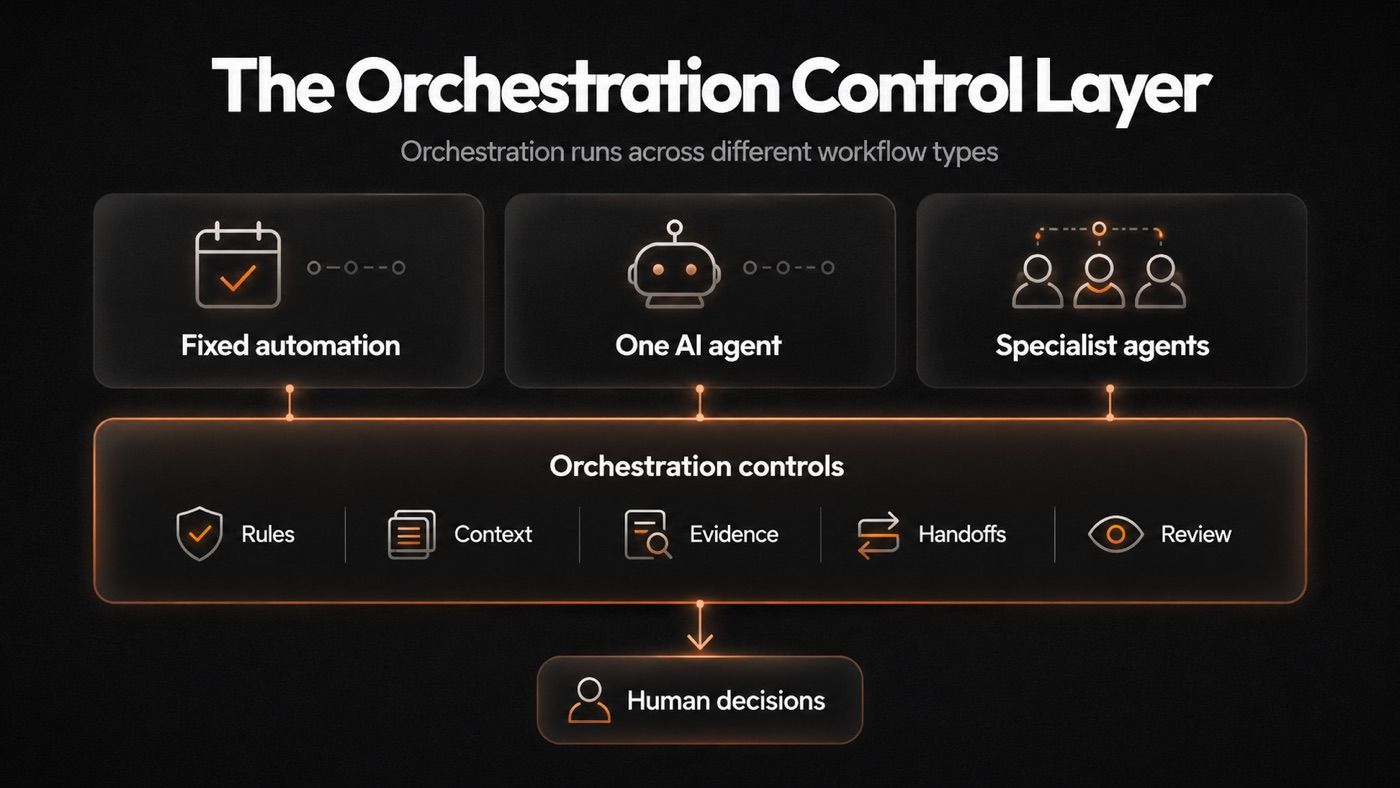
Traditional automation, a single AI agent, and several agents can all be useful. They solve different problems. Orchestration connects the work and makes the control points clear.
| Workflow type | Best when | What it needs |
|---|---|---|
| Fixed automation | The route is known and exceptions are rare | Clear rules |
| One AI agent | One owner, a tool set, and a reviewable result are enough | Good instructions, approved tools, and a stop point |
| Specialist agents | Different stages need distinct context, tools, or ownership | Clear roles and handoffs |
This isn't a maturity ladder. Agent orchestration is not a fourth workflow type. It is the control layer that becomes useful when work crosses tools, sources, stages, owners, or review points.
A form-to-spreadsheet update or deadline reminder rarely needs agent reasoning. One agent may be enough to turn meeting notes into a summary for review.
Use orchestration when parts of the work need different:
- Tools or permissions
- Source rules
- Saved details from past runs
- Approval steps
- Specialist instructions
- Paths for missing data or failed tools
Use this rule:
Split work only when stages need different information, authority, tools, standards, or review paths. Don't split work just because it has several steps.
I learned this the expensive way. Priya, a MoClaw staff writer who supports our competitive-research desk, first built a five-stage pipeline for a job that turned out to need two. She had a research agent, a dedup agent, a scoring agent, a formatting agent, and a delivery agent, roughly 14 credits per run across a recurring monitoring task. Three of those stages passed the full history forward and re-did each other's work. When she collapsed it back to research plus a single evidence-and-format stage, the run dropped to about 6 credits and the output stopped contradicting itself. The extra stages hadn't added rigor. They had added surface area for disagreement.
The Five-Question Test Before You Add a Stage
Every new stage introduces another point where work can slow down, become unclear, or fail. Add one only when it solves a problem that's already costing time, quality, or control.
1. Does this stage have one clear job?
"Check approved competitor pricing pages" is clear.
"Find useful insights" isn't.
A vague stage usually produces vague output.
2. Does it need different tools, information, access, or review?
It's often the best reason to split work.
A research stage may need browser access and source rules. A reporting stage may need only verified findings. A reviewer may need a decision request, not raw notes.
3. Can it return something the next stage can check?
A useful result may include evidence, a clear status, and an open question when needed.
The next stage shouldn't have to guess what happened earlier.
4. Will the split remove a real bottleneck?
Look for slow reviews, repeated rework, missed updates, duplicate research, or uneven output.
A new stage should solve a known problem. It shouldn't exist because a multi-agent diagram looks advanced.
5. Is there a clear path when the stage can't finish?
A blocked source, missing file, failed tool call, or conflicting claim should lead somewhere clear.
The stage may retry later, pause for review, or leave the item out of the final result. It shouldn't guess its way past missing evidence.
When most answers are no, improve the current agent or process first. Another stage may only add more work.
Set Clear Boundaries and Pass the Right Context
Many orchestration failures are not caused by a wrong answer alone. They happen when the workflow sends the right information, tool, or decision to the wrong stage or owner.
Don't start with a list of agent names.
Start with a short agreement for each stage.
| Contract part | What it answers | Example: pricing research |
|---|---|---|
| Job | What does this stage own? | Check approved competitor pricing pages |
| Inputs | What does it need? | Approved URLs, earlier notes, or reporting format |
| Access | What may it read, change, or send? | Browse and save notes, but don't update the CRM |
| Handoff | What must the next stage receive? | Link, date checked, evidence status, open question |
| Stop rule | When must it pause? | A key page is missing, or evidence conflicts |
A research stage should collect evidence but shouldn't decide whether the company must change its sales message.
A later stage can explain the possible impact. A person should decide whether to act.
Stable rules are the workflow's operating manual. Current-run details should not become permanent context by default. Keep only the evidence, unresolved questions, decisions, and rules that will improve the next run.
Stable rules include approved sources, report formats, access limits, and review rules.
Carry forward selectively: confirmed evidence, unresolved questions, prior decisions, and repeat failure patterns.
Leave behind raw browser activity, duplicate notes, stale links, and rejected claims.
The next stage doesn't need every prompt, raw note, browser action, or chat message. It needs the shortest useful handoff:
- What was found
- The source link or other proof
- Whether the claim is confirmed, incomplete, conflicting, or unverified
- An open question, if there's one
- The next owner
- A pause or review rule
A weak handoff says:
Competitor X changed pricing. This may matter.
A useful handoff says:
Competitor X added a lower-priced annual plan. Source: public pricing page, checked July 1. Status: confirmed. Open question: Does the plan apply to enterprise accounts? Next owner: sales operations. Don't change messaging until a person confirms the offer details.
The second handoff separates evidence from interpretation. It tells the next owner what they can trust and what they still need to check.
Example: A Weekly Market-Signals Workflow
A weekly market-signals workflow shows where orchestration helps without becoming overbuilt.
Its goal isn't to collect every competitor update but to find changes that may affect sales, positioning, product plans, or campaigns. Then it gives a person enough evidence to decide what happens next.
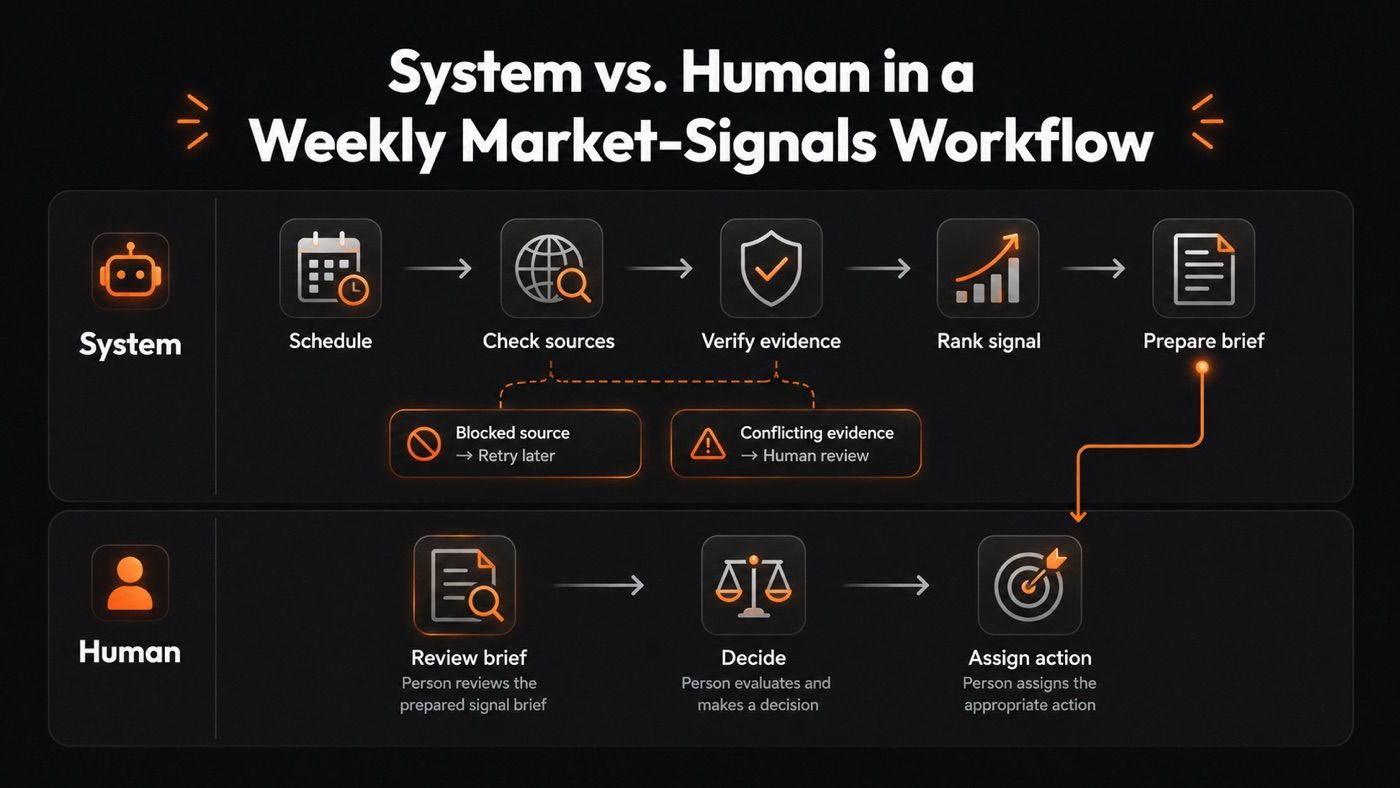
1. Start with a schedule and stable rules
Every Monday, the workflow loads the competitor list, source rules, report format, prior brief, and unresolved questions.
These rules keep the work consistent from one run to the next.
2. Check sources in parallel
Separate research stages check different places, such as competitor sites, pricing pages, release notes, partner news, hiring pages, and trusted industry reports.
Each stage has one job: find a material change, attach the source, record the date, and flag uncertainty.
It doesn't make a strategic call.
3. Check evidence and remove duplicates
The next stage removes duplicate findings, checks dates, and flags claims that lack support.
That distinction counts because decisions should follow evidence, not assumptions that happen to sound reasonable.
Confirmed fact: Competitor X added a lower-priced annual plan.
Possible interpretation: Competitor X may be trying to win price-sensitive startups.
The pricing page may support the first statement. The second may still help the team think. It needs more context before anyone treats it as a decision signal.
Marcus, a competitive-intelligence lead I worked with, kept getting burned here before he added this stage. In one week his old setup surfaced 11 "pricing changes" that were really the same regional promo scraped from six pages, plus one archived page that read as brand new. The dedup-and-date stage cut those 11 raw findings to 3 real ones and flagged the stale page for review. Nothing got smarter. The workflow just stopped presenting noise as signal.
4. Rank what needs attention
Not every finding needs the same level of attention.
| Check | Lower priority | Higher priority |
|---|---|---|
| Evidence | Old, weak, or incomplete source | Current, confirmed first-party source |
| Customer impact | A narrow edge case | A core customer group |
| Urgency | Can wait until the next review | May affect a live decision this week |
| Required action | No decision needed | A named owner must decide |
Higher priority doesn't mean a finding is more certain.
It means the finding needs earlier human attention.
5. Prepare a review-ready brief
The final brief should show:
- Key findings
- Source links
- Evidence status
- Open questions
- Suggested follow-up work
- A recommended owner
A person reviews the brief before anyone changes messaging, campaigns, sales plans, or product direction.
6. Show the failure path
A page may be blocked, missing, or in conflict with another credible source.
The workflow should return one of three results:
- Source unavailable
- Conflicting evidence
- Needs human review
It should record the attempt. Then it can defer the item to the next run or send it to a reviewer.
It shouldn't turn an unverified claim into a confident market signal.
A workflow isn't trustworthy because it has more stages, but because each stage leaves a clear record of what happened and what must happen next.
Choose the Lightest Pattern That Solves the Bottleneck
Workflow patterns are trade-offs, not upgrades. Use the lightest pattern that removes the bottleneck.
| Pattern | Use it when | Keep it under control by |
|---|---|---|
| Sequential workflow | Each stage needs the prior result | Set retry limits and a stop rule |
| Parallel workflow | Separate tasks can run at the same time | Combine results in one clear synthesis step |
| Manager and specialists | One main agent needs focused input from specialists | Give each specialist one narrow output contract |
| Routing or handoff | The next stage depends on what the workflow finds | Record why the path changed |
| Draft and check | Work needs review before release | Define what passes and limit review cycles |
Routing chooses where work should go next.
A manager can ask specialist agents for help while keeping control of the final result.
A handoff transfers active control of the task to a new agent or owner.
A manager-led workflow keeps one point of control. A handoff allows a new specialist to take over the next part of the work. Current agent frameworks support both approaches, along with sequential, parallel, and human-review patterns. OpenAI's practical guide to building agents and Anthropic's guide to building effective agents both describe these same building blocks, and Microsoft documents them directly in its agent framework orchestrations. LangChain's multi-agent documentation covers the handoff and manager patterns in code.
Use parallel work only when tasks are independent. When results need to come together, use one clear synthesis point.
What Grok Bot's Group Chats Change About Multi-Agent AI
Until August 2026 these patterns mostly lived in frameworks. You chose manager-and-specialists or a handoff, wrote it in code, and operated it yourself. xAI's Grok Bot, launched August 11, 2026, ships the pattern as a consumer product instead: bots message each other, share context in threads, and can sit together in a group chat where they pass work, assign ownership between themselves, and pull a person in only for judgment calls.
Read that against the pattern table above and it is manager-and-specialists plus handoff, with the routing decisions made by the agents rather than by your code. xAI describes its own teams running a chief-of-staff bot on top, with one specialist per lane: inbox, expenses, recruiting, bug fixes, operations.
The trade is the one this page keeps returning to. When agents negotiate ownership among themselves, you give up the explicit stop rule and the recorded reason a path changed. The five-question test still applies to every lane you add, and the fifth question, what happens when a stage cannot finish, gets harder to answer when the handoff was decided inside a conversation you were not reading.
Two practical notes before you treat it as your orchestration layer. It needs SuperGrok Heavy, Cursor Ultra, or Cursor Teams Premium, and xAI labels it early beta. Every reliability claim in the launch post is attributed to xAI's own staff, so multi-agent coordination here is worth watching rather than building this quarter's workflow on. For access details and how it compares with the other two agent products shipped this year, see our three-way comparison of Grok Bot, Claude Cowork, and ChatGPT Work.
Fact-check, August 12, 2026: capabilities, tier requirements, and beta status read off x.ai/news/introducing-grok-bot and x.ai/pricing. No third-party test of Grok Bot's multi-agent coordination had been published at the time of writing.
Signs You Are Over-Orchestrating
Every coordination step has a cost. The goal isn't to remove that cost but to make sure every step earns its place.
You may be over-orchestrating when:
- Two stages do the same work
- Every stage receives the full history
- Reviewers spend more time fixing outputs than using them
- No one can explain why the workflow took a certain path
- A human must repeatedly resolve the same avoidable conflict
Before you change a workflow, track review time, rework, missed updates, unverified claims, and cost per approved result.
Don't measure speed alone.
Measure whether the work improves with less manual effort and clearer ownership. If you are still deciding which tasks belong in an agent at all, our guide to what autonomous AI agents should handle is a useful gut check before you add coordination on top. To distinguish agent communities from task-running assistants, see our Moltbook explainer.
Where MoClaw Helps: Keep the Workflow From Starting Over
Recurring research often begins with a recovery job.
Someone has to find last week's brief, reopen the right pages, check what was already reviewed, and remember which questions were left open. That isn't analysis. It's the hidden cost of a workflow that loses its context after every run.
MoClaw can reduce that reset. Keep approved sources, reporting rules, prior briefs, and active questions in files on the AI Cloud Computer. Use the browser to check current pages, save source links and notes beside the brief they support, and schedule the next run instead of rebuilding the process by hand. Our use case library has the recurring-monitoring templates most people start from.
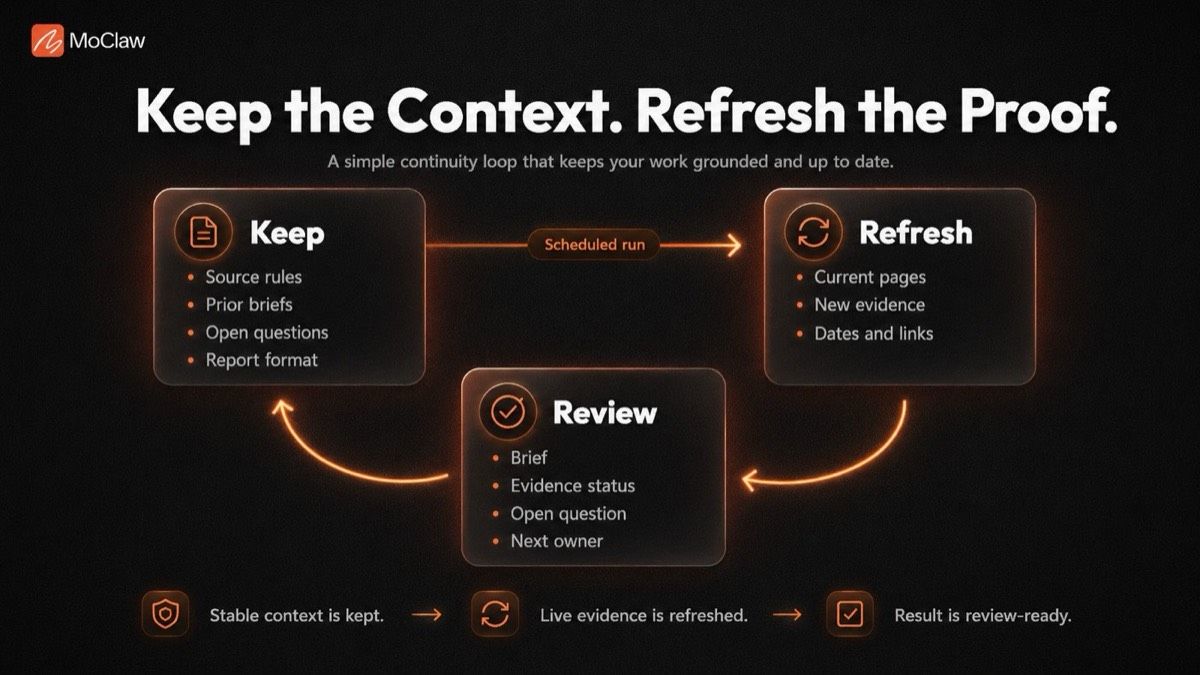
For market monitoring, the agent can prepare a short, review-ready brief that shows:
- The finding
- The source
- The date checked
- Evidence status
- Any uncertainty or open question
- The next owner or decision-maker
A reviewer can assess the finding without recreating the investigation or searching across chats, tabs, and documents.
The goal isn't to preserve everything. Keep the rules, open questions, and evidence that help the next run begin well. Refresh old evidence. Don't carry stale prompts, duplicate notes, or rejected claims into the next run.
MoClaw doesn't replace workflow design, define what matters, or make the final business decision. It gives a recurring workflow a consistent place to retain useful context, collect current evidence, and leave behind work a person can inspect before acting.
Build the Workflow You Can Explain
Complexity is often unavoidable. Confusion usually isn't.
Every workflow eventually reflects the decisions made while it was built. When those decisions are explicit, the workflow becomes easier to inspect, improve, and trust as it grows.
Start with a recurring task where people repeat research, chase missing context, question the evidence, or wait to learn who owns the next decision.
Make the job, access rules, handoffs, evidence, and stop points clear.
Add more coordination only when the work proves it needs it.
AI Agent Orchestration FAQs
Does every workflow stage need a separate AI agent?
No. A stage can be a rule, a tool call, an AI agent, or a human review step. Use a separate agent only when it needs distinct tools, context, instructions, or control.
What should persist between scheduled runs?
Keep the stable rules that help the workflow act consistently: approved sources, reporting format, access limits, and unresolved questions. Don't carry forward every raw note or browser action.
How do you stop parallel agents from duplicating work?
Give each stage a distinct source list, job, and output format. Then send all findings through one evidence-check and synthesis step before the final brief is created.
When should a workflow pause instead of retrying?
Pause when the work reaches a decision that needs human judgment, when evidence conflicts, or when a tool failure could change the result. Retry only when the next action is safe, defined, and likely to help.
Continue Reading
More Guide
Claude Model Upgrades: Protect Recurring AI Workflows

ChatGPT Codex: From Chat to Tasks

What Is Agent Handoff? The Waggle Standard

Programmatic Tool Calling for Agents

pxpipe Workflow: Compress Context Safely

TRAE Work Guardrails: Permissions and Review
The MoClaw editorial team writes about workflow automation, AI agents, and the tools we build. Default byline for industry overviews, listicles, and collaborative pieces.
Ready to put this into practice?
MoClaw runs browser tasks, research, and schedules automatically. Try it free.
References: Gartner: 40% of enterprise apps will feature task-specific AI agents by 2026 · OpenAI: A practical guide to building AI agents · Microsoft: Agent framework workflow orchestrations · LangChain: Multi-agent documentation · Anthropic: Building effective AI agents · IBM: What is AI agent orchestration?