AI ROI Measurement Framework for AI Agents

An AI ROI measurement framework that counts only verified work, prices review and recovery, and shows why value capture decides the final return.
Table of Contents
AI ROI measurement compares the financial value a workflow creates with the full cost of building and running it, and it counts only the work that passed review. The number breaks the moment a team credits an agent for output nobody used. A 2025 survey of 1,854 executives across Europe and the Middle East found that only 10% of organizations using agentic AI were already seeing significant ROI, while half expected returns within three years and another third within three to five.
Key Takeaways:
- AI ROI measurement counts work that passes review, not prompts, drafts, or attempted runs.
- Treat returned capacity as potential value until the business puts it to use.
- Include setup, tools, review, failed-run recovery, and upkeep in the cost side.
- Track cost per verified completion alongside ROI and payback.
- Scale only if the return holds when use, quality, or cost changes.
What AI ROI Measurement Really Counts
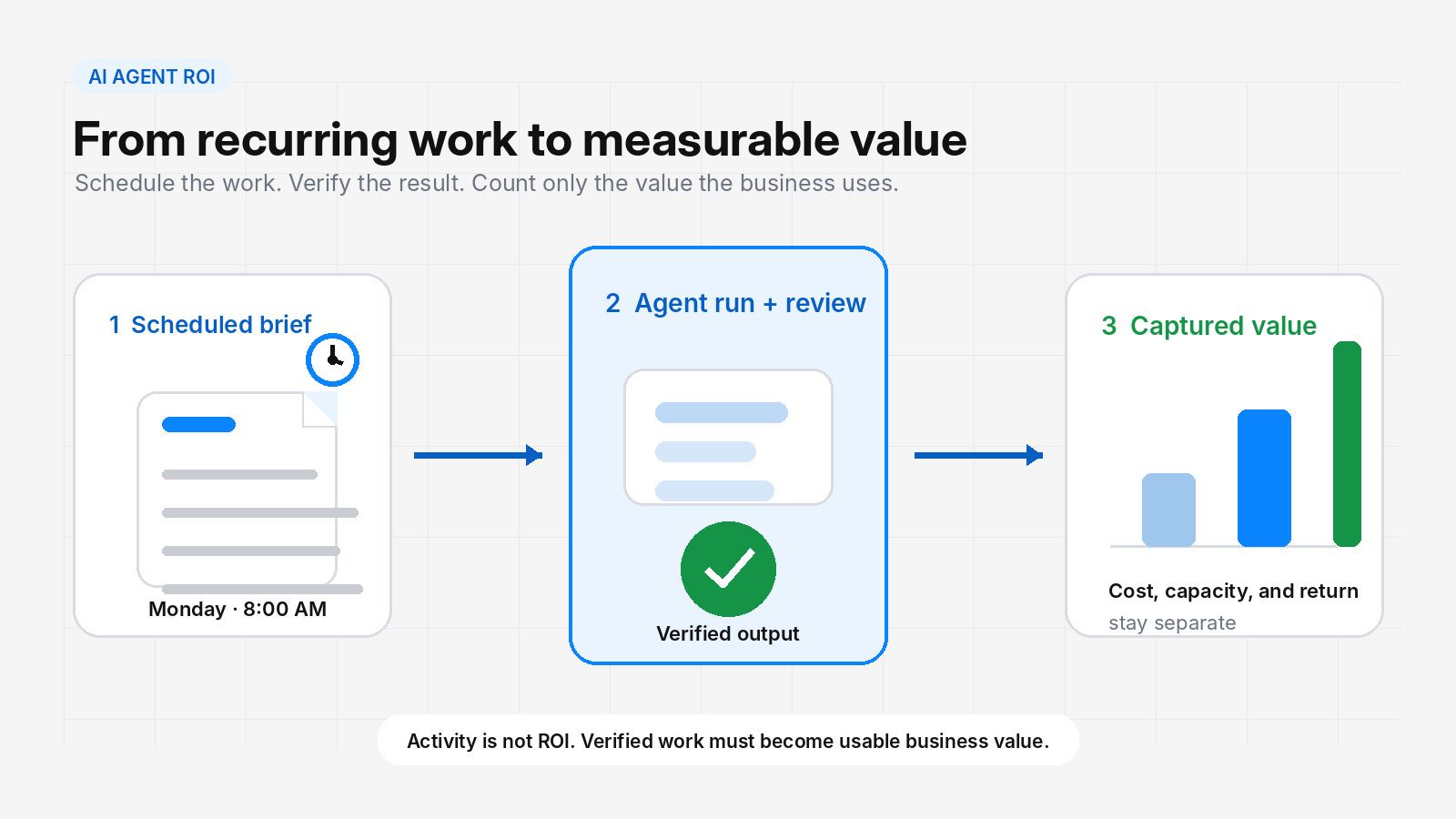
By 8:00 on Monday, a market brief is waiting in the shared folder. It used to take an analyst most of the morning. Now it arrives before the team logs in, neatly formatted and ready for review.
The speed is easy to see. The harder question is what the business actually gains from it.
Some weeks, review takes ten minutes. A changed website, weak source, or missed detail can turn the next one into an hour. At this point I stop looking at speed and check three things: what passed review, what the workflow cost, and where the returned time went.
The formula itself is ordinary:
ROI % = (Realized benefits - Total costs) / Total costs x 100
Realized benefits are gains the business can trace and price. They may come from lower costs, more accepted work, higher gross profit, fewer errors, faster service, or smaller losses.
The full cost goes far beyond the model bill. It includes setup, software, paid data, human review, repairs, monitoring, and upkeep.
The formula also works for agentic AI. But as an agent takes on more of the task, retries, review, and recovery can rise too. Those costs belong in the business case.
What this resolved: the arithmetic, which was never the hard part. What it left unsolved: which of the agent's output actually qualifies as a realized benefit.
Follow the Value Through the Workflow
The work an agent could handle is rarely the value the business can claim. I trace the value through every stage between the two:
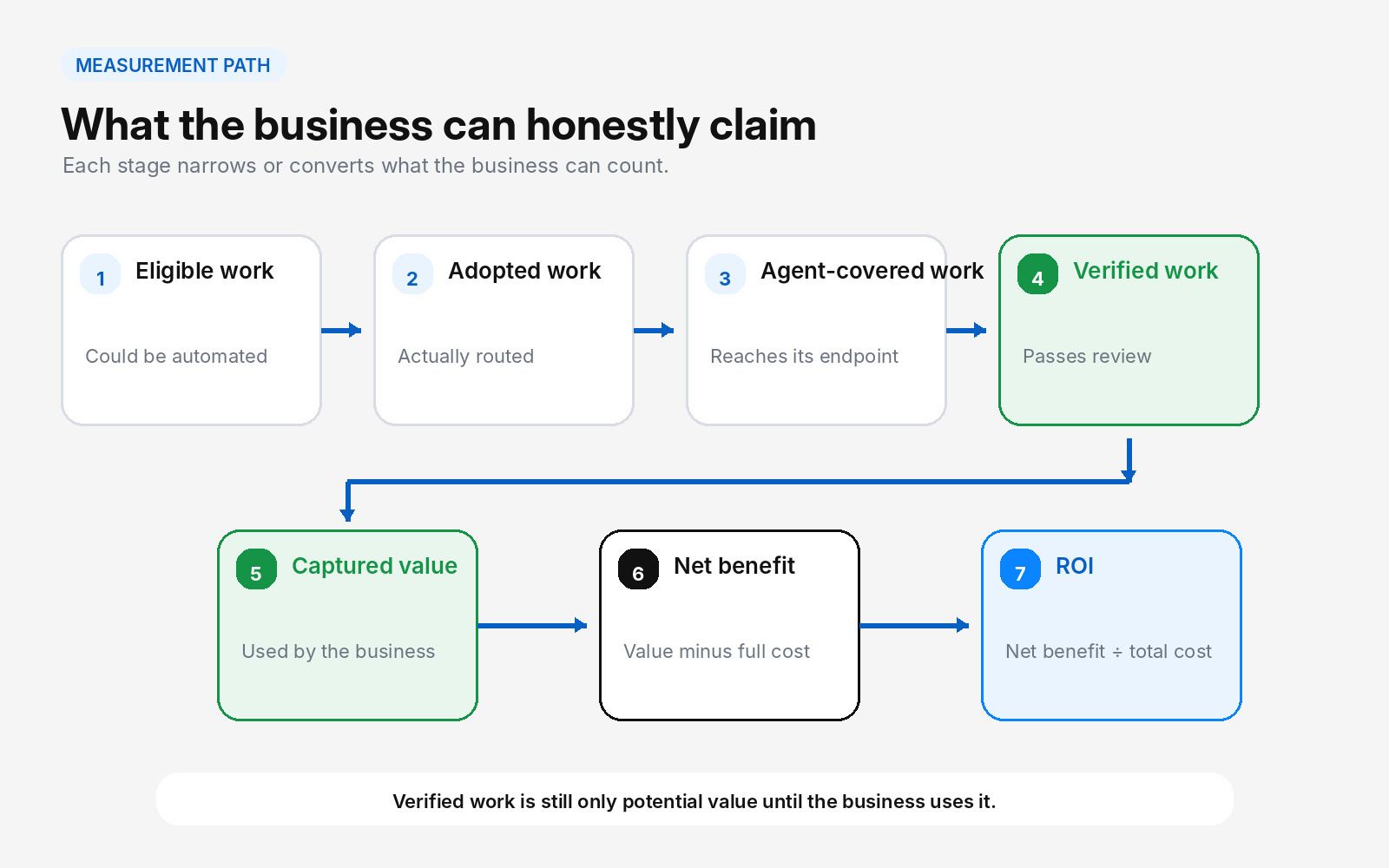
Eligible work is everything the agent could reasonably handle. Adoption reduces that pool to the work people actually send through it. Agent-covered work reaches the point where the agent's job ends. Verified work also passes review without a major correction.
Even verified work is not financial value on its own. The benefit appears only when the returned time or added output changes cost, capacity, service, risk, or profit. Count the part the business can price and keep the rest as supporting evidence.
Subtract the full workflow cost to find net benefit. Divide that net benefit by total cost to calculate ROI.
Take a workflow with 1,000 eligible tasks. Staff send 80% of them to the agent, which completes 75% from start to finish. Of those results, 85% pass review.
1,000 x 80% x 75% x 85% = 510 verified completions
The workflow produced 510 verified results. It did not create value from all 1,000 possible tasks. The financial case must still ask how much value the business captures from those 510 completions.
What this resolved: how much of the eligible pool survives to the finish line. What it left unsolved: what a finish line is, which has to be defined before anything can be counted against it.
Set the Baseline and the Finish Line
Start with the old process.
Pick one unit you can count, such as an approved research brief, a routed support case, or a checked invoice. Then observe a normal period of work.
During that period, record task volume, hands-on time, review and correction time, loaded labor cost, and normal rework. Add cycle time when speed affects service or revenue.
Use the same finish line for both the manual and agent paths.
A research brief, for example, may need current facts, approved sources, a set format, and a reviewer's approval. If one required source is missing, a polished draft has not reached the finish line.
Using the same finish line keeps partial agent output from receiving credit for the whole job.
Set the baseline before rollout. Use a comparison group where practical. Also track where reclaimed time goes, because time creates value only when it moves into useful work.
Keep the evidence behind the numbers. Record what ran, what finished, what passed review, and what needed repair. Without that record, too much of the estimate depends on memory. Microsoft's own guidance on monitoring and reporting agent value makes the same point about keeping the operational record next to the financial one.
What this resolved: a countable unit and a shared definition of done. What it left unsolved: the costs that only appear after the agent stops running.
Count the Costs That Appear After the Run
AI ROI measurement fails most often on the cost side. The model bill appears on an invoice. The rest of the cost builds up in smaller pieces.
Initial work may include process mapping, data cleanup, integrations, tests, access rules, and staff training. Monthly costs can include the platform, model use, APIs, paid sources, browser sessions, storage, and support. Together, these items form the agent's total cost of ownership.
Then comes the human tail.
People still review outputs, handle exceptions, repair failed work, and update the workflow when a source, rule, or tool changes. These small tasks add up across the month and often go uncounted.
Discarding a weak draft may take only a few minutes. Recovery costs rise after the agent changes a customer record, sends a message, or updates another system. Then someone may need to find the mistake, reverse it, check the repair, and explain what happened.
One production analysis calls the verification and rework around agentic systems an "agency tax". Recovery costs rise once an error reaches a live system.
Run cost can vary too. A 2026 study of coding agents found that repeated runs on the same task could differ by as much as 30 times in token use. Higher use did not reliably improve accuracy. The study covered coding tasks, so the 30x figure is not a benchmark for every business agent. It still shows why one average run can hide a wide cost range, which is the same trap that makes API pricing hard to budget from a rate card alone.
For day-to-day control, track:
Cost per verified completion = Total cost of the agent-handled workflow for the period / Verified agent completions in that period
This measures the cost of usable output rather than the cost of each prompt or attempted run.
That metric covers only the agent-handled path. To price the entire operation, use a separate measure:
Cost per accepted outcome = Total cost of the full workflow / All accepted outcomes
Use cost per verified completion for the agent-handled path and cost per accepted outcome for the whole operation, including manual work. Keeping them separate prevents unrelated costs from entering the same calculation.
What this resolved: a unit cost that tracks usable output instead of activity. What it left unsolved: whether the benefit side is large enough to cover it.
A Complete AI Agent ROI Calculation
Michael leads a small research team. The example below is illustrative, not a reported customer result.
His team prepares 20 market briefs each month. One brief takes four hours, and the fully loaded labor rate is $60 per hour. The current process therefore carries $4,800 in monthly labor cost.
The team sets up an agent for recurring research and first drafts. During the pilot, staff send 80% of briefs through the agent. The agent covers the full routed task, and 80% of its briefs pass review.
Each attempt still needs 30 minutes of checking. When a brief fails review, the team spends one extra hour diagnosing the problem and returning the brief to the normal manual process.
This calculation counts only that extra hour, because the normal manual completion time is already part of the baseline. Platform and usage costs total $300 per month, and setup costs $9,000.
Work That Reaches the Business
Staff route 16 of the 20 briefs through the agent:
20 x 80% = 16 briefs
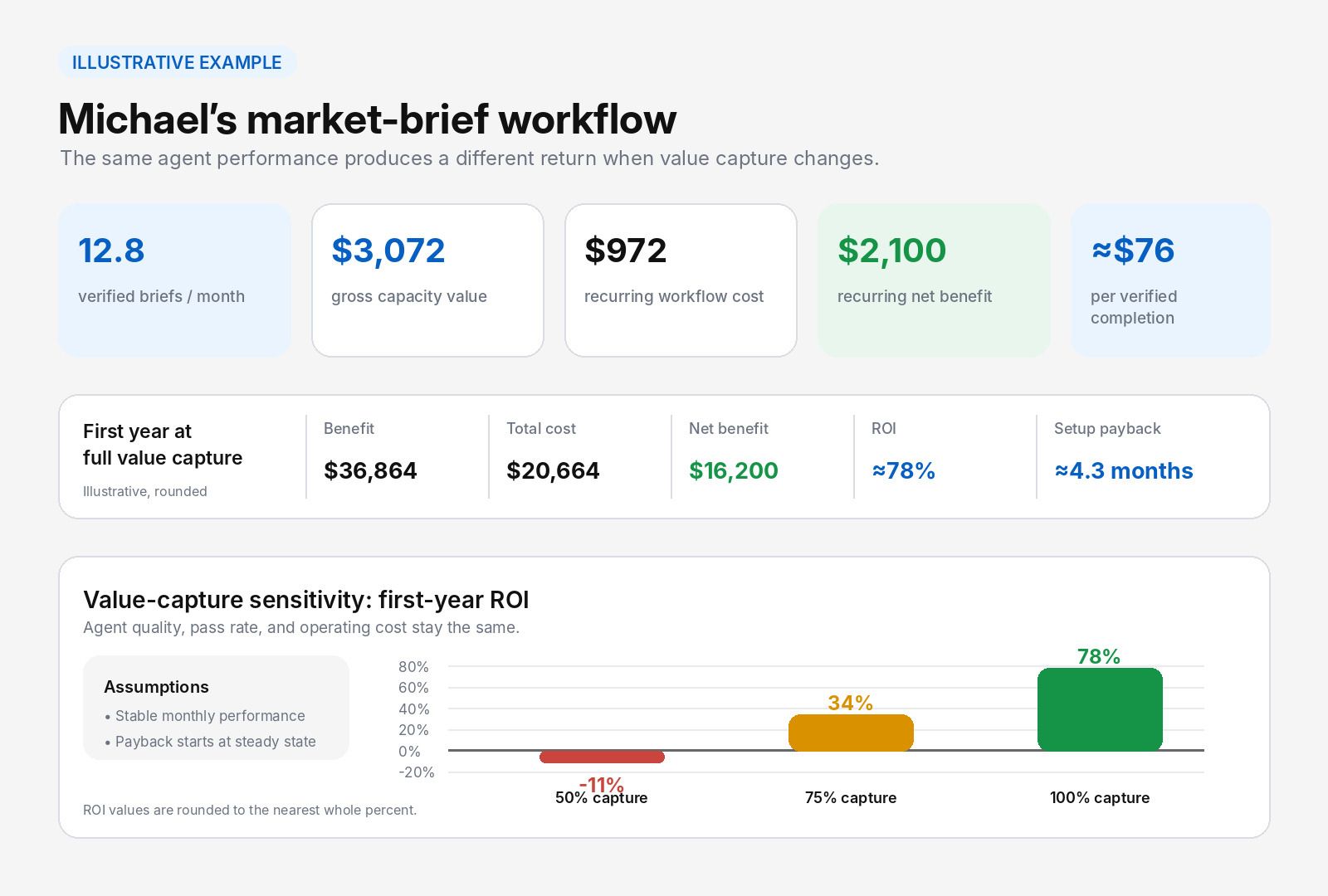
At an 80% review-pass rate, the workflow produces an average of 12.8 verified briefs per month:
16 x 80% = 12.8 verified briefs
The decimal is a monthly planning average. It does not mean the team completes a fraction of one brief.
At four hours and $60 per hour, those verified briefs represent $3,072 in gross monthly capacity value. This is before the value-capture rate and workflow costs:
12.8 x 4 hours x $60 = $3,072
Realized benefit = Gross capacity value x Value-capture rate
Review, Recovery, and Operating Cost
Reviewing all 16 attempts costs $480 per month:
16 x 0.5 hours x $60 = $480
An average month has 3.2 failed briefs. Recovering them adds $192:
3.2 x 1 hour x $60 = $192
After the $300 platform and usage cost, the recurring workflow costs $972 per month:
$480 + $192 + $300 = $972
That puts the recurring cost per verified completion at about $76:
$972 / 12.8 = about $76
This figure includes monthly review, recovery, platform, and usage costs. It excludes the one-time setup cost.
First-Year Return
| First-year measure | Calculation and result |
|---|---|
| Annual benefit at 100% value capture | $3,072 x 12 = $36,864 |
| Total first-year cost | $9,000 + ($972 x 12) = $20,664 |
| Net first-year benefit | $36,864 - $20,664 = $16,200 |
| First-year ROI | $16,200 / $20,664 x 100 = about 78% |
| Monthly recurring net benefit | $3,072 - $972 = $2,100 |
| Setup payback after stable performance | $9,000 / $2,100 = about 4.3 months |
The ROI and payback figures assume 100% value capture. Michael's team must find useful work for all the capacity returned. The payback period starts only after the workflow reaches the stable monthly performance shown above.
If the team captures 75% of the returned capacity, annual benefit falls to $27,648 and first-year ROI to about 34%. Capture only half, and the annual benefit no longer covers first-year cost; ROI drops to about -11%.
Nothing changed in agent quality or operating cost. Michael's team simply used less of the capacity it received.
I do not count an hour as savings until I can see where it went.
What this resolved: a full first-year return, built only from verified work. What it left unsolved: the capture rate, which is the assumption most business cases never state out loud.
Measure AI ROI for Your Own Workflow
Move the sliders to match one month of your own recurring work. The last slider is the one to watch: value capture changes the return without changing anything about the agent.
The defaults reproduce Michael's workflow: 20 eligible briefs, four hours each, $60 per hour, 80% adoption, an 80% pass rate, and $9,000 of setup. That is 12.8 verified briefs a month, about $76 per verified completion, and a first-year ROI near 78%.
Now drag value capture down. The first year stops paying for itself at about 57% capture, and the recurring workflow alone stops paying at about 32%. Neither number moves when you improve the agent, because neither one is about the agent.
What this resolved: where your own break-even sits. What it left unsolved: whether published customer results clear the same bar.
What Real Results Can Safely Show
Metrovacesa offers a useful company-reported example because its figures move beyond agent activity.
Its customer system processed 4,577 portal leads and automated 84.5% of engagements. The company reported around 3,000 confirmed visit requests, a 38% cut in customer-service time, and 56% of conversations handled outside normal business hours. Together, the figures show substantial use, customer action, and less service work.
The case also links the confirmed visits to 70 million euros in potential business volume. That number should remain labeled as potential. A full calculation would still need setup and running costs, human oversight, sales conversion, linked revenue, and gross margin.
FletcherTech's three-month trial tells a different story. Its internal AI system delivered 31,778 answers to 222 employees and was credited with returning more than 2,500 hours. That supports a strong claim about adoption and returned capacity. The public case does not show how much of that time became financial value.
When I read a customer story, I look for the outcome behind the activity. The missing numbers tell me what the case cannot yet prove.
What this resolved: that strong activity data and a proven return are different claims. What it left unsolved: how to tell the difference in your own reporting, month over month.
Read the Monthly Pattern Before You Scale
A single ROI figure can hide where the workflow gains or loses value, so useful AI ROI measurement is monthly rather than annual. Keep a short scorecard for recurring work:
- Adoption: whether people send eligible work through the agent
- Verified completion: how often results reach the finish line
- Review time: how much human effort remains
- Recovery cost: how expensive failed work becomes
- Cost per verified completion: the price of usable agent output
- Value-capture rate: how much returned capacity reaches the business
Look for a pattern across several runs. One poor brief may mean little. Repeated failures from the same source or handoff show where the workflow needs work.
Before adding volume, test a weaker month. Lower the pass rate, increase review time, or raise tool costs. The assumption that damages ROI most should guide the next round of testing.
Pair early signs, such as adoption and review-pass rate, with later proof, such as avoided cost and ROI. Give one person ownership of the review and hold it on a fixed schedule. A dashboard has little value when nobody acts on it.
What this resolved: which six numbers to watch every month. What it left unsolved: what to do when the pattern is bad.
Scale, Revise, Narrow, or Stop
By the end of a pilot, the team should know what it will do next. Microsoft's agent lifecycle guidance frames the same decision as a stage in normal operations rather than a one-time verdict.
Scale Carefully
Add volume or authority only after use is steady, quality holds, and the numbers still work under conservative assumptions. Change one part at a time so the team can see what shifts the economics.
Revise the Weak Stage
A poor source, slow handoff, or long review step may weaken an otherwise sound workflow. Name the fix and the result it should produce before funding the change.
Narrow the Scope
When one part works well and another consumes most of the benefit, reduce the agent's role. It may gather and organize evidence while a person keeps the final judgment. A narrower role may still produce a better return.
Stop When the Value Disappears
Stop when people avoid the workflow, review time keeps growing, or a simpler method produces the same accepted result for less. Ending the pilot is a valid decision when the agent no longer adds enough value to justify its cost and risk.
What this resolved: four defensible endings for a pilot. What it left unsolved: where the evidence for that decision actually lives.
How Zentor Helps Make Agent Work Measurable
Recurring work is easier to measure when its inputs, outputs, and run history stay together.
Zentor gives the agent a private cloud computer with a real filesystem, browser, shell, and persistent state. Files, installed tools, and browser sessions can remain available between sessions. Its scheduling tools can run recurring jobs in the cloud, and the Schedules dashboard lets users inspect jobs and review run history.
In Michael's case, the same workspace could preserve the approved source list, older briefs, working files, and finished drafts. A scheduled run can then gather the next inputs and save a draft for review. Its run history shows whether the task finished, failed, or needed repair.
His team could connect that record to the monthly scorecard: attempted briefs, verified completions, review time, recovery work, and cost per verified completion.
Zentor helps preserve the operational evidence behind recurring work: files, run history, and outputs. Michael's team still defines what counts as an accepted brief, records review and recovery work, assigns value to the result, and decides whether to scale.
Frequently Asked Questions
How long should an AI agent pilot run before ROI is measured?
Use enough normal work to observe common inputs, exceptions, review time, and cost changes. A weekly process may need several weeks. A high-volume queue may reveal a stable pattern sooner.
Can negative first-year ROI still support an investment?
Sometimes. A workflow may have a longer payback period or create benefits that grow with volume. State those benefits, measure them, and compare the return with other uses of the budget.
When is fixed automation cheaper than an AI agent?
Fixed automation often fits stable rules, known inputs, and predictable outputs. An agent earns its added cost when the work needs judgment, changing context, or flexible use of tools.
What is a good cost per verified completion?
There is no universal figure. Compare it with the loaded labor cost of the same finished unit. If a verified brief costs $76 against a $240 manual baseline, the agent-handled path is cheaper per unit of usable output, before value capture.
Turn AI ROI Measurement Into the Next Decision
After several ordinary weeks, the pattern matters more than one impressive run. The team can see whether people use the workflow, whether its outputs hold up, and whether the value survives review and recovery costs.
From there the choice becomes clearer: scale what works, repair the weak stage, narrow the agent's role, or stop. The goal is not the largest possible workflow. It is one that produces reliable value at a cost the business can justify.
Continue Reading
More Guide
OpenAI Models in Cursor: What Happens Nov 12

Manus AI Pricing: What 4,000 Credits Buys

8 Ways to Cut Your AI Agent Bill
Content Creation Workflow: Brief to Publish

Rune IDE: Keyboard-Driven and Agent-Optional

Browser Use Life Recorder: A Local Audio Diary
The Zentor editorial team writes about workflow automation, AI agents, and the tools we build. Default byline for industry overviews, listicles, and collaborative pieces.
Ready to put this into practice?
MoClaw runs browser tasks, research, and schedules automatically. Try it free.
References: AI ROI: The Paradox of Rising Investment and Elusive Returns · Monitor, Measure, and Report Value · Cost Versus Value: Managing Agentic AI System Performance · How Do AI Agents Spend Your Money? Analyzing and Predicting Token Consumption in Agentic Coding Tasks · Metrovacesa Case Study · FletcherTech Case Study · Manage the Agent Lifecycle