Content Creation Workflow: Brief to Publish

Run a content creation workflow from brief to publishing: structured briefs, states with evidence, approval records, and retries that don't publish twice.
Table of Contents
A content creation workflow is a repeatable process for moving content from the initial brief through drafting, review, approval, and publishing while keeping ownership and context clear.
Key Takeaways:
- Give every content item one accountable owner, even when several people contribute.
- Turn the brief into fields that can travel with the draft and assets.
- Use states with evidence for entry and exit, rather than a vague "in progress."
- Keep approval, publication, and distribution as separate recorded events.
- Measure rework and waiting time before adding automation.
Zentor published this guide, and I am Vera, a Zentor staff writer. On September 14, 2026, I ran a local recovery exercise with a synthetic approved article. A full restart made two mock publish operations after a later write failed; retaining the receipt made one. No live CMS, creator files, mailing list, or Zentor connection was involved.
The first result looked harmless: one distribution record existed in both runs. I only saw the problem in the activity log. The first policy had published the same mock article twice before it retried the failed distribution write. That is why this guide treats a clean status label as insufficient evidence.
Define the Output and Owner First
Begin with an inspectable result: a guide, newsletter, or carousel. Name the accountable owner, audience, reader decision, destination, and approval rule. Contributors can write, design, research, or schedule. The owner decides when work advances.
The brief should name the reader's question and evidence standard. Google's people-first content guidance frames useful content around who made it, how it was produced, and why it exists for readers. Use that as a brief check.
Turn the Brief Into Structured Inputs
Treat the brief as a record, not a chat message. Keep a content ID, working title, audience, intended outcome, source list, required and prohibited claims, reviewer, channel, due date, and asset requirements. Link to the canonical draft.
For images, video, and supplied material, capture source, license or permission, creator, version, and edits. Content Credentials provide an open standard for recording digital origin and changes. Provenance fields make a later rights question answerable.
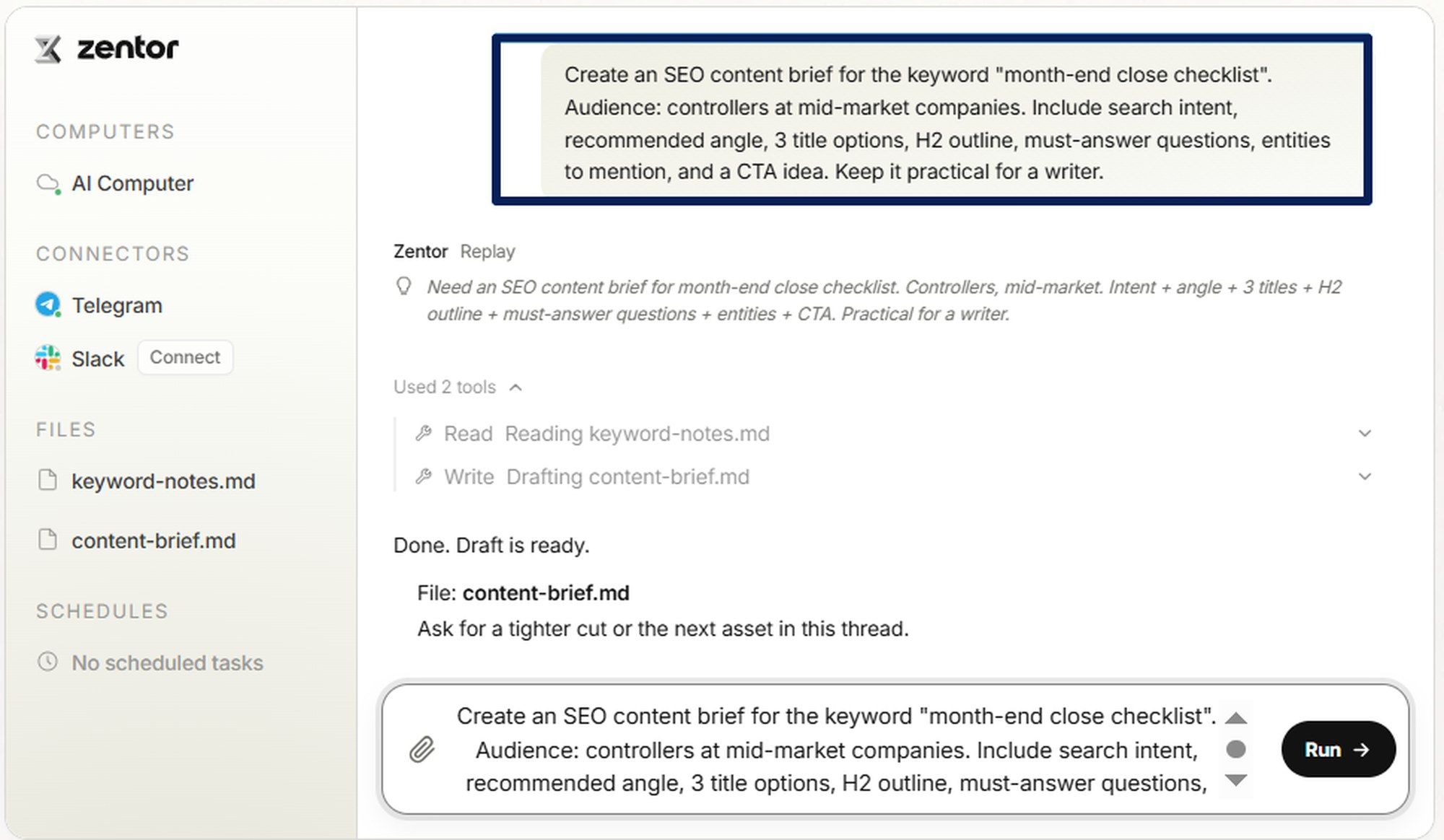
For recurring SEO work, Zentor's public Content Brief Generator example shows useful structured inputs: audience, angle, outline, questions to answer, entities, and a CTA idea. The exact tool matters less than keeping those decisions attached to the item that moves forward.
Move Work Through Clear Stages
Use only states that alter responsibility, risk, or the next action. This table works for a freelancer or small editorial workflow. Boring states are easier to recover.
| Status | Enter when | Owner | Exit evidence |
|---|---|---|---|
| Brief ready | Required fields and source plan exist | Content owner | Assignment accepted |
| In production | Writer or creator is working | Assigned contributor | Draft and asset links attached |
| In review | A reviewable version exists | Reviewer | Decision recorded against that version |
| Approved | Required reviewers agree | Content owner | Approval, version ID, and channel confirmed |
| Scheduled | Destination accepted the item | Publisher | Destination ID and planned time saved |
| Published | Public page or post is verified | Content owner | Live URL, timestamp, and final version saved |
| Needs recovery | A write, check, or handoff fails | Named recovery owner | Error, next action, and final outcome logged |
Drafting and Asset Creation
Start the draft from the structured brief and save source notes beside the claims they support. The contributor needs the audience, goal, approved angle, sections, asset brief, brand constraints, destination, and deadline.
Give changing decisions a version and a reason. "Use a friendlier tone" is not enough after three people have edited it. Record who requested the change, which draft it applies to, and whether it is accepted. That turns the content workflow into something a substitute can continue without guessing.
Review and Approval
Review the version that will be published. Separate factual, legal, brand, accessibility, and editorial checks when different people own them. A comment should point to a target, identify its author and status, and retain the version it addressed. The W3C Web Annotation model uses that same relationship between a comment and its target.
An approval is a decision, not the absence of comments. This content approval process records approver, time, version, channels, and conditions. A request for Monday publishing is different from approval to publish on Monday.
Publishing and Distribution
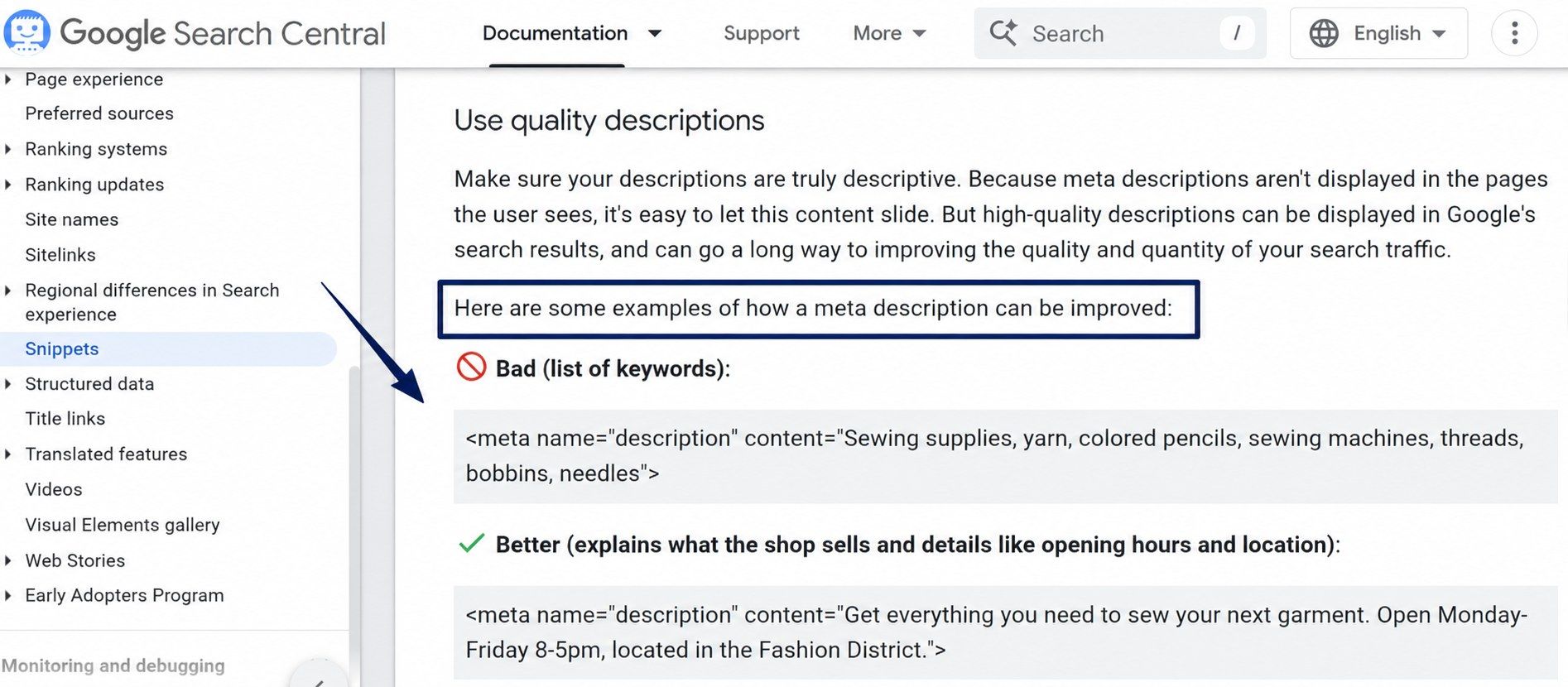
Before scheduling, check that title, URL, byline, assets, links, disclosure, and metadata match the approved version. Google recommends unique, descriptive page-level meta descriptions; give that field an owner.
Save the returned ID, URL, publication time, and final revision. The publishing workflow should read that confirmed record before a social post or newsletter references the canonical URL.
Keep Decisions and Context Attached to the Work
Carry audience, goal, evidence, non-negotiable claims, current version, unresolved comments, approval status, owner, channel, asset rights, and destination receipt. Past chat may explain a decision, but it is not the decision record.
This matters when work moves between a brief, document, design file, CMS, and distribution tool. Zentor's agent memory versus chat history guide makes the same point: retained context needs defined information.
Automate Handoffs Without Hiding Errors
Automate stable handoffs: create a project record from an approved brief, collect required fields, prepare a status update, or save a publication receipt. Keep review gates where a wrong output can look finished. Zentor's guide to automating fast-changing data with review covers a similar risk: a clean delivery can still be stale.
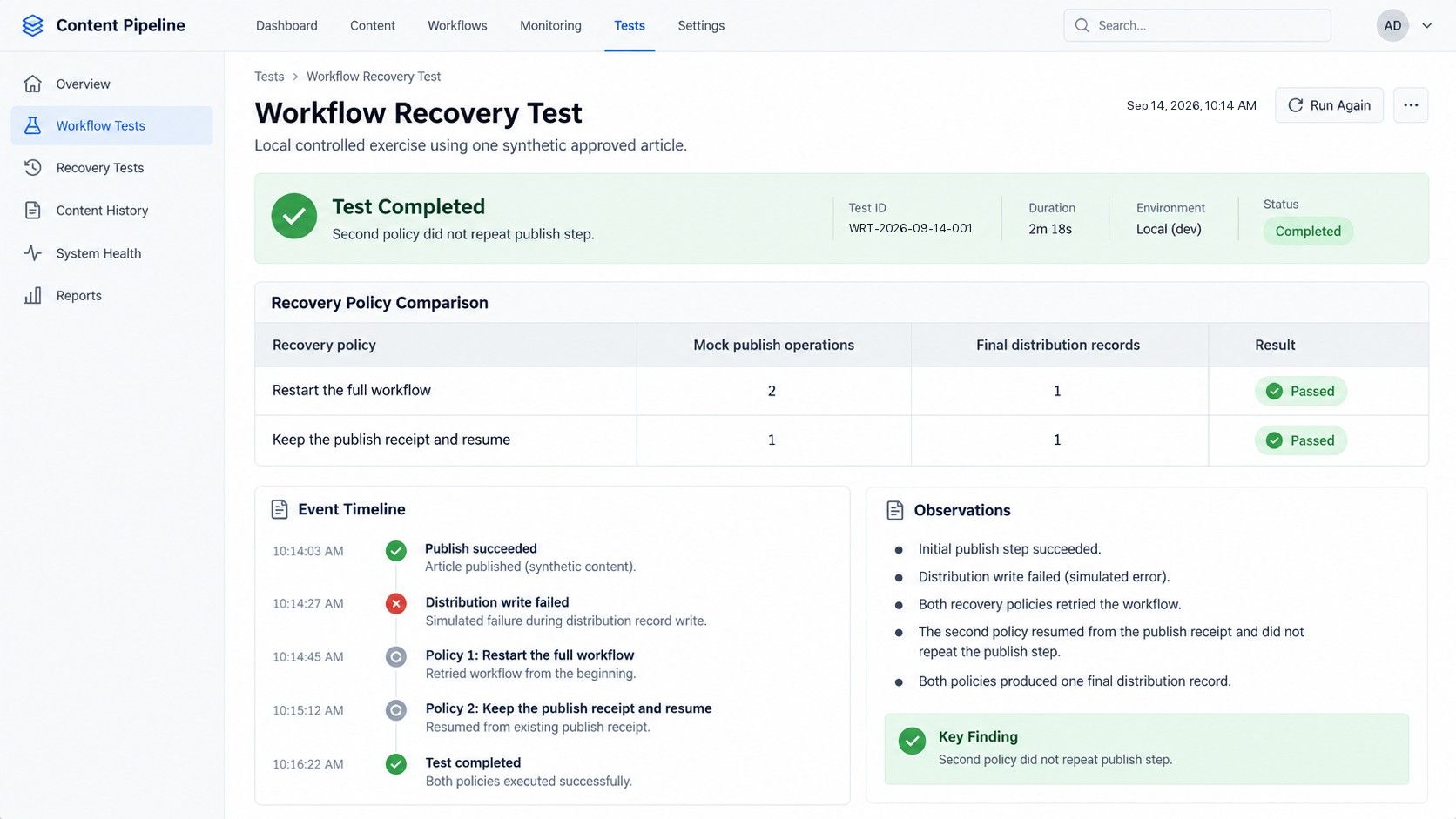
My local exercise used one synthetic approved article. Its mock publish succeeded, then its mock distribution write failed. Both policies made a second attempt.
| Recovery policy | Mock publish operations | Final distribution records |
|---|---|---|
| Restart the full workflow | 2 | 1 |
| Keep the publish receipt and resume | 1 | 1 |
The second policy did not repeat the publish step. This was a controlled example, not a test of a real content system, concurrent editors, or remote services. In production, use an action identity tied to content ID, version, target, and action type. Ask whether your connector supports idempotent requests, which can make a retry return the original result instead of creating a second operation. Check the destination before retrying an uncertain outcome.
Measure Rework, Delays, and Throughput
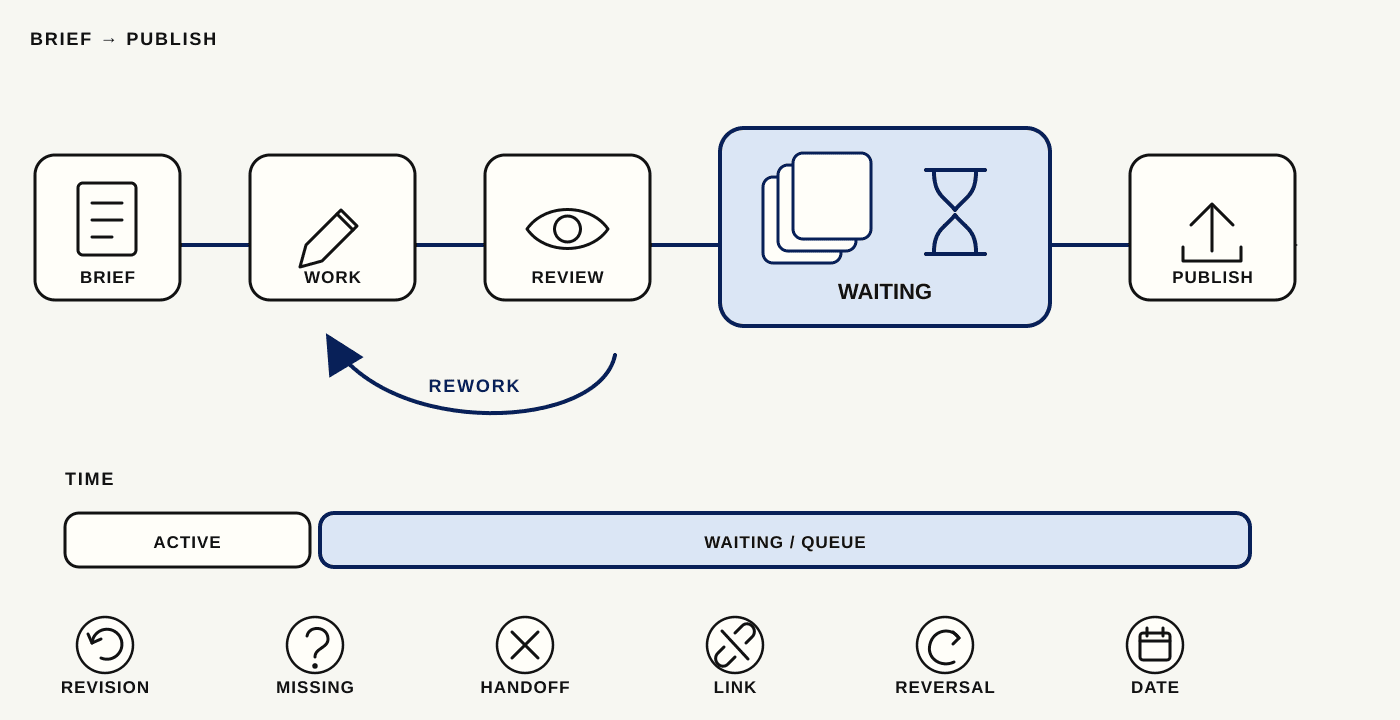
Track time from brief-ready to published, then separate active work from waiting. Count post-review revisions, returns for missing information, failed handoffs, and missed dates. A short content production system can be slower if its approval queue never clears.
Read those figures with factual corrections, asset-rights issues, broken links, and publish reversals. Measure a sample before changing the process. Automation can make throughput look better while moving rework downstream.
FAQ
How should a workflow handle last-minute edits?
Freeze the approved version and create a change request that names the requester, affected channel, urgency, and reviewer. If the CMS supports conditional updates, an If-Match check can prevent one editor from overwriting a newer resource. Reapprove changes that alter facts, claims, or asset rights; log minor formatting corrections separately.
Where should brand guidelines live?
Keep brand guidelines in one canonical, permission-controlled source with a named owner and version date. Put a reference to that source in every brief, then copy only the rules needed for the item. A shared PDF with no owner becomes another conflicting draft when the voice, terminology, or disclosure policy changes.
Can a content workflow preserve comments when files change tools?
Sometimes, but do not assume it. Preserve comments only when the receiving system can retain the comment text, author, time, target, status, and the source version. Export those fields before a migration and keep a read-only review record. A plain text export may preserve words while losing the exact passage the reviewer meant.
What should be archived after publishing?
Archive the approved brief, final source file, asset provenance, approval record, publication URL, destination ID, metadata, and a copy or capture of the published version. Retain correction notes too. They show why a later update happened and stop a future contributor from repeating a resolved decision.
When is a content workflow too complicated?
It is too complicated when a status, form field, or approval does not change ownership, reduce risk, or decide a next action. Remove it. A good test is whether a new contributor could use the record to continue the work. If a field is never read, it belongs in an archive or should disappear.
A Content Creation Workflow Works When Handoffs Stay Clear
Use this content creation workflow when work passes between people or tools and you need to know what was approved, published, or unresolved. Start with one repeatable content type, follow an item through the table, and keep the error record. That shows which step deserves automation next.
Continue Reading
More Guide
TRAE Work Guardrails: Permissions and Review

OpenTag Workflow: Slack Threads to Approval Trails
Claude Tag Guardrails for Workspace AI Access

Claude Tag Workflows for Shared Slack Context

What to Use Instead of Manus in 2026
Grok 4.5 API Europe: Access and Setup
The Zentor editorial team writes about workflow automation, AI agents, and the tools we build. Default byline for industry overviews, listicles, and collaborative pieces.
Ready to put this into practice?
MoClaw runs browser tasks, research, and schedules automatically. Try it free.
References: https://developers.google.com/search/docs/fundamentals/creating-helpful-content · https://c2pa.org/ · https://www.w3.org/TR/annotation-model/ · https://developers.google.com/search/docs/appearance/snippet · https://docs.stripe.com/api/idempotent_requests · https://developer.mozilla.org/en-US/docs/Web/HTTP/Reference/Headers/If-Match