Grok 4.5 API Europe: Access and Setup
Grok 4.5 API Europe is live in the xAI console. Verify the grok-4.5 model name, pricing, prompt caching, and fallbacks before production traffic.

Table of Contents
Grok 4.5 API Europe is a rollout workflow for checking whether an EU-based team can use xAI's grok-4.5 model through the API console, then managing agent traffic safely after access is confirmed. xAI lists grok-4.5 with a 500,000-token context window at $2.00 per 1M input tokens and $6.00 per 1M output tokens for short context, but a working request is not the same as an approved rollout. For an AI agent, setup means model configuration, account verification, cost visibility, prompt cache evidence, fallback routing, and human approval all have to be visible before production traffic depends on the model.
Key takeaways:
- Treat EU API console visibility as a starting point, not production approval.
- Keep
grok-4.5in configuration, not task prompts. - Verify pricing, context, rate limits, prompt caching, and cost fields with the production account.
- Build fallback behavior around detection, logs, fallback model, cache key, cost threshold, and human sign-off.
I learned to care about this after watching scheduled agent jobs fail in boring ways. The first test response looked fine. The second week was messier: a research brief retried, a cache key changed after a prompt edit, and the cost log no longer matched the expected daily budget. This guide is about making Grok 4.5 API EU access repeatable enough to approve, monitor, and pause when evidence changes.
Current API Status for Europe
Last checked: August 4, 2026. xAI's July 17 release note says Grok 4.5 is available in the API console for EU users. That does not remove the need for per-account checks: verify that your organization can create an API key, call grok-4.5, see pricing and rate-limit details, and run the same request from staging before approving production traffic.
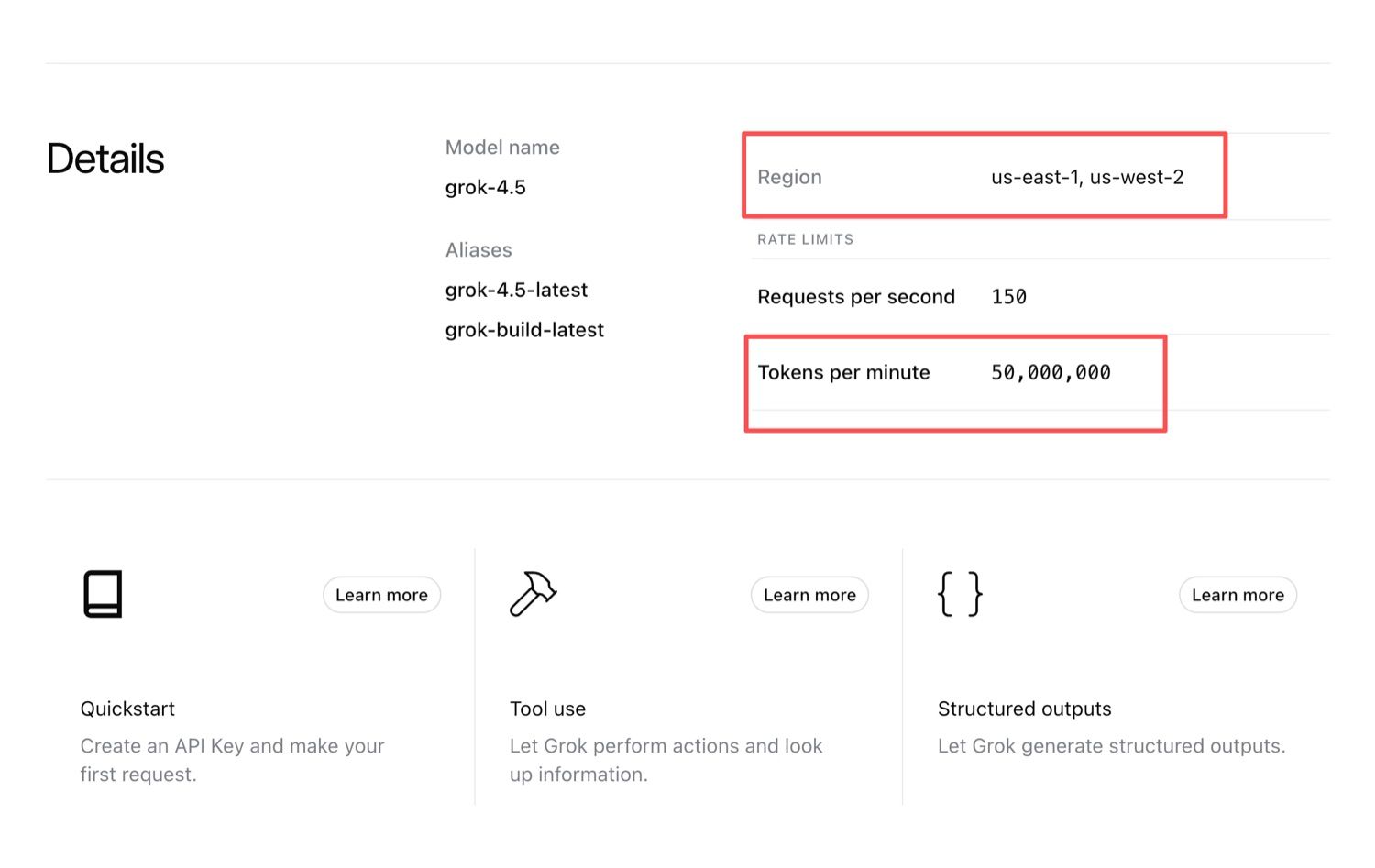
This distinction matters because xAI API Europe access is not the same as production approval. The console may expose the channel, while your team still needs to confirm key ownership, billing, runtime, internal policy, and fallback rules. The model detail page currently lists grok-4.5 with a 500,000-token context window and serving regions of us-east-1 and us-west-2, so teams with data residency requirements should record that separately before sending sensitive traffic. For the broader channel-by-channel tracker, see MoClaw's Grok 4.5 EU release status, which separates API console access from Cursor, Office add-ins, gateways, and team fallbacks.
API Basics to Verify First
Before asking how to use the Grok 4.5 API in a production agent, verify the small facts that usually break later. A working demo is useful, but it does not prove the production path. Keep the model string, endpoint family, pricing tier, context behavior, cache fields, and cost record in one place, preferably in the rollout ticket or release notes for that workflow.
Model name and endpoints
Use the exact grok-4.5 model name unless your release policy deliberately allows an alias. The console lists grok-4.5-latest and grok-build-latest as aliases, and an alias that silently re-points is exactly the kind of change a rollout review is supposed to catch. Put the model string in an environment variable, feature flag, or model routing table, not inside a long prompt. That gives the operator a clean way to pause, switch, or roll back the workflow without editing task instructions.
xAI lists Grok 4.5 for the Responses API and Chat Completions. For agent workflows, the Responses API is often cleaner because the request body can carry prompt_cache_key, and the response shape is convenient for usage tracking. Chat Completions can still work well when an existing stack already uses that format. Record the endpoint family as a rollout decision, not an implementation accident.
Pricing and context window
Pricing should be checked on the approval date, not copied from an old draft. As of this check, xAI lists Grok 4.5 pricing at $2.00 per 1M input tokens, $0.30 per 1M cached input tokens, and $6.00 per 1M output tokens for short context. The same pricing table shows long-context pricing beginning at 200,000 tokens, where input, cached input, and output all double.
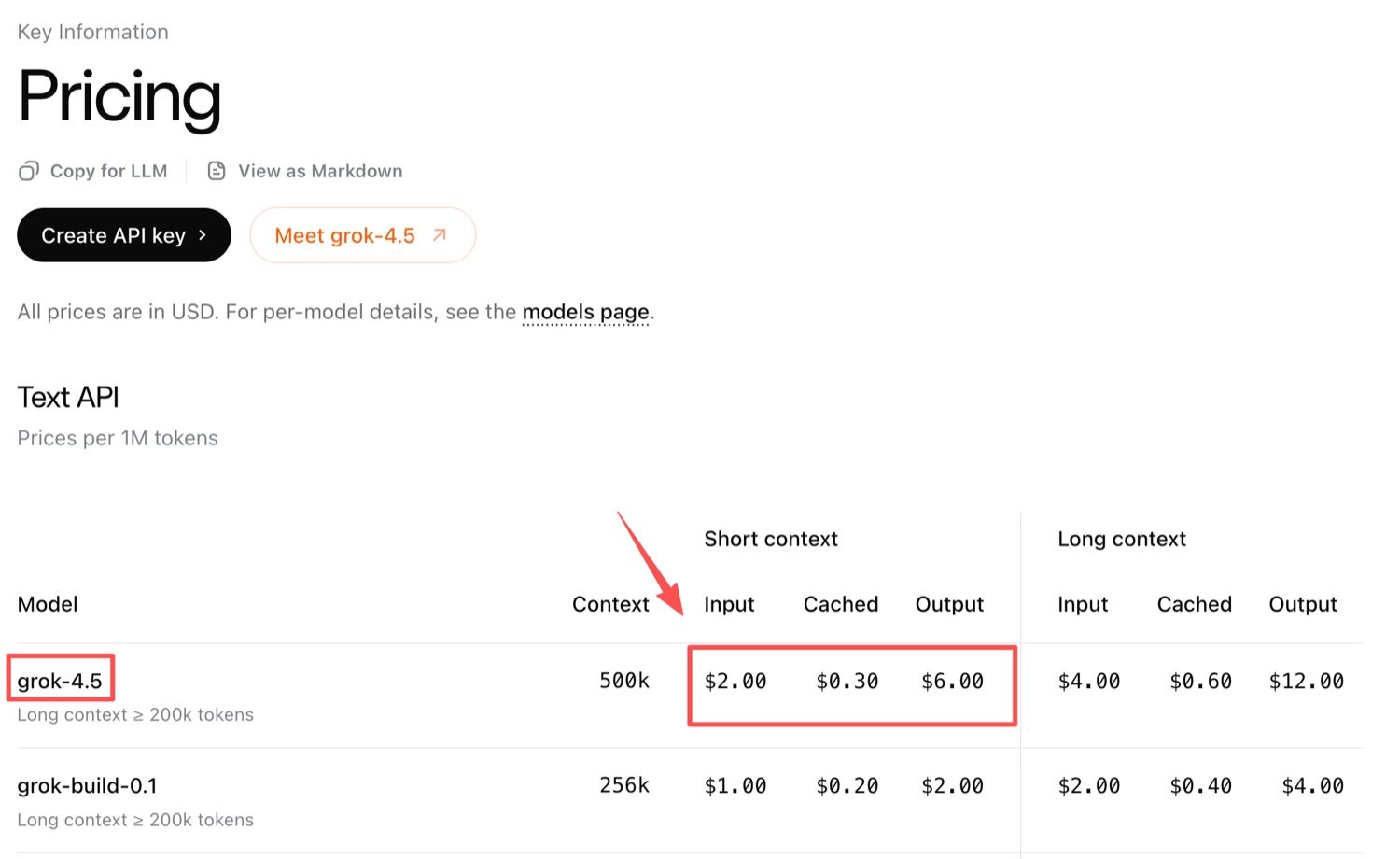
Here is the operational example I would use in a rollout review. Suppose your agent sends a stable 20,000-token instruction pack for a recurring competitor brief 40 times a month. Without cache benefit, that repeated input is 800,000 tokens, or about $1.60 before output. If the first run pays full input and the remaining 39 runs hit cached input, the repeated input side is about $0.27 before output. The lesson is simple: cost depends on prompt shape, cache hits, context size, retries, and tools, not only the model name.
Prompt caching fields
The Grok 4.5 prompt cache should be treated as a release-control field. xAI's prompt caching guidance recommends prompt_cache_key in the request body for the Responses API and the x-grok-conv-id HTTP header for Chat Completions, with stable content placed at the beginning of the request so repeated prefixes can be reused.
In a real agent workflow, the system policy, output rubric, source rules, and examples should stay stable at the front. The changing request should come later. Monitor cached_tokens after rollout: the Responses API reports cached tokens under usage.input_tokens_details.cached_tokens, while Chat Completions uses usage.prompt_tokens_details.cached_tokens. If repeated runs keep showing zero cached tokens, log a cache-miss warning before increasing the budget.
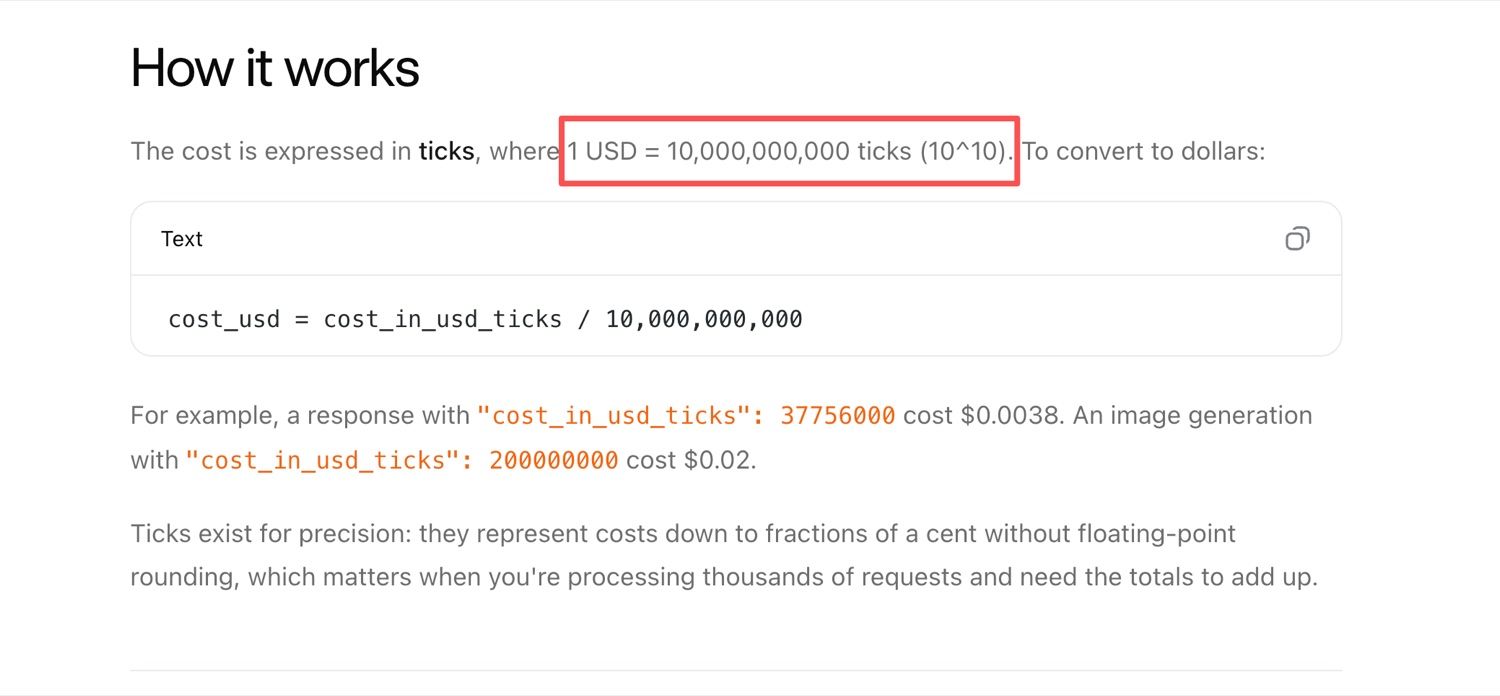
xAI also returns request cost through usage.cost_in_usd_ticks, where 1 USD equals 10,000,000,000 ticks. That is useful for agent operations because the workflow can compare actual request cost against the expected range on every run.
Check Whether Your Account Has Access
Access should be proven with the account that will own production work. A local test by one operator is not enough. Evidence should come from the same organization, billing setup, and runtime path that the scheduled agent will use.
The clean access check starts with the team admin confirming console access and selecting the intended API key. Then the staging environment should call grok-4.5 directly, not a consumer app name or gateway label. The response record should include the status code, model ID, endpoint family, cached-token field, cost field, timestamp, and whether a fallback path was used. After that, the same request should run from the staging runtime, not just a laptop, because a local success does not prove the scheduled environment is ready.
Picture what a shallow approval costs. If you signed off on a daily market-monitoring agent because one console call returned a fluent answer, the failure would not show up on day one. It would show up three weeks later, when a prompt edit moved the output rubric below the changing query, every run started reporting cached_tokens of 0 instead of roughly 18,000, and the month closed at full input pricing on all 30 runs rather than the cached rate the budget assumed. Nothing errored. The logs looked healthy. Only the invoice disagreed.
So I would not approve that agent on one fluent response. I would want a short evidence file: team, environment, model string, endpoint family, cache key, cached tokens, request cost, fallback status, and reviewer. That evidence is not exciting, but it is what lets a team compare today's access against next month's change.
Build Region-Aware Fallbacks
Fallbacks should protect the workflow without hiding why the primary route failed. The goal is to keep the agent honest when grok-4.5 is unavailable, over budget, rate-limited, or not approved for the current account.
| Control | What to configure | What the agent should do |
|---|---|---|
| Model name | Primary grok-4.5 plus approved fallback model |
Switch only under approved error classes |
| Region/account detection | Team, runtime, billing entity | Stop when the current path is not approved |
| Error log | Status, message, model, endpoint, timestamp | Preserve evidence for release review |
| Prompt cache key | Workflow slug plus prompt version | Explain cache hits and misses |
| Cost threshold | Per run and per schedule window | Pause or request approval above threshold |
| Human approval | Owner, channel, expiry | Require sign-off before production routing changes |
A good fallback design tells the operator what happened. "Primary unavailable, fallback approved for low-risk summary tasks, cost under threshold, reviewer notified" is usable. "Model failed, used another one" is not. The fallback model should be a documented part of the workflow, not a silent substitution that changes output quality, cost, or compliance posture without review.
What Not to Do
Do not turn uncertain access into informal credential or routing behavior. Anything that breaks the link between account, billing entity, runtime, and approval record makes the production agent harder to trust.
The biggest mistakes are usually small shortcuts. A team hardcodes the model name in prompts, approves production from a playground-only test, hides rate-limit errors behind a generic failure message, or assumes cached pricing without checking cached_tokens. Another common failure is letting fallback silently change behavior for high-stakes tasks. Staging and production keys should also stay separate, because mixed keys make cost, access, and incident review harder to reconstruct.
The cleaner path is simple: prove access, log behavior, set limits, and make fallback visible.
How MoClaw Fits This Workflow
MoClaw fits as the operations layer around the API rollout, not as a replacement for xAI's access controls. A team can use MoClaw to run recurring access checks, watch release and pricing changes, preserve evidence files, and prepare reports before production traffic changes.
For example, a MoClaw workflow could check Grok 4.5 access every morning, save response metadata, compare cache and cost values against the previous run, and alert the owner only when something changed. That is close to the operating-brief logic in MoClaw's AI agent planning checklist: define the job, evidence, limits, reviewer, and stop rules before connecting a model to live work.
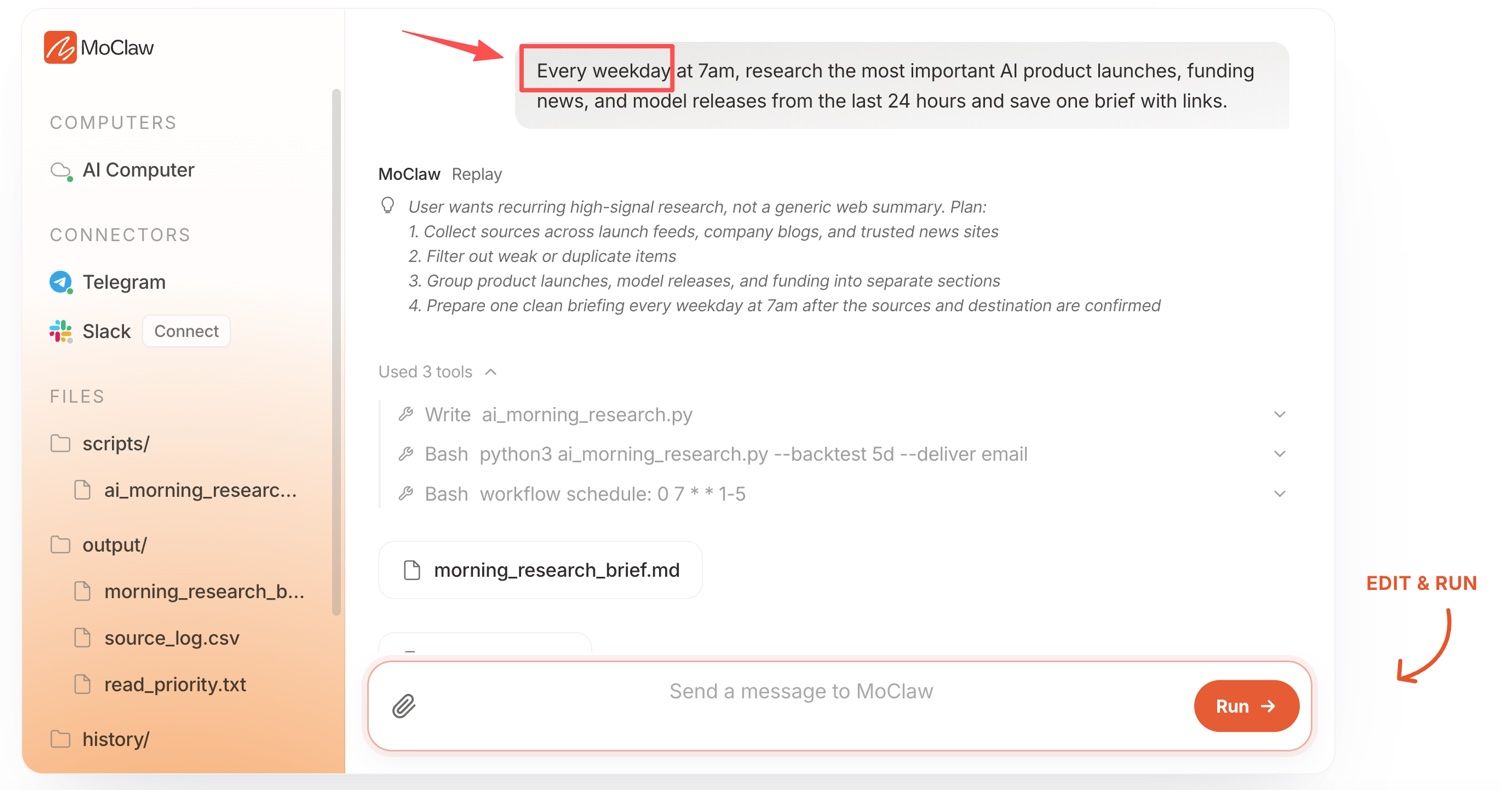
The same logic applies to fast-moving API facts. If a product team wants a daily AI release brief, MoClaw can keep the source list, prompt version, cache key, output file, and approval note together in a persistent workspace. That fits MoClaw's past guidance on keeping fast-changing data workflows reviewable, where the risk is often not a crash but a stale value that publishes cleanly.
The boundary is important. MoClaw should make the real state visible: which account was checked, which model answered, what the cache did, what the request cost, whether fallback ran, and who approved the next step.
FAQ
Who should own the production API key?
The production API key should belong to the organization, not a single operator. Put it under the same secret-management, billing, rotation, and offboarding process used for other production credentials. A person can administer it, but the owner of record should be the team responsible for output and cost.
Should staging and production use separate rollout checks?
Yes. Staging proves the integration path, logging fields, cache behavior, and fallback rules before users depend on them. Production proves the live key, billing entity, runtime, and approval chain match what was reviewed. Keep both records.
What access evidence should teams keep?
Keep enough evidence to reconstruct the decision without storing secrets. A good record includes timestamp, team, key owner, environment, endpoint family, model string, success or error status, rate-limit visibility, cached-token field, cost field, fallback status, and reviewer.
How should teams handle regional access changes?
Treat regional access changes as release events. Rerun staging, update the routing table, refresh cost thresholds, and ask the workflow owner to approve production behavior again. If the change affects model location, regulated data, or customer commitments, involve the privacy or compliance owner before the agent resumes work.
Does EU console access mean the model runs in the EU?
No. Console availability and serving region are separate facts. The model detail page lists us-east-1 and us-west-2 as serving regions, so an EU team with data residency obligations should record where requests are actually processed and clear that separately with whoever owns privacy review.
Grok 4.5 API Europe Is Ready When the Workflow Is Reviewable
Grok 4.5 API Europe is ready for production only when the team can explain the workflow without guessing: which account owns the key, which model name is configured, what pricing and cache fields are being monitored, what fallback can run, and who approves a change. A successful model call is the beginning. A reviewable agent workflow is the release standard.
Vera Note: This article covers Grok 4.5 API access for EU teams based on xAI documentation reviewed on August 4, 2026. Pricing, regions, rate limits, and console availability can change by account and date. This is a rollout-planning guide, not a claim that every EU account has production-ready Grok 4.5 API access, so verify current values in your own console before changing production behavior.
Continue Reading
More Guide
AI Travel Planning Workflow for Busy Teams

AI Travel Email Integration for Bookings

ChatGPT Codex: From Chat to Tasks

What Compound Engineering Actually Compounds

Running Claude Code Agents in Parallel

Grok 4.5 Agent Workflows: Tools and Fallbacks
The MoClaw editorial team writes about workflow automation, AI agents, and the tools we build. Default byline for industry overviews, listicles, and collaborative pieces.
Ready to put this into practice?
MoClaw runs browser tasks, research, and schedules automatically. Try it free.
References: xAI Docs: Pricing · xAI Docs: grok-4.5 model details · xAI Docs: Release notes · xAI Docs: Prompt caching · xAI Docs: Cost tracking · xAI Docs: Rate limits