Claude Code Plugin Marketplace: What's Inside

Anthropic's Claude Code plugin marketplace ships 39 in-house plugins and 15 third-party ones. What the split means and what to check before installing.
Table of Contents
Anthropic now runs a Claude Code plugin marketplace of its own, and the interesting part isn't the plugin count. It's the README. Before the directory tells you a single thing about what's inside, it tells you not to assume Anthropic has checked it: "Anthropic does not control what MCP servers, files, or other software are included in plugins and cannot verify that they will work as intended or that they won't change."
That sentence sits above the table of contents, in a yellow warning block, on a repository with Anthropic's own name on it. Most vendors bury that language in a terms page. Putting it first changes what the directory is claiming to be, and it's worth taking seriously before you run the install command.
Key Takeaways:
- Anthropic's directory holds 39 plugins it maintains itself and 15 third-party ones, in separate folders.
- The README's first block warns that Anthropic doesn't control the MCP servers or files inside a plugin and can't verify they won't change.
- A plugin can ship
.mcp.json, so installing one can wire up a server that reaches outside your machine with your tokens. - Approval is a point-in-time review of a moving git source. Check whether the marketplace entry pins a commit.
- Enable plugins per project rather than globally, and read the manifest before you install.
What the Claude Code plugin marketplace actually is
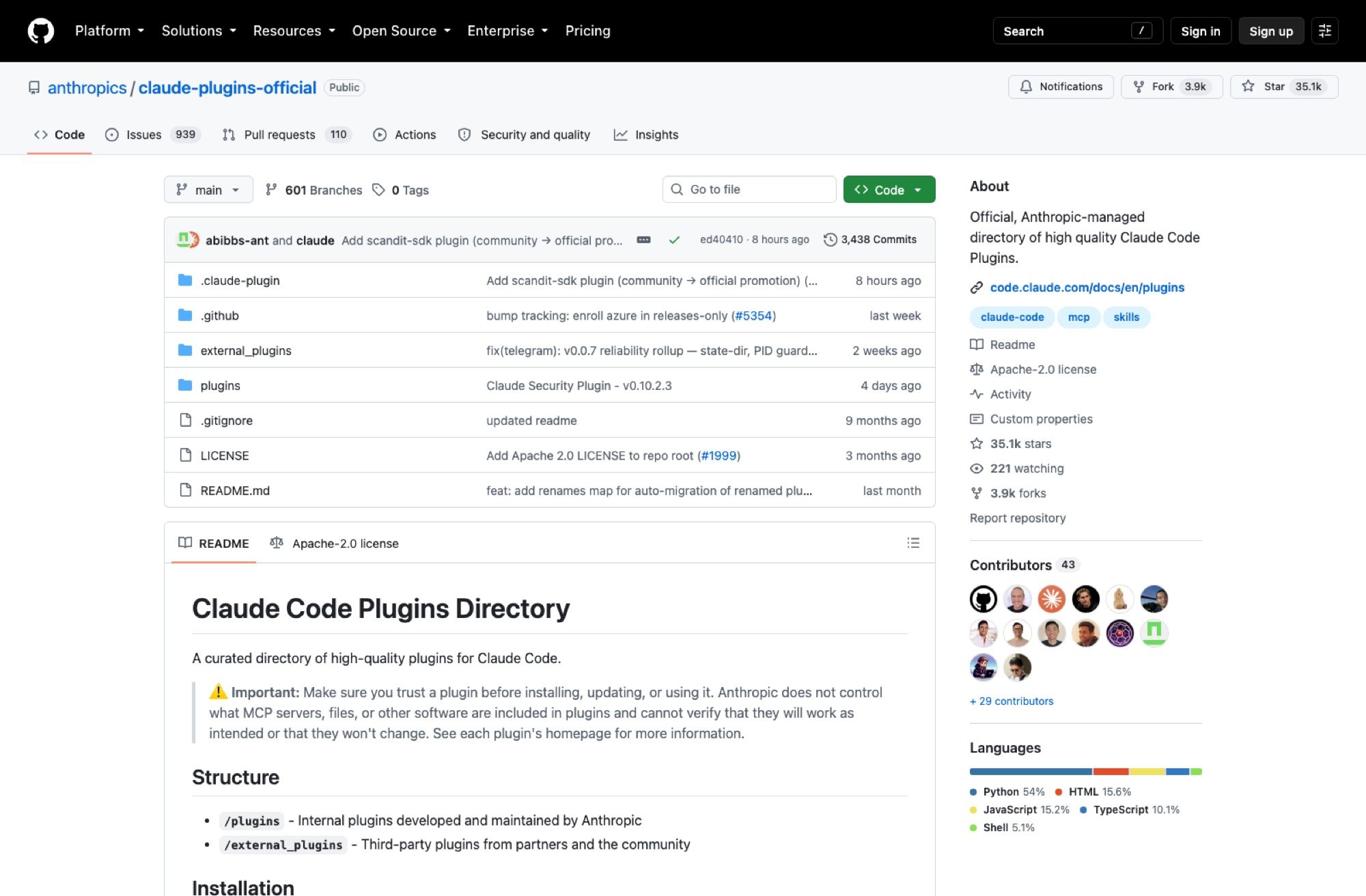
The repo is anthropics/claude-plugins-official, created on 20 November 2025 and sitting at 35,062 stars when I checked on 29 August 2026, with 3,438 commits from 43 contributors. It's Apache-2.0 at the root, though the README is careful to add that you should look at each linked plugin for its own license, which is the first hint that this thing is a pointer collection rather than a codebase.
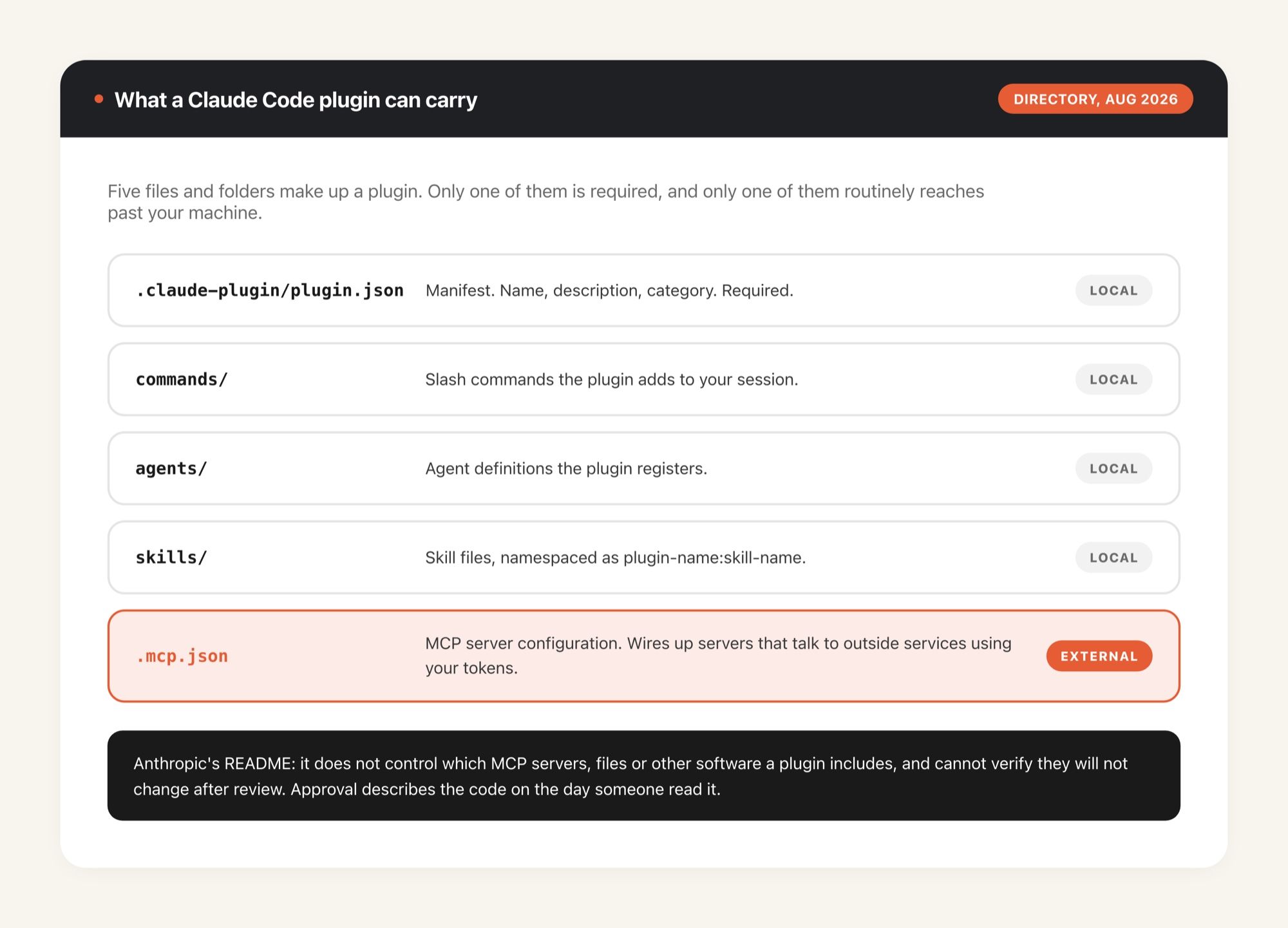
A plugin here is a directory with a fixed shape. There's a required .claude-plugin/plugin.json manifest, and then any combination of four optional pieces: commands/ for slash commands, agents/ for agent definitions, skills/ for skills, and .mcp.json for MCP server configuration. That last one carries most of the weight in this article, so hold onto it.
Thirty-nine in-house plugins, fifteen from everyone else
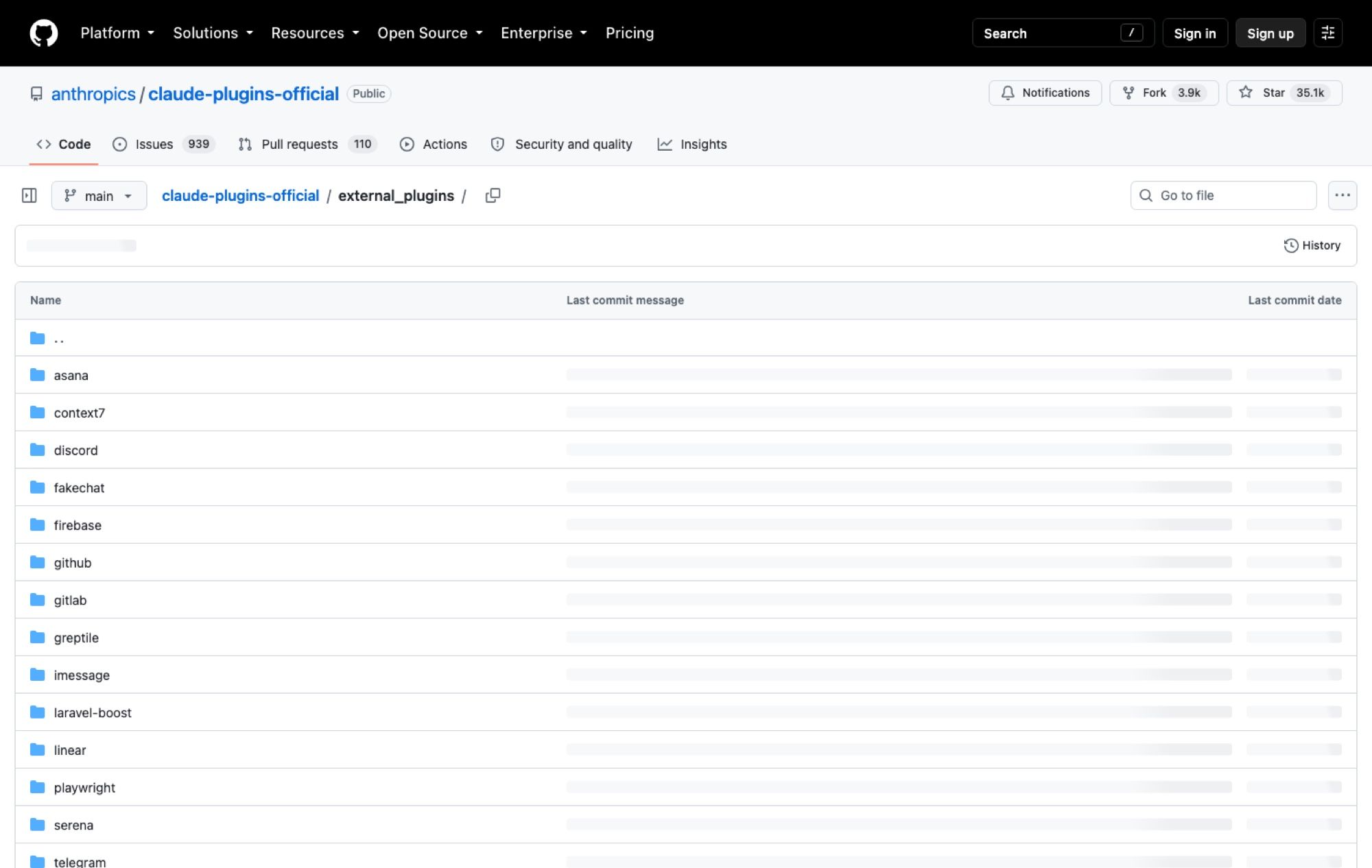
The directory splits into two folders, and the split is the whole design. /plugins holds work by Anthropic team members; /external_plugins holds submissions from partners and the community. On 29 August 2026 that came to 39 internal and 15 external.
The internal set is heavy on plumbing. Twelve of the 39 are language-server plugins, one each for C/C++, C#, Go, Java, Kotlin, Lua, PHP, Python, Ruby, Rust, Swift and TypeScript, which tells you Anthropic considers "give the agent a real language server" a solved problem it would rather ship than have everyone reinvent. The rest cover the work you'd expect a coding agent to want: code-review, pr-review-toolkit, code-simplifier, code-modernization, frontend-design, commit-commands. There's a plugin-dev plugin for building plugins and a skill-creator for building skills, plus claude-security and security-guidance sitting in the same folder as everything else.
The external fifteen are a different animal, and reading the list is the fastest way to understand the risk conversation:
- Issue trackers and project tools: asana, linear
- Source hosts: github, gitlab, greptile
- Infrastructure: firebase, terraform
- Messaging: discord, telegram, imessage
- Everything else: context7, fakechat, laravel-boost, playwright, serena
Look at what those names have in common. Almost every one of them is useful precisely because it reaches a system that holds your credentials, your source code, your infrastructure state, or your private messages. A GitLab plugin that can't touch your GitLab is worthless; the value and the exposure are the same property.
How installing from the marketplace works
Two ways in. You can run /plugin install {plugin-name}@claude-plugins-official if you already know what you want, or open /plugin and browse under Discover, the path most people take the first time. Anthropic's plugin documentation walks through both.
One detail in the README matters more than it looks. Plugin names are immutable slugs: once published, a plugin's name can't change, because users have it installed under that slug and a rename breaks their setup with a plugin-not-found error. If a rename really has to happen, the maintainer adds an entry to a renames map in the marketplace manifest and Claude Code rewrites the old slug on the next sync. That's a small piece of engineering that exists only because the install is a live pointer to somebody else's repository, which is the point I keep circling.
Getting into /external_plugins isn't automatic, either. Third parties submit through a directory submission form, and the README says external plugins have to meet quality and security standards before approval. Some do get promoted; the commit at the top of the repo when I looked was adding the scandit-sdk plugin, labelled "community → official promotion."
The warning Anthropic put at the top of its own README
So there's a submission form, a review, a standards bar, and then a warning that says Anthropic can't verify these plugins will work as intended or that they won't change.
Both things are true, and the second one is doing the heavier lifting. Review happens at a moment in time; a plugin entry points at a git source that keeps moving. The marketplace format even supports a sha field pinning a specific commit (the marketplace schema docs cover how entries are declared), but a plugin tracking a branch gets whatever that branch becomes. Approval was granted to the code as it stood on the day somebody read it.
Add .mcp.json back in. A plugin can ship MCP server configuration, so installing it can wire up a server that talks to an external service with your tokens. Anthropic is telling you plainly that it doesn't control which servers those are. Nothing about that is a scandal. It's the honest description of what a directory can and can't promise, and I'd rather have it in a warning box than in a footnote.
The practical consequence is about where this runs. A plugin executes with whatever access the environment around it already has, so on a laptop that's your SSH keys, your cloud credentials, your browser profile and everything else you've ever authenticated. That's the gap MoClaw fills for this particular problem: a hosted cloud AI computer gives the agent and its plugins their own machine with their own credential set, so a plugin behaving badly costs you a sandbox rather than your personal environment. It sits alongside your local install rather than replacing it.
What to check before you install a third-party plugin
Four things, in the order I'd actually do them.
Read the plugin.json and the .mcp.json. These are short files. The manifest tells you what the plugin registers, and .mcp.json tells you which servers get wired up and with what. If a plugin that claims to format Markdown wants a network-reaching MCP server, stop there.
Check whether the source is pinned. Marketplace entries can specify a sha. An entry pinned to a commit is a known quantity; an entry tracking main is a subscription to whatever that repository does next.
Look at the homepage, not the listing. The README says as much, and it's right. The listing is a name and a category; the plugin's own repo is where you find out who maintains it and how recently they touched it.
Decide per project, not once. Claude Code enables plugins per project in settings, which means the terraform plugin doesn't have to be loaded while you're editing a blog. Most people turn everything on globally and forget. Don't. Per-project enablement is a config toggle rather than a boundary, though, since every project still shares one filesystem and one set of credentials; giving a job its own MoClaw instance is what turns that toggle into actual separation, because the infrastructure plugin and the writing work stop living on the same disk.
If any of that sounds like more diligence than you'll realistically perform on a Tuesday afternoon, that's the honest reaction, and it's the reason the isolation argument matters more than the audit argument. Reviewing every dependency is a nice idea nobody sustains; putting the risky work on a machine you don't mind losing is a decision you make once. Running Claude on a MoClaw instance also means a scheduled job carries on after you close the lid, which local plugin setups can't do because a sleeping laptop runs nothing.
There's a second-order benefit that shows up later. Because the environment isn't tied to one physical machine, the plugin set you configured stays put when you pick the work up from a different device, and MoClaw keeps that continuity rather than asking you to re-authenticate a fresh install every time you switch. Anyone who has rebuilt a Claude Code config on a second laptop knows exactly how much that's worth.
An official listing is a curation signal, not a guarantee
Here's the distinction I'd hold onto. Being in Anthropic's directory means somebody at Anthropic read the submission against a standards bar and let it through. It does not mean Anthropic is standing behind the plugin's future behaviour, and the README says so in the first paragraph rather than making you infer it.
That's a stronger position than most plugin ecosystems take. The npm registry doesn't warn you. Neither does the VS Code marketplace, in language that direct. Anthropic shipping the caveat above the fold is the part of this launch I'd point at as a good precedent, even though it's the part that reads like a disclaimer.
The Claude Code plugin marketplace is worth using. Thirty-nine maintained plugins from the vendor is a real head start, and the external fifteen include tools most teams would otherwise wire up by hand. Just install them the way you'd add a dependency to production, not the way you'd install a browser extension. And if you want the ecosystem context, our roundups of Claude skills worth installing and what skills actually are cover the layer underneath plugins, while the third-party permissions review goes deeper on the audit question than I have here.
Counts and figures in this piece are as of August 2026, taken from the repository on 29 August; a directory that gained a community promotion the morning I wrote this will not have the same numbers next month.
FAQ
Is the Claude Code plugin marketplace made by Anthropic?
The repository is Anthropic-managed, and the /plugins folder holds plugins built by Anthropic team members. The /external_plugins folder holds third-party submissions from partners and the community, which Anthropic reviews for approval but does not develop or control.
Are external plugins in the directory safe?
They've passed a review, which is not the same as a guarantee. Anthropic's own README states it can't verify that plugins will work as intended or that they won't change after approval. Treat an external plugin the way you'd treat any third-party dependency with access to your credentials: read its .mcp.json, check whether the marketplace entry pins a commit, and enable it per project rather than globally.
How do I submit a plugin to the directory?
Third parties submit through the plugin directory submission form at clau.de/plugin-directory-submission. The README says external plugins must meet quality and security standards before approval, and community plugins can later be promoted into the official set.
Do I need to install plugins one at a time?
No. /plugin install {plugin-name}@claude-plugins-official handles a specific plugin, but browsing /plugin > Discover lets you work through the directory interactively, and Claude Code tracks which plugins are enabled for which project in your settings file.
Continue Reading
More Guide
OpenAI Assistants API Deprecated: What Broke

MCP Tools: What They Are and Which to Use

OpenAI Models Not Available in Cursor Nov 12

Coding Agent Security: When Your Tools Lie

OpenAI Python HTTPX2: What Actually Breaks

Goldie: App Store Screenshots, Automated

The MoClaw editorial team writes about workflow automation, AI agents, and the tools we build. Default byline for industry overviews, listicles, and collaborative pieces.
Ready to put this into practice?
MoClaw runs browser tasks, research, and schedules automatically. Try it free.
References: anthropics/claude-plugins-official (GitHub) · Claude Code plugins documentation · Claude Code plugin marketplace schema · Plugin directory submission form · external_plugins folder listing