Claude Cowork Not Working on Windows: Sep 2026
Claude Cowork not working on Windows since Sept 8? Update KB5124008 broke the Plan9 drive share. What still runs, and whether a fix exists yet.
Table of Contents
If you're seeing Claude Cowork not working on Windows since the middle of last week, the cause is documented and it isn't your machine. A Windows security update shipped on 8 September 2026 broke the folder share Cowork's sandbox relies on, so the workspace can't reach your drive and local commands fail. Chat and file editing mostly still work. Anthropic has an open incident for it, Microsoft has confirmed the underlying bug, and as of 14 September 2026 there is no released fix.
Key Takeaways:
- Anthropic's status page has carried "Degraded functionality for Claude Cowork on Windows" since 10 September 2026, 15:54 UTC, at major impact and still in the Identified state
- The trigger is Microsoft update KB5124008 (OS builds 26200.9445 and 26100.9445), which breaks Plan9 host folder shares into Hyper-V-based Linux VMs
- Microsoft's known-issues page names Claude Cowork and WSL as affected and marks the issue Confirmed
- Restarting and reinstalling Cowork do nothing, because the broken component is on the Windows side
- The vendors disagree on how close a fix is: Anthropic says Microsoft has developed one, Microsoft's page still says it's working on a resolution
What Anthropic's status page actually says
The incident report went up on 10 September 2026 at 15:54 UTC and has had a single update since. Its wording draws the line between what broke and what didn't:
"A Windows update released September 8 has left Claude Cowork on Windows unable to run local commands, because its workspace can no longer reach your computer's drive. For most users, chat and file reading and editing still work. There's no in-app workaround yet, and restarting or reinstalling won't help. Microsoft has developed a fix and is working to release it."
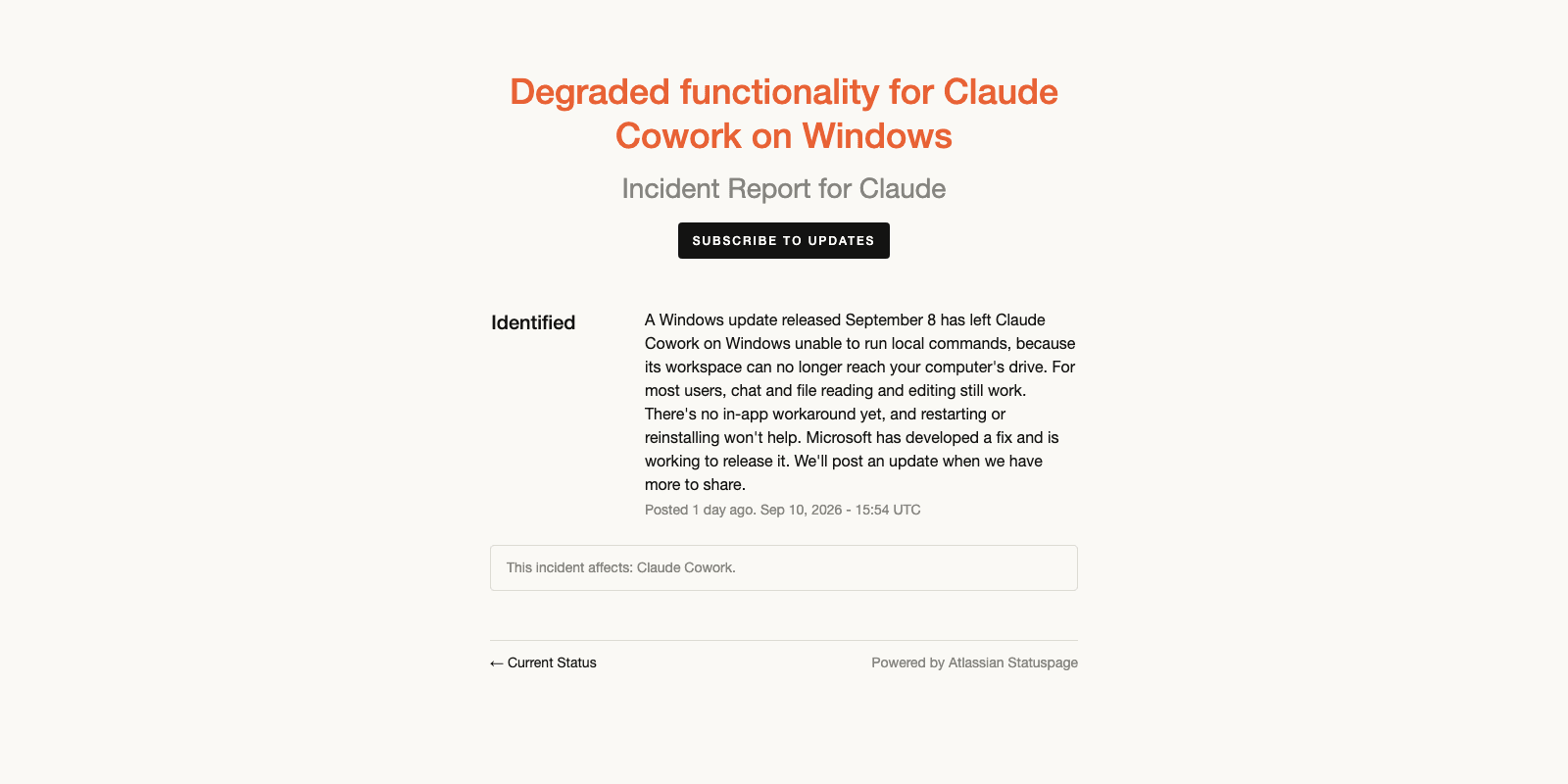
Two details tend to get skipped by people searching for why they have Claude Cowork not working after a routine patch cycle. The incident sits at Identified rather than Monitoring, meaning the cause is understood and the fix isn't deployed, and the "restarting or reinstalling won't help" line exists because that's the first thing everyone tries.
The root cause Microsoft confirmed on 11 September
Anthropic's page says "a Windows update". Microsoft's Windows 11 known-issues page names it, and that entry is the better document to read if you want to understand what actually happened.
The issue is filed as "Host folder shares might be unavailable in Hyper-V-based Linux VMs", opened 11 September 2026 at 02:22 PT and last updated the same day at 10:45 PT, status Confirmed. The originating update is KB5124008, builds 26200.9445 and 26100.9445. Microsoft's description:
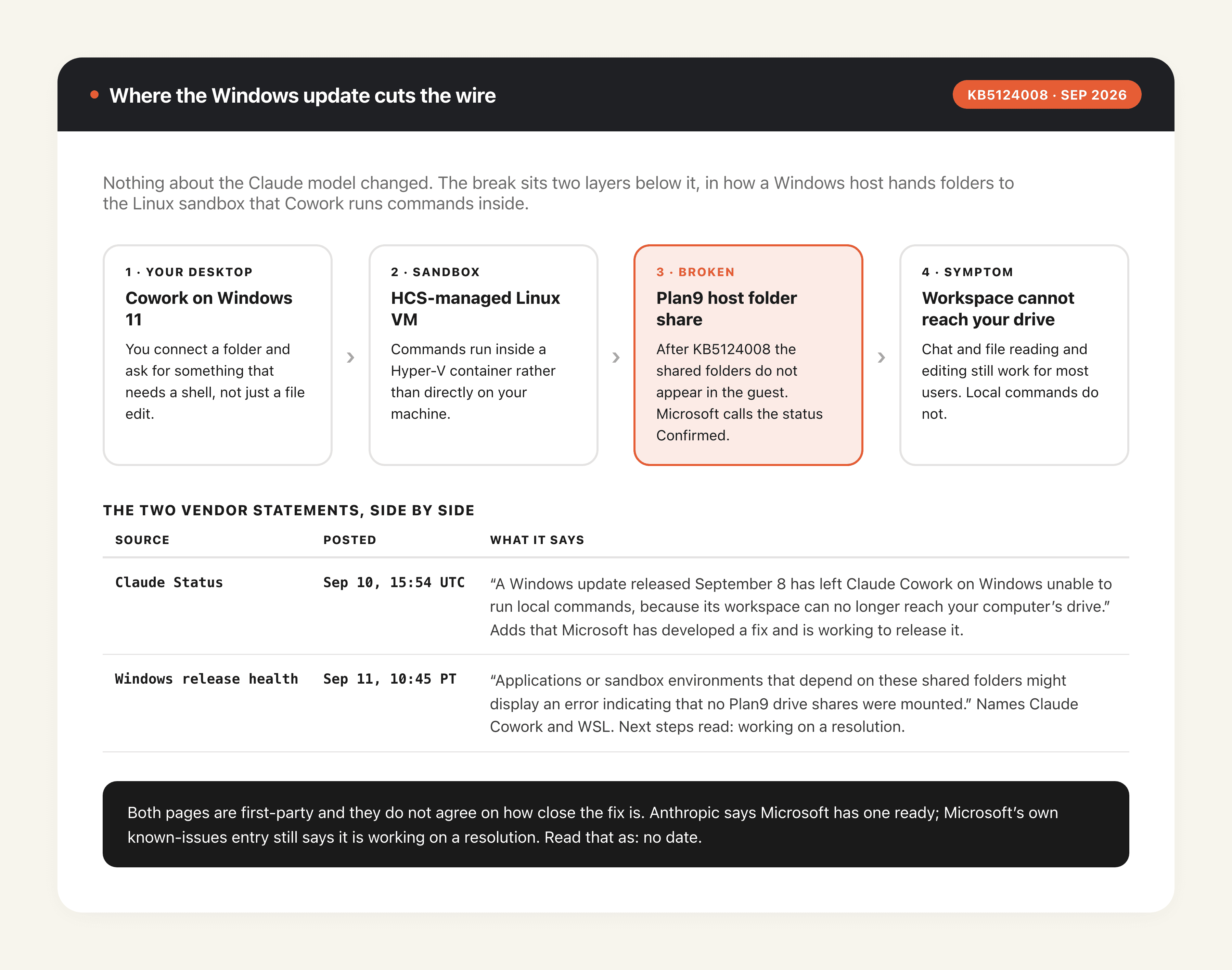
"After installing the September 2026 security update KB5124008, applications that use HCS-managed virtual machines might experience issues when sharing host folder with Linux VMs using Plan9. Affected virtual machines start normally, but folders shared from the Windows host using Plan9 do not appear or cannot be accessed in the guest environment."
Then the sentence that ties it back: "Applications or sandbox environments that depend on these shared folders might display an error indicating that no Plan9 drive shares were mounted. Claude Cowork and the Windows Subsystem for Linux (WSL) are two of the applications affected by this issue."
So Cowork runs its shell work inside a Linux VM managed by the Host Compute Service, and the folder you connected reaches that VM over Plan9, the same 9P protocol WSL uses for /mnt/c. Break the share and the VM still boots; it just can't see your files, which is exactly the workspace-with-no-drive phrasing Anthropic chose.
Affected platforms, per Microsoft: Windows 11 versions 26H1, 25H2, 24H2 and 23H2. Server is listed as None, and standard Hyper-V VMs that don't use Plan9 aren't affected. The same KB produced a separate Confirmed issue around Remote Desktop Services instability, so if your week has been strange in more than one way, that's likely the same update.
Claude Cowork not working: what still runs and what fails
Anthropic's line is "for most users, chat and file reading and editing still work", which sets a useful boundary. The model isn't degraded and the account isn't restricted; the thing that fails is the class of tasks that need a shell.
In practice that splits Cowork's jobs cleanly. Reading a folder, editing files, drafting and reviewing, anything inside the app's own file handling: largely fine. Running a build, executing a script, invoking a local CLI: fails. The frustrating middle case is a multi-step task that dies three steps in, because nothing warns you that step four needs a command.
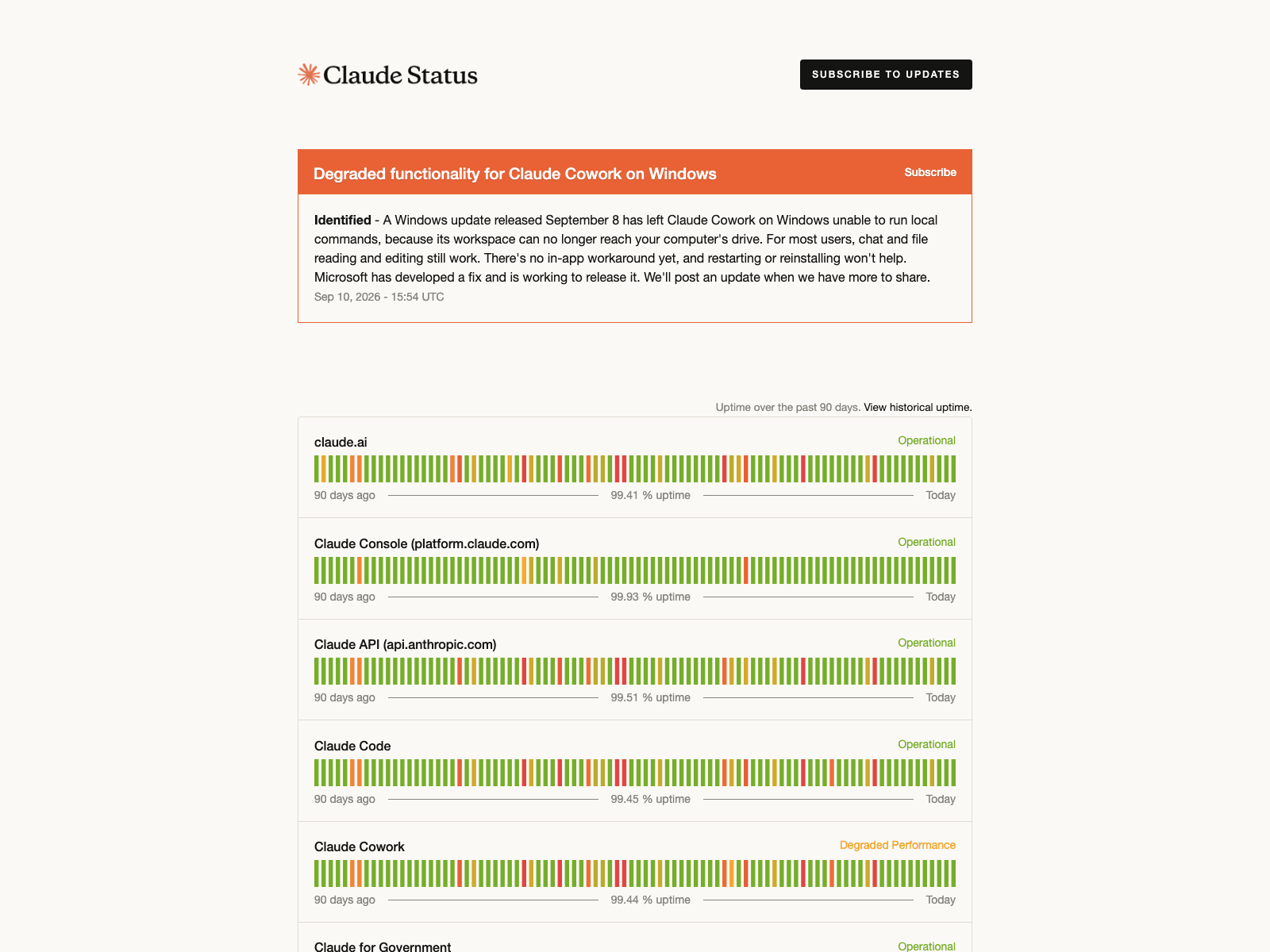
Claude Cowork is also still flagged on the Claude status page as of 14 September 2026, now reading Degraded Performance at 99.44% uptime over the trailing 90 days while every other component sits at Operational. That single amber row is the fastest at-a-glance confirmation that the problem is theirs.
It has also gone quiet. The incident has read Identified since 10 September at 15:54 UTC with no follow-up in four days, which on a major-impact incident says the fix isn't Anthropic's to ship.
How to tell this is your problem and not a different one
Three checks, in the order that costs least. Claude Cowork not working is a broad symptom, and at least three unrelated things produce it, so ruling the others out first is cheaper than waiting on a vendor.
Confirm you're on Windows 11 and that KB5124008 is installed; winver gives you the build, and 26200.9445 or 26100.9445 or later has it. macOS isn't affected. Next, try a task that only reads and edits files: if that succeeds while a shell task fails, the symptom matches the incident rather than a broken install. Third, open WSL and list /mnt/c, since Microsoft named WSL as affected by the same bug and a second application failing the same way is strong confirmation.
Users on Reddit and X have been pointing at the same KB since 11 September, and three phrasings circulate. The one worth searching for, reported independently by more than one Windows 11 25H2 user, is the mount error itself:
Plan9 mount failed: invalid argument
The others are sandbox-helper: no Plan9 drive shares, matching Microsoft's description of what affected applications would display, and a plainer report of the Linux workspace failing to start. All three are community reports rather than official wording, so treat the phrasing as indicative and the KB number as the thing to check.
"Missing HCS services" is a different Windows failure
One error gets mistaken for this incident often enough to be worth separating out. If the Cowork tab in Claude Desktop is greyed out and refuses to open at all, naming missing HCS services such as Missing HCS services: HNS, vmcompute, vfpext, that is not KB5124008.
The distinction is where the failure lands. Under the September bug the sandbox starts and then can't see your folder, so the session works until a shell step. Under the HCS error there is no session at all, because the Host Compute Service stack Cowork's VM needs was never registered: vmcompute, the Host Network Service, and the vfpext filtering driver. Bug reports against the Claude Code repo describing it date from July 2026, two months before the September update existed.
That one is a Windows features problem rather than a regression. Turning on Hyper-V, Virtual Machine Platform and Containers and rebooting registers the services, and Get-Service vmcompute confirms it. If every feature reports enabled and vfpext alone stays missing, the driver is sitting in the component store without ever being deployed.
Rolling back the update is a trade, not a fix
The obvious move is to uninstall KB5124008, and it does remove the symptom. It also removes a security update, which is the whole problem with that plan. Neither vendor suggests it, and the community thread documenting the rollback cautions against staying off the KB for long.
There's a workaround that costs nothing: run the shell work outside Cowork. Keep Claude for the chat, planning and file editing that still function, and run commands in a terminal yourself. It's clumsy and it defeats the point of an agent that can act, but it gets you through the week without opening a security hole.
One honest note on timing. Anthropic says Microsoft "has developed a fix and is working to release it"; Microsoft's own entry, updated a day later, says only that it is working on a resolution. Those are not the same claim, and until the release-health page moves to Resolved nobody outside the two companies can put a date on this.
Why a cloud workspace isn't in this failure path
Strip the specifics away and the pattern is ordinary: a desktop agent's ability to do real work rests on host-OS plumbing nobody thinks about until a Tuesday patch moves one piece. Plan9 shares, Hyper-V, the Host Compute Service; none of it is Anthropic's code and none of it is yours, yet a break anywhere in it takes the product's most useful capability offline. WSL went down the same way on the same update, which is the clearest evidence the failure was never about any one vendor's agent.
That's the gap Zentor fills. Its workspace disk lives in the cloud rather than being projected into a local VM from a Windows host, so the host-to-guest share that KB5124008 broke simply isn't a component in the path. This isn't an argument for uninstalling anything: Zentor runs alongside a Cowork or Claude Code install rather than instead of it, and the sensible posture during a vendor incident is redundancy rather than migration. If you want the longer version of how these sandboxes are built and where they break, our explainer on AI agent sandboxes covers the architecture, and the cloud AI agent guide covers what moves when the machine isn't yours.
None of that makes a desktop agent a bad idea; it makes a single copy of one a fragile plan. Jobs on a hosted machine don't need your laptop awake or patched, so a week-long desktop regression doesn't silently stop a recurring task. Free access at Zentor runs three days on 1,000 credits, and the $20 plan renews 1,000 credits a month. For how Cowork compares with the other desktop agents when everything is working normally, we put them side by side in Grok Bot vs Claude Cowork vs ChatGPT Work.
FAQ
Why can't Claude Cowork run commands on Windows?
Because Windows update KB5124008, released 8 September 2026, broke Plan9 host folder shares into Hyper-V-based Linux VMs. Cowork runs local commands inside such a VM, so the sandbox starts but can't see the folder you connected. Microsoft has confirmed the bug and lists Claude Cowork by name.
Is there a fix for Claude Cowork not working on Windows?
Not a released one as of 14 September 2026. Anthropic says Microsoft has developed a fix; Microsoft's known-issues page still reads "working on a resolution" with no date. The only safe interim approach is running shell commands yourself outside Cowork.
Does reinstalling Claude Cowork help?
No. Anthropic's incident note says so directly, and the reason is that the broken component is a Windows feature rather than anything in the Cowork install.
Is Claude Cowork down for everyone?
No. Reports of Claude Cowork not working cluster almost entirely on Windows 11 machines that took the September update. The component reads Degraded Performance rather than Major Outage, macOS is unaffected, and Anthropic says chat plus file reading and editing still work for most users. Only Windows machines carrying the September update lose local command execution.
Will uninstalling KB5124008 bring it back?
Removing the update removes the regression, and it also removes a September security update from the machine. Neither vendor recommends it.
Verified against Anthropic's status page and Microsoft's Windows 11 release-health documentation on 14 September 2026. Microsoft's entry "Host folder shares might be unavailable in Hyper-V-based Linux VMs" was last updated 11 September at 10:45 PT and still reads Confirmed. The Plan9 mount failed: invalid argument and sandbox-helper: no Plan9 drive shares strings are community reports and are not quoted from either vendor.
Continue Reading
More Guide
Content Creation Workflow: Brief to Publish

Rune IDE: Keyboard-Driven and Agent-Optional

Browser Use Life Recorder: A Local Audio Diary
BankMCP: Letting AI Read Your Bank Safely

Worktrunk: Git Worktrees for Parallel Agents

Free AI Shorts Generator: Open-Source Clipper
The Zentor editorial team writes about workflow automation, AI agents, and the tools we build. Default byline for industry overviews, listicles, and collaborative pieces.
Ready to put this into practice?
MoClaw runs browser tasks, research, and schedules automatically. Try it free.
References: https://status.claude.com/incidents/r1pqn1kb4hvk · https://learn.microsoft.com/en-us/windows/release-health/status-windows-11-25h2 · https://support.microsoft.com/en-us/help/5124008 · https://status.claude.com/ · https://www.anthropic.com/