Free AI Shorts Generator: Open-Source Clipper

A free, open-source AI shorts generator turns YouTube videos into subtitled vertical clips, no watermark, no credits. How it picks moments, Sept 2026.
Table of Contents
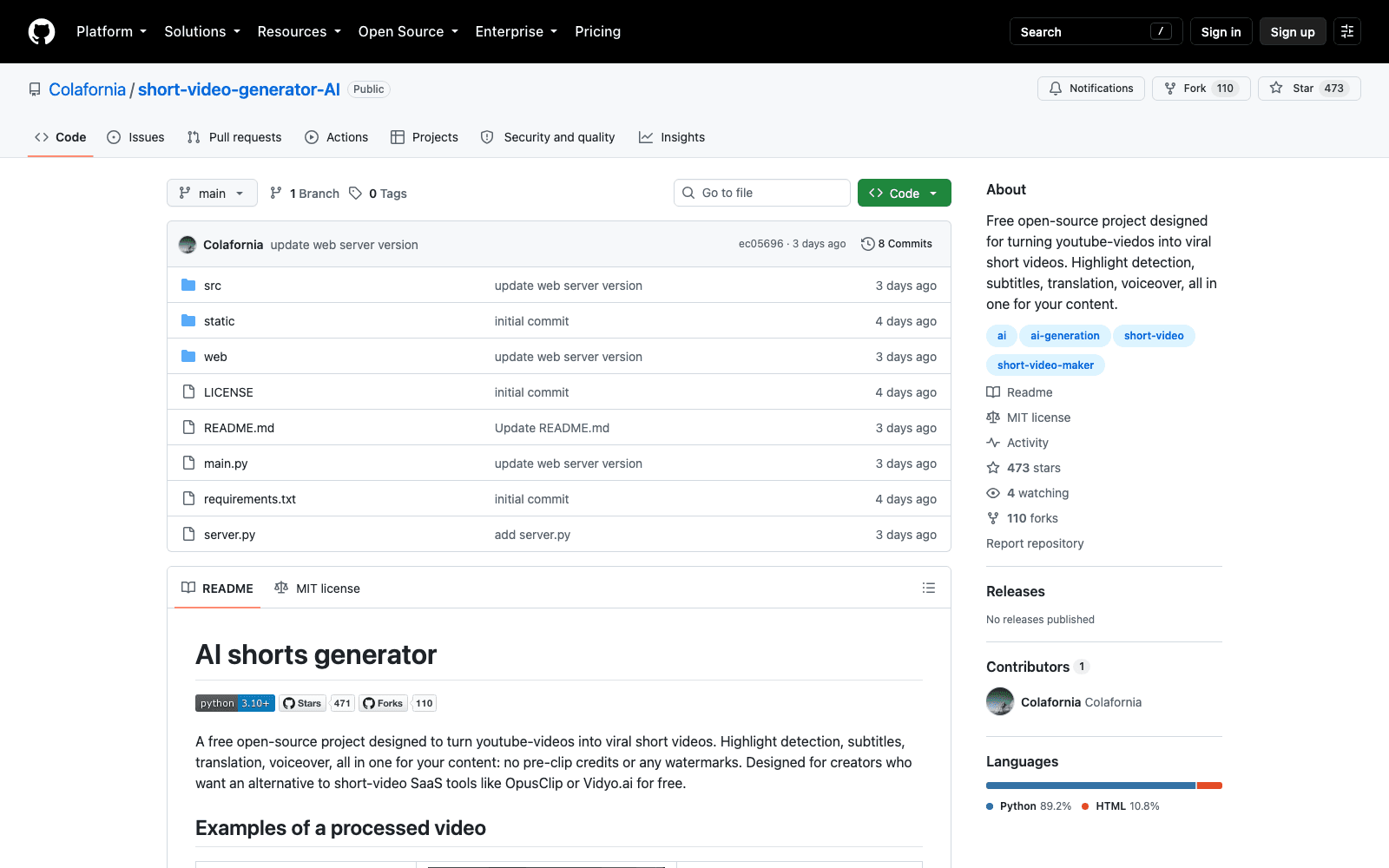
A free AI shorts generator that actually produces something postable is rarer than the category page count suggests, because the free tier of every hosted tool eventually asks for pre-clip credits or stamps a watermark on the corner. short-video-generator-AI does neither. Paste a YouTube link of any length, get a 9:16 vertical short with subtitles and an optional voiceover, no credits, no watermark. It went up on GitHub on 8 September 2026, is MIT-licensed, and had 472 stars four days later.
Key Takeaways:
- MIT licence, no watermark, no per-clip credit system; the costs you carry are an LLM API key and your own machine's time
- Transcription runs locally through
faster-whisper, so the transcript step doesn't depend on which model provider you picked - Highlight ranking scores candidate clips 0 to 100 against eight named criteria, then collapses overlapping candidates by score
- Three provider options: OpenAI, Gemini or MuAPI, set through
LLM_PROVIDER - Ships a CLI, a local web interface and an API, so it can sit inside something else you're building
How this free AI shorts generator decides what to clip
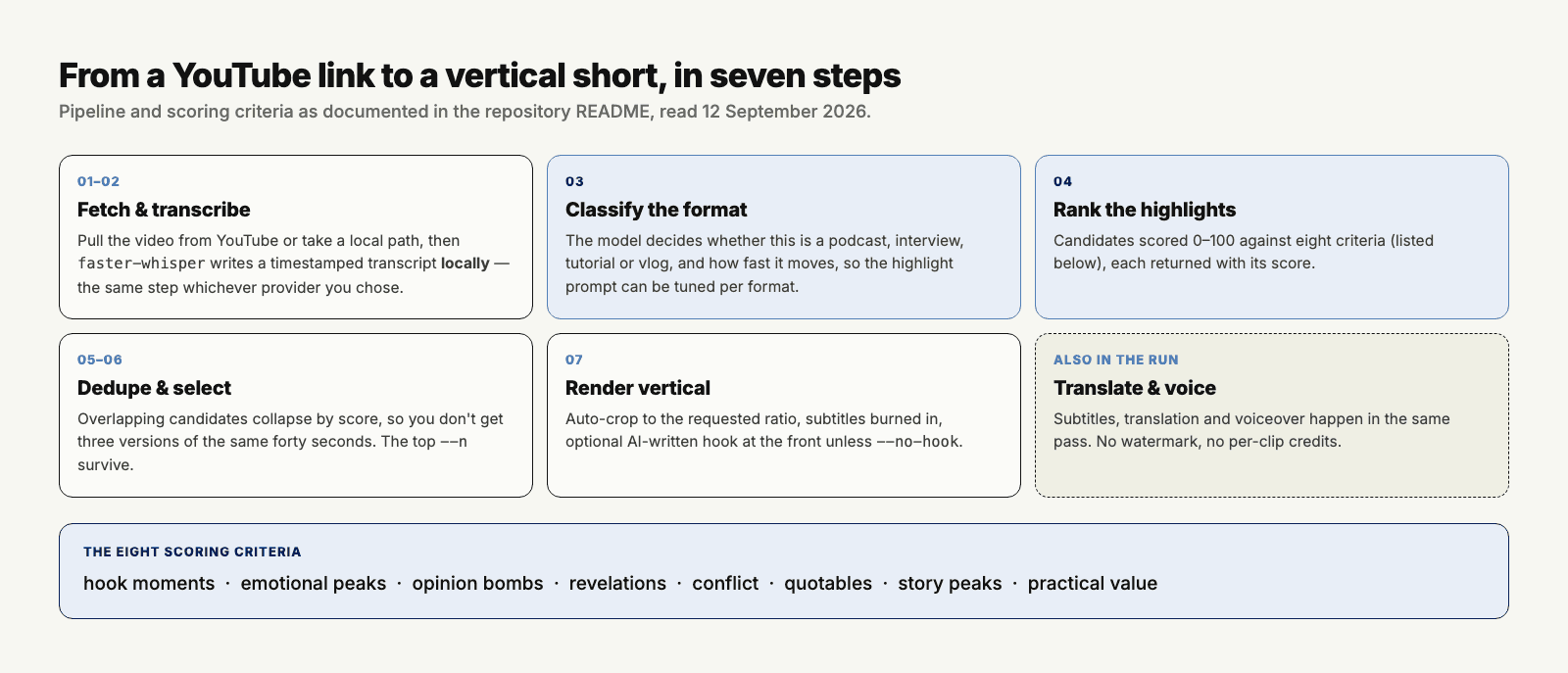
The pipeline is seven steps and the interesting one is fourth. First it fetches the source video from YouTube, or takes a local file path directly. Then faster-whisper produces a timestamped transcript on your machine — the same step regardless of provider, which is a sensible place to draw the line since transcription is the part you least want to pay per-minute for.
Step three is the one most tools skip: the LLM classifies what kind of video this is — podcast, interview, tutorial, vlog — along with its pacing, so the highlight prompt can be tuned to the format. A tutorial and a stand-up set do not have the same shape of good moment, and asking one prompt to find both is how you end up with clips that start mid-sentence.
Then the ranking. The chosen model reads the transcript through what the project calls a virality framework and scores candidates from 0 to 100 against eight things: hook moments, emotional peaks, opinion bombs, revelations, conflict, quotables, story peaks and practical value. Overlapping candidates get collapsed by score, the top N survive, and each is rendered as a vertical short at your requested ratio with an auto-crop, plus an AI-written hook at the front unless you pass --no-hook.
What "free" covers and what it doesn't
The MIT licence is the real thing: use it, modify it, ship it commercially, no permission needed. There's no paid tier and no feature behind a gate, which is a genuinely different arrangement from the freemium products it's positioned against.
What you still pay for is inference. Content classification, highlight ranking and hook generation all call an LLM, and you supply that key. faster-whisper runs locally so transcription is free in money and expensive in CPU, and rendering is ffmpeg-shaped work on your hardware. On a two-hour podcast this is not a background task.
The eight criteria, and why naming them matters
Most clipping tools describe their selection as "AI-powered" and stop there, which gives you nothing to argue with when the output is wrong. Publishing the eight criteria changes that: if your clips keep landing on opinion bombs when you wanted practical value, you know which knob is misfiring and you can go edit the prompt, because the prompt is in the repository.
The dedupe step deserves its own mention too. A ranker that scores every window independently will happily hand back three overlapping versions of the same strong moment, all scoring in the nineties, and the naive fix — take the top three — produces a folder of near-identical clips. Collapsing overlaps by score before selecting the top N is the unglamorous correction that makes the output usable, and plenty of paid tools still get it wrong.
What no framework fixes is source material. Scoring assumes there are peaks to find.
Against OpusClip and Vidyo.ai
The README names both, and the comparison is honest about its own shape. OpusClip and Vidyo.ai sell a hosted product: you upload, you wait, you download, and somebody else owns the reliability. What you get here is the same class of output with none of the account, the credit ledger or the watermark, in exchange for running Python 3.10 or newer and holding your own API keys.
Where the hosted tools are still ahead is everything around the clip. Brand templates, team seats, scheduling, a mobile app, a support queue when a render fails at 11pm. If your objection to OpusClip was the price, a free AI shorts generator you run yourself solves it. If your objection was the editing workflow, this doesn't.
One more thing the hosted products have that this doesn't is a track record. Four days and 472 stars is attention, not evidence, and the repository's last push was 8 September 2026, the day it appeared.
Translation, voiceover and the vertical crop
Beyond clipping, the project handles subtitles, translation and voiceover in the same run, which is what makes it a pipeline rather than a highlight finder. Translation in particular is the feature that quietly changes what the tool is for: one long English talk becomes a set of shorts in a second language without a separate workflow, and for anyone publishing to more than one market that is worth more than the clipping itself. The auto-crop renders each highlight to the ratio you ask for, defaulting to the 9:16 that every short-form platform wants.
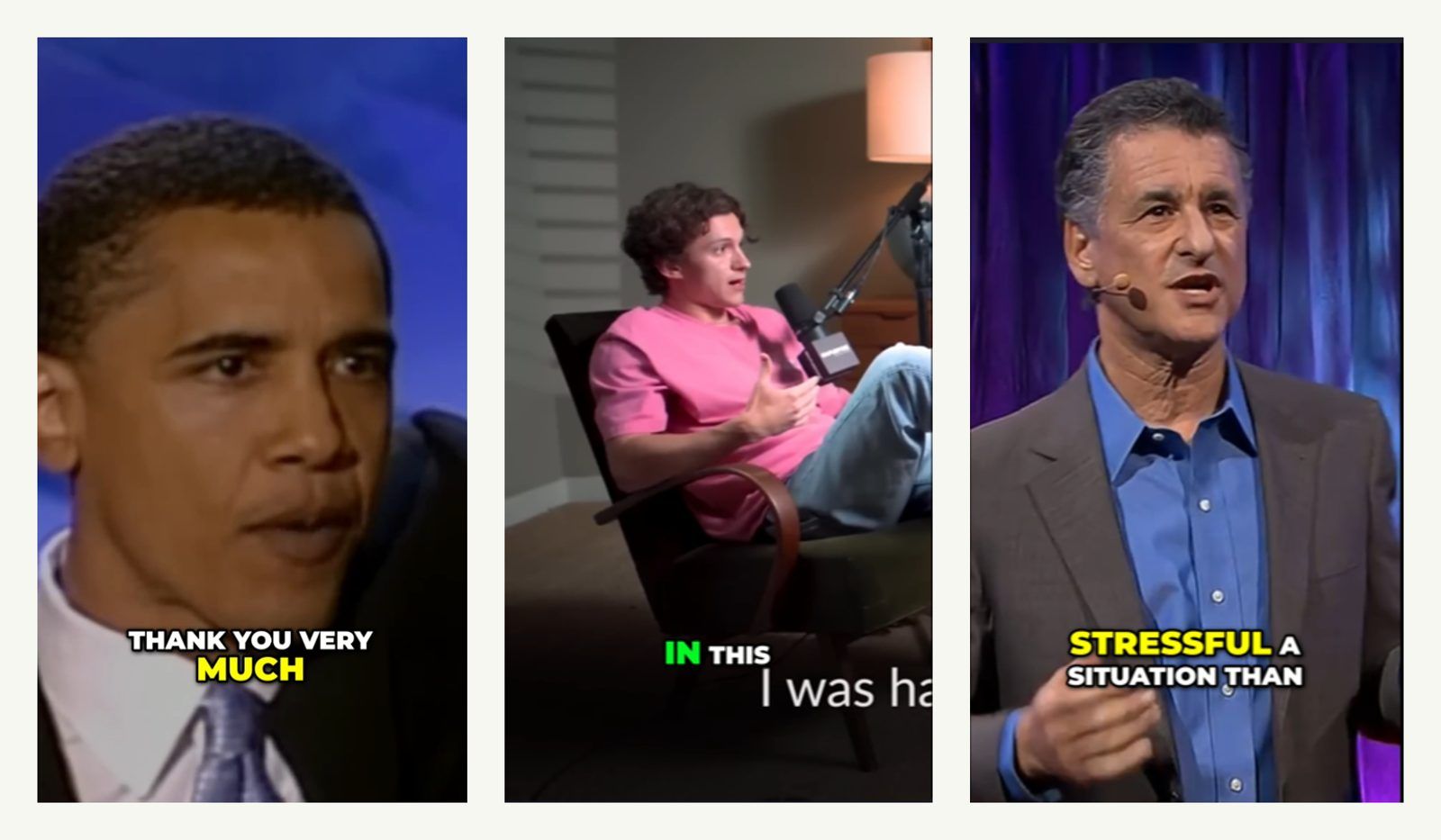
The demo clips in the repository are drawn from public speech and talk footage, including a TED talk by Daniel Levitin on staying calm under stress, a piece of an Obama speech, and a personal-story clip about overcoming social anxiety. Three examples is a small sample and the project doesn't claim otherwise, but all three are single-speaker, well-structured and rhetorically shaped, and that's not an accident. That choice tells you what the highlight ranker is good at: material with clear rhetorical peaks. A rambling two-hour conversation with no structure gives it much less to find, and no scoring framework invents structure that isn't there.
Running it: what you need on the machine
Python 3.10 or newer, the dependencies in requirements.txt, and an API key for whichever of the three providers you chose. Installation is the ordinary clone-and-virtualenv sequence rather than a one-line installer, so budget a few minutes and expect to read an error or two — this is a four-day-old repository and the install path has not been smoothed by a thousand issue reports yet.
Once it's up you have three ways in. The CLI is the one the README documents most fully, with flags like --n for how many clips to keep, --ratio for the aspect and --no-hook to suppress the generated opener. The local web version gives you the same pipeline through a browser if you'd rather not remember flags. The API is the third, and it's the one that makes this interesting to anyone building something larger.
Where the compute actually hurts
Here's the part the README doesn't dwell on. Transcribing a long video locally, calling a model over the full transcript, then rendering several vertical clips through ffmpeg is a chain that runs for a long time on a laptop, and it is the single most common reason people abandon self-hosted media pipelines after two tries.
Zentor is a hosted cloud AI computer, which puts the whole chain somewhere that stays awake and isn't the machine you need for other work. Start a batch against a back catalogue, close the laptop, collect the clips from whatever device you're near later. That's alongside your local install rather than instead of it — the repository stays yours, the keys stay yours, only the hours move.
What it doesn't do
No brand kit, no team workspace, no scheduler pushing finished clips to TikTok at 6pm. No mobile app. No face tracking that keeps a moving speaker centred in the vertical frame, which is the one feature people miss most when they leave a hosted clipper, and the auto-crop here is a crop rather than a follow.
The absence list is long and that's fine, because the project isn't pretending otherwise. It picks moments and renders verticals with subtitles and voice. Everything downstream of that is still your problem, and for a lot of people everything downstream of that was already their problem.
Fitting it into something bigger
Because it ships an API as well as a CLI and a local web interface, this is one of the easier clip pipelines to put inside another system. If you're assembling an end-to-end content workflow, our overview of AI agent video editors maps the adjacent tools, and the Shotcraft walkthrough covers what a code-driven video pipeline looks like when an agent drives it end to end.
That composability is probably the strongest argument for a free AI shorts generator you host yourself. A hosted product gives you clips; a repository with an API gives you a step you can put between two other steps, which is a different kind of useful.
FAQ
Is it really free with no watermark?
Yes. MIT licence, no paid tier, no pre-clip credits, and the README leads on the absence of a watermark. Your costs are the LLM API key you supply and the compute the transcription and rendering consume.
Does it work on any-length YouTube video?
The project says any length. Practically, longer means more transcript for the model to read and more local CPU time, so cost and wall-clock time scale with duration even though nothing is charged per minute.
Is there an API?
Yes, alongside the CLI and a local web interface. The README lists using the generator from your own projects through the API as a headline feature, which is what makes it worth considering as a component rather than only as a tool.
Which models can it use?
OpenAI, Gemini or MuAPI, chosen with the LLM_PROVIDER setting. Transcription doesn't go through any of them — faster-whisper handles that locally on every path.
What to verify before you trust it with a back catalogue
Run it once against a video you know intimately, and compare the clips it picked to the ones you would have picked. That single test tells you more than any benchmark, because highlight selection is a judgement call and yours is the one that has to agree with it. Check the subtitle timing on a fast speaker, since that's where transcription drift shows up first. And read the requirements.txt before you install into an environment you care about.
Worth an afternoon, not a production commitment
The design decisions here are better than the star count would have you assume: classify the format before ranking the highlights, keep transcription local, collapse overlaps by score instead of returning near-duplicates, expose the whole thing through an API. Those are the choices of somebody who has actually watched a clipper return three versions of the same forty seconds. Whether it survives contact with your back catalogue is a different question, and four days of public history is not enough to answer it. Clone it, run it against one video you already know well, and judge the clips it picks against the ones you would have.
Continue Reading
More Guide
Content Creation Workflow: Brief to Publish

Rune IDE: Keyboard-Driven and Agent-Optional

Browser Use Life Recorder: A Local Audio Diary
BankMCP: Letting AI Read Your Bank Safely

Worktrunk: Git Worktrees for Parallel Agents

anything2explainer: Code-Drawn Explainer Video
The Zentor editorial team writes about workflow automation, AI agents, and the tools we build. Default byline for industry overviews, listicles, and collaborative pieces.
Ready to put this into practice?
MoClaw runs browser tasks, research, and schedules automatically. Try it free.
References: https://github.com/Colafornia/short-video-generator-AI · https://github.com/SYSTRAN/faster-whisper · https://www.opus.pro/ · https://ffmpeg.org/ · https://www.ted.com/talks/daniel_levitin_how_to_stay_calm_when_you_know_you_ll_be_stressed