Worktrunk: Git Worktrees for Parallel Agents

Worktrunk is a Rust CLI for Git worktree management built for parallel AI agents. What it does, which agents get which features, and the licence.
Table of Contents
Worktrunk is a Rust command-line tool for Git worktree management, built by Maximilian Roos for people running several AI coding agents against the same repository at once. It sat at 7,259 stars on 13 September 2026, roughly eleven months after the first commit landed on 17 October 2025. The pitch is narrow and it holds up: Git already gives you worktrees, worktrunk makes them cheap enough that you'll actually use five of them.
That narrowness is worth defending up front, because the repository description ("designed for parallel AI agent workflows") invites a bigger reading than the tool deserves. Worktrunk does not schedule agents, watch their output, or decide who works on what. It manages directories and branches. Everything agent-shaped in it is a thin plugin layer on top of that, and as you'll see, the layer is thicker for some agents than others.
What worktrunk is, in one screen
Git's own git worktree command lets one clone have several working directories, each parked on a different branch, each with its own files on disk. Two agents editing the same checkout will fight over the same files; two agents in two worktrees won't. The isolation was never the hard part.
The friction was the ergonomics. Starting a worktree means git worktree add -b feat ../repo.feat, then cd ../repo.feat, which is the branch name typed three times and a path you have to invent and remember. Worktrunk addresses worktrees by branch name and computes paths from a configurable template, so wt switch feat is the whole ritual.
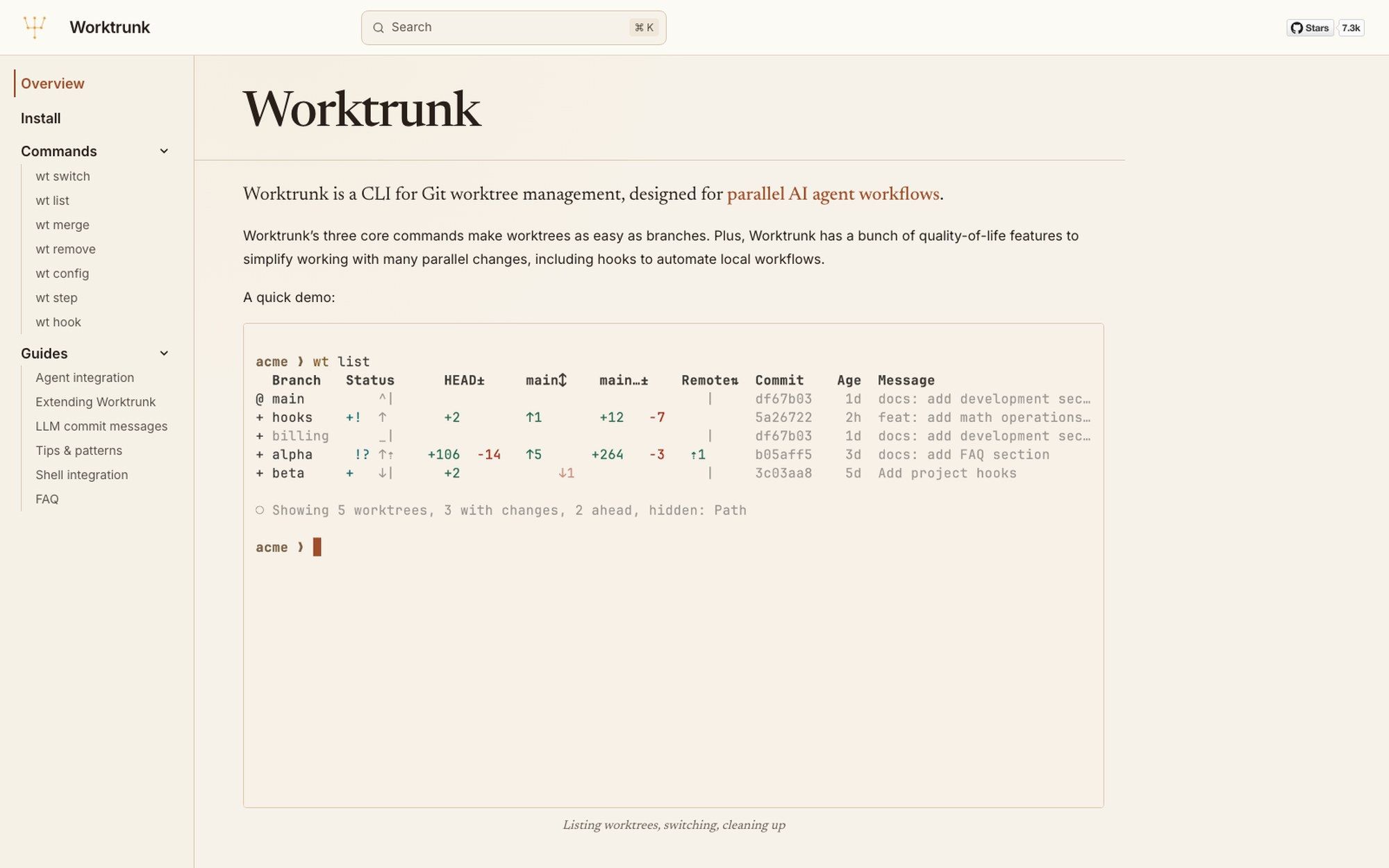
The demo on the front page is wt list, and it's the command that explains the design. Five worktrees, one row each, with columns for status, HEAD drift, how far ahead or behind main each one sits, remote state, the last commit and its age. Three of the five have uncommitted changes; two are ahead. You get that in one screen instead of five cds and five git status calls, and that single view is most of what people mean when they say worktrunk made parallel work bearable.
The commands, and the one that does the awkward work
There are seven: wt switch, wt list, wt merge, wt remove, wt config, wt step and wt hook. The docs group the first four as the core, and wt merge is the one that earns its place.
Creating worktrees is easy; retiring them is where people leave a trail of half-merged directories. wt merge folds a worktree's branch back and cleans up the directory behind it. As of 13 September 2026 the most recent commit on main was a fix to honour the Git worktree lock during exactly that cleanup path, which tells you the corner cases are real and still being found.
wt hook is the extension point. Hooks run shell commands at defined moments in a worktree's life, which is how people get a fresh worktree to inherit the things Git deliberately doesn't copy: a .env file, a symlinked dependency directory, a local database. Worktrunk also shares build cache between worktrees, which matters more than it sounds, because the alternative to sharing is compiling your project once per agent.
Which agent gets which features, and why the table is uneven
Worktrunk ships a plugin per agent CLI. The capability table is the most useful page on the site, and it's uneven in a way the marketing copy doesn't advertise.
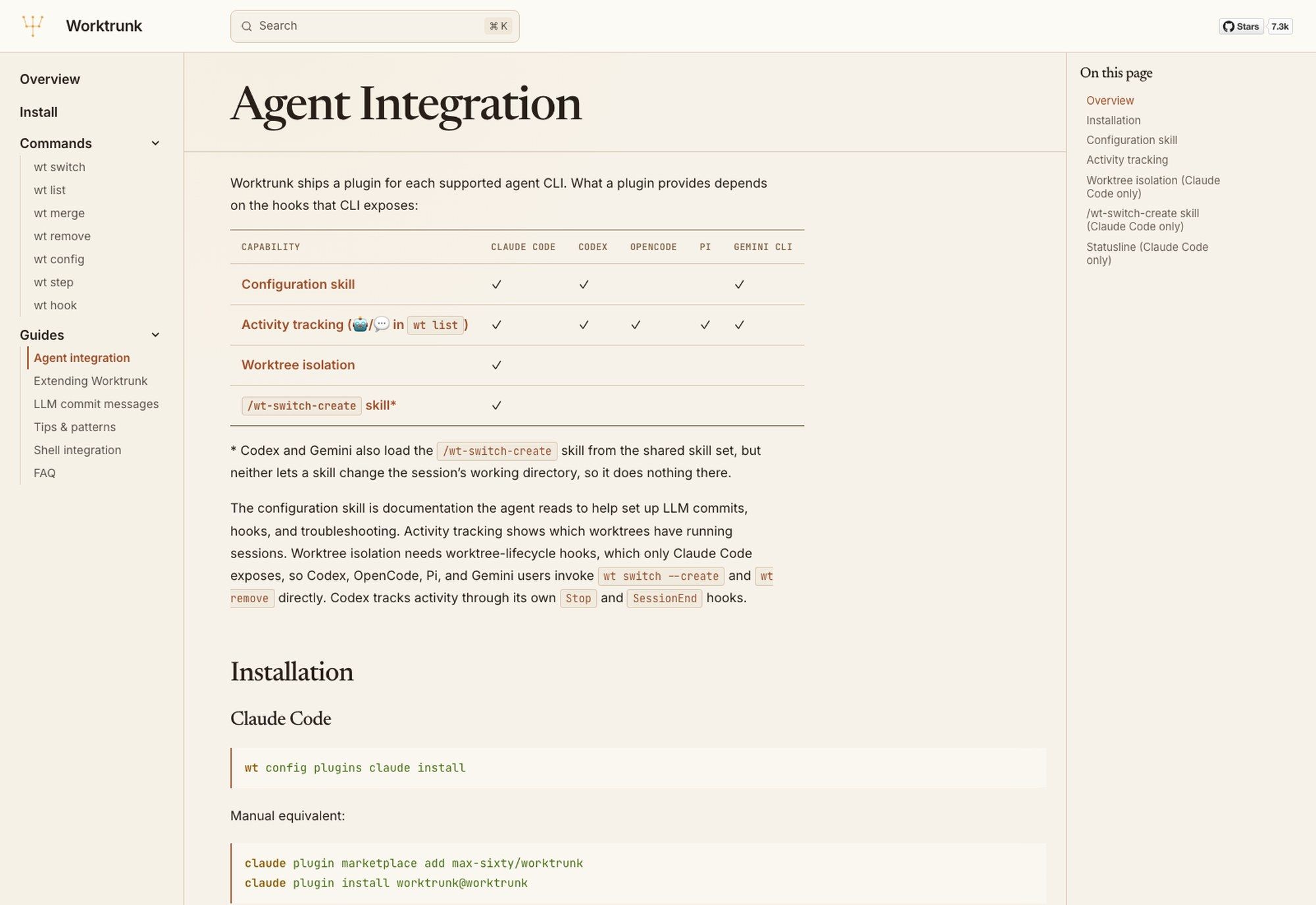
Activity tracking, which puts a marker in wt list showing which worktrees have a live agent session, works across all five supported CLIs: Claude Code, Codex, OpenCode, Pi and Gemini CLI. The configuration skill, which is documentation the agent reads so it can set up commits and hooks and diagnose its own problems, covers Claude Code, Codex and Gemini CLI.
Worktree isolation is Claude Code only. So is the /wt-switch-create skill, and the footnote there is the sharpest thing in the docs: Codex and Gemini do load that skill from the shared skill set, but neither lets a skill change the session's working directory, so it loads and then does nothing. Worktrunk's answer for those users is to call wt switch --create and wt remove yourself.
That asymmetry isn't worktrunk's fault. Worktree isolation needs worktree-lifecycle hooks, and Claude Code is the only one of the five that exposes them. But if you picked worktrunk because you read "parallel AI agent workflows" and you drive Codex, know that you're buying the worktree ergonomics and the activity markers, and you're doing the isolation by hand. If you want the fuller picture of what running several agents at once actually costs, we walked through it in our piece on parallel Claude Code agents.
Against the alternative: everyone in one checkout
The default setup is one clone, one directory, and however many agents you're brave enough to point at it. It works until two of them touch the same file, and then you get a class of bug that's miserable to diagnose because nothing crashed: one agent's edit silently lands on top of another's, the tests pass, and the missing change surfaces three commits later when you can no longer tell which session dropped it.
People try to route around this with branches and stashing, which trades file collisions for a different problem. Now the agents queue: one of them has to finish and commit before the next can check out, and the parallelism you wanted evaporates into a lock. Worktrees are the answer because the files are genuinely separate on disk while the history stays shared, and worktrunk's contribution is making the setup and teardown cheap enough that nobody skips it under deadline.
The cost is disk and startup. Every worktree is a full checkout of your working files, so a large repository multiplied by five hurts, and each one needs its own dependency install unless you wire a hook to link them. Worktrunk's shared build cache softens the compile side of that; nothing softens the disk. If your repository is a few hundred megabytes this is a non-issue, and if it ships large binary assets you'll want to think about it before you spin up the fifth one.
The licence the GitHub API will get wrong
Query GitHub's repository API for worktrunk and the licence comes back as NOASSERTION, which is the answer their detector gives when it can't match the file to a known template. Plenty of write-ups stop there and hedge, or worse, guess MIT.
The LICENSE file in the repository says something specific and permissive: the project is dual-licensed under MIT and Apache-2.0, and you may choose either at your option, with the copyright held by Maximilian Roos. That's the standard Rust-ecosystem arrangement, and it's exactly why the detector shrugs. Two licences in one file don't match one template.
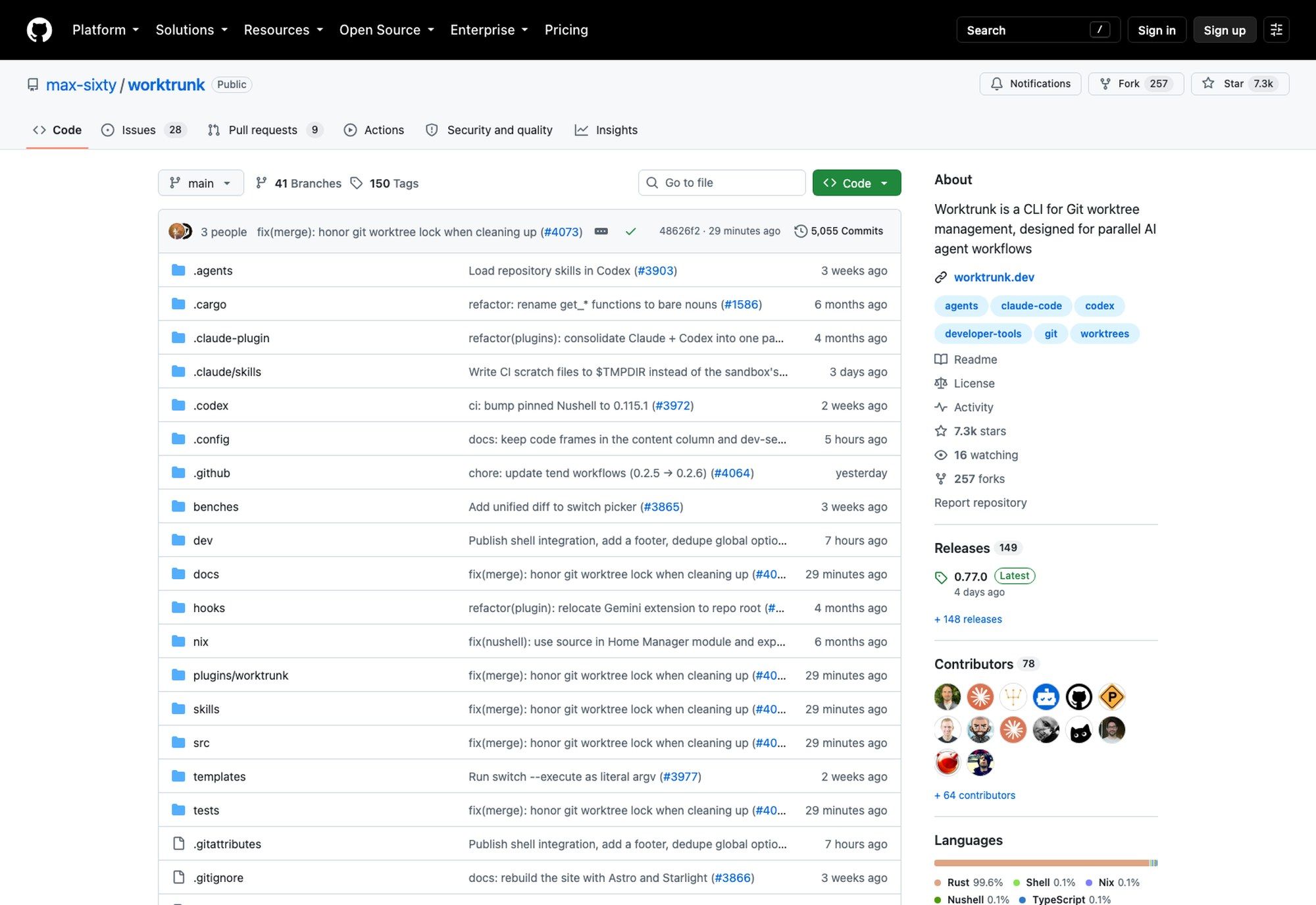
Read the sidebar in that screenshot and you can watch the same thing happen in the GitHub interface, which labels the entry "License" rather than "MIT license" the way it does for a single-licence project. The rule generalises: when an API reports NOASSERTION, open the file. Sometimes it hides something more restrictive than you assumed, and sometimes, as here, it hides something cleaner.
The numbers behind the star count
Stars tell you a project got attention. The rest of the repository page tells you whether anyone is home.
Worktrunk has shipped 149 releases, and v0.77.0 landed on 8 September 2026 with v0.76.0 a week before it and v0.75.0 on 27 August. There are 5,055 commits and 78 contributors, the codebase is 99.6% Rust, and the most recent merge to main was under an hour old when we checked. Against 331 days of repository age that's a release roughly every two days, sustained.
The version number is the caveat. Worktrunk is still on a 0.x line, and a project moving that fast will change behaviour under you. Pin the version if you're wiring it into anything shared, and read the release notes before you upgrade a machine that other people depend on.
Where worktrunk stops, and what fills the gap
Worktrunk manages the filesystem. It doesn't keep your machine awake, and that turns out to be the boundary people hit second.
A worktree is a directory on a disk, so five agents working in five worktrees are five processes on one laptop, competing for the same CPU and the same battery, and dying together when the lid closes. Worktrunk will hand you the isolation and then watch the whole set go down with the hardware. That's the gap Zentor fills: a hosted cloud AI computer that keeps running when your laptop doesn't, sitting alongside your local install rather than replacing it, so the long test run finishes whether or not you're at the desk.
The same split shows up in the tooling around agents generally, and the skills layer is the clearest example. Worktrunk's own agent integration ships as skills, which is the pattern the ecosystem converged on this year; our rundown of the best Claude skills covers the ones worth installing. With Zentor, the skills and the worktrees live on a machine you can pick up from a different device, which is a different guarantee than "it works on my Mac".
FAQ
Is worktrunk free and open source?
Yes. The LICENSE file dual-licenses it under MIT and Apache-2.0, your choice. The GitHub API reports NOASSERTION because its detector can't match a dual-licence file to a single template, which is a detection quirk rather than a restriction.
Does worktrunk work with Claude Code and Codex?
With both, but not equally. Activity tracking works on Claude Code, Codex, OpenCode, Pi and Gemini CLI. The configuration skill covers Claude Code, Codex and Gemini CLI. Worktree isolation and the /wt-switch-create skill are Claude Code only, because Claude Code is the only one of the five that exposes worktree-lifecycle hooks. Codex users run wt switch --create and wt remove directly instead.
What is a Git worktree?
A second working directory attached to one clone, checked out to a different branch, with its own copy of the files on disk but a shared object database and history. It's how you have two branches open at once without stashing, and it's why two agents can edit two features without overwriting each other.
How do I install worktrunk?
Homebrew, Cargo, Winget and the AUR all carry it, and the install page on worktrunk.dev lists the current commands. The agent plugins are a separate step: wt config plugins claude install wires up Claude Code.
Is worktrunk stable enough to depend on?
It's used enough to have 78 contributors and a release every couple of days, and it's still pre-1.0 at v0.77.0. Treat those as the same fact. Pin the version anywhere it's shared.
The honest summary
Worktrunk is a good Git tool with an agent-shaped marketing angle, and that ordering matters. Buy it for wt list and wt merge, which fix a genuine papercut in Git's own worktree interface and would be worth installing if no AI agent had ever been written. Treat the agent plugins as a bonus whose value depends entirely on which CLI you drive, and check the capability table before you assume your one is covered.
All figures here were verified against the GitHub API and the project's own documentation on 13 September 2026.
Continue Reading
More Guide
TRAE Work Guardrails: Permissions and Review

OpenTag Workflow: Slack Threads to Approval Trails

Claude Tag Guardrails for Workspace AI Access

Claude Tag Workflows for Shared Slack Context

What to Use Instead of Manus in 2026

Grok 4.5 API Europe: Access and Setup
The Zentor editorial team writes about workflow automation, AI agents, and the tools we build. Default byline for industry overviews, listicles, and collaborative pieces.
Ready to put this into practice?
MoClaw runs browser tasks, research, and schedules automatically. Try it free.
References: https://github.com/max-sixty/worktrunk · https://worktrunk.dev · https://worktrunk.dev/claude-code/ · https://github.com/max-sixty/worktrunk/blob/main/LICENSE · https://formulae.brew.sh/formula/worktrunk