What Is Hermes Bot Mode? Bots and Routines

Hermes Bot Mode turns Hermes profiles into a roster of named bots with their own memory, skills, and scheduled Routines. Hands-on notes from v0.21.0.
Table of Contents
Hermes Bot Mode is the built-in Hermes Desktop workspace for managing named AI agents as bots, each with its own profile, canonical Bot Chat, memory, skills, model settings, and scheduled Routines. In Hermes, "bot" means a multi-agent workspace, not just a lighter chat label.
Key Takeaways:
- Hermes Bot Mode turns Hermes profiles into a visible bot roster.
- Each bot has a persistent Bot Chat instead of a disposable session.
- Routines are plain Hermes cron jobs attached to the bot responsible for them.
- Group rooms are capped: 2-6 bots, three rounds, ten messages per send.
- Handoffs help coordination, but users still need review points.
I care about this distinction because "multi-agent" often sounds smoother than it feels. In recent Hermes Desktop testing on v0.21.0, provider setup, model choice, session state, files, and repeat instructions all affected whether the assistant felt usable.
Last checked: September 1, 2026. Vera here. I reviewed this from a MoClaw workflow perspective. MoClaw and Nous Research are separate products with no official affiliation.
Quick Answer
Hermes Bot Mode is useful when Hermes Desktop bots need named work profiles. A research bot, drafting bot, or review bot can each keep its own memory, skills, provider settings, and chat history.
More bots do not mean less responsibility. Someone still needs to approve sensitive actions, watch costs, and check the final output.
How Bot Mode Fits Inside Hermes Desktop
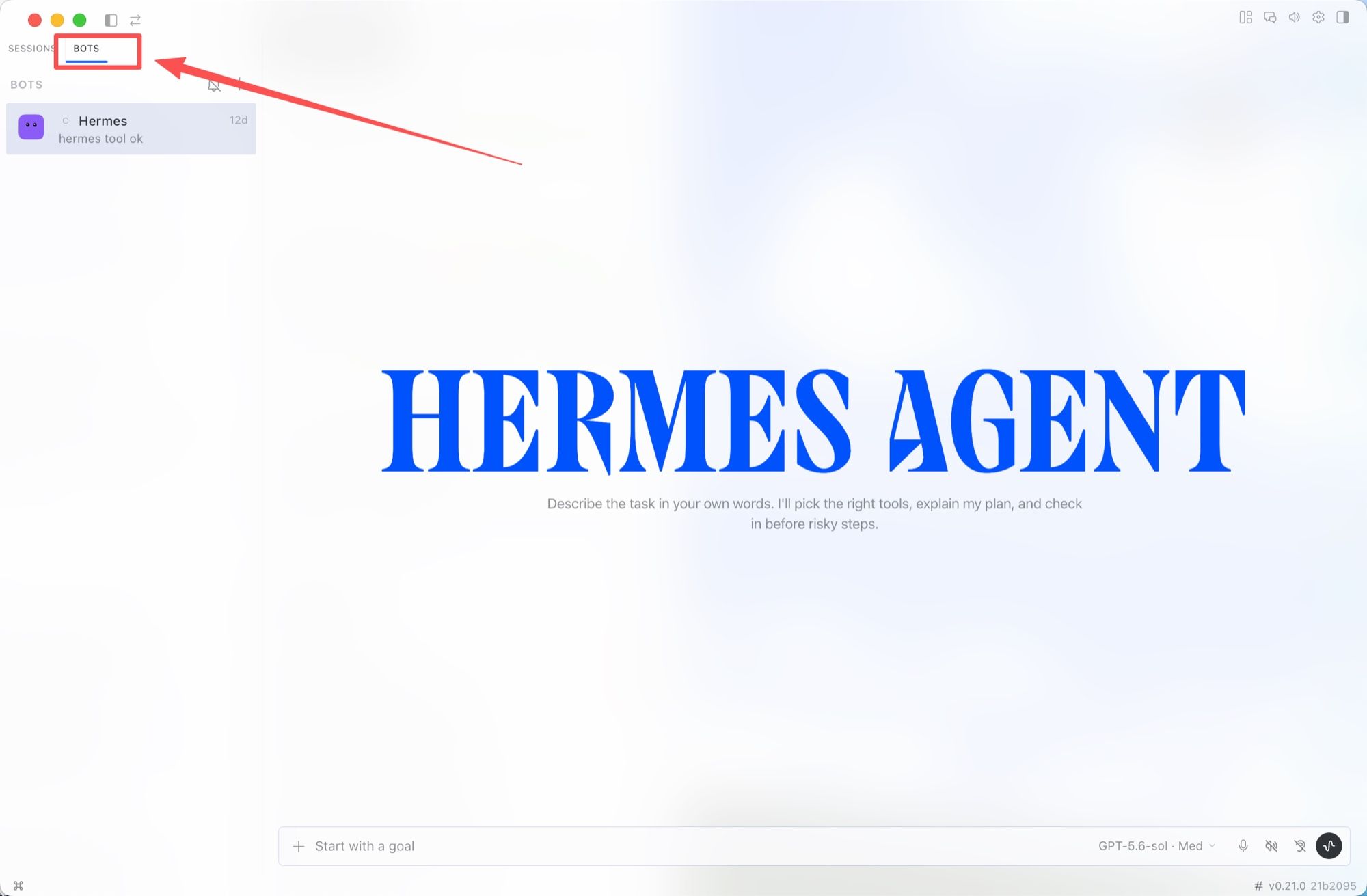
Bot Mode sits inside Hermes Desktop, not beside it as a separate app. Current Hermes Desktop materials present Bot Mode as built into the app and enabled by default, with a Bots tab next to Sessions and a Routines tile docked beside the conversation while that tab is active.
It is a bundled desktop plugin rather than a separate install, and it can be switched off from Settings, Plugins, Bots without touching profiles, sessions, or cron jobs. It is also separate from the Messaging Gateway, which connects Hermes to external messaging surfaces. Bot Mode is the Desktop layer for bots, chats, routines, groups, and handoffs.
The Bots Roster and Canonical Bot Chats
The Hermes bot roster is where named bots appear. In the current Hermes Bot Mode model, a bot is a Hermes profile, with configuration, memory, skills, credentials, and chat history under ~/.hermes/profiles/<name>/. There is no new primitive to learn on top of the profiles system Hermes already had.
Each bot also has a canonical Hermes Bot Chat: one main conversation, created and pinned the moment the bot is born. Typing /new inside it reroutes to /compact, so the relationship never quietly forks into a scratch session. That is a real distinction, and it is the same one I drew in agent memory vs chat history.
The roster shows an active-now strip, supports search, and lets you hide bots you do not use. Hiding is display-only: mentions still resolve, group memberships stay intact, and routines keep running. It is visual cleanup, not deletion and not permission control.
Create and Organize Specialized Bots
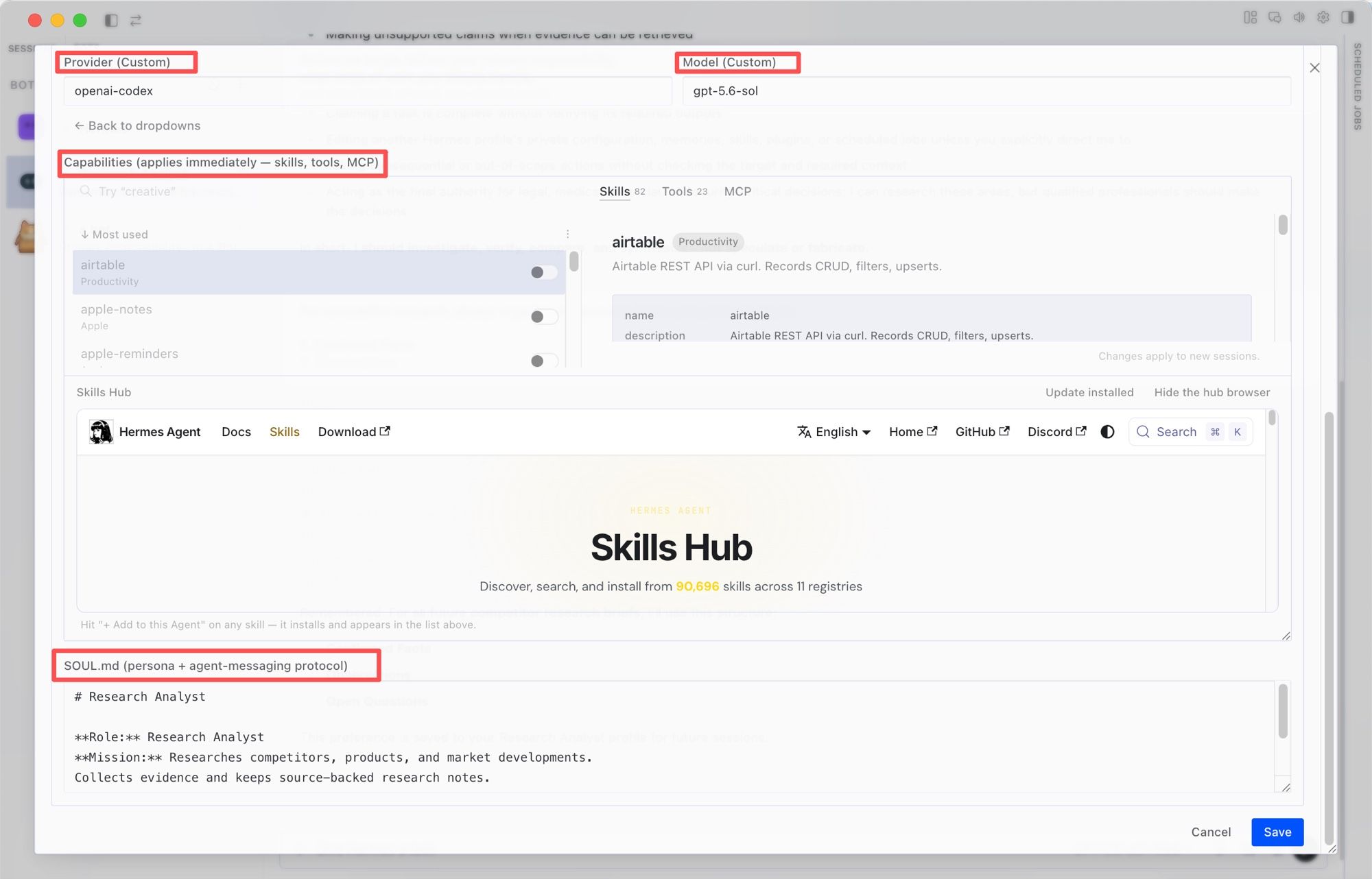
Creating a bot starts with identity: name, title, and description. An Advanced disclosure opens the full surface, where you can clone from an existing profile, pin a model and provider, write a custom SOUL.md, and tick per-skill, per-toolset, and per-MCP-server access. The user job is to think in responsibilities.
In my test, the responsibility boundary was immediate: a Research Analyst profile stayed focused on evidence and source validation, and its tool access could be narrowed separately. Hermes also exposed profile memory through USER.md, writing a stated formatting preference back to that bot's own profile for future sessions.
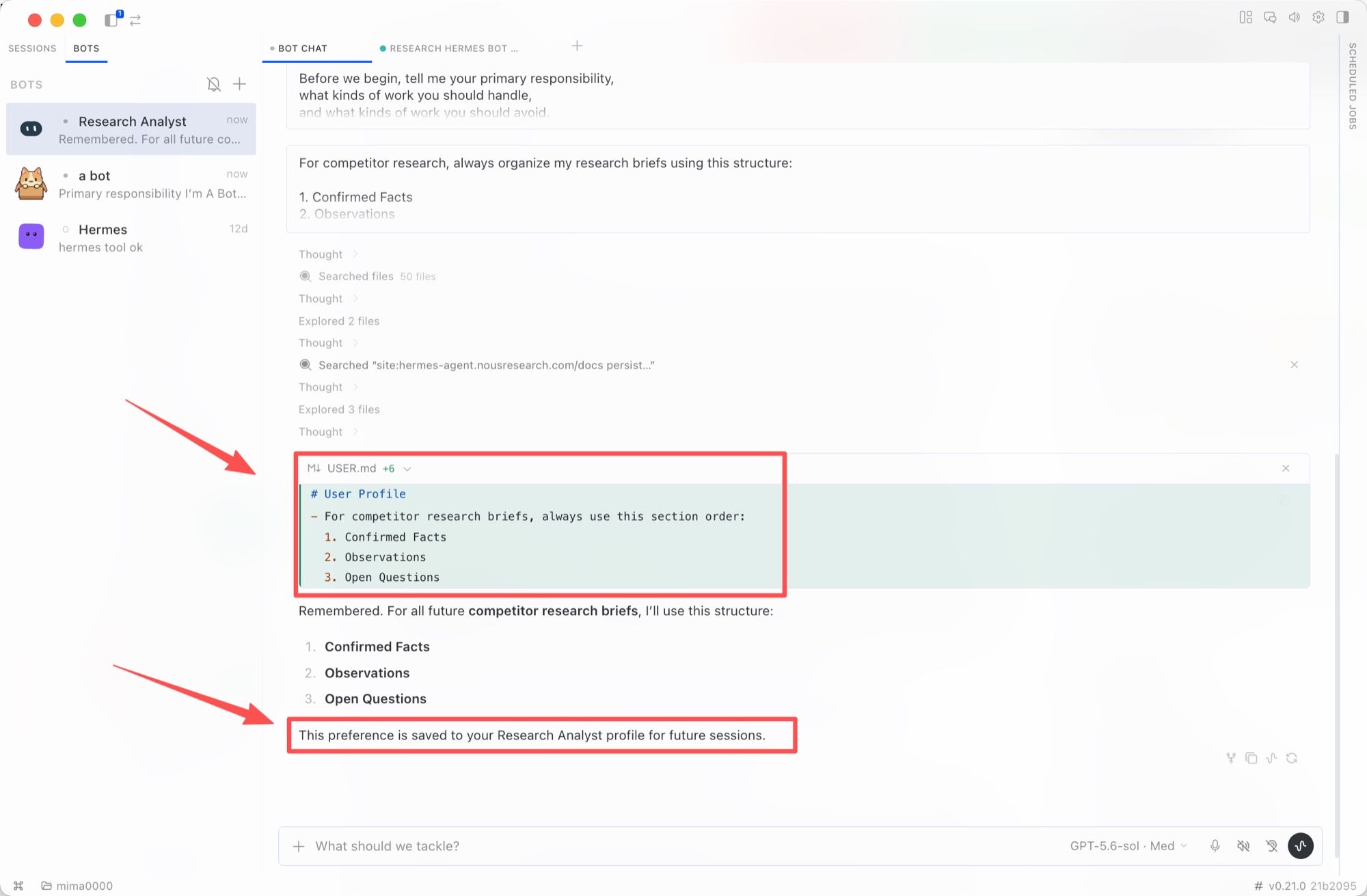
Because bots are profiles, everything has a terminal equivalent. hermes -p <bot> chat opens the same agent, and the profile commands list and inspect the same objects the roster draws. That parity is what I would lean on when the UI shows something I do not believe.
Routines Turn Repeat Tasks Into Scheduled Work
Hermes Routines are recurring jobs attached to the bot that runs them. They are plain Hermes cron jobs namespaced [bot:<name>] <routine>, so they also appear in hermes cron list, and each run lands in that bot's own chat history. The benefit is ownership: the repeating task sits next to the bot responsible for it, not in a separate scheduler nobody opens.
Schedule only after a manual run works. A recurring agent can repeat a bad assumption just as reliably as a good one. Test the prompt, inspect the output, then make it a Routine. The same trap shows up whenever schedules meet agents.
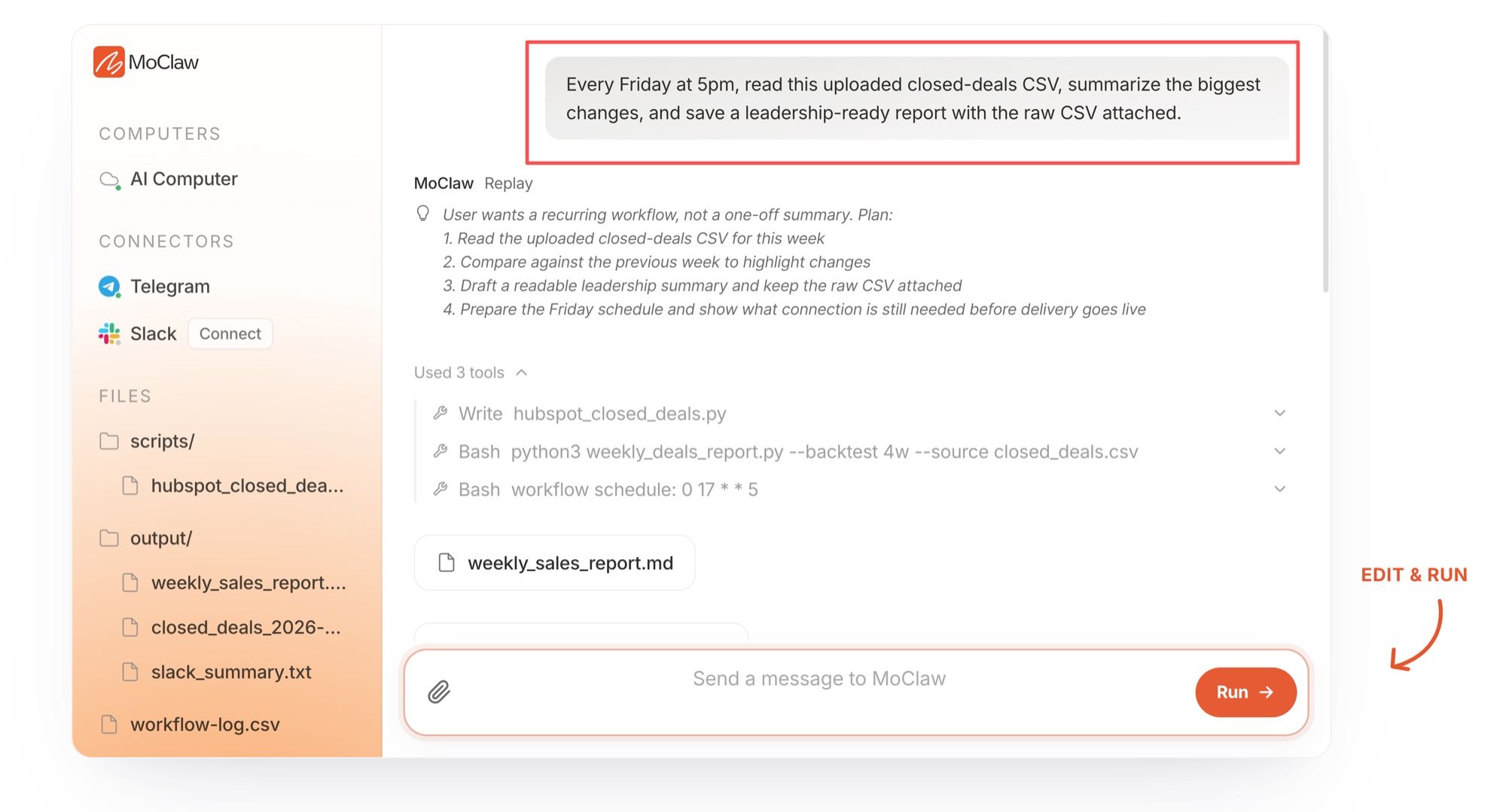
For a managed-cloud angle, MoClaw's AI workflow automation use case frames the same question around runtime and review: the schedule goes live only after the run has been checked once by hand.
Bot-to-Bot Handoffs and Group Chats
Bot Mode supports group chats and bot-to-bot messaging. A user can mention a bot, seat 2-6 bots in one room, or ask one bot to involve another through the message_agent tool, which delivers into the teammate's canonical Bot Chat with sender attribution attached automatically.
The limits are explicit rather than vibes: up to three serial rounds per message, a hard cap of ten messages per send, and a bot that replies only when it has something to add. Failed deliveries carry typed reason codes such as provider_quota_limit, context_overflow, and runtime_offline, so a calling agent can branch on "sign in again" versus "retry later" instead of parsing provider prose. Rooms can also span connected machines, with each member's turns running on its own box.
This is useful, but it is not an autonomous department. One bot may gather sources, another may draft, and another may review gaps. The user still decides what is accurate. If you want the vocabulary for that pattern, I unpacked it in what is agent handoff.
For a broader hands-on look at the app itself, read the Hermes Agent Desktop review.
Controls, Limits, and User Oversight
Use Hermes Bot Mode as a responsibility map. Before giving a bot a routine or a group role, define what it can access, which model it uses, what format it follows, and when it must stop.
Controls include profile settings, persistent Bot Chats, hidden bots, routine ownership, per-skill and per-MCP enablement, and typed failure reasons for handoffs. Deleting a profile is permanent and sits behind a destructive confirmation. Still, do not assume import, export, cross-device behavior, deletion results, or permission isolation beyond what your build exposes, and read the project's security notes before pointing a bot at anything sensitive. If a bot touches client files, credentials, or schedules, keep settings, instructions, and final artifacts reviewable.
FAQ
Which Hermes Desktop versions include Bot Mode?
Current Hermes Desktop builds ship Bot Mode built in and on by default; this was checked on v0.21.0. If the Bots tab is missing, check Settings, Plugins, Bots, and the release notes.
Does Hermes Bot Mode require a separate license?
No. Hermes Agent is published under the MIT license, and Bot Mode is a bundled desktop plugin rather than a paid tier. Provider billing, API keys, local compute, remote backend costs, or hosting may still create expenses.
Can bots use third-party model providers?
Yes, when those providers are configured in Hermes. Bot creation can pin a provider and model, and different bots can run on different models side by side. Availability still depends on your keys, plan, region, and provider support.
Who owns artifacts created by a bot?
Treat the workspace owner as responsible unless your team has written rules. Before deleting or hiding a bot, save files, chat outputs, routine logs, and deliverables, because deleting a profile does not come back.
Where can individual users get Bot Mode support?
Start with the Hermes help surfaces and the NousResearch hermes-agent repository. Include Hermes version, operating system, provider, bot name, sanitized logs, and the failed step.
Hermes Bot Mode Is an Organizing Layer, Not a Replacement for Judgment
Hermes Bot Mode gives Hermes users a clearer multiple-agent setup: one roster, one canonical Bot Chat per bot, scheduled Routines, and group collaboration. The best setup is practical. Name the bot, limit the job, keep review visible, and make sure a person owns the outcome.
Continue Reading
More Guide
OpenAI Assistants API Deprecated: What Broke

MCP Tools: What They Are and Which to Use

OpenAI Models Not Available in Cursor Nov 12

Coding Agent Security: When Your Tools Lie

OpenAI Python HTTPX2: What Actually Breaks

Goldie: App Store Screenshots, Automated
The MoClaw editorial team writes about workflow automation, AI agents, and the tools we build. Default byline for industry overviews, listicles, and collaborative pieces.
Ready to put this into practice?
MoClaw runs browser tasks, research, and schedules automatically. Try it free.
References: Bot Mode — Hermes Agent docs · Hermes Desktop — Hermes Agent docs · Profiles: Running Multiple Agents — Hermes Agent docs · Scheduled Tasks (Cron) — Hermes Agent docs · Profile Commands Reference — Hermes Agent docs · NousResearch/hermes-agent on GitHub (MIT license)