Open Higgsfield: One Prompt Bar, 40 Models
Open Higgsfield puts 40 image and video models behind one prompt bar. What it is, who built it, and the license and key questions the README leaves open.
Table of Contents
Two days old, one commit, 863 stars. Open Higgsfield landed on GitHub on 26 August 2026 and picked up more attention in forty-eight hours than most media tools manage in a year, which usually means either something real shipped or a very good name did the heavy lifting. Here it's some of both. The project is a browser studio that puts forty image and video models behind a single prompt bar, and it is not made by the company its name borrows from.
That second part matters more than the star count, so let's take the whole thing apart: what it does, who wrote it, and the two questions its README quietly leaves open.
Key Takeaways:
- Open Higgsfield is a community project, not a Higgsfield release; its own README calls it an open-source alternative to Higgsfield AI.
- Forty models sit behind one prompt bar: twelve image, twenty-eight video, each declaring the settings it accepts.
- The repository has no LICENSE file as of 28 August 2026, so commercial use has no written grant behind it.
- Both the hosted and self-hosted paths need your own platform key; the studio is free, the generation is not.
- History lives in one browser's IndexedDB with a sixty-record cap, and stored result URLs can outlive the files behind them.
What Open Higgsfield actually is
A composer at the bottom of the screen, a gallery filling everything above it, and a model picker sitting between them. You type a prompt once; the model you selected decides whether the request goes out as an image job or a video job. There is no mode switch to forget about, no separate tab for stills and another for clips. ⌘/Ctrl + Enter submits.
The interesting design choice is one layer down. Rather than hardcoding a settings panel per model, the catalog is the source of truth: each entry declares which controls it accepts, and the studio renders exactly those. So picking Kling 3 Pro gives you duration and resolution; picking a still-image model doesn't. Aspect ratio, output format, audio, batch size and prompt enhancement all appear or don't according to what the model itself says it supports. Add a catalog entry and the picker, the settings rail and the media roles all follow without touching the studio code.
Media inputs work the same way. Instead of one generic upload box, the composer exposes roles: start frame, end frame, references, video, audio, each capped by the model's own declaration of how many it will take. Files land in Vercel Blob and come back as public URLs the generate request can carry.
The word "open" in the name is doing some work
The README's own first line reads "OpenHiggsfield AI — Open-Source Alternative to Higgsfield AI." So the project isn't claiming to be official, and anyone reading past the repo title will know that inside ten seconds. The trouble is that plenty of people won't read past the repo title, and "open-" prefixes have a long history of being mistaken for a vendor's own release.
Here is what the repository page shows, as of 28 August 2026:
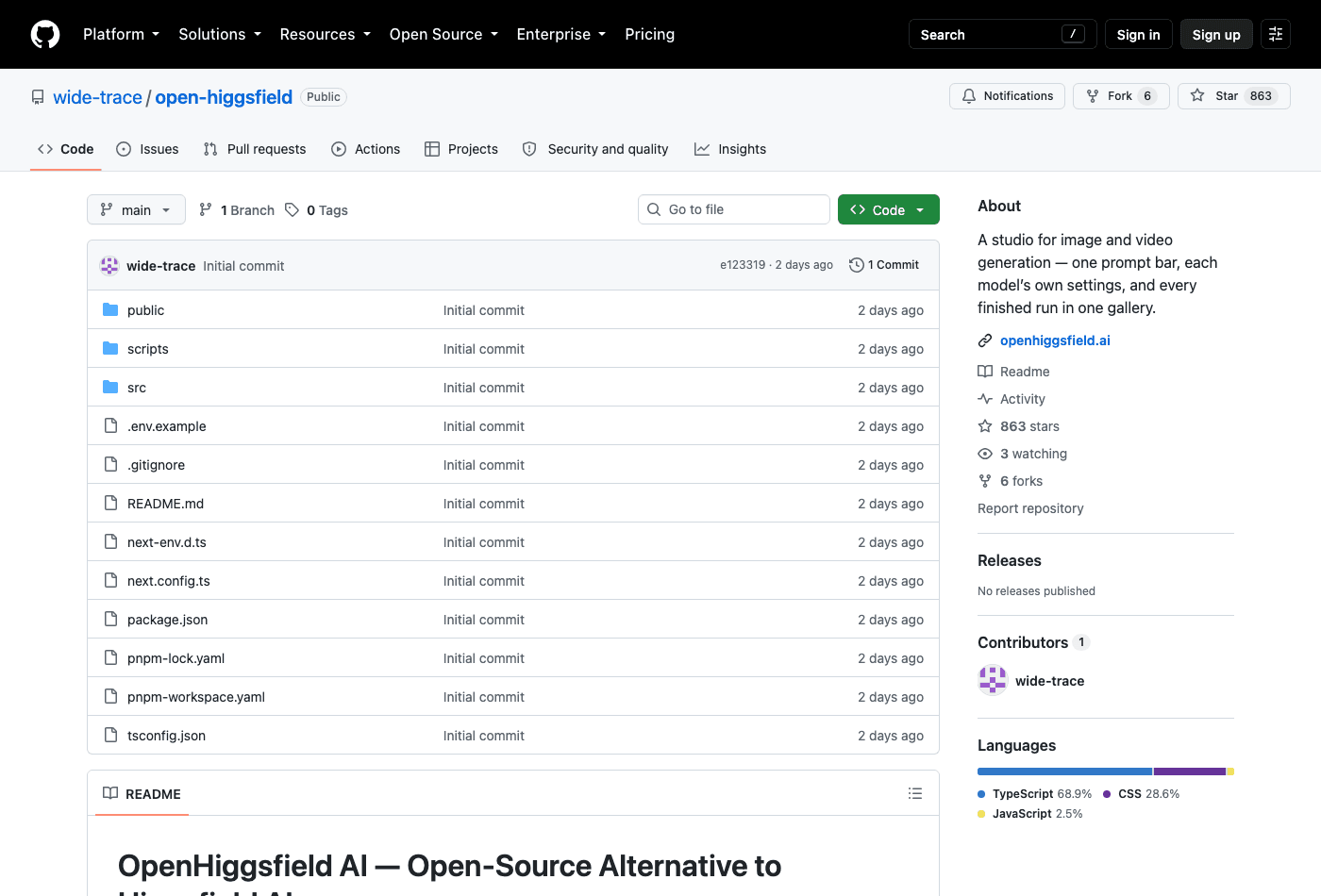
One commit. One contributor, the wide-trace account. Six forks against 863 stars, which is the ratio you get when people are bookmarking rather than building. No releases published. And in the file list: .env.example, next.config.ts, package.json, README.md, tsconfig.json, three directories, and no LICENSE.
That last absence is the one with teeth. The README says open-source in its first sentence; the repository grants you nothing in writing. Without a license file the default is ordinary copyright, which means forking it, self-hosting it for a client, or shipping anything built on it sits in a gap the author hasn't addressed yet. For a weekend clone that's a rounding error. If you were thinking of standing this up as the media tool for a studio, it's the first email you should send.
Forty models, and what each one is allowed to ask for
The catalog is the headline number: forty entries, twelve image and twenty-eight video.
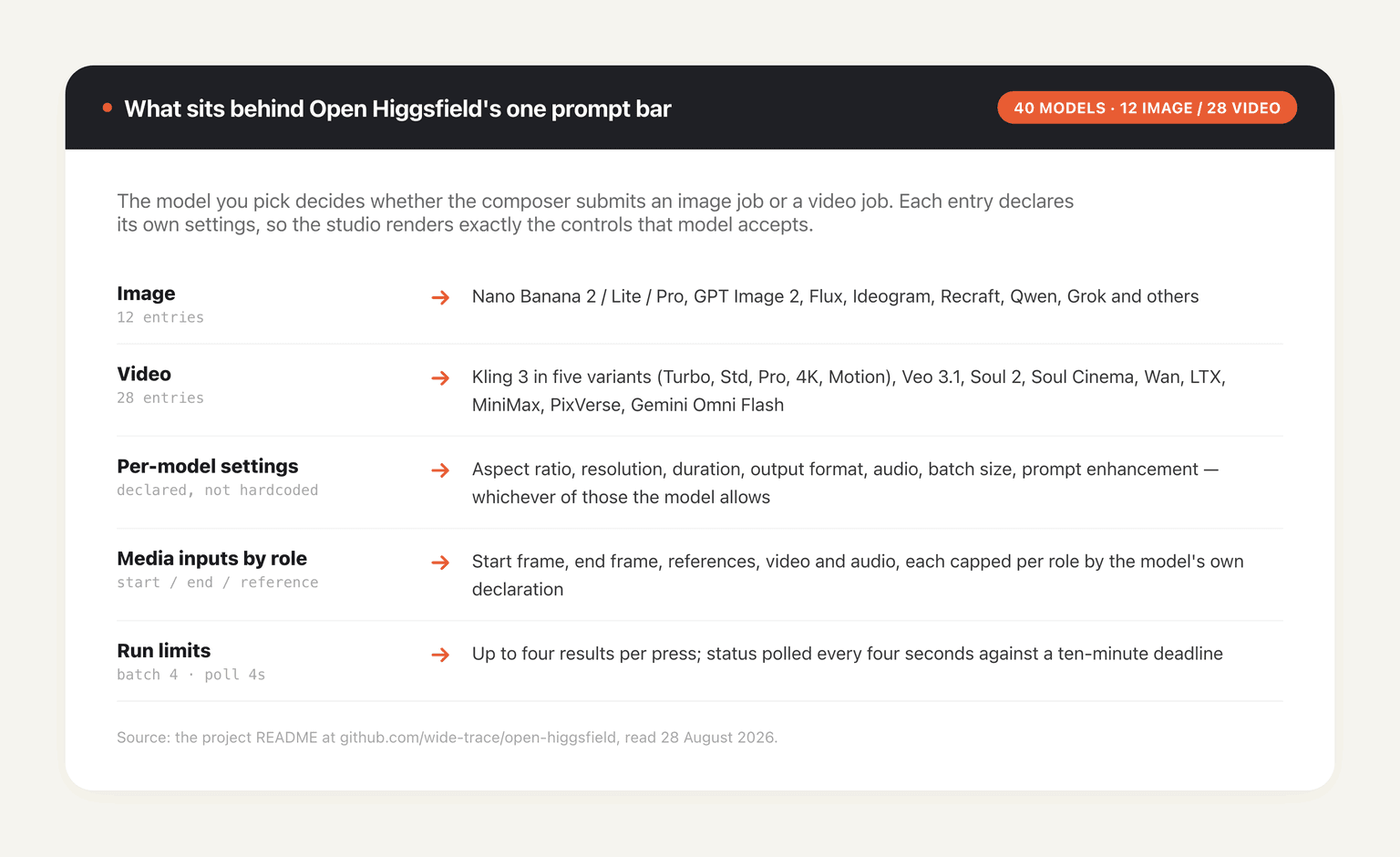
Video dominates by more than two to one, which tells you where the author's attention went. Kling 3 alone occupies five slots (Turbo, Standard, Pro, 4K and Motion), sitting alongside Veo 3.1, Soul 2, Soul Cinema, Wan, LTX, MiniMax, PixVerse and Gemini Omni Flash. The image side runs Nano Banana 2 in three tiers, GPT Image 2, Flux, Ideogram, Recraft, Qwen and Grok.
Runs are capped in two useful ways. A single press produces at most four results; models with a native count parameter use it, and the rest get submitted once per result so each tile clears on its own clock. Status gets polled every four seconds against a ten-minute deadline, after which the run is terminal whatever the platform says. Ten minutes is generous for a still and tight for a long clip at 4K, which is worth knowing before you plan an afternoon around it.
Nothing happens until you paste a key
The hosted version at openhiggsfield.ai wants one thing before it will do anything at all.
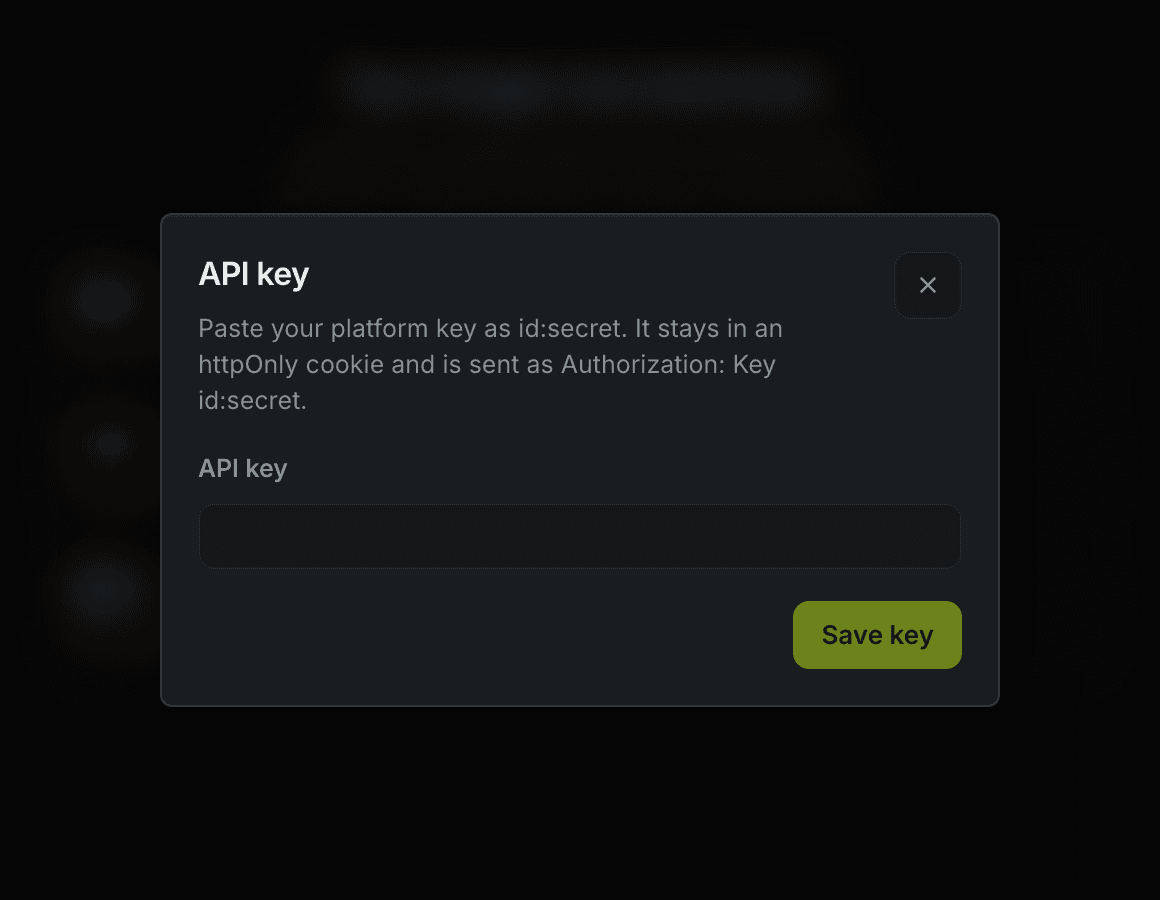
"Paste your platform key as id:secret. It stays in an httpOnly cookie and is sent as Authorization: Key id:secret." That modal is the first screen, and the README is straight about the split: the studio itself is free, the generation is not. What the README does not do is name which platform the key comes from. The self-hosted path makes the shape clearer without closing the question — HF_API_BASE_URL is described only as "generation API origin, server only," and the second variable is a Vercel Blob token for uploads.
Credit where it's due on the plumbing: the browser never talks to the generation API. Server actions are the only caller, submit is POST /{model}, status is GET /requests/{id}/status, and the key lives in an httpOnly cookie rather than anywhere a page script can reach. For a two-day-old project that's a better default than a lot of shipped software manages.
Your history lives in one browser and it has a ceiling
The gallery itself is the half of the app most similar tools skip. Four scopes run along an arrow-key-navigable tab rail — image, video, every finished run, and favorites — over a masonry grid that shows each result at its true aspect ratio rather than cropping everything into squares. Open a tile and the viewer gives you the prompt with one-click copy, the model, the resolved settings and the timestamp, which is the difference between a folder of PNGs and a record of how you got them.
Where that record lives is the catch. Runs persist in IndexedDB, in that browser, capped at sixty records. Favorites are exempt from the cap and never age out, which is the intended escape hatch. Everything else rolls off.
There's a second, sharper caveat the README states outright: result URLs belong to the generation platform, so old history can outlive its CDN lifetime and show gaps. You keep the record of the run; the file behind it may already be gone. Combine that with browser-local storage and the practical rule is blunt. Clear your site data and the gallery is gone. Open the studio on a different laptop and it's empty. Download anything you care about the day you make it.
This is where a browser studio and a persistent machine part company. A gallery pinned to one browser profile is fine for an afternoon of exploration and wrong for anything you'll want in November. MoClaw takes the other position on purpose: a hosted cloud AI computer with its own filesystem, so a render you made on the laptop is still there when you open it from a phone, and a job that runs past your patience keeps running after the lid closes. It sits alongside a tool like this rather than replacing it.
What "alternative to Higgsfield" does and doesn't promise
Read the comparison narrowly and it holds up. What Open Higgsfield replaces is an interface and a subscription to that interface: with no closed ecosystem and no studio plan: clone it and change it. The README makes exactly that argument and no more.
Read it broadly and it falls apart, because the compute is still somebody else's. You bring the platform key; the models run on the platform's hardware; the results sit on the platform's CDN until they don't. Self-hosting the studio changes who owns the UI, not who owns the GPUs or who bills you. That distinction is worth holding onto whenever a project describes itself as the open alternative to something, because the interface layer is often the cheapest part to replace, which is precisely why it's the part that gets replaced.
The comparison also has a moving target problem. We didn't verify anything about the commercial Higgsfield product for this piece, including its pricing or model list, so treat the repo's framing as the author's argument rather than a measured one.
Who should actually open it
If you generate stills and clips across several models in a week and you're tired of six tabs and six settings dialogs, this is worth twenty minutes. The reuse behaviour is the quiet win: clicking reuse on a finished tile restores the model, the resolved settings and the prompt, so a run can be re-rendered rather than retyped from memory. Bulk selection with shift-click ranges, a six-second undo on deletion, and per-tile favorites round it out. Somebody who actually generates things designed this.
Skip it if you need one model and one aspect ratio, because the catalog is overhead you won't use. Skip it too if you were planning to build on it commercially, at least until the license question gets an answer.
For agent-shaped work the gap is a different one. A studio like this ends at the download button; the file lands in your Downloads folder and the next twelve steps are yours. Our own writing on AI video editing agents and on building product video with a Claude Code skill covers the other half of that job, where generation is one step inside a workflow rather than the whole product. MoClaw is built for that half: the generated frame is a file on a machine that can then rename it, drop it in a folder, and hand it to the next step without a human doing the ferrying.
The honest summary at forty-eight hours old: a well-argued front end with an unusually clean architecture, one contributor, no license, and a dependency on a generation platform it doesn't name. Two of those four will probably be fixed by the time you read this. Check the repo before you commit anything to it.
FAQ
Is Open Higgsfield official or a community project?
Community. The README describes it as an open-source alternative to Higgsfield AI, and the repository has a single contributor, the wide-trace account, with one commit as of 28 August 2026. It is not published by the company whose name it references.
Is Open Higgsfield free?
The studio is. Generation isn't. Both the hosted version at openhiggsfield.ai and a self-hosted install require your own platform key, entered as id:secret, and whatever that platform charges is charged to you. The README does not name the platform.
What models does Open Higgsfield support?
Forty as of 28 August 2026: twelve image and twenty-eight video. That includes Nano Banana 2 in Lite and Pro tiers, GPT Image 2, Flux, Ideogram, Recraft, Qwen and Grok on the image side, and Kling 3 across five variants plus Veo 3.1, Soul 2, Soul Cinema, Wan, LTX, MiniMax, PixVerse and Gemini Omni Flash on the video side.
Can I use Open Higgsfield commercially?
Unclear, and that's the accurate answer rather than a cautious one. The repository has no LICENSE file, so despite the README calling itself open-source there is no written grant of rights. Until the author adds one, commercial use is a question for the author.
What happens to my generations if I clear my browser?
They go. History lives in IndexedDB in that specific browser with a sixty-record cap, favorites excepted. The README also warns that result URLs belong to the generation platform and can expire out from under a stored record, so download anything worth keeping.
Continue Reading
More Guide
Praxist License: Fair Source, Not Open Source
What Is GLM-5.3-Flash? Specs and Price

Tokentab: See What Claude Code Actually Costs

ChatGPT Ads India: Who Sees Them, How to Stop
OpenAI Assistants API Deprecated: What Broke
No Endpoints Found for OpenAI Batch Models

The MoClaw editorial team writes about workflow automation, AI agents, and the tools we build. Default byline for industry overviews, listicles, and collaborative pieces.
Ready to put this into practice?
MoClaw runs browser tasks, research, and schedules automatically. Try it free.
References: https://github.com/wide-trace/open-higgsfield · https://openhiggsfield.ai · https://api.github.com/repos/wide-trace/open-higgsfield · https://vercel.com/docs/vercel-blob · https://deepmind.google/models/veo/