Pexels API as an Agent Skill: Automating B-Roll Search
B-roll search automation explained: how Pexels API-style asset lookup can become a reusable agent skill inside faceless video workflows.

Table of Contents
B-roll search automation is the practice of letting a software agent turn a script into search queries, look up stock footage through a provider like the Pexels API, filter the results, and hand back a shortlist of clips for a human to review, instead of someone opening tabs and searching one keyword at a time.
Key takeaways:
- B-roll search automation replaces the manual "open stock site, type keyword, scroll, copy link" loop with an agent that does the lookup step for you.
- The Pexels API is the most common backend for this in open-source faceless video pipelines, but it is not developers-only. It is a documented HTTP endpoint anyone with an account can call.
- An agent turns a script into search intent in three moves: extract visual concepts, search and filter, return review-ready options.
- The final clip choice, and license compliance, still belong to a human. Automation handles assembly, not judgment.
That last point is where I want to be honest up front. This is not my main area. I am Vera, a MoClaw staff writer running a consulting practice in market research and operations support. I ran one asset-lookup task end to end while writing this to see whether the "search step as a skill" idea held up. It did. It did not turn me into a video creator.
Why B-Roll Search Is a Useful Agent Skill Example
Asset search is a good first skill because it is bounded, repeatable, and boring in exactly the way automation likes: text comes in, search terms come out, clips come back. Nothing requires taste until the very end.
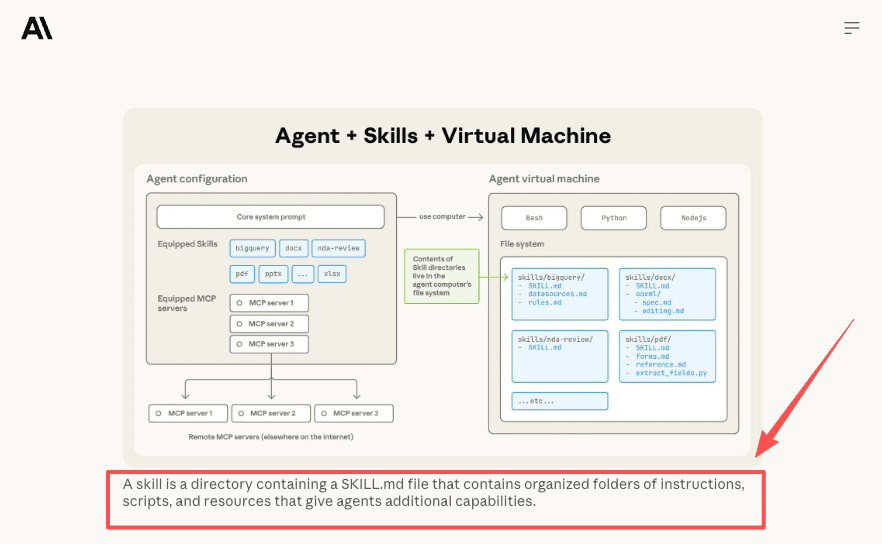
In Anthropic's framing, a skill is a directory containing a SKILL.md file with instructions and resources an agent loads on demand. Per the Agent Skills overview, you write the lookup logic once and reuse it across every video instead of re-explaining it each session. MoneyPrinterTurbo already does this: it sources footage from Pexels, Pixabay, and Coverr as one stage in a longer pipeline. The footage-lookup stage is conceptually the same thing a standalone B-roll skill does.
How an Agent Turns a Script Into Search Intent
The whole job breaks into three moves. None of them are clever on their own. Together, they are part of a production I least want to keep doing by hand.
Extracting visual concepts
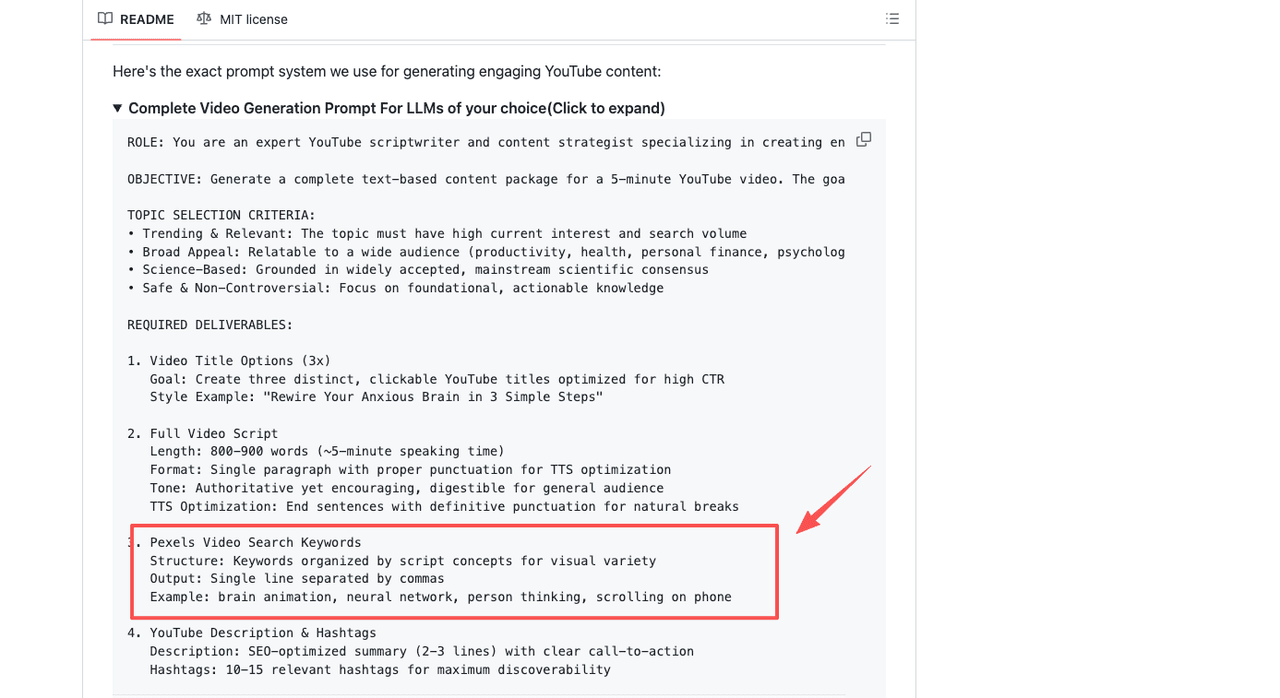
A script line like "your savings lose value while sitting in a low-interest account" is not a search query. The agent reads each line and pulls out visual concepts: "coins jar," "bank counter," "person checking phone bills." Mapping abstract narration to concrete imagery is fuzzy work a keyword macro can't do. One MoneyPrinterTurbo fork bakes this in directly, asking the model to output Pexels search keywords grouped by concept for visual variety.
Searching and filtering assets
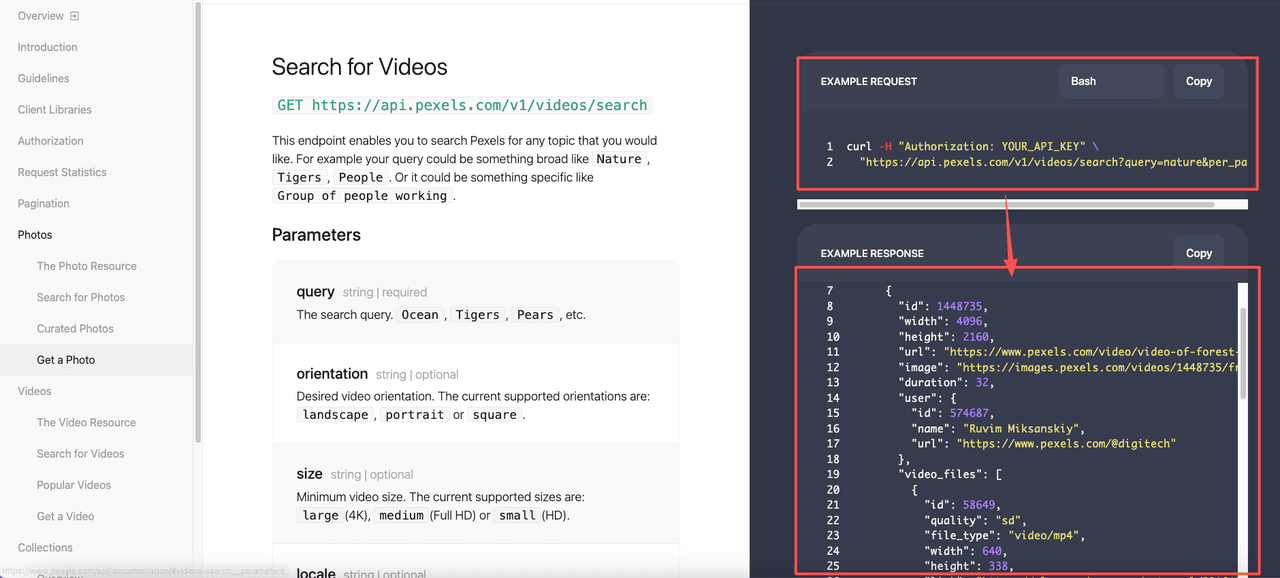
Once it has terms, the agent calls the provider. The Pexels API documentation describes a video search endpoint that accepts a query plus filters for orientation and size, and returns paginated results with multiple resolution files per clip. For faceless vertical content, the agent filters hard here: portrait orientation, a minimum width, and a duration that fits the line. A community Pexels skill spec shows the same call shape, hitting GET /v1/videos/search with orientation and size parameters, then filtering by duration client-side after results come back, since the search endpoint does not expose a duration filter directly. This is the step that benefits most from automation, because filtering twenty clips down to three is pure mechanical sorting. When I ran a test query on "person checking phone bills," the endpoint returned 52 videos. After filtering for portrait orientation and under 30 seconds, that narrowed to 11. Three were usable candidates.
Returning review-ready options
The agent does not publish. It returns a shortlist, ideally two or three candidates per script line, with the clip page, dimensions, and the photographer credit attached so attribution is easy later. That review-ready framing matters. The agent's output is a starting point for your judgment, not a finished cut.
What Still Needs Human Review
Automation handles assembly, not judgment. A pipeline can pull a technically correct clip that is tonally wrong: a stock smile where your script is sarcastic, footage you have seen in fifty other videos. The agent has no way to feel that, and output quality depends entirely on the quality of inputs at each stage.
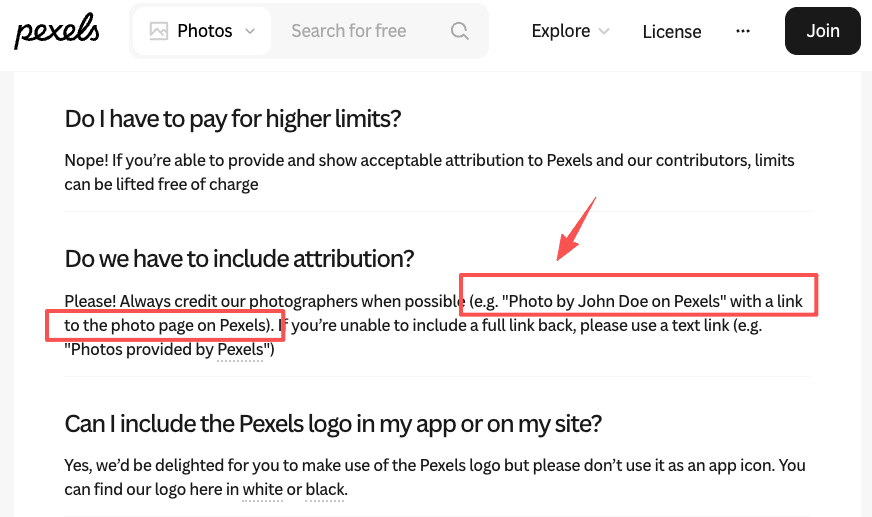
License compliance stays human too. The Pexels License allows commercial use, but API users must display a link back to Pexels and credit photographers when possible. You cannot redistribute clips standalone, and terms change. The agent pulls the clip. Confirming it is cleared for your use is on you.
When Manual Asset Selection Is Better
If your channel has a tight visual identity, brand-specific footage, or recurring characters, automated stock lookup will fight you more than it helps. Generic B-roll search assumes interchangeable filler, and a strong brand is the opposite of that. One reviewer flags it directly: a poor fit if you need custom B-roll under strict brand guidelines.
The decision framework is volume against precision. High volume of disposable shorts? Automate and review fast. Fewer, higher-stakes pieces? The lookup was never your bottleneck. For the in-between case, an agent shortlist plus a human final pick is the version I trust, and the pattern MoClaw's workflow automation use cases lean on.
FAQ
Does Pexels require attribution when you use its API to pull footage?
Yes. The API guidelines require a prominent link back to Pexels on any page making API requests, and ask that you credit photographers when possible. The Pexels License allows free commercial use, but the API terms add attribution requirements on top. Check the current API guidelines before shipping anything that pulls Pexels content, since terms can be updated.
Is the Pexels API only for developers?
No. Anyone with a free Pexels account can request an API key and receive it instantly, and the key is added as a simple authorization header on each request. You do need something that makes the HTTP call, a script, an app, or an agent, but the API itself is not gated to professional engineers. For exact rate limits and current access terms, check the official Pexels API documentation.
What happens when the Pexels search returns clips that are too long or the wrong orientation?
The search endpoint filters by orientation and size tier, but not by exact duration. Duration filtering happens after the results come back, on your side. An agent collects the paginated results and drops anything outside your length range before building the shortlist. That extra step means the agent may need to pull more pages than you expect if your duration window is narrow and the first page returns mostly long clips.
Can the same B-roll search skill work across different stock providers, or is it locked to Pexels?
The search logic is provider-specific because each API has different endpoints, parameters, and authentication. A Pexels skill and a Pixabay skill would need separate implementations even if the upstream goal is the same. Some open-source pipelines like MoneyPrinterTurbo handle this by supporting multiple providers as swappable backends, so you choose at configuration time. Building provider-agnostic search is possible but adds abstraction that a single-provider skill does not need.
B-Roll Search Automation vs Manual Selection: Choose by Volume and Brand Weight
If you make a lot of faceless video and any reasonable clip will do, B-roll search automation is worth setting up as a reusable skill, it takes the most repetitive step off your list and gives you a shortlist to review in seconds. If you make fewer, higher-stakes pieces with a distinct look, the lookup step was never your real cost, and manual selection keeps you in control of the thing that actually matters.
What I would not do is treat the agent's shortlist as a final answer. The clip choice is yours, and so is checking that what you publish is licensed for how you are using it. Run one script through an automated lookup, look at what comes back, and decide for your own situation whether the search step is something you still want to be doing by hand.
Continue Reading
More Guide
LTX 2.3 GGUF as a Tool Layer in AI Workflows

What Are AI Agent Skills? A Practical Guide

ChatGPT Codex: From Chat to Tasks

AI Travel Planning Workflow for Busy Teams

AI Travel Email Integration for Bookings

What Compound Engineering Actually Compounds
Field notes from the MoClaw team. We compare the agent stack we run in production against the alternatives we evaluated and dropped. Production stories with real numbers, not vendor decks.
Ready to put this into practice?
MoClaw runs browser tasks, research, and schedules automatically. Try it free.
References: a directory containing a SKILL.md file · output Pexels search keywords · Pexels API documentation · Pexels License · custom B-roll under strict brand guidelines