What Is Endoplexity? A Chrome Browser Agent

Endoplexity is a Chrome side panel that drives your real logged-in browser via the claude or cursor-agent CLI you already pay for. And where it stops.
Table of Contents
You already pay for Claude or Cursor. There's a tool-calling agent loop sitting on your laptop right now, fully funded, and it cannot see the tab in front of you. Endoplexity is a Chrome side panel built to close exactly that gap: it hands your existing claude or cursor-agent CLI a set of browser tools and lets it work on the page you already have open, logged-in session included.
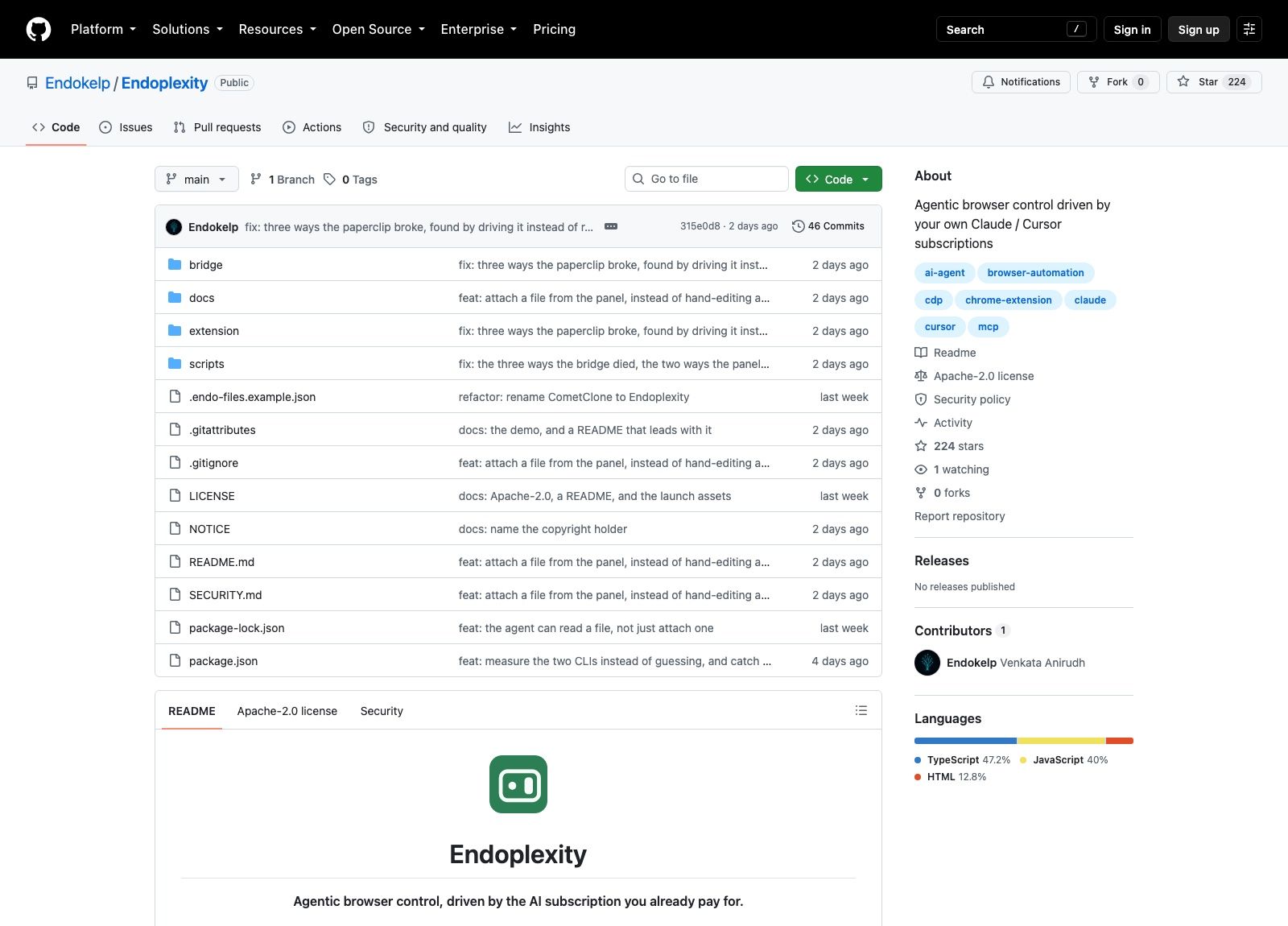
Endokelp published the repository on 14 August 2026. Three days later it carries 224 stars, one contributor, zero forks and no published releases, and that ratio is worth holding onto. Attention arrived; adoption has not yet.
Key Takeaways
- Endoplexity is a Chrome MV3 side panel plus a local bridge on
127.0.0.1:8787that hands your existingclaudeorcursor-agentCLI fourteen browser tools. There is no model API key anywhere in the setup. - It drives the real Chrome profile you are already logged into over
chrome.debugger, not a headless copy, so work behind a login needs no credentials handed over. - Pages reach the model as accessibility-tree snapshots and only changed lines get re-sent. The author measured a ten-turn task falling from 119,856 tokens to 31,626.
- The approval gate stops submit, delete and purchase actions, but it string-matches English button labels, so a French label or an icon-only button walks straight through.
- Apache-2.0 and free, at v0.0.1 and three days old: 224 stars, zero forks, no releases. Needs Node 24+, Chrome 114+, a manual unpacked install, and autostart exists on Windows only.
What is Endoplexity?
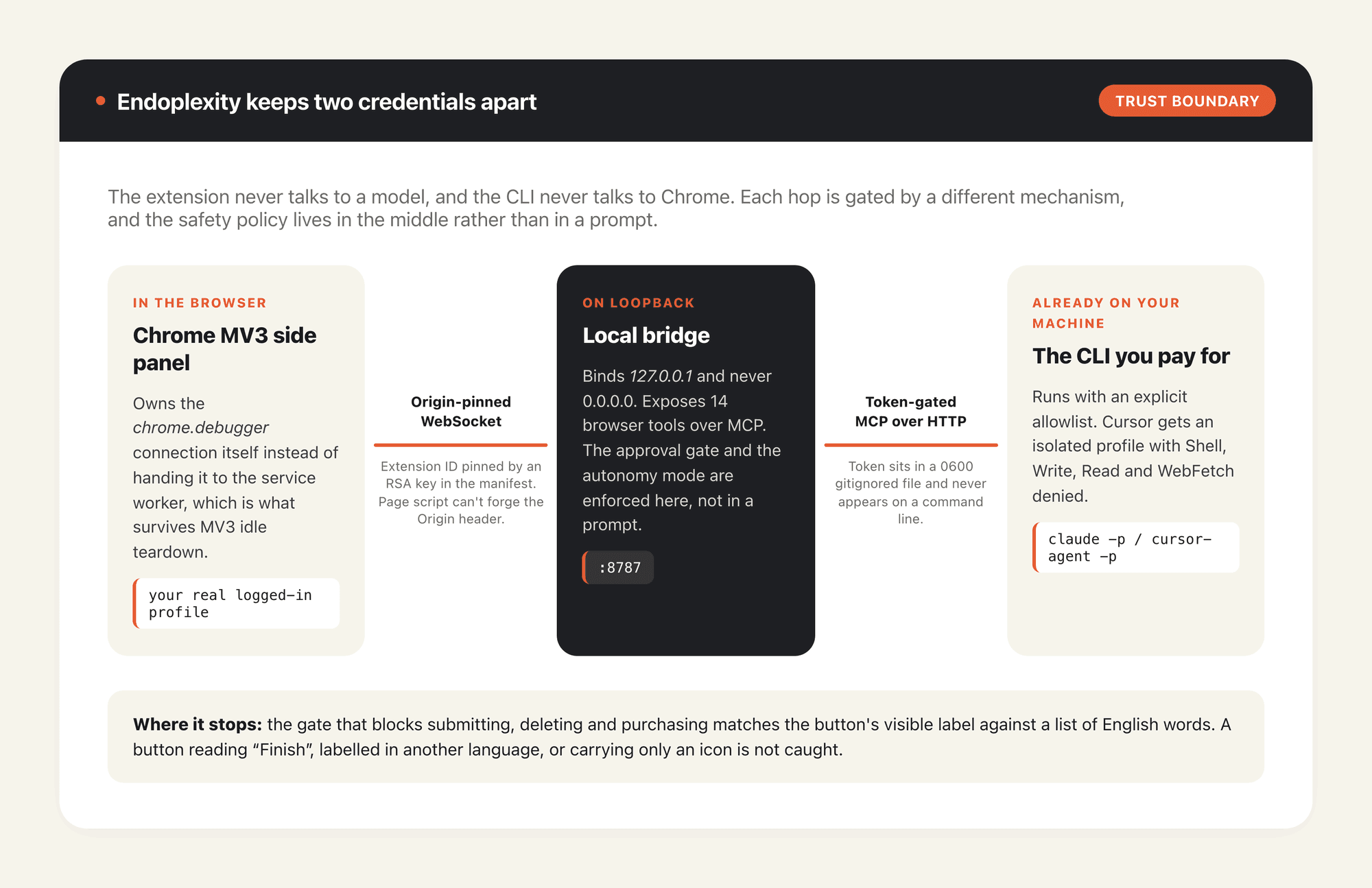
Strip the marketing and Endoplexity is two programs. One is a Chrome MV3 extension that owns a chrome.debugger connection to your browser. The other is a small local bridge listening on 127.0.0.1:8787, which exposes fourteen browser tools over MCP and enforces the safety policy. Between them sits an origin-pinned WebSocket; on the far side of the bridge sits the CLI you already installed.
The extension never speaks to a model. The CLI never speaks to Chrome. Neither one holds the other's credentials, which is a more deliberate arrangement than most projects in this category bother with.
The fourteen tools are the boring, necessary ones: snapshot, navigate, click, type, key, upload, read_file, select, scroll, hover, back, forward, tabs and use_tab. Two design calls do most of the work. Pages reach the model as an accessibility-tree snapshot rather than raw HTML, which is closer to what a model can actually use and a fraction of the bytes. And every action returns the page it produced, so acting and re-reading collapse into one turn instead of two; after the first full read, only changed lines get sent again. On a ten-turn Hacker News task the author measured that diffing at 119,856 tokens down to 31,626.
It runs on the subscription you already have
Most open-source browser agents want an API key and bill you per click. Endoplexity's argument is that you have already bought the expensive part. A Claude Pro plan is enough, and the README suggests picking Sonnet rather than a frontier reasoning model, since reading a page and clicking a button is not hard thinking.
There is one real cost measurement in the repo. A complete job application, filled agent-driven against a live Greenhouse form, came to 112,064 tokens across ten turns in 42 seconds of wall clock. The CLI reported that as roughly $0.0959 of equivalent API spend. On a subscription you never see that number on a bill, which is the whole pitch.
Your real browser, not a headless copy
This is the part that makes Endoplexity feel different from Playwright wrappers. It drives the Chrome you are already using, on the profile that is already authenticated, with Chrome's own yellow "Endoplexity started debugging this browser" banner sitting there the entire time. No headless instance that has to log back into everything, no separate cookie jar to keep warm.
The panel holds the CDP connection itself rather than handing it to the service worker, sidestepping MV3's habit of tearing down idle workers. That's why sessions survive longer than you'd expect from an extension.
That design has a cost nobody advertises. While the agent works, it is working in your window, on your tab, and you get to watch rather than participate. A fresh run always attaches to whichever tab you are currently looking at, so opening the right page before pressing Run is not a nicety, it is the interface. Anyone who has tried to keep working while an automation drives their only browser knows how that goes. The gap that leaves is a second machine rather than a second tab, and it's the reason MoClaw exists as a hosted cloud AI computer running beside your local setup instead of on top of it: the agent gets its own browser, its own screen and its own session, and you keep yours.
The safety model, and where it stops
Credit where it is due, the README states its boundaries plainly instead of implying there are none. The bridge binds loopback only and never 0.0.0.0. The extension ID is pinned by an RSA key in the manifest, so the WebSocket upgrade has to match that exact origin and page script cannot forge it. The /mcp endpoint, which a CLI reaches with no origin at all, is gated by a token in a 0600 gitignored file that never appears on a command line. Claude runs with an explicit allowlist plus --strict-mcp-config --setting-sources ""; Cursor runs in an isolated profile with Shell, Write, Read and WebFetch denied. The author says both were verified by trying to run a shell command rather than by reading documentation and hoping, and asks for holes to be reported privately via SECURITY.md.
Then there is the approval gate, and here the honesty gets genuinely useful. Submitting, deleting and purchasing all stop for a human. Silence denies, and a disconnected panel denies. But the check itself matches the clicked element's visible label against a list of English words: submit, pay, delete, confirm, a few more. That's a string match, not comprehension. A button labelled in French, worded as "Finish" or "Yes, place it", or carrying only an icon will sail straight through. The docs say so out loud, which tells you how much trust the gate has earned.
Three autonomy modes govern this: watch, normal and trust. An unrecognised mode falls back to normal, never trust, so it fails closed. The trust mode disables the gate entirely, and the demo GIF in the README runs in exactly that mode, which is why the gate never fires on camera.
One asymmetry deserves attention. upload hands a file to a page without the model ever seeing its contents, while read_file drops those contents straight into the model's context. Files resolve through a configured key rather than a model-supplied path, because DOM.setFileInputFiles runs in the browser process and can read almost anything. That allowlist is the whole boundary.
All of which is a long way of saying that this software drives a browser logged into your bank, your email and your employer's tooling. Pointing a four-day-old agent at that session is a different risk than pointing it at a machine you would happily wipe, and that separation is the practical reason to keep experimental agents on a hosted computer like MoClaw rather than the one holding your real accounts.
What it grew out of
A commit in the repo history reads refactor: rename CometClone to Endoplexity. Comet is Perplexity's browser, and the original name said out loud what the project was chasing. The README now carries a line stating the project is independent and not affiliated with, endorsed by, or sponsored by Perplexity AI, Anthropic, or Anysphere.
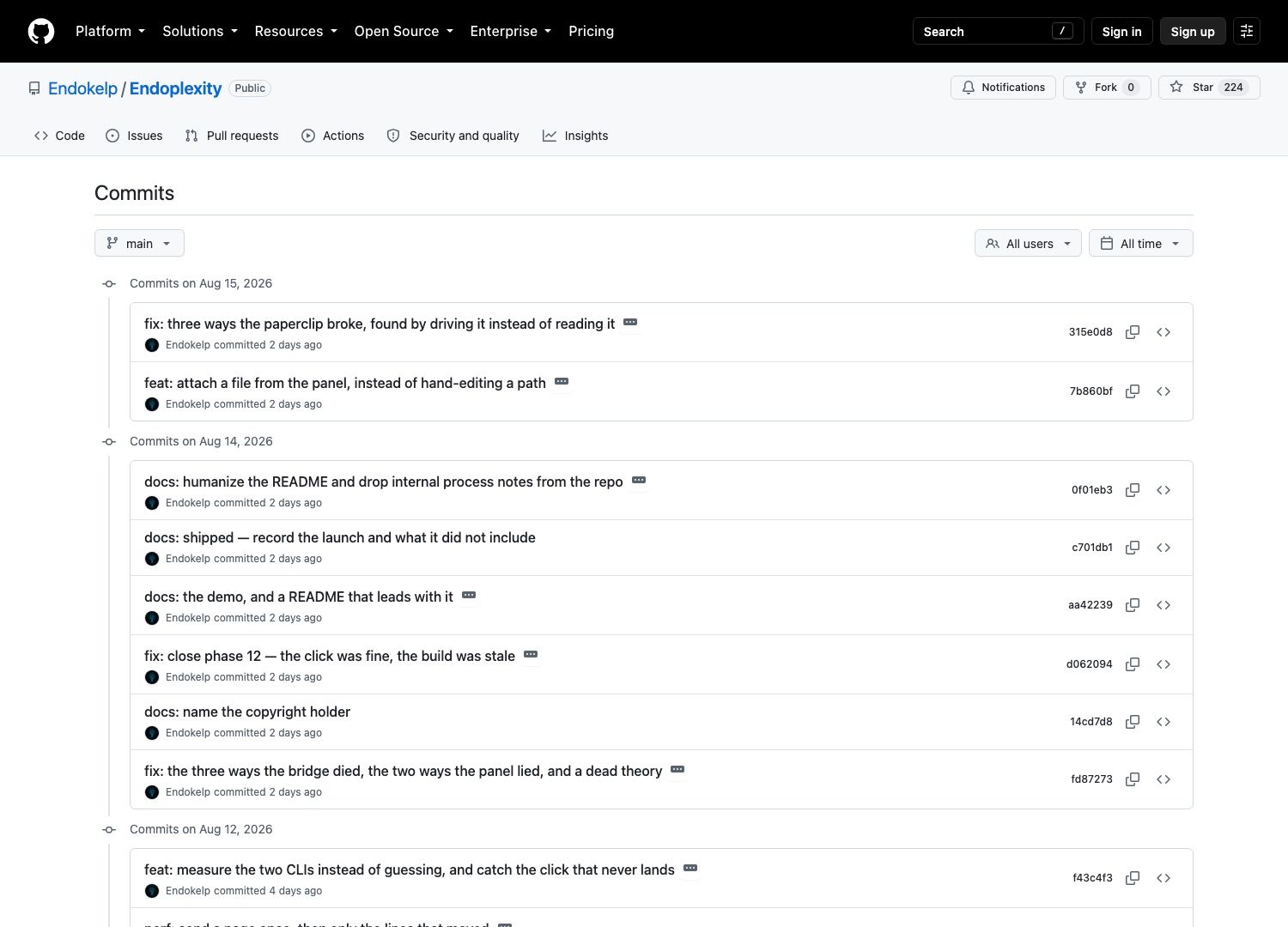
The commit log is unusually candid for a repo this young. fix: three ways the paperclip broke, found by driving it instead of reading it reads like someone testing by use rather than by unit test, which matches the 156 passing tests plus an in-panel self-test that drives the real CDP layer against a cross-origin fixture. You can run that yourself with await endo.selftest() in the panel's console.
One commit from 14 August reads docs: humanize the README and drop internal process notes from the repo. The document you're reading Endoplexity's claims from was rewritten for an audience two days before the project reached anyone, which is normal and worth knowing anyway: prefer the LICENSE file, the commit history and the Status section over the badges.
Endoplexity versus browser-use and the headless crowd
The comparison people reach for is browser-use, and the two solve overlapping problems from opposite ends. A headless framework gives you a clean, disposable, scriptable browser that has no idea who you are, so anything behind a login needs credentials handed to it. Endoplexity gives you a browser that already knows who you are and cannot be scripted in the same reproducible way, because it is attached to a live human session with whatever state that session accumulated.
There is a third position that neither occupies: a browser that stays logged in but isn't the one on your desk. That's what a hosted cloud AI computer such as MoClaw gives you, a persistent session the agent owns outright, so you get the login without handing over the profile you work in.
For scraping at any scale, headless wins and it is not close. For the errand that requires being logged in as you, filling a form on an ATS, comparing pricing pages behind a paywall, pulling something out of a dashboard that will not issue an API token, the live-session approach removes the hardest part of the job. If you want the wider category laid out properly, our 2026 guide to AI browser automation tools covers the six tool families and where each stops working, and Kimi WebBridge is the closest local-first comparison point.
Searching for Endoplexity in August 2026 mostly returns complexity-science papers, so the repository is currently the only real thing wearing the name.
Who should install it today
Requirements first, since they eliminate a lot of people. Node 24 or newer, because the bridge runs TypeScript directly with no build step and that only works on 24+. Chrome 114 or newer, with 135+ getting themed dropdowns and older versions falling back to the native picker. A claude CLI, a cursor-agent CLI, or both, already logged into a real subscription. Then a manual install: clone the repo, npm install, start the bridge, open chrome://extensions, turn on Developer mode, and load the extension/ folder unpacked.
The version number is v0.0.1 and the author says so rather than dressing it up. Known gaps are listed instead of hidden. Autostart is Windows-first: npm run setup writes a launcher into the Windows Startup folder, and macOS and Linux autostart simply aren't implemented yet, though the bridge itself is portable and npm start works anywhere. Sessions live in the bridge's memory, so restarting it ends resumability on purpose, since resuming into a Chrome that has moved on would hand the agent a transcript full of stale element references. Real ATS comboboxes usually aren't <select> elements and need a click-then-click flow. chrome:// pages and the Web Store cannot be driven at all, because Chrome refuses the debugger there.
Those last two constraints are the ones that decide whether this fits your week. An agent whose autostart only exists on one operating system, and whose session state dies with a local process, is a tool for tasks that finish while you are sitting there. Overnight work needs something that stays powered on when the lid closes, which is the requirement a laptop is structurally unable to meet and the one MoClaw was built for.
So: install it if you have the CLI subscription, run Windows or don't mind starting the bridge by hand, and have errands that require your logged-in session. Skip it if you need reproducible runs, headless scale, or a gate that understands buttons rather than matching English strings against them.
Verified against the repository, README, LICENSE and commit history on 17 August 2026. The project is three days old and moving quickly, so recheck version numbers and the gap list before you depend on any of it.
FAQ
Does Endoplexity need an API key?
No. The extension talks to a local bridge, and the bridge shells out to the claude or cursor-agent CLI already authenticated on your machine. There is no model API key anywhere in the setup, and no billing page to configure. A Claude Pro plan is enough.
Which CLIs does it work with?
The claude CLI and the cursor-agent CLI, either or both. Cursor needs a one-time npm run cursor-login into a bridge-owned profile kept separate from your normal Cursor login, so the two never collide.
Is Endoplexity free?
The code is Apache-2.0 licensed and free. You still pay for the Claude or Cursor subscription that does the reasoning, so the honest answer is that it's free software running on a paid brain you were already renting.
Can it act on pages I'm already logged into?
Yes, and that is the point of the design. It attaches to your real Chrome profile with your real cookies, and Chrome shows its own debugging banner the whole time. Irreversible actions hit an approval gate first, though that gate matches English button labels rather than understanding the page, so treat it as a speed bump and not a seatbelt.
Does it run on macOS and Linux?
The bridge is portable and npm start runs it anywhere, so Endoplexity is not a Windows-only tool. What's Windows-only is the autostart installer, which means on macOS and Linux you start the bridge yourself each session. The README's Status section is the accurate source on this; the badges at the top of the page don't mention it.
Continue Reading
More Guide
Claude Model Upgrades: Protect Recurring AI Workflows

Relay.app Alternative: Move Before Sep 14

What Is pgbot? Read-Only Postgres Checkups

What Is Cumora? AI Agents as Teammates

Mistral OCR: Your Version Gates Features

Kimi K2.6 Pricing Hides a Precision Trade
The MoClaw editorial team writes about workflow automation, AI agents, and the tools we build. Default byline for industry overviews, listicles, and collaborative pieces.
Ready to put this into practice?
MoClaw runs browser tasks, research, and schedules automatically. Try it free.
References: https://github.com/Endokelp/Endoplexity · https://github.com/Endokelp/Endoplexity/blob/main/LICENSE · https://github.com/Endokelp/Endoplexity/blob/main/SECURITY.md · https://github.com/Endokelp/Endoplexity/commits/main/ · https://github.com/browser-use/browser-use