Mistral OCR: Your Version Gates Features

Mistral OCR bills per 1,000 pages, not per token, and mistral-ocr-latest is an alias. Table, header and block extraction each need a different version.
Table of Contents
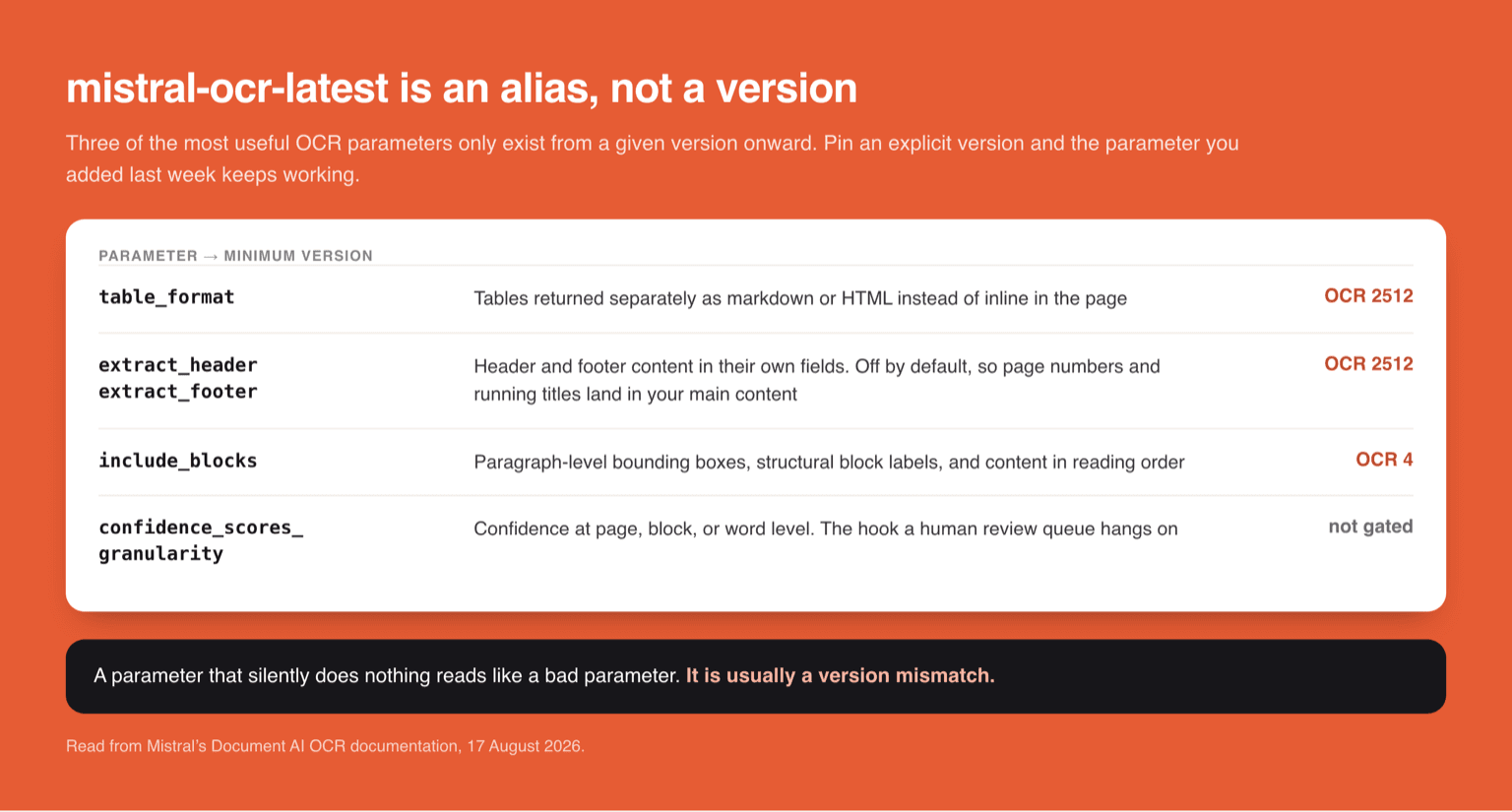
Mistral OCR is a document processing endpoint that extracts text, tables, and layout structure from PDFs and images, and it is billed per 1,000 pages rather than per million tokens. The detail that costs people an afternoon is that mistral-ocr-latest is an alias rather than a version, and three of the most useful parameters are gated behind specific versions: table formatting and header extraction need OCR 2512 or newer, and block extraction needs OCR 4 or newer. Everything here was read from Mistral's OCR processor documentation on 17 August 2026.
Key Takeaways:
mistral-ocr-latestpoints at whatever the current OCR model is. Pin an explicit version if you need reproducible output.table_formatandextract_header/extract_footerrequire OCR 2512 or newer.include_blocksrequires OCR 4 or newer.- It accepts PDF, PPTX, and DOCX through
document_url, and PNG, JPEG, and AVIF throughimage_url. - Confidence scores come back at page, block, or word granularity via
confidence_scores_granularity, which is the hook most pipelines need for a human review queue. - Pricing is per 1,000 pages, so a page of dense tables and a page with one sentence cost the same. That is the opposite of how a vision language model bills you.
What Mistral OCR does that a chat model does not
You can hand a PDF page to any multimodal model and ask it what the page says. Plenty of teams do, and for a handful of documents it works fine. The difference shows up at volume and in the shape of the output.
A chat model returns prose. Mistral OCR returns a structured object: an array of pages, each with markdown content, an images list with bounding boxes, a tables list, and document-structure metadata. You get reading order rather than the model's guess at reading order, and you get coordinates you can draw a box with.
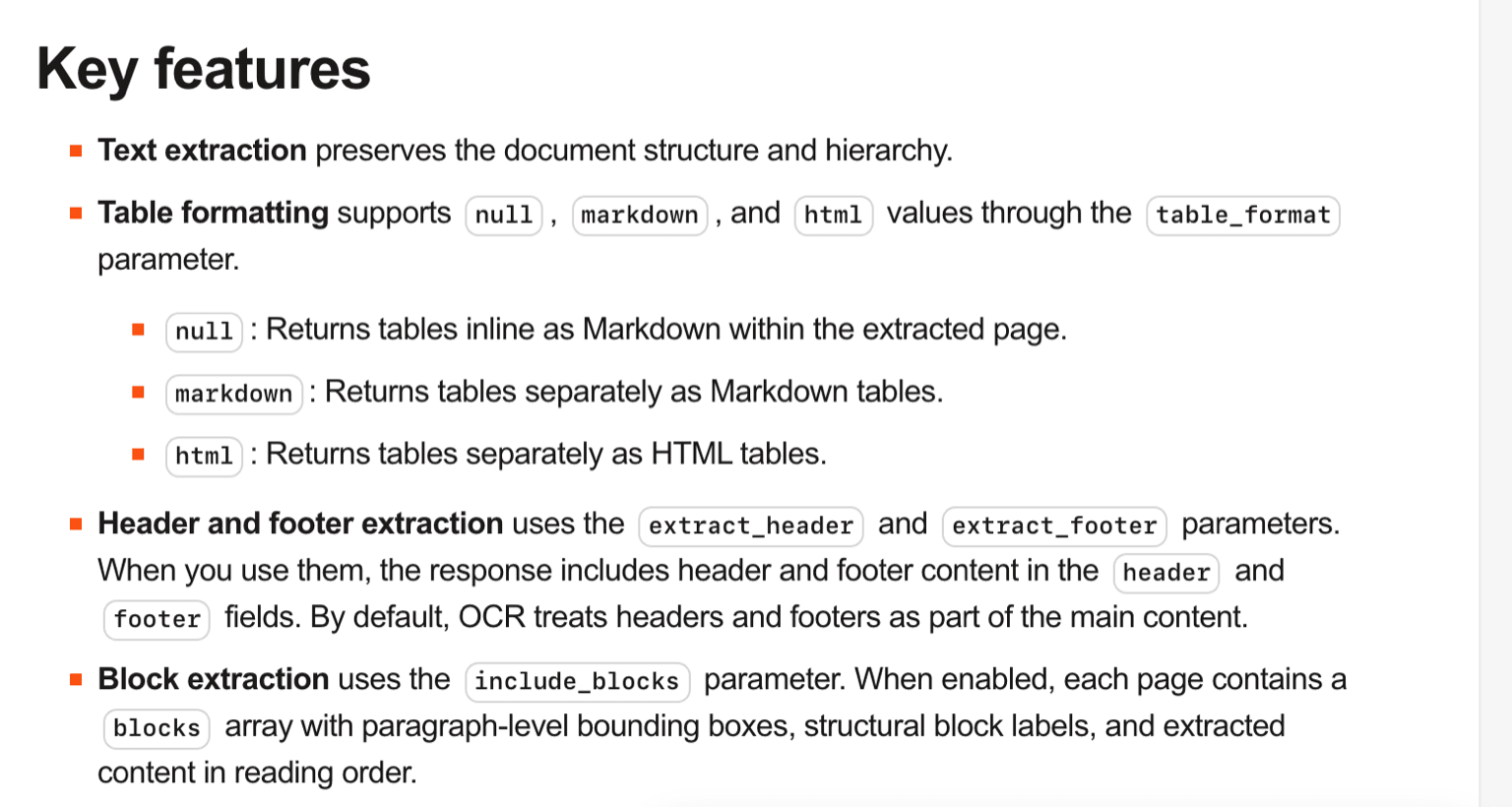
The multilingual claim is more than forty languages, which matters if your document set is not uniformly English. And the format support is wider than PDF: document_url takes PPTX and DOCX as well, which quietly removes a conversion step from a lot of pipelines.
mistral-ocr-latest is an alias, and that is the whole problem
The documented model string is mistral-ocr-latest, and the docs say plainly that it points to the latest OCR model. Convenient in a quickstart, and a liability in a pipeline.
Two failure modes come out of it. The first is that your output changes when Mistral ships a new version, without anything in your code changing. If you have downstream parsers keyed to a particular markdown shape, or golden files in your test suite, they can drift under you. The second is subtler: a parameter you added and tested happily on latest may not work when a colleague pins an older version for a reason of their own, and the failure will read as a bad parameter rather than a version mismatch.
The fix is unglamorous. Pin an explicit version in anything that runs unattended, keep latest for exploration, and treat a version bump as a change that needs the same review as a dependency bump. That is ordinary practice everywhere else and it gets skipped here because the alias makes it feel like a setting rather than a dependency.
Which parameters need which version
This is the table worth bookmarking, because the docs state the gating in an information callout that is easy to scroll past.

| Parameter | What it gives you | Minimum version |
|---|---|---|
table_format |
Tables returned separately as markdown or HTML instead of inline | OCR 2512 |
extract_header / extract_footer |
Header and footer content in their own response fields | OCR 2512 |
include_blocks |
Paragraph-level bounding boxes, structural block labels, reading order | OCR 4 |
confidence_scores_granularity |
Confidence at page, block, or word level | not version gated in the docs |
By default OCR treats headers and footers as part of the main content, which is exactly the behaviour that pollutes a RAG index with page numbers and running titles. Turning that off is a one-line change and it needs 2512 or newer.
include_blocks is the one that changes what you can build. Paragraph-level bounding boxes with structural labels in reading order is the difference between having text and having a document model, and it is the newest of the three, so it is also the one most likely to be missing on whatever version a team pinned six months ago.
Priced per 1,000 pages, not per million tokens
Mistral's pricing FAQ is explicit that a few APIs are priced differently from the token-based models, and OCR is one of them: it bills per 1,000 pages. Check the current rate on Mistral's pricing page before you budget, because it moves independently of the token prices you may already be tracking.
The structural consequence matters more than the number. Per-page pricing means a page costs the same whether it holds one sentence or a dense financial table, so your bill is a function of document count and nothing else. That makes forecasting genuinely easy, which is rare.
It also inverts the comparison against sending pages to a vision language model. There, a dense page costs more than a sparse one because it produces more tokens, and a long document with many images can get expensive in ways that are hard to predict from the page count alone. If you are weighing the two approaches, the tipping point is not quality, it is variance: OCR gives you a predictable line item, and a general model gives you a variable one. We laid out how that variable side behaves across the current multimodal models in Qwen 3.8 vs Kimi K3.
What the OCR response actually contains
The response is a JSON object with a pages array. Each page carries an index, a markdown field holding the main extracted content, an images list when image extraction is enabled, a tables list when you have asked for tables separately, and document-structure metadata alongside.
That markdown field is the part that determines how much work is left. Getting structure-preserving markdown out of a PDF means the hierarchy survives, so headings stay headings and lists stay lists, and a downstream chunker has something real to split on. Feeding a chunker undifferentiated text is where most document pipelines quietly lose their retrieval quality.
Beyond the OCR processor itself, Mistral's Document AI includes document annotations, which return information in a JSON schema you define rather than as free text. If your actual goal is fifteen named fields off an invoice rather than the whole page, that is the endpoint to read next, and it changes the shape of the pipeline enough that treating it as a variant of OCR will mislead you.
Where OCR ends and the agent work begins
Extraction is the easy half. What tends to eat the schedule is everything wrapped around it: retrying the pages that failed, holding the ones with low confidence for a human, converting the markdown into whatever the next system wants, and doing all of it across a backlog that takes hours.
This is where confidence_scores_granularity earns its place. Word-level confidence lets you route a specific field to review rather than flagging an entire document, which is the difference between a review queue somebody works through and a review queue somebody ignores.
The run itself needs somewhere to live. A ten thousand page backlog is a long job with retries, and a laptop that closes at six is a poor host for it. MoClaw is a hosted cloud AI computer built for that shape of work: the batch keeps going after you shut the lid, and the output waits for you in one place instead of a terminal you already quit. Once the text is out, the downstream is usually a document workflow rather than more extraction, which is the job our document to presentation and PDF to deck flows exist for.
What is not settled here
I have not benchmarked accuracy. Mistral publishes its own OCR evaluations and I have not reproduced them, so nothing in this article is a claim that Mistral OCR reads documents better or worse than the alternatives.
The version gating is documented but the release history behind it is not something I can reconstruct from the public docs, so if you need to know exactly what shipped in 2512 versus OCR 4 beyond the three parameters above, the API reference and changelog are the places to look rather than this page.
And on price, the structure is public and clear, per 1,000 pages, but rates change. Read the number off the pricing page on the day you build the model, not off an article.
FAQ
What is Mistral OCR?
It is Mistral's Document AI OCR processor, an API endpoint that extracts text and structured content from PDFs and images. It returns per-page markdown, image bounding boxes, tables, and document-structure metadata rather than free-form prose.
What does Mistral OCR cost?
It is priced per 1,000 pages rather than per million tokens, which Mistral's pricing FAQ states directly. Because it is a per-page rate, a dense page and a sparse page cost the same. Check the current figure on Mistral's pricing page.
What file types does Mistral OCR accept?
Through document_url it takes PDF, PPTX, and DOCX among other document formats. Through image_url it takes PNG, JPEG, AVIF, and other image formats. PDFs can be passed as a public URL, as Base64, or uploaded.
Why is my table_format or include_blocks parameter not working?
Almost certainly a version mismatch. table_format and the header and footer extraction parameters need OCR 2512 or newer, and include_blocks needs OCR 4 or newer. If you pinned an older version, those parameters have nothing to act on.
How many languages does Mistral OCR support?
The documentation describes strong multilingual performance across more than forty languages, with a full list published in the supported languages reference.
Pin the version, then read the parameter table
Most of the friction people hit with this API is not accuracy and not price. It is that the model string they copied out of a quickstart is an alias, and half the parameters they want came in at different times.
So do the two boring things first. Pin an explicit OCR version in anything that runs on a schedule, and check each parameter you plan to use against the minimum version before you write the integration rather than after the response comes back missing a field. That is twenty minutes that removes the entire category of problem, and it leaves you arguing about the thing that actually deserves the argument, which is whether the extraction is good enough for what you are building on top of it.
Continue Reading
More Guide
Claude Model Upgrades: Protect Recurring AI Workflows

Relay.app Alternative: Move Before Sep 14

What Is pgbot? Read-Only Postgres Checkups

What Is Cumora? AI Agents as Teammates

Kimi K2.6 Pricing Hides a Precision Trade

Grok 4.6 Doubles Its Price at 200K Tokens
The MoClaw editorial team writes about workflow automation, AI agents, and the tools we build. Default byline for industry overviews, listicles, and collaborative pieces.
Ready to put this into practice?
MoClaw runs browser tasks, research, and schedules automatically. Try it free.
References: Mistral Document AI OCR processor documentation · Mistral document annotations documentation · Mistral pricing · Mistral OCR announcement · Mistral API reference