What Is OpenWorker? Andrew Ng's AI Coworker

OpenWorker is Andrew Ng's free, open-source desktop AI coworker that delivers finished work, not chat. What it does, how it works, models, and limits.
Table of Contents
OpenWorker is a free, open-source desktop AI agent from Andrew Ng and Rohit Prasad that delivers finished work instead of chat: a drafted report, a Slack reply with the real numbers, an updated calendar, a triaged inbox. Released under an MIT license on July 23, 2026, it runs locally on your Mac, uses your own model API keys, and checks in for approval before doing anything consequential.
This is not a weekend demo. The repository ships with roughly 32,000 lines of Python across 119 files, a full Tauri desktop app, and 78 backend test modules, which is the footprint of a production-scale system rather than a proof of concept. It crossed 1,700 GitHub stars in its first days after Ng announced it on X.
Key Takeaways:
- OpenWorker is MIT-licensed, open source, and free. You bring your own model API key or run fully local with Ollama.
- It returns deliverables (documents, Slack replies, calendar edits), not chat transcripts, and asks for approval before any consequential action.
- Built by Andrew Ng and Rohit Prasad on their open-source aisuite library, with a Tauri desktop shell and a local Python agent server.
- It runs on macOS and Windows today. The Windows installer shipped on day one but is unsigned, and the marketing site still lists it as coming soon. There is no Linux build.
- The trade-off is setup: you manage the install, the API keys, and the model bill yourself.
What Is OpenWorker
OpenWorker is Andrew Ng and Rohit Prasad's answer to a specific complaint about AI agents: they talk instead of finishing. Announcing it on X, Ng described "an open-source agent that doesn't just chat with you, but delivers finished work, like hand you a polished document, send a slack message, or update a calendar entry." The project's stated goal is to give people "an open, privacy-preserving, model-independent option" for an AI coworker.
Three things separate it from the chat assistants most people already run:
- It is open source. The full codebase is MIT-licensed on GitHub. You can read every line, fork it, or run it air-gapped.
- It is local-first. Your files, your API keys, and your conversation history stay on your machine. Data leaves only through the specific model and integrations you choose to connect.
- It asks for an outcome, not a prompt. You tell it "prepare the Q3 board brief," and it decomposes that goal into steps, works across your local files and connected apps, and produces the artifact, rather than returning a wall of text you then have to act on yourself.
The model layer is built on aisuite, the open-source unified-LLM library that Prasad and Ng have been developing for over a year. That lineage matters: OpenWorker is model-independent by design, not locked to one provider.
What this resolved: A clear definition. OpenWorker is a local, open-source, deliverable-first agent, not another chatbot wrapper.
What it left unsolved: "Delivers finished work" is the pitch every agent makes. Whether it holds up depends on the model you plug in and the task, which the next section gets into.
What OpenWorker Can Actually Do
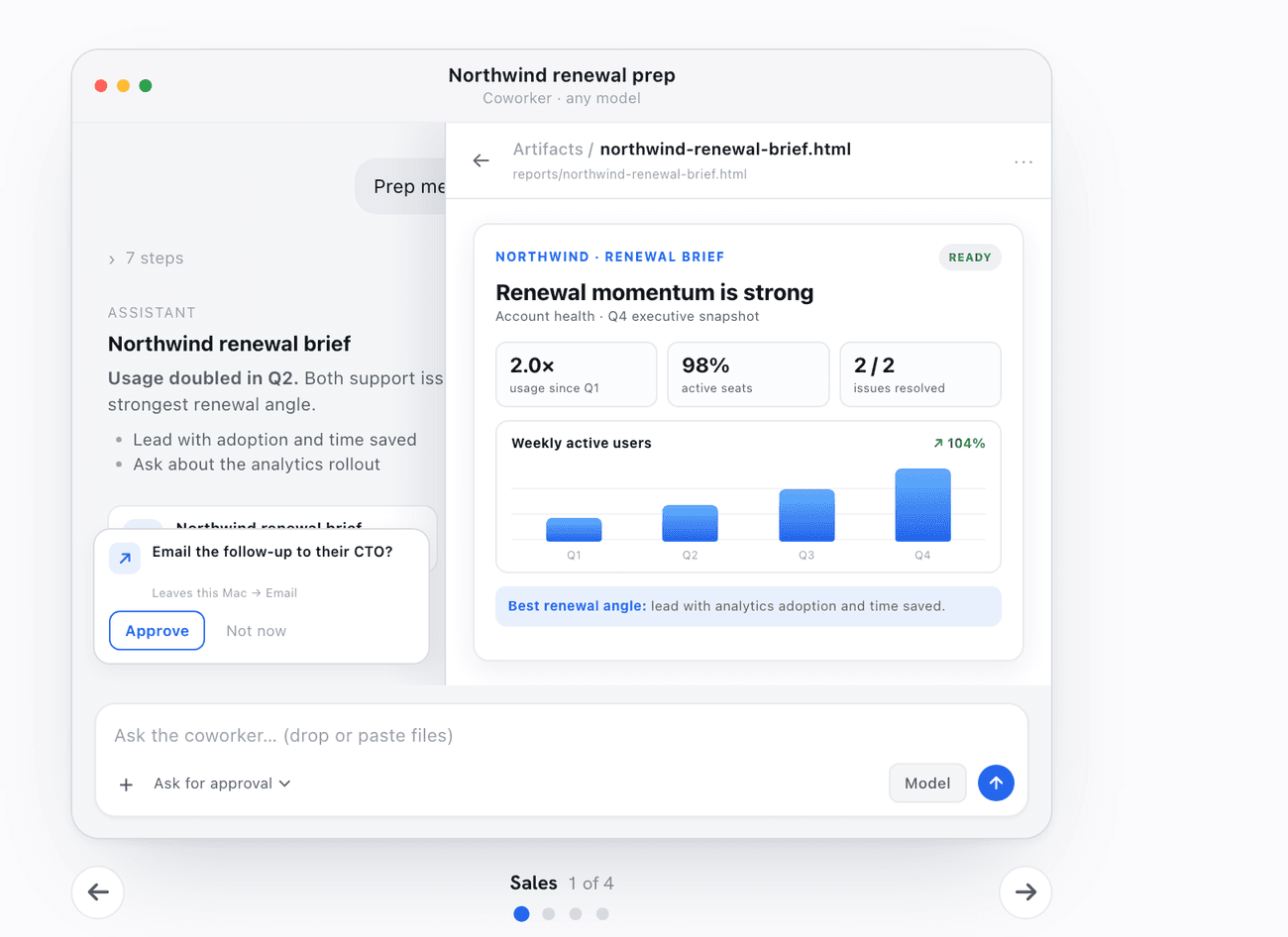
The four tasks Ng highlighted at launch are the honest scope of what OpenWorker is built for: prepare a customer brief, untangle your calendar, draft a report, and triage a Slack alert. Each one ends in a concrete deliverable, which is the whole point.
Say you have a 9 a.m. sales call and no time to prep. You ask OpenWorker to pull the prospect's last three email threads, check the shared calendar for the meeting, and draft a one-page brief with the open questions from the account. It works across your Gmail and Google Calendar, produces the document, and pings you to approve before it books a follow-up slot. You review the brief over coffee instead of building it from scratch.
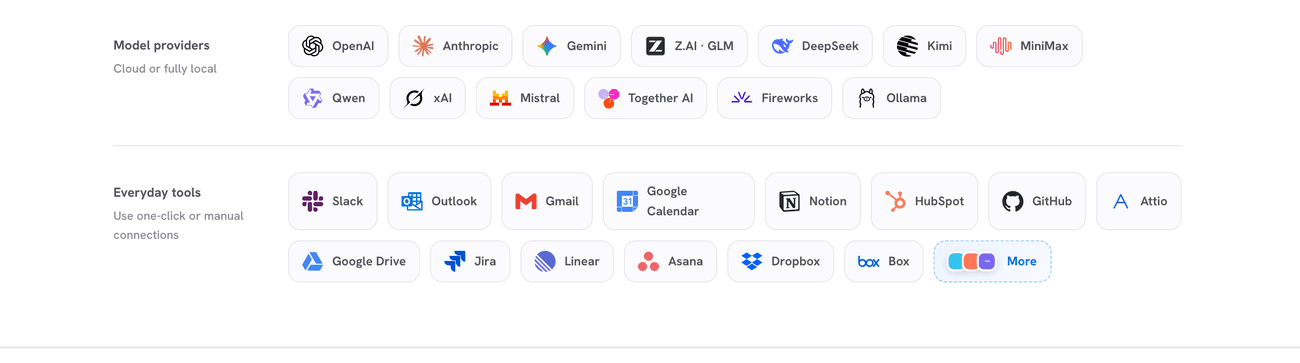
The reach comes from 25-plus integrations, including GitHub, Slack, Jira, Notion, Linear, HubSpot, Outlook, Gmail, and Google Calendar. You can also mention @OpenWorker directly inside Slack, so a teammate can hand it a task without opening the desktop app. Scheduled automations run on their own and keep a full transcript, so you can audit exactly what the agent did and why.
What this resolved: A grounded feature list. The starter use cases (brief prep, calendar cleanup, reports, Slack triage) all have benign failure modes and visible daily value.
What it left unsolved: Integration breadth is only as good as the model behind it. A weak model with 25 integrations still produces weak briefs.
How OpenWorker Works Under the Hood
This is where OpenWorker earns the "open" in its name, and where it diverges from the average launch-day press release. The architecture is four layers running locally on your machine.
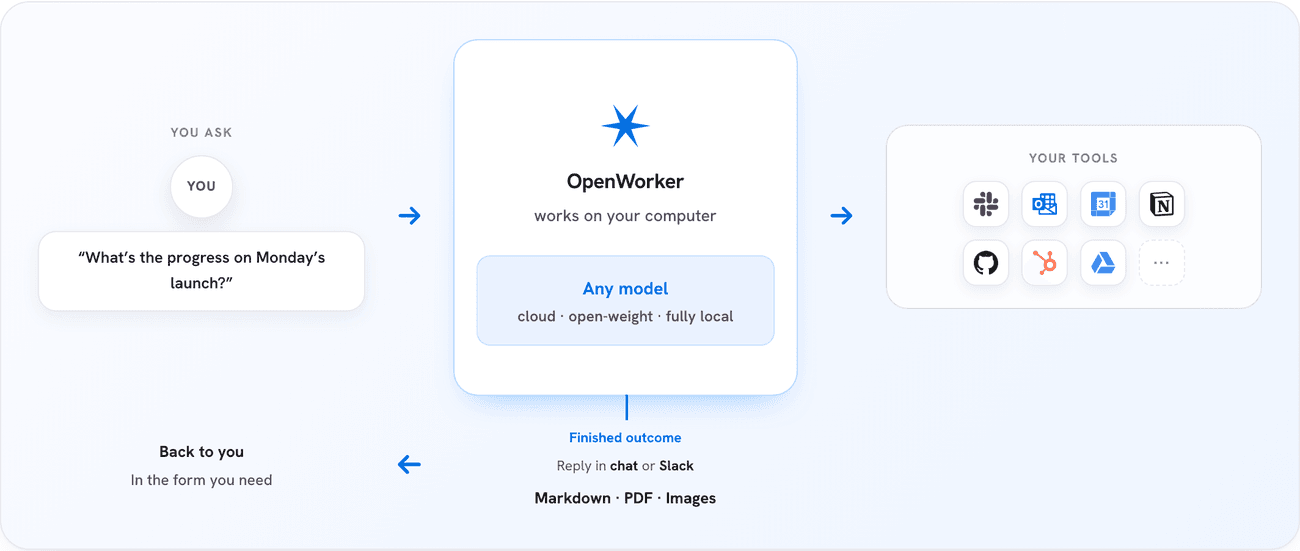
The desktop shell is a Tauri 2 native window wrapping a React 18 UI. The local agent server is Python 3.10-plus on FastAPI and uvicorn, bound to 127.0.0.1:8765 by default, and it caps each task at 12 model-to-tool iterations so a confused agent cannot loop forever. The capability layer exposes local tools (files, git, ripgrep search, shell, a todo list) plus the hosted integrations and Model Context Protocol support. The model router is the provider-agnostic aisuite interface. There is even a Rust-based speech-to-text sidecar for voice input.
The part worth studying is the permission model, because it is the difference between a useful agent and a liability. OpenWorker sorts every action into four risk tiers: read, write_local, exec, and external. Five permission modes then govern what runs without asking: discuss and plan are read-only, interactive (the default) prompts before any write, auto runs everything within a scoped path, and custom lets you auto-approve specific tools you trust.
The design principle Ng's team calls out is the one that should make risk-averse teams comfortable: "Unattended mode does not raise the autonomy ceiling." If you leave it running overnight and it hits a consequential action, an unanswered prompt routes to an Inbox for you to review later, rather than silently escalating to full autonomy. The agent never quietly grants itself more power because you stepped away.
What this resolved: A real, inspectable safety model. Risk tiers plus a hard turn cap plus an approval Inbox is more disciplined than most commercial agents ship with.
What it left unsolved: All of that safety lives on your machine, which means you are the one keeping the Python server, the environment, and the updates healthy.
Which AI Models OpenWorker Supports
Because it is built on aisuite, OpenWorker is genuinely model-independent. You bring your own key and point it at whatever you want.
On the commercial side, it supports the frontier APIs: OpenAI's GPT-5.6, Anthropic's Claude Fable 5 and Opus 4.8, and Google's Gemini. On the open-weight side, it can run Kimi, GLM, DeepSeek, Qwen, and Mistral, served through providers like Together and Fireworks. And if you want nothing leaving your laptop at all, it runs fully local through Ollama with no API key required.
The detail that makes this practical is that you can switch models per task, even mid-conversation. Use a cheap open-weight model to draft, then swap to a frontier model for the final pass on a high-stakes report. Run DeepSeek locally for routine code search to keep costs near zero, then switch to Claude Opus only for the one weekly report that leaves the building. Split that way, a month of model spend can land under the price of a single seat on most commercial agent platforms.
What this resolved: True BYOK flexibility. No vendor lock-in, and a real path to running everything offline.
What it left unsolved: Choice is a burden too. You have to know which model fits which task, manage multiple provider keys, and eat whatever those providers charge.
OpenWorker Limitations You Should Know
The open-source, local-first design is exactly what creates the friction. These are the trade-offs to weigh before you download it.
You bring, and pay for, your own API keys. OpenWorker is free, but the models are not. Every task hits your OpenAI, Anthropic, or Google account, and the bill lands on you. A founder who set an agent loose on a large document backlog without watching token usage can see a real charge by Friday. Local Ollama models sidestep the cost but ask more of your hardware.
Windows works, but the site will not tell you so. The homepage on openworker.com shows a Mac download and a greyed-out "Download for Windows / Coming soon." The README does not agree: it links a live "Windows 10/11 (x64)" button, and that link resolves to OpenWorker-windows-setup.exe, a 44 MB installer that was uploaded to the v0.1.6 release on July 23, the day of launch, alongside an .msi. Roughly 5,000 people have pulled it. The catch is in the README's own small print, that the builds "are not yet code-signed, so SmartScreen will warn; signing is in progress," and in the Windows-specific bug reports piling up in the tracker: a broken installer, corrupted grep output from the ripgrep parser, drive-letter paths, a lag in voice settings. So Windows is real and it is rough, which is a different thing from unavailable. Linux is the platform genuinely missing; no release carries a Linux build.
You own the install and the upkeep. A local Python agent server, a desktop app, and model keys are yours to set up, secure, and update. That is fine for a developer and a genuine barrier for a non-technical operator who just wants the deliverable.
It is early. OpenWorker launched in open beta on July 23, 2026. Expect rough edges, breaking changes, and integrations that are still maturing.
What this resolved: An honest picture. OpenWorker trades convenience for control, and that is the right trade for some people.
What it left unsolved: If you want the deliverable-first experience without the setup tax, you are looking for a different shape of product, which is the next section.
OpenWorker vs Cloud AI Agents
If you read the limitations above and thought "I just want the finished brief, not a Python server to babysit," you are the reason cloud AI agents exist. A managed cloud agent like MoClaw runs the same deliverable-first pattern, but the install, the model keys, and the infrastructure are handled for you. You describe the outcome in a browser and it runs.
The two approaches are genuinely different tools for different people, not better and worse:
| OpenWorker | Cloud AI agent (e.g. MoClaw) | |
|---|---|---|
| Setup | Install desktop app plus local Python server | Nothing to install, works in a browser |
| Model keys | Bring your own, you pay each provider | Managed and included |
| Platform | macOS, plus an unsigned Windows build; no Linux | Any device with a browser |
| Data location | Fully on your machine | Runs in the cloud |
| Maintenance | You own updates and upkeep | Handled for you |
| Best for | Developers, privacy-first users, tinkerers | Non-technical operators who want zero setup |
The honest read: if privacy, cost control, and open code are your priorities, and you are comfortable with a terminal, OpenWorker is a gift. If your priority is getting the work done without owning any infrastructure, a managed cloud agent removes the exact friction OpenWorker asks you to accept. A cloud agent is a managed AI coworker, not a replacement for the local control OpenWorker gives you. Pick the trade that matches how you work.
What this resolved: A clean decision axis. Control versus convenience, not one product beating the other.
What it left unsolved: Most people will not know which side they are on until they have tried one. Start with the one whose trade-off you can live with.
FAQ
Is OpenWorker free?
Yes. OpenWorker is open source under an MIT license, and the app itself costs nothing. You pay only for the model you use: bring your own API key for OpenAI, Anthropic, or Google, or run a local model with Ollama for no per-token cost at all.
Does OpenWorker work on Windows?
Yes, despite what the homepage says. openworker.com still shows "Windows support coming soon," but the GitHub README links a Windows 10/11 (x64) installer, and it has been attached to the releases since launch day on July 23, 2026, as both an .exe and an .msi. Two caveats: the Windows builds are not code-signed yet, so SmartScreen will warn you, and the open issues skew Windows-specific. Linux is the platform with no build at all.
What models does OpenWorker support?
OpenWorker is model-independent through the aisuite library. It supports commercial APIs (OpenAI GPT-5.6, Anthropic Claude Fable 5 and Opus 4.8, Google Gemini), open-weight models (Kimi, GLM, DeepSeek, Qwen, Mistral) via providers like Together and Fireworks, and fully local models through Ollama. You can switch models per task, even mid-conversation.
Is my data private with OpenWorker?
Yes, by design. OpenWorker is local-first: your files, API keys, and conversation history stay on your machine. Data leaves your device only through the specific model API and integrations you connect. Running a local Ollama model keeps everything offline.
Who made OpenWorker?
OpenWorker was created by Andrew Ng and Rohit Prasad, the same pair behind the open-source aisuite library that powers its model layer.
Who Should Actually Run OpenWorker
OpenWorker is the clearest sign yet that the "AI coworker" category is splitting in two: local, open, you-own-everything tools on one side, and managed cloud agents on the other. It also did not land alone: we traced how three launches in the same week all bet on humans and AI agents working in parallel. If you are a developer, a privacy-first team, or someone who wants to read the code and run models offline, OpenWorker is one of the most credible open-source agents to ship in 2026, and it is free to try today on a Mac.
If you are not that person, do not force it. The setup, the key management, and the unsigned-installer detour are real, and a managed cloud agent will get you to the same finished deliverable without any of them. If OpenWorker is not your fit, we rounded up the best OpenWorker alternatives separately. The smart move is to match the tool to your appetite for control: download OpenWorker if owning the stack excites you, and reach for a hosted agent if it does not. Either way, the era of AI that hands you finished work instead of chat has clearly arrived.
Continue Reading
More Guide
What Is Hermes Bot Mode? Bots and Routines
OpenAI Assistants API Deprecated: What Broke
MCP Tools: What They Are and Which to Use

OpenAI Models Not Available in Cursor Nov 12

Coding Agent Security: When Your Tools Lie

OpenAI Python HTTPX2: What Actually Breaks
The MoClaw editorial team writes about workflow automation, AI agents, and the tools we build. Default byline for industry overviews, listicles, and collaborative pieces.
Ready to put this into practice?
MoClaw runs browser tasks, research, and schedules automatically. Try it free.
References: OpenWorker on GitHub (MIT license) · OpenWorker official site and FAQ · Andrew Ng: Announcing OpenWorker (X) · aisuite: unified interface to multiple LLM providers · Andrew Ng on aisuite with Rohit Prasad (X)