Kimi K3 vs K2.6: What Changed & Upgrade?
Kimi K3 vs K2.6: 2.8x the parameters, 4x the context, and a 5x price jump. What K3 adds, what K2.6 still does better, and who should upgrade in 2026.

Table of Contents
Kimi K3 vs K2.6 is not a simple upgrade. Kimi K3 roughly triples the parameters (about 1T to 2.8T), quadruples the context window (256K to 1M tokens), and adds native video, but it also raises the price about 5x. For many existing K2.6 users, the honest answer to whether to upgrade is: it depends on whether you need reach or value.
That tension is the point. K2.6 was, and still is, a strong model: it drove 12 to 13 hour autonomous coding runs and hit a 96.6% tool-call success rate in one integration (CodeBuddy, via Moonshot's K2.6 materials). K3 is more capable, but capability you do not use is not worth a 5x bill.
Key Takeaways:
- Kimi K3 vs K2.6: ~2.8T vs ~1T parameters, 1M vs 256K context, video vs vision-only, and a jump from $0.60/$2.50 to $3.00/$15.00 per million tokens.
- K2.6 still does long autonomous coding sessions well and remains far cheaper; the upgrade is not automatic.
- K3 adds Kimi Delta Attention, native video, a higher independent benchmark score, Frontend Code Arena #1, and the K3 Swarm Max variant.
- For long coding sessions, K2.7 Code (model ID kimi-for-coding) is often the better value than jumping to K3.
- Upgrade to K3 for 1M context, multimodal, or swarm work; hold on K2.6/K2.7 Code for cost-sensitive coding.
Kimi K3 vs K2.6: Spec Comparison
Start the Kimi K3 vs K2.6 decision with the raw specs. The gaps are large on paper, which is exactly why the price question matters so much.
| Spec | Kimi K2.6 | Kimi K3 |
|---|---|---|
| Parameters | ~1T total | ~2.8T total (MoE, 896 experts) |
| Context window | 256K tokens | 1,048,576 tokens (1M) |
| Modality | Native vision | Native vision + video |
| Architecture | Prior attention | Kimi Delta Attention (KDA) |
| Variants | Single model | K3 Max + K3 Swarm Max |
| Price / 1M tokens | $0.60 in / $2.50 out | $3.00 in / $15.00 out |
| Open weights | Open (K2 family) | Due July 27, 2026 |
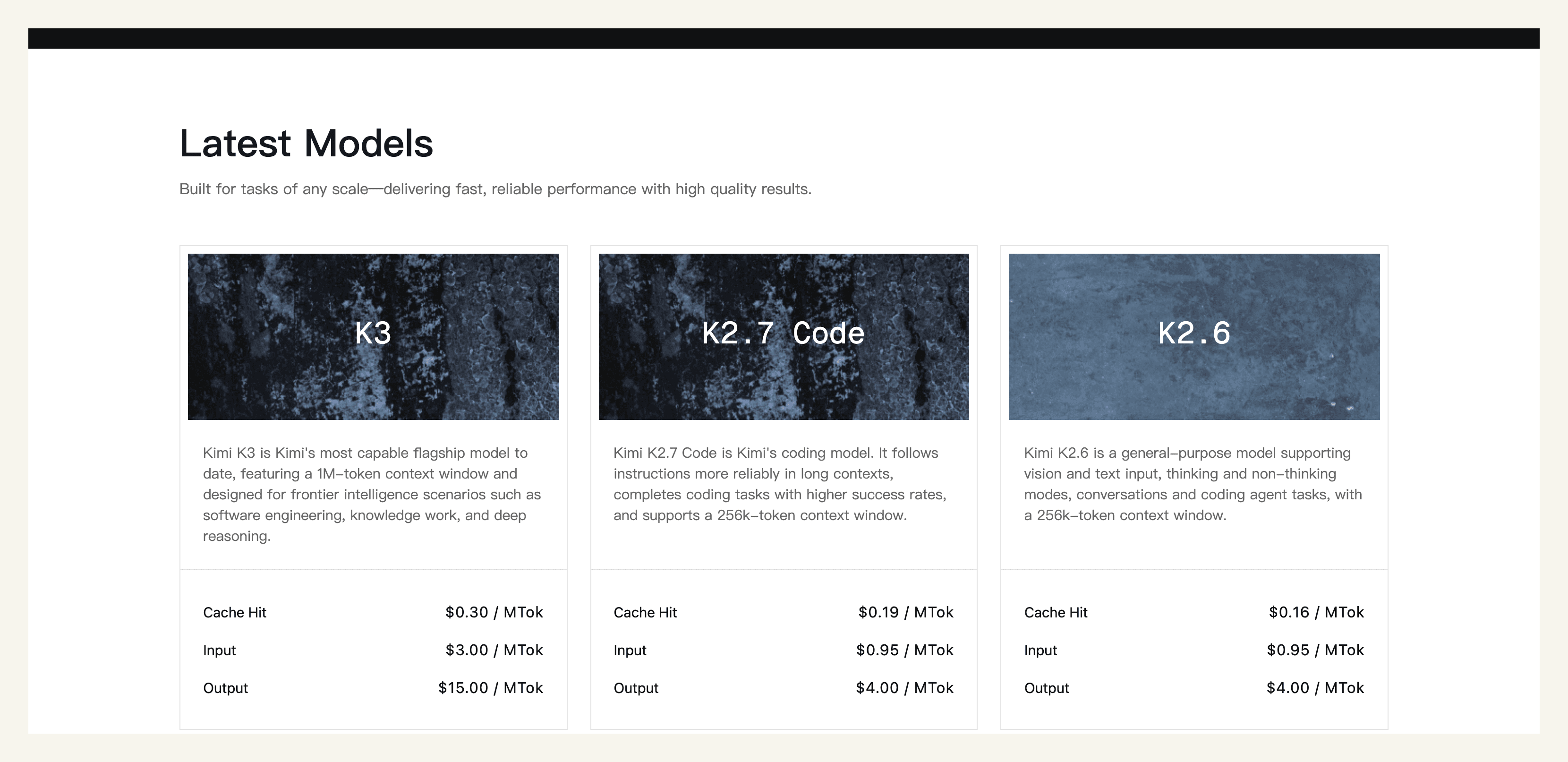
Every row shows K3 ahead on capability. But specs are a shopping list, not a recommendation. The next sections weigh what you actually gain against what you give up, starting with what K2.6 already does well. For the full K3 rundown on its own, see what is kimi k3.
What this resolves: the raw Kimi K3 vs K2.6 spec gaps. What it leaves unsolved: whether those gaps translate into value for your workload.
What Kimi K2.6 Already Did Well
Before chasing the upgrade, it is worth remembering that Kimi K2.6 is a capable model that many teams still run happily. Its headline strength was endurance: K2.6 sustained 12 to 13 hour autonomous coding runs across thousands of tool calls without falling over. On integrations it was reliable, hitting a 96.6% tool-call success rate with CodeBuddy, and Vercel reported a 50%-plus gain on their Next.js benchmark using it.
It was also a workhorse at scale. K2.6 processed 386 billion tokens on OpenRouter and ran roughly 7x cheaper than Claude Opus 4.6 at OpenRouter rates, which is exactly why so many cost-sensitive teams standardized on it. Take Sofia, a solo founder who runs an overnight agent on K2.6 to triage her issue tracker and draft fixes: it works, it is cheap, and nothing about K3's launch broke that. Her question is not whether K3 is better; it is whether better is worth 5x.
That is the tension the rest of this Kimi K3 vs K2.6 comparison has to resolve. K2.6's strength is that it is good enough and cheap, which sets a high bar for the upgrade.
What this resolves: why K2.6 is a real baseline, not an obsolete model. What it leaves unsolved: what K3 genuinely adds on top.
What Kimi K3 Actually Adds
Kimi K3 is not just a bigger K2.6. It adds capabilities K2.6 does not have. The architecture moved to Kimi Delta Attention, a hybrid linear attention scheme that makes the 1M-token context window practical rather than a spec-sheet number. Modality expanded from vision-only to native video understanding. And on the independent Artificial Analysis Intelligence Index v4.1, K3 scored 57.1, a real step up that put it #1 on the Frontend Code Arena (Artificial Analysis). Independent reviewer Simon Willison put K3 through his pelican-on-a-bicycle benchmark on launch day and judged it a clear generational step (simonwillison.net).
The other genuinely new thing is K3 Swarm Max, a dedicated variant for large-scale parallel agents that K2.6 did not ship as its own model. If your work fans out across many sources or items at once, that variant is a reason to upgrade on its own. We cover how it works in the kimi k3 agent swarm guide.
The upgrade from Kimi K2.5 to K3 is even starker: K2.5 was the visual-agentic release that introduced the swarm at 100 sub-agents, so a jump straight from K2.5 skips two generations of capability. For anyone still on K2.5, the Kimi K3 vs K2.5 gap is wide enough that the upgrade question is easier to answer yes.
What this resolves: the concrete capabilities K3 adds over K2.6. What it leaves unsolved: the part every other upgrade article skips, the bill.
The 5x Price Jump Where Kimi K2.6 Still Wins
Here is the part the pure-upgrade cheer leaves out: Kimi K3 costs about 5x what K2.6 did. K2.6 ran $0.60 per million input tokens and $2.50 output. K3 lists $3.00 input and $15.00 output. That is a 5x jump on both ends, and it lands whether or not your workload uses K3's extra capability. The Decoder framed this pricing as the end of super-cheap Chinese AI (the-decoder.com).
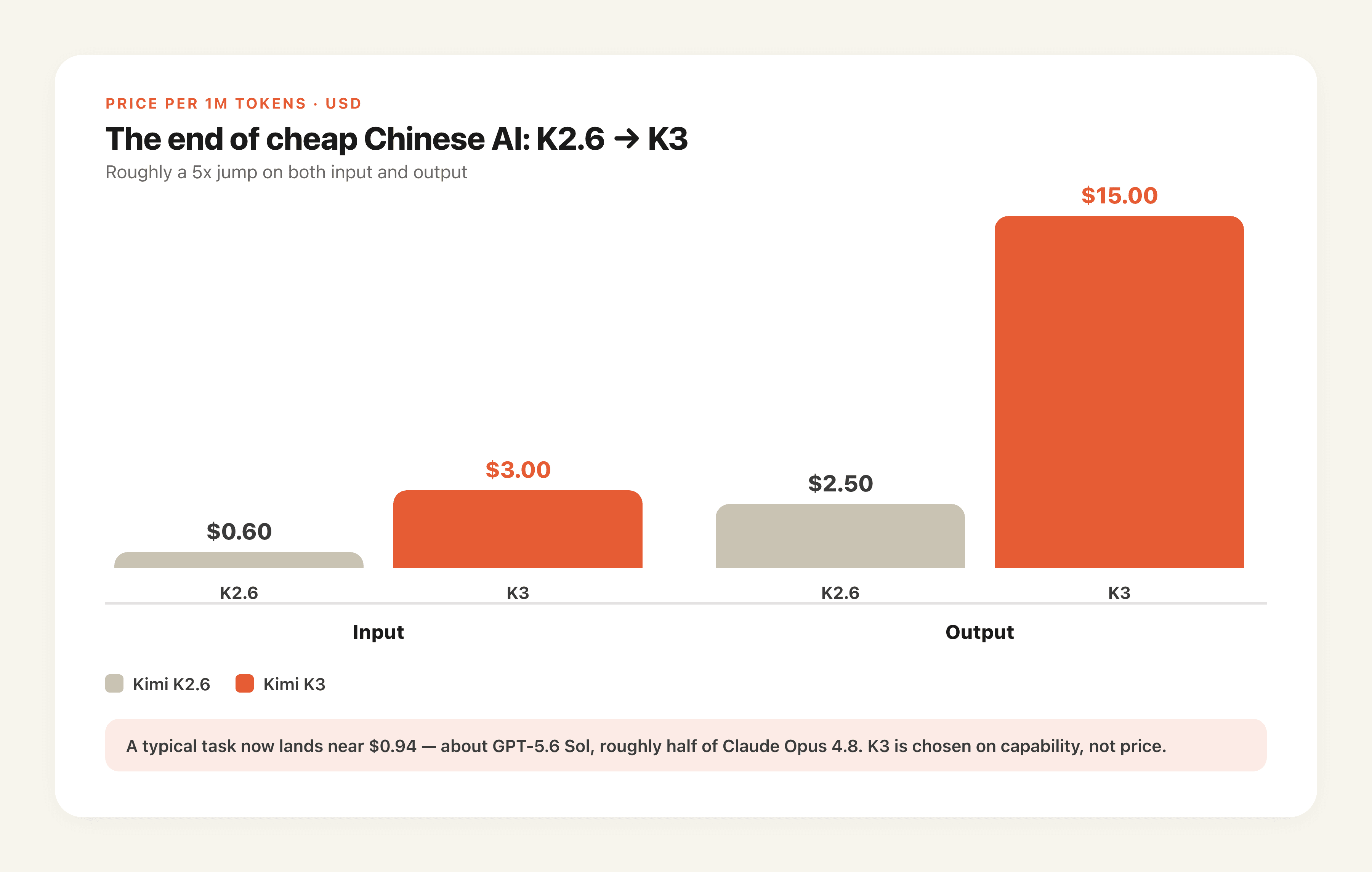
For output-heavy work the math is unforgiving. A long autonomous run that emits a lot of tokens, exactly the 12-hour coding sessions K2.6 was good at, gets six times more expensive on output alone. If your agent is chatty and your budget is real, moving that specific workload to K3 can quietly multiply your bill without improving the result. Tomás, an indie developer running a nightly refactor agent, tried K3 for a week and watched his output-heavy job go from a few dollars to real money, then moved it back to the cheaper tier and kept K3 only for the tasks that needed 1M context.
That is the contrarian read this comparison exists to give: K3 is better, but for cost-sensitive, output-heavy coding, K2.6 or the K2.7 Code model can remain the smarter pick. Do not upgrade a workload that was never bottlenecked on capability.
What this resolves: the real cost of the upgrade, not just the feature gains. What it leaves unsolved: which model to run for actual coding sessions.
 wh ✓@nrehiew_Here are a few benchmark scores of K3 that have been officially confirmed. This is a Fable/Sol class model that is strictly better than Opus 4.8 across the board at Sonnet pricing. Insane2.9K likes · on X, July 2026
 CG ✓@cgtwtsship Kimi K3 → top the Frontend Code Arena → outperform Opus 4.8 on every benchmark → Fable 5 level coding but Sonnet price → release the weights5.4K likes · on X, July 2026
 BridgeMind ✓@bridgemindaiKimi K3 just beat Fable 5 on the BridgeBench Horror House game test. Kimi K3 is better than Fable 5 at game development and UI design, the two things Fable 5 was supposed to own. The 5x price increase suddenly makes more sense.2.5K likes · on X, July 2026
 gus ✓@igus_aiThe CEO of Anthropic, watching China launch a new AI model that beats Claude Opus 4.8 at EVERYTHING, matches Fable 5 while costing 8 TIMES LESS, and on top of that is 100% open source, and being able to do nothing about it.18.8K likes · on X, July 2026 · translated from Spanish
Kimi K3 vs K2.7 Code for Coding Sessions
For day-to-day coding, the real comparison is often Kimi K3 vs K2.7 Code, not K3 vs the general K2.6. K2.7 Code, exposed as model ID kimi-for-coding (plus a kimi-for-coding-highspeed variant), is Moonshot's mature, long-session coding pick, tuned for exactly the multi-hour agent runs that eat output tokens.
The practical trade is capability versus cost and stability. K3 (model ID k3) is smarter and brings 1M context, but at $15 output it is expensive for long runs. K2.7 Code is cheaper and battle-tested for extended coding sessions. Two operational notes matter here: K3 access, the 1M context, and higher-throughput tiers are membership-gated, so calling them on the wrong plan returns a 401 rather than a clear error; and you should start a new session after switching models, because carrying an old session across a switch can trigger avoidable cache-miss costs.
For a developer living in multi-hour coding sessions, the honest recommendation is to stay on K2.7 Code until you hit a wall that specifically needs K3's context or multimodal reach. Upgrading the coding loop itself is rarely where K3 pays for its price.
What this resolves: which Kimi model to run for real coding sessions. What it leaves unsolved: a single clear upgrade verdict, below.
Should You Upgrade to Kimi K3? Verdict by Use Case
Should you upgrade to Kimi K3? Not by default. If you have been asking should I upgrade to Kimi K3, the honest Kimi K3 upgrade answer is that it depends entirely on your workload. Here is the verdict by what you actually do.
| Your workload | Verdict | Why |
|---|---|---|
| Long autonomous coding sessions | Hold on K2.7 Code | Cheaper, mature, output-heavy work stays affordable |
| Cost-sensitive, high-output agents | Hold on K2.6 | 5x price jump with no capability need |
| Needs 1M-token context | Upgrade to K3 | K2.6 caps at 256K |
| Multimodal / video understanding | Upgrade to K3 | K2.6 is vision-only |
| Large-scale parallel agents | Upgrade to K3 | K3 Swarm Max only |
| Still on K2.5 | Upgrade to K3 | Two-generation capability gap |
The pattern is clear: upgrade for reach (context, multimodal, swarm), hold for value (cost-sensitive coding). One more thing worth saying once: if you find yourself re-benchmarking and re-wiring every time Moonshot ships a new tier, that churn is its own cost, and a managed Kimi K3 agent that treats the model as a swappable part lets you move workloads between K2.6, K2.7 Code, and K3 without rebuilding the workflow each time, an approach we detail in protecting recurring workflows across model upgrades.
What this resolves: a concrete upgrade call for each workload. What it leaves unsolved: the specific questions below.
FAQ: Kimi K3 vs K2.6
Is Kimi K3 worth the upgrade?
It depends on your workload. Upgrade for 1M context, native video, or large-scale swarm work. Hold on K2.6 or K2.7 Code for cost-sensitive, output-heavy coding, where the 5x price jump buys capability you may not use.
Is K2.6 being deprecated?
Not as announced. Moonshot has not stated a K2.6 end-of-life at K3 launch, and K2.6 remains available alongside K3 and K2.7 Code. Treat this as current-as-of-launch, not a permanent guarantee.
How much more expensive is K3 than K2.6?
About 5x on both input and output: K2.6 was $0.60 input and $2.50 output per million tokens, while K3 is $3.00 input and $15.00 output. Output-heavy workloads feel the jump most.
Can I still use K2.7 Code?
Yes. K2.7 Code is available as model ID kimi-for-coding (plus kimi-for-coding-highspeed) and remains the value pick for long coding sessions. Remember to start a new session after switching models.
How does K3 compare to Claude, not just K2.6?
That is a different question with a split answer; see our kimi k3 vs claude comparison.
Kimi K3 vs K2.6: Upgrade for Reach, Hold for Value
The Kimi K3 vs K2.6 verdict resists a one-word answer, and that is the honest outcome. K3 is meaningfully more capable, more parameters, four times the context, native video, a dedicated swarm variant, and a higher independent benchmark score. K2.6 is meaningfully cheaper and still strong at the long autonomous coding it was built for. The 5x price jump is the hinge the whole decision turns on.
So upgrade for reach and hold for value. Move to K3 when you need 1M context, multimodal, or swarm scale; stay on K2.6 or K2.7 Code when your work is cost-sensitive coding that was never bottlenecked on capability. From here, get the full spec picture in what is kimi k3, weigh it against Claude in kimi k3 vs claude, or see whether parallel agents fit your work in the kimi k3 agent swarm guide.
Continue Reading
More Comparison
Kimi K3 vs Claude: Benchmarks & 2026 Verdict
ChatGPT Work vs Codex: Which Should Non-Developers Use?

Grok 4.5 vs Claude: Benchmarks & Pricing
OpenClaw Slack vs Claude Tag for Team Agents

Generative AI vs AI Agents vs Agentic AI

Claude Tag Alternative: Tag an AI for $20/mo
The MoClaw editorial team writes about workflow automation, AI agents, and the tools we build. Default byline for industry overviews, listicles, and collaborative pieces.
Use Kimi K3 on MoClaw, without the setup
Run Kimi K3 as an always-on managed agent with memory, your tools, and scheduling. No API wiring, no plan gating, no self-hosting.
References: Kimi K3 on Artificial Analysis (Intelligence Index v4.1) · Kimi K2 Agent Swarm and capabilities guide (DataCamp) · China's Moonshot AI releases Kimi K3 (VentureBeat) · Kimi's open model K3 nears GPT-5.6 Sol and Fable 5 (The Decoder) · Kimi K3, and what we can still learn from the pelican benchmark (Simon Willison)