Generative AI vs AI Agents vs Agentic AI

Generative AI vs AI agents vs agentic AI: not a power ranking, but how much work each carries. Learn which layer your workflow needs and where each fits.
Table of Contents
Three terms for three different amounts of work a system takes on. Generative AI produces a usable output; an AI agent completes a defined task with approved tools; agentic AI keeps a process moving as conditions change. The layer you want isn’t the most advanced one, it’s the smallest that finishes the job without leaving a mess for someone else to clean up.
That distinction has real money behind it. Gartner predicts more than 40% of agentic AI projects will be canceled by the end of 2027, largely because teams buy autonomy before the workflow is ready for it. Ask three people what an "AI agent" is and you get three reasonable answers: a founder pictures a system that keeps work moving in the background, an operator means software that completes a task, and a vendor uses the term for an entire product category. No one is wrong. They are describing different layers with the same word.
Key Takeaways:
- Generative AI produces an output, an AI agent completes a task with tools, and agentic AI carries a process through change over time.
- Fixed automation is the baseline, not a fourth AI category. Start there when clear rules can handle the normal cases.
- The question is never "which is more advanced," it is "what does this workflow actually need." Choose the smallest layer that works.
- Tool access alone does not make a system an agent. Test for boundaries, stop conditions, and recovery, not branding.
- The expensive failures are overbuilding, underbuilding, and undercontrolling. Match the control to the capability.
Quick Answer: Generative AI vs AI Agents vs Agentic AI
The fastest way to tell these apart is to ask who chooses the next step and what carries forward between steps. Fixed automation follows a known sequence. Generative AI usually produces a usable output. An AI agent completes a defined task with approved tools. An agentic workflow keeps an ongoing process moving as conditions change. Definitional sources like IBM on agentic AI vs generative AI and Cognigy on generative vs agentic AI draw the line the same way. For a plain-language definition of action-taking personal agents, see our AI Claw comparison.
Fixed automation is included as a baseline, not another AI category. These layers also work together: fixed automation may trigger an agent, while generative AI may handle part of that agent's research or reporting work.
| Fixed automation | Gen AI | AI agent | Agentic workflow | |
|---|---|---|---|---|
| Primary job | Run a known sequence | Produce a usable output | Complete a task | Carry a process through change |
| Who chooses the next step | Predefined rules | A person or a surrounding workflow | The agent, within task limits | The system, within policies and approval rules |
| Tool use | Configured integrations | Optional | Approved tools for the task | Approved tools across repeated checks and follow-up work |
| What carries forward | Rules and logs | Prompts and supplied context | Task findings | Evidence and open items |
| Human role | Define rules, handle exceptions | Provide context, validate output | Set the goal, limits, and stop condition | Set policy, approve consequential actions, resolve escalations |
| Main risk when misapplied | Misses exceptions | Output mistaken for completed work | Unclear authority or weak stop conditions | Hidden state, weak oversight, hard-to-review actions |
| Best fit | Stable, rules-driven work | Drafting, analysis, transformation | Bounded research, coordination, multi-step tasks | Recurring work that must respond to change |
Section summary: If clear rules cover the normal cases, you want automation. If you need an output, generative AI. If you need a finished task, an agent. If the work must continue through change, agentic.
The Same Competitor Brief, Handled Four Ways
The cleanest way to feel the difference is to run one job through all four layers. Renata handles competitive intelligence alone at a 40-person SaaS company and tracks 6 direct rivals. Suppose one competitor changes its pricing page on Tuesday, publishes release notes on Wednesday, and launches a feature page on Thursday. Renata's team still wants the brief on Friday.
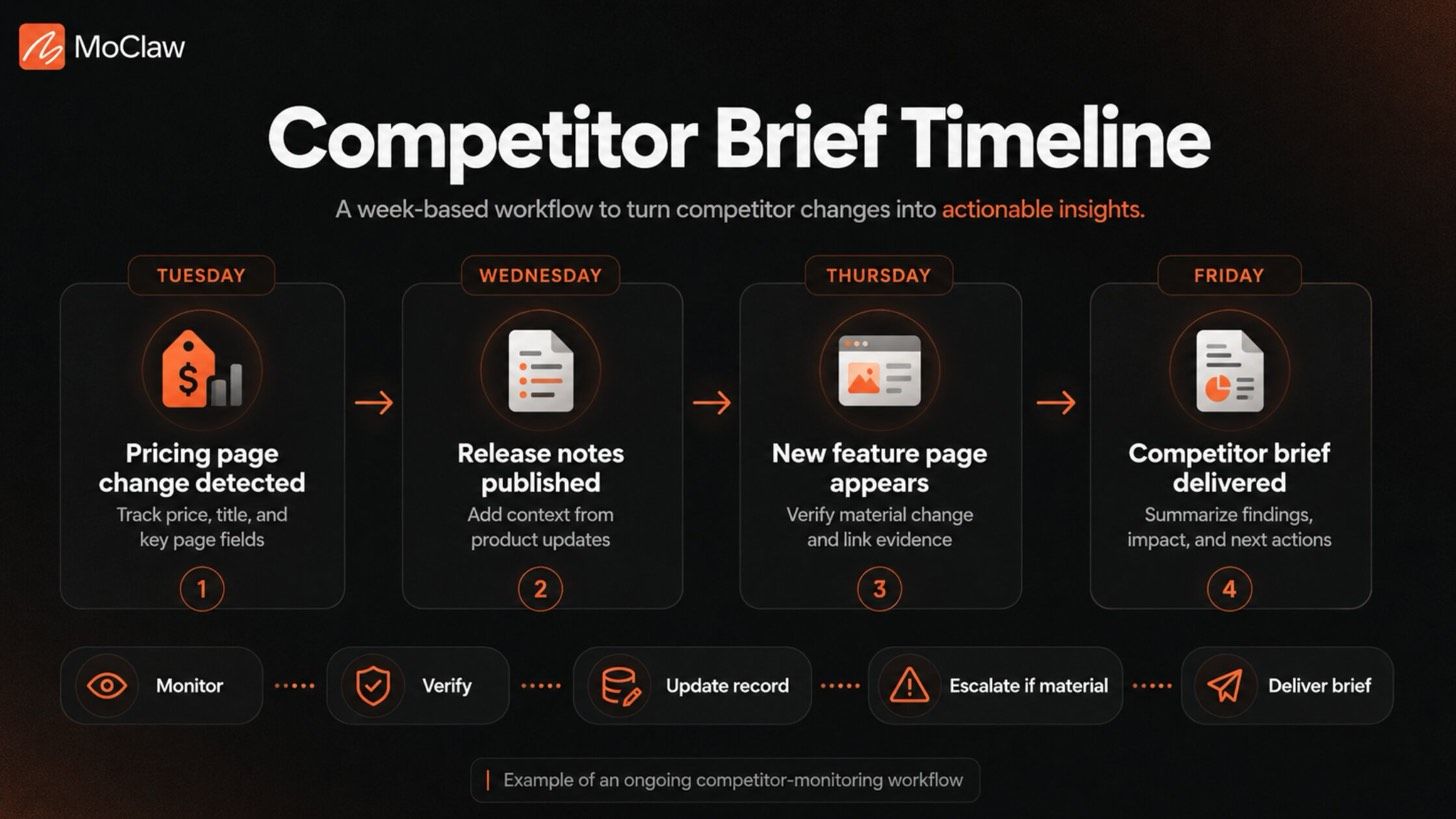
Fixed automation: executing a known sequence. The scheduled workflow checks fields it already knows: price, page title, release-note heading, and publication date. It drops the results into the usual template and sends it. It catches the price change only because it already tracks that field, and it never discovers the new feature page unless Renata adds the URL and defines what to monitor.
Gen AI: producing the first draft. Renata spots the new pages herself and gathers the relevant text, links, and screenshots. The model turns that material into a Friday brief that summarizes the changes, compares the updates, and flags what to watch. It cuts the time she spends assembling the narrative, but she still decides which changes belong and whether the summary matches the source.
AI agent: researching, organizing, and delivering. The agent is assigned to investigate approved competitor sources. It opens pages, searches release notes, compares findings with prior records, collects supporting links, and prepares the report. It can find the new feature page without Renata pasting it into a prompt, as long as the assignment and permitted sources support that search. Once the brief reaches its destination, the assignment ends.
Agentic AI: monitoring, updating, and escalating. The system does not wait until Friday. Scheduled monitoring detects the Tuesday change, updates the competitor record, and links the evidence to the relevant product area. Wednesday's release notes add context. If the feature page materially changes the competitor's position, the system verifies it and routes the finding for review. If a check fails, the unresolved item stays visible until it is retried or escalated. Friday's brief reflects a process that ran all week, an approach we cover in automating fast-changing data review workflows.
Section summary: Same brief, four finish lines. The further right you go, the less Renata has to remember to do, and the more the workflow has to be governed.
Generative AI: Producing the Output
Generative AI turns inputs into a usable artifact. It can write a first draft from a short brief, compare two policy documents, summarize a call transcript, or explain a technical issue for a non-technical reader, the use cases IBM groups under generative AI. In many workflows, that artifact is exactly what people were waiting for.
The handoff begins when someone has to verify, publish, send, or act on the output. You may need to check figures, add missing context, finalize the wording, upload it to the right system, or decide what happens next. Generative AI is enough when that handoff is simple and expected. It falls short when the output does not complete the work, and a person quietly becomes the glue between every run.
Section summary: Reach for generative AI when a usable output is the goal and a person will own what follows. The moment the output reliably starts more work, you have outgrown it.
AI Agents: Completing Tasks With a Clear Finish Line
An AI agent works best for a well-defined task. It uses tools to move from a goal to a finished deliverable, under rules a team can inspect, which is how IBM frames AI agents. You define the outcome before choosing the model: what must be delivered, what background matters, and which sources or systems are allowed.
Then you set limits. No external sends, no changes to customer records, no new data sources, no action beyond the brief. Define what "complete" looks like. The agent returns updates with supporting evidence and flags claims that need human review. It can choose the next research step inside that boundary, but it cannot rewrite the boundary while it works.
Tool access is where most teams get confused. Browser access, file search, and APIs widen what a model can do, but they do not by themselves make it a controlled agent. An agent uses those capabilities to pursue a stated objective within defined limits, then stops when the assignment is complete. Much of what gets sold as an "agent" is a chatbot with tool access, a gap we break down in AI chatbot vs AI agent. Work that must preserve state, handle exceptions, or adapt after the assignment ends needs a different design.
Section summary: An agent earns its place when a task needs controlled choices across approved tools and a clear stop condition. Judge it by its boundaries, not its tool list.
Agentic AI: Managing Work That Changes Over Time
Agentic AI describes workflows that continue beyond a single task. The workflow retains progress, responds to change, and escalates when human input is needed. The term has no single shared definition, so judge a system by its behavior, not its label.
A new event can change the next step: an update appears, an expected source is unavailable, or a result needs a closer look. An agentic workflow detects the trigger, identifies the next step, and adapts within defined rules. It also has to verify important results before treating them as finished, or longer-running automation repeats mistakes at scale, the failure mode Anthropic's guidance on building effective agents treats as a first principle.
Continuity depends on explicit work records, not chat history alone. That means the last verified competitor snapshot, pending checks, and unresolved questions live somewhere the workflow can reload after an interruption. Good agentic work also reduces unnecessary reviews rather than removing people: the system handles predictable, low-risk steps and requires review at uncertainty, conflicting evidence, or any action with real consequences. A useful escalation explains the issue and shows the evidence, the attempted steps, and the decision required, instead of just announcing that something went wrong.
Section summary: Agentic AI is the right layer when work must survive between runs, adapt to new information, and recover from failed steps, with people kept in the loop at the consequential moments.
How to Choose the Right AI Layer
Do not start by asking whether you need generative AI, an AI agent, or agentic AI. Look at the work itself and answer five practical questions.
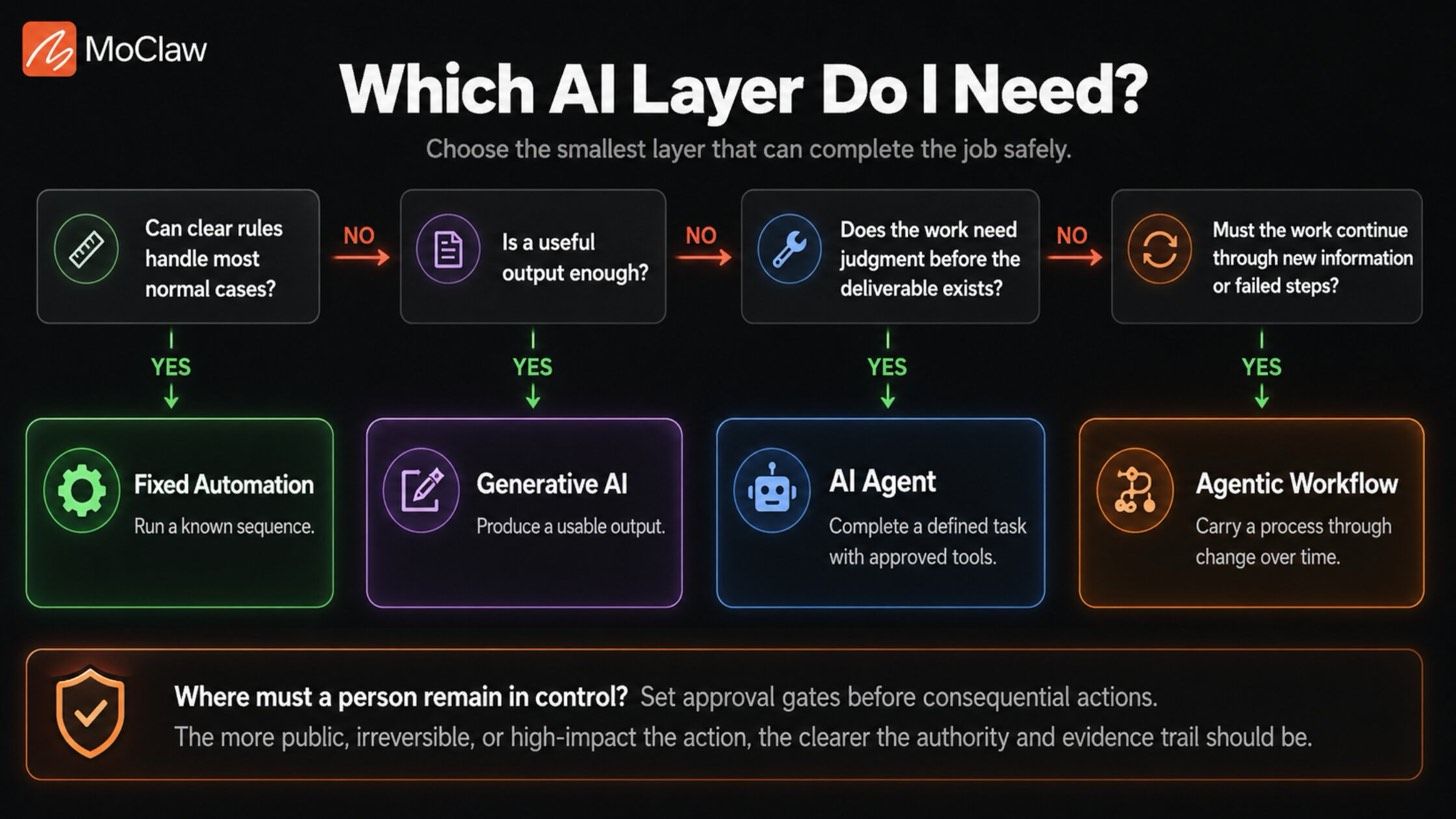
Can clear rules handle most normal cases? Begin with fixed automation when you know the path, the data is predictable, and exceptions are rare. A process does not need an agent just because it has many steps.
Is a useful output enough? Use generative AI when a usable output is the goal and a person will take responsibility for what follows.
Does the work need judgment before the deliverable exists? Add an AI agent when the task requires controlled choices across approved sources or tools. Define what the agent can decide, what it cannot change, and when it should stop.
Must the work continue through new information or failed steps? Repeating a schedule is not enough. Use an agentic workflow when the process must preserve progress, adapt to change, and recover from failures.
Where must a person remain in control? Set approval gates before consequential actions. The harder an action is to reverse, the clearer the approval and evidence trail should be.
Section summary: Choose the smallest AI layer that can complete the job safely, and add capability only when the workflow truly requires it.
What Breaks When You Choose the Wrong Layer
The wrong AI layer produces a result without making it clear who approved it, who owns it, or who fixes it when something goes wrong. The damage shows up in three shapes.
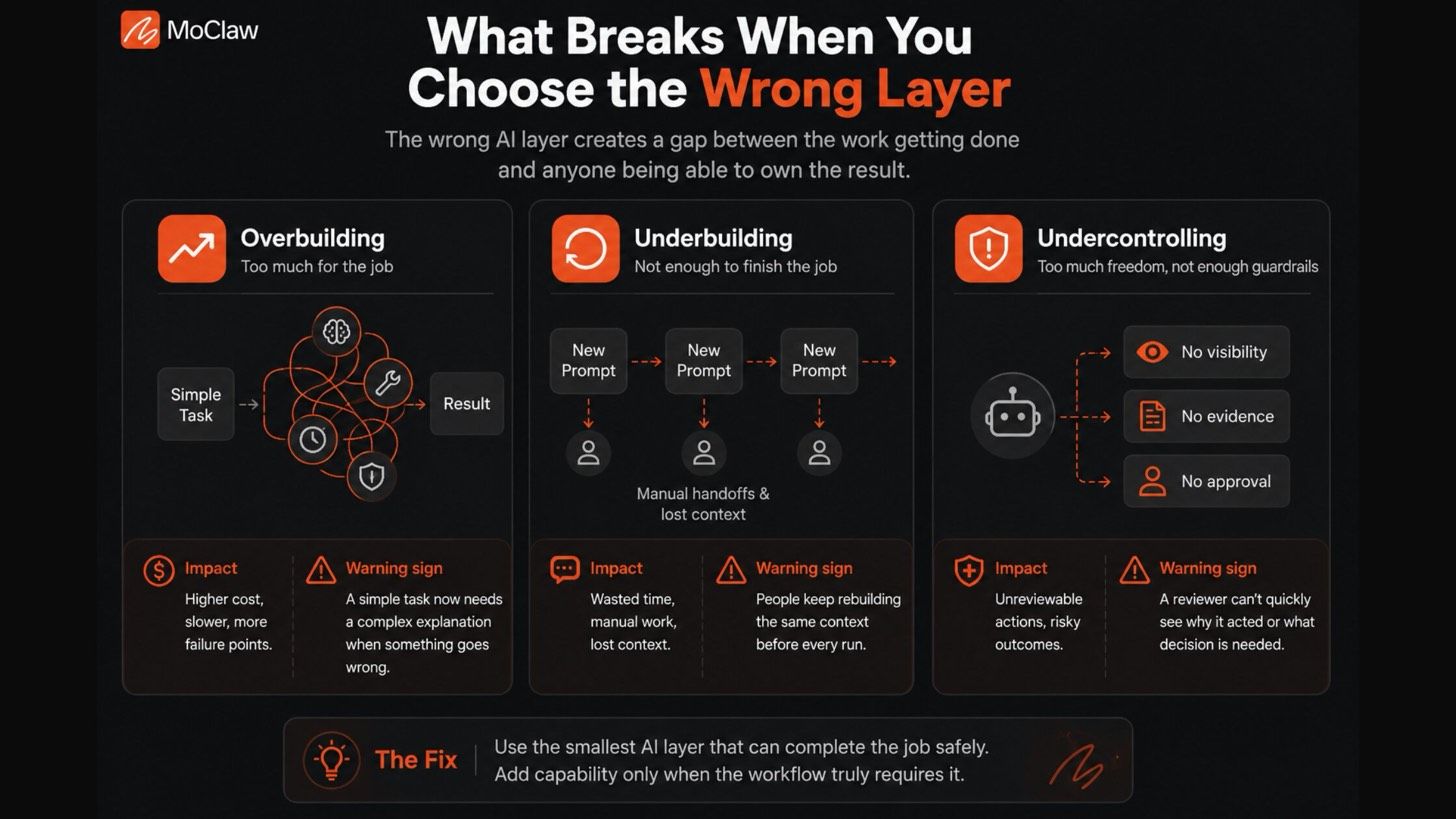
Overbuilding. Marcus leads a 3-person ops team and wired a multi-agent setup to rename and file incoming invoices. When one vendor changed its PDF layout, the run failed in several places at once, and debugging the reasoning chain took longer than the few minutes of manual filing it replaced. Every unnecessary decision adds cost, latency, and new ways to fail. Warning sign: a simple task now needs a complex explanation whenever something goes wrong.
Underbuilding. Every Friday, Priya re-pasted the same competitor URLs, last week's notes, and the brief format into a fresh chat before she could even start. The model produced useful results, but she rebuilt the entire workflow around every output. Warning sign: people keep reconstructing the same context before every run.
Undercontrolling. Speed becomes risk when nobody can explain why the system acted. Without clear limits, evidence, and escalation, a polished output can still hide an unacceptable decision. Warning sign: a reviewer cannot quickly see why the system acted, what it relied on, or what decision still needs a human.
Section summary: Overbuilding wastes money, underbuilding wastes people, and undercontrolling hides risk. The fix is matching the layer, and its guardrails, to the actual work.
When Agentic Work Needs an Operating Environment
Once work must continue between runs, a capable model is not enough. The process needs a place to keep the current report, source evidence, open questions, and unfinished checks, plus a way to revisit the systems it depends on and start the next run without rebuilding the task from scratch.
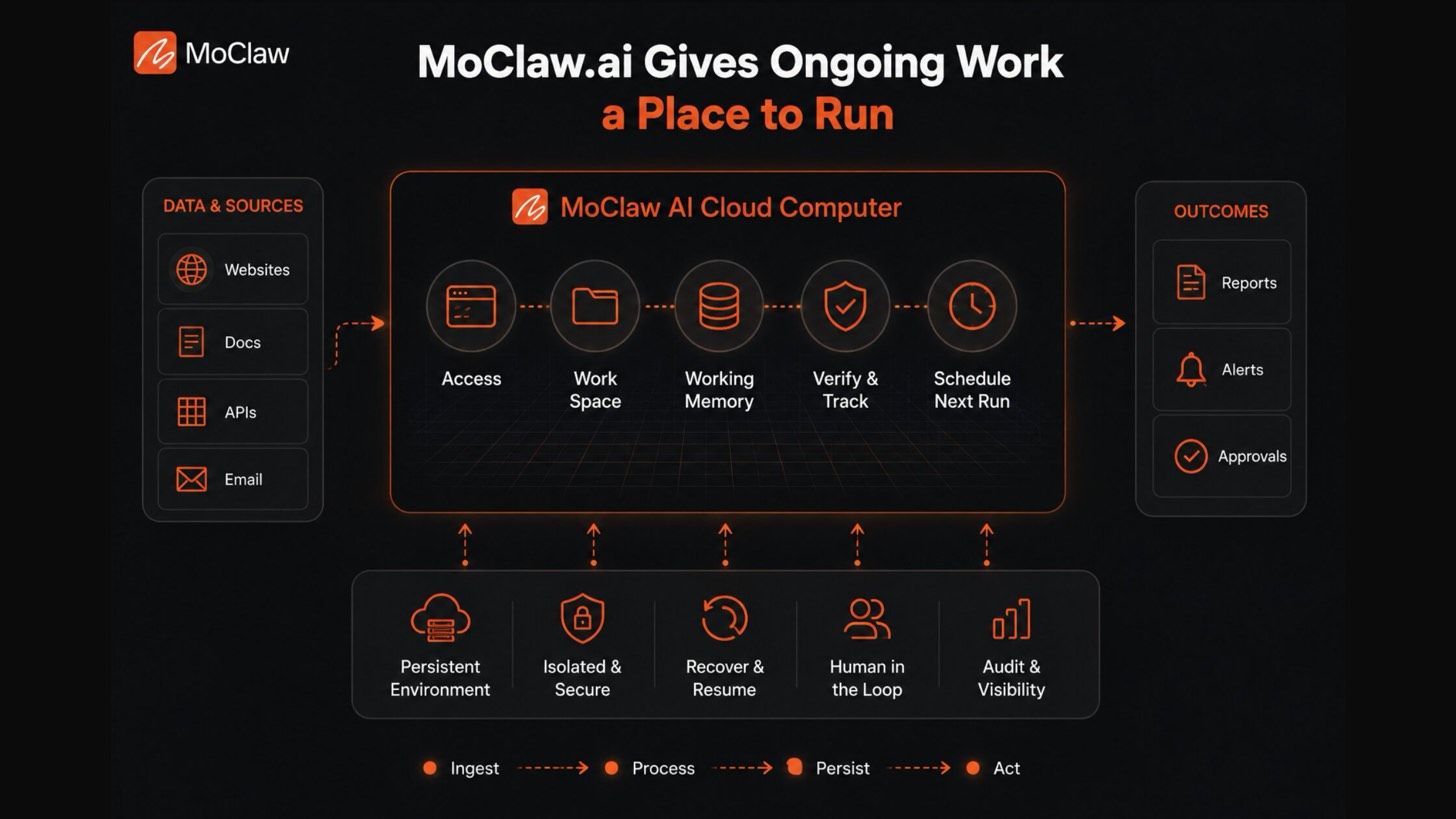
MoClaw provides that environment through its AI Cloud Computer. In Renata's competitor-brief workflow, it can revisit pricing and release-note pages through browser control, keep the current brief and source material in its workspace, and run the next scan on schedule. The workflow no longer depends on someone reopening the conversation and rebuilding context each Friday, and Tuesday's pricing change does not fade into a chat thread before Friday's report. The evidence and working files stay with the workflow. You can see more patterns in our use-case library and blog, or compare plans on the pricing page.
MoClaw is not a fifth AI category. It is the operating environment that helps ongoing agent work stay connected, visible, and easier to review.
Section summary: When the bottleneck is keeping work alive across runs and tools rather than understanding it, an operating environment is what turns an agent demo into a workflow you can trust.
FAQ
Does agentic AI require multiple agents?
No. A single agent can operate inside an agentic workflow. Multiple agents are worth using only when they improve separation of work, reliability, speed, or oversight.
Is ChatGPT generative AI, an AI agent, or agentic AI?
It depends on the setup. In a normal chat, ChatGPT is generative AI: you provide context and it produces an answer, draft, analysis, or plan. With tools and a defined assignment, it can act as an AI agent. It becomes agentic when the setup retains progress, verifies results, and escalates problems over time.
Can a workflow combine fixed automation, generative AI, and AI agents?
Yes. A workflow can use fixed rules to trigger work, generative AI to create a draft, and an agent to research or organize inputs. Splitting responsibilities this way is often safer than forcing one system to handle every step.
When is traditional automation better than AI agents?
Traditional automation is better when the inputs, route, and expected outcome are stable. If the correct next step can be expressed as clear rules and exceptions are rare, an agent usually adds cost and complexity without adding much value.
What is the safest way to start with AI agents?
Start with a narrow, reversible assignment. Give the agent one clear goal, approved tools and data, a stop condition, and human review before consequential actions. Expand access only after its work is reliable, easy to review, and easy to correct.
Generative AI vs AI Agents vs Agentic AI: Match the Layer to the Work
The teams that waste the least time do not start from "which AI is most capable." They start from the work: what carries forward between steps, who chooses the next step, and where a person must stay in control. Answer those, and the choice between generative AI, AI agents, and agentic AI usually makes itself. Generative AI hands you an output. An agent hands you a finished task. Agentic AI keeps the whole process honest over time. Pick the smallest one that finishes the job, and add capability only when the workflow proves it needs more.
Try MoClaw free and see what changes when ongoing work finally has a place to run.
Continue Reading
More Comparison
AI Chatbot vs AI Agent: Who Carries the Work?

DeepSeek Harness vs MoClaw (2026)

DeepSeek Harness Plugins vs Skills

Grok Bot vs Claude Cowork vs ChatGPT Work

Business Travel App vs AI Travel Agent Workflow

Free AI Agent: Where Each Free Tier Stops
Field notes from the MoClaw team. We compare the agent stack we run in production against the alternatives we evaluated and dropped. Production stories with real numbers, not vendor decks.
Choosing between tools? Let MoClaw run the work.
Always-on AI assistant on its own cloud computer. No switching required, no setup.
References: Gartner: 40%+ of agentic AI projects canceled by 2027 · IBM: Agentic AI vs generative AI · IBM: What are AI agents? · IBM: What is generative AI? · Anthropic: Building effective agents · Cognigy: Generative AI vs agentic AI