AI Agent Architecture: Components, Data Flow & Patterns

Learn how AI agent architecture connects goals, context, memory, tools, permissions, runtime, and review to choose the simplest reliable design.
Table of Contents
AI agent architecture is the full system that turns a goal into a controlled, checkable sequence of actions: what the agent can see, what it may do, what must be saved, and how the outcome is verified. The most impressive AI agent is rarely the most useful one, and architecture is what decides which is which.
Agentic systems are attracting major investment, yet Gartner forecasts that more than 40% of agentic AI projects will be canceled by the end of 2027. The gap between excitement and lasting value is becoming harder to ignore. Once an agent moves beyond a demo, the real test begins.
Key Takeaways
- AI agent architecture connects a goal to work that people can check.
- Information and authority move through the system together.
- Context, memory, task state, and evidence serve different jobs.
- Many tasks need fixed automation or bounded AI rather than a fully autonomous system.
- The best design is the smallest one that can finish the work, stay within its limits, and prove the result.
What Is AI Agent Architecture?
AI agent architecture is the full system that turns a goal into a controlled sequence of decisions and actions. It defines what the agent can see, what it may do, what must be saved, and how the outcome is checked.
The model handles work that needs judgment. The surrounding system handles files, tools, access, delays, failures, approvals, and handoffs.
A task may pause. A file may change. A browser session may expire. Good architecture makes those events manageable instead of leaving the model to guess.
Architecture vs. an Agentic Workflow
An agentic workflow is the route through one task. It may read customer files, check an account, flag missing details, prepare a brief, and request review.
The architecture supports that route. It defines trusted sources, available tools, saved progress, approval points, recovery behavior, and the completion test.
One workflow could use fixed rules, one AI step inside a fixed process, a single agent with several tools, or several agents with separate roles. These are design choices, not maturity levels. The same reasoning applies when you weigh an AI agent against a plain API or integration.
AI Agent Architecture Diagram: From Goal to Verified Action
A useful diagram should show two connected flows.
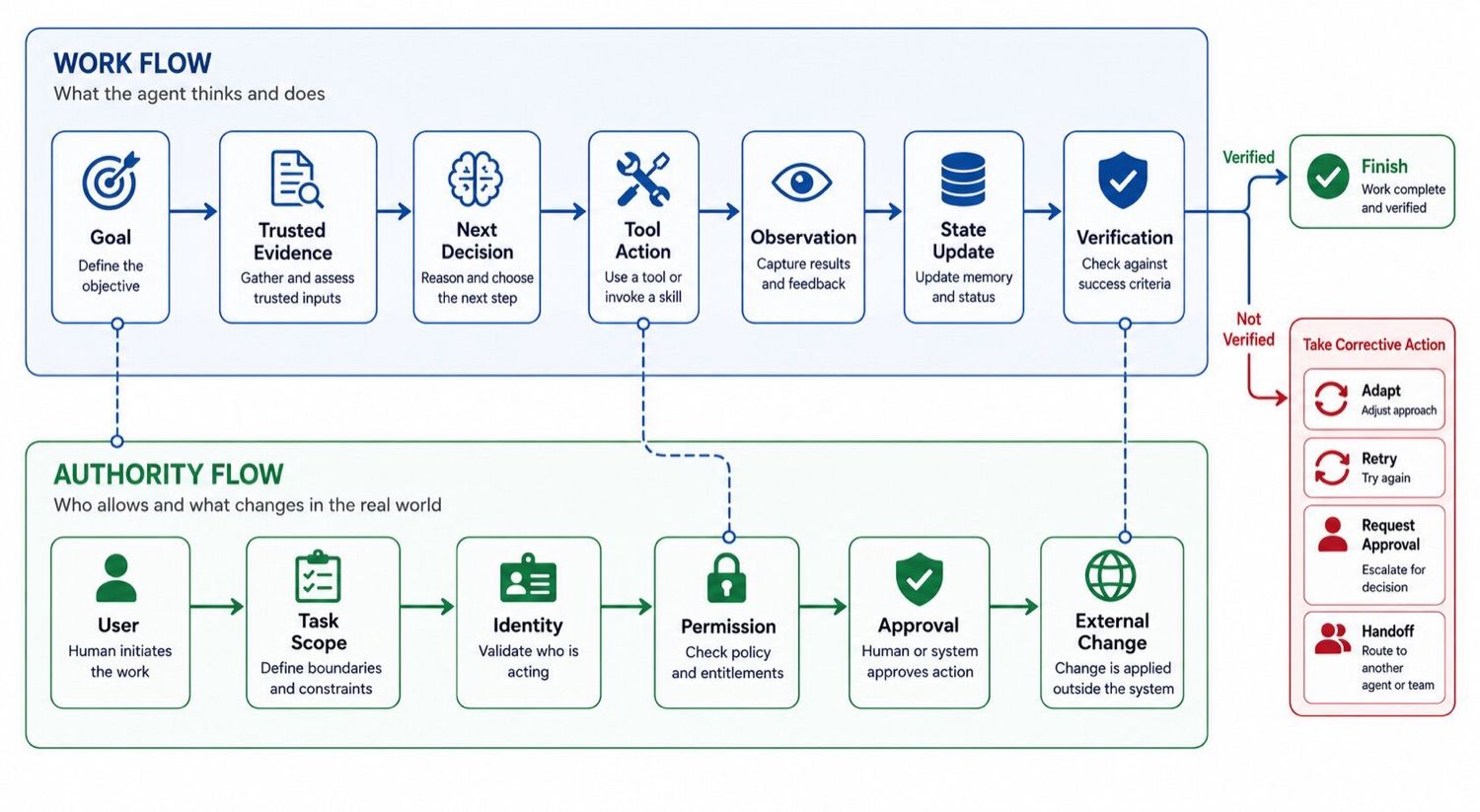
Work Flow
Goal → Trusted evidence → Next decision → Tool action → Observation → State update → Verification
Verified complete → Finish or hand off. Not complete → Adapt, retry, request approval, or escalate.
Trusted evidence supports the next decision, and a tool reads or changes something outside the model. Its result becomes an observation that updates the task state.
Verification decides what happens next. A confirmed outcome can close the task. An incomplete result sends the run through another bounded step or into a human handoff.
Authority Flow
User → Task scope → Identity → Permission → Approval → External change
The user starts the work, and the task scope limits it. Identity shows who or what is acting. Permission controls the data and actions available at that moment.
Approval belongs before a change the agent should not own alone.
The flows meet at each tool call. An agent may know the right action but lack permission. It may also have access while relying on weak or stale evidence.
A sound handoff carries the facts, limits, current result, and next owner forward together.
A Simple Example: Customer Onboarding Readiness
The following is a composite example.
Nina runs onboarding at a 30-person software company. Each new customer needs six checks across four sources: the signed contract, intake form, uploaded files, and account record.
The agent receives one job: check all six items, flag missing or conflicting details, and prepare a readiness brief. Do not contact the customer or activate the account.
It finds four ready items, one missing document, and one billing detail that conflicts with the contract.
The brief contains six rows, a status for each check, and a source link for every finding. Nina receives two clear issues to resolve. The task is complete only when every check has a status and supporting evidence.
The Eight Work-Completion Layers of AI Agent Architecture
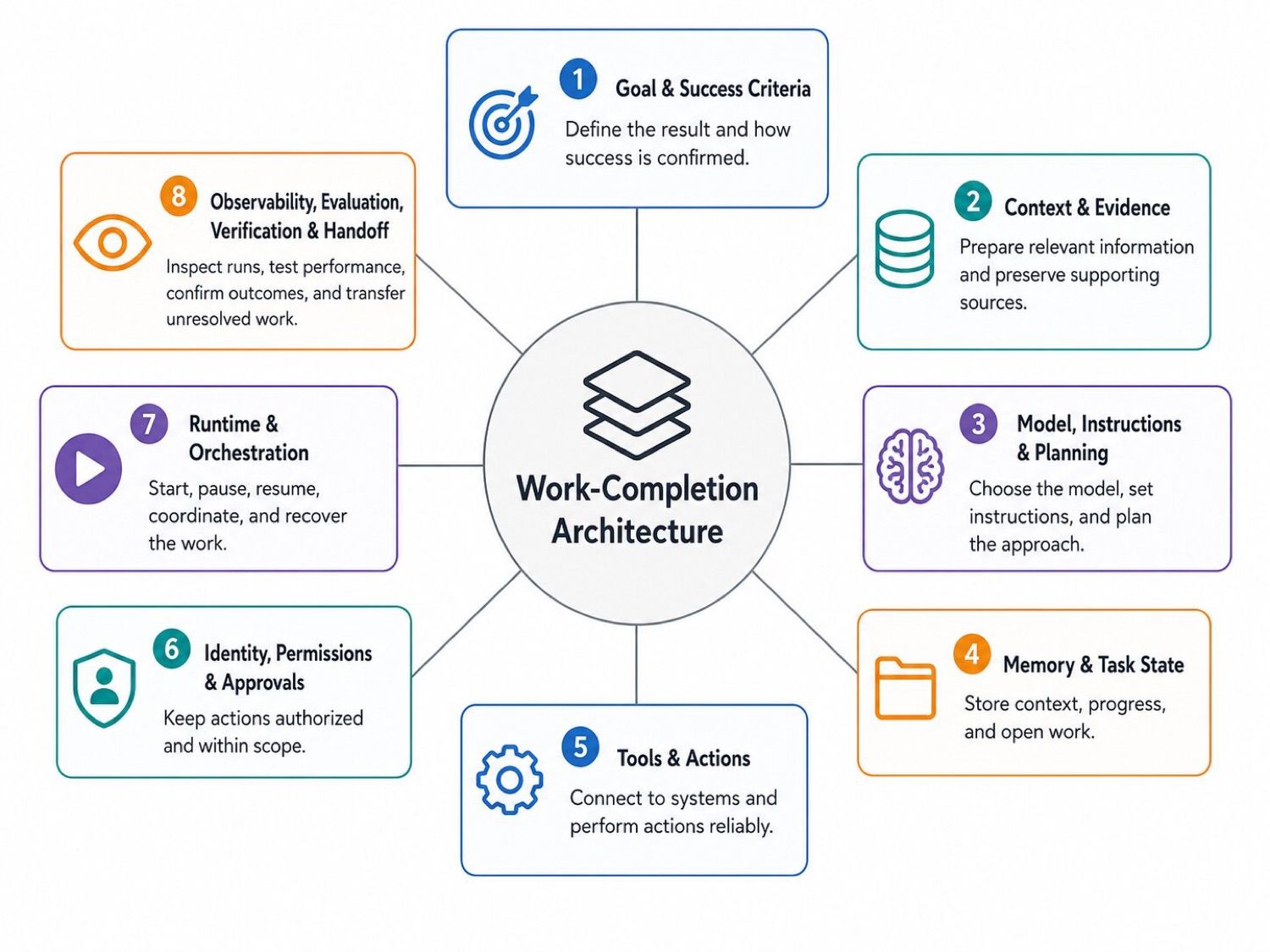
These are design responsibilities, not eight separate software services. One platform may handle several layers, but each one still needs a clear answer.
1. Goal and Success Criteria
A useful goal describes the result, boundaries, and stop point.
"Review this customer" leaves too much open. Nina's version names the checks, required output, forbidden actions, and cases she must own.
Success should be visible. A report may need required fields. A record update may need a confirmed value. A sent message may need a recipient, time, and delivery ID.
Without a clear finish, an agent may keep searching or stop when its answer merely sounds plausible.
2. Context and Evidence
Context is the information prepared for the current choice. Evidence is the source material that supports a finding or action.
The latest contract may guide a billing check. It becomes evidence when the brief cites the exact term behind a conflict.
A source can be current and still be wrong for the task. Keep its date or version, scope, and known limits. The agent needs the right information, not every file the company owns.
3. Model, Instructions, and Planning
The model helps when fixed rules cannot choose the next valid step.
Instructions define trusted sources, available actions, output needs, and stop rules. Planning turns current evidence into a bounded action.
New evidence may change the route. It should not expand authority without fresh approval.
4. Memory and Task State
Memory and task state may share storage, but they serve different jobs.
Memory carries selected knowledge into later work, such as a confirmed preference or stable rule.
Task state records where this run stands: completed checks, tool results, retries, pending approval, and the next valid step.
Evidence preserves the files, links, IDs, and outside results behind important conclusions. Memory needs scope, state should remain factual, and evidence should stay easy to inspect.
5. Tools and Actions
Tools let the agent read or change something outside the model. They may search files, browse a site, run code, create a document, send a message, or update a record.
Each tool needs one clear job. Similar tools force the model to guess.
Return values matter too. "Success" may hide the details needed for review or recovery. A message tool can return the recipient, time, and ID. A record update can return the changed fields and new version.
Keep action levels distinct: read, draft, write, and commit.
6. Identity, Permissions, and Approvals
The system should preserve who started the task and what that person allowed.
A prompt can guide behavior. It cannot replace access rules in the tool or connected system.
Use the narrowest access that fits the work. Nina's agent can read onboarding files and prepare a brief. It cannot activate the account.
Approval should sit close to the action it controls. If the message, amount, recipient, or record change shifts, the old approval may no longer apply.
7. Runtime and Orchestration
The runtime starts the task, loads saved state, calls tools, waits for approval, handles errors, and stores the final output.
It should know what triggered the run, which step is active, and why the work paused. Refresh facts that may have changed before action resumes.
Repeating a search is often safe. Repeating a payment, message, form, or update may create a duplicate, so check whether the first action worked.
Orchestration arranges work across code, one agent, or several agents. Clear state, exit rules, and safe retries often matter more than a large routing system.
8. Observability, Evaluation, Verification, and Handoff
These controls answer different questions:
- Observability shows what happened during the run.
- Evaluation tests the system across representative cases.
- Verification checks the outcome of this run.
- Handoff gives unresolved work to a person.
The agent's final message is not proof by itself.
Read a changed record again. Keep a delivery record for sent messages. Check that Nina's brief contains all six items and source links.
When the result cannot be confirmed, keep the task open. A useful handoff shows the goal, current status, evidence, completed actions, errors, and next decision.
How to Choose the Right AI Agent Architecture
Start with the shape of the work rather than the number of agents.
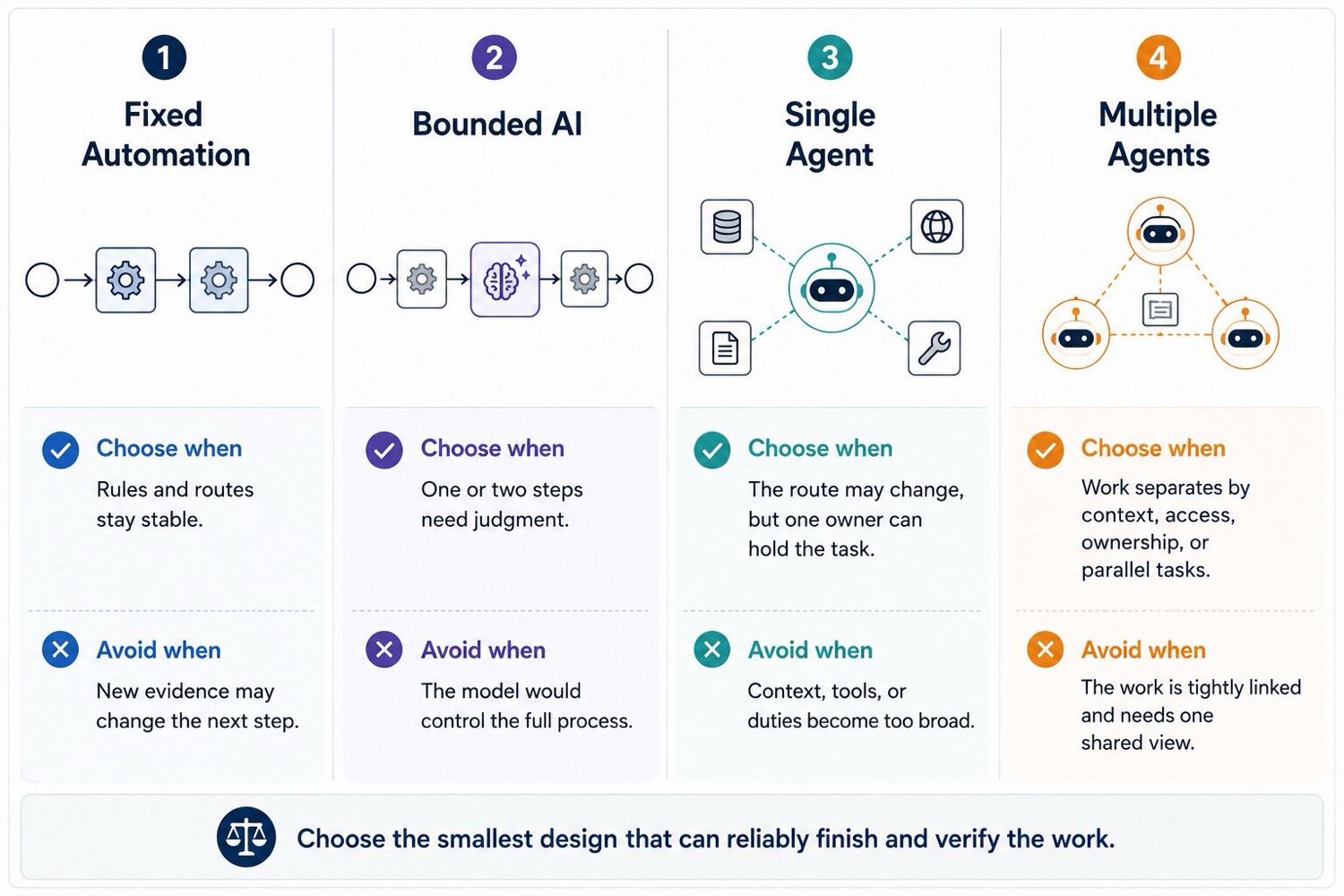
Fixed workflows suit stable checks and data moves. Bounded AI fits a fixed route with one uncertain step, such as extracting contract terms while code controls the final action.
A single agent works when evidence may change the path but one owner still holds the result. Starting with one agent also makes the system easier to evaluate, maintain, and improve before more coordination is added.
Several agents make sense when work separates through different knowledge, independent tasks, distinct permissions, or parallel execution. In one internal breadth-first research evaluation, a coordinator-worker system outperformed a single-agent baseline by 90.2%. It also used about 15 times the tokens of ordinary chats and was a poor fit for tightly linked work.
Complexity should solve a measured limit. Every added agent and handoff creates more state, cost, latency, and failure paths.
Common AI Agent Architecture Patterns
The architecture choice decides who controls the workflow. Execution patterns decide how the agent moves through it.
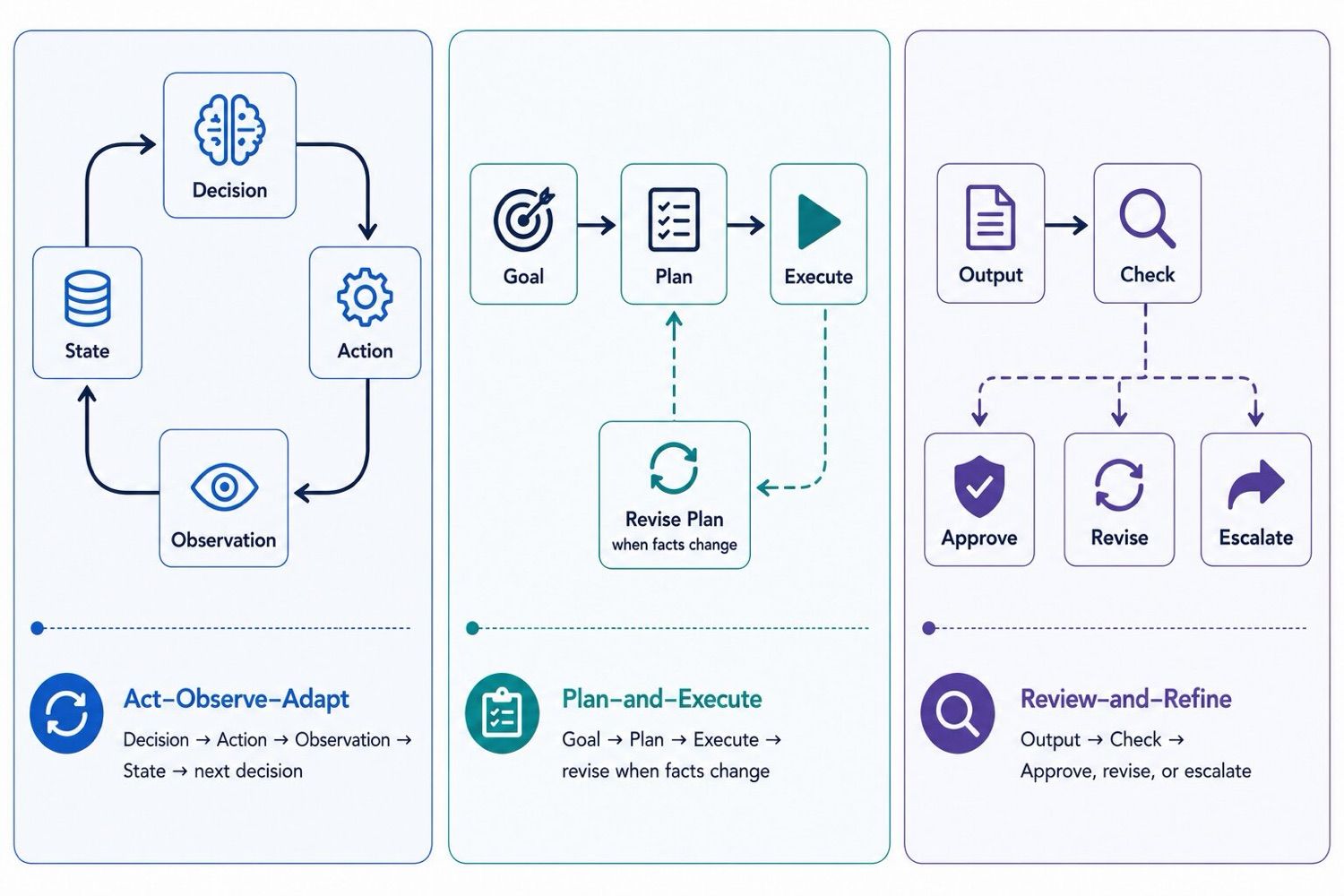
Act-observe-adapt: the agent chooses an action, uses a tool, observes the result, updates its state, and decides what comes next. This ReAct-style loop fits work where each result may change the route.
Plan-and-execute: the agent creates a working plan and revises it when facts change.
Review-and-refine: a result is checked against criteria, evidence, or tests, then approved, revised, or escalated.
These patterns can work together. One agent may start with a plan, adapt after each tool result, and run a final review before closing the task.
Common AI Agent Architecture Failures
Context and State Failures
The agent may use the wrong record, follow an old rule, forget a completed action, or repeat work after a pause.
These failures often begin when sources lose their date, version, scope, or owner, or when memory, state, and evidence collapse into one transcript.
Keep each record for one purpose. Refresh expiring facts and preserve completed steps.
Tool and Permission Failures
Warning signs include unstable tool choices, access wider than the job requires, and changes that nobody clearly approved.
Overlapping tools, prompt-only permissions, and approval given before the final action is known are common causes.
Give each tool one job. Narrow the access. Tie approval to the exact action, then keep the result returned by the outside system.
Completion, Verification, and Recovery Failures
The clearest sign is a confident "done" message with no proof. The record did not change, a retry sent the same message twice, or a failed run ended with no owner.
Keep the task open until the outcome is checked. Look before repeating a write. When the agent cannot finish, pass the goal, evidence, actions, and next decision to a named person.
Find the first point where facts, authority, progress, or proof became unclear. Repair that boundary before adding more prompts, tools, memory, or agents.
A 10-Question AI Agent Architecture Checklist
Before building, ask:
- What result must exist when the task ends?
- Can stable rules handle most of the route?
- Which steps truly need model judgment?
- Which sources are trusted and current?
- What facts must be refreshed before action?
- What belongs in memory, task state, and evidence?
- What may the system read, draft, write, or commit?
- Which actions need human approval?
- What proof will confirm the outside result?
- Who owns the case when the agent cannot finish?
The answers point toward the design:
- Mostly stable rules → fixed automation
- Fixed route with limited judgment → bounded AI
- Changing route under one owner → single agent
- Separate work with different context or access → multiple agents
- Unclear outcome, proof, or ownership → redesign before building
Use the checklist again when the workflow gains a tool, source, model, or new access. A small change can shift the risk.
A Persistent Place for the Work to Run
Once a workflow spans files, websites, schedules, and more than one session, it needs a stable place to continue.
MoClaw provides an AI Cloud Computer where files, tools, and working materials remain available between sessions. Browser Control supports sites without a useful API, while scheduled tasks can start recurring work.
In Nina's workflow, that environment could hold policies, case files, task state, and the final brief.
MoClaw does not decide which sources are trusted or what the agent may change. Those choices still belong to the workflow. Its role is practical: it gives the model, files, tools, and outputs a persistent, reviewable place to work.
Build the Smallest Architecture That Can Reliably Finish the Job
A strong architecture makes the work easier to understand and own. The team can see the goal, evidence, allowed actions, outside result, and the reason the run stopped.
Start with the simplest design that can handle the real uncertainty in the task. Then make completion visible enough for a person, a test, or the outside system to confirm it.
That is how a capable agent becomes work a business can trust.
Frequently Asked Questions
What is the simplest AI agent architecture?
For many tasks, it is one model with clear instructions, a small set of tools, saved task state, and a defined finish. Some work needs even less: a fixed workflow with one bounded AI step.
Is RAG part of AI agent architecture?
It can be. Retrieval-augmented generation finds useful context for the model. It does not manage tool actions, task state, access, recovery, approval, or proof of completion on its own.
What is the difference between memory and task state?
Memory keeps selected knowledge for later work. Task state records what happened, what remains open, and what should happen next.
Does every workflow need an AI agent?
No. Stable work with clear rules is often better handled by standard automation. An agent becomes useful when new evidence can change the route and the system must choose between valid next steps.
What is the difference between AI agent architecture and an agent framework?
A framework provides code for models, tools, routing, state, or agent coordination. The architecture is the wider design, including the goal, sources, permissions, runtime, checks, and human ownership. Choosing a framework does not decide whether the workflow should use fixed automation, one agent, or several agents.
Continue Reading
More Guide
What Is Hermes Bot Mode? Bots and Routines

OpenAI Assistants API Deprecated: What Broke

MCP Tools: What They Are and Which to Use

OpenAI Models Not Available in Cursor Nov 12

Coding Agent Security: When Your Tools Lie

OpenAI Python HTTPX2: What Actually Breaks
The MoClaw editorial team writes about workflow automation, AI agents, and the tools we build. Default byline for industry overviews, listicles, and collaborative pieces.
Ready to put this into practice?
MoClaw runs browser tasks, research, and schedules automatically. Try it free.
References: Gartner: Over 40% of Agentic AI Projects Will Be Canceled by End of 2027 · Google Cloud: Choose a Design Pattern for Your Agentic AI System · Anthropic: How We Built Our Multi-Agent Research System · Anthropic: Building Effective AI Agents · ReAct: Synergizing Reasoning and Acting in Language Models (Yao et al., 2022) · OpenAI: A Practical Guide to Building Agents · OpenAI: Inside Our In-House Data Agent