AI Agent vs API: Differences, Uses & When You Need Both

Compare an AI agent vs API by role, inputs, tool use, cost, and control. See how APIs, integrations, function calling, MCP, and agents work together.
Table of Contents
An API exposes a single capability, an API integration runs a fixed route, and an AI agent chooses the route at runtime when new facts change the next step. The AI agent vs API question is really about when the route gets decided, and getting it wrong is how a workflow returns a success code while still making the wrong business decision.
The API call returned a success code, and the finance system saved a proposed purchase-order match for invoice 4821. Then Elena reviewed the record and found the problem: the invoice had been linked to the wrong purchase order.
The request had the right format. The account had access. The API endpoint processed the call. Yet the workflow still made the wrong decision.
That gap explains the AI agent vs API question. An API exposes a capability. An API integration follows a route set before the work begins. An AI agent helps when the next step depends on what the system finds.
Most useful systems combine all three. In a 2025 survey of more than 5,700 developers, architects, and executives, 89% reported using generative AI in daily work, while only 24% actively designed APIs with AI agents in mind.
Key Takeaways
- Use an API when the exact operation is known.
- Use an API integration when the trigger and route are stable.
- Add an AI agent when new facts may change the next step.
- A successful request proves that the service processed it. It does not prove that it was the right action.
AI Agent vs API: Quick Comparison
| Question | API | API integration | AI agent |
|---|---|---|---|
| Main role | Exposes a capability | Connects known steps | Chooses among approved steps |
| Known at the start | The operation | The operation and route | The goal, but not always the route |
| Next step chosen by | Calling software | Workflow logic | The agent within set limits |
| Typical input | Structured fields | Events and mapped records | Emails, documents, and system data |
| Best fit | One precise action | Repeatable work | Context-based work |
| Main tradeoff | Caller must know what to request | New cases need new rules | More cost, delay, testing, and review |
| Common failure | Bad request | Bad route | Bad decision |
An application programming interface, or API, lets one program use data or features from another. A REST API commonly exposes resources and operations through URLs called endpoints.
That contract makes calls easier to build and test, not infallible. Records change, credentials expire, and services time out. A valid request can also point to the wrong customer, order, or invoice.
Agents do not recover safely by default. Safe recovery requires useful errors, fresh system state, retry rules, result checks, and a clear stopping point.
API, API Integration, and AI Agent Are Different Layers
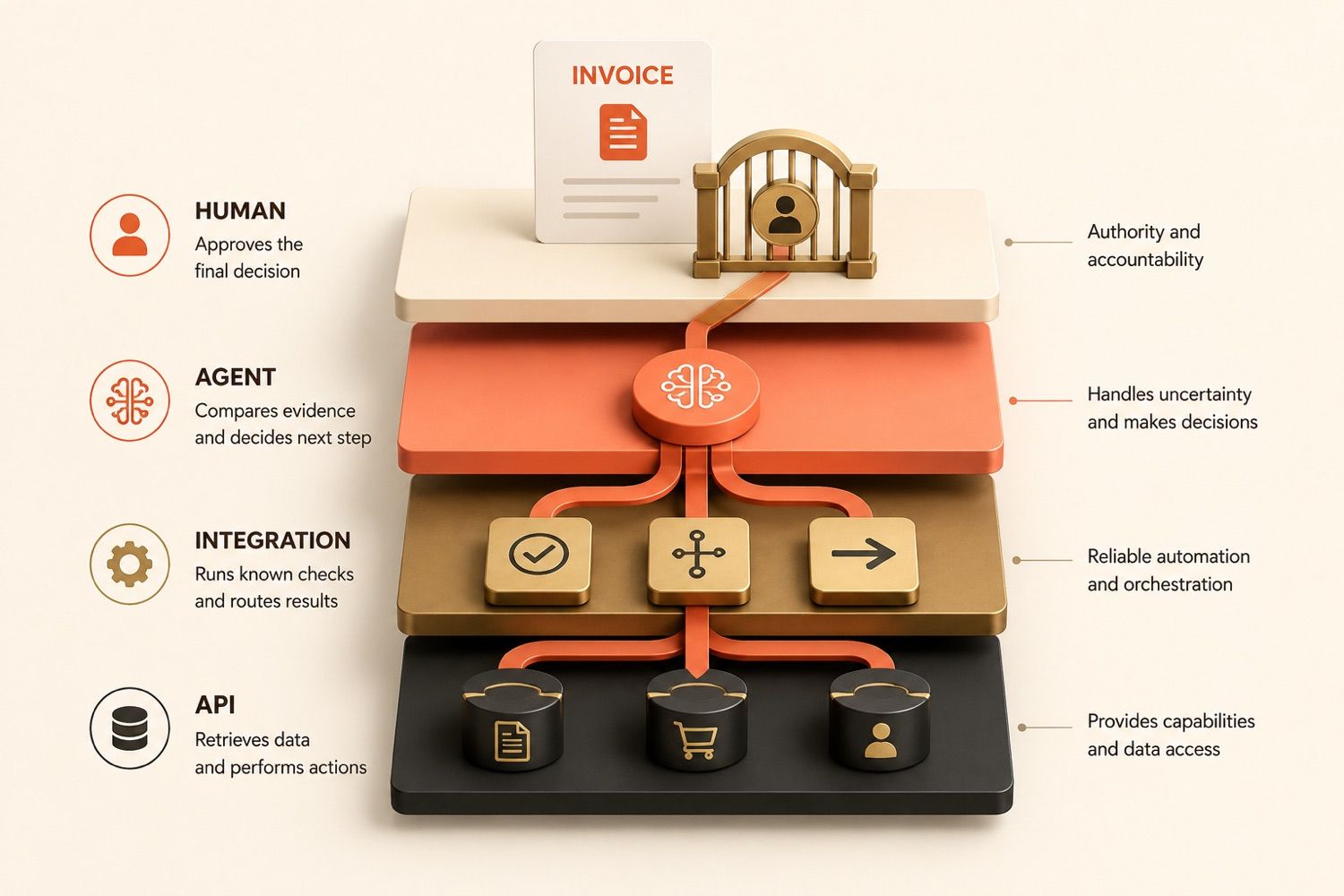
Consider this illustrative invoice review.
Elena leads finance operations at a small software company. Invoice 4821 is for $8,740, has no purchase order number, and could match two open orders with similar vendor names. Her team needs a review packet showing the likely match and the gaps, while payment remains untouched.
API: The Capability Layer
The accounting system may offer endpoints to retrieve the invoice, search purchase orders, read vendor records, or update a review status. Each performs a requested action; none decides which purchase order belongs to the invoice.
When the record and action are clear, such as "Retrieve invoice 4821," a direct call is the cleanest choice.
API Integration: The Predefined Route
A fixed API integration connects actions in a known order. A routine flow might read a purchase order number, retrieve the order, compare the total, and send a mismatch to a queue.
It may call several APIs or use a model to extract fields from an email, but it remains fixed because workflow logic decides what follows each result.
AI Agent: The Runtime Decision Layer
Elena's invoice is harder because a key field is missing. The workflow must read the email, inspect the attachment, compare two orders, and judge whether either match has enough support.
As facts emerge, an agent can choose from approved tools. Here, it selects neither order. Instead, it creates a packet with both possible matches, the differing fields, and one clear question. Elena makes the final choice.
The API exposes what software can do. The integration defines a known route. The agent decides which approved route fits the current situation.
The number of calls does not define an agent. A fixed integration may use ten API endpoints, while an agent may use only two tools. What matters is when the route is chosen.
How AI Agents Use APIs, Tools, and MCP
An agent does not reach an outside system through thought alone. Its choice moves through normal software:
Goal → agent decision → tool selection → structured call → application checks → API endpoint → result → verification
Tool Calling
AI agent tool calling means the agent selects an approved capability. A tool may call an API, query a database, read a file, run code, or control a browser.
For the invoice review, tools might include read_invoice, search_purchase_orders, and prepare_exception_report. Narrow tools are easier to test and limit than one broad tool called manage_finance.
Function Calling
AI agent function calling is a structured handoff between the model and the application.
The model may return a function and its arguments:
search_purchase_orders(vendor="Northstar Labs", amount=8740)
The application checks the arguments, permissions, and operating rules. It may run the function, require approval for a higher-risk action, or reject the request.
Strict schema enforcement can require the arguments to match a supplied JSON Schema. That protects the shape of the call, not whether the vendor, amount, record, or action is correct.
Tool Schemas and MCP Servers
A tool schema says what a tool does, which inputs it accepts, what it may change, and what it returns. The OpenAPI Specification provides a standard way to describe HTTP API operations, fields, security schemes, and responses.
A Model Context Protocol server can expose tools through a shared protocol. Tool definitions include a name, description, and input schema, and may also define structured output.
An MCP tool may call a REST API, read a file, query a database, or run another approved action. MCP standardizes how compatible AI applications discover and use tools; it does not replace access checks, approval, validation, or proof of the result.
A valid tool call proves that the arguments fit the expected structure. A successful API response proves that the service processed the request. Neither proves that the agent chose the right action for the goal.
Should You Use an API Integration or an AI Agent?
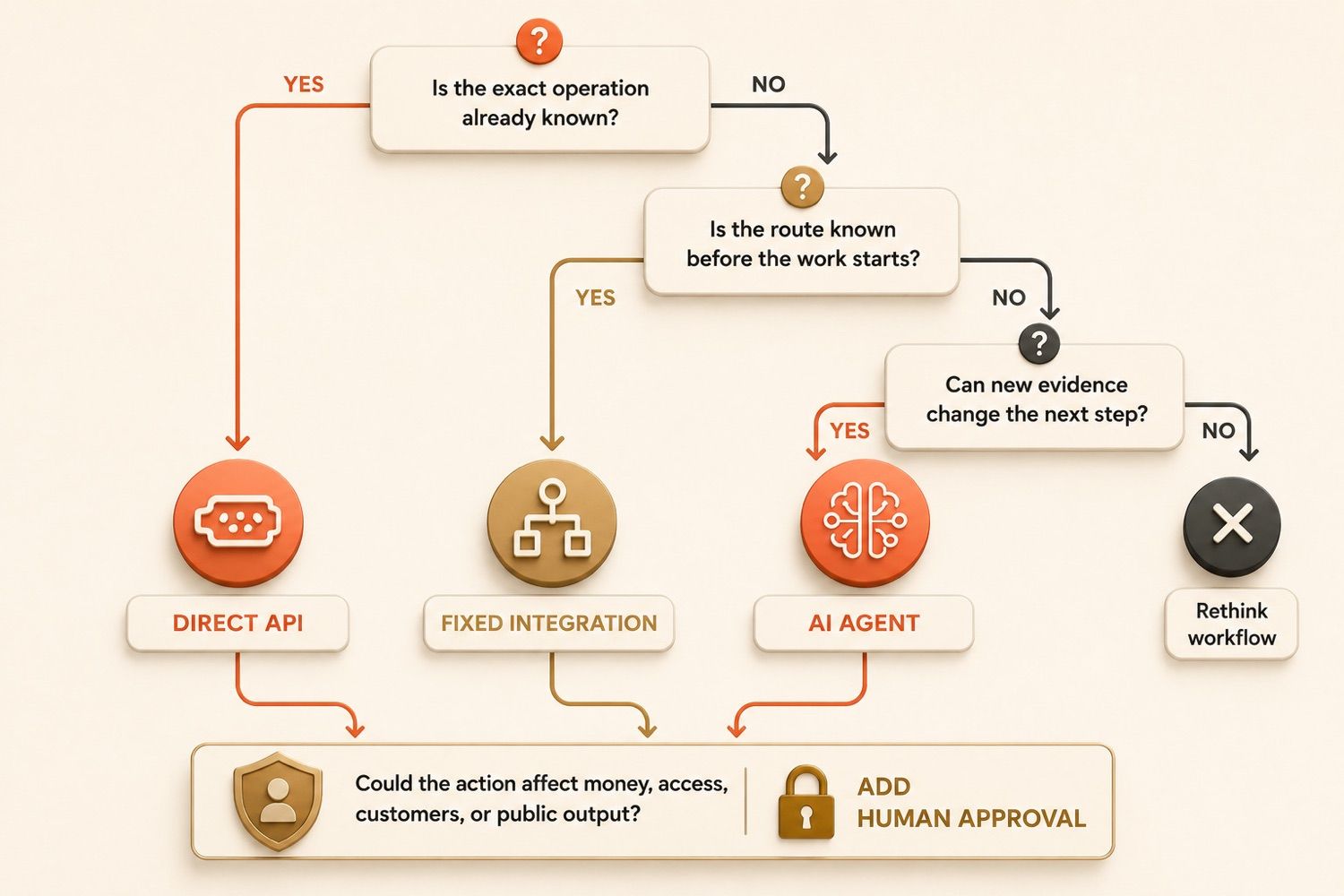
Start with the work, not the product label.
Use a Direct API Call When the Operation Is Known
If the exact operation is already known, use a direct API call. Adding model reasoning would create a choice the business has already made.
Use an API Integration When the Route Is Stable
Use a fixed API integration when the trigger, sequence, and main exceptions are known in advance. A narrow model step may help with extraction without owning the route.
Add an AI Agent When Context Changes the Route
Add an agent when the request arrives as an email, document, or broad goal and the right action is not clear yet.
Useful signals include cases that need different tools, plans that change with new facts, missing information that requires a question, or results a person should review before a costly action.
Place the agent at the first decision point that fixed logic cannot handle reliably. Keep the rest predictable.
Before adding the agent, decide how its result will be checked. A review packet can show the records compared, a research brief can link to evidence, and a code change can include a diff and test results. Review should match the cost of being wrong.
| Factor | Fixed API integration | AI agent integration |
|---|---|---|
| Input | Structured and expected | Mixed or unstructured |
| Route | Known before runtime | May change during the task |
| Cost and speed | Usually lower and faster | Usually higher and slower |
| Testing | Expected paths and outputs | Also test tool choice, retries, and stopping |
| Exceptions | Written as rules | Judged within set limits |
| Human review | Set by rule | Important for uncertain results |
Use an API integration when the system already knows which operations to perform and in what order. Add an AI agent when the workflow must understand the situation before it can choose the operation.
Agent reasoning should earn the extra cost, delay, monitoring, and failure paths it adds.
What Makes an API Reliable for AI Agents?
Reliable APIs for AI agents need four things:
Clear Contract
Keep each action narrow. Define the required fields, formats, side effects, and errors.
Return a status, record ID, time, and current state instead of a bare "success."
Limited Access
Use the narrowest credential the service supports. Some systems use API keys with limited permissions. Others use scoped OAuth tokens or delegated access. Split read and write rights where possible.
A workflow that gathers invoice evidence should not gain the right to release payments. Access and approval are not the same. An agent may prepare a change without being allowed to approve it.
Safe Writes
Read the current state close to an important write. A timeout does not prove that the first write failed, so check the result before trying again. Use idempotency controls when the API supports them.
Rate limits, duplicate checks, preview modes, and firm retry rules can stop one uncertain event from becoming several real changes.
Result Checks
After an action, read back the result or run the right test.
For invoice review, proof may include the invoice ID, the orders checked, totals compared, fields that differ, and a note that payment status did not change.
An API gateway can manage access, routes, traffic limits, and logs. It cannot decide whether an allowed request was wise for the case.
For more, see AI agent security risks and AI agent evaluation.
How MoClaw Supports AI Agent Integrations
An API call may end in seconds. The work around it may span files, websites, reviews, and later runs.
For Elena's invoice workflow, a scheduled task can start the review. Elena can also start the review when she uploads a new invoice. Saved instructions hold the matching rules, approved APIs retrieve current records, and the agent chooses only the checks the case requires before preparing a review packet for the data it must reconcile.
When a system has no useful API, Browser Control can work through the website. When a clean API exists, it is usually the better path because it is faster, easier to test, and less tied to page layout.
MoClaw's AI Cloud Computer keeps files, a shell, browser sessions, and working state in one persistent environment. A later run can continue with the same files, open questions, and prior output.
The fixed parts stay fixed. APIs retrieve records. Rules handle known checks. The agent handles only the parts that need judgment. Elena keeps approval over the final match and any payment action.
MoClaw does not replace APIs or remove the need for access rules and result checks. It gives recurring agent work a persistent place where APIs, browser work, files, schedules, and reviewable outputs can stay connected.
Use the Simplest Layer That Can Complete the Work
Use an API when the operation is known. Use an API integration when the route is known. Use an AI agent when the route depends on facts found during the task.
Many systems often use all three. Stable work stays in code, the agent gets only the choices that rules cannot handle well, and a person keeps control where mistakes affect money, access, customers, or public output.
The strongest architecture is not the one with the most intelligence in the middle. It is the one whose goal, actions, limits, and final result are easiest to check.
Frequently Asked Questions
Do AI agents always need APIs?
Not always. Agents can use files, command-line tools, databases, or browsers. However, APIs are often the cleanest and most testable path to an outside system.
Are AI agents just API wrappers?
Some simple products are close to wrappers. A useful agent gathers facts, chooses approved tools, changes course when needed, and returns a result that can be checked.
What is AI agent function calling?
Function calling lets a model return a function name and structured arguments. The application validates the request and decides whether to run it. Correctly shaped arguments do not prove the action is appropriate.
What is the difference between tool calling and an API call?
Tool calling is the agent choosing a capability. An API call is one way the application may execute that choice; a tool can also read a file, run code, query a database, or control a browser.
Does an MCP server replace a REST API?
No. An MCP server exposes tools and resources in a common form for AI applications. A tool may call a REST API underneath; the API still handles the service action, access, and response.
Continue Reading
More Comparison
Lindy vs MoClaw: Teammate or Cloud Computer?

DeepSeek vs ChatGPT: Research, Code, Price

ChatGPT vs Microsoft Copilot: Which Fits You?

Gemini vs ChatGPT for Work: Which Is Better?

Cursor Cloud Agent vs Grok Bot

GPT-5.6 Sol vs Terra vs Luna: Pick One
The MoClaw editorial team writes about workflow automation, AI agents, and the tools we build. Default byline for industry overviews, listicles, and collaborative pieces.
Choosing between tools? Let MoClaw run the work.
Always-on AI assistant on its own cloud computer. No switching required, no setup.
References: 2025 State of the API Report (Postman) · MDN API Glossary · MDN REST Glossary · OpenAI Function Calling Guide · OpenAPI Specification 3.2.0 · Model Context Protocol Server Overview · OAuth 2.0 Security Best Current Practice (RFC 9700) · Stripe Idempotent Requests · Amazon API Gateway