Gemini vs ChatGPT for Work: Which Is Better?

Compare Gemini and ChatGPT for work, writing, research, data, coding, context, and price. See which assistant fits the way your team already works.
Table of Contents
Gemini vs ChatGPT
ChatGPT vs Gemini; Gemini vs ChatGPT for work; Gemini vs ChatGPT for writing; Gemini vs ChatGPT for research; Gemini vs ChatGPT for coding; Gemini vs ChatGPT for data analysis; Google AI Pro vs ChatGPT Plus; Gemini vs ChatGPT context window
Gemini vs ChatGPT: Which Suits Your Workflow?
Compare Gemini and ChatGPT for work, writing, research, data, coding, context, and price. See which assistant fits the way your team already works.
A polished answer can hide a messy process.
A six-month field experiment followed 7,137 knowledge workers across 66 firms. In the second half of the study, the 80% of treated workers who used the assistant spent about two fewer hours on email each week.
The study did not compare Gemini with ChatGPT. It is still a useful reminder that AI value depends on how well the tool fits into real work.
Many ChatGPT vs Gemini reviews stop after one prompt. I follow one realistic task from the first trusted source to the approved result. The better fit depends on where the information lives, what the work must become, and how much copying, checking, and repair remains.
Key Takeaways
Gemini is often the cleaner start when the source and final work already live in Google.
ChatGPT Projects keep ongoing context together; Work often fits jobs that cross files, apps, and several rounds of edits.
Google AI Pro publishes a one-million-token context window for Gemini Apps. ChatGPT context varies by model and mode, and size alone does not prove that either tool found every key fact.
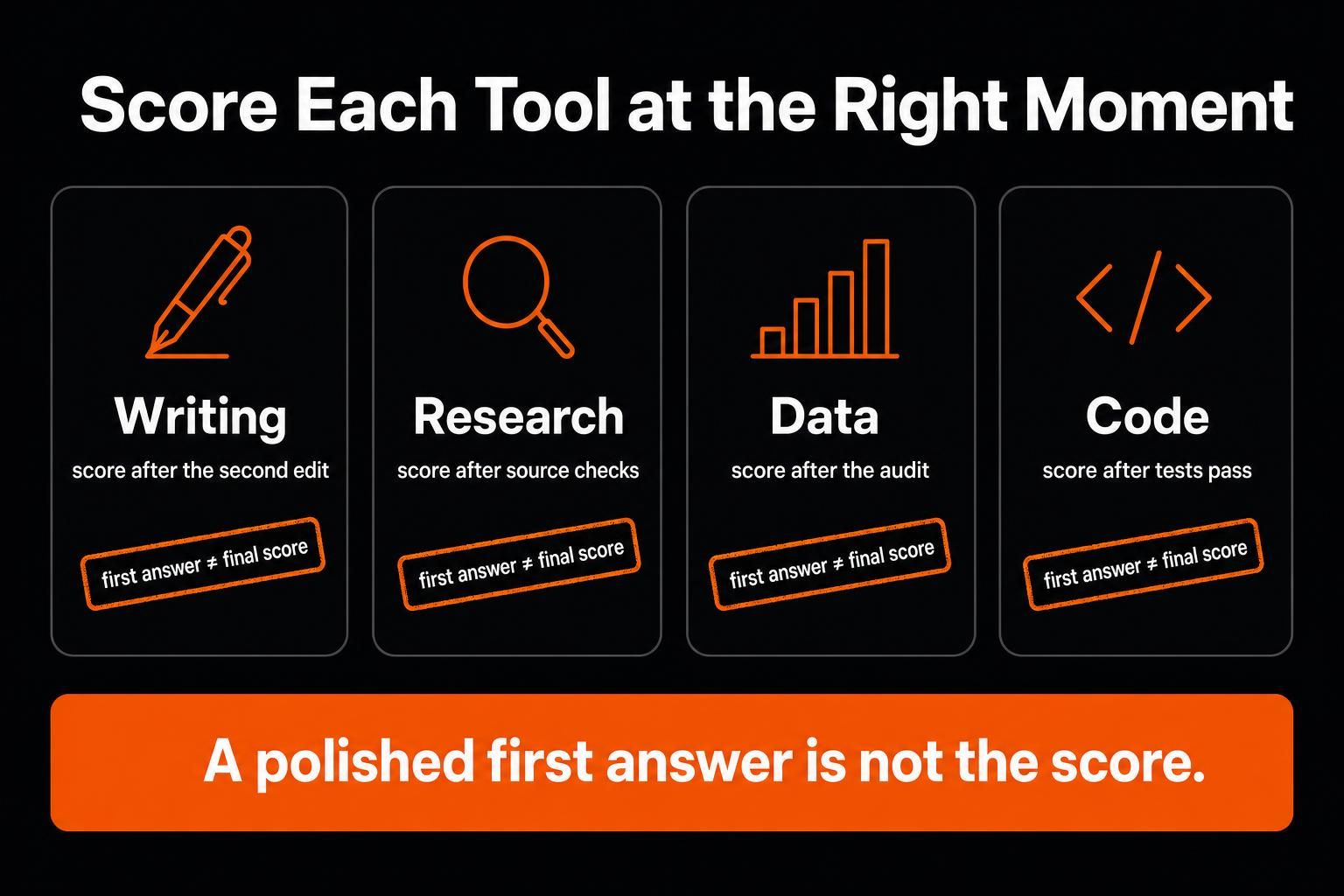
Judge writing after the second edit, research after source checks, data after an audit, and code after tests pass.
Use both only when each removes a different handoff you repeat.
Gemini vs ChatGPT: The Quick Answer
| Your workflow | Start with | Main check |
|---|---|---|
| Most context and output live in Gmail, Drive, Docs, Sheets, or Calendar | Gemini | Did it use the newest record? |
| The job crosses systems and must become several final files | ChatGPT Work | Is one source of truth clear? |
| One huge report, video, transcript, or codebase should stay whole | Gemini | Did it find key details and clashes? |
| Chats, files, rules, and edits need one shared home | ChatGPT Project | What survives a return or handoff? |
| Each tool removes a different repeated step | Test both | Give each tool one clear stage. |
This is a starting point, not a fixed ranking. Your plan, account, region, permissions, and task can change the result.
Start With Where the Work Lives
Consider Lena, an operations lead preparing a supplier-renewal decision. Her evidence is split across email, proposals, a long security report, a pricing sheet, and a late legal note. She needs a memo, decision log, short deck, and follow-up email. Lena is fictional, but the workflow is common.
Most of her records already remain in Google Workspace. When the account and permissions allow it, Gemini can find and sum up information from Gmail, Docs, Drive, and Calendar. It also works inside supported Google apps, so the work can stay close to the shared files.
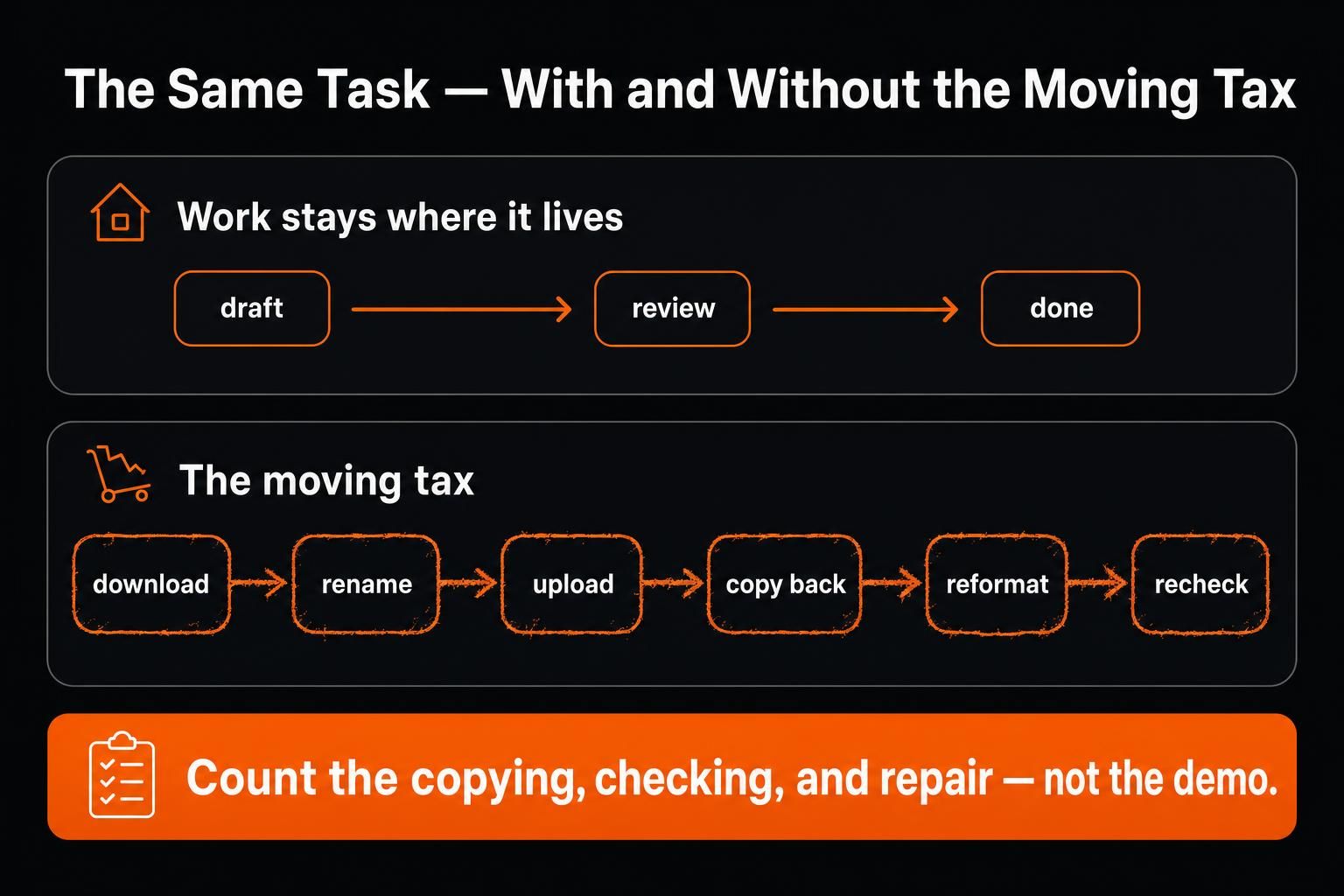
That can remove quiet setup work. Lena may not need to download an email thread, export a Sheet, upload a Doc, and copy the answer back.
ChatGPT can also work with connected Google sources, and Work can create or edit native Google Docs, Sheets, and Slides when the relevant Workspace app is enabled. Gemini’s edge is not exclusive access to Google files. It is that more of the workflow can stay inside Google’s own surfaces.
Direct access still needs checks. Through Gemini’s Workspace connection, comments and images in Docs, standalone pictures and videos in Drive, and Drive folder management can remain unavailable. Gemini can separately generate files in chat, so source access and output creation are different capabilities.
Lena asks for the five facts most likely to change the decision. She opens the source behind each one and records which file wins when two records clash.
ChatGPT Projects keep chats, files, instructions, and project memory together. A shared Project can give a team one live hub instead of a chain of separate chats.
ChatGPT Work handles longer jobs that end in documents, spreadsheets, slides, reports, or Sites. Its availability, tools, and limits vary by plan and surface. Work can use Project context and connected files while you track progress and approve key actions.
That helps when Lena needs more than an answer. One checked source pack must become a memo, decision log, deck, and email.
The key question is not which model sounds smarter. It is how much material must move before the work is ready to approve.
Context, Memory, and Project Continuity
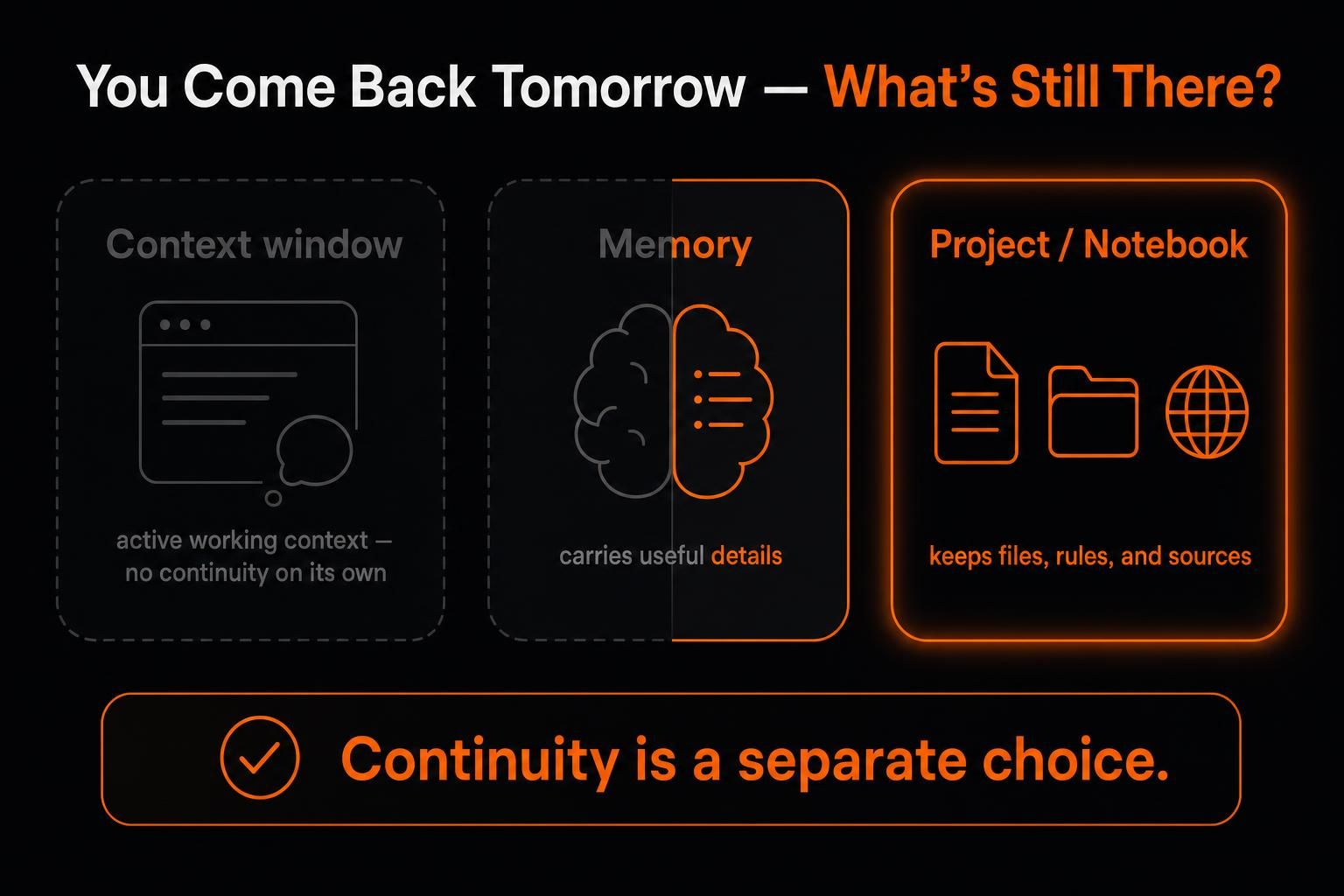
Lena returns two days later. The files are still there, but that does not mean the assistant remembers why one proposal was rejected.
A context window is what a model can consider in the current task. Memory can carry useful details into later chats. A project or notebook keeps a chosen set of work and sources together.
As of August 2026, Google lists 32K without an AI plan, 128K on Google AI Plus, and one million tokens on Google AI Pro and Ultra. ChatGPT’s available context varies by model and mode, with larger limits on manually selected reasoning models.
That published limit can help when splitting files would hide links between facts, but compare the exact ChatGPT model and mode you plan to use.
Still, accepted is not the same as understood. A large source set can hide details or links. I would test a buried clause, a clashing date, and one key number before I trusted the summary.
Before Lena asks for the memo, she requests a source map with:
the file name and date;
the key claim;
any conflict;
missing evidence;
facts that need a human decision.
Continuity is a separate choice. Drive projects can save files, folders, or emails for more than one chat. On personal Google accounts, notebooks in Gemini keep selected sources together and sync with Gemini Notebook. ChatGPT Projects keep chats, files, and instructions together. Project-only memory keeps that context inside the Project.
Neither tool should be the only record of a changed price, rejected claim, or legal approval. Keep those choices in a dated file the team can inspect.
Gemini vs ChatGPT for Writing, Research, Data, and Coding
Writing: Test the Second Revision
A first draft mostly tests fluency. The second revision tests control.
Gemini is often easier when the source files, draft, review, and approval stay in Google Workspace. ChatGPT may fit better when one checked source pack must become an article, email, deck, landing page, table, and social post.
Lena gives each product the same memo, research pack, and six style rules. She then asks for a 20% cut, a new opening, and the late legal change.
I would not score either tool from its first answer. I would check whether a fact vanished, a rejected claim returned, the tone became flat, or the shorter draft became thin.
At Questrade, a blog post that once took about two days to research and write could be drafted in a couple of hours with Gemini and Gems. That result came from its own Google Workspace setup, not a controlled test against ChatGPT.
Research: Open the Claims That Matter
A long report is easy to admire. Before I trust it, I open the claims that could change the decision.
Gemini Deep Research can use public search, chosen Gmail and Drive content, uploaded files, and Gemini Notebook sources. ChatGPT Deep Research can use the public web, chosen sites, uploaded files, and enabled apps.
Both let you review a plan and get a report with sources. The main difference is where your best evidence already lives.
Check the date and exact passage behind each key claim. Look for first-hand proof. Also note when several articles point back to one source. Five links do not always mean five pieces of evidence.
The research is ready when its key claims survive review, not when the report looks complete.
Data: Check the Workbook
A workbook is not finished because the chart looks clean.
Gemini has a natural home when the workbook and nearby work stay in Google Sheets. ChatGPT now also works inside Google Sheets and Excel. It may fit better when the same task must mix workbook edits with CSVs, Python, charts, and a separate report.
Give both tools the same data and the same output. Then check formulas, missing values, totals, chart ranges, labels, and filters. Ask another person to trace one number from a source row to the final chart.
Choose the tool whose workbook another person can audit with the fewest hidden fixes.
Coding: Test the Repository
A convincing explanation is not enough in a repository. The code still has to pass.
Gemini can import a GitHub repository or code folder into a chat for analysis. The imported repository is a snapshot: later changes do not sync, and Gemini Apps cannot write to it. Codex is the clearer ChatGPT path for code changes, commands, tests, and review.
Use a real repository with a known failure. Give each system the same rules and tests. Record passed tests, new bugs, hand edits, tool errors, and time to a passing result. Count an out-of-scope change as a failure, even if the demo looks good.
Google AI Pro vs ChatGPT Plus
The closest personal paid plans cost almost the same in the United States.
| Plan | US price | Main value |
|---|---|---|
| Google AI Pro | $19.99 a month | 5 TB storage, higher Gemini limits, a Pro model, Deep Research, and Gemini in supported Google apps |
| ChatGPT Plus | $20 a month | Advanced reasoning, higher limits, file analysis, Deep Research, Projects, custom GPTs, and expanded Work on desktop, web, and mobile |
The one-cent gap should not decide the purchase. Google bundles AI with storage and its apps. ChatGPT gives you a workspace that is less tied to one suite and can span several systems.
Count the work left before approval. Track file moves, repeated setup, fact repairs, format fixes, and review rounds. The cheaper workflow is the one that cuts this work without losing control.
The answer changes when the files belong to a client or employer. A personal plan is not a company data policy.
OpenAI does not use ChatGPT Business, Enterprise, or Edu content to train its models by default. For Google Workspace customer accounts, Google says Workspace data is not used to train or improve underlying generative AI models outside Workspace without permission. On personal ChatGPT plans, you can turn off model improvement while keeping chat history. On personal Gemini accounts, turning off Keep Activity disables Workspace and nearly all Connected Apps.
Teams still need rules for access, private files, retention, sharing, and final approval. A plan page cannot make that choice.
Run One Real Workflow Test
One normal task tells you more than another feature table. Use the same evidence, output, source clash, and late edit in each product.
Sources and setup: Ask for five key facts. Record each upload, connection, missing source, permission step, and repeated note.
Conflict and revision: Add one clash between sources. Remove an old rule. Ask for a shorter draft and check what vanished or came back.
Return and handoff: Come back the next day, add a file, and ask another person to continue. They should find the current brief, checked sources, open questions, latest draft, rejected claims, and next step.
Completion: Ask for the final files. Count the copying, formatting, and repair still needed before approval.
Score each area from 1 to 5, with 5 meaning the workflow performed better for your needs.
| Area | What to record |
|---|---|
| Setup | Uploads, access steps, copying, and repeated context |
| Accuracy | Correct facts, dates, and source use |
| Revision | Rules and checked facts kept after a change |
| Continuity | Ease of returning or handing off the work |
| Completion | Steps left before the files are ready |
| Human repair | Time spent fixing facts, tone, formulas, code, or format (less is better) |
Do not let a good average hide a serious failure. A wrong price, lost legal note, broken formula, or untested code should outweigh a polished paragraph.
At BBVA, Head of AI Transformation Antonio Bravo describes a rollout that includes an internal assistant in Peru used by more than 3,000 employees. It has cut average query time from about 7.5 minutes to around one minute. Across BBVA, employees have created more than 20,000 custom GPTs. This does not prove a broad ChatGPT win. It shows why a focused flow can matter more than a feature list.
When Using Both Makes Sense
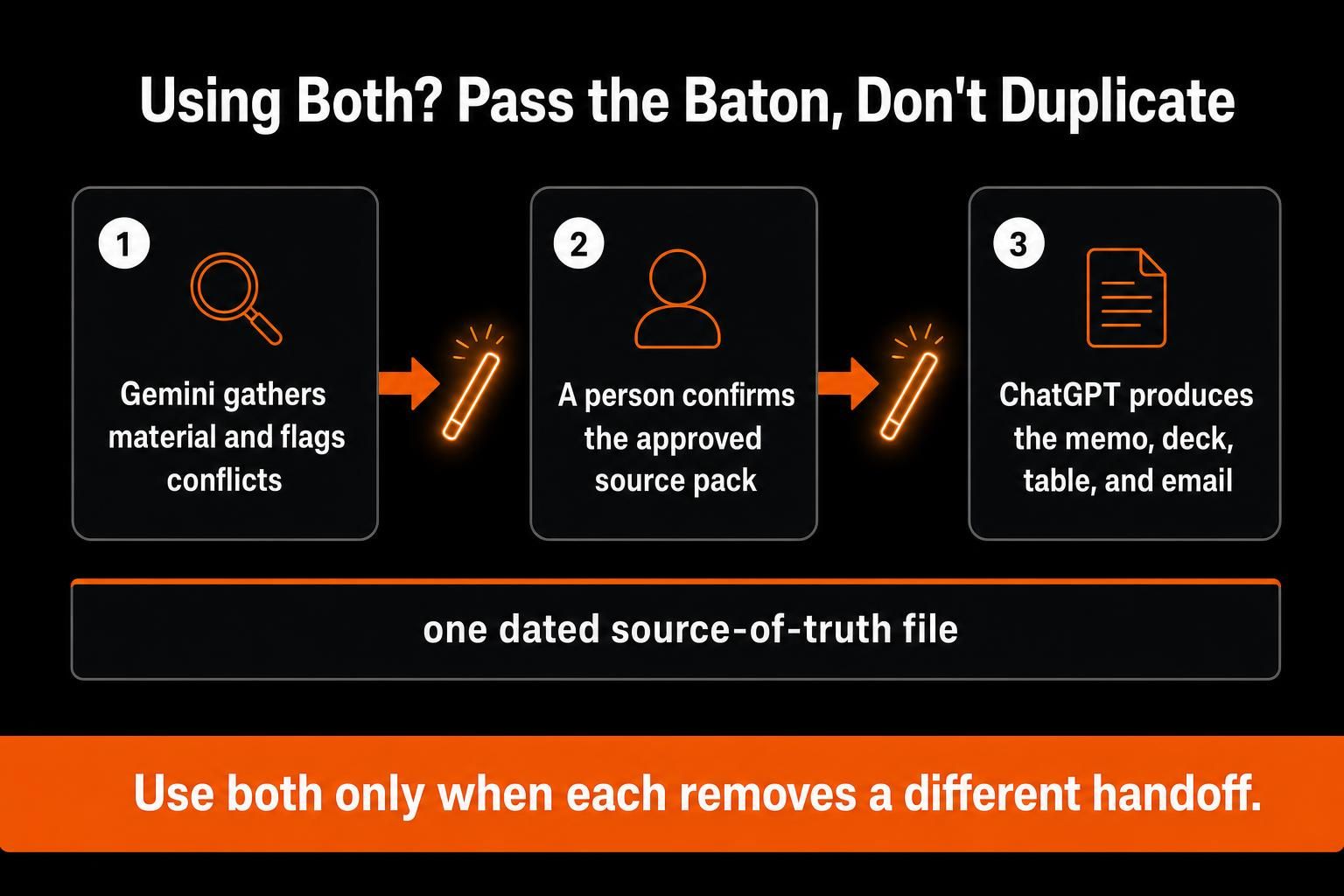
A workable split looks like this:
Gemini gathers material from Google Workspace and flags changes or conflicts.
A person confirms the approved source pack and records the decisions that matter.
ChatGPT turns that checked pack into the memo, deck, table, email, or other final formats.
One dated file remains the source of truth for both tools.
Do not give both tools a loose set of live, clashing files and hope they agree. The second tool may create one more draft to review, not a real gain.
Where MoClaw Fits
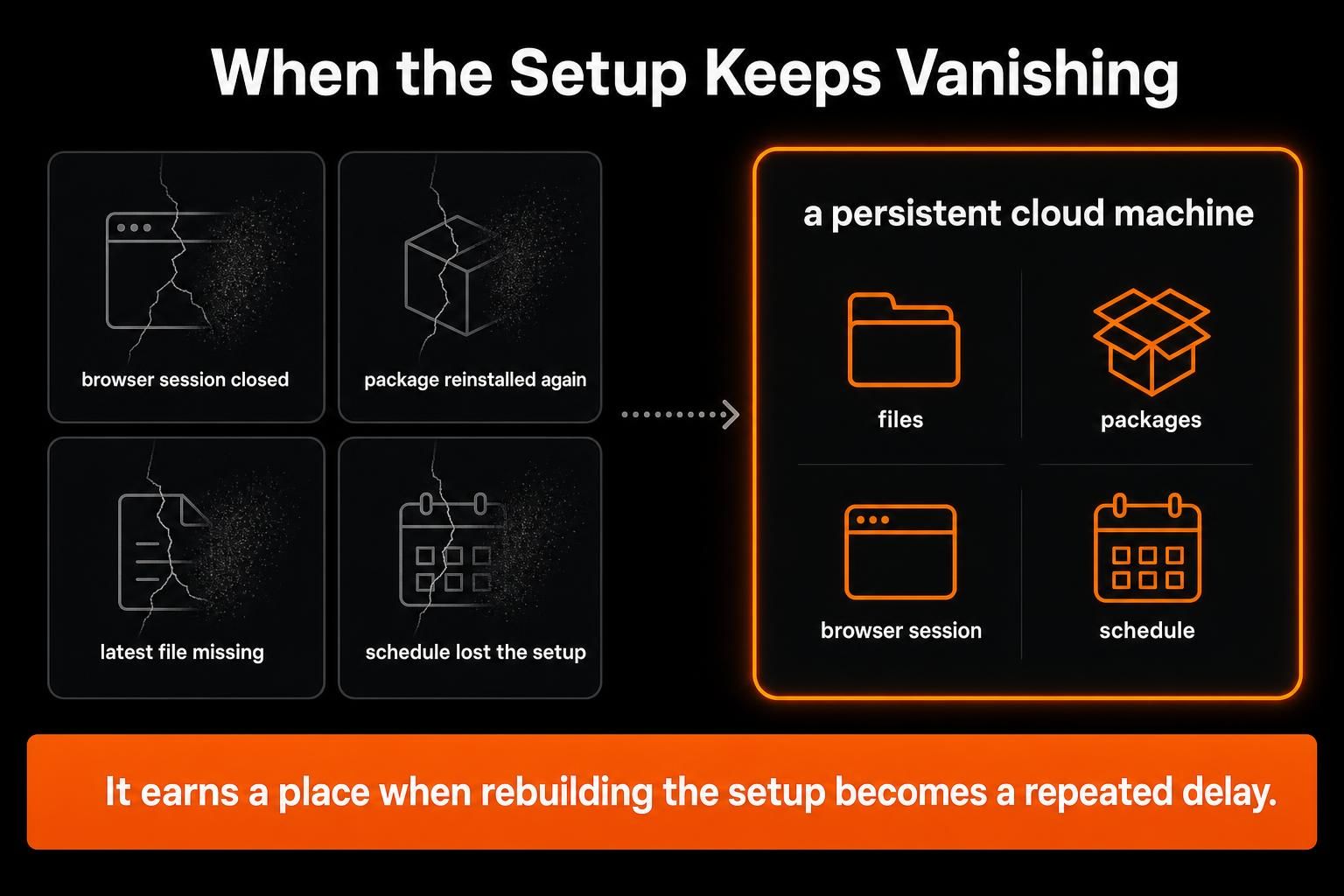
The test may reveal a different problem: neither model is the weak link. The work environment keeps resetting.
A later run may need the same files, installed packages, or signed-in browser session, not just the same instructions.
MoClaw gives the agent a private cloud machine with a real file system, shell, browser, and saved state. Files, installed packages, and signed-in browser sessions can stay across chats. A scheduled task can return to the same setup later.
That places MoClaw around the model, not against Gemini or ChatGPT. Either assistant may help with research, writing, data, or reasoning. MoClaw matters when the work also needs lasting files, browser state, scripts, installed tools, or a schedule.
Many one-time tasks do not need this layer. It earns a place when rebuilding the setup becomes a repeated delay.
Check MoClaw’s current integrations before building a workflow around a specific connector.
Frequently Asked Questions
Can you move a Gem or custom GPT from one platform to the other?
Treat it as a rebuild, not a direct migration. Keep the original instructions, reference files, examples, and tool requirements in a neutral folder so you can rebuild and test the setup in the other product.
Does this comparison change if you use the APIs instead of the apps?
Yes. This article compares the day-to-day products. An API choice should be tested separately because model pricing, limits, latency, tool support, and what your team builds around the model can matter more than the app-level workflow.
What if your company works mostly in Microsoft 365?
Gemini’s Google-native workflow advantage matters less. Test which assistant can reach the approved sources and return work to the tools your team actually uses. For a Microsoft-centered workflow, include Microsoft Copilot in the comparison instead of forcing a two-product choice.
Should a team standardize on one AI assistant?
Not automatically. One default can simplify training, policy, and support, but an exception can make sense when another tool removes a repeated handoff. Standardize the source-of-truth, approval, and data rules before you standardize the assistant.
What should you keep if you switch tools later?
Save a portable brief with the source list, approved facts, rejected claims, instructions, output requirements, and last accepted files. Then switching becomes a controlled transfer instead of a fresh start.
Final Verdict
Gemini is often the cleaner start when Google holds the evidence, working files, and final output. Its one-million-token context window also helps with very large source sets, as long as you check the key facts.
ChatGPT is often the better fit when a job crosses systems and must move through research, edits, data, code, and several final files. Projects keep the work together. Work and Codex help carry longer tasks into action.
MoClaw solves a third problem: the work setup itself must last.
Do not choose the tool with the best-looking first demo. Choose the workflow that reaches approval with the least copying, checking, rebuilding, and repair.
Continue Reading
More Comparison
DeepSeek vs ChatGPT: Research, Code, Price

ChatGPT vs Microsoft Copilot: Which Fits You?

Cursor Cloud Agent vs Grok Bot

GPT-5.6 Sol vs Terra vs Luna: Pick One

Gemini 3.7 Flash vs 3.1 Pro: Is Pro Over?

Qwen 3.8 vs Kimi K3: Cheaper Isn't Simpler
The MoClaw editorial team writes about workflow automation, AI agents, and the tools we build. Default byline for industry overviews, listicles, and collaborative pieces.
Choosing between tools? Let MoClaw run the work.
Always-on AI assistant on its own cloud computer. No switching required, no setup.
References: NBER - Shifting Work Patterns with Generative AI · Google Gemini Help - Use Google Workspace apps in Gemini · Google Gemini Help - Generate files from Gemini Apps · OpenAI Help - Google app for ChatGPT · OpenAI Help - Projects in ChatGPT · OpenAI Help - Creating and editing files with ChatGPT Work · Google Gemini Help - Context windows and AI plans · OpenAI Help - ChatGPT release notes · Google Drive Help - Work with projects in Drive · Google Gemini Help - Gemini Notebooks and NotebookLM · Google Workspace - Questrade customer story · Google Gemini Help - Deep Research · OpenAI Help - Deep research in ChatGPT · OpenAI Help - ChatGPT for Excel and Google Sheets · Google Gemini Help - Import a GitHub repository · OpenAI Help - ChatGPT Work and Codex · Google One · OpenAI Help - ChatGPT Plus · OpenAI - Business data privacy · Google Workspace - Gemini data protections · Google Gemini Help - Keep Activity and Connected Apps · OpenAI Help - ChatGPT data controls · OpenAI - BBVA customer story