Cursor Cloud Agent vs Grok Bot

Cursor Cloud Agent vs Grok Bot: isolated VMs that clone repos and open PRs versus a shared office computer. Pick by job, checked Aug 20, 2026.
Table of Contents
Cursor Cloud Agent vs Grok Bot is not a same-product comparison. A cursor cloud agent is an isolated coding VM that clones your repo and opens a pull request; Grok Bot is a shared-account office computer that signs into your apps and keeps working after you close the laptop.
Cursor's Cloud Agents help page, checked August 20, 2026, says they are available on all paid Cursor plans. Grok Bot is not. The Grok Bot FAQ lists SuperGrok Heavy, Cursor Ultra, and Cursor Teams Premium. Ahrefs had US volume 100 and global 450 for "cursor cloud agent" on August 20, 2026, with July volume-history at 163. That is still a small query, mostly grok bot vs cursor sorting.
Key Takeaways:
- Use a Cursor Cloud Agent when the output should be a branch and a PR inside an isolated VM.
- Use Grok Bot when the job lives in apps, files, a browser, and a computer that stays on after the laptop closes.
- Cloud Agents were formerly called Background Agents. They are not the Grok Bot computer.
- Every Grok Bot on one account shares one computer. xAI's docs say not to use separate Bots as a security boundary.
- Grok Bot can launch Cursor Cloud Agents. The team toggle is on by default. That does not make them the same product.
Vera here. The mix-up I keep seeing is the word "computer." You search grok bot computer and cursor cloud agent, and both pages talk about a VM. Then grok bot vs cursor looks like a replacement fight. It is not. One product hands you a PR. The other is a teammate desk with Chrome already open. This is a decision page. For the category essay, see Grok Bot vs AI Agent.
Checked on August 20, 2026 against Cursor Cloud Agent docs, Cursor Grok Bot help, xAI Grok Bot docs, and x.ai/bot. Access, pricing, and platform support can change.
Cursor Cloud Agent vs Grok Bot Is a Workflow Split
Ask what you want in your hands when the run finishes.
A Cursor Cloud Agent is git-bound. Cursor's Cloud Agents docs describe isolated VMs: cloned repos, dependencies, secrets, and network access. The agent works on a separate branch, then pushes for handoff. You can start one from Cursor Desktop, the agents web page, Slack, GitHub, Bitbucket, Linear, iOS, or the API.
Grok Bot is app-bound. xAI introduced it as teammates with their own computer: they sign into tools, work across apps, and come back when something needs approval. The computer and apps page says work runs on a persistent cloud computer, and that closing the laptop does not stop it.
Operators on X, including @Go7hic and @zkyo, have been drawing the same line: a Cloud Agent is git and project bound; Grok Bot is a general computer. Cursor staff (@poteto) posted that you can kick off a Cloud Agent from Grok Bot (tweet). Treat the tweet as social voice. The load-bearing version is in Cursor's team docs, below.
One disambiguation, then drop it: Grok Build is xAI's terminal coding agent. It is not the Grok Bot computer, and it is not a Cursor Cloud Agent. If your mental model is a CLI that edits a repo, you are closer to Grok Build or grok bot vs claude code. This article is also not a Claude Cowork comparison.
Cursor Cloud Agent vs Grok Bot Feature Comparison
| Dimension | Cursor Cloud Agent | Grok Bot |
|---|---|---|
| Isolation | Isolated VM per run, sandboxed from your laptop | One user-scoped computer shared by every Bot |
| Git / PRs | Clones the repo, works on a branch, opens a PR with artifacts | General apps, files, browser, and terminal; not a PR machine by default |
| What the computer is for | Build, test, and demo the changed software | Sign into tools, run office workflows, keep state after the laptop closes |
| Plan gate | All paid Cursor plans | SuperGrok Heavy, Cursor Ultra, Cursor Teams Premium |
| Computer sharing | Each agent gets its own VM | Files, cookies, sessions, and CLI credentials are shared |
| Mobile | Cursor iOS app; Android via the agents PWA | iPhone on iOS 18+; no Android or iPad at launch |
| Linux | Cloud VM is Linux; you drive it from Cursor on a paid plan | Computer is a Linux VM; official client is macOS/Windows/iOS |
| Job | Features, bugs, tests, CI fixes, merge-ready PRs | Research, inbox, dashboards, routines, multi-Bot handoffs |
If the row that matters is "opens a PR," pick Cloud Agent. If the row that matters is "already signed into the tools I use," pick Grok Bot. If you need both, run them together.
What Cursor Cloud Agent Ships: Repos, PRs, Isolated VMs
Call it a cursor background agent if that is still the phrase in Slack. Cursor's docs say Cloud Agents were formerly Background Agents. The idea is the same: move a coding task into a cloud VM and come back to a PR plus proof.
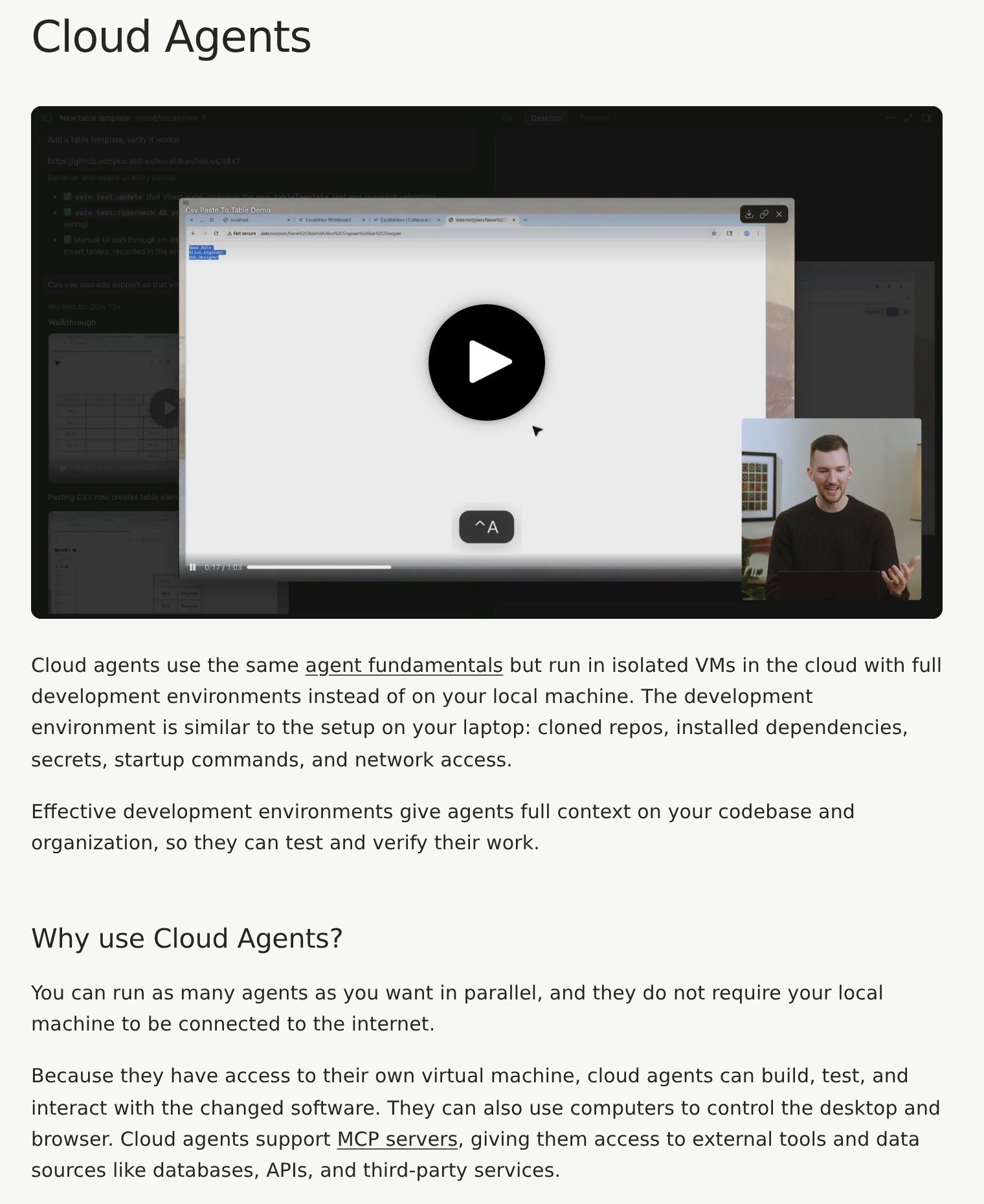
Each Cloud Agent runs in its own isolated VM with a full desktop. It can start a dev server, click through UI, and verify the change before it pushes. Artifacts attach to the PR. You can take over the remote desktop, then hand control back.
Cursor says your code runs in isolated VMs in AWS. Privacy Mode works. Legacy Privacy Mode does not, because the agent has to store code and environment data in the cloud while it runs. Network egress can be locked to an allowlist.
An admin has to connect source control first. Cursor documents GitHub, GitLab, Bitbucket Cloud, and Azure DevOps. "Move to Cloud" does not snapshot local uncommitted changes.
Billing is API pricing for the selected model, with a spend limit you set. That meter is not Grok Bot's weekly included usage.
What the Grok Bot Computer Ships: Apps, Files, Routines
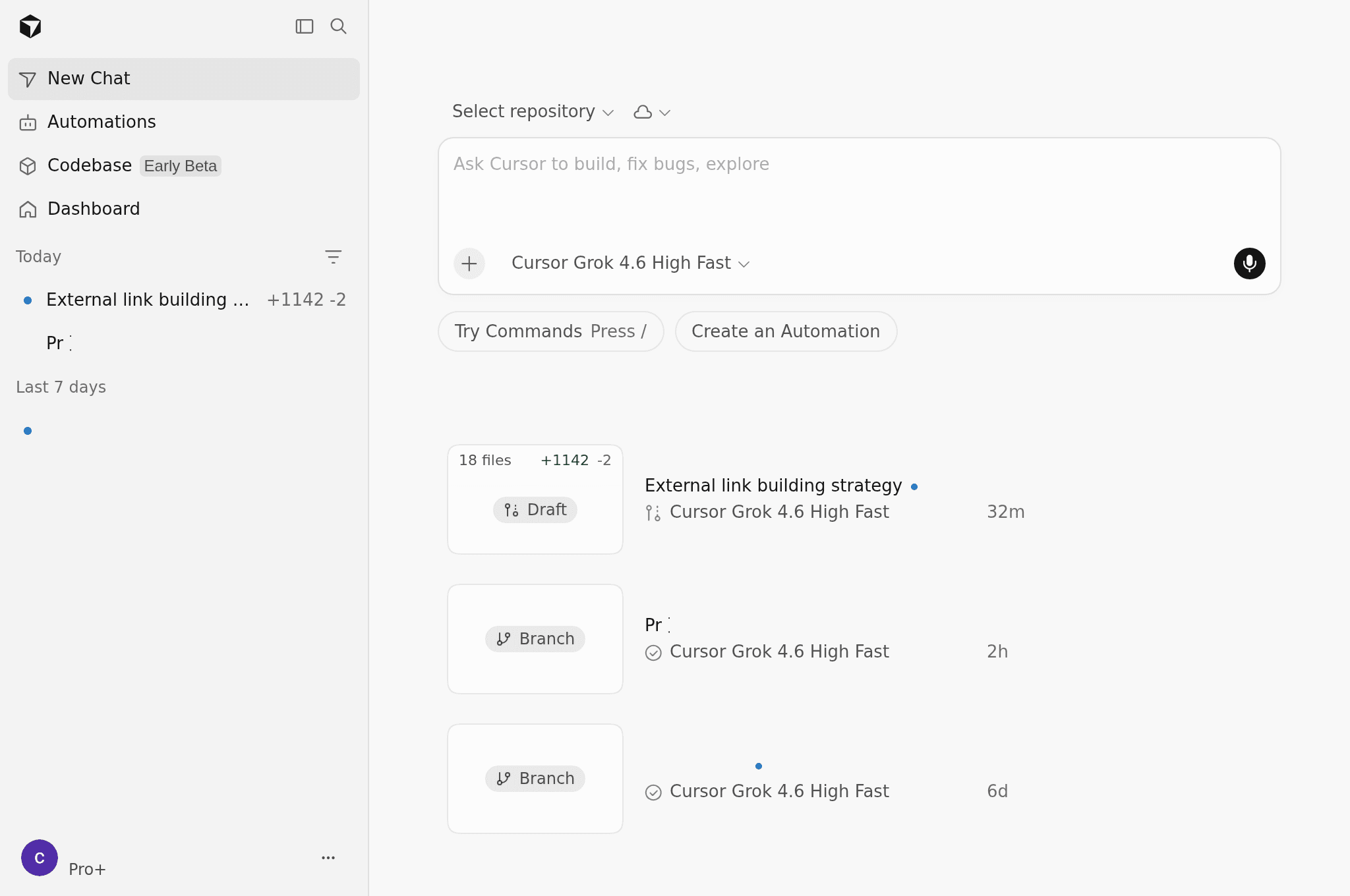
Grok Bot's job is not "open a PR." It is "use the tools you already live in." Cursor's getting-started page describes agents that use plugins, a cloud computer, and routines.
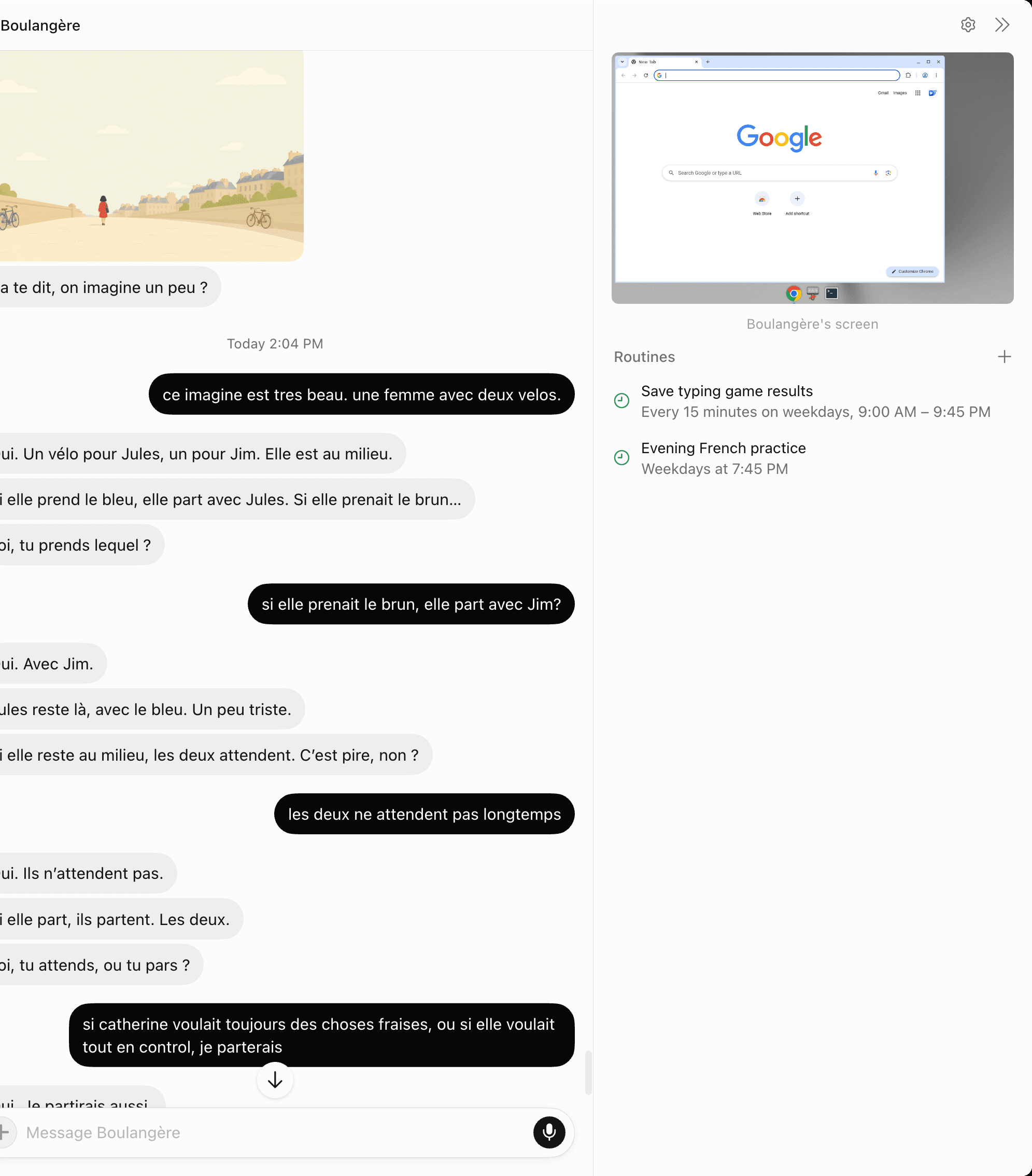
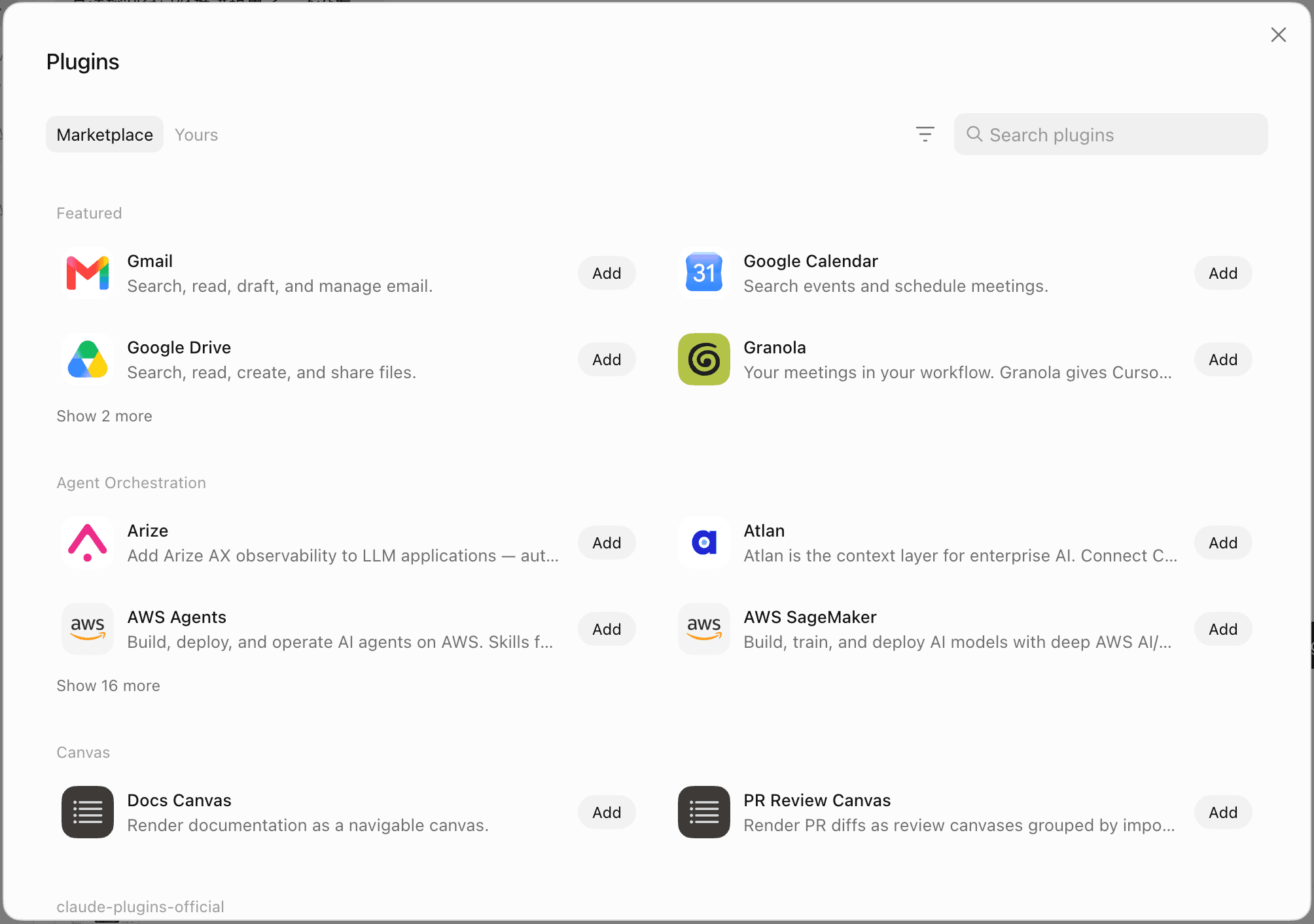
For the workflow view, see Grok Bot productivity. For this comparison: pick Grok Bot when the work is a dashboard, an inbox, a browser flow, or a named teammate you will message again tomorrow.
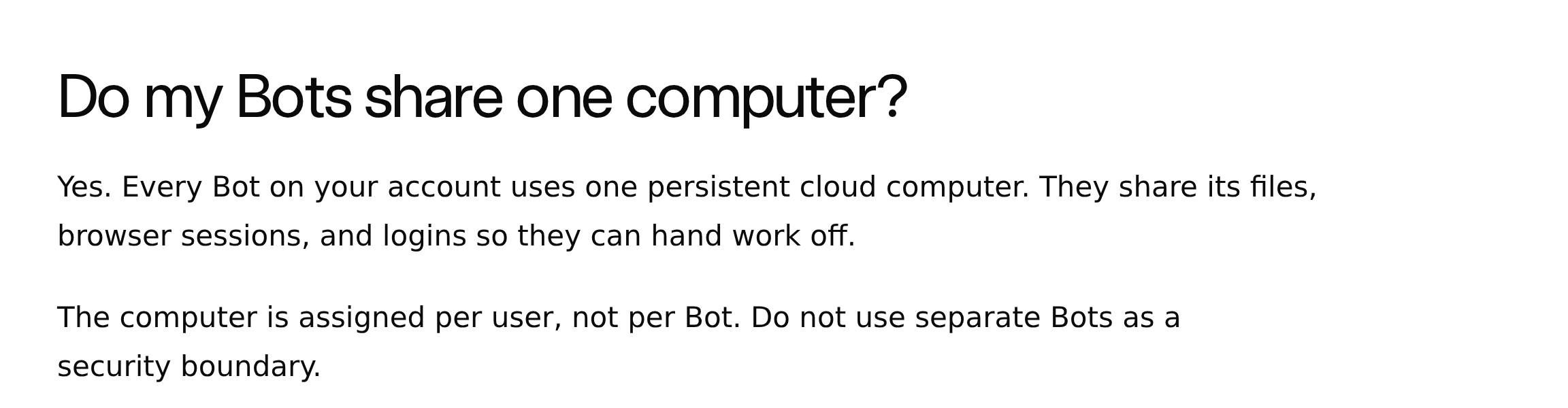
The FAQ answers "Do my Bots share one computer?" with yes. Every Bot on your account uses one persistent cloud computer. They share files, browser sessions, and logins so they can hand work off. The computer is assigned per user, not per Bot. The sentence to keep: Do not use separate Bots as a security boundary.
The computer-and-apps page repeats it. Cookies and signed-in sessions are shared. Files are visible to every Bot. Command-line credentials are shared. Each Bot gets its own screen, and several Bots can use browser and desktop tools in parallel, but those screens are "separate work surfaces, not separate security boundaries." A user (@kevincodex) reported installing a binary on one Bot and then seeing it from the others. That matches the published architecture. Naming a Bot "research-only" does not create a sandbox.
The cloud computer is not your laptop. The docs say it is separate from the Mac or Windows machine in front of you, so it does not inherit the Chrome tabs already open on your desk. Cursor staff on the forum have been explicit that Grok Bot does not attach local MCP servers, whether stdio or localhost. The intended path is remote HTTP/SSE MCP and catalog connectors, and a custom endpoint has to be publicly reachable over HTTPS. Sites can still block the Bot: the FAQ names CAPTCHAs and automation blocks, and the teams page says some services flag datacenter IPs. A forum report that Agent Computer traffic egresses from US AWS (the poster measured us-west-2) got a Cursor reply confirming US cloud infrastructure with no region picker.
Grok Bot should stop for passwords, passkeys, two-factor codes, CAPTCHAs, payments, and sites that require a human. You take over the computer, complete the blocked step, and hand control back. Teach a task, when available, records one browser workflow. The FAQ caps the recording at ten minutes.
You talk to Grok Bot from macOS or Windows, or from iPhone on iOS 18+. Cursor's mobile help page says Grok Bot is iOS-only for now. Cloud Agents have a different mobile story: Cursor for iOS, plus the web PWA on Android.
Grok Bot for Linux vs the Linux Cloud Computer
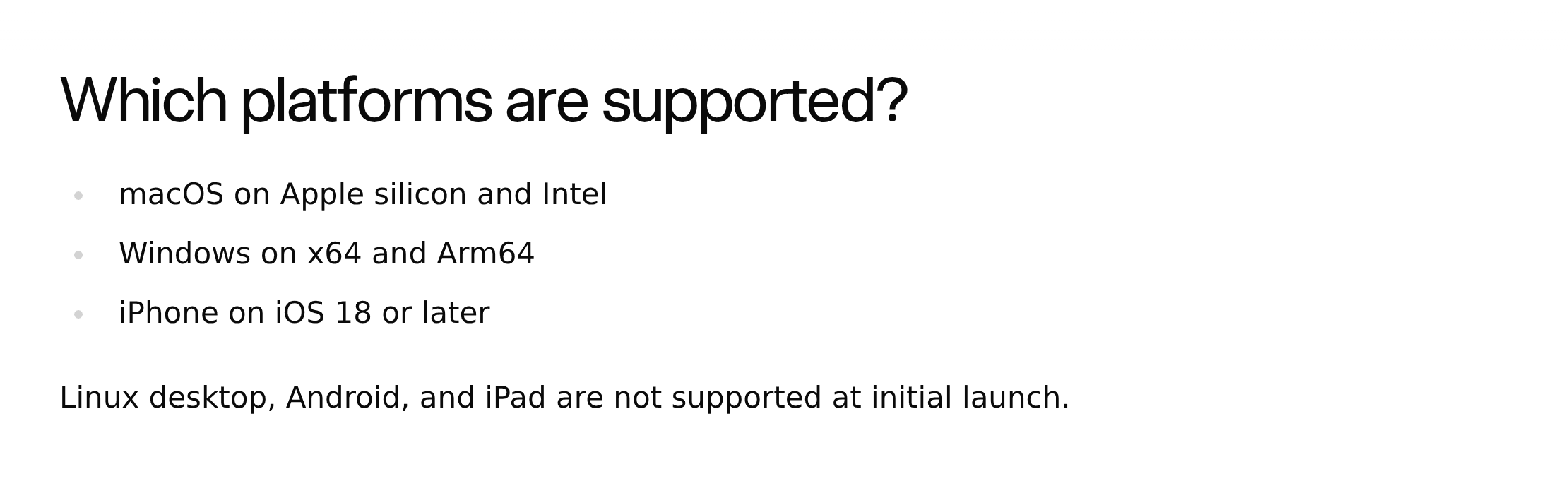
Re-checked August 20, 2026. Official desktop app support is macOS, Windows, and iOS. The FAQ still lists "Linux desktop, Android, and iPad are not supported at initial launch." Get-started says it is not currently available as a Linux desktop app. The teams page answers "Is there a Linux desktop app?" with no: computers run Linux, but the desktop app ships for macOS and Windows, plus mobile. The primary download CTA on x.ai/bot is still macOS.
The Bot computer is a managed Linux VM. Same teams page: one dedicated cloud computer per member, the Bot runs as a non-root user, and every Bot on that account shares it. Users have quoted Debian 13 with 8 cores, 16GB RAM, and 128GB disk. Those hardware numbers are not in the official docs.
Linux desktop client reports exist on the Cursor forum and may be unofficial or rolling. Thread Grok Bot Computer view is blank (Debian) describes a blank Computer view on Debian and Ubuntu, a disappearing .deb, and user-posted .deb, .rpm, and AppImage links. Some users said 0.20.0 restored the view. A Cursor reply treated that as a Linux-build bug, which is not the same as the FAQ listing Linux as supported. Do not treat forum download URLs as a reversal of the docs.
If you are on Linux and the job is a PR, Cursor Cloud Agent is the supported path today. If the job is Grok Bot, the official client list is still macOS, Windows, and iOS.
Shared Computer vs Isolated Cloud Agent VMs
You ask a Cloud Agent to add a feature. It clones the repo into its own VM, edits, runs tests, and opens a PR. Your laptop never runs those commands. The VM is not your signed-in Gmail.
You ask a Grok Bot to update a CRM and draft follow-ups. It uses the browser session already on your shared computer. Another Bot on the same account can see the files it wrote. Closing the Mac does not stop the run. That is the persistent cloud computer pattern: state lives in the cloud so the work survives the laptop lid.
They fail differently. Cloud Agents auto-run terminal commands inside the VM. Grok Bot's risk is shared state: a research Bot and a finance Bot are not two vaults.
MoClaw sits next to both as a managed cloud computer for recurring browser and file work, not as a Cursor replacement. If the job is keeping a workspace on after the laptop closes, compare that layer.
Plans, Pricing, and Launching Cloud Agents from Grok Bot
Cursor Cloud Agent is on all paid Cursor plans. If you already pay for Cursor Pro, you can use Cloud Agents. You still need source control connected, and you still pay API rates for the model.
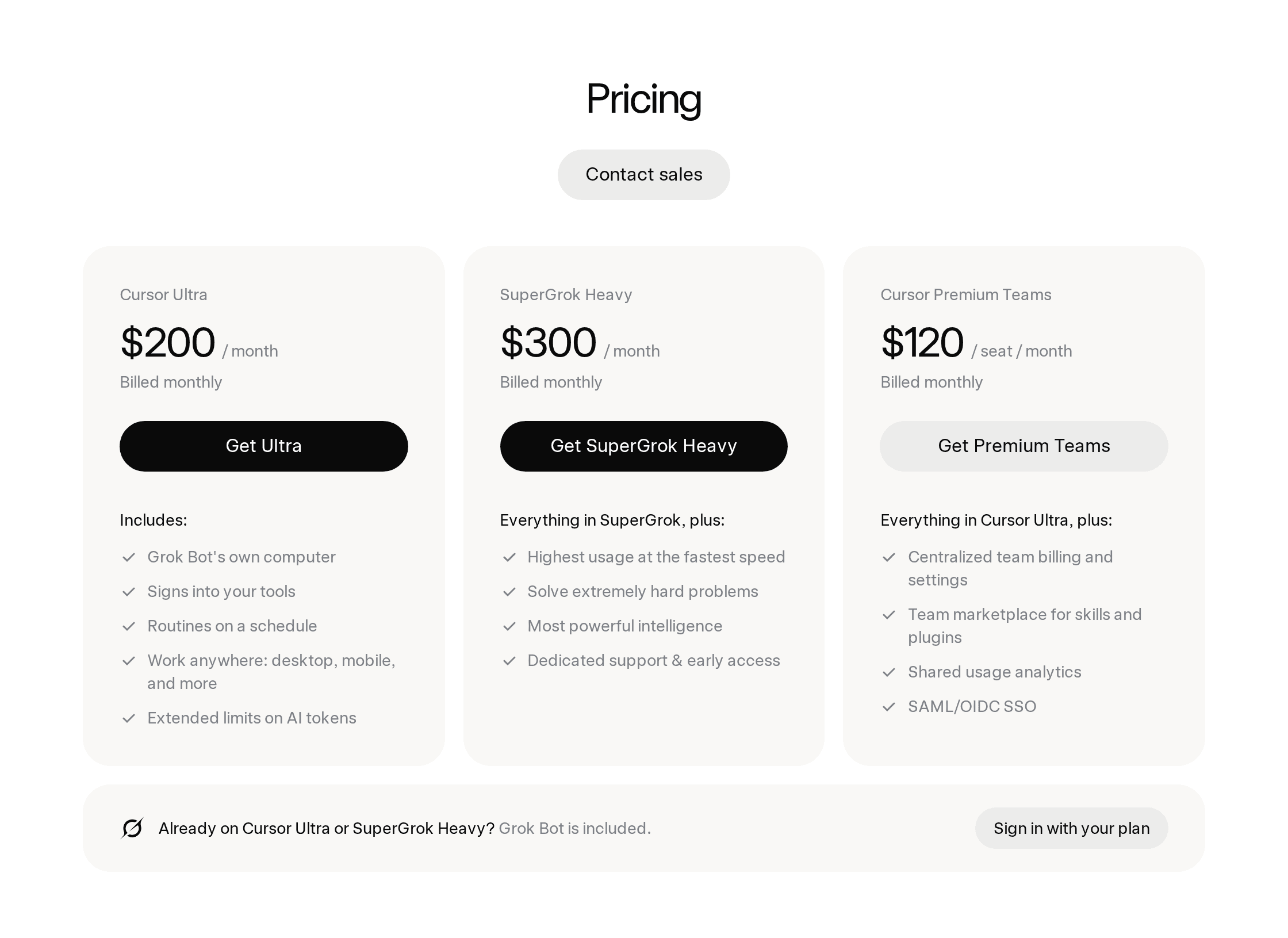
Grok Bot is not on Cursor Pro or Pro+. Eligible access is Ultra, a Teams Premium seat, or SuperGrok Heavy. On x.ai/bot, checked August 20, 2026: Cursor Ultra $200/month, SuperGrok Heavy $300/month, Cursor Premium Teams $120/seat/month. Paid access includes weekly usage, with optional on-demand tokens. What SuperGrok Heavy actually buys is the access deep-dive.
You can launch Cloud Agents from Grok Bot. Cursor's teams documentation has a team-wide Cloud Agents toggle that "controls whether Grok Bot Bots can launch Cursor cloud agents." It is on by default. That is the official fact behind the @poteto post, and the cleanest proof they are two products. Grok Bot can dispatch a coding VM the same way you Slack @cursor. Dispatching a Cloud Agent does not turn Grok Bot into a PR factory, and a Cloud Agent VM does not give you a signed-in Notion session.
Setup is not always instant. A Cursor forum thread, Grok Bot issues, collected "Can't reach your computer" and "Grok Bot couldn't finish setting up" reports after launch. A Cursor reply attributed it to heavy load and said reinstalling would not help. Treat that as a sourced beta limitation, not as an invented outage rate.
FAQ
Is a Cursor Cloud Agent the same thing as Grok Bot?
No. A Cloud Agent is an isolated coding VM that clones a repo and opens a PR. Grok Bot is a persistent, named agent on one shared cloud computer for apps, files, and browser work. You can launch the first from the second. They still do different jobs.
Can I use a cursor background agent on a free Cursor plan?
No. Cloud Agents, the current name for Background Agents, require a paid Cursor plan. Source control has to be connected before anyone can start a run from a repository.
Does Grok Bot run on Linux?
The Bot computer is a Linux VM. Official desktop app support, re-checked August 20, 2026, is still macOS, Windows, and iOS 18+. Linux desktop client reports exist on the Cursor forum and may be unofficial or rolling. The live FAQ still says Linux desktop is not supported at initial launch.
Do Grok Bots isolate credentials from each other?
No. All Bots on an account share files, browser sessions, and command-line credentials. xAI's wording is "Do not use separate Bots as a security boundary."
How much do these products cost?
Cloud Agents bill at API model pricing on top of a paid Cursor plan, with a spend limit you set. Grok Bot is included with Cursor Ultra ($200/month on x.ai/bot), SuperGrok Heavy ($300/month), or Cursor Premium Teams ($120/seat/month), plus weekly usage and optional on-demand tokens. Check the live pages before you buy. This article does not link checkout URLs.
Can Grok Bot replace Claude Code for repo work?
Not as its primary job. Grok Bot vs Claude Code is a different comparison. Claude Code and Grok Build are coding agents in your terminal or editor. For merge-ready PRs inside Cursor, Cloud Agent is the product Cursor documented for that loop.
Cursor Cloud Agent vs Grok Bot: Choose by the Job
Pick Cursor Cloud Agent when you want an isolated VM to build, test, and open a PR. Pick Grok Bot when you want a shared office computer that already has your tools, and a Bot you can message from the phone after you close the lid. Pick both when the Bot should dispatch the coding VM. That handoff is supported. The names are not synonyms.
If the work you care about is the persistent computer itself, start from the cloud computer layer and run one real workflow there before you pick a plan.
Continue Reading
More Comparison
GPT-5.6 Sol vs Terra vs Luna: Pick One

Gemini 3.7 Flash vs 3.1 Pro: Is Pro Over?
Qwen 3.8 vs Kimi K3: Cheaper Isn't Simpler

DeepSeek Harness Plugins vs Skills

DeepSeek Harness vs MoClaw (2026)

Grok Bot vs Claude Cowork vs ChatGPT Work
The MoClaw editorial team writes about workflow automation, AI agents, and the tools we build. Default byline for industry overviews, listicles, and collaborative pieces.
Choosing between tools? Let MoClaw run the work.
Always-on AI assistant on its own cloud computer. No switching required, no setup.
References: Cloud Agents (Cursor docs) · Cloud Agents help (Cursor) · Grok Bot FAQ (xAI docs) · Use the computer and apps (xAI docs) · Grok Bot for teams and enterprises (xAI docs) · Grok Bot (x.ai/bot) · Introducing Grok Bot (xAI news) · Getting started with Grok Bot (Cursor help) · Introducing Grok Build (xAI news) · Grok Bot Computer view is blank (Debian) - Cursor forum · Grok Bot issues - Cursor forum · @poteto on launching Cloud Agents from Grok Bot · Does Grok Bot support local MCP? (Cursor forum) · Grok Bot computer US AWS egress (Cursor forum) · Get started with Grok Bot (xAI docs)