Grok Bot Productivity: Strengths and Limits

Grok Bot productivity in practice: the persistent cloud computer, routines and approvals it gets right, and the shared-state limits to check first.
Table of Contents
Grok Bot productivity depends less on the model and more on whether the work needs a computer that stays on after you close the laptop. Grok Bot gives each named agent a persistent cloud machine, app access, files, routines, and handoffs you can review. The trade-off is that persistence raises questions about shared state, approvals, plan access, and model choice.
Key Takeaways
- Grok Bot productivity fit is strongest when the task spans apps, files, browser sessions, or multiple AI teammates.
- Every Bot on one account uses the same computer. xAI's own docs call the per-Bot screens "separate work surfaces, not separate security boundaries," so do not treat Bots as credential isolation.
- Routines turn repeatable work into scheduled runs, but risky actions still need explicit approval rules, and an approval never reverses work already completed.
- Access is gated: SuperGrok Heavy, Cursor Ultra, or Cursor Teams Premium, on a macOS or Windows desktop, with no Linux app.
- MoClaw is a relevant Grok Bot alternative when you want a managed cloud computer and a say in which model runs the job.
Hi, Vera here. I usually evaluate agents with a weekly research workflow: collect updates from five sources, compare them to last week's file, draft a client note, and stop before sending. Chat can help with the note. A productivity agent has to preserve source history, open websites, write files, remember the format, and leave evidence. One useful xAI data point: several Bots can work in parallel, but each Bot runs only one computer-use task on its own screen at a time.
This article is written from a MoClaw editorial perspective, and MoClaw has no official affiliation with xAI. Last checked: August 19, 2026. Verify availability, plans, regions, routing, and team controls before purchase.
Quick Verdict by Productivity Task
Grok Bot productivity questions usually resolve at the workflow level, not the model level. Grok Bot fits tasks that need workspace state, multiple tools, and a human approval point. A marketer could ask one Bot to collect competitor page changes, another to draft notes, and another to prepare a launch checklist.
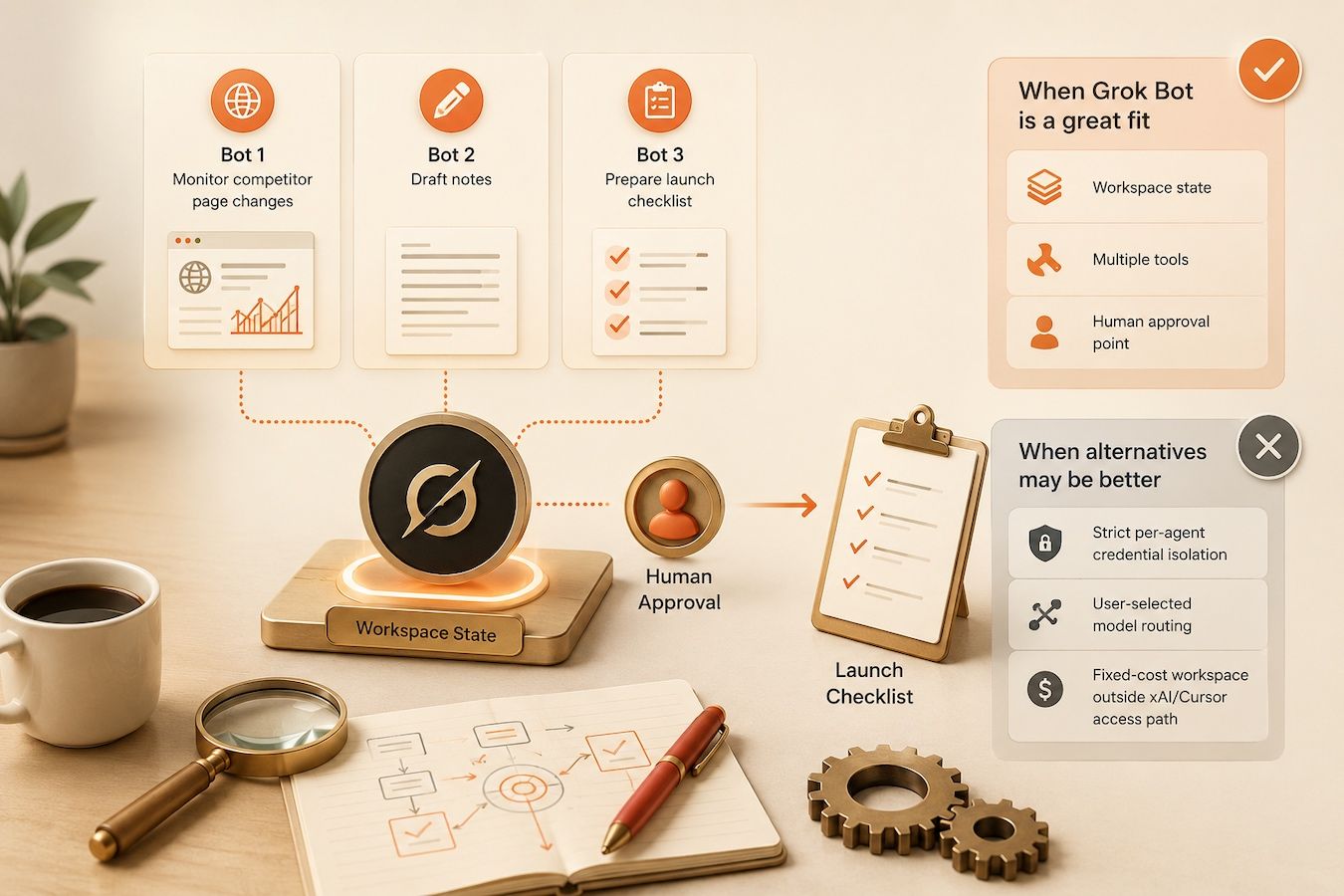
It is less ideal when you need strict per-agent credential isolation, a model you pick yourself, or a workspace outside the xAI/Cursor access path. In those cases, Grok Bot alternatives such as MoClaw or a developer stack may fit better.
What Grok Bot Offers Today
The current Grok Bot overview describes Bots as persistent named agents that can use apps and websites on a cloud computer, collaborate, hand off tasks, and come back when approval is needed. In the docs and in the app, a Bot is defined as "a single persistent, named agent or one AI teammate," which anchors this Grok Bot review.
Persistent cloud computer
The productivity jump comes from the persistent cloud computer. Grok Bot can use a browser, command line, files, and connected tools without your laptop staying open. Browser sessions, files, and credentials live on that computer, so later work can continue where the last run stopped.
Browser, files, terminal, and connectors
Grok Bot can work through websites, a terminal, saved files, and connectors. That lets it move from research to file creation to browser action in one thread. Browser flows can still hit CAPTCHAs, login refreshes, payment checks, or sites that require a human step, so plan for the handoff instead of hoping it never happens.
Named Bots, parallel work, and handoffs
Named Bots make specialization easier. One Bot can research, another can draft, and another can check formatting. The docs are precise about how that parallelism works: each Bot gets its own screen on the shared computer, several Bots can use browser and desktop tools at the same time, and one Bot runs only one computer-use task on its screen at a time. Shared state makes handoffs cheap, but separate Bots are not separate security containers.
Skills, routines, and approvals
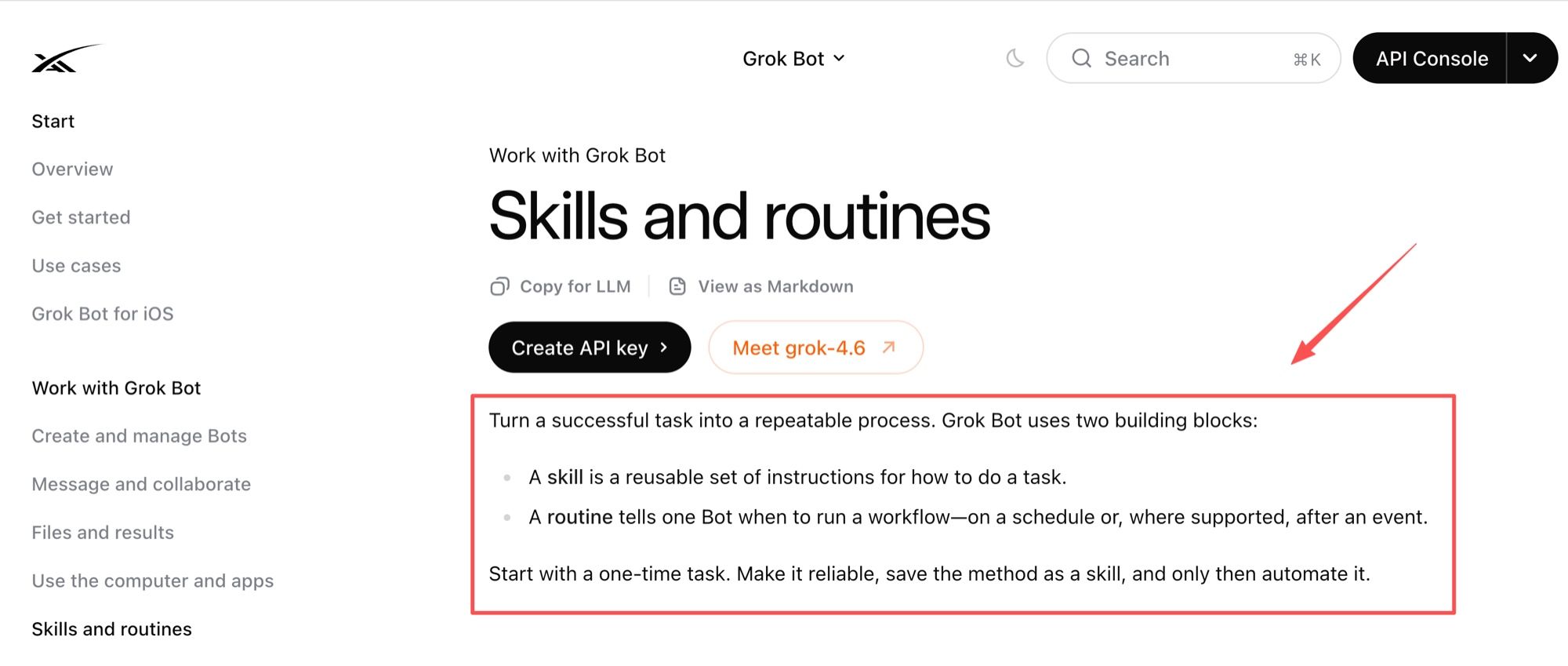
Grok Bot skills and routines turn successful one-time work into reusable instructions and scheduled runs. Skills describe reusable task instructions; routines tell a Bot to run a workflow at a time or after an event. Test once, save the method, then schedule only after the output format, source checks, and approval boundaries are clear.
Productivity Workflows That Fit
The best Grok Bot productivity workflows need tools, but still have clear stopping points.
Research across multiple sources
Research fits because Grok Bot can keep source files, browse current pages, and coordinate across Bots. A good prompt names the sources, the comparison date, the output format, and the evidence standard. For important work, ask the Bot to check current sources rather than rely on memory.
Repetitive work across apps
Repetitive app work fits when the steps are visible: open a dashboard, export a CSV, compare rows, update a draft, or prepare a ticket. Use a connector when one exists. Browser work still helps where no connector does, but it should stop at payments, permission changes, production updates, or external messages.
Deliverables that need review
Grok Bot is most useful when the output is a reviewable draft rather than an invisible action. Account briefs, weekly reports, competitive notes, test summaries, and client-ready files all end with a human reading something. The higher the stakes, the more the prompt should require evidence and an approval step.
Trade-Offs and Security Boundaries
The main trade-offs are about who can reach shared state, what must pause for approval, and whether your plan and platform support the product at all.
One shared computer across Bots
Every Bot on one account uses the same computer. Browser cookies and signed-in sessions are shared, files are visible to every Bot, and command-line credentials are shared. The per-Bot screens are, in the docs' own words, separate work surfaces rather than separate security boundaries. Practical consequence: if one Bot signs into a billing console, every other Bot inherits that session. Keep sensitive logins off the shared computer instead of assuming a naming convention protects them.
Permissions and approval points
The approval and security controls rely on explicit boundaries, secure handoffs, and Auto Review rules where enforcement is available. The docs name the action classes that deserve a boundary:
- Sending messages or invitations
- Publishing content
- Purchases and financial transfers
- Deleting or overwriting data
- Changing permissions
- Production changes
- Accepting legal terms
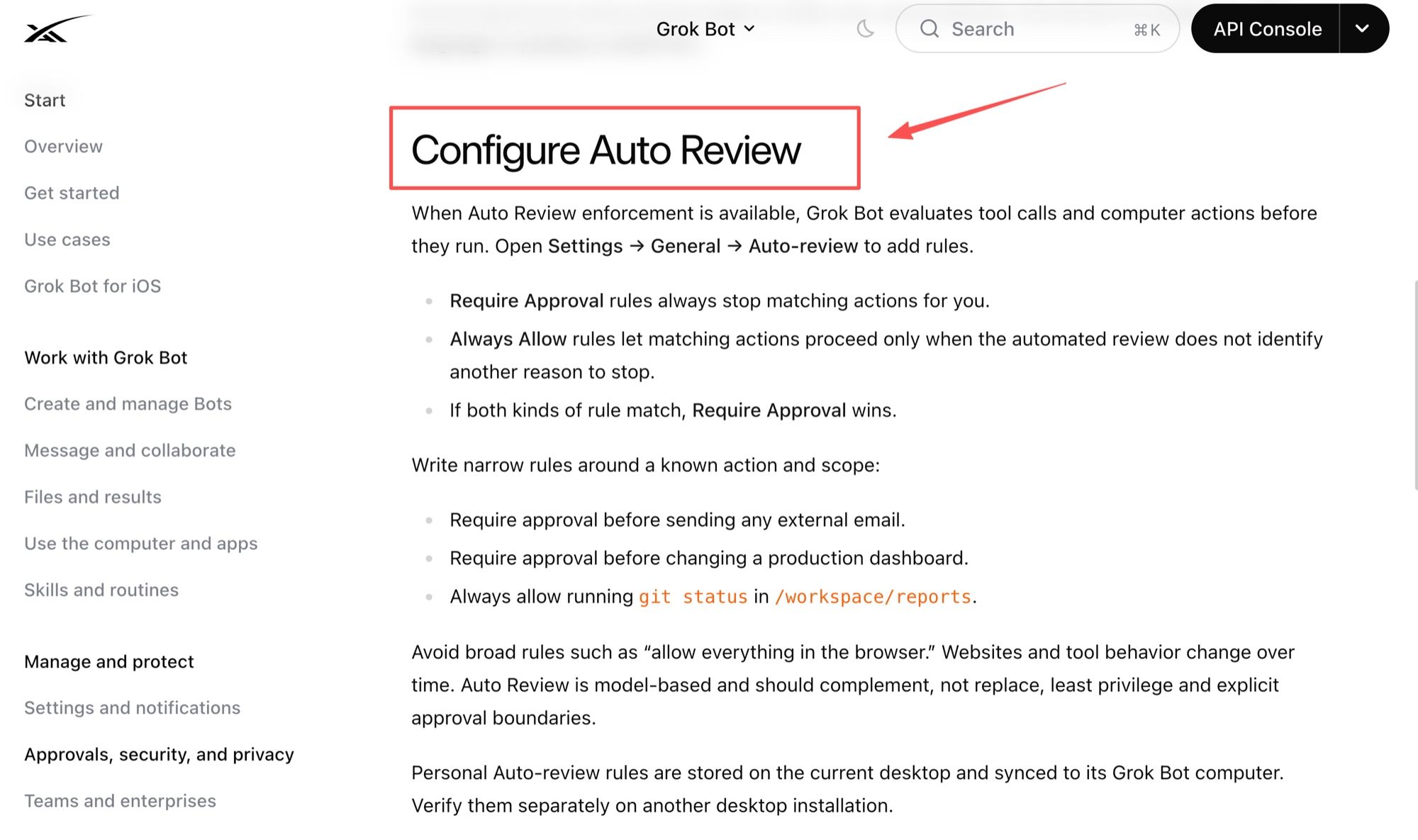
Auto Review rules follow a simple precedence: Require Approval rules always stop matching actions, Always Allow rules let an action through only when the automated review finds no other reason to stop, and Require Approval wins when both match. Write narrow rules tied to a known action and scope rather than "allow everything in the browser." Two details matter operationally: Auto Review is model-based and should complement, not replace, least privilege; and personal auto-review rules are stored on the current desktop and synced to its Grok Bot computer, so a second desktop installation needs its own check. Above all, an approval controls the proposed action. It does not reverse work already completed.
Product availability and plan limits
Availability and billing are not universal. Eligible access runs through SuperGrok Heavy, Cursor Ultra, or Cursor Teams Premium, the desktop app is macOS or Windows, and Grok Bot is not currently available as a Linux desktop app. Team rollout can vary. Check plan, platform, region, privacy mode, and settings before production use.
Grok Bot vs MoClaw by User Profile
This is not a winner-take-all ranking. Grok Bot is strongest inside the xAI/Cursor ecosystem, especially for multi-Bot collaboration. MoClaw is strongest for people who want a managed cloud computer with browser work, schedules, channels, and a choice of model.
| Dimension | Grok Bot | MoClaw |
|---|---|---|
| Target user | xAI/Cursor users coordinating named AI teammates | Individuals and small teams running recurring cloud workflows |
| Work organization | Multiple Bots, handoffs, group context | Managed workspace with skills, browser work, files, schedules, and channels |
| Compute environment | One user-scoped cloud computer shared by every Bot | Private Linux cloud machine with filesystem, shell, browser, and state |
| Model choice | No user or admin model picker; product-managed routing | Pick the model for the job; the cloud computer, skills, and schedules stay the same |
| Permissions boundary | Shared computer state plus approvals and Auto Review | Account cloud workspace with browser control and scheduled jobs |
| Portability | Routine export portability is not publicly documented | File portability is clearer than full workflow portability |
| Price and availability | Plan and organization dependent; team access is rolling out | The MoClaw pricing page lists a $20/month plan with credits and cloud computer access |
Teams coordinating specialized AI teammates
Choose Grok Bot when the team value comes from named agents, parallel Bot work, handoffs, and xAI/Cursor account controls. It fits specialized Bots collaborating through shared files and context, provided everyone understands that the shared computer is the real trust boundary.
Individuals managing recurring cloud workflows
Choose MoClaw when the job is less about multiple named teammates and more about one managed cloud workspace for browser work, files, schedules, and reviewable outputs. The MoClaw cloud computer is built around persistent files, a shell, browser sessions, and state that survives across chats, with sleep behavior to account for.
Users who care which model runs the job
Grok Bot has no model picker for users or admins, and xAI has said it does not plan to add one: the product manages routing and failover for you. That is a reasonable trade if you never want to think about it, and a hard stop if a specific model is part of your requirement. MoClaw goes the other way. The DeepSeek integration page is a good example: you point the workspace at a different model, and skills, browser control, the cloud computer, schedules, and files keep working around it.
What to Verify Before You Commit
Before committing to Grok Bot, verify access eligibility, desktop platform, region, privacy mode, admin controls, model routing, billing, routine limits, shared-computer policy, and approval behavior. For teams, the Grok Bot teams material adds details worth reading before rollout: plugin and MCP policy follows the Cursor team policy, there is no model picker, spend and usage appear in the dashboard, and an audit view is listed as coming rather than shipped.
Related MoClaw Reading
- Grok Bot vs AI Agent
- Grok Bot vs Claude Cowork vs ChatGPT Work
- SuperGrok Heavy: Do You Need It for Grok Bot?
- Agent memory vs chat history
- AI chatbot vs AI agent
FAQ
How should teams resolve conflicting results from different Grok Bots?
Assign one owner before starting. If two Bots disagree, ask each to show sources, assumptions, timestamp, tool path, and skipped evidence. The owner either picks a result or sends both back for reconciliation.
What happens to routines when a Bot is deleted?
Deleting a Bot removes its active profile, conversation, and routines from Grok Bot. Files, sessions, and connected accounts live on the shared computer, so check what remains after deletion rather than assuming a clean sweep. Hide the Bot instead if you may need its work later.
Can administrators audit which Bot used a shared login?
Not fully today. Spend and usage are visible on the dashboard, and an audit view of Bot actions is described as coming. Until it ships, keep important work in named conversations and require evidence trails for sensitive workflows.
What records help investigate a failed multi-Bot handoff?
Keep the original task, the owner for each step, source files, shared paths, approvals, timestamps, screenshots where relevant, and the final handoff message. For recurring work, keep routine run history and the likely failure source.
Does Grok Bot offer region-specific data controls?
Region-specific Grok Bot data controls are not publicly documented as a universal self-serve setting. Review team privacy settings, subprocessors, and model routing before rollout.
Grok Bot Productivity Depends on Workflow Fit
Grok Bot is a serious productivity agent when work needs persistent state, app access, files, routines, approvals, and named AI teammates. It is not the only fit. Choose Grok Bot when xAI ecosystem collaboration is the advantage. Choose a Grok Bot alternative such as MoClaw when your priority is a managed cloud computer, recurring browser workflows, channels, and control over which model runs. Start from the workflow, the permission boundary, and the evidence you want to be holding after the work is done.
Continue Reading
More Guide
Ox Alpha: What We Know So Far

Claude Code Session Manager: Wake for Mac

Grok Speaking Gibberish: What Actually Helps

How to Build Claude Skills for Agent Workflows

Claude Code AGENTS.md: What Actually Loads
Herdrm: One Mac Console for Every Coding Agent
The MoClaw editorial team writes about workflow automation, AI agents, and the tools we build. Default byline for industry overviews, listicles, and collaborative pieces.
Ready to put this into practice?
MoClaw runs browser tasks, research, and schedules automatically. Try it free.
References: Grok Bot overview (xAI docs) · Get started with Grok Bot (xAI docs) · Use the computer and apps (xAI docs) · Skills and routines (xAI docs) · Approvals, security, and privacy (xAI docs) · Teams and enterprises (xAI docs)