ChatGPT vs Microsoft Copilot: Which Fits You?

Compare ChatGPT and Microsoft Copilot for research, writing, Microsoft 365, Excel, business data, security, and pricing before you buy seats.
Table of Contents
ChatGPT and Microsoft Copilot can both draft, search, study files, analyze data, and help with spreadsheets. The harder difference appears around the answer. It lies in where the evidence comes from, how revisions are handled, and where the result must go.
The better fit depends on how the job moves from evidence to approval.
Key Takeaways: ChatGPT vs Microsoft Copilot
Choose ChatGPT first when one project must hold mixed files, research, data, and repeated revisions. It is useful when the work changes as it moves from discovery to analysis, drafting, and review.
Choose Microsoft 365 Copilot first when a task begins in Outlook or Teams. It becomes especially useful when the task must end in Word, Excel, PowerPoint, or SharePoint. Its main edge is not a universal lead in writing or reasoning. It stays close to the records and files a Microsoft-based team already uses.
Copilot Chat may already be included with a qualifying Microsoft 365 plan, making it a practical first pilot.
Test both products with the same source conflict, late revision, and final-file requirement before standardizing.
So, is Microsoft Copilot better than ChatGPT? It is better when the key records, working files, and review path already live in Microsoft 365. It is not the best fit for every research or cross-tool project.
I would start with one question: Where must the finished version live? Then work backward to the sources that shape it.
| Workflow | Better first test | Why |
|---|---|---|
| Mixed-source research | ChatGPT | Keeps changing material in one project |
| Recurring Microsoft 365 report | Microsoft 365 Copilot | Works near the source and final Office file |
| Long document with many revisions | ChatGPT | Gives the work a clear project boundary |
| Microsoft 365-centered spreadsheet process | Microsoft 365 Copilot | Keeps workbook edits and review inside the Office path |
| Small Microsoft-based pilot | Copilot Chat | May already be included |
Compare the Right Products First
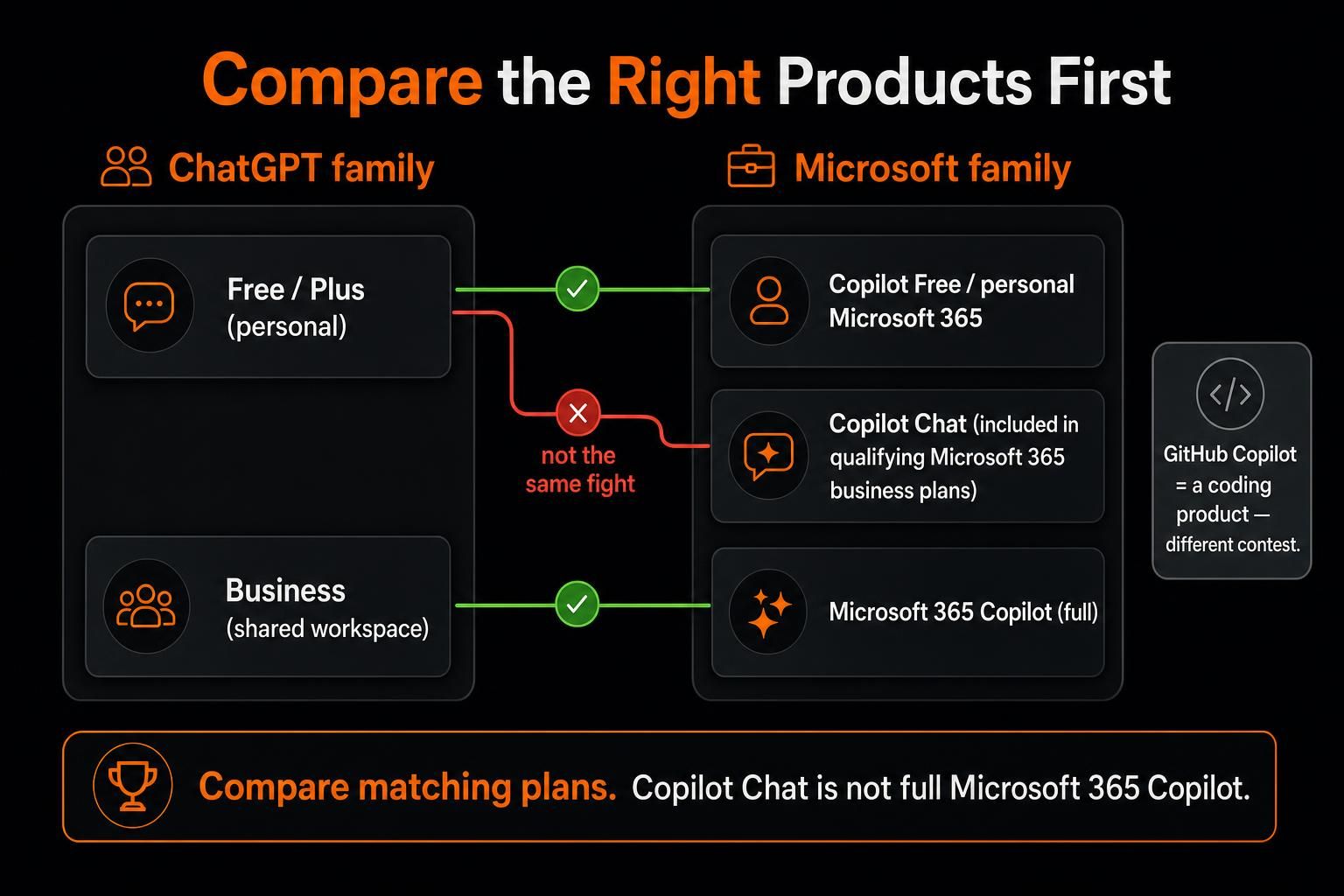
“Microsoft Copilot” can mean several products. A loose comparison can make either side look stronger than it is.
For personal use, compare ChatGPT Free or Plus with Microsoft Copilot Free or Copilot in a personal Microsoft 365 plan.
ChatGPT Plus focuses on the AI service. Microsoft’s paid personal plans bundle Copilot with Office apps and cloud storage. The main AI benefits belong to the plan owner.
Work plans create a different contest. Copilot Chat comes with qualifying Microsoft 365 business plans and can use the web, added files, and limited open-app context. Full Microsoft 365 Copilot can also use meetings, email, chats, and files the signed-in user may open.
ChatGPT Business provides a shared workspace with Projects, connected tools, company knowledge, custom GPTs, and admin controls. It starts at two paid seats. Enterprise adds stronger account, role, retention, and storage controls.
GitHub Copilot is a separate coding product. It matters here only when software work is the main job.
Start With Where Decisions Become Official
A polished answer can make a task feel almost done. In practical work, it may only move the job to a new stage.
“Better for writing” means little if the team spends another hour rebuilding the draft in Word. “Better for research” means little if the tool cites an old file and misses the note that changed the decision.
ChatGPT treats the project as the main work area. A Project can hold source files, instructions, past choices, and later drafts. Company knowledge can search enabled sources, including SharePoint and Outlook, and link back to the original material. Access still depends on the user and workspace settings.
Where available, ChatGPT Work can create or edit documents, spreadsheets, presentations, reports, and analyses. This suits jobs that cross tools before the final shape is clear.
Microsoft takes a more direct route through its own apps. Full Microsoft 365 Copilot works with Outlook, Teams, SharePoint, Word, Excel, and PowerPoint. It can use content the signed-in user may already open; the license does not unlock every company file.
Connectors can add approved outside data, but setup and source permissions still control access.
Before choosing, map where decisions become final. A company may store most files in SharePoint while product calls happen in Slack and GitHub. Another may treat a Teams meeting, an Outlook thread, and the current workbook as its official record.
Count integrations later. First, find where decisions become real.
One Workflow From Evidence to Approval
Consider Emma, an operations director at a 35-person consulting firm. She is a composite example, not a measured case study.
Emma has one Teams transcript, 18 Outlook emails, six SharePoint files, a Slack thread, three GitHub issues, and an Excel tracker. By day’s end, leadership needs a client brief, risk summary, revised tracker, and short deck.
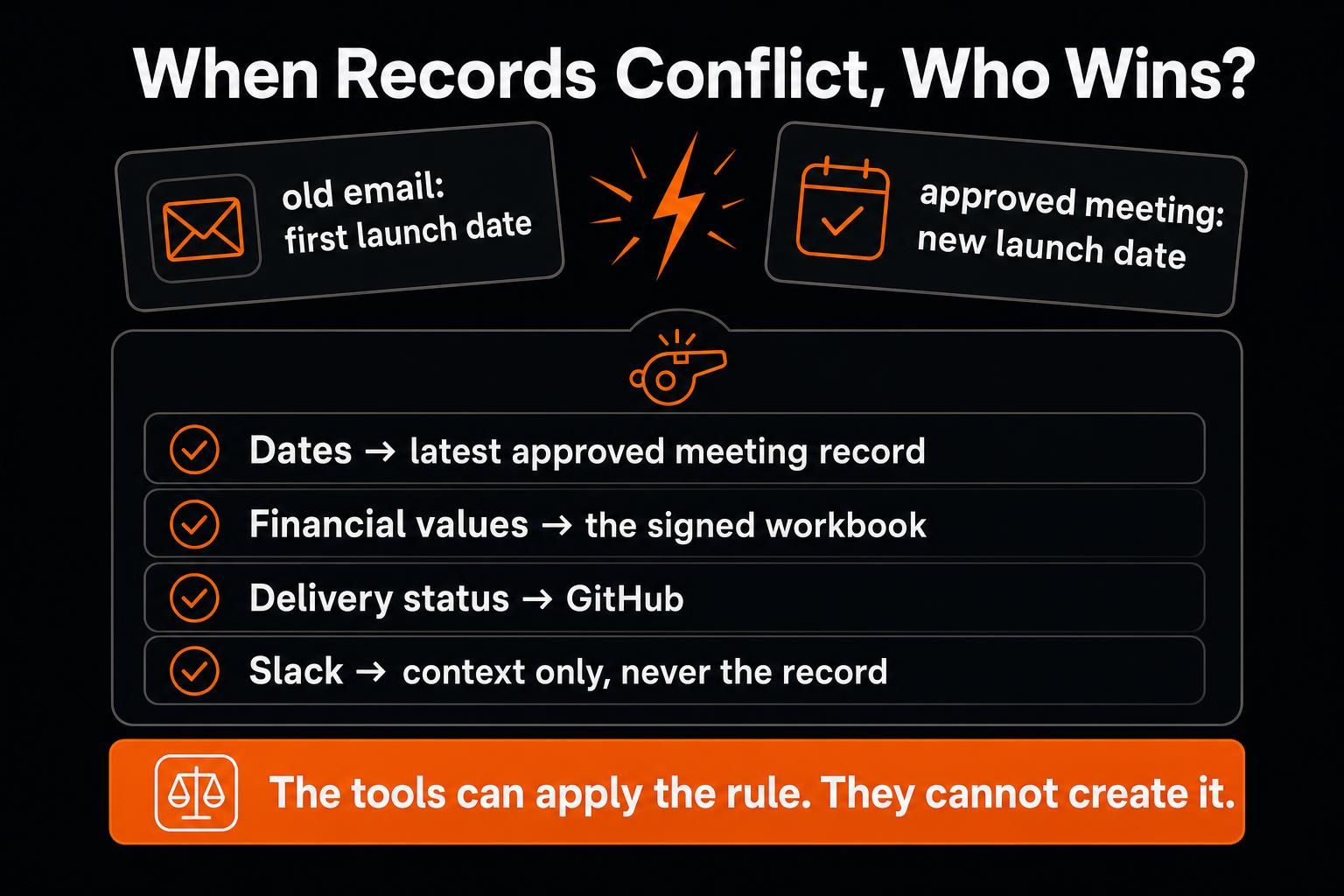
An old email shows the first launch date. A later Teams meeting approved a new one. The tracker still uses the old forecast. A GitHub issue shows a delivery risk that never reached the meeting notes.
Emma writes one source rule before asking either tool to finish the job. The latest approved meeting record controls dates. The signed workbook controls financial values. GitHub controls delivery status. Slack may add context, but it cannot replace an approved record.
In this scenario, the practical choice is a split workflow. Emma uses Copilot to update the tracker and build the deck inside Microsoft 365. ChatGPT combines the Slack and GitHub evidence for the risk brief. Emma reviews it before adding it to the client package.
The tools can apply Emma’s source rule; they should not invent it. The point is not that two subscriptions are better. Source authority and the final file should decide each tool’s role.
ChatGPT vs Microsoft Copilot for Writing and Research
ChatGPT is usually easier to treat as a project room. It can hold source files, writing rules, rejected ideas, and later revisions without forcing the work into one app too early. That helps when the question changes or the final format is not clear at the start.
Copilot becomes more efficient when the source material and review process already live in Microsoft 365. A manager can turn Teams notes, Outlook threads, and SharePoint files into a Word brief without rebuilding the context elsewhere. Comments, layout, and coauthoring stay close to the normal process.
Neither product wins writing by brand name alone. Output depends on the model, instructions, evidence, and review. Test both with the same brief. Add one disputed fact, one accepted paragraph that must stay, and one new source that should change the conclusion.
Then revise late. Change a key assumption and check whether the right sections update without rejected text returning.
Under Co-CEO Julia Stadler, STADLER reported more than 125 custom GPTs and 30% to 40% time savings on common knowledge tasks. It also reported a 2.5-times faster path to a first draft and more than 85% daily active use. These are company-reported results, so treat them as one rollout rather than a universal benchmark.
The useful lesson is that adoption grew through repeated use, not one polished demo.
ChatGPT vs Microsoft Copilot for Excel and Office Work
For work already in Microsoft 365, Copilot offers the cleaner path. In Word and PowerPoint, it can stay inside the reviewed file, reducing copying that breaks comments, layout, links, or ownership.
Copilot in Excel can edit worksheets and create formulas. It can also build charts and PivotTables, reshape data, and work in edit, plan, or chat modes. Its changes use Excel’s built-in features, so they remain editable. Formulas, ranges, links, and charts still need review.
ChatGPT for Excel and Google Sheets lives in a sidebar inside the spreadsheet. It can handle large, multi-tab files. The sidebar can build, update, and explain formulas, references, and assumptions. Availability and some actions can vary by plan, app, and workspace settings.
The real issue is not whether either tool can make a chart. It is whether a reviewer can trust the working file.
I would test a workbook with one changed input and one broken formula. I would also include hidden rows and a chart that still points to old data. Compare the fix, its explanation, the undo path, and the review time.
Both tools can give a fluent explanation for a bad formula. The flashier chart matters less than a clear, fixable trail.
At Loyens & Loeff, some case-law research reportedly fell from three hours to one. Meeting summaries and monthly reports fell from one hour to 15 minutes. The firm also used legal review, training, and Microsoft governance tools. These figures describe one rollout, not a result every buyer should expect.
Microsoft Copilot vs ChatGPT Security
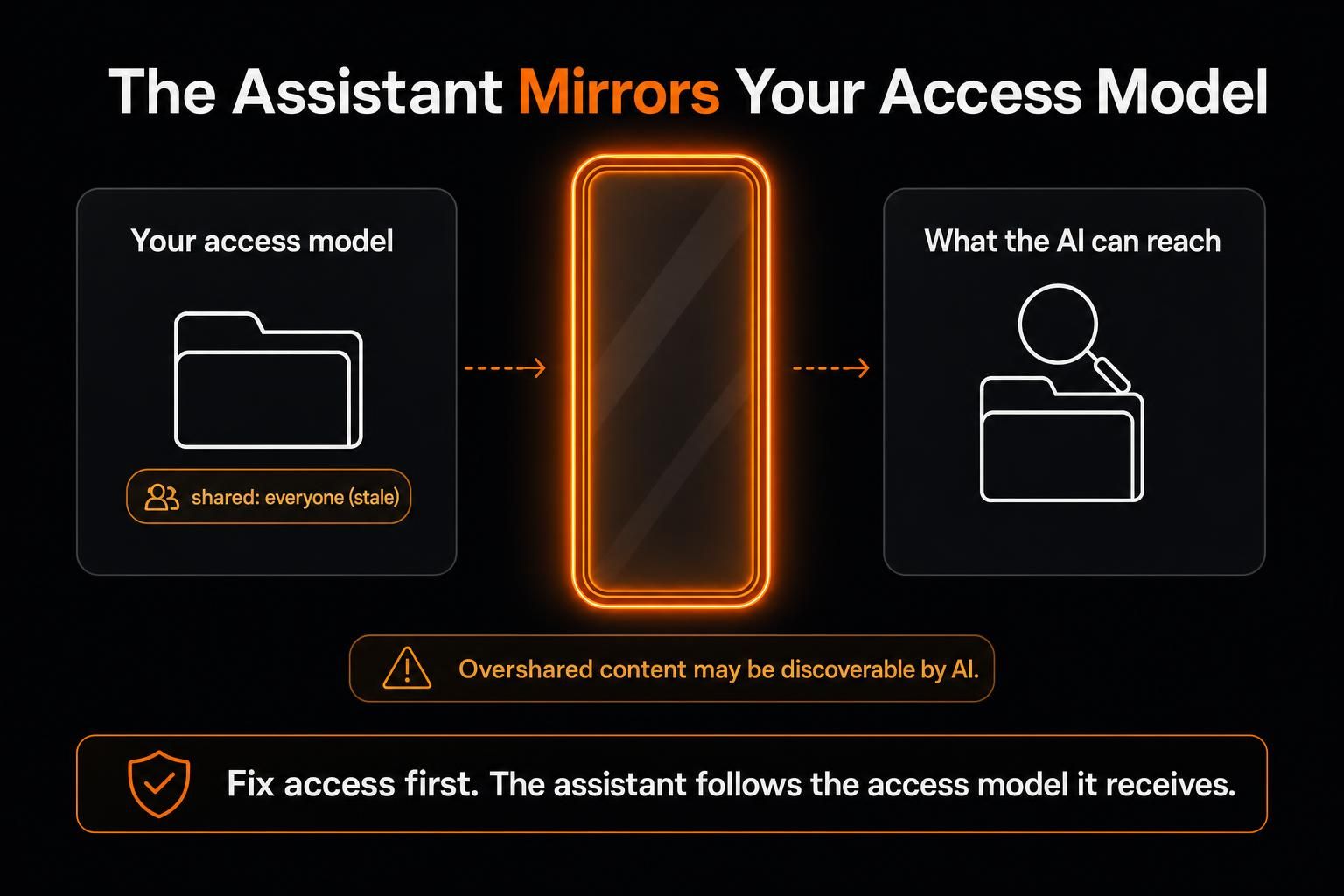
There is no one-word winner on security. Start with what each user can already open.
Microsoft 365 Copilot follows the user’s existing access and company sign-in rules. That can fit teams already managing identity, SharePoint, and data rules in one place. It can also surface old sharing mistakes faster. If a person can open an overshared folder, Copilot may find its contents.
ChatGPT Business does not use workspace data to train OpenAI’s models by default. Business data is encrypted in transit and at rest. Connected sources keep their access rules, while Enterprise adds stronger account, role, retention, and storage controls.
Neither product fixes weak access rules. Audit permissions before treating a good answer as proof that the setup is safe.
ChatGPT vs MS Copilot Pricing and Real Workflow Cost
Prices and promotions change. The figures below were checked in August, 2026.
ChatGPT Plus costs $20 a month.
Microsoft 365 Personal costs $99.99 a year and includes Office apps, one terabyte of storage, and Copilot for one person. Premium costs $199.99 a year and gives the owner higher Copilot use. Several non-AI benefits can cover up to six people.
ChatGPT Business costs $20 per user each month on an annual plan or $25 when billed monthly. It requires at least two paid standard seats. Teams can purchase workspace credits to extend usage beyond included limits for some ChatGPT models and Codex.
Microsoft 365 Copilot Business normally lists at $21 per user per month with an annual commitment. A first-year promotion currently drops that to $18 when paid yearly; the promo window varies by purchase channel, so check the pricing page for current terms. A qualifying Microsoft 365 Business plan is required. A true monthly commitment costs $25.20 per user per month.
Copilot Chat may already come with a qualifying Microsoft 365 plan. That makes it a sensible first pilot before a company buys the full add-on.
The seat price is only the visible cost. Also count setup, source cleanup, access reviews, training, human checks, file repair, and unused licenses. A low price can become costly when people keep rebuilding context. Paying more may be worthwhile when it removes a handoff from work that repeats each week.
Choose One, Use Both, or Keep Testing
Look at the last five tasks that mattered.
Mark each task’s main sources and final destination. ChatGPT will often fit better when the job crossed several systems or changed shape. Copilot is the more practical first test when the records and output stayed inside Outlook, Teams, SharePoint, and Office.
I would not buy both for everyone on day one. Add the second product only when it solves a different, measured problem. Two subscriptions create waste when the same files move back and forth, and no one knows which copy to trust.
For a serious pilot, use one recurring job the team already understands. Plant four known problems:
An outdated deadline in an email
A broken formula in the workbook
One useful fact in a less obvious source
One accepted paragraph or value that must not change
Then measure whether the product found the right evidence, explained the conflicts, preserved accepted work, and reached the right destination. Track correction time, review time, and whether people use the product again without being pushed.
A polished demo is easy. A repeatable workflow is the real test.
When the Task Needs Its Own Computer
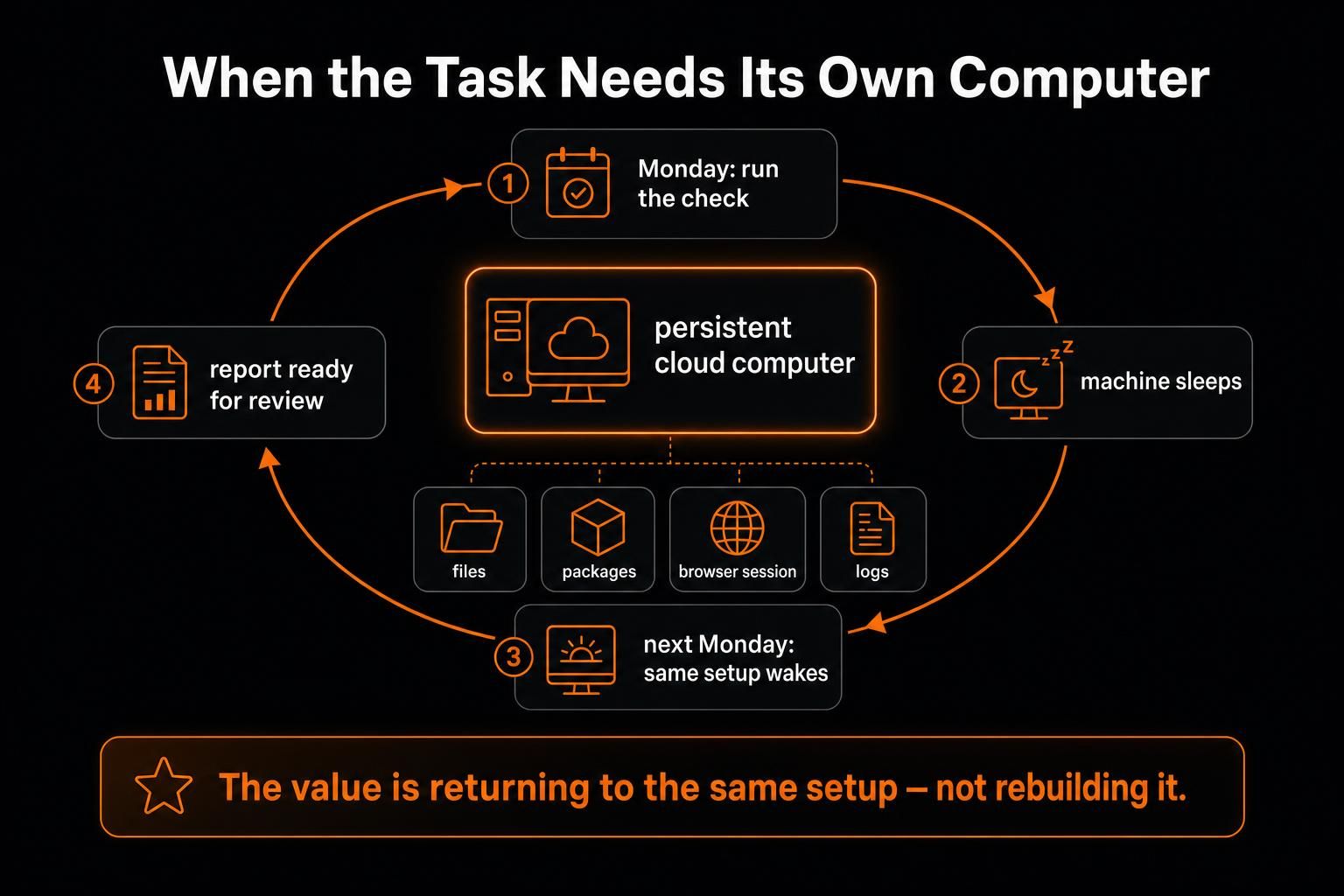
For most teams, the choice ends with the assistant and the file. Some jobs need another layer: a place where the work can keep running.
MoClaw gives an AI assistant a private cloud computer with a file system, shell, browser, and saved state. Files and tools can remain available across sessions. Scheduled tasks can repeat work without rebuilding the environment each time.
For instance, this suits jobs that revisit the same sites each week. The system can collect changes, run a data script, save the output, and send a report for review. The value comes from keeping the same environment across runs.
MoClaw does not replace Microsoft’s native company context or ChatGPT’s project workspace. It fills the gap between getting help with a task and giving that task a lasting place to run.
Frequently Asked Questions
Can ChatGPT Connect to Microsoft 365?
Yes. On supported plans, ChatGPT can use enabled Microsoft 365 sources through connected apps and company knowledge. Access depends on the user’s rights, workspace settings, and the source that has been connected.
Should a Team Test With Live Client or Employee Data?
Begin with a low-risk sample or a synthetic copy of the workflow. If live data is needed, use an approved business workspace. Confirm access and name the reviewer before the test starts.
What Should a Company Preserve Before Switching AI Tools?
Keep source files, prompts, approval rules, style guidance, and final checks outside the assistant. Switching is harder when no one can explain where key facts came from or why a result was accepted.
Which One Is Easier to Test With a Small Team?
A Microsoft 365 customer may already have Copilot Chat through an eligible plan. ChatGPT Business starts at two paid standard seats. In either case, keep the first pilot small and use a task the team already knows well.
Test the Path to the Approved File
ChatGPT and Microsoft Copilot now share enough features that another long checklist will not settle the choice.
Use one task that matters. Include the real sources and one known conflict. Add a file that must be edited and the review step your team already follows. The better fit helps people find the right proof and keep accepted work intact. It also reaches an approved result with less repair.
Continue Reading
More Comparison
DeepSeek vs ChatGPT: Research, Code, Price

Gemini vs ChatGPT for Work: Which Is Better?

Cursor Cloud Agent vs Grok Bot

GPT-5.6 Sol vs Terra vs Luna: Pick One

Gemini 3.7 Flash vs 3.1 Pro: Is Pro Over?

Qwen 3.8 vs Kimi K3: Cheaper Isn't Simpler
The MoClaw editorial team writes about workflow automation, AI agents, and the tools we build. Default byline for industry overviews, listicles, and collaborative pieces.
Choosing between tools? Let MoClaw run the work.
Always-on AI assistant on its own cloud computer. No switching required, no setup.
References: OpenAI - What Is ChatGPT Plus? · Microsoft 365 Copilot · Microsoft Support - Copilot Chat with and without a Microsoft 365 Copilot license · OpenAI for Business · OpenAI - Company knowledge in ChatGPT Business, Enterprise, and Edu · OpenAI - Creating and editing documents, spreadsheets, and presentations with ChatGPT Work · Microsoft Learn - Microsoft 365 Copilot architecture · Microsoft Learn - Microsoft 365 Copilot connectors prerequisites · OpenAI - STADLER reshapes knowledge work at a 230-year-old company · Microsoft Support - Get started with Copilot in Excel · OpenAI - ChatGPT for Excel · Microsoft Customer Story - Loyens & Loeff · OpenAI - Business data privacy, security, and compliance